
Infrastructure as Code (IaC) simplifies managing cloud resources by treating infrastructure like code - stored in version control, tested, and automated. Integrating IaC with CI/CD pipelines ensures consistent, repeatable deployments, reduces errors, and eliminates configuration drift. Here's an overview of how to achieve this integration:
- Prepare Your Environment: Choose the right IaC tool (e.g., Terraform, AWS CloudFormation), set up version control for traceability, and configure your pipeline tools for automation. Secure sensitive data with tools like AWS KMS or HashiCorp Vault.
- Map IaC to Pipeline Stages: Include validation (
terraform validate), security checks (e.g., tfsec, Checkov), and speculative plans in the build stage. For deployments, use a structured process: initialise, plan, review, and apply changes. - Apply Best Practices: Automate testing with tools like Terratest, maintain security through Policy as Code, and monitor infrastructure for drift using remote state management.
::: @figure 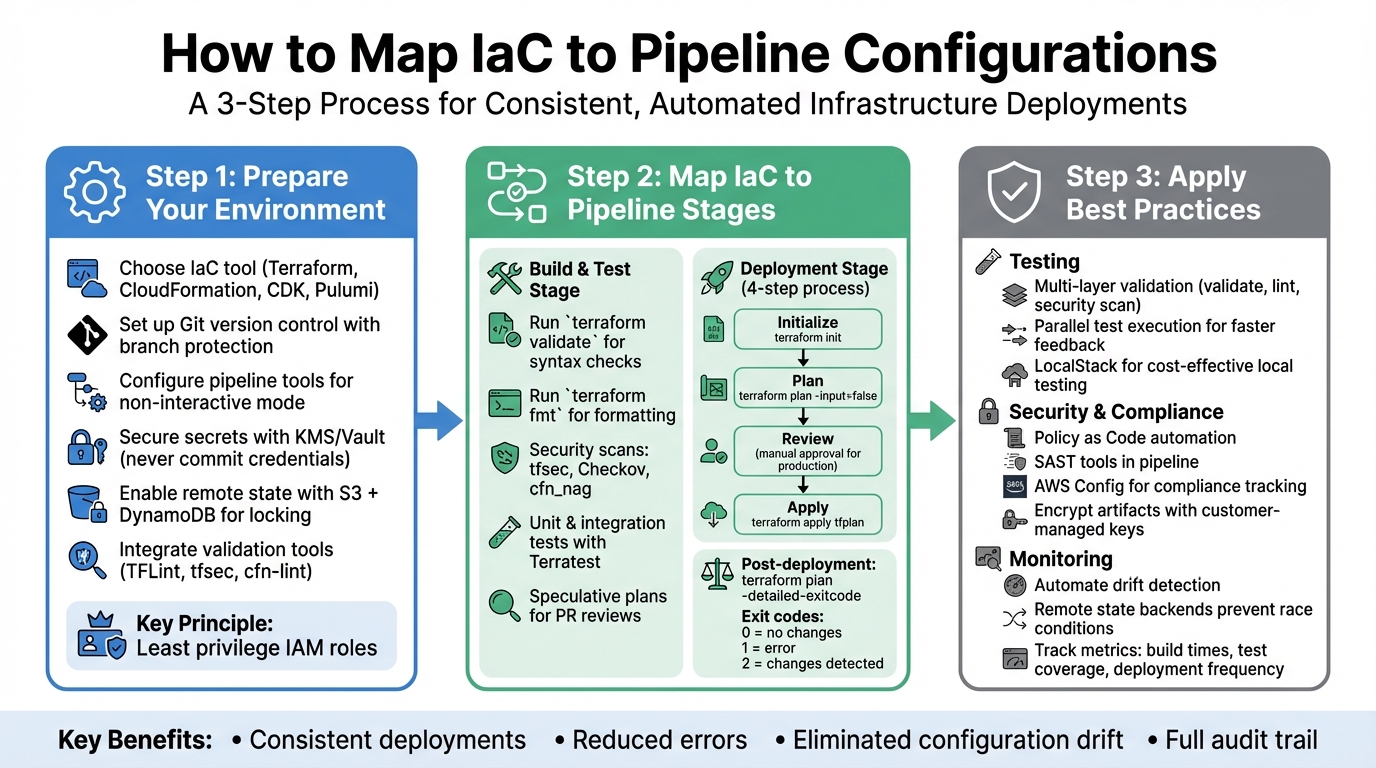 {3-Step Process for Mapping IaC to CI/CD Pipeline Configurations}
:::
{3-Step Process for Mapping IaC to CI/CD Pipeline Configurations}
:::
IaC Design a CD Pipeline - CICD and IaC Episode 4
Need help optimizing your cloud costs?
Get expert advice on how to reduce your cloud expenses without sacrificing performance.
Step 1: Prepare Your IaC and Pipeline Environment
Before linking Infrastructure as Code (IaC) to your pipelines, you need to lay a solid groundwork. This involves selecting the right tools for your infrastructure, setting up version control, and configuring your pipeline environment to handle automated deployments seamlessly. This step ensures that the theoretical advantages of IaC translate into practical pipeline workflows.
Select Your IaC Tool
Choosing the right IaC tool depends on your cloud strategy and your team's expertise. For multi-cloud setups, Terraform is a popular choice due to its platform-agnostic nature. On the other hand, AWS CloudFormation and AWS CDK are tailored specifically for AWS, offering tighter integration with its ecosystem. A key distinction lies in how they handle state: CloudFormation manages state automatically, whereas Terraform requires a remote backend - commonly Amazon S3 paired with DynamoDB for state locking.
Your team's preferred programming language also plays a role. Terraform uses HashiCorp Configuration Language (HCL), which is declarative and easy to learn but requires familiarity with a new syntax. If your team is more comfortable with languages like TypeScript or Python, tools like Pulumi or AWS CDK might be better suited.
To avoid misconfigurations, use validation tools such as TFLint and tfsec for Terraform or cfn-lint for CloudFormation. These tools help identify issues before they make their way into production.
Set Up Version Control for IaC
Store your infrastructure code in Git to enable traceability, collaboration, and the ability to roll back changes when needed. Use dedicated branches (e.g., main, dev, or feature branches) to ensure changes are isolated and prevent accidental overwrites by team members.
Since this code will be managing your whole infrastructure, it's important to maintain its integrity and quality.- HashiCorp [3]
Protect sensitive data by configuring .gitignore to exclude files like .tfstate and .terraformplan.out. Never commit API keys or credentials directly into your repository. Instead, use environment variables or secret management tools like GitHub Secrets, AWS KMS, or HashiCorp Vault. To maintain transparency and reduce errors, set up pull request workflows that include reviews of speculative plan outputs before applying changes. This creates an audit trail and ensures that potential issues are caught early.
Configure Your Pipeline Tools
Your pipeline must handle IaC workflows independently, without manual intervention. Configure tools to run in non-interactive mode, and set the TF_IN_AUTOMATION environment variable to optimise log formatting for automated outputs.
Follow the principle of least privilege when provisioning service roles. Grant only the permissions necessary for resource modifications. As AWS engineers Aromal Raj Jayarajan and Vijesh Vijayakumaran Nair explain:
The AWS Identity and Access Management (IAM) role... follows the principle of least privilege. This IAM role's permissions must be updated based on the specific resources that your pipeline needs to create.[1]
To avoid race conditions in simultaneous pipeline runs, enable remote state management with backends that support state locking, such as Amazon S3 with DynamoDB or Google Cloud Storage. Enable bucket versioning to safeguard against accidental deletions. Finally, integrate linting and security scanning tools into your pipeline as validation steps before the plan
phase. This ensures issues are identified and resolved early, keeping your pipeline secure and efficient.
Step 2: Map IaC to Pipeline Stages
Once your environment is set up, the next step is to integrate Infrastructure as Code (IaC) into every stage of your pipeline. By embedding IaC into your CI/CD pipeline, you can validate code, automate resource provisioning, and catch errors early in the process.
Add IaC to Build and Test Stages
In the build stage, the goal is to identify issues before resources are provisioned. Right after your code is checked out, run commands like terraform validate to check for syntax errors and terraform fmt to maintain consistent formatting. As Luca Mazzaferro, DevOps Architect at AWS, explains:
Automated tests ensure quality, stability, reliability and security of the code, hence, of the provisioned resources.
Security checks are just as crucial at this stage. Tools such as tfsec, Checkov, and cfn_nag can scan for misconfigurations and compliance problems. Running these scans simultaneously speeds up feedback. Additionally, include unit, integration, and end-to-end tests to validate logic, module behaviour, and the final state of your infrastructure. For integration testing, frameworks like Terratest are particularly useful. They provision real resources in temporary environments, run assertions, and then tear everything down, keeping costs under control.
For pull requests, speculative plans using terraform plan allow you to preview changes without affecting live infrastructure. This gives your team the chance to review proposed modifications before implementation. Use non-interactive flags like -input=false to prevent pipeline interruptions, and ensure you persist the .terraform directory between stages for consistent results.
Once validation is complete, these practices can be seamlessly extended into the deployment pipeline.
Use IaC in Deployment Pipelines
Deployment pipelines generally follow a four-step process: Initialize (init), Plan (plan), Review, and Apply (apply). Run these commands in non-interactive mode by including the -input=false flag.
To ensure that the changes reviewed are exactly what gets deployed, save your plan as an artifact (e.g., tfplan) and apply it directly using terraform apply tfplan. This approach prevents discrepancies between the review and execution stages. If you’re running the plan and apply steps on different machines, extract the working directory to the same absolute path to avoid issues with relative paths stored in the plan file.
For deploying the same codebase across Development, Test, and Production environments, use Workspaces or environment-specific variable files (e.g., .tfvars) to handle unique configurations. Additionally, setting the TF_PLUGIN_CACHE_DIR can save time by avoiding repeated downloads of large provider binaries during every pipeline run.
Validate Deployments with IaC
Post-deployment testing ensures that your infrastructure behaves as expected. Running terraform plan with the -detailed-exitcode flag provides a clear status: an exit code of 0 indicates no changes, 2 signals modifications, and 1 points to errors.
To manage costs, consider deploying to a temporary environment, running assertions, and then automating the cleanup process. The Terraform test framework supports unit and integration tests written in standard HCL syntax, eliminating the need for additional programming languages. Serhii Vasylenko, Technical Lead Manager at Grammarly, offers this advice:
Fully automated application of configuration generally works well with environments that tolerate unexpected downtimes... plan review is recommended for production-grade environments.
For production deployments, it’s wise to include manual approval gates after the plan stage. This allows for human oversight, ensuring that proposed changes are safe before they’re executed. It’s a careful balance between automation efficiency and production reliability.
Step 3: Apply Best Practices for IaC and Pipeline Integration
Once your environment is set up and your pipeline stages are mapped out, the next step is to refine and secure your integration. Combining Infrastructure as Code (IaC) with pipelines is just the starting point. To ensure long-term reliability and flexibility, you’ll need to adopt practices that enhance performance, strengthen security, and support continuous improvement.
Automate Testing for IaC Scripts
Testing is a cornerstone of a stable IaC setup. Start by implementing multi-layer validation to catch issues early. Use tools like terraform validate, TFLint, and security scanners such as tfsec, Checkov, or cfn_nag before deploying. This ensures that your scripts are both functional and secure.
For deeper validation, tools like Terratest can confirm that your resource configurations are correct. If you're working with AWS infrastructure, LocalStack offers a Docker-based emulation environment. This allows you to test locally, cutting down on cloud costs and speeding up feedback loops. To make your pipeline even more efficient, run linting, security checks, and unit tests simultaneously rather than one after the other. Using a Makefile can help developers replicate the exact testing steps locally, mirroring what runs in the pipeline.
Maintain Security and Compliance
Security needs to be baked into every step of your pipeline, not added as an afterthought. According to the AWS Well-Architected Framework, the risk of not automating security testing and validation is rated as Medium. To mitigate this, integrate static application security testing (SAST) tools directly into your pipeline. These tools scan IaC templates for vulnerabilities and irregularities before deployment.
Another essential practice is using Policy as Code, which automates governance by ensuring deployments adhere to organisational standards. Tools like AWS Config can automatically record resource changes and evaluate them against compliance rules. Enforce least-privilege IAM roles (as discussed in Step 1) and use customer-managed keys to encrypt pipeline artefacts. Running security tools inside Docker containers within the pipeline ensures a consistent environment without needing to install multiple tools on the build agent. These measures create a solid foundation for secure and compliant pipeline operations.
Monitor and Improve Continuously
Automation reduces human error, but continuous monitoring ensures your infrastructure remains consistent with its intended configuration. Once deployed, infrastructure is vulnerable to configuration drift - unauthorised manual changes that can make IaC templates outdated and risky to use. As Microsoft highlights:
When the infrastructure is deployed and operational, cloud configuration drift can be difficult to resolve, especially in production environments.
Automate drift detection to keep resources aligned with their defined configurations and use automated reconciliation to restore environments to their intended state. Any drift detected should be logged immediately for quick resolution. Observability platforms that gather performance metrics and activity logs can help identify anomalies and trigger automated remediation workflows. Additionally, using remote state backends with state locking prevents race conditions during simultaneous pipeline runs.
HashiCorp underscores the importance of automation in this process:
Automation of Terraform can help ensure that the correct settings are used for each environment, and that the working directory is properly configured before each operation.
Regularly assess your pipeline metrics - such as build times, test coverage, and deployment frequency - to uncover bottlenecks and areas for improvement. By iterating on these metrics, you can ensure your IaC and pipeline integration evolves alongside your infrastructure, supporting a seamless end-to-end pipeline strategy.
Conclusion
Key Takeaways
Aligning Infrastructure as Code (IaC) with pipeline configurations is a game-changer for achieving consistent, auditable, and efficient deployments. By committing infrastructure changes to version control and automating validation through pipelines, you ensure that your development, staging, and production environments stay in sync throughout the entire process.
To achieve this, focus on integrating version control, automated validation, and GitOps workflows. These practices establish a single source of truth for your infrastructure. For example, remote state management ensures your team works from a shared, centralised source, while GitOps methodologies use Git repositories as the authoritative record of your infrastructure's desired state. Security should be a cornerstone of this process - apply least privilege principles, incorporate Policy as Code, and avoid storing secrets within IaC templates. As Alaa Mansour and Michael Lihs from Thoughtworks aptly put it:
Infrastructure code is CODE![2]
This structured approach not only simplifies cloud deployments but also ensures they are secure, scalable, and easier to maintain.
How Hokstad Consulting Can Help

If you're looking to refine your pipeline integration and cloud deployment strategies, expert guidance can make all the difference. Hokstad Consulting specialises in DevOps transformation and cloud cost optimisation, offering tailored CI/CD pipeline solutions that prioritise security, efficiency, and cost-effectiveness.
One standout service is their FinOps solutions, which can cut non-production cloud costs by up to 70% through automated resource management [4]. Hokstad Consulting also provides ongoing support to fine-tune and secure your cloud deployments. Visit hokstadconsulting.com to learn how they can help you optimise your cloud infrastructure and streamline your deployment pipelines.
FAQs
What are the main advantages of integrating Infrastructure as Code (IaC) with CI/CD pipelines?
Integrating Infrastructure as Code (IaC) into CI/CD pipelines simplifies cloud resource management by automating and standardising how infrastructure is provisioned. This approach helps minimise manual errors, boosts deployment reliability, and ensures all changes are well-documented for better traceability.
With infrastructure deployment automated, teams can deliver updates quickly and consistently, improving operational efficiency and cutting down on downtime. This setup also enables scalable, repeatable processes, making it easier to handle complex systems and adjust to shifting business demands.
How can I securely manage sensitive data when working with Infrastructure as Code (IaC)?
To safeguard sensitive data when working with Infrastructure as Code (IaC), begin by marking sensitive input variables as sensitive. This ensures they aren't displayed in logs or outputs, reducing the chances of accidental exposure during deployment.
Leverage a centralised secrets management tool to securely handle sensitive information. These tools help enforce access controls, enable dynamic rotation of secrets, and keep data encrypted. By doing so, you minimise the risk of unauthorised access or data breaches.
Adopting these measures allows you to keep your infrastructure secure while managing it effectively.
What are the best practices for testing Infrastructure as Code (IaC) in a pipeline?
To ensure your Infrastructure as Code (IaC) deployments are both reliable and secure, it's important to adopt effective testing practices within your pipeline. Start with static analysis and linting. These methods catch syntax errors and ensure adherence to coding standards right at the beginning, offering quick feedback without the need to deploy resources. Tools like terraform validate can then be used for automated validation, confirming that your configurations are correct before moving on to more detailed testing.
The next step is to run unit and integration tests. These tests create temporary, isolated infrastructure components, allowing you to validate specific modules or configurations without impacting existing systems. Tools such as Terratest can automate this process, making it more consistent and dependable. Lastly, include end-to-end tests in a staging environment. These tests check the entire infrastructure stack, ensuring that security and compliance requirements are met before transitioning to production.
Incorporating these testing steps into your CI/CD pipeline helps you catch issues early, minimise manual work, and enhance the dependability of your cloud infrastructure.