
If I get the tenant boundary wrong, the key design goes wrong too. In a multi-tenant cloud, I need to decide three things up front: what a tenant is, where that tenant’s data sits, and whether isolation should come from separate keys or from app controls. That one choice affects access, audit logs, off-boarding, and monthly KMS spend.
Here’s the short version:
- Per-tenant keys fit high-risk or high-value tenants.
- Shared keys with tenant-bound encryption context fit high-volume, lower-risk tenants.
- Every Encrypt and Decrypt call must include the same tenant ID context.
- Runtime access and key admin access must stay separate.
- Rotation, tagging, and spend checks keep key use under control.
- Central control suits firms that want one policy path; team-owned control suits firms that want less waiting.
A simple cost example shows the trade-off fast: if one KMS key costs about £0.80 per month, then 10,000 tenant keys = about £8,000 per month before request charges. That makes key choice a security and cost decision at the same time.
What I’d focus on first:
- Define the tenant and data boundary
- Pick one key per tenant or one shared key
- Pass
tenant_idin every crypto request - Split data use from key admin
- Tag keys for tenant, risk, environment, and cost centre
- Review key count, last use, and spend each month
Replicon: Multi-Tenant SaaS Solution with Bring Your Own Key (BYOK) Encryption for Enterprises
Quick Comparison
| Model | Best fit | Main upside | Main trade-off | Audit trail | Fixed monthly key cost |
|---|---|---|---|---|---|
| One key per tenant | Regulated, enterprise, high-risk tenants | Strong tenant separation | More keys and more work | Very clear | Higher |
| Shared key + encryption context | Large numbers of similar, lower-risk tenants | Fewer keys and lower fixed cost | Isolation depends on the app using context every time | Clear if context logging is in place | Lower |
My rule of thumb is simple: use the least complex key setup that still meets your isolation, reporting, and contract needs.
Choose the right tenant key model
::: @figure 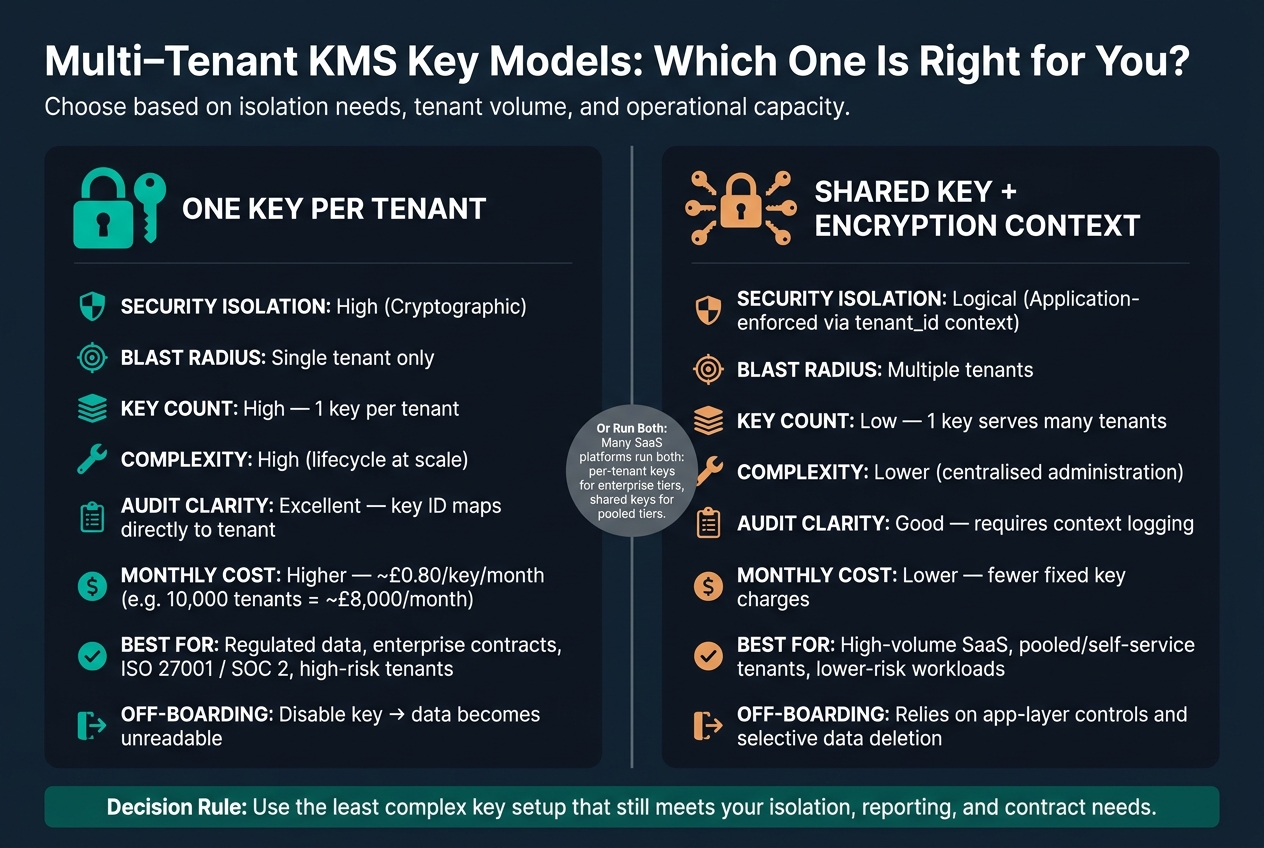 {Multi-Tenant KMS Key Models: Per-Tenant vs Shared Key Comparison}
:::
{Multi-Tenant KMS Key Models: Per-Tenant vs Shared Key Comparison}
:::
Once you’ve set the boundary, the next choice is pretty simple: does each tenant get its own KMS key, or do several tenants share one key with a tenant ID passed in every request? The right pick depends on data sensitivity, tenant numbers, and how much operational work your team can take on.
Use the table below to line up each model with your risk and scale needs.
| Feature | One key per tenant | Shared key with tenant-bound encryption context |
|---|---|---|
| Security isolation | High (cryptographic) | Logical (application-enforced) |
| Blast radius | Single tenant | Multiple tenants |
| Key count | High (1:1 with tenants) | Low (1:many) |
| Complexity | High (lifecycle at scale) | Lower (centralised administration) |
| Audit clarity | Excellent (key ID maps to tenant) | Good (requires context logging) |
| Monthly cost | Higher (per-key fees) | Lower (fewer fixed key charges) |
Use one key per tenant when isolation and auditability matter most
A per-tenant key gives you hard cryptographic separation. If a tenant leaves, you can disable the key and schedule deletion. Once that happens, the data is unreadable. That’s often much easier to show during off-boarding than trying to prove selective deletion inside a shared store.
This model fits regulated data, enterprise contracts, and any tenant that needs a separate audit trail. If a customer asks for evidence during an ISO 27001 or SOC 2 review, you can show key usage logs, rotation records, and access reviews tied only to their key. AWS can handle large key counts, but the bigger issue is day-to-day operational load.[1][9]
It also helps to stay practical here. Reuse one tenant key across that tenant’s services - web app, analytics, and backups - instead of spinning up separate service keys. That keeps key counts under control while still holding on to tenant-level isolation.[6][3]
Use a shared key when tenant volumes are high and workloads are lower risk
If you’re dealing with hundreds or thousands of smaller tenants with similar risk profiles, per-tenant keys can get expensive and awkward to manage very quickly. At about £0.80 per key per month, 10,000 tenants works out to roughly £8,000 a month in fixed key fees alone, before any API calls.[8] A shared key cuts those fixed charges by a large margin.
The trade-off is simple: isolation moves away from cryptography and into application controls. Every encrypt and decrypt request needs to include the tenant ID in the encryption context. AWS KMS treats that as additional authenticated data, and decryption fails unless the context matches exactly what was used when the data was encrypted.[4][5]
That’s a solid control, but only if your application applies it every single time. Miss it once, and the whole setup starts to wobble. Pair it with strict IAM policies and tenant filtering at the data layer, and a shared key model works well for high-volume, lower-risk workloads.
A common SaaS setup is to run both models side by side: per-tenant keys for enterprise or regulated tiers, and a shared key with tenant-bound encryption context for pooled, self-service tenants.[7] That way, key overhead lines up with the actual risk and value of each tenant segment.
Next, enforce that tenant ID in every encrypt and decrypt request.
Set up encryption flow and tenant-aware access control
Once you’ve picked the key model, the runtime flow is straightforward: encrypt with a tenant-bound context, store the encrypted data key, then decrypt with that exact same context. Whether you use per-tenant keys or a shared key, the tenant boundary needs to show up in every encrypt and decrypt call.
Use GenerateDataKey to create two things at once: a plaintext data key and an encrypted copy of that key. Encrypt the data locally with the plaintext key, discard the plaintext key after use, and store the encrypted copy next to the ciphertext.[10][11][12]
Bind every encrypt and decrypt request to the tenant ID
Encryption context ties each KMS request to a tenant. Use a stable schema across every service, such as tenant_id=acme-123, app=billing, env=prod. These values should be machine-generated and applied through a shared library so each service uses the same field names and values.
That detail matters more than it might seem. If one service uses tenantId and another uses tenant_id, decryption will fail even if the key policy is set up properly.
This is a two-layer design, and both layers do different jobs. IAM and key policy decide who can call KMS. Encryption context decides which tenant’s data that call can decrypt. So a service role may be allowed to use a shared key in general, but it can still be blocked from decrypting another tenant’s ciphertext if the context doesn’t match.
Separate key use from key administration in IAM and key policies
Runtime services and key administrators should not use the same role.
| Role | Permissions | Scope |
|---|---|---|
| Runtime role (application service) |
GenerateDataKey, Encrypt, Decrypt
|
Data plane only |
| Admin role (platform or security team) |
CreateKey, PutKeyPolicy, rotation, ScheduleKeyDeletion
|
Management plane only |
On larger platforms, split access by plane and by tenant. In cross-account setups, access has to be allowed in two places: the owning account’s key policy and the caller’s IAM policy. Both must permit the action. Also, avoid broad principals in key policies.[15][17][18][19]
For tenant-aware access at scale, use ABAC. Use KMS grants only for temporary access, and lock them down with EncryptionContextEquals.[13][14][16][3]
Once access control is in place, rotate key material, tag keys, and track tenant-level cost without breaking existing data.
Rotate keys, tag them and track tenant-level cost
With tenant-aware access in place, rotation and tagging help you keep ownership, risk and cost in check.
Rotate key material without breaking access to existing tenant data
Automatic rotation only applies to symmetric customer-managed keys that use AWS-generated key material. It keeps all earlier key versions, so existing ciphertext can still be decrypted, and you don’t need to re-encrypt old data.[2][26][28]
For most tenant workloads, rotating once a year is a sensible starting point. For financial, health or legal records, tighten that to 6–12 months and record the choice in your key management policy and risk register. It also helps to schedule rotations during planned maintenance windows in UK time, so tenant disruption stays low.
A safe rotation workflow looks like this:
- confirm scope by tag
- test decrypt
- rotate
- monitor logs for several hours after rotation
- rewrap active data keys only where policy says you must[2][26][28]
Use automatic rotation where AWS KMS supports it. Handle unsupported key types on a separate path. Asymmetric keys, HMAC keys, keys with imported material and keys in a custom key store all need manual rotation.[8][26][27] If you suspect compromise, don’t mess about with partial fixes. Create a new key, move that tenant’s data, and disable the old key for that tenant only.
Tag keys so finance, security and operations can all report on them
Once rotation is sorted, tagging gives each key a clear owner, a risk label and a cost centre.
Consistent tagging gives finance, security and operations one shared picture of each key. Agree the taxonomy before provisioning starts, then enforce it through infrastructure-as-code so every key is labelled the same way from day one.[22][23]
| Tag | Purpose | Example value |
|---|---|---|
TenantId |
Maps key to a specific tenant | acme-123 |
TenantSegment |
Groups tenants for cost and margin reporting |
enterprise, sme, internal
|
RiskTier |
Drives rotation frequency and access review |
high, medium, low, regulated
|
CostCentre |
Aligns with UK cost-centre codes | CC-4210 |
Environment |
Separates production from non-production |
production, staging, development
|
Activate these as cost allocation tags in the AWS Billing and Cost Management console. They’ll show up in Cost Explorer and Cost & Usage Reports within 24 hours. That gives finance a clean way to produce monthly KMS spend reports in GBP (£), broken down by tenant segment and risk tier.[21][24][25]
Tagging also helps you spot dormant keys. A simple example: no Encrypt or Decrypt calls in production for 90 days. Filter your key inventory by last-used timestamp and segment, check that the related data has been archived, deleted or moved, then disable the dormant key and watch for decrypt failures before deletion. A quarterly tag audit, paired with a check of key counts per tenant against expected baselines, helps catch key sprawl before it pushes up the monthly bill.[20]
Pick an operating model and run through a practical checklist
Once you've locked in the key model and access controls, the next step is deciding how the whole thing will run in production.
Use centralised administration when governance consistency matters more than team autonomy
Centralised administration makes sense when one security or platform team needs to enforce the same key policy across every tenant and workload. In this setup, all customer-managed keys sit in one or a few dedicated security accounts. Product accounts can use those keys through cross-account permissions and KMS grants, but they can't change lifecycle settings, rotation schedules or key policies. [29][30]
This setup fits organisations working under FCA, PRA, ISO 27001 or SOC 2 frameworks, where auditors want one clear evidence trail. A single team owns CloudTrail logs and KMS audit records across the estate, which makes it simpler to show which keys protect which tenant data.
The downside is pretty plain: speed can take a hit. If the central team is stretched, key provisioning can turn into a queue.
Use distributed administration when product teams need faster delivery within clear guardrails
With distributed administration, each product team owns and runs keys inside its own account, using centrally defined templates and naming rules. That removes the central bottleneck and works well for fast-moving SaaS platforms, especially when schema changes happen often.
The risk is drift. One team tweaks a policy, another names things differently, and before long you've got a mess on your hands.
To keep that under control, use organisation-level SCPs to block rotation from being disabled and to stop wildcard principals, even in team-owned accounts. Give teams standard key policy templates and require consistent tagging from the start. That way, teams keep control of day-to-day delivery without governance slipping.
At heart, this is a trade-off between governance consistency and delivery speed.
| Dimension | Centralised administration | Distributed administration |
|---|---|---|
| Where keys live | One or a few central security accounts | Each product or workload account |
| Who administers | Core security/platform team | Product teams within guardrails |
| Tenant isolation enforced by | Standard encryption context and IAM conditions across all workloads | Per-account IAM policies, SCPs and automated compliance checks |
| Audit ownership | Single team owns all KMS logs and CloudTrail | Teams own local logs; central SIEM aggregates them |
| Incident recovery | Controlled but slower; goes through central team | Faster but requires standardised runbooks per team |
| Operational overhead | Concentrates in central team; risk of ticket queues | Spreads across teams; risk of duplication and inconsistency |
Final checklist for running multi-tenant KMS at scale
Use this checklist to turn the operating model you've picked into production controls.
- Define tenant boundaries.
- Choose per-tenant or shared keys.
- Bind every Encrypt and Decrypt call to
tenant_id. - Separate admin and runtime roles.
- Rotate with a tested workflow.
- Tag every key consistently.
- Review monthly spend against tenant value - compare KMS costs per tenant with revenue or service value each month. If a tenant's risk profile grows, move it to per-tenant keys.
FAQs
How do I choose between per-tenant and shared KMS keys?
Choose based on security, compliance, and operational overhead.
Use per-tenant keys when you need strict data segregation in regulated settings, such as financial services or NHS deployments. They also make auditing clearer, which matters when you need to show exactly how each tenant’s data is handled.
Use shared keys when the goal is to keep management simpler and costs lower, especially if trusted internal teams don’t need separate keys. It’s the more straightforward option and can save a lot of admin work.
For higher-security setups, a hierarchical model can give you centralised auditing while still keeping logical tenant isolation.
What happens if the tenant ID context is missing or wrong?
If the tenant ID context is missing or wrong, access to encryption keys will usually fail with authentication or authorisation errors. If the workload identity mapping doesn’t line up, actions like Decrypt or GenerateDataKey may stop working.
These failures often point to a setup issue or possible misuse, so they should be logged and watched for repeat decryption errors or unauthorised access attempts.
When should a tenant move to its own KMS key?
A tenant should move to a dedicated KMS key when the security model calls for strict isolation, compliance rules, or a separate failure domain.
It also makes sense when you need tenant-specific audit trails or key rotation policies that a shared key setup can't support. And if a key is ever compromised, a dedicated key keeps the blast radius limited to that one tenant.