
Managing hybrid cloud scaling costs can be challenging, but it doesn't have to be overwhelming. By applying smart strategies, you can control expenses while maintaining performance. Here's a quick summary of the key steps:
- Monitor Costs: Use tools to track spending across public and private clouds in one place.
- Rightsize Resources: Identify underused or oversized resources and adjust them to fit actual needs.
- Automate Scaling: Set up auto-scaling rules and automation to prevent unnecessary expenses.
- Optimise Pricing: Take advantage of reserved and spot instances for predictable and dynamic workloads.
- Reduce Data Transfer Costs: Minimise egress fees by keeping data within regions or zones and using compression or private links.
- Conduct Regular Audits: Review usage and costs regularly to catch inefficiencies and anomalies.
These steps ensure you’re scaling efficiently without overspending. Whether it’s automating shutdowns during off-peak hours or using lifecycle policies for storage, small adjustments can lead to big savings. For businesses in the UK, tools like AWS Trusted Advisor or Azure Advisor can help simplify the process. If you need expert help, consulting services like Hokstad Consulting offer tailored solutions to optimise hybrid cloud environments.
::: @figure 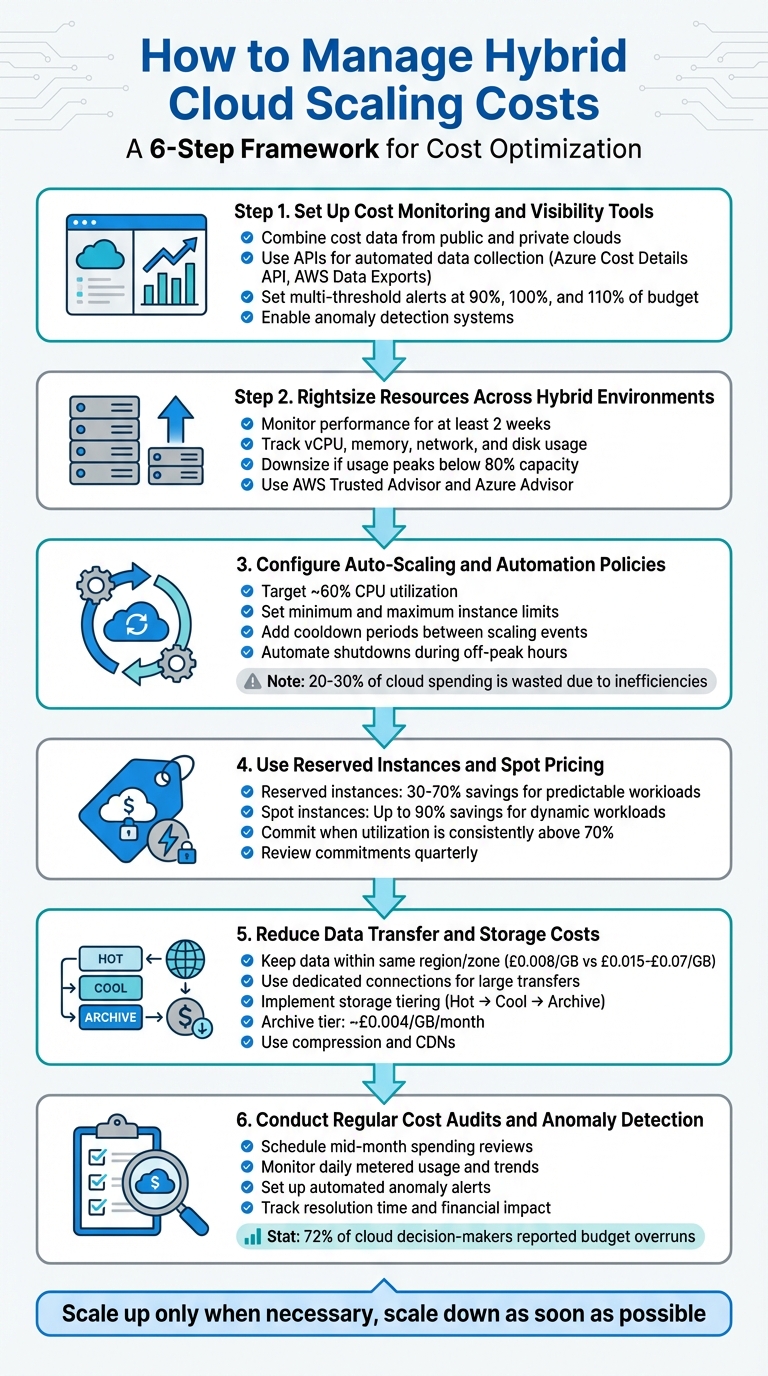 {6-Step Hybrid Cloud Cost Management Framework}
:::
{6-Step Hybrid Cloud Cost Management Framework}
:::
Step 1: Set Up Cost Monitoring and Visibility Tools
Set Up Cost Monitoring
Start by keeping a close eye on your hybrid cloud spending across all platforms. To do this, you’ll need to combine cost data from both public and private clouds into a single system using a unified data format [5]. This approach ensures you have a complete, consolidated view of all your expenses in one place.
Leverage APIs for automated data collection. Tools like the Azure Cost Details API and AWS Data Exports allow you to programmatically pull billing and usage data into custom dashboards or your existing financial systems [5][4]. This eliminates manual data entry and ensures your information stays up to date.
Once your data is collected, organise it using multi-level hierarchies that reflect your organisation’s structure. Create management groups, subscriptions, and resource groups that align with your departments and teams [4][7]. This setup promotes accountability by enabling individual teams to focus on their specific spending, rather than sifting through aggregated organisational data.
These tools lay the groundwork for a clear, real-time view of your resource usage.
Visualise Resource Usage
With your data centralised, the next step is to turn those raw numbers into actionable insights. Real-time monitoring is key here, as it allows you to interpret raw billing data quickly. Use metered data for daily cost estimates and invoiced data for reconciling those figures [5]. Dashboards can help by highlighting high-cost resources, underutilised assets, and spending trends.
Set up multi-threshold alerts to keep costs under control. For example, configure alerts at 90% (ideal spending), 100% (target budget), and 110% (over-budget) of your planned expenditure [5]. These notifications provide early warnings, giving you time to act before costs escalate. For added foresight, enable forecast alerts at 110% of your budget to predict potential overspending before it happens [5]. Additionally, implement anomaly detection systems to flag unusual cost spikes or drops, helping you identify deviations from historical patterns [5][6].
Step 2: Rightsize Resources Across Hybrid Environments
Identify Over-Provisioned and Underutilised Resources
Cutting out waste starts with ensuring your infrastructure matches the actual workload demands. This process, often referred to as rightsizing, involves pinpointing resources that are either oversized or unnecessarily expensive for their current tasks.
To get an accurate picture, monitor performance for at least two weeks to account for workload spikes [8]. Pay close attention to four key metrics: vCPU usage, memory usage, network throughput, and ephemeral disk activity. These will reveal whether your resources are being fully utilised or sitting idle most of the time.
Here’s a practical benchmark to guide your decisions: if vCPU and memory usage peak at less than 80% of capacity, it’s time to consider downsizing to a smaller, more efficient instance type [8]. Tools like AWS Trusted Advisor and Azure Advisor can help by automatically flagging virtual machines with low CPU or network activity for resizing or shutdown [8]. On Google Cloud, you can take it a step further by creating custom machine types that align perfectly with your workload needs, avoiding unnecessary extra capacity [9].
Non-production environments like development and testing also offer opportunities to trim excess since they rarely require full production-level resources [9]. If you’re building internal tools for rightsizing, set a savings threshold - don’t spend time resizing an instance unless it delivers meaningful cost reductions [8].
Once you’ve tackled inefficiencies, make sure your resource allocation remains flexible to meet changing demands.
Adjust Workloads Based on Demand
Keeping resources aligned with demand is an ongoing process. The goal is simple: scale up or out only when absolutely necessary and scale down or in as soon as possible [1]. This way, you maintain performance without wasting resources.
For this, target-tracking and predictive scaling - based on CPU usage and historical data - are invaluable tools [10]. If your workloads follow predictable patterns, schedule-based scaling can adjust capacity at specific times. Meanwhile, event-based triggers, like message queue length, can provide more accurate signals than relying solely on CPU or memory metrics [1].
To manage demand efficiently, consider techniques like throttling, rate limiting, and queue-based load levelling - these can help keep scaling costs in check [1]. In hybrid setups, don’t overlook the hidden costs of data transfers between on-premises and cloud environments, which can quickly add up during scaling [12]. Serverless options, such as Azure SQL Database serverless, offer another solution by automatically scaling as needed and pausing billing when not in use [10].
Finally, set upper scaling limits to avoid runaway costs and tag resources by environment (e.g., Production, Development, QA) to apply tailored scaling policies. Automating shutdowns during off-peak hours is another simple yet effective way to save [9][11].
Step 3: Configure Auto-Scaling and Automation Policies
Configure Auto-Scaling Rules
Set a baseline for your system by defining the minimum number of instances required to maintain steady performance. At the same time, establish a maximum limit to manage costs and avoid overloading backend services [15][1].
Aim for around 60% CPU utilisation or request concurrency as your scaling target. For workloads that rely on asynchronous processes, like those using message queues or Kafka topics, consider adding event-based triggers. These can help fine-tune scaling adjustments for better efficiency [15][1].
Introduce cooldown periods between scaling events to avoid constant up-and-down fluctuations [1]. For services that aren't mission-critical, you can go a step further by setting policies to scale down to zero instances when there's no traffic. This approach can completely eliminate costs tied to idle resources [15]. Before rolling out any auto-scaling configurations, make sure your infrastructure isn't already over-provisioned. Scaling an inefficient setup only leads to more waste [14].
Once your scaling thresholds are in place, automation can take over to keep costs in check.
Use Automation to Prevent Cost Spikes
Automation complements your scaling rules by providing an extra layer of control over costs. Think of it as setting financial guardrails. Use tools like throttling, rate limiting, and queue-based load levelling to manage demand surges and reduce the frequency of scaling events [1].
Set up automated actions to tackle inefficiencies. For instance, you can schedule the removal of unused resources or apply savings plans when certain thresholds are approached [16]. Tools like AWS Instance Scheduler can automatically stop EC2 and RDS instances during low-usage periods [18], while autoscalers such as Karpenter optimise workloads by consolidating them onto the most suitable instances [17]. For critical workloads, add annotations (e.g., safe-to-evict=false) to ensure they aren’t terminated prematurely [17].
Automated cost management tools enable teams to remain agile and innovative while maintaining budgetary control.– AWS DevOps Guidance [16]
Considering that 20–30% of cloud spending is often wasted due to inefficiencies [14], automation isn't just helpful - it's essential. These measures integrate seamlessly with your overall cost management strategy, ensuring you avoid unexpected expense spikes while maintaining control across complex, multi-platform environments.
Step 4: Use Reserved Instances and Spot Pricing
Benefits of Reserved Instances
Reserved instances can help you cut costs significantly - offering discounts of 30–70% compared to standard rates - when you commit to specific resources for one or three years [19]. They’re particularly useful for workloads that run continuously, such as databases, core applications, or always-on services. Once your workload patterns stabilise and utilisation is consistently above 70%, it’s a good time to commit. To ensure these commitments stay aligned with your business needs, review them quarterly [19]. On the other hand, spot instances are a great option for managing costs when dealing with fluctuating demands.
Use Spot Instances for Dynamic Workloads
While reserved instances are great for predictable, long-term use, spot instances shine in scenarios where flexibility is key. They let you access unused cloud capacity at steep discounts - up to 90% off on-demand pricing [20][21]. However, there’s a catch: providers can reclaim spot capacity with as little as two minutes' notice, which makes them unsuitable for critical tasks. Instead, they work best for jobs that are stateless and fault-tolerant, like batch processing, CI/CD pipelines, big data analytics, or containerised workloads.
Interruptions are rare, happening less than 5% of the time on average [21]. To make the most of spot instances, stay flexible by using a mix of instance families, sizes, and availability zones. Design your applications to handle interruptions gracefully - save states, drain containers, or deregister from load balancers within the two-minute window.
For the best cost efficiency, combine pricing models: use reserved capacity for steady, baseline needs, spot instances for scaling during dynamic periods, and on-demand instances to handle unpredictable spikes. This hybrid approach helps you optimise costs while maintaining a reliable environment.
Step 5: Reduce Data Transfer and Storage Costs
Cut Down on Data Transfer Expenses
Data transfer fees can add up quickly, especially when moving data out of a provider's ecosystem. Providers like AWS, for instance, offer the first 100 GB of monthly outbound data transfer for free. Beyond that, costs drop from roughly £0.07 per GB to as low as £0.04 per GB as usage scales up [22]. However, these charges, often referred to as egress fees, are more than just a way to recover costs. As David Johnson, Director of Product Marketing at Backblaze, explains:
Data egress fees are not just about cost recovery - they are a powerful mechanism for vendor lock-in[22].
To minimise these costs, keep data transfers within the same region or availability zone whenever possible. Transferring data between zones usually costs about £0.008 per GB, while inter-region transfers can range from £0.015 to £0.07 per GB [22]. For large-scale data movement between private and public clouds, dedicated private connections like AWS Direct Connect or Megaport are often much cheaper than relying on internet-based VPNs [22][12]. Starting with VPNs during testing phases is a practical approach, but once you have a clear understanding of your bandwidth needs, switching to dedicated links can save you money in the long run [12].
Other ways to reduce data transfer volumes include using compression, delta encoding, or Content Delivery Networks (CDNs). CDNs cache frequently accessed static content closer to users, reducing repeated egress from your origin storage [22][23]. For workloads with heavy read operations, consider using columnar storage formats such as Parquet or ORC. These formats allow you to fetch only the specific data columns you need, cutting down on unnecessary data transfer and I/O [23].
By addressing transfer overheads, you can shift focus to optimising storage costs through tiering.
Save with Storage Tiering
Storage tiering helps you align your storage costs with how often data is accessed. This approach ensures you're only paying for the access levels you actually need. For instance:
- Hot or Standard tiers: These offer instant access and are ideal for active databases or frequently accessed files, though they come with higher storage costs.
- Cool or Infrequent tiers: These provide near-instant access at a lower storage cost but charge more per transaction.
- Archive or Cold tiers: These offer the lowest storage costs - around £0.004 per GB per month. However, retrieval times can range from minutes to hours, and access fees are higher [23][24].
Automation plays a big role here. By using lifecycle policies, you can automatically move data to cooler tiers based on how often it's used. For example, files can shift to cool storage after 30 days of inactivity and then to archive storage after 90 days [23][25]. To save even more, consolidate smaller files into larger TAR or ZIP archives before transferring them to cooler tiers. This reduces the number of billable transactions [25].
That said, cooler tiers come with higher retrieval costs, so only move data that you expect to remain untouched for long enough to offset these fees [23][25]. As Microsoft's Azure Well-Architected Framework puts it:
The goal of data tiering is to align access and retention with the most cost-effective storage tier[23].Need help optimizing your cloud costs?
Get expert advice on how to reduce your cloud expenses without sacrificing performance.
Step 6: Conduct Regular Cost Audits and Anomaly Detection
Schedule Regular Cost Audits
Keeping tabs on your cloud spending through regular cost audits is a smart way to spot inefficiencies before they spiral out of control. Here's a telling statistic: 72% of cloud decision-makers reported budget overruns last year [13]. By routinely reviewing your cloud usage, you can compare what you've allocated with what you're actually using. This helps you adjust resources based on real CPU, memory, and network usage metrics [13][1].
To stay on top of things, monitor daily metered usage, amortised costs, and consumption trends [5]. This level of detail allows you to perform variance analysis, which involves comparing forecasted costs with actual expenses. It’s a great way to finetune your budgeting and scaling strategies for the future [5][13]. Plus, your audit reviews can tap into the alert notifications set up in your monitoring system to flag when spending nears or exceeds set limits.
Make these audits part of your regular routine. For example, you could schedule mid-month spending reviews during team sprint cycles [2]. When auditing, focus on specific signs of inefficiency, such as EBS volumes with less than one IOPS per day or RDS instances that have gone unused for seven days straight [24]. Some organisations even gamify the process by using dashboards and efficiency ratings to motivate teams to cut down on cloud waste [2].
After each audit, it’s crucial to identify any anomalies quickly so you can address unexpected changes right away.
Set Up Anomaly Detection Systems
Anomaly detection builds on your cost monitoring efforts, helping you catch unusual patterns that might not yet blow your budget but could signal technical issues or configuration mistakes [5]. As Microsoft Learn puts it:
Anomaly management refers to the practice of detecting and addressing abnormal or unexpected cost and usage patterns in a timely manner[26].
Set up alerts across different levels - whether for subscriptions, specific workloads, or cost categories. Document automated workflows to ensure that the right people are notified and can respond quickly [26][6]. When an anomaly pops up, dive into the details immediately. Check for changes in application behaviour, resource usage, or configurations that could explain the spike [26].
Keep an eye on key metrics like how often anomalies occur, their financial impact, and how long it takes to resolve them [26][5]. These indicators not only measure how effective your cost management strategy is but also reveal whether your hybrid cloud setup is running smoothly or needs attention [5].
Custom Tools for Hybrid Cloud Cost Management
Benefits of Custom Cost Management Solutions
When it comes to managing hybrid cloud costs, custom tools can make a world of difference. While general-purpose tools provide a basic overview, they often fall short in handling the complexities of hybrid environments. These setups typically involve a mix of public clouds, private infrastructure, and on-premises systems, each with its own quirks - like varied billing cycles, legacy systems, and specific resource tagging requirements. Custom solutions are designed to tackle these unique challenges head-on.
With tailored tools, you can monitor spending by project, team, or even customer. They also allow for the creation of automation rules that align with your specific scaling needs and budget limits. This level of customisation ensures that your cost management strategy is as dynamic as your infrastructure.
Yannis Spiliopoulos shared his experience, saying:
With Datadog's high-fidelity cost data, the savings opportunities we estimated were extremely accurate, which gave us confidence... that we could share this across other teams and ultimately provide an even better customer experience.[1]
How Hokstad Consulting Can Help

Hokstad Consulting brings expertise in cloud cost engineering, specifically for hybrid environments, and boasts an impressive track record of cutting cloud expenses by 30–50%. Their approach isn’t just about audits; they go a step further by crafting custom automation and monitoring tools tailored to your unique infrastructure setup - whether it’s public cloud, private cloud, or managed hosting.
They offer solutions that seamlessly integrate into your DevOps processes. These include automated CI/CD pipelines with built-in cost controls, caching systems to reduce data transfer costs, and offloading mechanisms to optimise performance. What sets them apart is their no savings, no fee
pricing structure, which caps fees at a percentage of the actual savings achieved. This ensures their goals are directly aligned with yours.
For ongoing support, they provide flexible retainers that cover everything from infrastructure monitoring to performance tuning and security audits, all designed with hybrid cloud environments in mind. These tailored services not only help you manage costs more effectively but also improve overall system performance.
Conclusion
Summary of Cost Management Methods
Managing costs in hybrid cloud environments requires constant fine-tuning [3]. This guide has highlighted six key strategies: unified cost monitoring, resource rightsizing, auto-scaling and automation, optimised pricing models, reducing data transfer and storage costs, and regular audits with anomaly detection [1][3][5].
The key takeaway? Scale up only when absolutely necessary and scale down as soon as possible. Set up alerts at 90%, 100%, and 110% of your forecasted spend to catch overspending before it spirals [1][5]. These practices are not just tried-and-tested - they’re also the foundation for smarter cost management moving forward.
Next Steps for Hybrid Cloud Cost Optimisation
To build on these strategies, consider the following actions to further streamline your hybrid cloud expenses. Start by forming a multidisciplinary team that brings together finance experts, engineers, and business leaders [2][4]. Ensure consistent resource tagging across all teams and projects to maintain accurate cost tracking [2][5]. Automate processes wherever possible - schedule non-production environments to shut down outside working hours, and use event-based scaling triggers rather than depending solely on CPU metrics [1]. These steps reinforce the importance of financial accountability while fostering a mindset of continuous improvement.
For UK businesses juggling the complexities of public clouds, private infrastructure, and on-premises systems, expert support can make all the difference. Hokstad Consulting offers tailored solutions with a no-savings, no-fee approach, as well as flexible retainers for ongoing monitoring, performance optimisation, and security audits in hybrid environments.
AWS re:Invent 2022 - Multi- and hybrid-cloud cost optimization with Flexera One (PRT016)
FAQs
How can I monitor and control hybrid cloud costs in real time?
To keep hybrid cloud costs under control in real time, the first step is to standardise resource tagging across all cloud platforms, whether public or private. Use consistent tags like project, owner, or environment to monitor usage effectively. These tags also help enforce budgets using tools like AWS Cost Explorer or Azure Cost Management, creating a reliable framework for accurate cost tracking.
Next, consider deploying a FinOps platform to consolidate cost data from all providers. These platforms offer real-time dashboards, detect anomalies, and send automated alerts when unexpected cost spikes occur. They can also merge cost data with performance metrics, helping you spot inefficiencies such as underused resources. Make it a habit to review reports in GBP (£), share insights with your teams, and adjust strategies to cut waste and optimise spending.
For more tailored support, Hokstad Consulting provides expert advice on tagging practices, tool selection, and automation to help you stay in control of your hybrid cloud scaling costs.
What are the best practices for optimising cloud resource usage?
Optimising cloud resources involves matching your compute, storage, and networking capacities to actual workload demands. This approach helps minimise waste while ensuring performance stays on track. To get started, gather at least two weeks of usage data, focusing on metrics like CPU, memory, network, and disk I/O. Leverage monitoring tools to analyse this data, pinpoint underused resources, and apply consistent tagging to assets for easier tracking.
With this insight, you can automate adjustments to improve efficiency. For instance, scale down virtual machines that are over-provisioned, shift idle workloads to smaller instance types, and take advantage of reserved or spot pricing for workloads with predictable traffic patterns. Make it a habit to review resource usage quarterly to accommodate seasonal shifts, new services, or updates to your applications.
For even better results, embed these optimisation techniques into a broader cost management framework, such as FinOps. Establish clear cost-reduction targets, assign responsibility to a specific team or individual, and incorporate resource checks into your deployment workflows. By keeping a close eye on usage and making regular adjustments, organisations across the UK can cut down on hybrid cloud waste and ensure expenses stay in line with business goals.
What’s the difference between reserved and spot instances for cost optimisation?
Reserved instances are perfect for steady, long-term workloads. They come with a fixed, discounted rate, but in return, you commit to using them over a specified period. This makes them a great match for predictable resource needs where consistency is key.
On the other hand, spot instances are all about flexibility. Their pricing changes dynamically and can be up to 90% cheaper. However, the trade-off is that they can be interrupted at short notice. This makes them ideal for non-critical or flexible tasks that won’t suffer from occasional disruptions.
When used wisely, both options can help cut costs significantly, depending on how predictable your workload is and how much interruption it can handle.