When selecting a cloud platform for machine learning, the choice often comes down to AWS, Azure, or GCP. Each offers distinct strengths in framework compatibility, tools, integration, and pricing. Here's what you need to know:
- AWS SageMaker: Best for teams needing detailed control and broad framework support (e.g., PyTorch, TensorFlow). Offers proprietary chips like Inferentia for cost savings but has higher pricing and complex configurations.
- Azure ML: Ideal for organisations using Microsoft tools. Strong integration with Power BI, Synapse, and access to OpenAI models. Lower platform surcharges but less transparent pricing.
- GCP Vertex AI: Suited for data-driven teams. Features seamless BigQuery integration, serverless workflows, and cheaper GPUs. However, higher data egress fees and fewer third-party integrations can be limiting.
Quick Comparison
| Feature | AWS SageMaker | Azure ML | GCP Vertex AI |
|---|---|---|---|
| Framework Support | Broadest (e.g., PyTorch, MXNet) | Includes .NET, OpenAI models | TensorFlow, JAX, BigQuery |
| Key Tools | SageMaker Studio, Bedrock | Azure ML Studio, OpenAI GPT | Vertex AI, Model Garden |
| Cost Profile | Higher instance pricing | No platform surcharge | Cheaper GPUs, serverless |
| Best For | Engineering-heavy teams | Microsoft-centric organisations | Data-driven teams |
Your choice depends on your existing tools, data location, and team requirements. AWS is great for engineering-heavy setups, Azure suits regulated industries, and GCP excels for BigQuery users or research-focused teams.
::: @figure 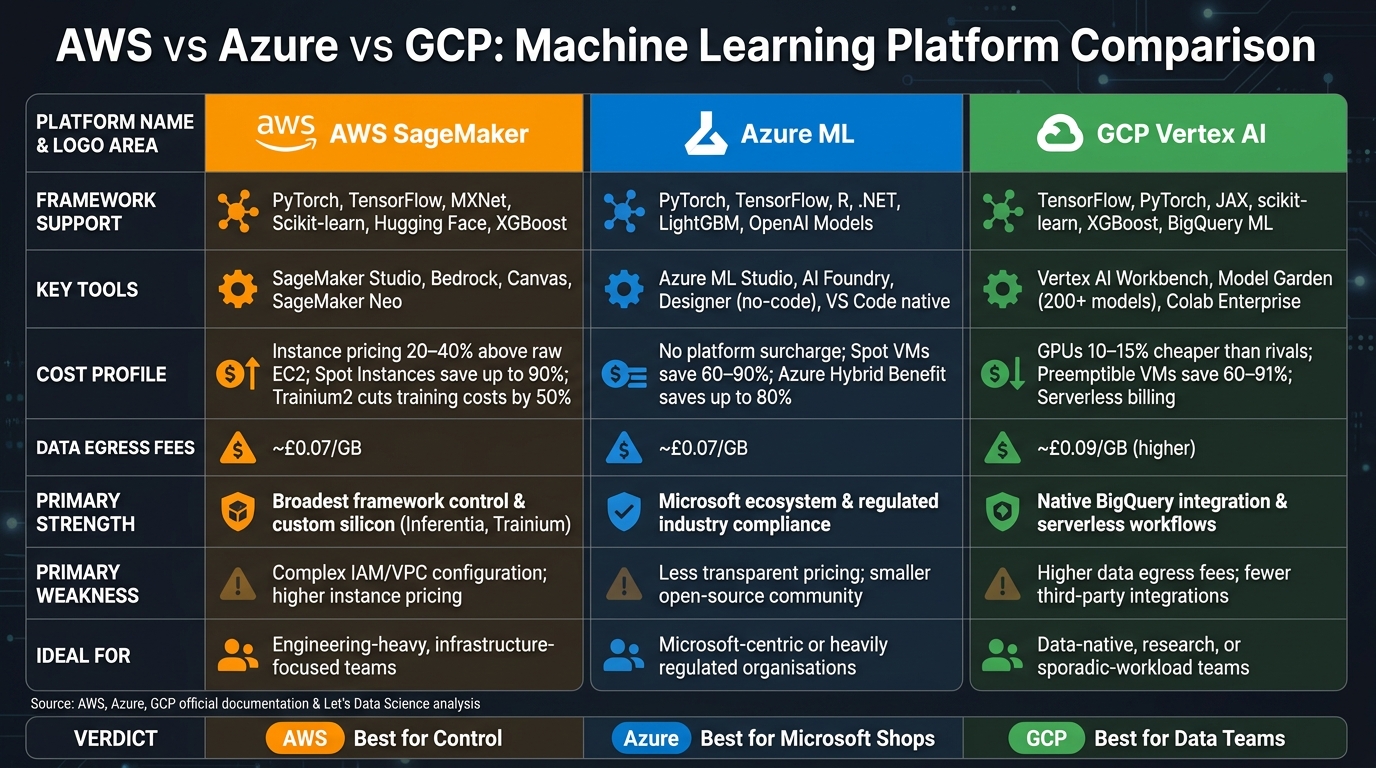 {AWS vs Azure vs GCP: Machine Learning Platform Comparison 2024}
:::
{AWS vs Azure vs GCP: Machine Learning Platform Comparison 2024}
:::
1. AWS Machine Learning Stack
Framework Support
AWS provides support for a wide range of machine learning (ML) frameworks, including PyTorch, TensorFlow, Hugging Face, Scikit-learn, XGBoost, and Apache MXNet [5][9]. Integration is streamlined through the Amazon SageMaker Python SDK, which includes pre-built Docker containers and open-source APIs for both training and deployment. For users requiring more granular control, AWS offers Deep Learning AMIs (DLAMIs). These come pre-installed with ML frameworks, NVIDIA CUDA drivers, and cuDNN libraries, enabling immediate setup on EC2 instances [7].
This extensive framework compatibility forms the backbone of AWS's managed ML tools, supporting a seamless development experience.
Managed Tooling
Amazon SageMaker stands out as AWS's flagship managed service, handling every stage of the ML model lifecycle - from data preparation and training to deployment and monitoring. Features like the SageMaker Training Compiler enhance performance by optimising memory usage and increasing batch sizes. For instance, it allows the batch size for a distilgpt2 model on a g5.4xlarge instance to jump from 138 to 390 [6]. Additionally, SageMaker Neo takes optimisation further by compiling models for specific hardware, including CPUs, GPUs, and AWS Inferentia chips [8].
DevOps and CI/CD Integration
AWS supports MLOps with tools designed for efficient DevOps and CI/CD workflows. SageMaker Pipelines enables teams to define ML workflows as Directed Acyclic Graphs (DAGs), while the SageMaker Model Registry handles versioning, lineage tracking, and approval processes [11][12]. Deployment processes can be automated using Amazon EventBridge, which triggers actions when a model gains approval, minimising manual steps. Furthermore, AWS integrates with third-party tools like GitHub Actions and Jenkins via AWS CodeStar connections, ensuring compatibility with established industry workflows [10][12].
This approach has been successfully adopted by organisations like NatWest Group. Their Data Platform Engineering team utilised SageMaker to streamline ML and data workflows across the company:
Amazon SageMaker delivers a ready-made user experience to help us deploy one single environment across the organisation, reducing the time required for our data users to access new tools by around 50%.- Zachery Anderson, CDAO, NatWest Group [13]
Cost and Performance
AWS's technical capabilities also impact cost and performance - two critical factors for ML operations. While the pay-as-you-go model offers flexibility, costs can escalate if not carefully managed. SageMaker instances typically cost 20–40% more than equivalent raw EC2 instances [1][15]. However, AWS's proprietary hardware provides notable advantages: Inferentia2 chips deliver 40% better price-performance and up to 10x lower latency compared to standard GPU instances [1][4]. Similarly, Trainium2 chips can cut training costs for transformer models by up to 50% [4].
To manage expenses, leveraging Spot Instances can reduce training costs by 70–90%, with SageMaker handling checkpoints to prevent data loss [1][15]. However, users should be mindful of additional charges, such as data egress fees (£0.07/GB) and CloudWatch monitoring costs, which can significantly increase overall expenses [2][15]. These considerations are crucial when evaluating ML platforms, aligning with the decision-making criteria discussed earlier.
Need help optimizing your cloud costs?
Get expert advice on how to reduce your cloud expenses without sacrificing performance.
2. Azure Machine Learning Stack
Framework Support
Azure ML is compatible with popular Python frameworks like PyTorch, TensorFlow, scikit-learn, XGBoost, and LightGBM. For teams working outside Python, it also supports R and .NET [17]. The Model Catalogue offers a wide selection of foundation models from providers such as OpenAI, Meta (Llama), Mistral, Cohere, NVIDIA, and Hugging Face [17][18]. Additionally, Azure ML integrates seamlessly with MLflow, allowing users to track experiments and incorporate models built on open-source platforms [17][22].
Managed Tooling
Azure ML caters to a wide range of technical expertise by offering multiple tools. Azure ML Studio provides a user-friendly web interface, while the no-code Designer enables pipeline creation using drag-and-drop functionality. For users needing more control, the platform includes a Python SDK and Azure CLI [17]. Pre-configured environments, such as cached Docker images for PyTorch and TensorFlow, help reduce build times and speed up deployments [19][21].
Marks & Spencer is a prime example of how Azure ML can scale. The company processes data for 30 million customers, enabling personalised offers and enhanced customer service [18]. These tools also integrate tightly with DevOps workflows, making them versatile for enterprise needs.
DevOps and CI/CD Integration
Azure ML works seamlessly with Azure DevOps and GitHub Actions, ensuring a clear separation between rapid, iterative data science (inner loop) and the formal CI/CD processes used for staging and production deployment (outer loop). Tools like Bicep, Terraform, or ARM templates handle infrastructure provisioning, while OpenID Connect (OIDC) manages authentication, eliminating the need for manual secret rotation.
Azure Event Grid can trigger automated retraining or deployment when issues like data drift occur or when a new model version is registered. As Gregor Pacnik, Innovation Delivery Manager at TAL, notes:
Azure Machine Learning regularly lets TAL's data scientists deploy models within hours rather than weeks or months – delivering faster outcomes and the opportunity to roll out many more models than was previously possible.[20]
Cost and Performance
Azure ML has a markup of around 25% over raw VM rates, which is lower than AWS SageMaker's 28–40% [15]. Unlike AWS, Azure includes pipeline orchestration at no additional charge, while AWS charges about £0.08 per pipeline step [14]. To reduce costs further, Azure Spot VMs offer savings of 60–90%, though users must manage with a 30-second eviction notice (compared to AWS's 2 minutes), making regular checkpointing crucial [2][15].
For high-performance training, Azure provides access to NVIDIA H100 and A100 GPU clusters. On-demand H100 8-GPU instances cost approximately £78.77 per hour. Teams with existing Microsoft licences can benefit from the Azure Hybrid Benefit, which can cut Windows-based workload costs by up to 80% [23]. Storage costs are also competitive, with object storage priced at about £0.014 per GB per month and data egress fees around £0.07 per GB [2].
3. Google Cloud Platform Machine Learning Stack
Framework Support
Google Cloud Platform's Vertex AI supports popular machine learning frameworks such as TensorFlow, PyTorch, scikit-learn, and XGBoost. It also provides prebuilt Docker containers, while allowing teams to use custom images for frameworks like JAX or specific Spark versions [25].
One standout feature is BigQuery ML, which enables teams to build and deploy machine learning models directly within BigQuery using SQL. This eliminates the need to move data elsewhere, making it especially appealing for organisations already storing data in BigQuery. This approach streamlines workflows compared to more traditional, notebook-driven methods [24].
Managed Tooling
GCP complements its framework support with a variety of managed tools. It offers four distinct training options tailored to different levels of expertise:
- AutoML: A codeless solution for beginners.
- Serverless Training: Fully managed training for custom Python code.
- Training Clusters: Dedicated capacity for critical jobs.
- Ray on Vertex AI: Distributed Python workloads [26].
The Model Garden provides access to over 200 curated models, including Google's Gemini, Anthropic's Claude, and open-source models like Llama and Mistral [27]. Additional tools include Vertex AI Pipelines for orchestration, a Model Registry for version control, and a Feature Store for low-latency data serving [27].
Abdol Moabery, CEO of GA Telesis, shared his experience with GCP's generative AI:
The accuracy of Google Cloud's generative AI solution and practicality of the Agent Platform gives us the confidence we needed to implement this cutting-edge technology into the heart of our business.[28]
DevOps and CI/CD Integration
Vertex AI Pipelines is built on Kubeflow, an open-source standard that allows seamless portability of pipelines across on-premises Kubernetes and other cloud platforms [1]. For CI/CD, Google Cloud Build and GitHub simplify the automation of model lifecycle management. This includes archiving outdated models and monitoring for prediction drift, with the ability to trigger automated retraining when necessary [24].
Cost and Performance
When it comes to pricing, GCP's GPU instances are generally 10–15% cheaper than comparable options, with hourly rates ranging from approximately £0.35 to £9.45 [2]. Preemptible VMs offer significant savings, cutting costs by 60–91%, though regular checkpointing to Cloud Storage is critical to avoid data loss [16].
GCP's TPU v6 (Trillium) delivers up to 4.7× the compute power of its predecessor, significantly boosting training throughput. This can lead to considerable savings in both cost and time. However, TPU workloads typically require code written in JAX or TensorFlow rather than PyTorch.
One area to watch is data egress costs, which are approximately £0.09 per GB - higher than AWS's pricing [2].
Cloud Provider Comparisons: AWS vs Azure vs GCP - Artificial Intelligence and Machine Learning
Pros and Cons
Here's a breakdown of the key advantages and drawbacks for each platform, based on the earlier analysis. Each platform is tailored to different team structures and operational needs.
AWS SageMaker
AWS SageMaker is ideal for engineering-focused teams looking for detailed control. It provides access to a wide range of open-source models via Bedrock, a mature Spot instance market that can cut training costs by up to 90% [1], and custom silicon options like Trainium and Inferentia, which reduce transformer model training costs by up to 50% compared to NVIDIA-based instances [4]. However, this level of control comes at the cost of increased configuration complexity. Additionally, AWS instance pricing is 20–40% higher than raw EC2 costs [1].
Azure ML
Azure ML is a strong choice for organisations already using Microsoft tools. It offers exclusive access to OpenAI's cutting-edge models (such as GPT-5), seamless integration with Microsoft Fabric and Power BI, and robust governance features, making it particularly appealing for regulated industries. Another benefit is its lack of a platform surcharge, meaning you only pay for compute and storage [2]. However, pricing can be less transparent outside Enterprise Agreements, and its open-source ecosystem is smaller compared to AWS [1][2].
GCP Vertex AI
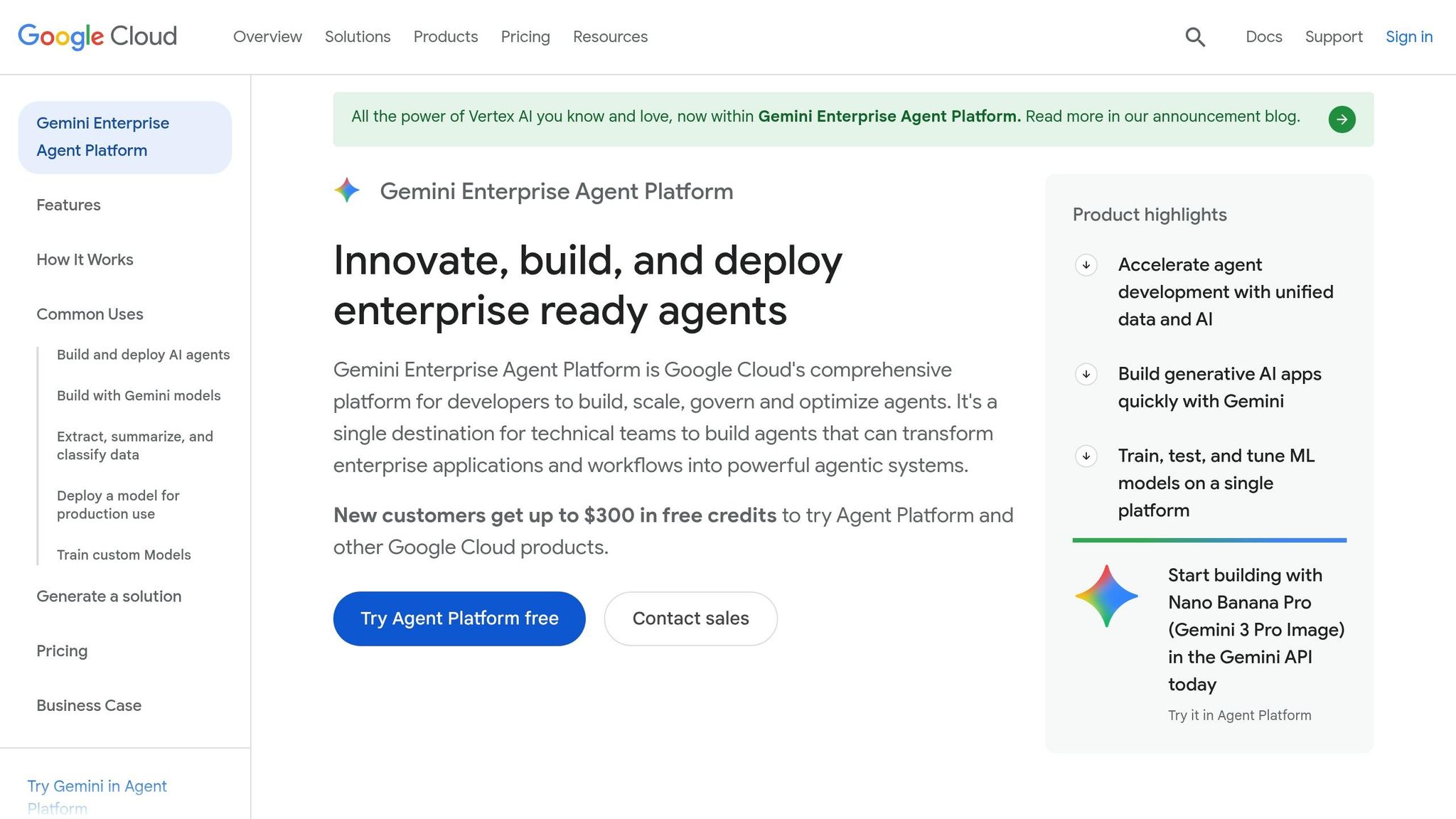
GCP Vertex AI caters to data-driven and research-oriented teams. Its serverless billing model ensures you only pay when your code runs, and its GPU instances are generally 10–15% cheaper than alternatives [2]. The platform also provides effortless data access through native BigQuery integration. On the downside, higher data egress fees (approximately £0.09 per GB) and limited third-party integrations can be restrictive [2][3].
Below is a table summarising the platforms' strengths and weaknesses:
| Feature | AWS SageMaker | Azure ML | GCP Vertex AI |
|---|---|---|---|
| Framework compatibility | Widest (PyTorch, TensorFlow, MXNet, scikit-learn) | PyTorch, TensorFlow, plus first-class .NET support | Strong for JAX and TensorFlow; Kubernetes-native |
| Key tooling | SageMaker Unified Studio, Bedrock, Canvas | VS Code native, Azure ML Studio, AI Foundry | Colab Enterprise, Vertex AI Workbench, Model Garden |
| Data integration | S3, Glue, Redshift, EMR | Microsoft Fabric, Synapse, Power BI | BigQuery (native, zero-friction) |
| Cost profile | Spot instances up to 90% savings; Savings Plans 20–40% off | No platform surcharge; bundled discounts via Enterprise Agreements | 10–15% cheaper GPUs; serverless billing; sustained-use discounts |
| Primary weakness | Complex IAM/VPC configuration | Opaque pricing; smaller open-source community | Higher data egress fees; fewer third-party integrations |
| Ideal for | Engineering-heavy, infrastructure-focused teams | Microsoft-centric or heavily regulated organisations | Data-native, research, or sporadic-workload teams |
Conclusion
When choosing a cloud ML platform, it's essential to weigh factors like control, integration, and cost efficiency. AWS SageMaker appeals to engineering teams needing fine-grained control and broad framework compatibility. Azure ML aligns well with organisations relying on Microsoft tools or operating in heavily regulated sectors. Meanwhile, GCP Vertex AI caters to teams prioritising serverless workflows and seamless integration with BigQuery, making it ideal for data-driven or research-oriented environments.
These differences highlight a fundamental point: selecting the right platform is less about individual features and more about how well it fits your existing architecture and workflows.
Picking a cloud ML platform is less about features and more about architectural fit. You aren't choosing a tool; you're choosing the ecosystem your team will operate in for the next three to five years.- Let's Data Science [1]
Your current data infrastructure and tools should play a central role in your decision. For example, if your datasets already reside in BigQuery, switching to AWS could lead to unnecessary egress costs. Similarly, teams entrenched in Microsoft 365 and Entra ID will find Azure ML reduces operational complexity. For those prioritising framework compatibility, earlier sections of this article provide a clearer breakdown of the platforms' strengths than simply comparing model catalogues.
To ensure flexibility and control costs as your needs evolve, consider containerising your training code with Docker and using cloud-neutral MLOps tools like MLflow or Kubeflow. These strategies can help maintain portability across platforms.
If you're grappling with high cloud expenses or the challenges of migration, Hokstad Consulting offers tailored solutions. Their expertise in cloud cost optimisation and AI strategy can help cut your cloud spend by 30–50%, streamline workload migrations, and build scalable MLOps pipelines that operate seamlessly across AWS, Azure, and GCP. For teams transitioning from basic notebook experiments to fully automated ML systems, expert guidance like this can make a tangible difference.
FAQs
Which cloud is best for PyTorch workloads?
All three major cloud providers offer support for PyTorch. The right choice for you will hinge on your specific infrastructure requirements and the location of your data, as this can help reduce transfer costs.
- AWS SageMaker: A well-established option that includes features like cost-efficient spot instance training.
- Azure: A solid choice for enterprises, offering excellent compliance features and upcoming hardware tailored for PyTorch.
- Google Cloud Vertex AI: Best suited for workflows focused on research and seamless integration with BigQuery.
How do I avoid surprise ML cloud costs?
When managing machine learning projects, focusing on efficient architecture can save you from surprise expenses. It's easy to be drawn to attractive headline pricing, but hidden costs - like data egress, storage, and idle compute - can quietly dominate your cloud bill, often accounting for more than half of it.
Here are some practical tips to keep costs under control:
- Use spot or preemptible instances: These are great for training tasks, as they come at a lower cost. Just ensure your code is prepared to handle interruptions.
- Keep data and compute in the same region: Transferring datasets across regions can rack up hefty transfer fees, so always aim to store your data close to where computations happen.
- Automate idle resource cleanups: Set up systems to automatically tear down unused resources. Also, take advantage of automatic discounts offered by cloud providers whenever possible.
By being mindful of these factors, you can significantly cut down on unnecessary spending while maintaining performance.
Can I keep my ML pipelines portable across clouds?
To keep your machine learning pipelines flexible and avoid being tied to a single vendor, it's important to steer clear of proprietary platform features that could lead to vendor lock-in. Instead, rely on cloud-agnostic tools like Kubeflow or MLflow for tasks such as orchestration, tracking, and model management.
Here are a few practical tips:
- Use neutral data formats: Store training data in format-neutral layers like Parquet on object storage. This ensures your data remains accessible and compatible across different platforms.
- Separate infrastructure from pipeline logic: By decoupling your infrastructure from the logic of your pipelines, you can avoid expensive and time-consuming re-architectures if you ever need to migrate your workloads elsewhere.
This approach not only saves time and resources but also ensures your machine learning workflows remain adaptable to future needs.