
Choosing the right managed Kubernetes service - Amazon EKS, Microsoft AKS, or Google GKE - depends on your team's expertise, cloud ecosystem, and budget. Here's a quick breakdown:
- Amazon EKS: Best for teams already using AWS. Offers flexibility and deep AWS integration but requires more manual setup. Control plane costs £0.07/hour (~£53/month), with advanced tools like Karpenter for cost optimisation.
- Microsoft AKS: Ideal for organisations using Azure services or Windows Server containers. Features a free control plane for smaller clusters and strong enterprise integrations. Paid tiers start at £0.07/hour with added SLAs.
- Google GKE: Perfect for automation-focused teams or AI/ML workloads. Autopilot mode eliminates node management, and GKE supports up to 15,000 nodes per cluster. Pricing starts at £0.07/hour, with pod-based billing for Autopilot.
Quick Comparison Table:
| Feature | Amazon EKS | Microsoft AKS | Google GKE |
|---|---|---|---|
| Control Plane Cost | £0.07/hr (~£53/mo) | Free / £0.07/hr | £0.07/hr / Free |
| Max Nodes | ~1,000 | ~1,000 | 15,000 |
| Upgrade Process | Manual | Semi-automated | Fully automated |
| Best For | AWS workloads | Azure ecosystem | Automation, AI/ML |
Each platform offers unique strengths. EKS suits AWS-heavy setups, AKS excels in Azure environments, and GKE simplifies operations with automation. Your choice should align with your tech stack, workload needs, and cost considerations.
::: @figure 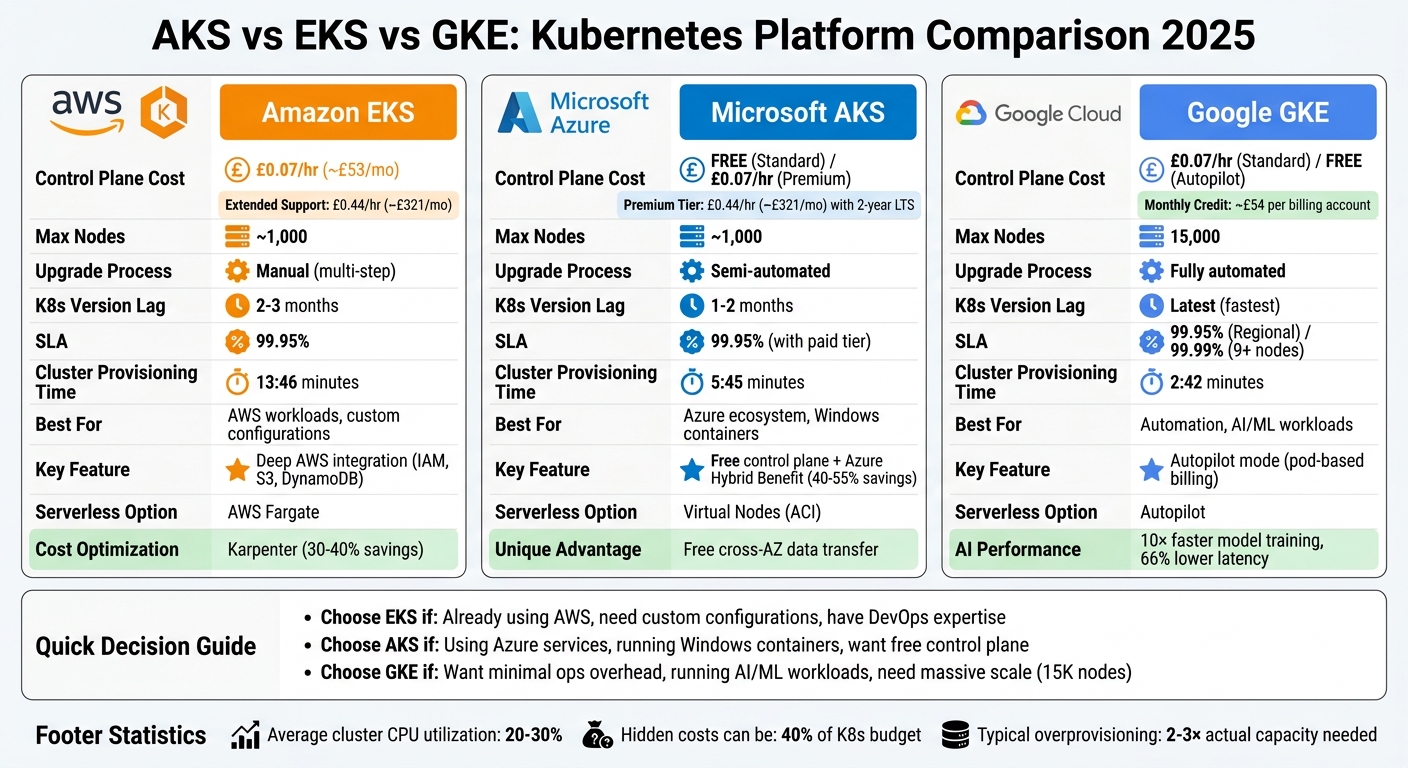 {AKS vs EKS vs GKE: Complete Feature and Pricing Comparison 2025}
:::
{AKS vs EKS vs GKE: Complete Feature and Pricing Comparison 2025}
:::
EKS vs GKE vs AKS Evaluating Kubernetes in the Cloud
Need help optimizing your cloud costs?
Get expert advice on how to reduce your cloud expenses without sacrificing performance.
Amazon EKS: Features, Costs, and Use Cases
Amazon EKS (Elastic Kubernetes Service) is AWS's managed Kubernetes solution, designed for organisations already invested in the AWS ecosystem. Rather than prioritising out-of-the-box simplicity, EKS provides the tools for custom configurations, offering flexibility at the cost of requiring manual setup.
Amazon EKS Features
Amazon EKS ensures high availability by running your Kubernetes control plane across three Availability Zones [7][9]. It integrates seamlessly with AWS IAM for role-based access control, while EKS Pod Identity simplifies application access to AWS services like S3 and DynamoDB [7][9].
The platform supports several compute options, including Amazon EC2 instances (such as Graviton and Spot instances), AWS Fargate for serverless container execution, and EKS Auto Mode, which automates infrastructure management with minimal effort [7][8][12]. Networking is handled via the Amazon VPC CNI, assigning real VPC IP addresses to pods. However, this requires a minimum /19 subnet to avoid running out of IP addresses [6].
EKS also supports tools and integrations like Argo CD for GitOps workflows, AWS Controllers for Kubernetes (ACK) to manage AWS resources via Kubernetes APIs, and Kube Resource Orchestrator (kro) for composing custom resources [10][12]. Compliance-wise, EKS meets standards such as SOC, PCI, ISO, FedRAMP-Moderate, and is HIPAA eligible [7].
Case studies highlight its capabilities. For example, Sony Interactive Entertainment standardised their platform on EKS in 2026, achieving deployment speeds five times faster and cutting operational costs by 60%. Riot Games also saved around £7.3 million annually by migrating to EKS [8].
These features are paired with a competitive pricing model.
Amazon EKS Pricing
EKS charges £0.07 per cluster per hour (around £53 monthly) during the initial 14 months of a Kubernetes version’s release [11]. After this period, the cost rises to £0.44 per hour (approximately £321 monthly) when the version enters extended support [11][13].
For those requiring high-performance setups, Provisioned Control Plane tiers range from £1.21 per hour (XL tier) to £10.19 per hour (8XL tier), in addition to the version fee [11][13]. EKS Auto Mode, which simplifies node management, adds about a 12% surcharge on EC2 On-Demand rates [11][13].
However, the control plane fee is just part of the total cost. A typical three-node production cluster in the UK costs around £446 monthly, factoring in compute (£323), load balancing (£16), NAT gateway (£40), storage (£6), and cross-Availability Zone data transfer (£7) [2]. Using EC2 Spot Instances can slash compute costs by up to 90%, while ARM-based Graviton instances offer about 20% savings compared to x86 instances [7][13].
Understanding these costs helps identify when EKS is the right choice.
When to Use Amazon EKS
EKS is particularly well-suited for Kubernetes-based containerised workflows that align with modern DevOps practices. It shines in high-performance, large-scale deployments, especially for organisations heavily integrated with AWS services. Hybrid setups are also supported through AWS Outposts or EKS Anywhere. Additionally, advanced provisioning tools like Karpenter can cut costs by 30–40% by optimising instance selection [6].
For example, Jaguar Land Rover significantly improved their pipeline build times - by 95% - using EKS, showcasing its ability to handle demanding workloads [8].
That said, EKS requires more configuration effort than some alternatives. Smaller teams or those prioritising minimal operational overhead might find the £53 monthly control plane fee and setup complexity less appealing. However, for AWS-focused organisations with the necessary expertise, EKS delivers robust capabilities and seamless integration with AWS services.
Microsoft AKS: Features, Costs, and Use Cases
Microsoft AKS (Azure Kubernetes Service) offers a free control plane, which helps cut down infrastructure costs while delivering top-tier Kubernetes performance. Unlike Amazon EKS, AKS provides this free control plane across all cluster types, making it an appealing option for organisations aiming to save on expenses without sacrificing enterprise-level functionality [2].
Microsoft AKS Features
One of AKS's standout features is its completely free control plane, which sets it apart as the only major provider offering this benefit. This eliminates the baseline £53 monthly fee that EKS imposes, potentially saving organisations around £657 annually per cluster [2].
AKS also includes automatic node health repair, continuously monitoring worker nodes and replacing any that fail - no manual input required [15]. For even less operational effort, AKS Automatic takes care of infrastructure tasks like node provisioning, scaling, and network setup. It also includes a pod readiness SLA, ensuring 99.9% of qualifying operations are completed within five minutes [15].
When it comes to Windows Server containers, AKS provides the most advanced support among the major platforms [3]. Organisations can also leverage the Azure Hybrid Benefit to reuse existing on-premises licences, cutting node costs by 40–55% [2]. Seamless integration with Microsoft Entra ID (formerly Azure AD) and Azure DevOps simplifies identity management and CI/CD pipelines.
For teams requiring extended Kubernetes support, the Premium tier offers Long-Term Support (LTS), extending Kubernetes version support to two years - one year more than standard community support [14]. For AI-driven workloads, the AI Toolchain Operator (KAITO) streamlines deploying machine learning models [16]. Another cost-saving feature is free cross-availability zone data transfer within the same region, a notable advantage over AWS and Google Cloud [2].
Real-world examples demonstrate AKS's capabilities. In 2025, Victoria's Secret & Co. improved performance threefold and achieved 99.99% availability with AKS. Kamal Abhinay, their Head of Engineering, stated:
Azure just made sense for us. Choosing Azure Kubernetes Service not only provides us with the support and managed control plane, but also allows us to use most Kubernetes components as they are with fewer proprietary abstractions.[16]
CapitaLand Investments also benefited significantly. Assistant Vice President Darrence Tan remarked:
With AKS, we reduced critical priority incidents by 60%. The transition from VM-based architecture to AKS also resulted in a 50% cost reduction.[16]
These features, combined with a competitive pricing structure, make AKS a strong contender in the Kubernetes landscape.
Microsoft AKS Pricing
AKS offers three control plane tiers:
- Free tier: Ideal for development environments or clusters with fewer than 10 nodes. It costs nothing but provides a 99.5% uptime target without a financial SLA [2].
- Standard tier: At £0.07 per hour (around £53 monthly), this tier is suited for production workloads and includes a financially backed 99.95% uptime SLA [2].
- Premium tier: Priced at £0.44 per hour (approximately £321 monthly), this tier adds benefits like a two-year LTS support window [14].
For additional automation, AKS Automatic costs £85 per cluster monthly, along with vCPU-based charges for automated node management [14].
Other costs include:
- Load balancers: ~£13 monthly
- NAT gateways: ~£23 per month plus £0.033 per GB processed
- Standard SSD storage: ~£0.055 per GB monthly
- Outbound data transfer: ~£0.063 per GB for the first 10 TB [2]
For Windows workloads, the Azure Hybrid Benefit can save up to 55% on vCPU licensing costs [2]. Azure Spot VMs offer discounts of up to 90% compared to pay-as-you-go pricing, while Azure Reservations can lower compute costs by as much as 72% for predictable, long-term workloads [2].
These pricing options make AKS a cost-efficient solution for various deployment needs.
When to Use Microsoft AKS
AKS is particularly well-suited for organisations running Windows Server containers. Its advanced support and cost-saving Azure Hybrid Benefit make it an excellent choice for migrating legacy .NET applications to Kubernetes [3]. For teams already using Microsoft tools like Azure Active Directory, Azure DevOps, or Azure Policy, AKS offers seamless integration, reducing setup complexity.
The free control plane is ideal for smaller deployments, development environments, or teams managing multiple clusters. Compared to EKS, which charges a flat fee regardless of cluster size, AKS can result in significant savings, especially for non-production environments [2].
For those seeking simplicity, AKS Automatic provides production-ready clusters with minimal setup, handling upgrades, scaling, and node provisioning automatically [14]. In hybrid or multi-cloud scenarios, Azure Arc enables unified management of AKS clusters across on-premises, edge, and other cloud platforms [3].
With support for up to 5,000 nodes per cluster, AKS accommodates everything from small-scale development to large-scale production. Built-in KEDA integration allows event-driven autoscaling, enabling workloads to scale to zero based on triggers like Azure Service Bus queue depth [3].
While organisations heavily invested in AWS or Google Cloud might prefer their respective platforms, AKS shines for Microsoft-centric setups, Windows workloads, and cost-conscious deployments. It offers powerful features with minimal operational complexity, making it a strong choice for a wide range of use cases.
Google GKE: Features, Costs, and Use Cases
Google GKE (Google Kubernetes Engine) was the first managed Kubernetes service, debuting in 2015. This early entry gave Google valuable insights into what organisations need from a managed platform [19]. One of its standout features is its ability to automate control plane and node upgrades, significantly reducing manual effort [19].
Google GKE Features
GKE offers two operational modes: Autopilot and Standard. Autopilot takes full control of infrastructure management, including nodes, scaling, and applying security patches, allowing teams to focus entirely on their applications [17][24]. In contrast, Standard mode gives users control over the underlying VM instances.
The platform supports four distinct types of autoscaling - horizontal and vertical pod autoscaling, cluster autoscaling, and node auto-provisioning [22]. Additionally, GKE features release channels (Rapid, Regular, and Stable), enabling organisations to balance between adopting new features and maintaining stability [19].
Security is a strong point for GKE. Tools like Binary Authorization ensure only trusted container images are deployed, while Shielded GKE Nodes provide hardened virtual machines with verified integrity [18][20]. GKE also uses a Container‑Optimised OS maintained by Google, which enhances both security and stability [19].
For AI and machine learning workloads, GKE shines with its integration of TPUs and GPUs. Companies like Moloco have reported a 10× improvement in model training speeds, while others like HubX achieved up to 66% lower latency using TPUs [27]. The platform supports clusters with as many as 65,000 nodes - far exceeding the 1,000–5,000 node limits typical of other platforms [27]. It also offers a 99.99% availability SLA for worker nodes in regional configurations with at least nine nodes [23]. Organisations like Philips Hue (Signify) have leveraged GKE to scale their infrastructure, handling a 1,150% increase in transactions and commands over the past decade [27].
Google GKE Pricing
GKE's pricing model starts with a management fee of around £0.07 per cluster per hour [26]. Google also provides a monthly credit of approximately £54 per billing account, which can cover the management fee for one zonal or Autopilot cluster [26][28].
In Standard mode, costs include charges for Compute Engine VM instances, storage, and networking [17][21]. Autopilot mode, however, uses a pod‑based billing model, charging only for the vCPU, memory, and ephemeral storage that pods request. For example, in the Iowa region, this costs roughly £0.032 per vCPU per hour [26]. This approach eliminates costs for idle node capacity, which is significant given that the average Kubernetes cluster uses only about 13% of its CPU capacity [2].
Storage costs are competitive, with Persistent Disk storage priced at approximately £0.029 per GB per month - lower than EKS (£0.073) and AKS (£0.055) [1]. Outbound data transfer rates are around £0.058–£0.062 per GB for North America and Europe [1]. For workloads with utilisation below 60–70%, Autopilot can lead to savings due to its efficient resource allocation, even if it costs 20–30% more per resource unit [2].
Google also offers Sustained Use Discounts of up to 20% and Committed Use Discounts of up to 57% for predictable workloads [2]. For clusters running on the Extended release channel beyond the standard support window, an additional fee of about £0.35 per hour applies, bringing the total to around £0.42 per hour [26][11].
When to Use Google GKE
GKE is particularly well-suited for organisations focused on AI and machine learning workloads. Its Gen AI‑aware inference capabilities can cut serving costs by over 30%, reduce tail latency by 60%, and increase throughput for AI tasks by up to 40% [27].
For teams lacking Kubernetes expertise, Autopilot mode is a great option. It handles node repairs, patches, and scaling automatically [27]. As Jesus Paz, Founder of ClusterCost, put it:
If you are strictly optimising for raw infrastructure bill - especially for < 5 clusters - GKE is the clear winner in 2025.
- Jesus Paz [25]
GKE also supports multi‑cloud and hybrid strategies through GKE Enterprise and Fleets, enabling organisations to manage clusters across on‑premises setups (like bare metal and vSphere) and other public clouds via a single interface [26][27]. For data-heavy applications, its competitive storage costs and automatic discounts make it an attractive choice [21].
Choose Standard mode if your workloads require specific privileges, detailed node configuration, or specialised hardware [17][24]. Opt for Autopilot mode for workloads with fluctuating demands, as its billing model ensures you only pay for the resources you use. For testing new Kubernetes versions, the Rapid release channel is ideal, while the Stable channel is better suited for production environments [19].
AKS vs EKS vs GKE: Feature Comparison
Choosing the right platform depends on your infrastructure and operational priorities. Each service reflects the philosophy of its parent cloud provider: AWS focuses on offering detailed control, Azure leans heavily into enterprise integration, and Google champions automation and ease of operations.
When it comes to Kubernetes version updates, GKE leads the pack, delivering new versions within weeks. AKS usually follows with a delay of about one to two months, while EKS tends to lag behind by two to three months[3][5]. For teams eager to adopt the latest features or stay closely aligned with Kubernetes upstream development, these timelines can significantly affect operations and agility.
Operational overhead is another area where the platforms differ. GKE simplifies upgrades with a fully automated process, while EKS requires a manual, multi-step approach, including separate updates for the control plane and worker nodes[4]. AKS offers a middle ground with semi-automated upgrade options. However, the importance of these differences may vary depending on how much value you place on cloud-specific integrations[3].
Scalability is a key differentiator for larger deployments. GKE supports up to 15,000 nodes per cluster, far exceeding the 1,000-node limits of both AKS and EKS[4][5]. While this may not matter to most organisations, it’s a critical factor for businesses running extremely large-scale workloads. Additionally, GKE also has the fastest cluster provisioning times - averaging 2:42 minutes - compared to AKS at 5:45 minutes and EKS at 13:46 minutes (including node group creation)[5].
Features and Capabilities Comparison Table
Below is a side-by-side comparison of key features and capabilities:
| Feature | Amazon EKS | Microsoft AKS | Google GKE |
|---|---|---|---|
| Control Plane Cost | £0.07/hr (~£51/mo) | Free (Standard tier) / £0.07/hr (SLA tier) | £0.07/hr (Standard) / Free (Autopilot) |
| Upgrade Process | Manual, multi-step | Manual / Semi-automated | Fully automated (Release Channels) |
| Primary Scaling Tool | Karpenter / Cluster Autoscaler | Cluster Autoscaler + KEDA | Autopilot / Node Auto-Provisioning |
| SLA Guarantee | 99.95% | 99.95% (with paid SLA) | 99.95% (Regional) / 99.99% (9+ nodes) |
| Maximum Nodes | ~1,000 | ~1,000 | Up to 15,000 |
| Windows Support | Supported | Best-in-class integration | Supported |
| Serverless Option | Fargate | Virtual Nodes (ACI) | Autopilot |
| K8s Version Lag | 2–3 months | 1–2 months | Latest (fastest) |
| Identity Integration | IAM Roles (IRSA) | Azure AD (Entra ID) | Workload Identity |
| Network Technology | VPC CNI (pod IPs from VPC) | Azure CNI / Kubenet | Dataplane V2 (Cilium/eBPF) |
| Cross-AZ Data Transfer | £0.007/GB | Free (within region) | £0.007/GB |
| Extended Support Cost | £0.42/hr (~£306/mo)[2] | Not applicable | Not applicable |
This table highlights the nuances between the platforms, from pricing structures to scaling capabilities. Factors like control plane fees, inter-zone data transfer costs, and upgrade processes all play a role in shaping the overall experience. These differences will guide your decision based on your specific needs and priorities.
How to Choose the Right Platform
Platform Selection Guide
When deciding on a Kubernetes platform, it's crucial to align your choice with your operational needs and long-term goals. For example, EKS is ideal if you're already running AWS workloads, thanks to its seamless integration with IAM, RDS, and related AWS services. On the other hand, organisations deeply embedded in Microsoft's ecosystem will benefit from AKS, which integrates smoothly with Azure AD (now Entra ID) and Azure DevOps. If speed and minimal configuration are your priorities, GKE is designed to get you up and running quickly with Kubernetes [29][31]. These considerations help you balance operational requirements with how well a platform fits into your existing tech stack.
Your team's capacity and expertise are also key factors. As Tim Derzhavet explains:
AWS gives you primitives and expects you to assemble them. Azure tries to integrate everything into a cohesive enterprise story. Google assumes you want Kubernetes to work the way Google runs it internally[6].
This means EKS often requires more hands-on configuration compared to GKE's Autopilot or AKS's semi-automated setup [29][6].
Don't overlook your networking setup. For instance, EKS's VPC CNI can make IP management more complex, while GKE's VPC-native clusters simplify this process with alias IP ranges. Meanwhile, AKS allows you to choose between Azure CNI (for better performance) and Kubenet (for more efficient IP usage) [6][31].
Another factor is talent availability. AWS skills are widespread, making it easier to find experienced professionals. However, expertise in GKE is less common and can be more expensive [6]. If your team already has a strong AWS background, sticking with EKS often makes sense unless there's a strong technical reason to switch. This is particularly true for hybrid environments, where consistent management across platforms is essential.
For hybrid or multi-cloud strategies, Azure Arc can extend a single management plane across on-premises and other cloud environments [6][20]. Additionally, Kubernetes clusters often operate at just 20–30% CPU utilisation. This means many organisations pay for 2–3 times more capacity than they actually use. By using tools like the Vertical Pod Autoscaler (VPA) in recommendation mode, you could cut resource requests by up to 75% [30].
Expert Support from Hokstad Consulting
Once you've chosen a platform, fine-tuning your deployment is the next step. Expert guidance can make a significant difference, helping you optimise costs and improve overall performance.
Hokstad Consulting specialises in optimising Kubernetes deployments, with a focus on reducing cloud costs by 30–50%. Their services range from cloud cost audits to identify inefficiencies, to zero-downtime migrations and custom automation that speeds up deployment cycles. Whether you're on AWS, Azure, or Google Cloud, they offer tailored solutions for public, private, hybrid, and managed hosting environments.
For organisations managing Kubernetes at scale, Hokstad Consulting provides on-demand DevOps support, performance enhancements, and regular security audits. Their No Savings, No Fee
model ensures you only pay if they deliver measurable cost reductions. Visit Hokstad Consulting to explore how their expertise can help you get the most out of your Kubernetes platform.
Conclusion
When selecting a platform, it’s crucial to align your choice with your operational needs and priorities. EKS offers extensive customisation options, but it demands manual configuration and a hands-on approach to management [6]. AKS, on the other hand, stands out for its seamless integration with Azure services like Active Directory and Azure DevOps, as well as its strong support for Windows containers - though some features are still in development [33]. Meanwhile, GKE simplifies operations with GKE Autopilot, which fully manages nodes and supports up to 15,000 nodes per cluster - three times more than what EKS or AKS can handle [32].
These platforms reflect distinct philosophies about managed Kubernetes. As Tim Derzhavets puts it:
EKS, AKS, and GKE represent fundamentally different philosophies about what 'managed Kubernetes' means[6].
- EKS provides the building blocks for custom configurations.
- AKS integrates seamlessly into Microsoft’s ecosystem.
- GKE focuses on automation, reducing operational overhead.
Your decision should consider not only your current cloud environment but also your team’s ability to handle operational complexities.
It’s also worth noting the financial implications. Hidden costs can make up as much as 40% of a Kubernetes budget [34], while average clusters often run at only 20–30% CPU utilisation [30]. Overprovisioning is common, leading to organisations paying for two to three times more capacity than needed. Costs can also pile up from inter-zone data transfers, storage policies, and improperly sized pod requests. Tackling these inefficiencies requires expertise and careful planning.
FAQs
Which service is cheapest for small, non-production clusters?
Azure AKS is often the best choice for small, non-production Kubernetes clusters when keeping costs low is a priority. Its free control plane helps significantly cut down expenses, making it a great fit for budget-conscious setups. On top of that, AKS provides an easy-to-use setup and management process, which is perfect for smaller clusters that don’t rely on advanced features or enterprise-grade reliability.
What hidden costs most affect total Kubernetes spend?
Kubernetes can bring unexpected costs if you're not paying attention to certain areas. Idle resources, like unused pods and nodes, are a common culprit. These can quietly drain your budget if left unchecked. Then there are network charges - things like egress fees and the costs of load balancers - which can quickly add up and take a big chunk out of your budget.
Another factor to watch out for is poorly optimised autoscaling settings. If your scaling configurations aren’t fine-tuned, you might end up over-provisioning resources, which means you're paying for more than you actually need. Keeping a close eye on these aspects is critical for managing costs effectively and avoiding surprises.
When should I choose GKE Autopilot over Standard mode?
GKE Autopilot is a great choice if you're looking to cut down on the effort involved in managing clusters. With Google taking care of tasks like node provisioning, capacity planning, and maintenance, it offers a fully managed experience. This mode works well for those who prefer a pay-per-pod billing model, which helps avoid costs from idle nodes, and want a more hands-off approach to Kubernetes.
On the other hand, the Standard mode is better suited for workloads that require tailored configurations or specific hardware control.