
Kubernetes rollbacks are your safety net when deployments go wrong. Whether it's a misconfigured variable or a buggy release, Kubernetes helps you revert to a previous stable version with minimal downtime. Here's what you need to know:
- Key Mechanism: Rollbacks rely on ReplicaSets, which store up to 10 previous revisions by default. This allows you to quickly restore a stable state.
- Rollback Commands: Use
kubectl rollout undoto revert changes. You can specify a specific revision or revert to the most recent one. - Advanced Strategies: Techniques like blue-green and canary deployments offer additional control, reducing risks during rollbacks.
- Best Practices: Always document changes, limit retained ReplicaSets, and configure Role-Based Access Control (RBAC) to secure rollback permissions.
- Monitoring: Set up audit logs to track rollback actions and ensure accountability.
Kubernetes rollbacks are indispensable for maintaining service reliability. Whether you're handling simple rollouts or complex deployment strategies, these tools ensure you can recover swiftly from unexpected issues.
How to Do Kubernetes Rolling Updates & Rollbacks (Hands-On)
How Kubernetes Manages Deployment Revisions and Rollbacks
In Kubernetes, ReplicaSets play a crucial role in managing Pods within a Deployment. These controllers ensure that the desired number of Pods are running. When you update a Deployment's Pod template - like changing the container image or tweaking environment variables - Kubernetes creates a new ReplicaSet to handle the updated version. The previous ReplicaSet isn’t deleted; instead, it’s scaled down to zero replicas and kept as a record of the old configuration [4]. This setup is key to how Kubernetes handles rollbacks.
When a rollback is initiated, Kubernetes identifies the ReplicaSet tied to the last stable version, scales it up, and simultaneously scales the current one down to zero. The system keeps track of revisions using the deployment.kubernetes.io/revision annotation in each ReplicaSet's metadata. This annotation ensures the controller knows which version is active and can revert to a previous state if needed.
What Are ReplicaSets?
A ReplicaSet ensures that a specific number of identical Pods are running at all times. If a Pod fails or gets deleted, the ReplicaSet replaces it automatically. Each ReplicaSet is tied to a specific Pod configuration, such as a particular container image or environment variable setup [4]. During a rollout, Kubernetes can manage multiple ReplicaSets simultaneously, enabling smooth version transitions.
To distinguish between versions, Kubernetes generates a unique pod-template-hash label for each ReplicaSet based on its Pod template [1]. This mechanism prevents overlap and allows the Deployment controller to reuse an existing ReplicaSet if a previous configuration is restored. By default, Kubernetes keeps the last 10 ReplicaSets for any Deployment, providing a safety net for rollbacks [4].
| Feature | Deployment | ReplicaSet |
|---|---|---|
| Primary Role | Orchestrates updates and rollbacks | Maintains a stable set of Pods |
| Pod Management | Indirect (via ReplicaSets) | Direct |
| Revision History | Tracks multiple versions | Represents a single version |
| Update Strategy | Supports RollingUpdate and Recreate | No built-in update mechanism |
| Rollback Support | Built-in with rollout undo
|
Requires manual scaling |
How Rollbacks Work in Kubernetes
When rolling back, Kubernetes relies on the deployment.kubernetes.io/revision annotation to locate the previous ReplicaSet. It scales down the current ReplicaSet and scales up the older one. Interestingly, the rollback process assigns a new revision number to the restored ReplicaSet. For example, rolling back from revision 3 to revision 2 results in the restored ReplicaSet being tagged as revision 4 [4].
The rollback follows the same rolling update rules as a standard deployment. By default, Kubernetes ensures that at least 75% of Pods remain active (maxUnavailable 25%) while allowing up to 125% of the desired Pods to run temporarily (maxSurge 25%) [1]. This gradual process minimises service disruption and ensures availability.
It’s worth noting that simply scaling a Deployment - changing the number of replicas - doesn’t create a new revision. Only updates to the Pod template trigger a revision. You can manage how many old ReplicaSets are retained by setting the revisionHistoryLimit in your Deployment manifest. If this is set to zero, rollbacks using kubectl rollout undo are disabled [4].
Using kubectl Rollout Commands for Rollbacks
When managing revisions with ReplicaSets, Kubernetes offers several kubectl commands to help you maintain control over rollbacks. These commands - history, undo, and status - work seamlessly with Deployments, DaemonSets, and StatefulSets, giving you the tools needed for effective version management.
kubectl rollout history
The kubectl rollout history command lists all saved revisions of a resource. For example, running:
kubectl rollout history deployment/<deployment-name>
displays a table with two columns: REVISION (the sequence number) and CHANGE-CAUSE (a description of what triggered the change). If the kubernetes.io/change-cause annotation is missing, the CHANGE-CAUSE column will show <none>.
To dive deeper into a specific revision, you can use the --revision flag:
kubectl rollout history deployment/<deployment-name> --revision=<number>
This command provides details about the Pod template for that revision, including container images, environment variables, and labels. By reviewing this configuration, you can confirm that you're rolling back to the correct stable version before proceeding.
kubectl rollout undo
The kubectl rollout undo command is used to perform rollbacks. By default, running:
kubectl rollout undo deployment/<deployment-name>
reverts the resource to its most recent previous revision. If you need to roll back to a specific version, include the --to-revision flag:
kubectl rollout undo deployment/<deployment-name> --to-revision=<number>
To preview the rollback without making changes, use the --dry-run=server option. Keep in mind that if your revisionHistoryLimit is set too low, older ReplicaSets might have been deleted, making a rollback to those versions impossible.
kubectl rollout status
Once you've initiated a rollback, you can monitor its progress with:
kubectl rollout status deployment/<deployment-name>
This command tracks the rollout until it either completes or times out. If multiple rollouts are happening, you can use the --revision flag to check the status of a specific version.
After confirming a successful rollback, it's a good idea to check the application's health. Use:
kubectl logs <pod-name>
to ensure the restored version is running without runtime errors. It's worth noting that Kubernetes considers a Pod successful as soon as it starts unless you've configured a minReadySeconds value, which defaults to 0. This means there’s no enforced stability period unless explicitly set.
Advanced Rollback Strategies
When it comes to Kubernetes recovery processes, advanced strategies like blue-green and canary deployments take rollback capabilities to the next level. While the kubectl rollout undo command offers a simple way to revert changes, these techniques reduce risk and downtime even further, though each comes with its own trade-offs in terms of speed, resource usage, and user impact.
Blue-Green Deployments
Blue-green deployments rely on two identical environments: one active (blue) and one standby (green). The new version is deployed to the green environment while the blue environment continues to handle all production traffic. Once the green environment has been thoroughly tested, traffic is switched over by updating the Kubernetes Service selector to point to the new version. If issues arise, rolling back is as simple as switching the Service selector back to the blue environment.
Blue-green deployment switches traffic completely from one environment to another, while Canary deployment gradually shifts traffic in small increments. Blue-Green offers faster deployment with immediate rollback but requires more resources.- Daniel Swift, Java Microservices Architect [8]
The standout advantage of blue-green deployments is the ability to perform a near-instant rollback since the previous environment remains fully operational. However, this approach demands twice the infrastructure capacity, which can significantly increase costs [8]. This strategy is particularly suited for mission-critical applications where downtime is not an option and the budget allows for the added resource requirements. To implement this, use version-specific labels (e.g., version: v1 and version: v2) for your Deployments, and ensure the Service selector can independently target each version. For teams looking to minimise costs, canary deployments might be a more practical alternative.
Canary Deployments
Unlike blue-green, canary deployments take a gradual approach by routing a small percentage of traffic - typically 5–10% - to the new version. This allows for real-world testing with limited exposure. Key metrics like error rates and latency are monitored closely, and traffic is incrementally increased as confidence in the new version grows. If any issues are detected, the rollout can be paused, and traffic redirected to the stable version before most users are impacted [8].
The main advantage of canary deployments is their ability to limit the blast radius
of potential issues. While blue-green deployments expose all users to a new version once the switch is made, canary deployments affect only a small subset initially [21, 24]. Additionally, this approach is more resource-efficient, typically requiring only about 1.1x the usual capacity, compared to the 2x needed for blue-green [9]. However, canary rollbacks can be more intricate to execute, often requiring tools like Istio or Linkerd for precise traffic control, or automation tools such as Argo Rollouts or Flagger, which integrate with Prometheus metrics [21, 23].
Canary deployments are ideal for high-risk feature updates where performance needs to be validated under actual production conditions without exposing the entire user base to potential issues. It’s crucial to ensure your database schema changes remain backward-compatible, as rolling back the application code alone won't resolve issues if the database no longer supports the previous version [21, 25].
Both blue-green and canary deployments strengthen the reliability of your deployment pipeline. For more insights on how to optimise Kubernetes deployments and rollbacks, check out Hokstad Consulting.
Best Practices for Reliable Rollbacks
::: @figure 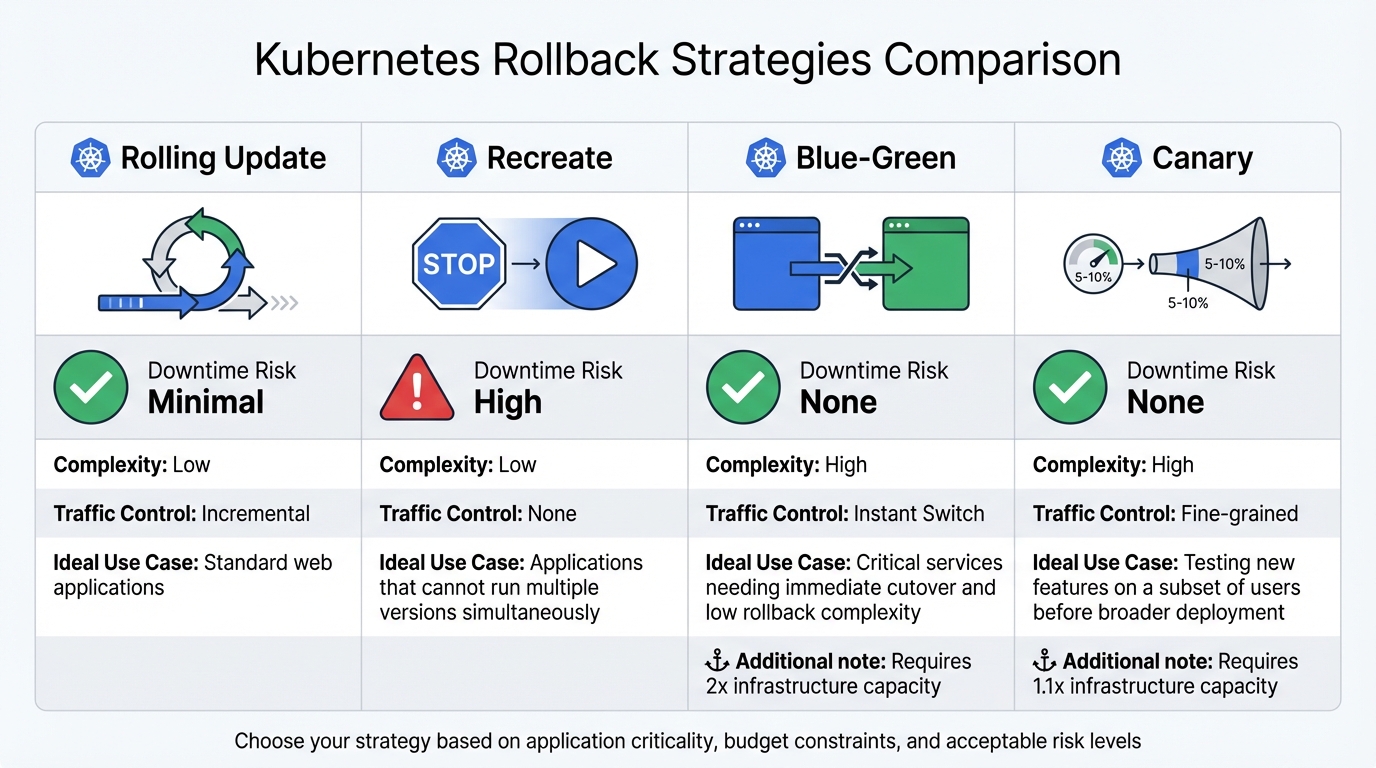 {Kubernetes Rollback Strategies Comparison: Rolling Update vs Recreate vs Blue-Green vs Canary}
:::
{Kubernetes Rollback Strategies Comparison: Rolling Update vs Recreate vs Blue-Green vs Canary}
:::
To ensure reliable rollbacks in Kubernetes, you need a well-prepared deployment pipeline. Key practices include maintaining a clear audit trail, managing ReplicaSet retention, and selecting the most suitable rollback strategy for your application.
Record Changes with --record Flag
In Kubernetes, rollout history can be uninformative without proper annotations. Previously, the --record flag automatically added the kubernetes.io/change-cause annotation, but this feature has been deprecated in recent Kubernetes versions [10].
The deprecated --record flag is gone, so the professional standard today is to use annotations that explain why a change was made. Without that context, your rollout history is just noise.– Nic Vermandé, ScaleOps [10]
To keep your rollout history meaningful, you should manually annotate deployments. Use the following command:
kubectl annotate deployment/<name> kubernetes.io/change-cause="reason"
This approach lets you document the reason for a change rather than just the command executed. For example, instead of merely recording kubectl set image deployment/app app=v2.1, you could annotate with Rolled back due to a 15% increase in API latency on v2.1
. You can then verify these annotations using:
kubectl rollout history deployment/<name>
This makes it easier to trace the context behind changes, which is invaluable during troubleshooting.
Limit Retained ReplicaSets
Kubernetes retains old ReplicaSets (with zero replicas) to allow quick rollbacks. By default, it keeps up to 10 revisions, but in production, it’s often better to retain only 3 to 5. You can control this through the spec.revisionHistoryLimit field in your Deployment manifest.
If the limit is set too low, you might lose the ability to revert to a stable state. On the other hand, retaining too many revisions can lead to unnecessary resource usage and metadata clutter.
In GitOps workflows, many teams set revisionHistoryLimit to zero. This ensures the cluster state remains aligned with version control, as rollbacks are handled by reverting Git commits rather than using kubectl rollout undo [2]. This trade-off highlights the importance of aligning your strategy with your operational workflow.
Comparison of Rollback Strategies
There are several rollback strategies to choose from, each with its own strengths and trade-offs. The table below provides a concise comparison:
| Strategy | Downtime Risk | Complexity | Traffic Control | Ideal Use Case |
|---|---|---|---|---|
| Rolling Update | Minimal | Low | Incremental | Standard web applications |
| Recreate | High | Low | None | Applications that cannot run multiple versions simultaneously |
| Blue-Green | None | High | Instant Switch | Critical services needing immediate cutover and low rollback complexity |
| Canary | None | High | Fine-grained | Testing new features on a subset of users before broader deployment |
Rolling updates are Kubernetes’ default and involve incrementally replacing pods, ensuring minimal downtime and low complexity. Recreate strategies, by contrast, stop all old pods before starting new ones, which can cause downtime but guarantees only one version is active at any time. For high-stakes changes, canary deployments allow gradual testing on a subset of users, balancing safety with efficiency. Meanwhile, blue-green deployments are ideal for critical services, offering an instant switch between environments and a straightforward rollback process.
If you're looking to optimise your Kubernetes deployments while managing cloud costs, consider exploring Hokstad Consulting for expert DevOps and cost engineering solutions.
Monitoring and Securing Rollback Operations
Having robust rollback commands is essential, but they’re only part of the equation. Keeping a close eye on these operations and ensuring they’re secure plays a big role in protecting production deployments. Without proper safeguards, unauthorised users could accidentally or maliciously undo deployments, or critical rollback actions might go untracked during an incident.
RBAC for Rollback Permissions
Role-Based Access Control (RBAC) is a key tool for managing who can perform rollbacks in your cluster. Running kubectl rollout undo requires get and patch permissions on workload resources like deployments, daemonsets, or statefulsets in the apps API group [7][2]. To reduce risk, it’s best to limit these permissions to specific namespaces using Role and RoleBinding rather than granting cluster-wide access [11][12]. For even tighter control, use the resourceNames field in your RBAC rules to allow rollbacks only for specific critical applications. This approach ensures access is restricted to the services you intend [12].
In CI/CD pipelines, assign dedicated ServiceAccounts with the bare minimum permissions they need. This avoids relying on overly privileged accounts, such as cluster-admin or members of the system:masters group [11][12][13][6]. Be cautious about using wildcards (*) in RBAC rules, as they can unintentionally grant risky permissions like delete or escalate [11][12].
To further strengthen security, combine these access controls with audit logging for a clear record of rollback actions.
Audit Logging During Rollbacks
Tracking rollback events is just as important as controlling access to them. Kubernetes audit logs provide a detailed timeline of cluster activities, helping you answer critical questions: Who initiated the rollback? Which resource was affected? When did it happen? Where did the request come from? [14][15]. To capture this information, configure your audit policy to log patch and update events for deployment resources at the Request level [14].
You can set up your audit policy to use either a Log backend or a Webhook backend. The Log backend is reliable but requires careful disk space management, while the Webhook backend integrates with security information and event management (SIEM) tools for real-time analysis, though it depends on stable network connectivity [14][15].
To ensure audit reliability, monitor Prometheus metrics like apiserver_audit_event_total and apiserver_audit_error_total [14]. Additionally, secure your audit logs by mounting policy files as read-only and restricting access to log directories to prevent tampering [14]. These steps help maintain the integrity of your rollback monitoring process.
Conclusion
Rollback mechanisms play a crucial role in ensuring reliable Kubernetes deployments. When production changes lead to major bugs or performance drops, having a solid fallback plan can be the difference between a minor hiccup and extended downtime.
Effective rollback strategies - whether they involve simple kubectl commands or advanced automated canary deployments - rest on three key elements: precise health probes, backward-compatible database migrations, and clear configuration annotations [5][3]. Without these in place, even the most efficient rollback processes can falter.
As we look towards deployment practices in 2026, there's a growing emphasis on progressive delivery. Tools that automate rollbacks based on real-time metrics like error rates and latency are becoming standard [5][3]. Whether using blue-green deployments for instant traffic switching or canary releases to limit exposure, the focus remains on reducing risk while keeping services running smoothly.
Hokstad Consulting offers expertise in DevOps transformation and cloud infrastructure optimisation. Their services help organisations integrate automated rollback triggers and monitoring-driven automation into CI/CD pipelines. This approach not only reduces deployment risks but also shortens release cycles - often cutting cloud costs by 30–50% while improving reliability.
As highlighted throughout this guide, technical solutions are only as effective as the operational discipline behind them. By combining RBAC controls, audit logs, and finely tuned probes with a well-thought-out rollback strategy, you can deploy frequently and confidently without compromising stability.
FAQs
How does Kubernetes manage rollbacks with ReplicaSets?
Kubernetes handles rollbacks through ReplicaSets by reverting your deployment to an earlier version. With the kubectl rollout undo command, you can swiftly restore a previous version of your application if something goes wrong during a deployment. This helps you return to a stable state with as little disruption as possible.
The rollback process takes advantage of the ReplicaSet’s capacity to maintain a specific state, reducing risks and downtime during deployment. It’s an effective way to protect your production environment from errors.
What are the advantages of using blue-green deployments for rollbacks in Kubernetes?
Blue-green deployments offer a reliable and straightforward way to handle rollbacks by letting you shift traffic back to the previous environment if something goes wrong with the new release. This method helps minimise downtime, keeps the user experience smooth, and lowers the risks tied to deployment mistakes.
Here’s how it works: you maintain two separate environments - one active (blue) and one on standby (green). Updates can be tested in the green environment without interfering with the live system. If everything checks out, traffic is redirected to the green environment. But if issues arise, switching back to the blue environment is quick and simple, ensuring operations remain uninterrupted.
How does Role-Based Access Control (RBAC) improve rollback security in Kubernetes?
Role-Based Access Control (RBAC) adds an extra layer of security to rollback processes in Kubernetes by ensuring that users and systems are granted only the permissions they actually require. This approach helps limit the chances of unauthorised changes or privilege misuse during rollbacks.
By clearly defining roles and tying them to specific users or services, RBAC creates a controlled and secure environment. This reduces risks, keeps vulnerabilities in check, and ensures rollbacks are conducted safely and effectively.