
When upgrading Istio in large-scale Kubernetes environments, maintaining system stability and avoiding downtime is critical. This process becomes complex with hundreds of services, multiple clusters, and stringent SLAs. Key challenges include version compatibility issues, service interruptions, and coordinating multi-cluster deployments.
The most effective strategies are:
- Canary Upgrades: Gradual rollout using revision tags to test changes on a subset of workloads before full deployment.
- Parallel Control Planes: Running multiple Istio versions simultaneously to isolate risks and simplify rollbacks.
- Rigorous Testing and Monitoring: Tracking key metrics like proxy convergence times and error rates to identify issues early.
For multi-cluster setups, upgrade the primary cluster first to prevent service discovery and mTLS failures. Proper planning, resource allocation, and clear rollback criteria are crucial for success. A phased approach, starting with non-critical services, ensures minimal disruptions while maintaining high availability.
A Field Guide for Safe Istio Upgrades
Need help optimizing your cloud costs?
Get expert advice on how to reduce your cloud expenses without sacrificing performance.
Challenges of Upgrading Istio in Large-Scale Systems
Upgrading Istio in environments with hundreds of services isn’t just about technical execution - it’s a balancing act of planning, communication, and managing risks. These challenges fall into three main areas: version compatibility, service availability, and multi-cluster coordination. Let’s break them down.
Version Compatibility Issues
Istio has strict rules about the version compatibility between its control plane (Istiod) and data plane (sidecar proxies). Specifically, they must stay within one minor version of each other. If this gap is exceeded, things can go sideways - cross-cluster service discovery might break, mTLS handshakes could fail, and traffic routing may stop working altogether [7][6][5].
On top of that, changes to Custom Resource Definitions (CRDs) can add to the headaches. If CRDs aren’t updated before deploying a new control plane, or if outdated webhooks linger, Istiod might fail to start or throw validation errors that block deployments [12]. Nick Nellis, Senior Manager at Solo.io, highlights the potential impact:
If your istio-agent sidecars lose the ability to communicate with Istiod or are incompatible with the configuration being sent, your workloads will not be able to join or communicate with the mesh [4].
Incompatibilities like these don’t just disrupt communication - they also increase the risk of downtime during upgrades.
Reducing Downtime and Service Interruptions
Upgrading sidecars means restarting pods, which creates a window where traffic might hit pods that are either shutting down or not ready yet [10]. This is especially tricky for services relying on long-lived connections, like gRPC or WebSockets, where abrupt restarts can lead to major disruptions [10].
The ingress gateway is another potential bottleneck. In-place upgrades can disrupt user traffic instantly, while poorly executed canary upgrades might accidentally spin up extra load balancers [4][3]. Running multiple Istio revisions during a canary upgrade also doubles the control plane’s resource usage. Each Istiod pod typically needs 500m–2,000m CPU and 2Gi–4Gi memory [2]. For systems already operating close to capacity, this increased demand can lead to resource quota failures. These challenges become even more pronounced in multi-cluster setups.
Multi-Cluster Deployment Complexity
Multi-cluster deployments bring their own set of challenges, especially around synchronisation. All clusters need a shared root CA for mTLS, and upgrades require careful coordination of east–west gateways and remote secrets to ensure cross-cluster communication remains intact [5]. Nawaz Dhandala warns:
a version mismatch between clusters can break cross-cluster service discovery, mTLS handshakes, and traffic routing [5].
If east–west gateways fail during an upgrade, cross-cluster traffic stops immediately [5]. In Primary–Remote topologies, the primary cluster must always be upgraded first since remote clusters rely on its control plane. Reversing this order guarantees outages [5][6].
For organisations managing multiple clusters across regions, upgrades can take weeks - up to five in some cases - to allow enough time for validation at each stage [2]. These complexities underline the need for well-thought-out strategies to avoid disruptions in large-scale systems.
Upgrade Strategies for Minimal Disruption
::: @figure 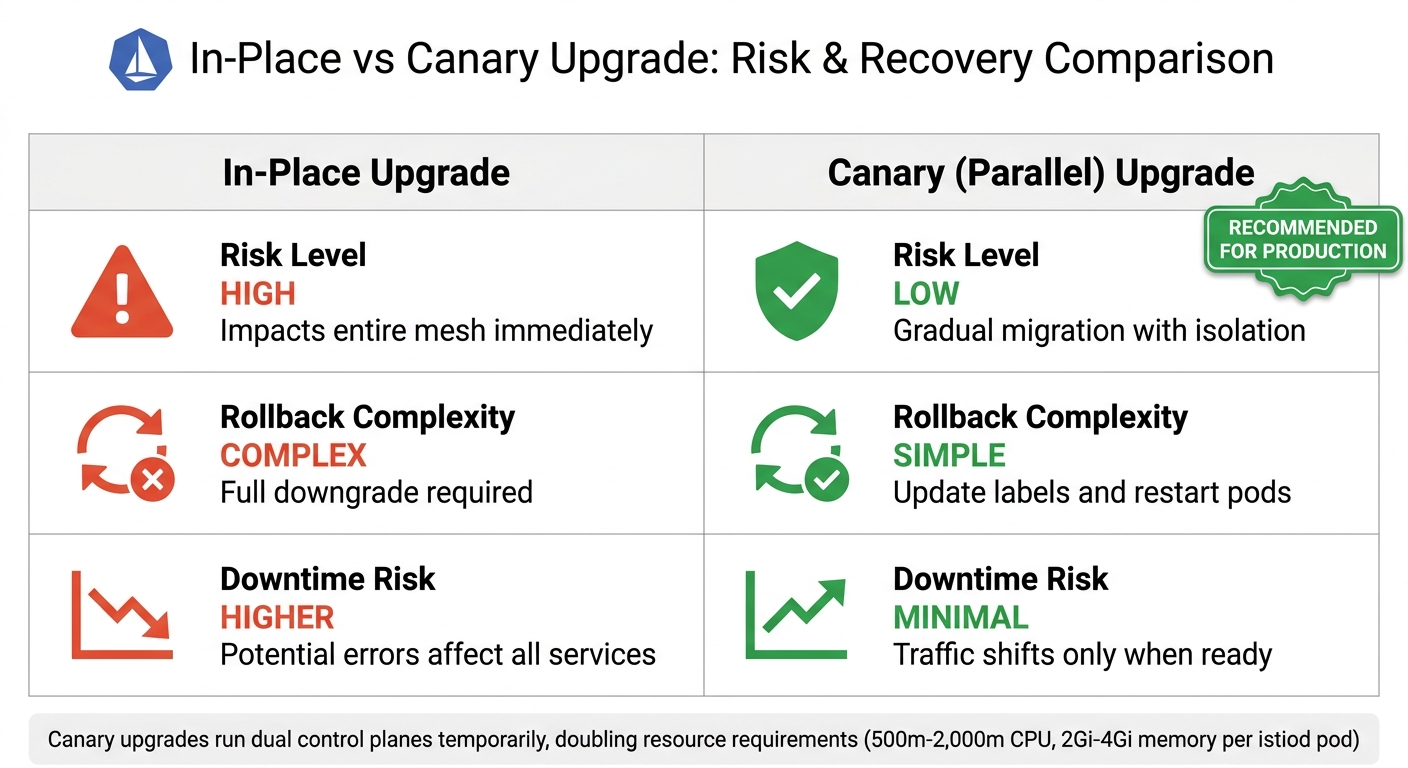 {Istio Upgrade Strategies Comparison: In-Place vs Canary Deployment}
:::
{Istio Upgrade Strategies Comparison: In-Place vs Canary Deployment}
:::
Upgrading Istio requires careful planning to avoid service interruptions. To tackle the challenges of the upgrade process, three key strategies stand out: canary upgrades, parallel control planes, and rigorous testing. Each method focuses on maintaining stability while addressing different aspects of the upgrade.
Canary Upgrades for Gradual Rollout
Istio's revision-based upgrade system makes it possible to run multiple control planes simultaneously, each identified by a revision tag like istiod-1-20-0. This setup enables workloads to migrate gradually, reducing risk [1][8][11]. As Christian Posta, Lin Sun, and Sam Naser from the Istio community explain:
A revision tag reduces the number of changes an operator has to make to use revisions, and safely upgrade an Istio control plane [1].
Instead of relabelling every namespace individually, revision tags simplify the process. Operators can update the pointer of a single tag to migrate all associated namespaces to a new revision [1].
A great example of this approach comes from Diatom Labs. In March 2025, their team, led by Cloud/DevOps Engineer Altin Ukshini, used a revision-based canary strategy to upgrade a Kubernetes cluster managing over 50 microservices. Over four days, they used Terraform and Helm to execute the upgrade: starting with the staging environment, then migrating non-critical services, followed by production services, and finally decommissioning the old control plane. This phased rollout ensured no downtime and allowed for instant rollbacks if needed [8].
The process requires a few key steps: remove the istio-injection=enabled label, replace it with istio.io/rev=<revision>, and perform a rolling restart to inject the updated proxy version [13][11]. For multi-cluster setups, always upgrade the primary cluster first in primary-remote configurations to maintain compatibility across clusters [6].
Parallel Control Planes for Version Isolation
Running parallel control planes offers an extra layer of safety during upgrades. By deploying a new control plane alongside the existing one (using a revision field like istioctl install --set revision=1-22), you can isolate versions and limit the impact of failures. Rollbacks are straightforward - just revert namespace labels and restart pods. Proxies remain tied to a specific control plane revision for their entire lifecycle, avoiding issues caused by mid-operation switches.
Christian Posta from Solo.io highlights the benefits:
Using revisions makes it safer to canary changes to an Istio control plane [1].
However, keep in mind that running dual control planes temporarily doubles resource requirements [2].
| Feature | In-Place Upgrade | Canary (Parallel) Upgrade |
|---|---|---|
| Risk Level | High; impacts the entire mesh | Low; gradual migration and isolation |
| Rollback | Complex; full downgrade required | Simple; update labels and restart pods |
| Downtime Risk | Higher; due to potential errors | Minimal; traffic shifts only when ready |
It’s a good idea to keep the old control plane running for 24–48 hours after the migration to ensure everything is stable before removing it. Also, remember that Istio only supports a version skew of one minor version between the control plane and data plane [7][6].
Testing and Monitoring During Upgrades
Testing and monitoring are essential to ensure a smooth upgrade process. Keep an eye on both control plane and data plane metrics. For example, monitor metrics like pilot_proxy_convergence_time, pilot_xds_pushes, and pilot_total_xds_rejects to spot bottlenecks, while istio_requests_total and istio_request_duration_milliseconds help detect error rates and latency spikes during namespace migrations [3][2].
In multi-cluster setups, test cross-cluster communication by checking connectivity between pods on the new revision in one cluster and services on the old revision in another [2][6]. During version skew periods, review istiod logs for errors like nack
or rejected
and monitor pilot-agent stats for mTLS handshake failures [7].
Start upgrades with internal tools and non-critical namespaces, monitoring for at least 48 hours before moving to critical production services [2]. Pre-defined rollback triggers - such as a spike in P99 latency or certificate errors - help remove emotional decision-making during high-stakes situations [2]. For larger clusters, the entire process, including preparation, staging, and phased rollouts, can take up to five weeks [2].
Case Study: Istio Upgrade in a Large-Scale System
Scenario Overview and Initial Challenges
In March 2025, Diatom Labs undertook the complex task of upgrading Istio within a production Kubernetes cluster supporting over 50 microservices. With any disruption directly affecting users, the stakes were high. Cloud/DevOps Engineer Altin Ukshini spearheaded the transition from Istio version 1.24.0 to 1.25.0, aiming to achieve the upgrade with zero downtime [8]. This case study provides a detailed look at the practical application of strategies for such an upgrade.
The team identified several risks early on, including version mismatches between the control and data planes, vulnerabilities in the ingress gateway, and the potential for configuration propagation failures. To mitigate these risks, they closely monitored key metrics such as pilot_total_xds_rejects and pilot_proxy_convergence_time. Additionally, Istiod logs were inspected for errors like nack
or rejected
messages, which could indicate xDS synchronisation issues [3][7]. These measures laid the groundwork for a carefully planned, phased upgrade process.
Implementation of Upgrade Strategies
The team opted for a revision-based canary strategy, completing the process in just four days [8]. Terraform was used to manage multiple control planes simultaneously, while a custom bash script automated rolling restarts of deployments [8]. The upgrade followed a phased approach:
- Day 1: Tested the new control plane in a staging environment.
- Day 2: Migrated non-critical services.
- Day 3: Transitioned core production services.
- Day 4: Removed the old control plane.
To ensure a smooth transition, they installed the new control plane alongside the existing one, using revision labels (istio.io/rev=1-25-0) to allow both versions to operate in parallel. Workloads were migrated one namespace at a time by updating namespace labels and performing rolling restarts. This approach allowed for immediate rollback by simply reverting the labels [8].
The key to success is careful planning, thorough testing, and systematic execution of the upgrade process[8].
This methodical execution was instrumental in achieving a seamless upgrade.
Results and Lessons Learned
The upgrade was completed without downtime, ensuring uninterrupted service across all 50+ microservices. Running two control planes simultaneously did temporarily double resource usage, but this trade-off enabled smooth migration and instant rollback capabilities [2][8].
Several key lessons emerged from this experience. First, establishing clear rollback criteria before starting the upgrade proved invaluable, as it eliminated the need for on-the-fly decision-making during critical moments [2]. Automating namespace migration through scripts also proved essential for managing the upgrade at scale [8][2]. For future upgrades, the team decided to prioritise ingress gateway management with blue/green deployment strategies, recognising its pivotal role in maintaining user-facing traffic [4].
This case study highlights how a structured, well-planned approach can tackle even the most challenging upgrades in large-scale systems.
Best Practices for Future Istio Upgrades
Aligning Istio with Kubernetes Best Practices
Managing Istio upgrades alongside Kubernetes infrastructure requires thoughtful planning, especially when it comes to pod lifecycle and resource allocation. For instance, PodDisruptionBudgets should include minAvailable or maxUnavailable policies to ensure pods aren’t disrupted excessively during sidecar rotations [10]. Setting RollingUpdate to maxUnavailable: 0 ensures that new pods are fully ready before old ones are terminated [10].
The holdApplicationUntilProxyStarts feature ensures application containers don’t start until the sidecar proxy is ready to manage network traffic [10]. Additionally, setting terminationGracePeriodSeconds on pods to exceed Istio’s terminationDrainDuration - commonly 30 seconds - gives proxies enough time to properly drain existing connections [10]. Nawaz Dhandala, a contributor at OneUptime, offers this advice:
Upgrades should be routine, not heroic. Practice the process regularly, keep your staging environment in sync with production, and never skip the canary phase [9].
Before starting an upgrade, always run istioctl x precheck and istioctl analyze to catch deprecated APIs or configuration issues [11][12]. Make sure your cluster has enough capacity to support dual control planes, as each istiod pod can require substantial CPU and memory resources. Also, monitor the pilot_proxy_convergence_time metric to track how quickly proxies apply new configurations during upgrades [9][14]. These practices not only ensure smoother upgrades but also set the stage for adopting newer approaches like ambient mode and adapting to evolving workloads.
Using Ambient Mode for Traffic Management
Ambient mode introduces a different architecture by separating the data plane from application pods, allowing upgrades without restarting workloads [15]. This approach can lower service mesh infrastructure costs by as much as 92% compared to traditional sidecar setups [18]. Rushy R. Panchal, Senior Engineer at Airbnb, highlights its simplicity:
Ambient mode... simplifies upgrades by not needing to touch workload deployments at all [16].
During a ztunnel upgrade, new connections are routed to the updated instance, while old connections are gracefully terminated with a TCP RST after a defined grace period [15]. For best results, upgrade components in this order: the istio-base chart, followed by istiod, the CNI node agent, and finally the ztunnel [15]. Using strategies like cordoning nodes or blue/green pools during ztunnel upgrades can help minimise disruptions in production [15]. Keep a close eye on services with long-lived TCP sessions, such as databases or streaming applications, as these may experience interruptions during ztunnel restarts [15]. Beyond cost savings and operational efficiency, ambient mode also positions your system for emerging workload patterns.
Preparing for AI-Driven Workloads
Switching to Istio's sidecarless architecture can significantly reduce the resource demands of the data plane, which is especially important when scaling AI inference workloads that already consume substantial resources [17][18]. For distributed AI inference on Kubernetes, systems need to be optimised to handle the high compute requirements of large language models [18]. Solo.io underscores the importance of security in this context:
If your gateway can't tell the difference between a tool call and a model invocation, it can't enforce meaningful security. Agentic systems demand a new class of context-aware, AI-native gateways [18].
To future-proof traffic management for AI workloads, use the Kubernetes Gateway API as a foundational layer, ensuring compatibility with upcoming AI-native gateway extensions [18]. When running dual control planes, allocate sufficient CPU and memory per istiod instance to handle the demands. Specialised agent gateways can improve efficiency, reducing Model Context Protocol (MCP) token consumption by up to 91% through progressive disclosure techniques [18]. By aligning your service mesh with the demands of AI-driven workloads, you can maintain scalability and security while preparing for future challenges.
Conclusion
Upgrading Istio in large-scale systems requires careful planning, thorough testing, and a methodical approach to execution. The revision-based canary strategy stands out as a reliable method, enabling teams to operate multiple control planes simultaneously and migrate workloads incrementally - one namespace at a time. This step-by-step approach helps minimise the impact of potential issues [2][6][8]. Additionally, using revision tags to avoid manual namespace relabelling adds an extra layer of efficiency and safety for complex deployments [19]. Together, these strategies form a solid framework for managing resource usage and ensuring smooth rollback processes.
However, running parallel control planes does come at a cost - doubling resource requirements. It's crucial to ensure there’s enough CPU and memory capacity to support multiple istiod pods during the migration process [2]. For large-scale upgrades, teams should allocate realistic timelines, typically around five weeks [2]. As Nawaz Dhandala from OneUptime explains:
The technical steps are the easy part. Getting the planning and coordination right is what makes the difference between a smooth upgrade and an incident [2].
To mitigate risks, it’s essential to establish clear rollback criteria and maintain proactive monitoring throughout the upgrade. Key metrics like pilot_xds_push_errors and pilot_proxy_convergence_time should be closely tracked to identify potential problems early on [2][3]. Having predefined rollback thresholds ensures quick and objective decision-making when metrics indicate issues [2][8].
Upgrading multi-cluster environments introduces additional complexity. Adhering strictly to version skew policies and following proper upgrade sequencing - starting with primary clusters in primary-remote topologies - can prevent cross-cluster communication breakdowns [6][7][5]. After completing the upgrade, performing a detailed post-upgrade review is essential. This step allows teams to document lessons learned and refine their runbooks for future quarterly Istio releases [2]. Treating upgrades as routine tasks helps organisations uphold strict SLAs while continuously improving their service mesh.
For those needing customised guidance on navigating these intricate upgrades, Hokstad Consulting offers expertise in optimising Istio deployments, ensuring your organisation meets its SLAs with confidence.
FAQs
How do I choose between an in-place and canary Istio upgrade?
Choosing between an in-place upgrade and a canary upgrade in Istio largely depends on how complex your system is and how critical uptime is for your operations.
In-place upgrades are straightforward and quicker to execute. However, they come with a higher risk of disruption, which can be a dealbreaker for large-scale production systems where stability is paramount.
On the other hand, canary upgrades, which rely on revision-based deployments, offer a more controlled approach. They allow you to gradually migrate workloads with minimal downtime. Plus, if something goes wrong, rolling back is much easier - making this method a safer choice for large, high-stakes environments.
For smaller systems or those that aren’t mission-critical, the simplicity of in-place upgrades might make them a better fit.
What should trigger an immediate rollback during an Istio upgrade?
If the control plane component istiod fails to start, an immediate rollback is essential. This could happen due to issues like invalid configurations, exceeding resource limits, or RBAC permission errors. Rollbacks are equally critical when instability arises in the control or data plane. Examples include crash loops, unresponsiveness, or failures in service communication.
How can I safely upgrade Istio across multiple Kubernetes clusters?
Revision-based canary upgrades let you run multiple Istio versions at the same time, making it easier to migrate workloads gradually. Here’s how to do it step by step:
Check version compatibility: Before anything else, make sure your cluster supports the new Istio version you're upgrading to. Compatibility is key to avoiding issues.
Install the new Istio version: Deploy the new version with a revision label. This allows both the old and new control planes to coexist without interfering with each other.
Migrate workloads by updating namespace labels: Adjust the namespace labels to point workloads to the new Istio revision. This ensures a smooth transition without disrupting traffic.
Monitor the migration: Use tools like Prometheus to keep an eye on how the workloads are performing during the switch. This helps you catch and fix any issues early.
Decommission the old control plane: Once you’re confident everything is stable, safely remove the old Istio version from your cluster.
By taking these steps, you can keep downtime to a minimum while maintaining stability throughout the upgrade process.