
Integration testing is critical to ensuring your CI/CD pipeline runs smoothly and catches issues early. It bridges the gap between unit tests and real-world system behaviour, helping you avoid costly production failures. Here's a quick summary of the key practices to improve your integration testing:
- Automate consistently: Remove human error by automating tests for every pull request or merge.
- Use containers: Isolate environments to prevent data contamination and mimic production setups.
- Test incrementally: Validate small changes early to save time and resources.
- Prioritise critical tests: Focus on high-impact areas like essential user journeys.
- Align environments: Match testing and production setups to avoid discrepancies.
- Apply Test Impact Analysis: Run only relevant tests to reduce execution time.
- Run tests in parallel: Speed up pipelines by dividing workloads across multiple machines.
- Manage test data with IaC: Treat test data like code for consistency and repeatability.
- Monitor pipeline metrics: Track performance to identify and fix bottlenecks.
- Review regularly: Audit and update your test suite to maintain reliability.
::: @figure 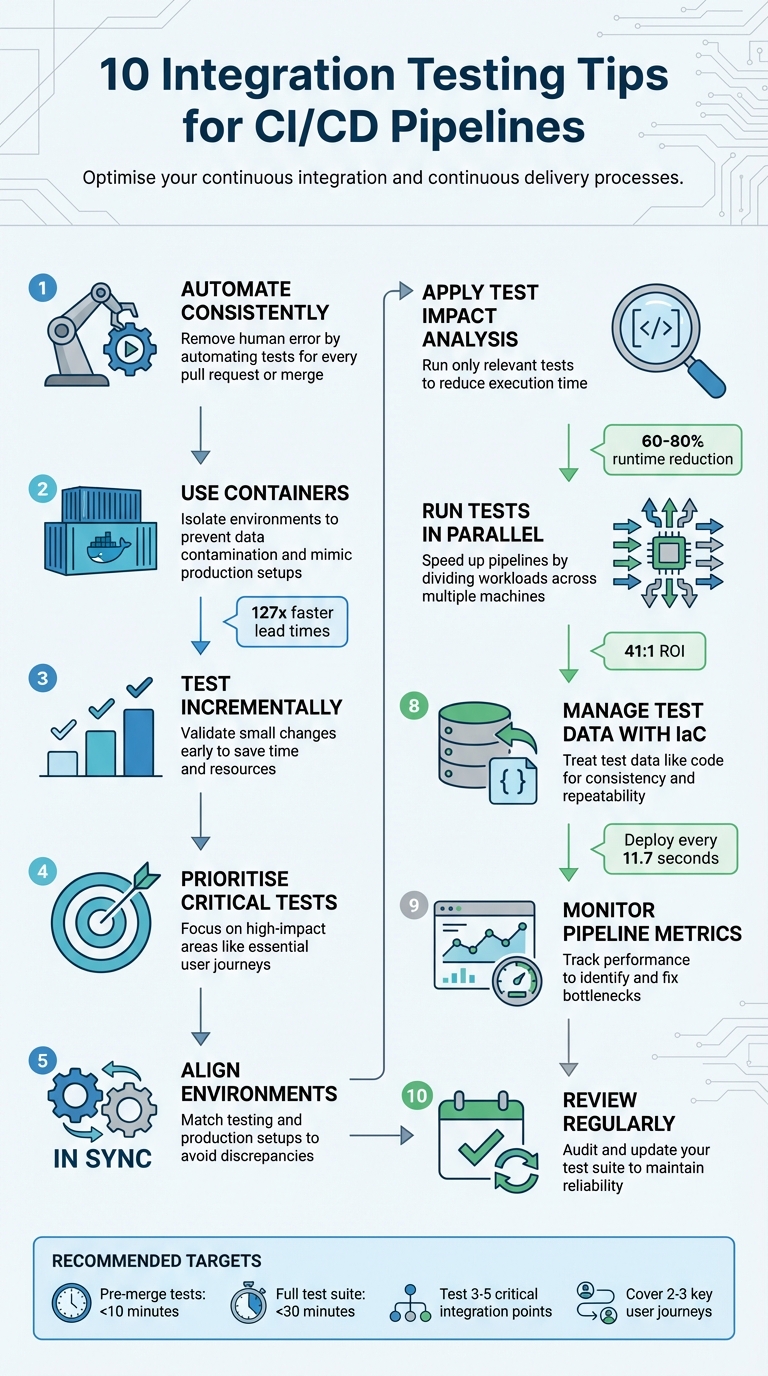 {10 Integration Testing Tips for CI/CD Pipelines}
:::
{10 Integration Testing Tips for CI/CD Pipelines}
:::
The Best Way to Run Integration Tests in Your CI/CD Pipeline
1. Automate Integration Tests for Consistency
Relying on manual integration testing often introduces inconsistencies that can disrupt the reliability of your CI/CD pipeline. Variability in how tests are executed across different environments can lead to unpredictable outcomes. By automating integration tests, you ensure that the same tests are executed in the same way for every build, eliminating the potential for human error or miscommunication [5].
The same tests, in the same way, every single time.– Hoop.dev [5]
Manual testing is prone to delays and errors since outcomes can vary depending on who performs the tests. On the other hand, automated integration testing ensures consistent, scripted execution with a high degree of precision [5][6]. By standardising test environments, you can achieve deterministic results - tests that produce identical outcomes regardless of when or who initiates them [3].
To implement this, configure your pipeline to automatically run integration tests for every pull request or merge. This acts as an immediate quality checkpoint, helping to catch potential issues early [5]. Combine this with ephemeral environments: spin up clean, isolated containers for each test run and tear them down afterwards. This prevents interference from shared states or leftover data [5][2]. Treat your test data like your application code - keep it version-controlled and easy to reset. This further strengthens consistency between test runs [5][2].
This automated approach aligns perfectly with CI/CD practices, providing faster feedback and more reliable deployments. Hokstad Consulting highlights this method as a key component in building a dependable and efficient pipeline.
2. Use Containers for Isolated Testing Environments
Shared environments can lead to parallel builds interfering with test data, which often results in flaky tests and frustrating debugging delays. Containers solve this problem by creating isolated environments for each test run, ensuring no data contamination occurs [11]. This approach mirrors real-world testing conditions more accurately.
With containers, you can test against actual production versions of services like PostgreSQL, Kafka, or Redis, rather than relying on in-memory substitutes like H2. This setup helps uncover syntax errors and compatibility issues that might otherwise go unnoticed. Addressing defects early in development is crucial since fixing them in production can be up to 15 times more expensive [10].
Tools such as Testcontainers streamline the process by automating container management. They handle dependencies before and after tests, and their dynamic port mapping feature avoids conflicts by assigning available ports at runtime [12]. Additionally, helper containers like Ryuk monitor and clean up test containers, ensuring resources are freed even if a build crashes. This prevents resource leaks on CI nodes [8].
By spinning it up from inside the test itself, you have a lot more control over the orchestration and provisioning, and the test is more stable.
– Gianluca Arbezzano, SRE, InfluxData [8]
For CI runners with limited resources, Testcontainers Cloud offers a solution by offloading orchestration to ephemeral cloud environments, avoiding bottlenecks [9]. Teams embracing these early testing practices have seen impressive results, including 127 times faster lead times and 182 times more deployments per year. Local integration testing alone can identify defects at least 65% faster compared to shared environments [10].
3. Test Incrementally to Find Issues Early
Waiting until the end of development to run integration tests can lead to time-consuming and expensive debugging. By testing incrementally, you can validate changes as they happen, catching errors when they’re easiest to fix. Start small: focus on 3–5 critical integration points, like service-to-service API contracts or database interactions, and 2–3 essential user journeys. This way, you can prove the approach works without overwhelming your team [2].
Incremental testing becomes even more important with the rise of AI coding tools. While AI might speed up development, it doesn’t inherently understand your system's architecture.
If AI helps you ship features 2–3x faster, but you're catching integration issues in production, you're creating incidents 2–3x faster.
– Atulpriya Sharma, Sr. Developer Advocate, Testkube [2]
A fail-fast strategy is key here. Start with the quickest and most failure-prone checks. For example, linting and unit tests should complete in under two minutes, followed by integration tests within 5–10 minutes. This approach ensures obvious issues are caught early, reducing the need for resource-heavy tests later [13]. It also reinforces consistent quality checks throughout your CI/CD pipeline. For legacy systems, prioritise testing new code first instead of aiming for complete coverage right away. This helps teams build testing discipline step by step [3].
Using differential coverage can also keep testing focused and efficient. Instead of testing the entire codebase, concentrate on recent changes. Aim for pre-merge tests to finish within 10 minutes and post-merge validation within 30 minutes. This keeps the workflow smooth while maintaining high standards of quality [3].
4. Prioritise Critical Tests for Faster Feedback
Not all tests in your pipeline hold the same weight when it comes to efficiency. Running an entire test suite on every commit is often a waste of resources - especially if a unit test fails early, rendering further tests irrelevant. The solution? Organise your pipeline into gates that prioritise tests based on their speed and importance.
Gate 1 should include static analysis and unit tests, designed to complete in under two minutes. These tests offer near-instant feedback, identifying issues like syntax errors, type mismatches, security vulnerabilities, and flaws in core business logic. Gate 2 follows with integration tests, which take around 5–10 minutes. Finally, Gate 3 is reserved for selective end-to-end tests, focusing on pre-release validation [7]. This structured approach ensures that obvious issues are caught quickly, saving time and resources before tackling more complex, time-heavy tests.
This setup naturally supports a fail-fast strategy. Configure your pipeline to halt immediately when a lower-level test fails. As Semaphore explains:
A failure in unit tests is a sign of a fundamental problem, which makes running the remaining high-level and long-running tests irrelevant[14].
This not only saves compute time but also narrows the focus to fixing critical issues right away, instead of wasting effort on tests that no longer matter.
For integration and end-to-end tests, concentrate on 3–5 essential user journeys that are crucial to your business. Examples include login, checkout, or account management - processes that directly impact revenue and customer satisfaction. Use a risk-based approach to prioritise features with the most significant effect on your goals, and rely on historical data to identify areas that have been problematic in the past [15].
Modern pipelines take this a step further by using test impact analysis. Instead of running the entire suite, this method selectively executes tests linked to the specific code changes. When combined with parallel execution, it can cut runtimes by 60–80% while still maintaining focus where it matters most [7]. These strategies align perfectly with the broader goal of optimising CI/CD pipelines for both speed and effectiveness.
Experts at Hokstad Consulting frequently apply these principles to streamline DevOps workflows, ensuring faster feedback and smarter resource use.
5. Keep Testing and Production Environments Aligned
When tests pass in staging but fail in production, it creates a false sense of security. This gap often arises because the testing environment doesn't fully match the production setup. As CircleCI explains: The closer the QA environment can get to production, the higher confidence you will have in the results of the tests
[16]. Ensuring alignment between these environments is crucial to spotting integration issues early.
One frequent issue is mismatched backing services. For instance, using SQLite in your local setup while running PostgreSQL in production can lead to subtle differences that slip through integration tests. The Twelve-Factor App methodology highlights this risk: differences between backing services mean that tiny incompatibilities crop up, causing code that worked and passed tests in development or staging to fail in production
[17]. The fix? Standardise databases, message queues, and caching layers across all environments to avoid these pitfalls.
Ephemeral environments can also help maintain consistency. These temporary, on-demand setups, created using containers and Infrastructure-as-Code, mirror production for each pipeline run. They prevent configuration drift and can even reduce costs [2]. By aligning your environments in this way, you'll lay the groundwork for more accurate testing throughout your pipeline.
Once your environments are consistent, focus on validating infrastructure-specific interactions that unit tests might miss. For example, integration tests should check for proper secrets mounting, RBAC roles, and service discovery - exactly as they function in production [4]. Packaging applications with Helm charts ensures that every test deploys an environment identical to production. Additionally, using the same tracing, logging, and metrics tools in both environments can significantly speed up debugging of integration issues [2]. This approach ensures your tests reflect actual system behaviour.
AI-generated code often passes isolated unit tests but stumbles during system integration. Aligning testing and production environments is essential to catch these architectural mismatches before they affect your users.
6. Use Test Impact Analysis to Reduce Execution Time
Running an entire test suite every time code changes can be a huge drain on resources. That’s where Test Impact Analysis (TIA) comes in. TIA identifies which specific tests are affected by changes in your code, saving time and effort. It does this by mapping dependencies between your code and tests, using either static analysis (looking at code structure) or dynamic analysis (tracking coverage during execution) [18][20]. As Paul Hammant, an independent consultant, explains:
If tests ran infinitely quickly, we would run all the tests all the time, but they are not, so we need to balance cost vs value when running them[20].
The impact of TIA can be striking. For example, Instawork Engineering managed to cut their median test execution time in half using Testmon. Similarly, FastAPI achieved an impressive 8x speedup with Tach. In one instance, a change to fastapi/background.py triggered only 750 out of 2,012 tests, completing in just 11.69 seconds instead of the 88.32 seconds needed for the full suite [22][19].
To use TIA effectively, you’ll need to take some precautions. Configure your pipeline to run the full test suite periodically - nightly runs are a good option - to catch edge cases. Always include newly added tests, modified tests, and any tests that previously failed, even if TIA suggests they’re not impacted [21][23]. Use path filters to skip tests for non-critical changes, like documentation updates, while ensuring full runs for key files like pom.xml or build.gradle [21][23]. And, crucially, set up a fallback mechanism: if TIA can’t determine the impact of changes to files like CSS or configuration files, it should default to running all tests. This ensures your pipeline remains reliable [18][21].
Kevin Loo, Managing Director of Software Development at HedgeServ, highlights the advantages:
Developers count on the quicker test runs, and the pace of development has increased because of an increased confidence[20].
Pairing TIA with parallel testing can speed things up even further [23]. The trick is finding the right balance - getting faster feedback while maintaining thorough test coverage. TIA helps you achieve both, while also paving the way for more advanced optimisations like parallel execution in your pipelines.
7. Run Tests in Parallel to Speed Up Pipelines
As your test suite grows, running tests one after another can become a bottleneck. Parallel testing solves this by running tests at the same time across multiple machines or containers, significantly reducing execution time. For example, a suite of 1,000 tests that usually takes 60 minutes can be completed in just 6 minutes by splitting the workload across 10 machines [27].
The advantages go beyond just speed. Parallel testing allows teams to run more tests - including cross-browser, multi-device, and various operating system configurations - within the same timeframe. This broader coverage helps uncover issues earlier, making it easier to fix problems and release updates faster [24][26]. In fact, a well-optimised CI/CD pipeline can deliver a 41:1 return on investment [26]. To achieve this, carefully configuring your CI/CD platform is a must.
How to Implement Parallel Testing
To make parallel testing work effectively, you’ll need to configure your CI/CD platform to divide tasks across multiple executors. For instance, you can use the parallelism key in CircleCI or strategy.parallelism in Harness [25]. The key is to distribute tests evenly across these executors. Using historical timing data ensures that all parallel tasks finish at roughly the same time, preventing delays [25]. Additionally, setting your test runner to output JUnit XML can help CI platforms split tests more efficiently [25].
Adopting a fail fast
strategy can also improve efficiency. Start with quicker tests like linters or unit tests to catch errors early before running longer integration or end-to-end tests [26]. Many tools and frameworks support parallel execution through built-in environment variables and CLI flags. For instance, you can use NODE_INDEX and NODE_TOTAL for automatic test allocation, or framework-specific commands like jest --shard=1/3, pytest --shard-id=0 --num-shards=2, and cypress run --parallel [25][28].
Optimising Parallelism
While parallelism speeds up pipelines, it’s important to find the right balance. Each worker comes with startup costs, and too many parallel nodes can lead to diminishing returns [29]. Aim for a setup where all workers finish their tasks in about 2 minutes, excluding overhead [29]. Additionally, address flaky tests by identifying their root causes and muting them temporarily to avoid blocking the pipeline [29]. Keep in mind that the overall pipeline speed depends on the slowest individual job, so optimising any unusually long-running tests is crucial [26].
At Hokstad Consulting (https://hokstadconsulting.com), we apply these strategies to optimise CI/CD pipelines, enabling faster and more reliable software delivery.
8. Manage Test Data with Infrastructure-as-Code
Relying on manual methods to manage test data in CI/CD pipelines can drag down delivery speed. Pairing automated test execution with Infrastructure-as-Code (IaC) for test data management ensures your data setup is as reproducible as your code. IaC treats test data configurations just like application code - versioned, automated, and repeatable. By defining dataset structures, volumes, and transformation rules in files like data_config.yml, stored alongside your source code, you can maintain consistency across environments while simplifying test data usage [30].
The benefits of this approach are evident. Amazon deploys code to production every 11.7 seconds, thanks in part to automated pipelines that can provision isolated test environments on demand [31]. Tools like Terraform, Pulumi, and Testcontainers enable you to spin up ephemeral database instances preloaded with the necessary test data, dismantling them automatically after use. This avoids issues like overlapping data between test runs and eliminates the risk of racking up costs from unused cloud resources.
In a modern test data management approach, treating data as code is essential for reproducibility, regulatory compliance, and speed in continuous delivery processes.- Sara Codarlupo, Marketing Specialist, Gigantics [30]
To stay aligned with application updates, version-control your data configuration files. For instance, if a developer modifies the database schema, the related test data definitions can be updated within the same commit. Adding metadata tags to all test resources via IaC tools allows lifecycle management systems to identify and clean up temporary infrastructure efficiently. For industries with strict regulations, synthetic data generation or automated data masking ensures compliance by keeping PII out of test environments [2].
Hokstad Consulting (https://hokstadconsulting.com) showcases how IaC strategies can scale test data management to match the pace of modern delivery cycles, ensuring consistency and efficiency in CI/CD pipelines.
9. Monitor Pipeline Metrics to Find Bottlenecks
When you lack clear visibility into your pipeline's performance, it becomes much harder to improve it. Tracking the right metrics helps you identify slowdowns in integration tests and pinpoint where resources are being wasted. Key metrics to monitor include build time, deployment frequency, lead time for changes, success and failure rates, and Mean Time to Recovery (MTTR).
Start by analysing queue wait times and checkout durations, as these are often prime areas for improvement. Pay close attention to queue depth - if builds are consistently waiting for compute resources, it's a clear sign of an infrastructure bottleneck. For cloud-based pipelines, dive deeper into metrics like CPU utilisation, memory usage, network throughput, storage I/O, and auto-scaling events. Keeping an eye on these helps you catch infrastructure-level issues before they slow down your delivery process. This detailed metric tracking works hand in hand with earlier strategies like test automation and aligning environments.
Set alerts based on thresholds - for example, flagging metrics that exceed 125%–150% of their historical averages. This approach helps you spot real problems without overreacting to minor fluctuations. Distributed tracing is another powerful tool, as it follows requests across pipeline stages and infrastructure components, helping you pinpoint the exact sequence of events leading to failures or delays. Using streaming telemetry with tools like OpenTelemetry ensures your service level objectives (SLOs) stay aligned with application data.
To make troubleshooting easier, standardise metadata in your pipeline events. Include details like the pipeline ID, queue name, repository path, and commit data. This structured data allows for faster diagnosis when bottlenecks occur. If an integration test fails, adopt a fail-fast strategy - stop the pipeline immediately to avoid wasting resources on subsequent stages like end-to-end testing. These monitoring techniques complement parallel testing and data management practices, ensuring a smoother and more efficient CI/CD pipeline.
Hokstad Consulting (https://hokstadconsulting.com) applies these methods to shorten deployment cycles and cut cloud infrastructure costs effectively.
10. Review and Update Your Test Suite Regularly
To keep your integration testing effective, it's crucial to review and update your test suite on a regular basis. Integration tests need consistent maintenance to avoid becoming flaky, redundant, or outright obsolete as your application evolves. When developers lose confidence in the test suite, they may start ignoring failures altogether, resorting to a retry until green
approach. As MinimumCD aptly puts it:
It is better to have no tests than to have tests you do not trust[3].
A reliable test suite is the backbone of earlier CI/CD optimisation efforts, and regular reviews help preserve that reliability.
With the rise of AI coding assistants, the importance of staying on top of your test suite has only grown. A staggering 72% of teams using AI coding tools have reported production incidents [2]. This often happens because AI-generated code might pass unit tests but fail at service boundaries. If left unchecked, technical debt can pile up at what some refer to as AI speed
[2]. Regular audits can help ensure these challenges don’t undermine your test suite’s effectiveness.
Quarterly audits are a good practice, especially following major releases or architectural changes. Tools like PIT (for JVM) and Stryker (for JavaScript) are excellent for mutation testing, helping you identify weak spots in your tests. Tracking your defect escape rate is another useful metric - it shows whether your tests are catching bugs before they hit production. If a test consistently fails to catch intentional code breakages, it’s time to question its value. Tests with pass rates below 95% should be flagged for repair or removal.
Performance is another critical factor. Set clear execution time budgets for your tests. If pre-merge tests take more than 10 minutes or if your full suite exceeds 15–30 minutes, it’s time to trim the fat [32][3]. Also, for every bug that makes it to production, add a test to prevent it from happening again. This approach not only improves your test suite but also builds trust among developers.
Conclusion
The ten tips for integration testing provide a framework for continuous improvement in testing practices. When techniques like parallel execution, test-impact analysis, and containerisation are applied together, they can turn testing bottlenecks into opportunities. For instance, these methods have been shown to cut CI times from 45 minutes to under 10 minutes while increasing deployment frequency by up to five times [7][1].
As Atulpriya Sharma, Sr. Developer Advocate at Testkube, aptly states:
Skipping tests might feel fast - until your customers find the bug. Investing in automation isn't overhead; it's how you build momentum without breaking things[2].
With the rise of AI-generated code speeding up development, strong integration testing becomes even more critical. It helps catch architectural issues that unit tests alone might overlook.
To get started, focus on manageable goals: automate 3–5 vital integration points, cover 2–3 key user journeys, aim for pre-merge test times under 10 minutes, and keep full test suites under 30 minutes. Use DORA metrics to track and measure your progress [2][3][7][13].
As systems grow, regular reviews and updates to your test suite are crucial. Without attention, outdated or inefficient tests can slow productivity. While software evolves through CI/CD pipelines, release processes often remain static and unexamined [33]. Remember, your test suite is like any other codebase - it needs consistent care and improvement.
For more advice on streamlining CI/CD pipelines and integration testing, check out Hokstad Consulting.
FAQs
How do containers enhance the reliability of integration tests in CI/CD pipelines?
Containers make integration tests more dependable by offering isolated and uniform environments that closely replicate production settings. This reduces problems stemming from variations in local development setups or server configurations.
When tests run with actual dependencies inside a controlled containerised setup, it ensures consistent results and lowers the chances of unforeseen failures during deployment. This method simplifies the testing process and boosts confidence in your CI/CD pipeline.
How does Test Impact Analysis help speed up integration testing in CI/CD pipelines?
Test Impact Analysis helps cut down test execution time by running only the tests influenced by recent code changes. Instead of running the entire test suite, this method targets specific areas, speeding up the CI/CD process and improving efficiency.
By narrowing the focus to affected areas, teams can make better use of their resources, catch issues sooner, and shorten deployment cycles - all while maintaining the reliability of the software.
Why is it important to match testing environments with production in CI/CD pipelines?
Ensuring that testing environments are as close as possible to production environments in CI/CD pipelines is crucial for spotting potential problems before deployment. When tests run under conditions that closely resemble live systems, the chances of unexpected failures or performance hiccups after release are significantly reduced.
This approach helps verify system behaviour, network configurations, and security settings with greater accuracy. It enables teams to identify issues tied to infrastructure, dependencies, or environment-specific settings early on, leading to more stable and reliable deployments. By simulating actual operating conditions, you can be more confident that your software will function as intended once it goes live.