
End-to-end (E2E) testing in CI/CD pipelines ensures your software works from start to finish, just like a real user would experience it. By automating critical workflows - such as login, payments, or user registration - you can catch issues early and save time on manual testing. E2E tests are slower and fewer than unit or integration tests but are essential for validating complex user journeys across multiple components.
Key highlights:
- Why E2E in CI/CD matters: Immediate feedback on user workflows reduces defects by up to 46% and improves system stability by 74%.
- Preparation: Test high-impact workflows first (e.g., payments) and set up reliable infrastructure using tools like Docker and headless browsers.
- Best tools: Cypress, Playwright, and Selenium offer different strengths for browser support, debugging, and parallelisation.
- Efficiency tips: Use parallel execution, caching, and selective test runs to speed up pipelines. Monitor flaky tests and resource usage to maintain reliability.
This approach balances speed and quality, ensuring smooth deployments without disrupting critical business processes.
Large Scale E2E Automation Tips and Tricks for CI/CD
Preparing for E2E Testing Integration
Before you dive into adding end-to-end (E2E) tests to your development pipeline, it's crucial to plan what to test and set up the necessary infrastructure. Skipping this preparation can lead to unreliable results and wasted effort.
Identifying System Workflows to Test
Focus on testing high-impact workflows first - think payment processing, user registration, or login systems. These scenarios often involve multiple components working together, such as your UI, database, email service, and third-party APIs. E2E tests are resource-intensive, so avoid duplicating tests already covered by unit or integration testing. Instead, reserve them for critical, high-risk scenarios where data flow across subsystems is essential.
Consider implementing a smoke test suite to quickly check core features during deployments. To keep feedback fast and efficient, use selective execution to run only the tests relevant to recent changes. Once you've prioritised workflows, you can turn your attention to building the infrastructure needed to run these tests reliably.
Infrastructure Requirements for E2E Testing
After identifying the workflows to test, make sure your testing environment is up to the task. E2E tests require a live instance of your application. This might mean starting a local server within your CI runner or deploying to a staging environment. Either way, you'll need to plan for adequate CPU and memory to avoid browser crashes or false test failures.
Containerisation is key to ensuring consistency. Using official Docker images provided by testing frameworks helps create a stable environment, complete with pre-installed dependencies, specific browser versions, and Node.js. This shields your tests from unexpected changes in your CI provider's default runners. If you're working in a Linux CI environment without a physical display, you'll need tools like Xvfb (X virtual framebuffer) to run browsers in headless mode.
To manage server readiness, use tools like wait-on or start-server-and-test to ensure your servers are fully up and running before tests begin. Avoid relying on static delays; dynamic checks are far more reliable. Speed up your pipeline by caching global binaries (e.g., ~/.cache/Cypress) to skip unnecessary downloads. For large-scale parallelisation, consider cloud-hosted browser services, which can handle over 20 workers simultaneously, reducing the load on your local CI resources [9].
Choosing E2E Testing Tools
::: @figure 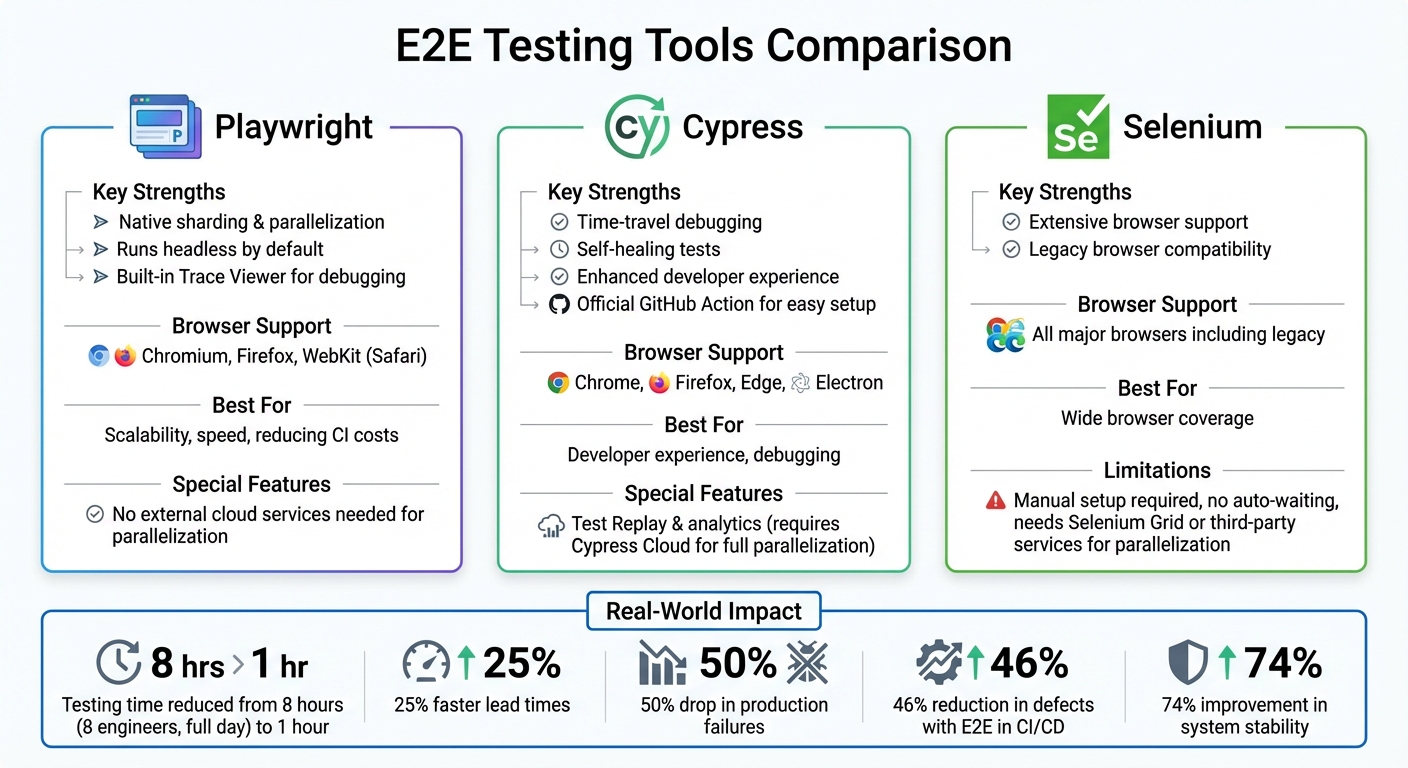 {E2E Testing Tools Comparison: Cypress vs Playwright vs Selenium}
:::
{E2E Testing Tools Comparison: Cypress vs Playwright vs Selenium}
:::
Picking the right end-to-end (E2E) testing tool can significantly impact the efficiency of your CI/CD pipeline. Among the most popular choices - Cypress, Playwright, and Selenium - each brings its own strengths, whether it's speed, browser compatibility, or ease of maintenance.
Playwright stands out for its scalability and speed. It supports native sharding, allowing you to distribute tests across multiple CI jobs without relying on external cloud services. Covering Chromium, Firefox, and WebKit (Safari), it runs in headless mode by default and offers a detailed Trace Viewer to debug failures in CI environments. For teams managing extensive test suites and aiming to reduce CI costs, Playwright's built-in parallelisation is a game-changer [11].
Cypress focuses on enhancing the developer experience with features like 'time-travel' debugging and self-healing tests. It supports Chrome, Firefox, Edge, and Electron. However, full parallelisation requires Cypress Cloud. Its official GitHub Action simplifies setup by managing dependency installation and caching. Cypress Cloud also provides features like Test Replay
and analytics to identify flaky tests, reducing maintenance efforts [13].
Selenium is known for its extensive browser support, including legacy browsers, but it requires manual setup and lacks auto-waiting functionalities. For parallel execution, users need to configure Selenium Grid or use third-party services.
The benefits of these tools aren't just technical - they translate into real-world efficiency. For instance, in December 2025, Martin Schneider shared how parallelised testing reduced his team's testing time from an entire day for eight engineers to just one hour. Many organisations have reported 25% faster lead times and a 50% drop in production failures [10]. Both Cypress and Playwright offer official Docker images (e.g., cypress/browsers and mcr.microsoft.com/playwright), ensuring consistent setups and eliminating works on my machine
headaches [11].
To optimise your CI/CD pipeline further and make the most of these tools, you might explore the tailored services available through Hokstad Consulting (https://hokstadconsulting.com).
Need help optimizing your cloud costs?
Get expert advice on how to reduce your cloud expenses without sacrificing performance.
Adding E2E Testing to CI/CD Pipelines
Setting Up Tests in Jenkins, GitLab CI/CD, and CircleCI
To integrate end-to-end (E2E) tests into your CI/CD pipeline, you'll need to configure test jobs and ensure the environment supports browsers. Here's how to set things up across CircleCI, GitLab CI/CD, and Jenkins.
On CircleCI, configure your jobs in the .circleci/config.yml file. Use convenience images like cimg/node:16.10-browsers, which come preloaded with browsers. If your tests require a live application, start the server in the background before running the tests. CircleCI also supports reusable configuration packages called Orbs, such as cypress-io/cypress, which simplify setup by reducing repetitive code. If tests fail, you can enable store_artifacts to save screenshots and videos for troubleshooting.
For GitLab CI/CD, define your pipeline in the .gitlab-ci.yml file. Choose a Docker image with browser support, such as cypress/browsers, and use the cache keyword to speed up future runs. Start your application in the background (e.g., with npm start &) and configure artifacts: paths to capture debugging data, but set it to when: on_failure to conserve storage space.
In Jenkins, you can configure jobs through a Jenkinsfile or the UI. Make sure your agents are equipped with the necessary browser support to run the tests effectively.
Running E2E Tests in Pipeline Stages
Once your environment is ready, the next step is to integrate E2E tests into your pipeline stages. The key is to decide when and how to run these tests for maximum efficiency.
For merge or pull requests, selective test execution can help catch regressions early without running the entire suite. Tools are available to map code changes to specific tests, saving time and resources [3]. CircleCI even offers a re-run failed tests only
feature to handle transient errors without re-executing the full suite [7].
For staging and canary deployments, smoke tests are a great option. These are a small set of critical E2E tests that verify the main user journey. GitLab treats smoke tests as mandatory and blocking for staging and canary environments, ensuring stability before production [14]. Meanwhile, the full regression suite, which can be resource-intensive, is better suited for scheduled or nightly pipelines [14].
To speed up test execution, consider parallelisation. Split tests across multiple runners to reduce overall runtime. Separating dependency installation and test execution into different jobs can also improve efficiency [12]. For even faster execution, use APIs to create test resources instead of relying on UI interactions [15]. GitLab suggests using the Commit resource over ProjectPush, as HTTP requests tend to be quicker than Git CLI commands [15].
Finally, configure your pipeline to store artefacts like screenshots and videos only when tests fail. This approach preserves debugging data while saving storage space [12]. Both GitLab and CircleCI allow you to distribute tests across multiple containers using features like the parallel attribute or test splitting, significantly cutting down feedback times.
Best Practices for E2E Testing in CI/CD
Balancing the Testing Pyramid
The testing pyramid offers a practical way to organise your testing efforts. Ideally, unit tests should make up about 70% of your test suite, with integration tests taking a smaller share, and E2E tests reserved for the most critical workflows [18].
Unit tests should make up the bulk of your testing strategy. A good rule of thumb is about 70 percent.- AWS Whitepaper [18]
E2E tests are the slowest and most resource-intensive to run [16]. They also tend to be fragile and harder to maintain. For these reasons, they are best suited for testing essential user journeys and high-risk areas where errors could have a major impact on your business. By catching bugs early through unit and integration tests, you can save both time and money compared to relying heavily on E2E tests.
| Test Level | Volume | Focus |
|---|---|---|
| Unit | High (~70%) | Individual functions or components in isolation |
| Integration | Medium | Interactions between modules or external systems |
| End-to-End | Low | Complete user workflows and overall system integrity |
This structured approach not only improves efficiency but also simplifies monitoring and debugging as your suite matures.
Monitoring and Scaling E2E Tests
Once you've established a balanced test distribution, the next step is maintaining and scaling your E2E tests effectively. As your application grows, parallelisation becomes crucial to keep pipeline execution times reasonable. Tools like GitLab's dynamic parallel job scaling can help maintain consistent test speeds [3].
To evaluate the efficiency of your test suite, monitor metrics such as defect density, test execution time, flaky test percentages, and automation coverage [17]. Tools like Allure can provide detailed visual reports to enhance your understanding of test results [3]. Additionally, caching the global system cache (e.g., ~/.cache/Cypress) instead of the node_modules folder can significantly reduce installation times [5].
For isolated testing environments, innovative solutions like database branching can make a big difference. For example, Neon uses GitHub Actions and Playwright to create dedicated database branches for each pull request. These branches mirror the production schema, enabling E2E tests to run against ephemeral data environments. This approach eliminates many flaky test issues caused by shared staging databases [19]. By closely monitoring your suite, you can ensure that each level of the testing pyramid functions as intended.
Troubleshooting Common Issues
Even with a well-designed testing environment, challenges like flaky tests can disrupt your CI/CD pipeline. When a test is identified as flaky, move it to a quarantine
state to prevent it from blocking the pipeline while you resolve the issue [3]. Flaky tests are often caused by leftover data from previous runs, shared resources, or unmocked third-party services [6].
Environment inconsistencies are another frequent problem, often resulting from timing issues or uncontrolled dependencies. Tools like wait-on or start-server-and-test can ensure your application is fully responsive before tests begin. For external dependencies, libraries such as nock or msw can mock outbound HTTP calls, providing faster and more predictable test results [6].
When tests fail in CI, collecting artefacts like videos, screenshots, and traces (using tools like Playwright Trace Viewer) can be invaluable for debugging [9]. If browser crashes or video issues occur, check that your CI runners have adequate CPU and memory resources [5]. These troubleshooting practices can help maintain consistency and reliability in your regression results.
Conclusion and Next Steps
Key Takeaways
Integrating end-to-end (E2E) testing into your CI/CD pipeline can transform how you validate software quality. Automating complete user workflows not only provides immediate feedback on builds but can also cut testing time dramatically - from an entire day to just one hour[1]. To maximise effectiveness, balance E2E tests with unit and integration tests. While unit and integration tests catch issues early, E2E tests ensure that critical business flows, like login or checkout, work seamlessly. Tools such as Cypress, Playwright, and Selenium each bring their own strengths to the table, but their success hinges on correct implementation. Techniques like parallel execution, selective test runs, and consistent use of Docker environments can significantly enhance pipeline efficiency. Considering that roughly 80% of software teams encounter difficulties with integrated system testing[1], tackling challenges like flaky tests and environment inconsistencies is essential for success. These strategies lay a solid foundation for adopting E2E testing in practice.
Next Steps for Adoption
To get started with E2E testing, take the following steps:
- Set clear objectives for your testing strategy. Identify the most business-critical user journeys - like those with the highest risk - and prioritise testing those workflows first[4].
- Gradually build your test suite as new features are developed[20]. Start small with a set of smoke tests running against production environments while performing the bulk of integration tests on local development servers[2][4].
Assess your current CI/CD setup to ensure it supports parallel test execution and allocates resources effectively. Use official Docker images to maintain consistent environments and implement caching strategies - such as caching the Cypress binary - to minimise setup times[5][8]. Configure lightweight checks, like linting and unit tests, to run before resource-heavy E2E suites. This approach helps catch issues early and conserves CI credits[4].
Before BrowserStack, it took eight test engineers a whole day to test. Now it takes an hour. We can release daily if we wanted to.– Martin Schneider, Delivery Manager at BrowserStack[4]
By starting small, optimising for speed, and scaling gradually, you can achieve similar efficiencies in your deployment process while maintaining confidence in your releases.
For expert advice on enhancing your CI/CD pipeline and implementing robust E2E testing, reach out to Hokstad Consulting at https://hokstadconsulting.com.
FAQs
What are the main advantages of incorporating end-to-end testing into CI/CD pipelines?
Integrating end-to-end (E2E) testing into your CI/CD pipelines can make a significant difference. It identifies workflow issues that other testing methods might miss, helping to create a system that’s both stronger and more dependable. By catching bugs earlier in the process, it lowers the risk of expensive mistakes making their way into production.
E2E testing also speeds up development cycles by automating essential testing tasks. This means teams can roll out updates faster and with more confidence. In the end, it improves the overall quality of your deployments and builds trust in the pipeline’s reliability.
What should I consider when selecting an E2E testing tool for my CI/CD pipeline?
When selecting an end-to-end (E2E) testing tool for your CI/CD pipeline, it's crucial to ensure it supports your application's technology stack, as well as the browsers and devices you plan to test. Tools like Playwright and Selenium are great choices because they work across various platforms, making them suitable for a wide range of testing environments.
You’ll also want to evaluate how well the tool integrates with your current CI/CD setup. Many tools come with built-in support for popular platforms such as GitHub Actions, Jenkins, or GitLab CI, which can make integration much smoother. Features like automation, detailed reporting, and the ability to scale are also worth considering to meet your testing demands efficiently.
Lastly, take into account your team's familiarity with the tool and how steep its learning curve might be. Choosing a framework that is well-documented and widely used can minimise onboarding time and improve productivity. The ideal tool should fit your application's requirements, simplify your testing process, and help you achieve your CI/CD objectives effortlessly.
How can you make end-to-end (E2E) tests more efficient in a CI/CD pipeline?
To make your E2E tests more efficient within your CI/CD pipeline, start by focusing on the most critical user journeys. This ensures you're testing the areas that matter most while avoiding unnecessary overlap in your test coverage. Another important aspect is managing your test data - keep it consistent, reusable, and simple to reset between test runs.
When it comes to execution speed, there are several ways to boost performance. Run tests in parallel to save time, use lightweight environments to reduce overhead, or take advantage of scalable, cloud-based testing setups. Additionally, it’s essential to regularly review your test suite. Remove any outdated or redundant cases to keep your tests relevant and aligned with the evolving needs of your pipeline.