Integrating compliance scanning into CI/CD pipelines ensures UK organisations meet regulatory frameworks like ISO 27001, PCI DSS, and UK GDPR without compromising deployment speed. By embedding automated security checks at every development stage, teams can create audit-ready documentation like SBOMs, reduce remediation times by 72 days, and maintain continuous compliance.
Key takeaways:
- Compliance scanning integrates security checks directly into CI/CD workflows, replacing manual audits with automated, ongoing validation.
- Challenges include balancing speed with thorough checks, managing alert fatigue, and maintaining consistency across teams.
- Solutions involve setting clear thresholds, automating policy enforcement (e.g., Policy-as-Code), and optimising scanning tools for efficiency.
DevSecOps Governance: Automate Compliance Checks in Your CI/CD Pipeline
Preparation: Getting Ready for Compliance Integration
Laying a solid groundwork is essential before embedding compliance checks into your workflow. This ensures smooth integration without unnecessary delays.
Understanding Your Compliance Frameworks and Policies
Start by mapping every component of your software supply chain. This includes libraries, file systems, deployment tools, and third-party providers [9]. Conduct a gap analysis against recognised standards like ISO 27001 or PCI DSS to pinpoint any missing controls [7].
Bring together your security, development, and operations teams to conduct threat modelling. This helps align security checks with your business goals [8][9].
Automating the creation of a Software Bill of Materials (SBOM) is another critical step. An SBOM provides a detailed inventory of both direct and transitive dependencies, addressing the growing need for supply chain transparency [1]. These foundational steps pave the way for introducing scanning tools into your pipeline.
Setting Risk Thresholds and Blocking Criteria
Define thresholds to determine when builds should fail. For example, you could block builds if High
or Critical
vulnerabilities are found, but only if fixes are available or if disallowed licences are involved [13][4]. Some organisations set specific limits, such as failing a pipeline if more than three high-severity vulnerabilities are detected [13].
It’s important to differentiate between general security flaws and compliance-related violations. For example, unencrypted S3 buckets might breach SOC 2 or HIPAA standards, while vulnerabilities like SQL injection could violate PCI DSS controls [4]. Tools like Open Policy Agent (OPA) can be used to evaluate Infrastructure as Code (IaC) against compliance rules, providing clear pass/fail outcomes [4].
During early implementation, consider adopting a soft-fail
approach. This allows visibility into issues without halting deployments. As your processes mature, transition to a hard-fail
strategy. For instance, always enforce hard-fail policies for detecting secrets like API keys or passwords in code repositories [4].
In the early phases of implementing Checkov custom policies, you can use the soft-fail option in your Checkov scan to allow IaC with security issues to be merged. As the process matures, switch from the soft-fail option to the hard-fail option.
– Benjamin Morris, Amazon Web Services [12]
Once your thresholds are set, review your pipeline to ensure every component meets these standards.
Auditing Your Current CI/CD Pipeline
Take stock of all pipeline components, including source control systems, automation servers, and build nodes [10][11]. Verify that developer devices are secure. If not, the pipeline itself should act as the primary trust boundary [3].
Ensure technical safeguards are in place to prevent bypassing review processes or altering security rules [3][11]. For source control, implement measures like protected branches, signed commits, multi-factor authentication, and the removal of auto-merge rules. Similarly, audit automation servers to confirm build nodes are isolated and secure communication protocols (e.g., TLS 1.2 or higher) are enforced [11].
Review your security tool coverage - such as SAST, SCA, and IaC scanning - across all stages of the Software Development Lifecycle. This helps identify gaps in compliance checks [4]. Secrets should be securely managed using encrypted vaults like HashiCorp Vault or AWS Secrets Manager, with strict least-privilege access [11]. Tools like Legitify can help identify misconfigurations and policy violations in your source control management (SCM) assets [11].
The pipeline should enforce rules that define whether code is accepted or rejected before deployment... It should not be possible for individuals to 'police themselves' by modifying these rules.
– NCSC [3]
Finally, review all plugins and integrations within your CI/CD platform. Remove any that are outdated or lack a reliable security history [11]. Ensure your pipeline outputs scan results and deployment logs in standard formats (like JSON or SARIF) to a central logging system, making audits easier [4].
Building a Compliance-Driven Scanning Architecture
::: @figure 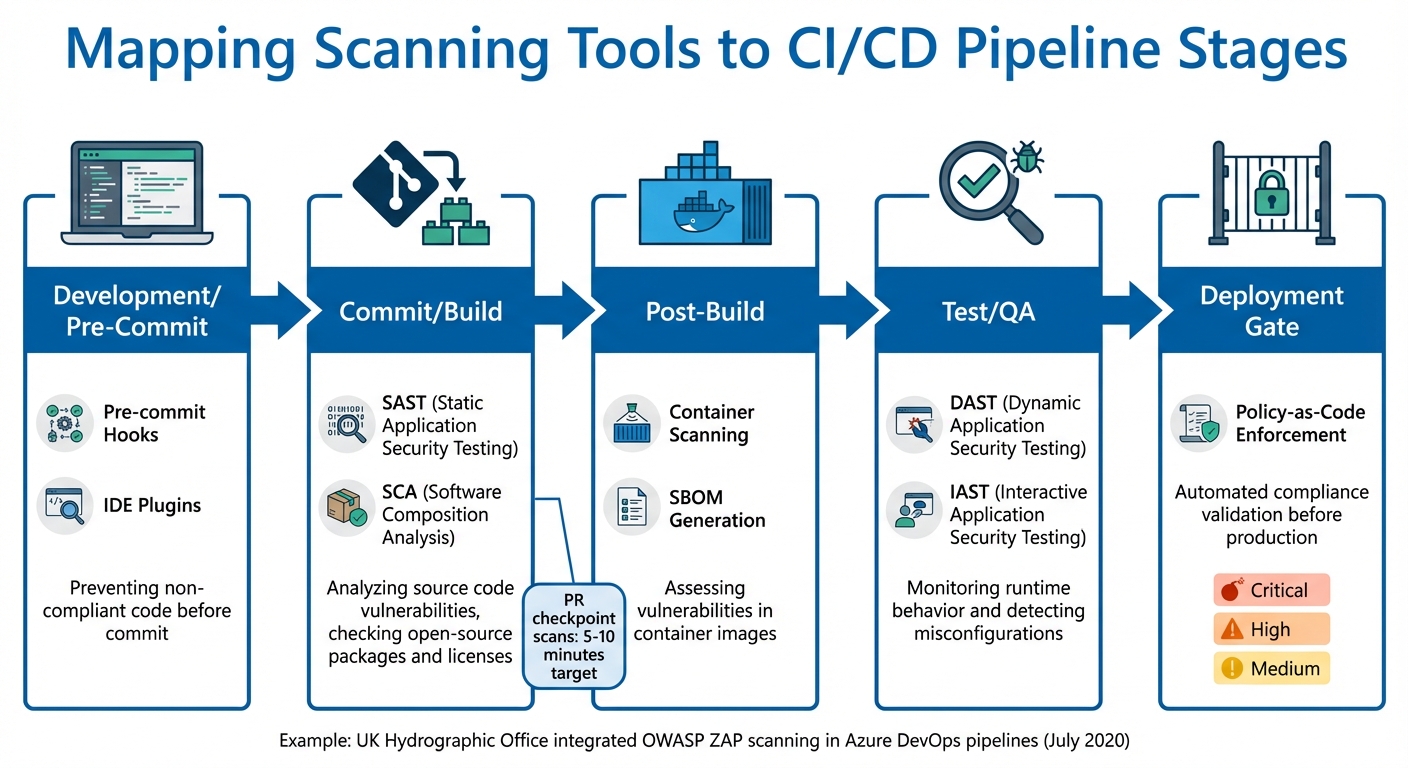 {CI/CD Compliance Scanning Pipeline Integration Workflow}
:::
{CI/CD Compliance Scanning Pipeline Integration Workflow}
:::
To create a scanning architecture that prioritises compliance, it's essential to integrate checks at critical stages of the pipeline. This approach helps detect issues early, keeps delivery timelines intact, and ensures costs remain manageable.
Mapping Scanning Tools to Pipeline Stages
Different scanning tools are most effective when used at specific stages of the CI/CD pipeline. For example, Static Application Security Testing (SAST) and Software Composition Analysis (SCA) are highly effective during the commit and build stages. SAST examines source code for vulnerabilities, while SCA ensures licence compliance and checks open-source dependencies. Pre-commit hooks and IDE plugins can also catch code issues early, saving time and effort later.
Post-build, container images should be scanned using tools that generate Software Bill of Materials (SBOMs), enabling detailed vulnerability assessments. During testing and quality assurance, Dynamic Application Security Testing (DAST) and Interactive Application Security Testing (IAST) become crucial. These tools evaluate the application's runtime behaviour, simulating a production-like environment to uncover misconfigurations or runtime vulnerabilities.
For example, in July 2020, the UK Hydrographic Office integrated automated security scanning into their Azure DevOps pipelines using the OWASP ZAP Docker image. This setup enabled full scans of web applications and APIs, with vulnerabilities identified through custom PowerShell scripts that converted XML reports into NUnit test results before deployment.
| Scanning Tool Type | Pipeline Stage | Primary Focus |
|---|---|---|
| Pre-commit Hooks | Development | Preventing non-compliant code before it’s committed |
| SAST | Commit/Build | Analysing source code for known vulnerabilities |
| SCA | Commit/Build | Checking open-source packages, licences, and Infrastructure-as-Code issues |
| Container Scanning | Post-Build | Assessing SBOMs for vulnerabilities in container images |
| DAST | Test/QA | Monitoring runtime behaviour and detecting misconfigurations |
| IAST | Test/QA | Evaluating code in real-time within the application server |
Automated gates can further enforce compliance by configuring scanning jobs to return specific exit codes - success (0) or failure (1). While some jobs may allow failures to avoid disrupting workflows, critical vulnerabilities often necessitate blocking the pipeline to adhere to compliance policies.
Using Policy-as-Code for Automation
Integrating tools is only the first step. To streamline compliance further, Policy-as-Code can transform manual processes into automated enforcement mechanisms. By storing compliance policies in Git, teams create a single source of truth that can be shared across projects through CI/CD configurations or Open Policy Agent (OPA) Bundles.
The pull request stage becomes a key enforcement checkpoint. Comprehensive policy suites - covering Terraform plans, Kubernetes manifests, and other infrastructure code - prevent non-compliant changes from being merged. Enforcement can be tiered: critical policies operate in Blocking
mode to halt the pipeline, while less critical guidelines issue warnings in Advisory
mode.
To minimise delays, policy checks should execute in under two to three minutes. Clear violation messages are critical - they should explain the issue, why it breaches standards, and how to fix it. For even quicker feedback, lightweight pre-commit hooks can run policy linters locally, catching issues before code is pushed.
Balancing Speed, Coverage, and Cost
Balancing compliance coverage with pipeline speed requires careful planning. For faster execution and reduced bandwidth, use Docker images no larger than 50 MB. Lightweight distributions, such as Debian slim
or Alpine Linux, combined with multi-stage builds, can keep scanner images efficient.
Customise scanning based on project requirements. For instance, skip Java-specific scans for Python projects by using CI/CD variables to trigger only the relevant tools. When introducing new scanning jobs, using an allow failure
flag initially can help fine-tune thresholds without disrupting workflows.
Shifting compliance checks earlier in the development cycle can significantly reduce costs. Late-stage fixes are expensive and can delay deployments. SAST, with its quick code-level analysis, is ideal for early stages, while DAST ensures runtime validation in near-production environments. Both tools are essential, as SAST cannot detect runtime issues and DAST cannot pinpoint code-level flaws.
By embedding compliance checks early in workflows, teams can catch vulnerabilities before they ever reach production, significantly reducing the time and cost of late-stage fixes.
– Snyk
To control costs further, optimise scanner images and use conditional scanning. SBOM-centric scanning offers a more targeted approach, allowing vulnerabilities to be assessed without repeatedly scanning entire container images. This not only saves resources but also enhances efficiency.
Implementing Compliance Scanning in Existing Pipelines
With your architecture ready, the next step is weaving scanning tools into your current workflows. The best way to approach this is by starting small and scaling up. Many platforms offer pre-built plugins for tools like Jenkins, GitHub Actions, or TeamCity, making integration straightforward. For more custom setups, CLI binaries and REST APIs provide the flexibility you need. These tools effectively connect your scanning architecture to your daily pipeline activities.
Integrating Code and Dependency Scanning
Once your scanning architecture is set, focus on integrating Static Application Security Testing (SAST) and Software Composition Analysis (SCA) scans early in the development process. A good starting point is adding these scans at the pull request stage. This captures vulnerabilities when they're easiest - and cheapest - to fix. To implement, you'll need to set up account access, install the scanner binary, generate a Software Bill of Materials (SBOM), and call the Scan API to create detailed vulnerability reports.
Initially, configure these scans as non-blocking by using parameters like allow_failure: true. This lets developers see compliance issues without disrupting the pipeline. Place these scanning jobs in the test stage for consistency, and use clear naming conventions (e.g., _sast or _dependency_scanning) to simplify management and audits.
Ensure security reports are generated in standard formats like CycloneDX 1.5 or JSON, and label them as pipeline artefacts. This not only makes results accessible on security dashboards but also serves as audit evidence. Some platforms can even detect the repository's programming languages automatically, triggering only the relevant scans. For example, Java dependency checks will be skipped for projects that only use Python.
Adding Container and IaC Compliance Checks
After integrating code-level scans, expand your compliance efforts to containers and Infrastructure-as-Code (IaC). For containerised applications, scan container images right after the build process. Tools like the Amazon Inspector SBOM Generator can automatically create CycloneDX-compatible inventories of all components within a container image. These inventories act as a persistent record for compliance tracking.
SCA tools can also evaluate IaC manifests, such as Terraform plans or Kubernetes configurations, to identify vulnerabilities. Pre-commit hooks are particularly useful here - they can block non-compliant IaC updates on a developer’s workstation before they even reach the pipeline. To keep pipelines running efficiently, optimise scanner Docker images to stay below 50 MB, or at the very least, under 1.46 GB [6][16].
Enforcing Pipeline Gates with Compliance Policies
Enforcing compliance comes down to setting clear severity thresholds. Define which vulnerabilities - typically Critical
or High
severity - should block builds, while allowing Low
or Medium
issues to trigger warnings. This ensures serious risks are addressed without holding up delivery for minor concerns.
You can't protect what you can't see. Discovery through SAST and DAST isn't just helpful, it's foundational to securing your API surface.
– Eran Kinsbruner, Enterprise Product Marketing Executive, Checkmarx [14]
Scanners should follow POSIX standards, exiting with a code of 0 for success and 1 for failure. The pipeline gate then determines whether to block builds based on these results. During initial rollouts, you can manage scan bypass by configuring environment variables like SAST_DISABLED: 'true'.
| Integration Method | Ease of Setup | Customisation Level |
|---|---|---|
| Plugins | High | Low |
| CLI Binary | Medium | Medium |
| REST API | Low | High |
Overcoming Challenges in Compliance-Driven CI/CD Pipelines
Integrating compliance scanning into your CI/CD pipeline is a big step, but it’s only the beginning. Tackling operational challenges head-on is key to keeping your pipeline efficient and ensuring your team can make the most of the tools you’ve implemented. Common hurdles often include sluggish pipeline performance, an overwhelming number of alerts, and rising resource costs. Addressing these issues early can save your team a lot of headaches and keep things running smoothly.
Reducing Pipeline Performance Issues
When scans take too long, they can slow down pipelines and delay critical feedback. To keep things moving, consider running lightweight dependency checks during pull requests while saving resource-heavy Dynamic Application Security Testing (DAST) for nightly builds or pre-deployment stages. Aim to keep PR checkpoint scans within a strict 5–10-minute window [20]. Studies show that organisations integrating security testing earlier in development can resolve vulnerabilities 60% faster [17].
You can also speed things up by scanning incrementally - focusing only on modified modules or changed container layers. Running scanning steps in parallel and leveraging build caches can further boost efficiency.
Speed only matters if developers trust the pipeline and security teams trust its guardrails.
– Kiran Itagi, Senior Associate, Actalent [18]
Another way to optimise performance is by configuring scanners to prioritise actionable vulnerabilities - ignoring issues without available fixes [9]. For UK businesses handling sensitive data under GDPR, these optimisations should align with NCSC guidelines and GDS standards [2].
While performance is crucial, managing the flood of alerts is just as important.
Reducing Alert Fatigue and Noise
When scanners flag hundreds of issues, it’s easy for developers to tune out even the critical ones. To avoid this, prioritise alerts based on factors like exposure, production impact, and data sensitivity [19]. Tools that use graph-based attack path analysis can help identify how multiple low-severity issues might combine into a critical risk [19].
Consolidating results is another effective strategy. Use a centralised platform to aggregate findings from multiple scanners. For example, if three tools flag the same vulnerable library, generate a single ticket instead of multiple alerts [19][20]. Set clear triage SLAs, such as reviewing new findings within 24 hours and resolving high-severity issues within seven days, to prevent alert backlogs.
The risks are real - GitGuardian reported over 12.8 million secrets exposed on public GitHub repositories in 2023, a 67% increase from the previous year [19]. To mitigate such risks, start with hardened base images to eliminate common vulnerabilities and provide developers with actionable guidance. This could include details like the exact file location, line number, and specific fixes, delivered directly within their IDEs or pull requests [19][20].
Managing Costs and Resource Constraints
Compliance scanning can be resource-intensive, and without careful planning, it can lead to soaring compute costs. To strike a balance between robust compliance and fast deployment, categorise scans by cost and confidence. Run fast, low-cost dependency checks to block pull requests, while scheduling more expensive DAST scans as non-blocking, advisory tasks [20]. For example, the GOV.UK infrastructure team uses centralised, reusable workflows for CodeQL SAST scanning across all repositories, tailoring inputs to specific languages to avoid unnecessary analyses [21].
To further manage costs, use slim, multi-stage Docker images and implement conditional scanning. Reserve resource-heavy tests, like nightly regression scans, for specific times, while keeping pull-request checks lightweight.
To keep an image size small, consider using dive to analyse layers in a Docker image to identify where additional bloat might be originating from.
– GitLab Documentation [6]
Maintaining and Improving Compliance Scanning
Once you've integrated compliance scanning into your processes, the work doesn't stop there. It's essential to keep monitoring and fine-tuning these scans to stay ahead of emerging threats and regulatory updates. This ongoing effort ensures your security remains audit-ready and aligned with your compliance strategy. Below, we'll explore how to track performance, update policies, and adapt your compliance practices as your organisation grows.
Tracking Metrics for Security and Performance
To gauge the success of your compliance scanning, focus on tracking meaningful metrics. Key indicators like vulnerability remediation time, blocked builds, and pipeline duration can provide actionable insights when you compare scanner outputs against a defined baseline. Research shows that organisations achieve faster remediation when security checks are embedded during development rather than after deployment [19]. These metrics not only help balance speed and compliance but also offer a clear view of your security progress over time.
For example, compare the results from your local CI images to a benchmark, such as your production environment. If compliance performance falls below this standard, fail the pipeline to prevent risks from escalating [22]. Pay close attention to how factors like network exposure, excessive privileges, and sensitive data interact to create heightened risks. These combined threats are more critical than isolated low-severity issues [19]. To simplify long-term analysis, ensure all metrics are fed into a centralised dashboard [5][16][15].
Reviewing Policies and Adapting to Changes
Compliance is not static - both regulations and threats are constantly evolving. To keep up, regularly update your policy code. Frameworks like Open Policy Agent (OPA) or Kyverno allow you to define compliance rules as versioned, testable code that can evolve alongside your application [19][11]. This ensures your scanning tools remain aligned with the regulatory controls established during the initial setup.
Runtime context can also inform policy reviews. For instance, if production telemetry shows that a vulnerability affects code that’s never executed, you might lower its priority. On the other hand, issues impacting internet-facing services with admin privileges or sensitive data should trigger immediate action [19]. Establish feedback loops so data from runtime protection automatically updates scanning rules, enabling earlier detection of similar risks [19]. Additionally, regularly audit third-party plugins and remove those that no longer provide value [11][23].
Scaling Compliance Practices with Maturity
As your organisation's compliance practices become more stable, look for ways to enhance them further. Start by generating Software Bills of Materials (SBOMs) in formats like SPDX or CycloneDX to maintain a comprehensive inventory of all software components and dependencies [5][19]. Next, consider adopting the SLSA (Supply-chain Levels for Software Artifacts) framework. Level 2 requires version-controlled source and authenticated build services, while Level 3 adds hardened, isolated build environments and ensures non-falsifiable provenance [19].
To reduce vulnerabilities in base images, rely on hardened golden images [19]. Replace static secrets with short-lived credentials using OIDC workload identity federation, which significantly lowers the risk of credential theft [19][11]. As your organisation matures, consolidate your policies into a unified policy engine. This approach helps maintain consistency across code, CI/CD pipelines, and cloud environments, preventing policy drift and reducing the complexity of managing multiple tools [19].
FAQs
How can organisations ensure compliance scanning in CI/CD pipelines is both thorough and efficient?
To strike a balance between speed and thoroughness in compliance scanning, organisations should embrace a layered approach. Begin by integrating lightweight, incremental scans early in the development pipeline, such as during pull requests or commits. These quick checks help catch vulnerabilities like known CVEs or licence issues, offering developers immediate feedback and stopping insecure code from advancing further.
For more detailed assessments, schedule thorough scans - like container image analysis or policy evaluations - at key stages, such as during merges to the main branch or nightly builds. This allows for a deeper review without disrupting daily workflows. Performance can be further improved by strategies like running scans in parallel, caching artefacts, and reusing previous results.
It’s also important to establish clear failure criteria, focusing on high-severity issues while documenting lower-risk findings for future attention. By approaching compliance as code and automating governance processes, organisations can ensure auditability and adhere to regulations like GDPR or ISO 27001, all while maintaining rapid delivery of new features.
How does Policy-as-Code improve compliance automation in CI/CD pipelines?
Policy-as-Code makes compliance automation more straightforward by integrating policies directly into your CI/CD workflows. This approach removes the need for manual checks, minimising errors and ensuring governance remains consistent. Plus, developers receive instant feedback during the development process, which helps them address issues early.
With compliance checks automated, organisations can lower risks, fix problems faster, and maintain consistent enforcement throughout the pipeline. This not only strengthens security and compliance but also speeds up deployment cycles, allowing teams to work more efficiently while upholding high standards.
How can teams prevent alert fatigue when adding compliance scanning to CI/CD pipelines?
Alert fatigue occurs when developers face an overwhelming number of low-priority warnings, causing them to potentially miss critical security issues. To tackle this, it's essential to prioritise alerts based on risk level and filter out those below a specific severity threshold. Customising rule sets to align with your tech stack and silencing alerts for known, resolved issues can also significantly cut down on unnecessary noise.
Another helpful approach is grouping related findings into a single ticket, making them easier to manage. Automating triage ensures that every alert is actionable and reaches the right person. You can also optimise workflows by running incremental scans - focusing only on updated components - and integrating alerts into tools that your developers already use.
For UK organisations, these strategies not only reduce alert fatigue but also help maintain compliance with regulations like GDPR, all while boosting efficiency. Hokstad Consulting offers support in designing tailored, compliant DevSecOps pipelines that strike the right balance between security and productivity.