
Automated testing is critical for improving CI/CD pipelines. It ensures faster feedback, reduces production defects, and saves costs by identifying issues early in development. Without it, pipelines are just fast deployment tools, risking quality and higher defect costs.
Key Takeaways:
- CI/CD Basics: Continuous Integration merges code frequently, triggering builds and tests. Continuous Delivery ensures the code is always ready for deployment.
- Why Testing Matters: Fixing defects in production costs up to 100x more than during development. Automated tests provide instant feedback, boosting productivity and reducing errors.
- UK Business Benefits: Faster lead times (127x), lower failure rates (182x), and compliance with regulations (e.g., GDPR) make automated testing vital for industries like fintech and healthcare.
- Steps to Implement:
- Set a Test Strategy: Prioritise quick tests (unit, integration, end-to-end) and set thresholds (e.g., 95% pass rate).
- Choose Tools Wisely: Use frameworks like JUnit, pytest, or Cypress, ensuring compatibility with your CI/CD platform.
- Ensure Compatibility: Test in production-like environments (Docker/Kubernetes) and enable parallel execution to cut test times by 60–80%.
- Best Practices:
- Balance speed and coverage: Run fast tests frequently; schedule slower ones.
- Monitor results: Use tools like Allure Reports to track trends and failures.
- Fix flaky tests: Quarantine unreliable tests and address root causes.
Integrating automated testing improves delivery speed, reduces defects, and ensures compliance, making it essential for modern software development.
How Is Testing Automated In A CI/CD Pipeline? - Next LVL Programming
Prerequisites for Integrating Automated Testing
Before diving into automated testing within your CI/CD pipeline, it's crucial to lay a solid foundation. Three key elements - crafting a clear test strategy, choosing the right tools, and ensuring system compatibility - will determine whether automated testing becomes a game-changer or a constant headache. Let’s break these down.
Creating a Test Strategy
A well-thought-out test strategy outlines what to test, when to test it, and how quickly developers should receive feedback. The aim? Spot defects early without bogging down the pipeline and, in turn, developer productivity. A tiered gate system works best here:
- Fast tests first: Unit tests and linting should wrap up in under five minutes.
- Integration tests: Aim for completion within 10 minutes.
- End-to-end tests: Selective tests should take 15–30 minutes.
Each gate should have checkpoints with thresholds, such as a 95% pass rate or 80% code coverage. If these aren’t met, the pipeline should halt, stopping faulty code from moving forward. This approach not only boosts CI/CD efficiency but also lowers defect-related costs and speeds up deployment.
Flaky tests, which can erode trust in the pipeline, need immediate attention. Quarantine unstable tests into a separate, non-blocking suite to keep the main pipeline reliable.
In 2026, a B2B SaaS company with 18 engineers used this method to cut its change failure rate from 22% to 4%. They also slashed manual QA time from 16 hours to just two hours per release[1].
Selecting the Right Tools
Your tools should align with your tech stack and CI/CD platform. Seamless integration is key, whether you’re using Jenkins, GitLab CI, or Azure DevOps. Here’s how to choose:
- Unit testing frameworks: Match your programming language (e.g., JUnit for Java, NUnit for .NET, or pytest for Python).
- End-to-end testing tools: Focus on browser support and stability. For example:
- Cypress: Great for modern JavaScript apps, offering real-time debugging and ease of use.
- Playwright: Excellent for cross-browser testing on Chrome, Firefox, and Safari, with features like auto-waiting to reduce flakiness.
- Selenium: A solid choice for legacy systems, though it has a steeper learning curve.
Look for tools that generate machine-readable outputs, such as JUnit XML, to help trigger pipeline gates. Also, consider tools that integrate with reporting platforms like Allure Reports or Slack for better visibility.
Once you’ve chosen your tools, ensure they’re fully compatible with your infrastructure.
Checking System Compatibility
Your tools need to play nicely with your existing setup, especially if you’re using containerisation or cloud-based environments. Testing frameworks should support Docker and Kubernetes, enabling tests to run in isolated, production-like settings. This consistency ensures reliable results across different environments.
For UK businesses, it’s important to confirm that tools meet GDPR requirements and other regulatory standards, including maintaining proper audit trails.
Infrastructure compatibility should also include support for parallel execution and test impact analysis (TIA). Tools that can run tests simultaneously across multiple containers or nodes - and only run tests affected by recent code changes - can cut execution time by 60% to 80%. Additionally, ensure your setup supports database snapshots or data factories, so each test run starts from a clean, predictable state. This keeps scenarios independent and your pipeline efficient, even as your business evolves.
Step-by-Step Guide to Integrating Automated Testing
::: @figure 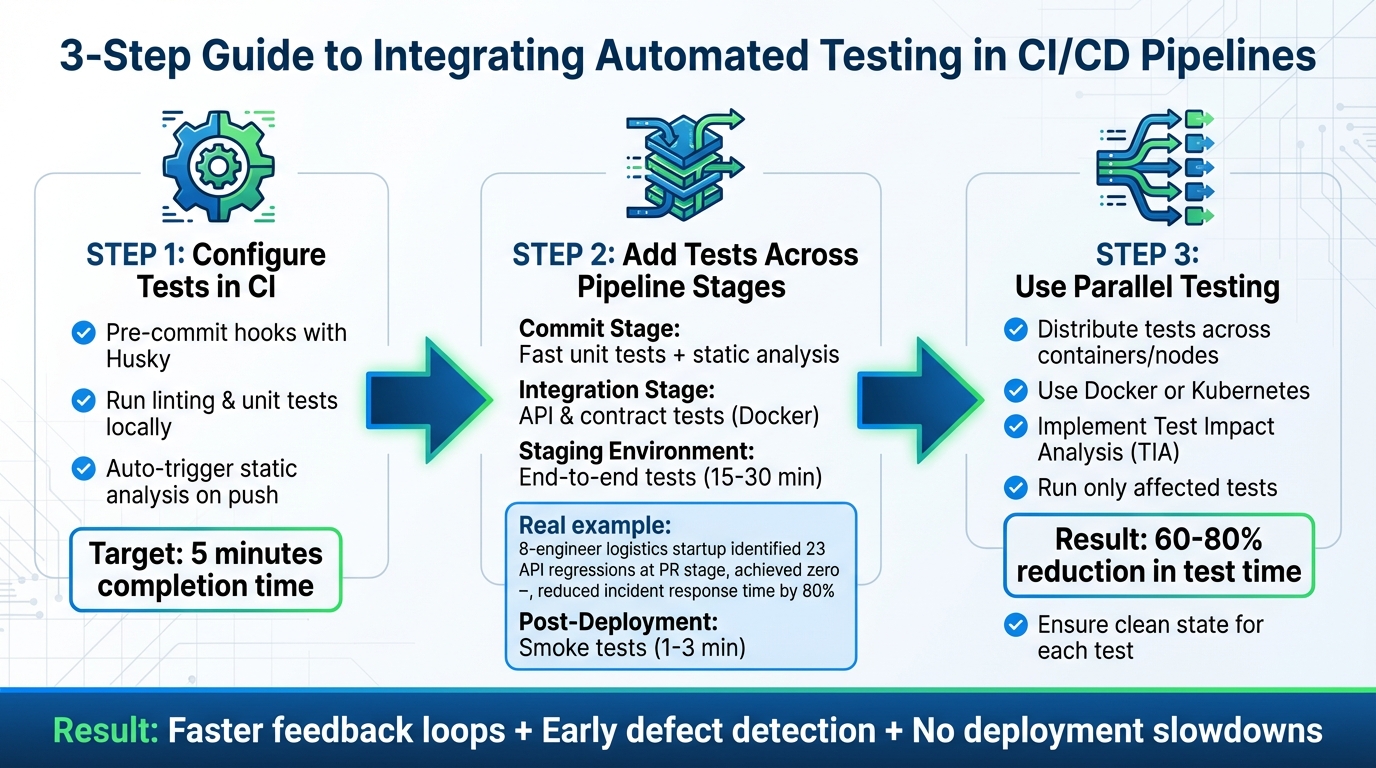 {3-Step Guide to Integrating Automated Testing in CI/CD Pipelines}
:::
{3-Step Guide to Integrating Automated Testing in CI/CD Pipelines}
:::
Now that you have your strategy and tools in place, it's time to weave automated testing into your CI/CD pipeline. The aim is simple: catch defects early, maintain swift feedback loops, and ensure code quality without slowing down your delivery process. Here's a practical three-step guide to get you started.
Step 1: Configure Tests in CI
Begin by running linting and unit tests on every commit - before the code is pushed. Using pre-commit hooks with tools like Husky allows these checks to be executed locally in under two minutes. This provides quick feedback and prevents flawed code from even entering the pipeline.
Once the code is pushed, configure your CI server to automatically trigger static analysis and unit tests. Ideally, these tests should complete within five minutes to keep the development flow uninterrupted. Once this is set up, you can move on to integrating tests at every stage of the pipeline.
Step 2: Add Tests Across Pipeline Stages
Different stages of your pipeline require different types of testing to ensure thorough coverage:
- Commit Stage: Run fast unit tests and static analysis to identify syntax errors and logic issues early.
- Integration Stage: Focus on API and contract tests to validate service communication. Tools like Docker can help test database migrations and service interactions in isolated environments.
- Staging Environment: Perform end-to-end tests to replicate real-world user journeys. These are ideal for scheduled runs or just before major releases.
- Post-Deployment: Use smoke tests to quickly verify production stability. These should take no more than one to three minutes, allowing for rapid rollbacks if needed.
For example, in 2026, a logistics tech startup with a team of eight engineers adopted this staged approach using Shift-Left API and Testcontainers. Within just 30 days, they identified 23 API regressions at the pull request stage and reported zero production incidents. This reduced their incident response time by 80% [3].
Step 3: Use Parallel Testing
Once you’ve integrated tests at all stages, the next step is to optimise efficiency by running tests in parallel. Sequential testing can create unnecessary bottlenecks, but parallel execution - using multiple containers or nodes - can dramatically cut down overall test times. Configure your CI to distribute tests across isolated environments, such as Docker or Kubernetes, ensuring each test runs independently.
To make this even more efficient, implement test impact analysis (TIA). This method identifies and runs only the tests affected by recent code changes, keeping feedback cycles fast even as your test suite grows. Just ensure each parallel test starts with a clean state to avoid any cross-contamination.
Best Practices for Automated Testing in CI/CD
Building on the integration steps, these practices ensure that automated testing stays efficient and dependable in your CI/CD pipeline. The ultimate aim is to catch defects early without causing delays or introducing inconsistencies. Even the most thorough test suite loses its value if it slows down deployments or provides unreliable results. Below are three key strategies to maintain a reliable automated testing workflow.
Balancing Speed and Test Coverage
Efficient testing is all about prioritisation. By categorising tests based on speed, you can schedule them more effectively. For instance, fast unit tests (taking less than 100 milliseconds) should run with every commit, while slower end-to-end tests can be reserved for scheduled runs or major releases [1][5]. This approach provides immediate feedback without overwhelming the pipeline.
Parallel execution is another way to speed things up. Spreading tests across multiple runners can significantly cut down runtime. For example, a 20-minute test suite can shrink to just four minutes when distributed across five workers [1][4]. One team even reported a 65% reduction in runtime simply by adopting parallel execution [5].
Automation in CI/CD is about balance. If you treat all tests the same, your pipeline will choke.– Abhishek Verma, QA Automation Engineer [5]
To keep things efficient, set a feedback SLO (Service Level Objective) of 10 minutes for pull request validation. If your pipeline takes longer, it’s worth auditing for sequential dependencies or finding areas for parallelisation [1][2]. Remember, catching a defect during development is around 100 times cheaper than fixing it in production [1].
Monitoring and Reporting Test Results
Good monitoring transforms automation into a tool for continuous improvement. Tools like Allure Reports excel here, offering interactive dashboards with detailed execution steps, screenshots, and historical analysis across more than 50 testing frameworks [10][11]. For Java-based projects, TestNG provides built-in HTML summaries that are easy for stakeholders to review without needing CI/CD access [13].
To track trends over time, store past reports in cloud storage [11][12]. Hosting reports on platforms like GitHub Pages ensures accessibility for the entire team without requiring specialised tools [11][14]. Categorising tests - such as Smoke, Regression, API, or UI - makes it easier to filter and investigate failures quickly [11].
Good reporting isn't just about pass/fail - it's about making automation trustworthy and actionable.– Abhishek Verma, QA Lead [11]
With clear and actionable insights, the focus shifts to ensuring the reliability of the tests themselves. This is where addressing flaky tests becomes critical.
Handling Flaky Tests
Flaky tests are a common problem, accounting for up to 16% of failures and wasting 16–24% of developers' time [6][8]. These unreliable tests often stem from six main issues: timing problems, shared test states, network dependencies, fragile UI selectors, environment inconsistencies, and test order dependencies.
One way to reduce flakiness is by replacing hardcoded sleep() calls with explicit waits. These waits can monitor specific conditions, like an element becoming clickable or an API response being received [6][9]. For database-dependent tests, use transactions that roll back after each test or truncate tables in a beforeEach hook to avoid data contamination [6][9]. Mocking external APIs with tools like WireMock can also prevent third-party downtime from affecting test reliability [6][7].
When a flaky test is identified, move it to a quarantine suite. This allows the test to run for data collection without blocking merges [6]. High-performing teams treat flakiness as a top-priority bug, assigning ownership to ensure it gets resolved [6]. Framework flags like --repeat-each=50 can help by running suspected flaky tests multiple times in CI to confirm their failure rate [6].
Conclusion and Next Steps
Incorporating automated tests into your CI/CD pipeline speeds up and strengthens software delivery. The process is simple: set up tests early in the CI phase, spread them across pipeline stages, and use parallel execution to keep things moving quickly. Teams that adopt these strategies often experience deployment speeds increasing by 66% [19]. Furthermore, 92% of organisations report improved software quality after implementing automated testing [18].
Consistency is crucial. Focus on unit and integration tests to get quick feedback, and aim for at least 80% test coverage before hitting production. Regularly review flaky tests, as they can waste 19% of developers' time if ignored. Addressing these issues can cut that wasted time in half [17]. These measures create a solid foundation for discussing strategies and future actions.
For UK-based companies, these enhancements can lead to measurable financial benefits. Streamlined pipelines can shorten deployment cycles by 20–30% [15] and lower cloud hosting expenses by up to 40% in GBP terms [16]. For example, a fintech company in London transitioned from weekly to daily releases, enabling faster feature rollouts and minimising downtime - critical for complying with UK regulations.
Key Takeaways
Here’s a breakdown of the main benefits and actions for integrating automated testing:
Effective automated testing in CI/CD relies on three key principles: early integration, smart parallelisation, and ongoing monitoring. Start by categorising tests according to their speed and impact. Quick unit tests should run with every commit and complete in under five minutes, while more thorough end-to-end tests can be scheduled to run in 15–30 minutes. Parallel execution can dramatically reduce test suite times - for instance, a 45-minute suite can be cut to just 8 minutes. Monzo Bank demonstrated this in June 2024 by using CircleCI, enabling daily deployments and reducing production bugs by 62% [18].
Monitoring is what turns automation into a true quality assurance tool. Dashboards can track metrics like pass/fail rates, test coverage, and flaky test rates (aim to keep these under 1%). Establish clear service level agreements (SLAs) - for example, if pull request validation takes longer than 10 minutes, it’s time to investigate sequential dependencies. The BBC’s implementation of GitHub Actions and Cypress in Q1 2023 reduced deployment failures from 15% to 1.2% across more than 50 microservices, saving £450,000 annually in downtime [19].
Working with Experts
To fully realise these benefits and ensure sustained success, expert guidance can make a world of difference.
While the technical steps are manageable, scaling automated testing in more complex environments often requires specialised knowledge in cloud architecture, cost management, and DevOps transformation. Hokstad Consulting focuses on designing tailored CI/CD pipelines for UK businesses, integrating automated testing across public, private, and hybrid cloud setups. Their expertise often results in 30–50% reductions in GBP hosting costs alongside faster deployment cycles.
Hokstad Consulting offers services like AI-driven testing, strategic cloud migration, and continuous DevOps optimisation to keep pipelines efficient. For businesses dealing with regulatory compliance or distributed teams, their skills in parallel testing configurations and GDPR-compliant logging ensure both speed and audit readiness. Visit Hokstad Consulting to learn how their DevOps solutions can streamline your deployment process while maintaining top-tier quality standards.
FAQs
Which tests should run on every commit?
When it comes to maintaining a reliable CI/CD pipeline, there are a few essential tests you should run on every commit. These include:
- Unit tests: These focus on validating individual components or functions, ensuring they work as intended in isolation.
- Integration tests: These check how different modules or services interact with each other, catching issues in their communication or data flow.
- Security scans: These scans help identify potential vulnerabilities in your codebase, keeping your application safe from threats.
- End-to-end (E2E) tests: These simulate real user workflows, testing the entire system to make sure it behaves as expected from start to finish.
Running these tests consistently helps catch problems early, improves the quality of your code, and ensures your pipeline delivers dependable results.
How do I keep CI feedback under 10 minutes?
To ensure Continuous Integration (CI) feedback stays under 10 minutes, it's essential to automate tests at every stage, give priority to the most critical ones, and run tests simultaneously. Tools like Jenkins, Selenium, and Cypress are excellent for catching errors early in the process. Running tests in parallel can significantly cut down testing time by spreading the workload across multiple resources.
It's also important to track metrics like build duration and failure rates. These insights can help pinpoint bottlenecks and refine workflows, making feedback loops quicker and smoother.
How can we reduce flaky tests in CI/CD?
Reducing flaky tests in CI/CD pipelines starts with tackling their root causes. Issues like timing mismatches, shared states, network reliance, and inconsistent environments are often to blame. To address these, use tools and strategies to monitor test stability and automate the detection of unreliable tests.
Preventative steps can make a big difference. Focus on creating strong, well-designed tests and managing configurations with care. Quarantining problematic tests until they are fixed is another effective approach. Additionally, keeping your test suite updated, running tests in parallel, and ensuring environments closely match production can significantly improve reliability.