
Role-Based Access Control (RBAC) is a security model that assigns permissions based on roles rather than individuals. This is crucial for CI/CD pipelines where multiple teams and automated processes interact with sensitive systems. Automating RBAC ensures permissions are consistent, reduces errors, and improves security by enforcing the Principle of Least Privilege (PoLP).
Key Takeaways:
- Why RBAC matters: It limits access to specific environments (e.g., development, staging, production) and minimises risks if an account is compromised.
- Automation benefits: Tools like Infrastructure as Code (IaC) and GitOps manage access policies as code, ensuring accuracy, speed, and auditability.
- Steps to implement RBAC:
- Define roles and permissions (e.g., Developer, Auditor, Administrator).
- Integrate roles with identity providers like LDAP or OIDC for centralised management.
- Configure RBAC in CI/CD tools (e.g., Jenkins, GitLab CI) using plugins, APIs, or scripts.
- Use IaC tools (e.g., Terraform, CloudFormation) to manage roles and policies.
Example Results:
- Netflix reduced access breaches by 85% with RBAC automation.
- Capital One cut over-privileged accounts by 92%, saving £960,000 annually.
To secure your pipelines, start by auditing permissions, automate role assignments, and use tools to monitor for configuration drift. This approach strengthens security, reduces human error, and simplifies compliance.
::: @figure 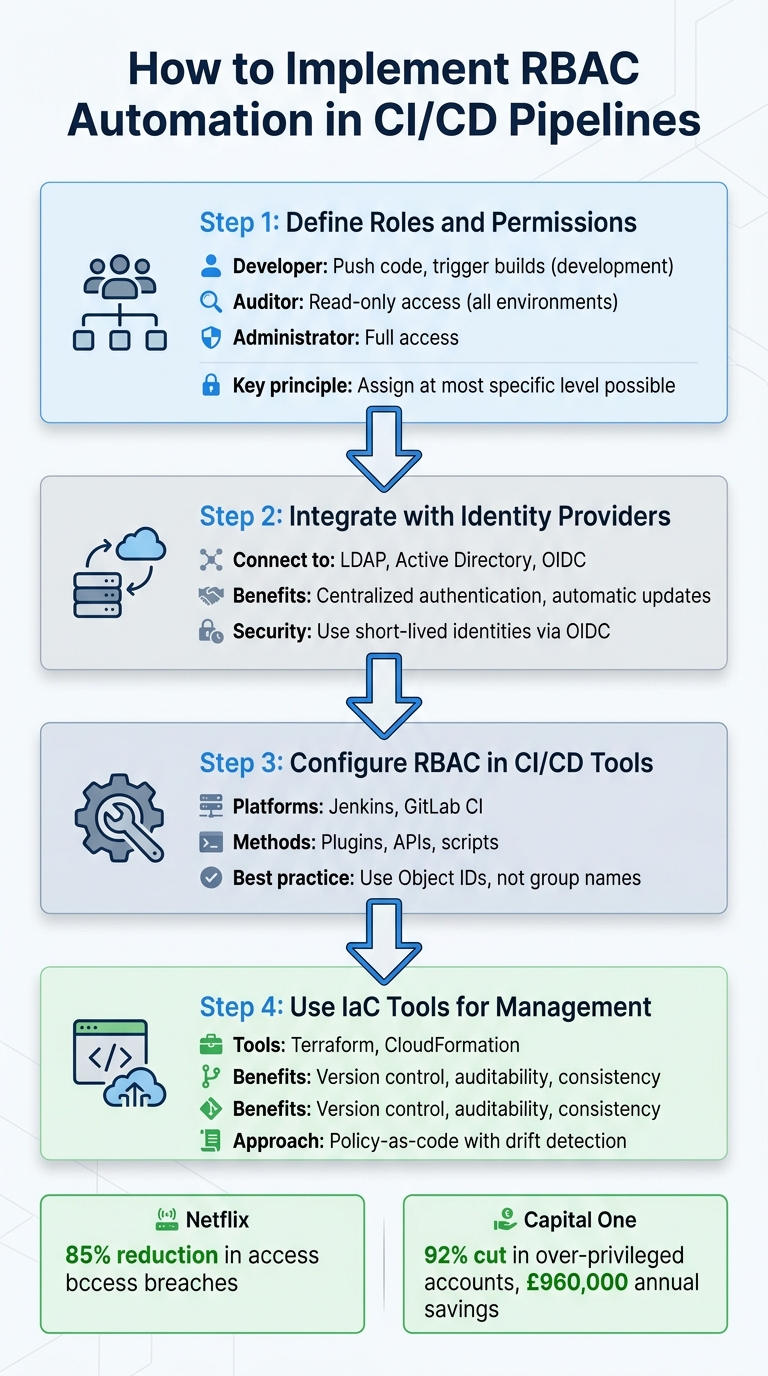 {4-Step RBAC Automation Implementation Process for CI/CD Pipelines}
:::
{4-Step RBAC Automation Implementation Process for CI/CD Pipelines}
:::
Automate Azure Role Based Access Control (RBAC) using Github
Need help optimizing your cloud costs?
Get expert advice on how to reduce your cloud expenses without sacrificing performance.
Setting Up RBAC Foundations
Before diving into automating Role-Based Access Control (RBAC), it's crucial to establish a solid foundation. Start by defining clear roles and linking them to your organisation's identity systems. This means mapping out who needs access to what resources and then building the necessary technical infrastructure to support these requirements.
Defining Roles and Permissions
Start by identifying distinct roles within your CI/CD workflow and grouping users based on their functions. For instance:
- A Developer might need permissions to push code and trigger builds in development environments.
- A Database Administrator (DB Administrator) would focus on database management tasks.
- An Auditor typically requires read-only access to compliance and billing data across all environments.
The key is to align these roles with the technical permissions they need. For example:
- Developers might require Contributor-level access at the resource group level, along with specific rights like
S3:PutObjectorEC2:StartInstances. - Administrators often need full access (*) at the subscription or management group level.
- Database administrators usually need granular, resource-specific permissions such as
DBDataAPIandDescribeDBInstancesfor their assigned databases.
To minimise risks, assign permissions at the most specific level possible. For example, developers should have access limited to resource groups, while auditors might work at the subscription level. This approach helps prevent accidental or unauthorised changes outside a role's intended scope.
Some CI/CD platforms, such as CloudBees CI, offer features like Role Filters. These filters allow permissions to be restricted to specific objects, such as folders, without inheriting permissions from parent objects. This creates isolated private
projects, ensuring only designated teams can access them [1].
Once roles and permissions are clearly defined, the next step is to integrate them seamlessly with your organisation's identity system.
Integrating with Identity Providers
The integration of defined roles with your organisation's identity system is essential for centralised and efficient management. By connecting to systems like LDAP, Active Directory, or OAuth providers, you can ensure that authentication is centralised. This also means that role assignments will automatically update as employees join new teams or leave the organisation, reducing the need for manual updates across multiple tools.
Modern CI/CD platforms often rely on OpenID Connect (OIDC) for authentication. This allows pipeline runners to use short-lived identities, effectively eliminating the risks associated with static credentials [3][4]. For example, when a GitLab runner deploys to AWS, it authenticates via OIDC and receives temporary credentials valid only for that deployment task.
To enhance security further, advanced setups leverage custom OIDC claims. These claims can restrict access to secrets based on specific criteria, such as Git branches or project IDs. For instance, using claims like oidc.circleci.com/vcs-ref, you can ensure that a pipeline running on a feature branch cannot access production secrets, even if it uses the same service account [3].
Additionally, some identity providers, such as Okta's Terraform provider, now support DPoP (Demonstrating Proof-of-Possession). This feature binds access tokens to a specific client cryptographically, reducing the risk of token replay attacks if credentials are intercepted [2]. These measures add layers of security, ensuring that your RBAC implementation is both efficient and resilient.
Implementing RBAC in CI/CD Tools
Once you've got a solid understanding of RBAC, the next step is configuring access controls within your CI/CD tools. While each platform has its own way of handling permissions, the core process is the same: define roles, assign them to users or groups, and stick to the principle of least privilege.
RBAC Configuration in Jenkins, GitLab CI, and Other Tools
Jenkins relies on the Role Strategy Plugin for detailed access control. This plugin supports three types of roles: Global roles (covering permissions across the entire system, like admin rights), Project roles (using regex patterns to match job names), and Agent roles (managing access to specific nodes) [5].
For instance, you can use naming conventions like dev.* to automatically assign permissions, which helps avoid misconfigurations - a problem reported by a third of organisations [5]. A good example is setting up a project role with the pattern dev.*, granting developers access to any job starting with dev
[5]. Research shows that most teams use between four and eight custom roles tailored to their internal structures [5]. This approach not only simplifies RBAC management but also lays the groundwork for policy automation via APIs.
GitLab CI takes a hierarchical approach, where permissions flow from the root group to sub-groups and down to individual projects. It comes with built-in roles like Guest, Reporter, Developer, and Maintainer, each offering different levels of access [7]. As GitLab experts James Wormwell, Paul Meresanu, and Kees Valkhof explain:
Security starts with structure. Building a scalable and secure development platform begins with getting the fundamentals right - especially role-based access control (RBAC)[7].
Both Jenkins and GitLab integrate with identity providers like Azure Active Directory, LDAP, or Keycloak through OIDC and SAML. For example, when connecting Jenkins to Azure AD, it's better to use Object IDs rather than group names for role assignments. This way, even if group names change, permissions remain unaffected [6]. In GitLab, connecting with Keycloak lets you map realm roles directly to GitLab access levels, and enabling SCIM ensures automated user provisioning and de-provisioning [7].
When using Jenkins with GitLab repositories, ensure Personal Access Tokens (PATs) are scoped to the minimum permissions needed. Instead of granting full API access, restrict tokens to specific scopes like read_repository [8]. This approach blends manual setup with automated workflows for a more streamlined process.
Using APIs and Scripts for Policy Management
Scaling RBAC across CI/CD tools often requires moving beyond manual setups to programmatic management. While manual configurations might work for smaller teams, APIs become crucial as your infrastructure grows. Both Jenkins and GitLab offer APIs to define and enforce RBAC policies through code.
For Kubernetes-based setups, you can automate permissions using ServiceAccounts and token management. Create a ServiceAccount with the required permissions, and then extract the token using:
kubectl get secret <name> -o jsonpath='{.data.token}' | base64 -d
This token can then be programmatically added to your CI/CD platform's secrets management system, removing the need for manual steps [9][14].
GitLab's Agent for Kubernetes simplifies this further. Once installed in your cluster, the agent securely provides a kubecontext to CI/CD jobs without storing long-lived tokens externally [10]. You can even use the access_as parameter in the agent's config.yaml file to ensure pipeline jobs run with the same permissions as the user or project that triggered them [10][11].
Additionally, the GitLab CLI (glab) streamlines kubeconfig creation for both local and pipeline access. When combined with API-driven management of protected environments, it can rotate credentials and audit access automatically, making it easier to maintain security at scale [11][12][13][14].
Automating Role Assignment and Permissions
Automating role assignments and permissions is a logical step to enhance the security of your CI/CD pipelines. As teams and infrastructures expand, manually managing Role-Based Access Control (RBAC) becomes both inefficient and error-prone. By automating this process through Infrastructure as Code (IaC), you minimise human error and ensure that every permission adjustment is both tracked and reviewed.
Using Infrastructure as Code (IaC) for RBAC
Defining RBAC through code brings structure and accountability. Permissions become version-controlled, auditable, and easy to replicate. As ITU Online highlights:
If access is not defined as code, it remains an ad hoc method that does not audit well.[16]
Tools like Terraform and CloudFormation allow you to define roles and permissions in configuration files stored alongside your application code. For instance, you can create Terraform child modules to encapsulate IAM roles and policies. These modules can then be reused across environments by using variable files such as dev.tfvars or production.tfvars. This modular strategy ensures your RBAC setup is consistent across all environments.
In Kubernetes environments, GitOps tools like Argo CD or Flux can synchronise RBAC manifests (e.g., Roles and RoleBindings) directly from Git repositories to your clusters. Changes to permissions are made via pull requests, enabling team reviews. Before deploying, validate your configurations using tools like terraform plan, AWS IAM Policy Simulator, or argocd admin settings rbac validate to catch potential issues early.
When configuring ServiceAccounts for CI/CD tools, bind them to specific Roles rather than broader ClusterRoles. For ServiceAccounts that don’t require direct API access, set automountServiceAccountToken: false to reduce the risk of credential misuse. Avoid using wildcards (*) in policies - be explicit about actions and resources.
For Azure, specific limits like 4,000 role assignments per subscription and 500 per management group mean it's better to assign roles to groups rather than individual users. Additionally, employing Just-In-Time (JIT) access ensures that elevated permissions are temporary and automatically expire after a set period.
By adopting these IaC practices, you can ensure that your RBAC policies evolve alongside your environments without losing consistency.
Maintaining Consistency with Automation
Once RBAC is defined through IaC, the next challenge is maintaining consistency. Manual changes that bypass coded policies can lead to configuration drift, which must be detected and corrected promptly. Automated role assignments can help recover quickly from such discrepancies. Setting up drift detection ensures that RBAC rules remain aligned with your source of truth. Tools like Amazon EventBridge can monitor for unauthorised manual changes and trigger workflows to restore permissions to their approved state [15][16].
SCIM (System for Cross-domain Identity Management) simplifies synchronisation between your Identity Provider (e.g., Okta or Microsoft Entra ID) and cloud platforms. When team members join or leave, SCIM automatically updates their access across all connected systems, eliminating orphaned accounts and ensuring permissions match the current team structure.
Using environment-specific files can further refine access levels - for example, granting contributor access in development but restricting it to read-only in production. To avoid unexpected issues during automated updates, pin your provider versions in Terraform. Additionally, schedule regular CI/CD plan
checks to identify and resolve drift before it impacts security [16].
Securing CI/CD Pipelines with RBAC Best Practices
Protecting your CI/CD pipelines requires careful planning to minimise vulnerabilities and ensure accountability. By focusing on environment segmentation and applying the least privilege principle, you can create a strong security framework. Adding continuous monitoring ensures these safeguards stay effective. Let’s explore how isolating environments and limiting permissions can enhance your pipeline's protection.
Environment Segmentation and Least Privilege
Keeping development, staging, and production environments separate is a must. Each should have its own infrastructure boundaries - whether that’s through separate cloud accounts, Virtual Private Clouds (VPCs), or Kubernetes namespaces. This isolation ensures that if one environment is compromised, it won’t affect the others, particularly critical production data.
The least privilege principle ensures that users and service accounts only have the permissions they absolutely need. For instance, instead of granting broad permissions with wildcards (*), use specific actions like patch or update. Limit access to specific resources rather than providing access to entire namespaces. In Kubernetes, it’s better to use RoleBindings within a namespace rather than ClusterRoleBindings, which apply cluster-wide. Additionally, block high-risk actions such as escalate, bind, and impersonate, as they can bypass RBAC restrictions.
For Kubernetes pods, disable automountServiceAccountToken unless API access is necessary - this prevents token theft. Adopt a deny by default
approach, where access is blocked unless explicitly allowed. Regularly review permissions, ideally every 90 days, to remove unused accounts and prevent privilege creep.
Auditing and Monitoring RBAC Policies
Once your RBAC policies are in place, regular auditing and monitoring help maintain their integrity. Tools like conftest with Open Policy Agent (OPA) can validate RBAC configurations in your CI pipeline, flagging risky permissions like wildcards before deployment. Use tools such as kube-bench or Kubescape to assess compliance with CIS benchmarks and uncover misconfigurations early.
Set up a Kubernetes CronJob to run weekly checks for overly permissive roles, such as cluster-admin, and send alerts to your security team. Export Kubernetes audit logs and CI/CD activity logs to an off-cluster system like Splunk or the ELK stack for forensic analysis. Centralised logging ensures that even if an attacker gains access to a cluster, the audit trail remains intact.
Finally, managing RBAC through GitOps adds another layer of accountability. Every change to Roles or RoleBindings is peer-reviewed via pull requests and tracked in version control. This not only strengthens security but also provides a clear audit trail for compliance purposes.
Conclusion
Incorporating RBAC automation into CI/CD pipelines can transform how organisations manage access control and deployment security. By setting well-defined roles and permissions, adopting policy-as-code, and enforcing least privilege principles across environments, teams can establish a security framework that grows alongside their operations. The benefits are tangible - teams have reported a 60% drop in access-related incidents and a 40% reduction in deployment times [web:2].
The results speak for themselves. For instance, Netflix introduced RBAC automation in Q1 2024 using Spinnaker, Terraform for policy-as-code, and Okta for identity management. With this approach, they reduced unauthorised access attempts by 85%, cut deployment review times by over 80%, and maintained zero privilege escalations in production for six months. This initiative, led by Principal Security Engineer Priya Patel, demonstrates the effectiveness of these measures [web:4]. Similarly, Capital One automated RBAC in their GitHub Actions and Jenkins pipelines in late 2023. The outcome? A 92% reduction in over-privileged service accounts (from 450 to 36), 55% faster audit cycles, and £960,000 in annual savings from reduced breach risks [web:5].
To get started, audit your pipeline permissions to identify over-privileged accounts and gaps. Test automation in a staging environment to validate policies before rolling them out more widely. Continuous monitoring is essential to ensure policy integrity as your infrastructure evolves.
Looking ahead, policy-as-code adoption is expected to grow, with 68% of enterprises planning to integrate it by 2025 [web:3]. Combining RBAC automation with GitOps workflows ensures that all access changes are peer-reviewed and version-controlled, enhancing both security and traceability. For organisations undergoing DevOps transformations, Hokstad Consulting offers expertise in implementing automated access controls alongside infrastructure improvements, helping to cut deployment cycles by 30-50% while maintaining strong security across hybrid environments. By embracing RBAC automation, organisations can secure their CI/CD pipelines while streamlining their operations.
FAQs
What’s the quickest way to audit and fix over-privileged CI/CD accounts?
The quickest way to handle over-privileged CI/CD accounts is by combining consistent permission reviews with automated auditing. Here's how you can approach it:
- Conduct regular permission reviews: This helps identify and strip away any unnecessary privileges that may have been granted.
- Automate role management: Use tools to enforce the principle of least privilege, ensuring accounts only have access to what they genuinely need.
- Leverage audit tools: Tools like Kubernetes logs or policy frameworks can help you monitor configurations and spot potential issues.
By blending manual oversight with automation, you can maintain secure and well-regulated CI/CD pipelines.
How do I use OIDC to remove long-lived secrets from my pipeline jobs?
By leveraging OpenID Connect (OIDC), you can swap out long-lasting secrets for short-lived, dynamically generated credentials. This approach enhances security by allowing your CI/CD pipelines to authenticate with cloud providers or external systems without the need to store static secrets. For instance, tools like CircleCI, GitHub Actions, and Azure Pipelines support OIDC integration. This enables jobs to request temporary identity tokens that are validated by cloud providers and automatically expire once the job is finished, reducing the risk of exposure.
How can I detect and automatically roll back RBAC configuration drift?
To keep RBAC configurations consistent, it's essential to use continuous monitoring and automated remediation workflows. Tools like terraform plan, Puppet, or AWS Config Rules can perform regular scans to spot any deviations from the intended settings. If drift is detected, automation - using tools like Lambda functions or Terraform - can quickly revert policies back to their original state. By pairing frequent audits with automated detection and correction, you can maintain both security and compliance throughout your CI/CD pipelines.