
Deleting vectors does not immediately free disk space. Compaction reclaims space by moving live records into replacement segments and retiring old ones. Unlike compression, it removes obsolete data rather than reducing vector precision.
Safe compaction needs more than a start command:
- Before: Record disk usage, latency and RAG results. Check version support, test recovery and reserve enough space on every replica.
- During: Use supported controls and monitor resource use, ingestion and p95/p99 query latency against agreed limits.
- After: Confirm that old files have been released, indexes are ready and fixed RAG tests still pass - including 100% exclusion of stale content.
There is no fixed savings percentage or free-space rule. Results depend on obsolete data, segment layout and retained files. Set the schedule by update volume and disk-space trends - not calendar dates alone.
::: @figure 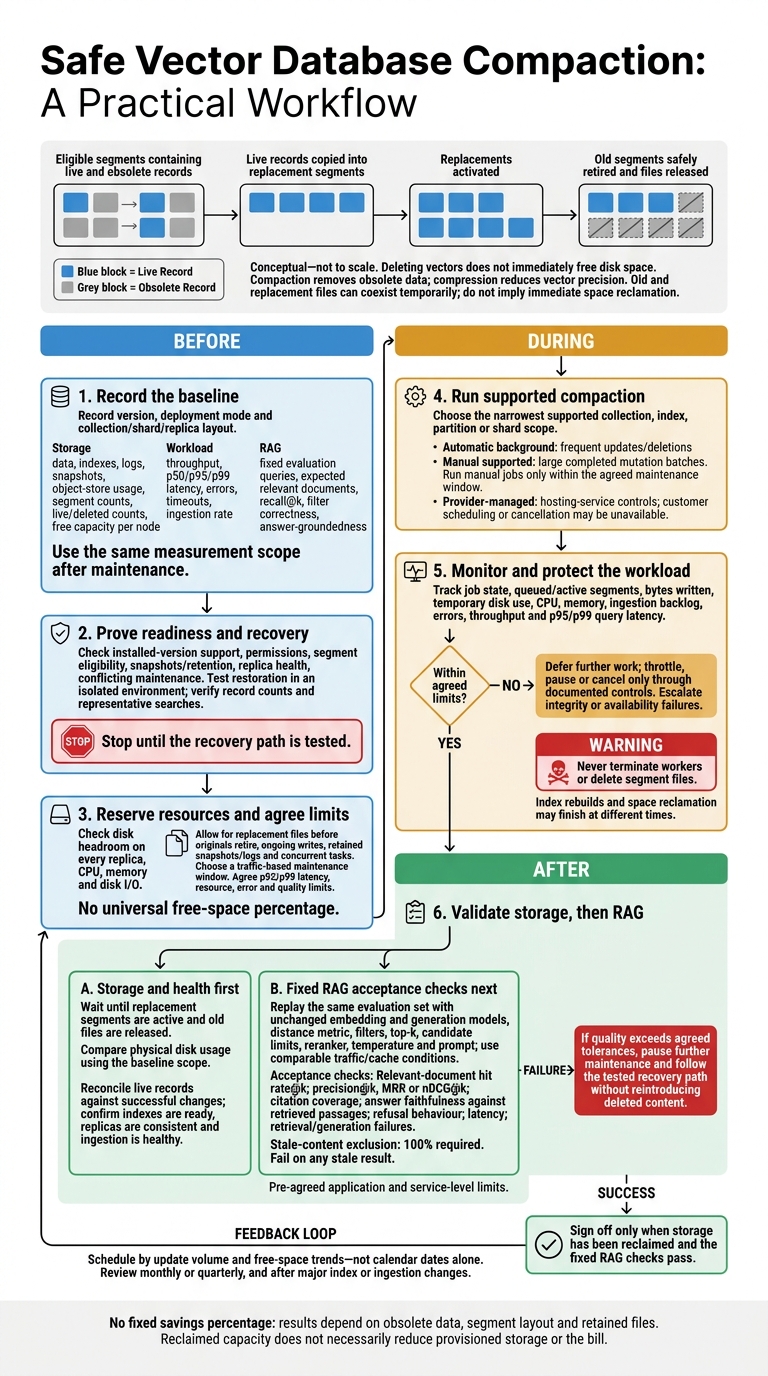 {Vector Database Compaction: Safe Storage Reclamation}
:::
Check readiness and record baseline metrics
Record the database version, deployment mode, storage backend and collection/shard/replica layout. Measure storage by database and collection, covering data, indexes, logs, snapshots and object-store usage. Also record segment counts and sizes, live and deleted record counts where available, and free capacity on each node. Use the same measurement scope after maintenance to compare storage savings and RAG quality after compaction.
Measure query throughput, p50/p95/p99 latency, errors, timeouts and ingestion rate during typical busy and quiet periods. Save a fixed RAG test set, including the expected relevant documents, to benchmark recall and grounded answers after compaction. Keep the embedding model, distance metric, top-k, candidate limits and reranker settings unchanged. Record recall@k, filter correctness and answer-groundedness.
Check eligibility and recovery safeguards
Record the baselines before checking recovery and capacity. Confirm whether the deployment supports automatic, scheduled or manual compaction. Check its scope, required permissions, and controls for viewing status or cancelling a run. Follow the documentation for the installed version, rather than assuming another deployment works the same way.
| Check | Why it matters | Evidence | Action if it fails |
|---|---|---|---|
| Version and supported process | Controls vary by version and deployment mode | Configuration export, documented command or API, and operator permissions | Stop; confirm the supported procedure |
| Segment eligibility | Thresholds and exclusions can prevent useful work | Deleted fraction, segment size, collection state, flush status and pending index builds | Wait for eligibility or use documented settings |
| Backup scope and restoration | Having a backup does not prove you can recover | Backup identifier, retention period, covered data/configuration, restore steps and restore-test results | Stop until recovery is tested |
| Snapshots and retention | Snapshots can prevent old files from being retired | Active snapshots, exports, retention locks and object-store lifecycle rules | Resolve conflicts; confirm when old files can be retired |
| Replicas and other maintenance | Lag or competing jobs can make the run unsafe | Replica health, replication queues, imports, migrations and reindexing status | Reschedule until replicas are healthy and conflicts are cleared |
Test restoration in an isolated environment, then check record counts and representative searches. Verify whether the backup includes vectors, payloads, schema, index configuration, aliases and access settings. If anything is missing, confirm the separate recovery steps. Record the restore time and rollback decision. Stop until the recovery path is tested. Use these checks to decide whether the run can start safely.
Reserve resources and set a maintenance window
Choose a window based on actual query and ingestion traffic, including batch jobs and downstream RAG demand. Do not apply a universal free-space percentage. Check every replica separately: cluster-wide free space can hide a full node.[5]
| Resource or risk | Required check | Mitigation |
|---|---|---|
| Disk headroom | Follow documented rebuild requirements, allowing for concurrent tasks, replacement files before originals retire, writes during the run, retained snapshots and logs, and each replica’s rebuild needs | Expand storage, reduce concurrent work or postpone |
| CPU | Check sustained load and cores available for merging and index rebuilding | Limit workers or use a quieter window |
| Memory | Compare working-space requirements with node and container limits | Reduce concurrency or increase memory |
| Disk I/O | Check throughput, IOPS, queue depth and storage latency, including object-store traffic | Use supported throttling or move the window |
| Query latency | Set p95/p99 limits against the baseline and service-level objectives | Throttle or pause through supported controls |
| Execution risks | Confirm restart, cancellation and temporary-file clean-up behaviour | Test in staging, avoid overlapping maintenance and retain recovery capacity |
Apply the same thresholds throughout the run when deciding whether to continue or stop.
Schedule and run supported compaction
Work through scope, readiness, limits, execution and validation, in that order. Set stop limits using the readiness-check baseline. Run compaction when updates and deletions have left enough obsolete data to justify the work.
Identify the collection, index, partition or shard in scope. Use the recorded version, deployment mode and provider to select a supported command or API, then target the narrowest supported scope.
Choose automatic or manual compaction
Use supported background automation for regular updates and deletions when resource use stays within limits. Reserve manual runs for large, completed batches that meet the documented eligibility rules, or for a maintenance window.
For self-managed runs, apply the agreed concurrency limits, resource ceilings, temporary disk space allowance and acceptable increase in latency. For provider-managed runs, use the hosting service’s maintenance controls. Customer options to trigger, schedule or cancel a run may not be available.[6][7][3]
| Approach | Availability | Scheduling control | Operator effort | Suitable workloads |
|---|---|---|---|---|
| Automatic background | Depends on version and deployment | Thresholds or intervals; settings vary | Low after setup, with monitoring | Frequent updates and deletions |
| Manual supported | Requires a documented operation | Customer-selected window and supported scope | Checks, execution and validation | Large completed mutation batches |
| Provider-managed | Controlled by the hosting service | May offer no customer schedule | Monitor and escalate through support | Managed deployments |
Run manual jobs only within the agreed maintenance window.
Monitor progress and define when to stop
Compaction reads live records from eligible segments, writes replacement segments, activates them and retires the old ones. Index rebuilds and space reclamation may finish at different times.
Track job state, queued and active segments, bytes written, temporary disk use, CPU, memory, ingestion backlog, error counts, query throughput and p95/p99 query latency against the agreed limits.
Defer further work as those limits approach. Use only documented controls to throttle, pause or cancel a run. Stop when resource use threatens safe segment retirement or query quality. Never terminate workers or delete segment files. Escalate integrity errors, repeated retries, replication failures, corrupted-segment messages or availability breaches to the platform operator.
Hand over only after completion is confirmed, queued work is accounted for, obsolete segments are safely retired and the collection is healthy. Pass the job ID, timestamps and storage figures to validation.
Verify reclaimed storage and RAG quality
Measure storage savings and database health
Once the run finishes, check storage first, then repeat the RAG checks.
Wait until replacement segments are active and old files have been released before comparing readings. Reclaimed capacity does not necessarily mean less provisioned storage or a smaller bill. Volumes, snapshots and replicas change on different schedules.[12][4]
| Metric | Baseline | Post-compaction value | Expected direction | Remediation |
|---|---|---|---|---|
| Physical disk usage | Recorded used GB | Used GB after garbage collection | Down | Check retention, snapshots, replicas and files outside compaction scope |
| Segment count | Recorded count | New count | Usually down or stable; not guaranteed | Investigate only if health or performance worsens |
| Live record count | Recorded live total | Reconciled live total | Match expected changes | Reconcile successful inserts, updates, deletions and failed writes |
| Deleted-record count | Recorded tombstones | Near zero for eligible data | Down | Check deletion propagation and retention policies |
| Query latency | Recorded p50/p95/p99 | Same query mix and concurrency | Stable or improved | Check index readiness and resource contention |
| Throughput | Recorded queries/s | Same load | Stable or improved | Check throttling, background work and queue depth |
| Index readiness | Ready | Ready | Remain ready | Do not declare success while replacement indexes are building |
| Ingestion health | Recorded success rate | Equal or better | Stable | Review write errors, back-pressure and rejected batches |
Reconcile live counts against the change ledger. Check that indexes are ready, replicas are consistent and ingestion is succeeding without increased errors or back-pressure. If storage savings are small, record compaction status, segment ownership, retention settings and the storage breakdown before escalating.[11][4]
Run RAG acceptance checks with fixed settings
If storage and health checks pass, replay the baseline RAG set without changing the settings. Keep the same evaluation queries, embedding and generation models, distance metric, filters, top-k, reranker, temperature and prompt. Traffic and cache-warming conditions should also be comparable.
Use a stable dataset where possible. If data changes during testing, record concurrent inserts, updates and deletions. Then replay equivalent changes or exclude affected queries. Save retrieved IDs and scores alongside the answers.
| Metric | Baseline | Result | Tolerance | Decision |
|---|---|---|---|---|
| Relevant-document hit rate@k | Baseline query-set score | Post-run score | Agreed maximum decline | Investigate missing relevant documents |
| Precision@k, MRR or nDCG@k | Labelled-query scores | Same labelled-query scores | Pre-agreed ranking tolerance | Investigate irrelevant context or ranking drift |
| Stale-content exclusion | Baseline stale-content checks | Post-run stale-content checks | 100% exclusion required | Fail on any stale result |
| Citation coverage | Claims with valid supporting citations | Same assessment | Application requirement | Fail if required support is missing |
| Answer faithfulness | Supported material claims | Same assessment | Agreed quality threshold | Investigate unsupported claims |
| Refusal behaviour | Unanswerable-query outcomes | Same test outcomes | Required refusals or qualifications preserved | Fail unsafe answers |
| Retrieval and answer latency | Baseline percentiles | Post-run percentiles | Service-level limits | Investigate breaches |
| Retrieval/generation failures | Baseline failure rates | Post-run failure rates | Agreed error limits | Escalate breaches |
Check faithfulness against retrieved passages, not how convincing an answer sounds. Include queries with no answer, contradictory evidence and only superseded content.
A healthy database can still return worse approximate-search results after compaction. Investigate changed IDs and scores, using exact or higher-recall search where supported. If quality drops beyond tolerance, pause further maintenance and follow the agreed recovery path without reintroducing deleted content. Retain settings, dataset versions, results, decisions and timestamps in UK date format.[8][9][10][11]
Conclusion: Set a measured compaction schedule
Use the validation results to set the next maintenance window. Sign off only when storage has been reclaimed and the fixed RAG checks pass.
Assign one owner for maintenance, one technical deputy and one RAG-quality owner. Before each run, record storage targets, latency and error limits, retrieval tolerances, and who can approve a pause or recovery.
Base the schedule on update volume and free-space trends, not the calendar. Review it monthly or quarterly, and after major index or ingestion changes. Run compaction more often when obsolete data builds up or headroom shrinks. Run it less often when it reclaims little space and has a measurable impact on the workload.
For production RAG planning and implementation support, Hokstad Consulting helps teams define how supported maintenance is managed and carried out.
FAQs
How can I estimate whether compaction is worth running?
Check tombstone ratios, fragmentation and retrieval recall against your performance and storage thresholds. Don’t rely on automated triggers alone: assess whether these issues affect search latency or result quality enough to warrant action [1].
Compare the cost and impact of compaction with repairing individual records or rebuilding the full index. Before considering a rebuild, check whether compaction restores performance. Include maintenance costs in your index management budget in pounds sterling, alongside service-level agreements [1].
How can I compact safely during continuous ingestion?
If generation management is available, write replacement chunks as a pending generation and verify them before making them visible and retiring the previous version. Measure the delay between a source change and its availability in search: writes may not be searchable straight away.
Make retries idempotent and reject stale events by recording event IDs and applied source versions. Reconcile against an authoritative source snapshot to find orphaned chunks or missed events. Deletion tombstones often need later compaction to reclaim space.
Why might compaction change my RAG retrieval results?
Compaction merges index segments and can change when updates or deletions to chunks become visible. If deletions or index changes are handled inconsistently, stale or superseded chunks may remain searchable, affecting recall and ranking. Compaction can also expose existing issues, including duplicates, mixed index versions or permissions drift.
Validate retrieval before and after compaction using versioned queries, and check for deleted or superseded content [1][2].