
Immutable infrastructure replaces live server updates with pre-tested, version-controlled images to ensure reliable deployments with zero downtime. Instead of updating servers directly, new instances are created, validated, and swapped seamlessly, preventing issues like configuration drift and untracked changes. This approach eliminates risks tied to traditional server management, such as outages during updates or inconsistent environments.
Key Benefits:
- Zero Downtime: New servers are tested before traffic is redirected, ensuring uninterrupted service.
- Simplified Rollbacks: Reverting to a previous state is as easy as switching traffic back to older instances.
- Improved Security: No manual changes mean all systems remain consistent and traceable.
- Cost Efficiency: Automation reduces resource wastage and troubleshooting time.
- Scalability: Easily handle traffic spikes by provisioning identical servers on demand.
By separating data storage from application servers, this method ensures resilience and faster recovery during failures. Tools like Packer, Terraform, and Kubernetes streamline the process, while deployment strategies like blue-green or rolling updates further enhance reliability. Many organisations report up to 75% fewer outages and 40% faster deployments by adopting this model. Transitioning requires a shift in mindset but delivers predictable, repeatable, and efficient results.
Immutable Infrastructure Explained With Best Practices
What is Immutable Infrastructure?
Immutable infrastructure means treating deployed servers and components as unchangeable. Instead of modifying systems already in use, you replace the entire server with a new, pre-configured version. The old instance is retired, and the new one takes over seamlessly. This approach represents a significant departure from traditional methods, which we'll delve into shortly.
Unlike mutable infrastructure - where engineers might log into production servers to make live changes - immutability avoids such practices. While making quick adjustments directly on servers might seem convenient, it often leads to unrecorded changes. Over time, these tweaks create snowflake servers
, which are unique setups that can't be easily replicated. When issues arise, troubleshooting becomes challenging because the exact changes made are unclear.
Immutable infrastructure tackles this by following a strict replace, don't update
philosophy. Any change - be it a security patch, configuration tweak, or new feature - is handled by creating a fresh, version-controlled image. Once tested and verified, this image is deployed as a whole. Since no modifications occur after deployment, configuration drift is avoided entirely.
One key consideration with this approach is that persistent data must be stored elsewhere. Databases, logs, and user uploads are kept in external systems, such as managed cloud databases or block storage. This allows application servers to be replaced without risking data loss. Keeping the application layer stateless and separating it from the data layer is essential for immutability to work effectively.
Key Characteristics of Immutable Infrastructure
Immutable infrastructure relies on deploying pre-built images. Tools like Packer and Docker play a central role in creating golden images
or containers. These images bundle everything needed - operating system, application code, and dependencies - into a single, versioned artefact. Before deployment, these images are rigorously tested to ensure reliability.
Deployments are atomic, meaning updates are applied as a complete package. New instances are created, validated, and tested before they take over production traffic. If anything goes wrong, the old environment remains unaffected. This process is heavily automated using Infrastructure as Code (IaC) tools like Terraform or Pulumi, which manage provisioning, while CI/CD pipelines handle image building, testing, and deployment. This automation reduces manual work and lowers the risk of human error.
To prevent configuration drift, direct access to servers is restricted or entirely disabled. Engineers can't log in to make quick fixes that bypass the version-controlled image pipeline. This strict approach ensures that every deployment is documented and reproducible.
These principles directly address the risks associated with mutable infrastructure.
Problems with Mutable Infrastructure
Mutable infrastructure often leads to configuration drift. When engineers patch systems, adjust configurations, or deploy code directly to live servers, these changes may not be documented. Over time, production environments can diverge from staging or development setups, making it harder to replicate issues or roll out updates confidently.
This drift creates inconsistencies between environments. A bug that doesn't appear during testing might emerge in production because the two setups no longer match. Debugging such issues becomes guesswork, and rolling back to a stable state can be risky without a clear reference point.
Additionally, applying updates directly to live systems increases downtime risks. If an update fails halfway through, it can leave systems in a broken or partially updated state. Recovering from such situations often requires significant manual intervention, leading to extended outages, potential revenue loss, and a hit to customer trust.
| Feature | Mutable Infrastructure | Immutable Infrastructure |
|---|---|---|
| Update Process | Manual, in-place patches/updates | Deploy complete new instances |
| Configuration Drift | High risk; servers become unique | Eliminated; all servers are identical |
| Rollback | Complex, manual, and risky | Simple; redeploy a previous image |
| Security | Vulnerable to untracked changes | Consistently clean and verified |
| Deployment | Incremental | Atomic – fully succeeds or fails |
| Analogy | Uniquely maintained servers |
Cattle(disposable, easily replaced) |
Shifting to immutable infrastructure requires a new mindset for managing servers. However, by replacing servers with every update, this method ensures deployments are predictable, repeatable, and reliable.
How Immutable Infrastructure Enables Zero Downtime
The concept of immutable infrastructure ensures zero downtime by keeping old and new instances entirely separate during deployments. When new, fully tested instances are provisioned, the production environment continues running without interruption. Only after the new instances are validated does traffic get redirected. This method avoids the partial failures often seen with traditional in-place updates.
One major advantage of this approach is that the previous environment remains active throughout the deployment process. This allows teams to monitor system performance in real-world conditions. Organisations using these strategies report 75% fewer configuration-related outages and 40% faster deployment cycles [5]. The key lies in treating deployments as all-or-nothing operations - either they succeed entirely, or they fail without impacting production.
This method also shines during unexpected events, such as traffic surges during Black Friday or viral campaigns. Immutable infrastructure enables rapid horizontal scaling by allowing dozens of identical instances to be provisioned within minutes. Since every server originates from the same versioned template, they behave consistently. Load balancers then distribute traffic evenly, ensuring no single server gets overwhelmed. This seamless scaling sets the stage for robust rollback procedures, covered in the next section.
Atomic Deployments and Rollbacks
Atomic deployments involve updating the entire system or reverting it entirely. Each new instance is based on a version-controlled image and undergoes rigorous automated health checks before handling live traffic. These checks ensure application responsiveness, database connectivity, and API functionality. Only after passing every test does the load balancer route traffic to the new environment.
If a health check fails, the deployment stops immediately. The old environment remains untouched, continuing to handle all traffic as if nothing happened. This is a stark contrast to in-place updates, where a failed patch can leave systems in a broken state, requiring manual fixes. With immutable infrastructure, rolling back is as simple as redirecting traffic to the old instances - no emergency patches or extended downtime needed. Organisations using this model report 85% faster rollback times and 60% fewer deployment-related incidents [5].
The principle of never SSH into production
reinforces this reliability. Manual changes are avoided entirely, ensuring every deployment follows the same tested process. If debugging is needed, a new instance can be deployed with diagnostic tools, or centralised logging can be used - without ever altering live servers [2].
Blue-Green and Rolling Deployments
Building on atomic deployments, blue-green and rolling deployment strategies further ensure uninterrupted service. In a blue-green deployment, two identical environments are maintained. The Blue
environment runs the current production version, while the Green
environment hosts the new release. Initially, only Blue receives traffic. Once Green passes all health checks, the load balancer switches traffic over in a single step.
This setup allows for near-instant rollbacks. If issues arise after the switch, traffic can be redirected back to Blue in seconds. Salesforce, for example, used this strategy during their transition to the Hyperforce
architecture in December 2024. By adopting an immutable model with AWS EC2 and Kubernetes, they implemented blue-green and canary deployments. This allowed them to route small portions of traffic to new instances first, catching regressions early while maintaining high availability across their global operations [6].
Rolling updates offer another approach, especially useful for environments with multiple instances. Tools like Kubernetes replace old instances gradually, ensuring a minimum number of healthy servers remain available throughout the process. For example, in a setup with ten instances, the orchestrator might replace two at a time, waiting for health checks to pass before proceeding. This gradual replacement ensures users experience no service interruptions, even during lengthy deployments.
| Strategy | Mechanism | Best For |
|---|---|---|
| Blue-Green | Full fleet deployed in parallel; traffic switched at once | Rapid cutovers and instant rollbacks [3] |
| Rolling Updates | Gradual replacement of instances | Minimising resource usage during deployment |
| Canary | Small traffic slice sent to new version first | Testing new features with minimal risk [4] |
Both strategies depend on separating persistent data from application servers. Databases, user sessions, and uploaded files should reside in external services like managed cloud databases or object storage. This separation ensures that application servers can be destroyed and recreated without risking data loss, as the new instances simply reconnect to the same external data sources.
Implementation Process: Steps to Adopt Immutable Infrastructure
::: @figure 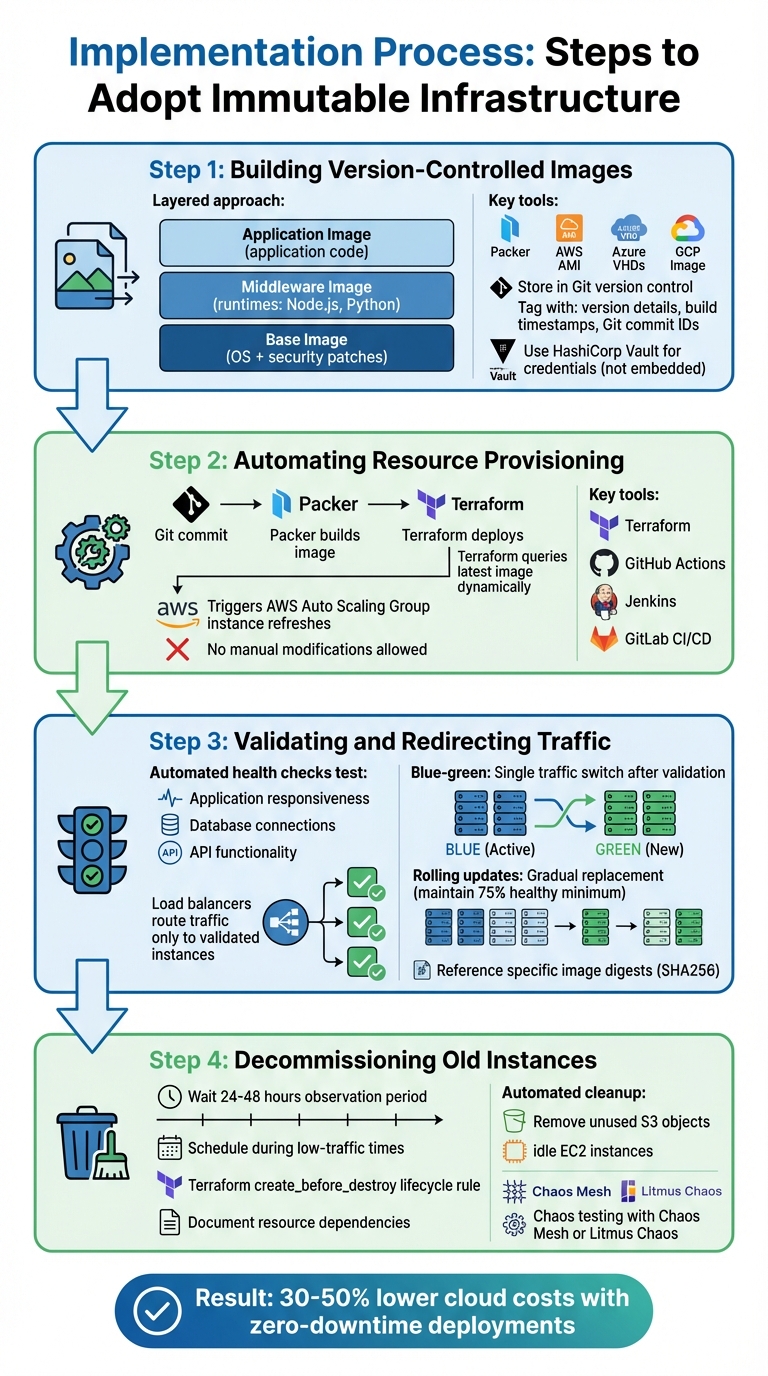 {4-Step Implementation Process for Immutable Infrastructure Deployment}
:::
{4-Step Implementation Process for Immutable Infrastructure Deployment}
:::
Adopting immutable infrastructure involves a structured, automated approach that ensures consistency and reduces manual intervention. This process starts with creating version-controlled images and concludes with the safe decommissioning of outdated resources. By automating provisioning and optimising resource usage, organisations can lower cloud costs by 30–50% while achieving the reliability needed for zero-downtime operations.
Step 1: Building Version-Controlled Images
The foundation of immutable infrastructure lies in creating pre-tested, version-controlled images that act as templates for deployments. Tools like Packer by HashiCorp automate this process, from launching a temporary instance to installing software and capturing the final image. These images - whether AWS AMIs, Azure VHDs, or GCP images - are stored alongside configuration files in version control systems like Git.
A layered approach can streamline the building process:
- Base Image: Includes operating system hardening and security patches.
- Middleware Image: Adds runtimes like Node.js or Python.
- Application Image: Contains the specific application code.
By updating only modified layers, rebuild times are significantly reduced. Version control tracks all changes to Packer templates, enabling teams to audit changes and roll back if necessary. This traceability is invaluable for debugging and compliance.
Automation and version control are fundamental to building and managing this approach.- Rohan Timalsina [7]
To ensure security, tag images with version details, build timestamps, and Git commit IDs. Avoid embedding sensitive information directly in images; instead, use tools like HashiCorp Vault to inject credentials at startup. For containers, multi-stage Dockerfiles can help ensure only essential runtime components are included, reducing both costs and potential vulnerabilities.
With robust images ready, the next phase focuses on automated deployment.
Step 2: Automating Resource Provisioning
After creating the images, automation tools take over to deploy them without manual input. Terraform, for example, dynamically queries the latest Packer-built image using data sources
, avoiding the need for hardcoded image IDs. Terraform can trigger rolling updates, such as AWS Auto Scaling Group (ASG) instance refreshes
, to replace old instances seamlessly [8][9][2].
CI/CD platforms like GitHub Actions, Jenkins, or GitLab CI/CD integrate these workflows. A Git commit can trigger Packer to build a new image, which is then stored in an artefact repository. Terraform applies the changes automatically, ensuring deployments follow the same tested process every time.
If debugging is required, spin up a new instance with diagnostic tools or rely on centralised logging. However, never modify a running server - this discipline ensures every instance remains consistent with its versioned image.
Step 3: Validating and Redirecting Traffic
Once resources are provisioned, it's crucial to validate their functionality before routing live traffic. Automated health checks confirm that the new instances are fully operational by testing application responsiveness, database connections, and API functionality. Load balancers monitor these health endpoints and only route traffic to instances that pass consistently.
In blue-green deployments, the load balancer shifts traffic from the old environment to the new one in a single step - only after validation confirms readiness. For rolling updates, tools like Kubernetes handle gradual replacements, ensuring a minimum number of healthy servers remain operational. Parameters like a minimum healthy percentage (e.g., 75%) and an instance warmup period help maintain stability during the transition.
When working with containers, always reference specific image digests (e.g., SHA256) instead of generic tags like latest
[2].
Step 4: Decommissioning Old Instances
Decommissioning outdated instances is the final step, carried out only after the new environment has proven stable under real-world traffic. Typically, this observation period lasts 24–48 hours, with decommissioning scheduled during low-traffic times to catch any issues missed during automated testing.
Terraform's create_before_destroy lifecycle rule ensures new resources are fully functional before removing old ones, avoiding service gaps. Detailed records of resource dependencies, such as database connections or storage buckets, help prevent disruptions to linked services.
Automated cleanup processes can identify and remove unused resources, such as old S3 objects or idle EC2 instances, reducing unnecessary costs. Chaos testing tools like Chaos Mesh or Litmus Chaos simulate failures to verify the system's ability to recover or roll back, ensuring confidence in the decommissioning process.
Benefits Beyond Zero Downtime
Immutable infrastructure offers more than just zero downtime - it brings consistency, security, and faster deployments to the table. The predictability it provides is a game-changer: the same versioned image moves seamlessly from development to production, completely sidestepping the dreaded it worked on my machine
problem[10][12].
By eliminating the need for risky manual changes, these systems also bolster security[10][1]. If a security vulnerability is discovered, you can quickly revert to a previously secure state by swapping images, avoiding the complexities of trying to undo
live server modifications[10][1].
Recovery times shrink dramatically too. Instead of spending hours troubleshooting, you can redeploy a verified build in just minutes[10]. This shifts incident management from reactive problem-solving to proactive, automated replacements, redefining how production issues are resolved.
The next sections explore how these advantages reshape CI/CD pipelines and help cut costs.
Improving CI/CD Pipelines
Immutable infrastructure revolutionises CI/CD workflows by ensuring consistency across all stages. Each image, identified by its SHA256 digest, progresses automatically from testing to production[2]. This guarantees that whatever passes your tests is exactly what goes live in production.
The bake, don’t fry
approach fits perfectly with DevOps methodologies[12]. Instead of deploying raw code and configuring servers post-deployment, you pre-build fully configured machine images. Tools like GitHub Actions, Jenkins, or GitLab CI/CD can trigger Packer to create these images upon code commits, with Terraform handling provisioning afterwards. This automation removes manual steps, which are often where errors creep in.
Security and compliance also benefit from this setup. Tools like Open Policy Agent (OPA) can enforce policies programmatically during deployment, while pre-commit hooks catch issues like hardcoded secrets or API keys before they even enter your pipeline. Kostis Kapelonis, Senior Developer Evangelist at Octopus Deploy, highlights this point:
Use pre-commit hooks for early security checks... This allows static analysis, secret scanning, and code linting to catch issues before code even reaches the CI/CD pipeline, reducing vulnerabilities at the earliest stage.
This level of consistency doesn’t just enhance security - it also supports zero-downtime deployments by ensuring releases are reliable and predictable.
Cost Optimisation and Resource Efficiency
Immutable infrastructure also shines when it comes to cutting costs and improving resource use. Automated clean-up routines handle unused resources - like old AMIs, orphaned snapshots, idle instances, or forgotten storage objects - helping you save money without compromising reliability.
Predictability simplifies resource management. Since every instance is identical, you can measure actual consumption and adjust instance sizes or container specs based on accurate data rather than guesswork. By separating state from compute, scaling becomes more efficient, allowing you to pay only for what you use[2][11].
The savings extend beyond infrastructure. Developers can focus on building new features instead of firefighting production issues, while operations teams avoid the headaches of undocumented changes[12]. These combined efficiencies reinforce a zero-downtime deployment strategy while keeping costs under control.
Practical Tips from Hokstad Consulting
Hokstad Consulting provides actionable strategies to help businesses optimise their cloud operations, focusing on cost savings and efficient deployment.
Custom Automation for Cost Reduction
Hokstad Consulting has enabled businesses to cut cloud expenses by 30–50% through customised immutable infrastructure setups. Their strategy revolves around automating tasks like cleaning up unused AMIs, orphaned snapshots, and idle resources. This approach not only trims costs but also ensures continuous service availability.
What makes their service stand out is their No Savings, No Fee
model. Clients only pay a percentage of the savings achieved, making the process risk-free. By using tools such as Terraform and Packer alongside version-controlled images, they help businesses scale without the need for constant manual adjustments. This method allows companies to align instance sizes with actual usage data, eliminating the guesswork and avoiding overspending on underutilised resources.
Moreover, their expertise extends to migration strategies, ensuring that even during complex transitions, service continuity remains intact.
Zero-Downtime Migrations and AI-Enhanced Monitoring
Hokstad Consulting excels in conducting seamless cloud migrations without service interruptions. Staying true to the principles of immutable infrastructure, they build new systems alongside existing ones, rigorously validate them, and then atomically switch over traffic. This approach minimises risks and upholds the reliability of operations throughout the migration.
Their AI-driven monitoring solutions take DevOps to the next level. By integrating AI into hybrid and multi-cloud environments, they can detect and address anomalies before they escalate into bigger issues. This shifts incident management from reactive problem-solving to predictive maintenance, where potential disruptions are flagged and resolved automatically. Combined with zero-downtime migrations, this proactive approach reinforces the reliability and resilience of immutable infrastructure in maintaining uninterrupted service.
Conclusion
Immutable infrastructure is a game-changer for system reliability and uptime. By treating servers as disposable - replacing them entirely instead of modifying them - organisations can eliminate configuration drift and significantly reduce the risk of system failures. As Martin Fowler aptly puts it:
It is a good idea to virtually burn down your servers at regular intervals. A server should be like a phoenix, regularly rising from the ashes[13].
This approach ensures predictable deployments and makes rollbacks virtually instantaneous.
The financial advantages are just as compelling. For UK businesses, downtime can cost as much as £4,300 per minute [14]. By adopting immutable infrastructure, companies not only achieve operational consistency but also cut costs substantially.
Consider the July 2024 CrowdStrike outage, which caused 8.5 million systems worldwide to crash [13]. This event highlighted the dangers of live, in-place updates and underscored the value of immutable deployments, where new infrastructure is thoroughly validated before being brought online. Businesses that decouple data from compute functions - storing databases and session data in managed services - gain the agility to rebuild and redeploy without risking data loss or service interruptions [27,24].
Transitioning to immutable infrastructure does require expertise. Hokstad Consulting specialises in guiding businesses through this transformation, helping reduce cloud costs by 30–50% while ensuring zero-downtime migrations. Their No Savings, No Fee
model removes financial risk, making it easier for organisations to modernise confidently. Whether you're managing hybrid environments or planning a full cloud migration, expert support ensures you reap the rewards of immutability without compromising service availability. Hokstad Consulting has a proven track record of helping UK businesses embrace these advancements while maintaining seamless operations.
FAQs
Do I need to redesign my app to be stateless?
By using immutable infrastructure, you can replace servers or containers instead of modifying them, which helps ensure zero downtime and more dependable deployments. Although stateless applications are often the easiest to work with in this setup, it can also be applied to stateful applications if implemented carefully.
How do I handle databases and user uploads with immutability?
For databases, rely on replicated and distributed systems to keep everything running smoothly, even when replacing servers. Store user uploads in external, persistent storage - such as cloud storage or network-attached options - kept separate from the servers. This approach safeguards data from being lost during server replacements. To keep deployments consistent and dependable, use Infrastructure as Code (IaC) tools to automate the process.
What’s the quickest way to start using immutable infrastructure?
To speed things up, consider using pre-built, versioned images or containers that can be deployed repeatedly without any changes. Tools like Terraform and Packer are excellent for creating these images, which you can then roll out across multiple environments. When updates are needed, it’s better to rebuild and redeploy the images instead of altering the existing servers. Additionally, containerisation tools like Docker and orchestration platforms such as Kubernetes can make the process even more efficient and straightforward.