
Identity federation simplifies access by allowing a single login across multiple systems. But UK organisations face added complexity due to strict compliance standards, including the Data (Use and Access) Act 2025, which mandates digital verified credentials by 2027. Rising threats like deepfakes and the shift to Zero Trust security models also demand stronger, more tailored workflows.
Here’s how you can customise federation workflows in 5 steps:
- Define Use Cases and Governance: Identify human and workload identity needs, assign responsibilities, and align with UK regulations like GDPR and ISO 27001.
- Design Attribute Models: Map identity data carefully, use stable identifiers, and automate updates with SCIM to avoid permission drift.
- Configure Trust Relationships: Set up secure connections between Identity Providers (IdPs) and Service Providers (SPs) using metadata exchange and proper protocols (e.g., SAML or OIDC).
- Integrate with DevOps: Replace static credentials with short-lived tokens in CI/CD pipelines to improve security and reduce risks.
- Test and Refine: Continuously validate workflows through automated testing, monitor logs, and address issues like clock drift or expired certificates.
These steps ensure compliance, security, and smooth authentication across systems, while reducing operational overhead. For expert guidance, Hokstad Consulting supports organisations with federation integration and cloud automation.
::: @figure 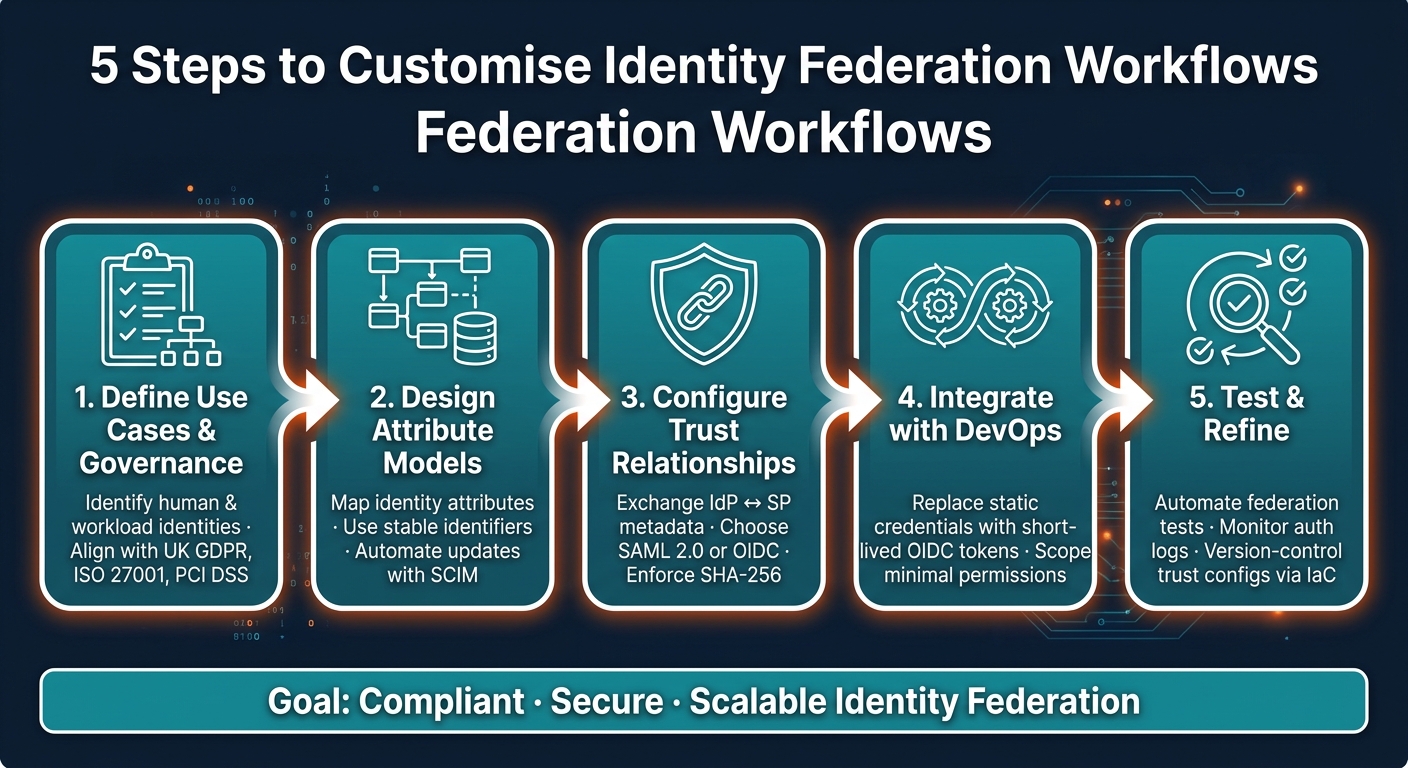 {5 Steps to Customise Identity Federation Workflows}
:::
{5 Steps to Customise Identity Federation Workflows}
:::
SSO and Federation Explained | How Single Sign-On Really Works
Step 1 – Define Federation Use Cases and Governance
Before diving into configuration, it’s crucial to establish clear federation goals and assign specific responsibilities. Overlooking this step often leads to stalled projects or security vulnerabilities down the line. Start by outlining use cases and determining who will oversee each aspect before moving on to designing attribute models.
Identify Federation Use Cases
Federation use cases typically fall into two main groups: human identities and workload identities.
- Human identities: These include enabling employee SSO (single sign-on) for SaaS and on-premises applications, onboarding external partners or contractors without disrupting their existing identity systems, and managing access during mergers or acquisitions.
- Workload identities: These are becoming increasingly important, such as allowing GitHub Actions runners to securely access AWS or Azure resources without embedding long-lived credentials in your pipelines [3][4].
To highlight immediate benefits of SSO, examine helpdesk data - around 30% of support calls often relate to password issues. Pair this analysis with a compliance mapping exercise to uncover use cases driven by regulatory requirements, like those related to UK GDPR.
Map Stakeholders and Responsibilities
Strong federation governance hinges on clearly defined ownership. Each component of the federation setup should have a dedicated owner, rather than being managed collectively by a team.
| Stakeholder | Primary Responsibility | Key Governance Task |
|---|---|---|
| Identity Provider (IdP) | Authenticates users and issues tokens | Maintaining metadata accuracy and certificate validity [1][8] |
| Service Provider (SP) | Consumes assertions and grants access | Mapping incoming claims to internal permissions [2][8] |
| Security Admin | Manages authentication policies and MFA | Reviewing audit logs and conducting access reviews [5][6] |
| SRE / Ops Team | Monitors federation health and uptime | Defining SLIs/SLOs for token issuance and latency [7] |
| HR / HRIS | Source of truth for personnel data | Triggering joiner, mover, and leaver (JML) events [6] |
A single source of truth, such as an external IdP or HRIS, should be designated for user management [6]. Avoid manual overrides, as they can introduce inconsistencies that are both difficult to audit and challenging to resolve.
Address Policy and Compliance Requirements
For organisations in the UK, compliance requirements significantly influence federation workflows. Your governance framework should address the following:
| Regulation | Control Objective | Technical Implementation |
|---|---|---|
| UK GDPR | Data minimisation | Implement fine-grained RBAC/ABAC; avoid broad roles like *:*. |
| ISO 27001 | Access management | Conduct regular access reviews and automate provisioning. |
| PCI DSS | Strong authentication | Enforce MFA for privileged accounts. |
| NCSC Principles | Identity and authentication | Use a centralised IdP with UK-based data residency. |
Data residency is a particularly sensitive issue for UK organisations post-Brexit. Ensure that your IdP and any federation broker handle identity data within the UK or in jurisdictions with adequacy decisions. This isn’t just a legal requirement - it’s also becoming a key factor for enterprise procurement decisions.
Once your use cases and governance structure are well-defined, you can move on to designing attribute models and crafting authorisation logic in the next step.
Step 2 – Design Attribute Models and Authorisation Logic
With your use cases and governance framework in place, the next step is to figure out how identity data flows and what kind of access it grants. The key here is to stay disciplined: include only the attributes that are absolutely necessary and ensure consistency throughout. These decisions lay the groundwork for establishing trust relationships in the following stages.
Define Core Attribute Schemas
Every federated identity system requires a stable, unique identifier - usually a NameID or Subject - to act as the primary key across all connected systems. Without this, service providers risk creating duplicate accounts, which can lead to both security vulnerabilities and operational headaches.
In addition to the unique identifier, a standard schema for human identities should include attributes like email, givenName, groups, department, and a session expiration timestamp. For workload identities, such as a CI/CD pipeline authenticating to AWS, you’ll need cloud-specific identifiers like Amazon Resource Names (ARNs). A key design principle to follow is that roles should represent intent or capability, not job titles. For instance, a role like Finance Admin
remains relevant even if someone gets promoted, while a title-based role like Senior Analyst
does not [5].
RBAC doesn't fail because roles are wrong. It fails because roles stop matching reality.- LoginRadius [5]
Plan Attribute Mapping
Attribute mapping serves as the bridge between your identity provider (IdP) and each service provider (SP). For example, your IdP might store givenName, but the SP could expect FirstName. Mapping ensures compatibility between these systems [10]. Stick to the principle of least privilege by only mapping the attributes that are absolutely required [10]. Avoid passing all internal groups into SAML assertions - platforms like Microsoft Entra ID limit group email addresses in a SAML token to 150, and overly large assertions can even exceed web server buffer limits [11].
When IdP and SP formats differ significantly, transformation expressions (like regex) can help convert values. For instance, you might need to translate a department name like Marketing
into an internal code such as DEPT_402 [9][10]. For lifecycle events like role changes or department moves, automate updates using SCIM (System for Cross-domain Identity Management). This prevents access drift, where outdated permissions accumulate silently over time [5].
Getting your attribute mapping right isn't just about convenience; it's a huge part of your security posture.- SSOJet [10]
Implement Authorisation Logic
While authentication confirms who someone is, authorisation determines what they can do. These two processes are distinct and should be treated as such in your federation setup [5]. Once attributes flow correctly from the IdP, they can be used in either RBAC (role-based access control) or ABAC (attribute-based access control) models - or even a hybrid of the two - to make access decisions.
For more precise control, tools like Common Expression Language (CEL) allow you to define conditions that restrict access based on specific claims. For example, you might require email_verified == true before granting access, or limit certain actions to users in a specific department during business hours [13]. Avoid bundling high-risk actions, such as data exports or policy changes, into general roles. Instead, isolate these tasks into dedicated, narrowly defined roles. Keeping the number of roles manageable makes auditing and maintaining accuracy much simpler.
Step 3 – Configure Trust Relationships and Technical Setup
Once you've outlined your attribute models and authorisation logic, the next step is translating your design into a functional configuration. This is where careful attention to detail is critical - small mistakes can cause authentication failures. The goal here is to establish secure trust between your Identity Provider (IdP) and Service Providers (SPs).
Configure Identity and Service Providers
The trust between an IdP and an SP is built through metadata exchange. This involves sharing an XML or JSON document that includes crucial details like endpoints, entity identifiers, and public keys. For the SP, you'll need the IdP's Issuer URI, Passive Authentication endpoint, and signing certificate to validate incoming assertions [14]. On the other hand, the IdP requires the SP's Entity ID and Assertion Consumer Service (ACS) URL - the endpoint where successful login tokens are sent [15].
To keep things running smoothly, always provide a Metadata URL rather than hardcoding certificate strings. This ensures automatic renewal of signing certificates before they expire [14].
If you're still hardcoding cert strings in a web.config file, you're just waiting for a 2 AM support call.- Avi Kapoor, Customer Success Engineer, SSOJet [18]
A few common pitfalls to avoid: ensure all server clocks are synchronised using NTP, as even slight clock discrepancies can lead to SAML assertion or JWT token rejections [8]. Also, enforce SHA-256 for digital signatures, as SHA-1 is increasingly unsupported by modern systems [15]. Finally, disable XML parser DTD processing to prevent XXE vulnerabilities [15].
Choose Federation Patterns
The protocol you choose depends on what you're connecting. SAML 2.0 is ideal for enterprise SSO and legacy systems, while OpenID Connect (OIDC) works better for modern apps, APIs, and mobile platforms due to its JSON-based format and simpler implementation [12].
| Feature | SAML 2.0 | OpenID Connect (OIDC) |
|---|---|---|
| Format | XML-based | JSON/JWT-based |
| Transport | Browser redirects, POST bindings | HTTP with OAuth 2.0 flows |
| Token Size | Larger (XML + signature overhead) | Smaller, compact JWTs |
| Best Use Case | Enterprise SSO, legacy systems | Modern apps, APIs, mobile |
| Mobile Support | Limited | Excellent |
For workload identities, such as a GitHub Actions pipeline authenticating to Azure, Workload Identity Federation is a better alternative to long-lived service account keys. Trust is established using three parameters: the issuer (e.g., https://token.actions.githubusercontent.com), the subject (e.g., repo:org-name/repo-name:environment:prod), and the audience (e.g., api://AzureADTokenExchange) [16]. Keep in mind that Microsoft Entra ID allows a maximum of 20 federated identity credentials per application or managed identity [16].
Workload identity federation eliminates the need for long-lived API keys, access keys, or service account keys.- CloudToolStack Team [17]
Automate Provisioning and De-Provisioning
Manual provisioning doesn't scale and poses security risks. SCIM (System for Cross-domain Identity Management) is the standard protocol for automating identity data exchange between your IdP and connected service providers [19]. This ensures that when a new employee joins, their account is automatically created across all integrated systems. Similarly, when they leave, their access is revoked without delay.
The most effective way to implement this is by connecting your SCIM setup directly to your HR platform. Platforms like Workday or Oracle HCM can trigger Joiner, Mover, Leaver
events automatically [19][20]. This eliminates the need for manual IT tickets and ensures access changes occur almost in real time. De-provisioning is especially critical - delayed offboarding often leaves accounts active long after an employee has departed, creating a clear compliance and security risk.
Step 4 – Tailor Federation for DevOps, Cost, and Security
With trust relationships and provisioning in place, the next step is to fine-tune federation to optimise DevOps workflows, manage costs effectively, and strengthen security. Below, we’ll explore how to embed federation into CI/CD pipelines, control operational expenses, and boost security measures.
Integrate Federation into CI/CD Workflows
Replace static credentials in your CI/CD pipelines with short-lived OIDC tokens. Static secrets, such as AWS access keys or Azure service principal passwords, are inherently risky. In fact, the Cybersecurity and Infrastructure Security Agency (CISA) reported that in 2024, over 60% of cloud-related security breaches were initiated through compromised cloud credentials [22].
OIDC-based federation addresses this issue head-on. CI/CD providers like GitHub Actions or Azure DevOps can issue tokens that your cloud platform validates against a trust policy. These OIDC tokens are valid for only a few minutes and are scoped to minimal access, significantly reducing potential risks [21][24].
Workload identity federation is an OpenID Connect implementation for Azure DevOps that allow you to use short-lived credential free authentication to Azure.- Jared Holgate, Senior Cloud Solution Architect, Microsoft [23]
Here are some best practices to follow:
- Assign pipelines only the permissions they require. For example, in Azure, use
Website Contributor
instead of the broaderContributor
role [21]. - For production deployments, link federated credentials to specific GitHub Environments instead of branches. This enables approval gates and reviewer checks [21][22].
- Avoid using broad wildcards in subject claims (e.g.,
repo:org/*), as these could unintentionally grant deployment access to any new repository created in your organisation [22].
Manage Cost and Governance
Federation can also help you cut operational costs. By eliminating long-lived secrets, you avoid the need for rotation schedules, expiry monitoring, and the support challenges caused by unnoticed certificate expirations. This reduction in operational overhead translates to lower infrastructure expenses.
However, there are limits to consider. For instance, Microsoft Entra ID enforces a cap of 20 federated identity credentials per application or user-assigned managed identity [26][27]. If you manage multiple branches, environments, or workflows, you might hit this limit quickly. A practical solution is to use flexible federated credentials with expression-based matching. This approach allows a single trust object to cover multiple branches or workflows using patterns like release/* [25][26].
Flexible matching provides a balanced solution. You can stay on federation, keep the setup auditable, and still support real-world CI/CD patterns.- Protego Blog [25]
To keep things manageable, establish standardised naming conventions for branches and workspaces early on. Inconsistent naming can make wildcard rules harder to audit and maintain [25].
Improve Security and Observability
Federation isn’t just about streamlining workflows and cutting costs - it’s also a critical tool for improving security and observability. Regular monitoring is essential. For example, review Entra ID sign-in logs or AWS CloudTrail to track how and when federated credentials are being used. Unexpected patterns in these logs can signal misconfigurations or misuse [21].
To limit the potential impact of issues, use separate app registrations for staging and production environments. This keeps the blast radius contained if something goes wrong [21]. Additionally, manage identity providers and role-assume policies through Infrastructure as Code tools like Terraform or CloudFormation. This ensures trust relationships are version-controlled and peer-reviewed before being deployed to production [28].
Finally, always maintain at least one non-federated, MFA-protected account as a backup option. While federation is resilient, it’s wise to have a fail-safe in case your OIDC provider experiences downtime [22]. This small step ensures you’re never locked out when it matters most.
Step 5 – Test, Validate, and Refine Federation Workflows
Once federation is integrated into your CI/CD pipelines, the next challenge is ensuring it performs reliably under stress and over time. Testing these workflows isn’t a one-time task - it’s an ongoing process that requires structured scenarios, automated checks, and continuous refinement. Start by crafting specific test scenarios to validate every component of your authentication setup.
Define Test Scenarios and Acceptance Criteria
Single Sign-On (SSO) failures often arise from small configuration issues. As Team Scalekit explains:
Most SSO failures come from subtle configuration gaps, such as missing attributes, incorrect assertion URLs, or certificate drift... rather than from application code issues.[30]
To prevent such issues, your test plan needs to go beyond simple login checks. Test both Service Provider (SP)-initiated and Identity Provider (IdP)-initiated flows. Validate that Assertion Consumer Service (ACS) URLs and audience values are correctly handled in both directions. Don’t just test the happy path
- intentionally cause failures, such as expired assertions or invalid signatures, to ensure proper error handling.
Here’s a breakdown of key test categories and their success criteria:
| Test Category | Specific Scenario | Acceptance Criteria |
|---|---|---|
| Protocol Configuration | Redirect and ACS URL matching | Redirects resolve without loops; callback URLs match registered endpoints |
| Security | Signature and certificate validation | Assertions pass cryptographic checks using current keys |
| Data Integrity | Mandatory attribute presence | Required claims (e.g., email, NameID, role) are present and formatted correctly |
| Time Constraints | Clock skew and token expiry | Tokens are rejected if outside the NotBefore/NotOnOrAfter window |
| Authorisation | Role and permission mapping | Users are assigned correct default roles upon successful login |
| User Experience | Logout propagation | Sessions terminate across all platforms and the central IdP |
These tests ensure that trust configurations work as intended. Stability is only achieved when repeated identical authentication attempts consistently succeed [30].
Automate Testing and Verification
Relying on manual testing for federation workflows is inefficient and prone to oversight:
Manual testing of federation flows is slow, unreliable, and incomplete. It is easy to miss edge cases, such as expired assertions, clock drift between servers, or provider-side changes.- Andrios Robert [29]
To address this, use an IdP simulator or a dedicated test organisation to replicate login flows without involving live enterprise IdPs. Automate these tests within your CI/CD pipeline to catch issues like certificate drift or metadata changes before they impact production [29].
When simulating failures, adjust one parameter at a time to isolate errors clearly. Monitor authentication logs and event timelines for error codes like signature_validation_failed or mandatory_attribute_missing, which can quickly identify the root cause [30]. Also, ensure all servers are synchronised via NTP to avoid clock skew errors - an easily preventable but common issue [8].
Set Up a Continuous Improvement Process
Testing doesn’t stop after initial validation. A feedback loop is essential for maintaining federation reliability. Monitor metrics such as authentication success rates, token issuance times, and provider health scores to identify bottlenecks early [31]. Set up alerts for unusual patterns, like sudden spikes in failed tokens, to detect potential issues before they escalate.
Manage identity mapping rules and trust configurations through version-controlled Infrastructure as Code, as discussed in Step 4. This approach prevents configuration drift, where undocumented manual changes accumulate over time. Additionally, create operational runbooks for incident response, outlining steps to isolate faulty providers and switch to backup IdPs [31]. Regularly update these runbooks to reflect changes in your provider landscape or compliance needs.
A high-performing identity federation SRE team is both guardian and mechanic. They maintain trust across systems, prevent silent failures, and ensure authentication stays invisible and instant for users.- Andrios Robert [31]
Wrapping It Up
Customising identity federation workflows takes careful planning and execution. As Andrios Robert explains: Identity federation is more than a checklist. It is a precise workflow that protects your organisation against fragmented authentication and security drift.
[1] Every step, from defining use cases and governance to attribute modelling, trust configuration, DevOps integration, and continuous testing, is designed to ensure authentication flows smoothly across systems.
The real challenge isn’t just getting federation up and running. It’s keeping it reliable as infrastructure changes, new partners come on board, and compliance demands shift. This is where automation, Infrastructure as Code (IaC), and continuous observability become game-changers, turning a fragile setup into one that scales with confidence.
To tackle these challenges and maintain strong authentication, having expert support can make all the difference. Hokstad Consulting offers expertise in DevOps transformation, cloud automation, and custom development. Their services cover everything from initial architecture planning to ongoing security improvements and cost management. This includes codifying identity rules using Terraform, integrating federation into CI/CD pipelines, and simplifying credential management across multi-cloud environments.
FAQs
Which protocol should we use: SAML or OIDC?
When deciding between SAML and OIDC, it all comes down to your organisation's specific requirements and the systems you already have in place.
SAML works best for older enterprise environments, offering strong support for web-based Single Sign-On (SSO) through XML assertions. On the other hand, OIDC is a more modern, JSON-based protocol that excels in cloud-native applications, mobile compatibility, and lightweight solutions.
In short, choose SAML for integrating with legacy systems. For newer, scalable setups, OIDC is usually the better option.
What identity attributes should we share in federation?
When setting up federation, some key attributes are commonly shared to ensure seamless identity mapping and proper access control. These typically include user IDs, email addresses, group memberships, and roles. Sharing these details allows the identity provider (IdP) and the service provider (SP) to align user identities effectively, ensuring users receive the correct permissions and access based on their roles.
Important claims to include are:
- A unique user identifier (such as NameID)
- Email address
- Group memberships
- Roles
These attributes should be customised to fit your organisation’s security requirements and the specific demands of your applications.
How can we test federation changes safely?
To ensure federation changes are tested safely, rely on automated testing within controlled environments that closely simulate practical scenarios. This includes replicating trust relationships and token exchanges. Such setups can help identify problems like expired assertions or clock drift before they affect live systems.
It's also crucial to maintain strong monitoring practices. Track metrics such as authentication success rates and token issuance times. Go beyond basic downtime alerts by setting up notifications for unusual patterns or anomalies. This proactive approach ensures reliability across protocols like SAML, OpenID Connect, and OAuth 2.0.