
If you manage AWS IAM with Terraform, you cut risky console edits, keep a clear record of every change, and make reviews part of the process. That matters because 99% of excessive cloud permissions found by Unit 42 were unused for 60 days, and 74% of cloud breaches tied to cloud assets involved misconfigured cloud setups, according to IBM.
If I had to boil this guide down, I’d say this:
- I keep IAM roles, policies, and trust rules in Terraform code
- I store state in an encrypted S3 backend in
eu-west-2 - I use role assumption and OIDC, not long-lived access keys
- I build policies with
aws_iam_policy_documentwhere possible - I run
fmt,validate,plan, and reviewedapplyin CI - I check for drift every day
- I keep access tight, visible, and easy to review
- I use multi-account layouts where isolation matters more
The article also makes a few clear calls. Use managed policies for reuse. Keep inline policies for one-off cases. Avoid attaching policies through managed_policy_arns on the role when separate attachment resources do the job more cleanly. And remember: a permission boundary limits what a role or user can get, but grants nothing by itself.
A few points stand out:
- Terraform 1.10+ supports S3 state locking with
use_lockfile = true - State can hold policy JSON and role ARNs, so encryption and bucket access rules matter
- GitHub Actions OIDC trust should be narrowed to a single repo and branch
- Reviewers should watch for wildcard actions,
Resource = "*", and trust policy changes -
terraform apply tfplanshould use the exact plan file that was reviewed - 23% of cloud identities had critical or high-severity excessive permissions, and in AWS 35% of human identities had critical permissions, according to Tenable
- Gartner says 99% of compromised cloud records through 2027 will come from user misconfiguration or account compromise, not provider failure
Here’s the short version of the article’s path:
| Area | What I’d do |
|---|---|
| Backend and access | Keep state in S3, encrypt it, lock it, restrict it, and use an assumed role |
| IAM design | Split roles, policies, and attachments into clear Terraform files |
| Policy format | Default to aws_iam_policy_document
|
| Reuse | Use variables, for_each, and small modules |
| Change control | Run validate → plan → review → apply reviewed plan |
| Drift | Run scheduled terraform plan -detailed-exitcode checks |
| Guardrails | Use least privilege, role-based access, OIDC, and state protection |
| Common failures | Stop manual console edits, broad “temporary” access, and hidden admin-like modules |
The main point is simple: if you want IAM that is easier to audit, safer to change, and less likely to drift, put it in Terraform and treat access changes like code changes.
Prepare the Terraform and IAM baseline
Set up Terraform, providers and remote state
Start by pinning one Terraform version across the team. Use tfenv or a .terraform-version file so everyone stays on the same 1.x release. From Terraform 1.10.0 onwards, S3 state locking is available and is the recommended option instead of DynamoDB locking.[3][4] If you're still using an earlier 1.x release, DynamoDB locking is still the fallback, but it's now treated as legacy.
Keep Terraform state in eu-west-2 so control data stays in the UK. For AWS access, have the provider assume a dedicated operator role instead of relying on long-lived access keys:
terraform {
  required_version = "~> 1.10"

  backend "s3" {
    bucket       = "my-uk-org-terraform-state"
    key          = "iam/dev/terraform.tfstate"
    region       = "eu-west-2"
    use_lockfile = true
    encrypt      = true
  }
}

provider "aws" {
  region = "eu-west-2"

  assume_role {
    role_arn     = "arn:aws:iam::123456789012:role/terraform-iam-dev-operator"
    session_name = "terraform-iam-dev"
  }
}
Set encrypt = true because state can include policy JSON and role ARNs.[2][4] Lock down the bucket so only the operator role and CI runner can use it, and require HTTPS with aws:SecureTransport. It also helps to split state by environment, with paths such as iam/dev/ and iam/prod/.
With state locked down and access mapped out, the next piece is understanding the IAM parts Terraform will manage.
Understand the IAM building blocks
Before you write policy resources, get clear on what each IAM concept does and how it maps to Terraform. Here's the core set used throughout this guide:
| IAM Building Block | Terraform Resource / Argument | Purpose |
|---|---|---|
| Managed Policy | aws_iam_policy |
Reusable policy attached to multiple identities |
| Inline Policy | aws_iam_role_policy |
Policy embedded directly into a single role |
| Role | aws_iam_role |
Identity that AWS services or users can assume |
| Trust Policy |
assume_role_policy (in aws_iam_role) |
Controls who can assume the role |
| Permission Boundary |
permissions_boundary (argument) |
Limits the maximum permissions a role or user can hold |
| Policy document generation |
aws_iam_policy_document (data source) |
Generates policy JSON using HCL |
These are the resources used in the next section to express policies and roles as code.
A permission boundary sets the maximum permissions a role or user can hold. It grants nothing on its own.[5][6] That's why it's so useful in multi-team organisations. A platform team can define the top limit, while application teams manage their own roles inside that cap without being able to push privileges further.
In practice, managed policies (aws_iam_policy) are the better fit for anything reused across roles. Keep inline policies for one-off cases that only belong to a single role. AWS also recommends checking actual usage over a sample window, then trimming policies down to the services that were called.[7] A sensible starting point is the minimum permissions Terraform needs, followed by tightening once you've reviewed plan and apply activity.
Need help optimizing your cloud costs?
Get expert advice on how to reduce your cloud expenses without sacrificing performance.
Define IAM policies as code in Terraform
Create policies and roles with Terraform resources
Use aws_iam_role, aws_iam_policy, aws_iam_role_policy_attachment, and aws_iam_policy_document together. The role sets trust, the policy sets permissions, and the attachment connects the two.
Here’s a concrete example for a GitHub Actions CI pipeline that deploys to one AWS environment with OIDC. The trust policy limits role assumption to a single repository and branch, and the permission policy is scoped to only the services the pipeline uses:
data "aws_iam_policy_document" "github_actions_trust" {
  statement {
    effect  = "Allow"
    actions = ["sts:AssumeRoleWithWebIdentity"]

    principals {
      type        = "Federated"
      identifiers = [var.github_oidc_provider_arn]
    }

    condition {
      test     = "StringEquals"
      variable = "token.actions.githubusercontent.com:aud"
      values   = ["sts.amazonaws.com"]
    }

    condition {
      test     = "StringLike"
      variable = "token.actions.githubusercontent.com:sub"
      values   = ["repo:my-org/my-repo:ref:refs/heads/main"]
    }
  }
}

resource "aws_iam_role" "github_actions_deploy" {
  name               = "github-actions-deploy-prod"
  assume_role_policy = data.aws_iam_policy_document.github_actions_trust.json

  tags = {
    Environment = "prod"
    cost_centre = "platform-engineering"
    owner       = "platform-team"
  }
}

data "aws_iam_policy_document" "deploy_permissions" {
  statement {
    sid     = "S3DeployArtifacts"
    effect  = "Allow"
    actions = ["s3:PutObject", "s3:GetObject"]
    resources = [
      "arn:aws:s3:::my-org-deploy-artifacts-prod/*"
    ]
  }

  statement {
    sid    = "CloudFormationDeploy"
    effect = "Allow"
    actions = [
      "cloudformation:CreateStack",
      "cloudformation:UpdateStack",
      "cloudformation:DescribeStacks"
    ]
    resources = [
      "arn:aws:cloudformation:eu-west-2:123456789012:stack/my-app-prod/*"
    ]
  }
}

resource "aws_iam_policy" "deploy_permissions" {
  name   = "github-actions-deploy-prod-policy"
  policy = data.aws_iam_policy_document.deploy_permissions.json
}

resource "aws_iam_role_policy_attachment" "deploy_attach" {
  role       = aws_iam_role.github_actions_deploy.name
  policy_arn = aws_iam_policy.deploy_permissions.arn
}
Each statement points to one bucket or one stack. Actions stay explicit. Resources stay narrow. Conditions limit who can assume the role. That’s the whole point: keep access tight and easy to review.
One note that saves pain later: avoid setting managed_policy_arns directly on aws_iam_role. Use separate aws_iam_role_policy_attachment resources instead. It makes lifecycle behaviour easier to follow and helps avoid problems when several attachments change at once.
Once this policy structure is in place, automate validation, review, and drift checks before apply.
Choose the right policy document format
Choose the format based on policy complexity and ownership.
| Format | Maintainability | Readability | Reuse | Dynamic generation |
|---|---|---|---|---|
| HEREDOC JSON | Low | Medium | Low | Poor |
jsonencode() |
Medium | Medium | Medium | High |
| External JSON files | Medium | High | Medium | Poor |
aws_iam_policy_document |
High | High | High | Very high |
HEREDOC JSON is raw JSON pasted into a Terraform file. It may be fine for a quick test, but it gets messy fast. There’s no structural validation, and refactoring can turn into a headache.
jsonencode() turns an HCL map into JSON. That makes it easier to use variables and expressions directly. It fits short, fairly static trust policies well.
External JSON files, loaded with file(), are useful when a security team owns the policy content and wants it kept separate from Terraform code. The downside is simple: feeding Terraform variables into those files is awkward, and the files are mostly static.
aws_iam_policy_document should be the default choice for new work. It can merge statements from different sources, check the document shape before sending it to AWS, and build policies from module outputs.
A simple rule works well here: use aws_iam_policy_document for anything reused or generated dynamically. Use external JSON only when a central security team manages policy content outside Terraform.
Use one format across a module so reviews stay predictable.
Reuse patterns with variables, for_each and modules
Once you have more than a few roles, copy-pasting resource blocks becomes a maintenance drag. Use for_each to generate one role per map entry instead.
variable "app_roles" {
  type = map(object({
    cost_centre     = string
    allowed_buckets = list(string)
  }))
  default = {
    payments = {
      cost_centre     = "finance"
      allowed_buckets = ["my-org-payments-prod"]
    }
    reporting = {
      cost_centre     = "analytics"
      allowed_buckets = ["my-org-reports-prod"]
    }
  }
}

resource "aws_iam_role" "app" {
  for_each           = var.app_roles
  name               = "app-role-${each.key}-prod"
  assume_role_policy = data.aws_iam_policy_document.ecs_trust.json

  tags = {
    Environment = "prod"
    cost_centre = each.value.cost_centre
    application = each.key
  }
}
Tag each role with cost_centre and application for audit and chargeback.
Once the pattern settles down, move the repeated role logic into modules. That way, each environment follows the same trust, policy, and attachment layout instead of drifting over time.
For file layout, keep things split by concern:
-
roles.tfforaws_iam_roleresources and trust policies -
policies.tfforaws_iam_policyresources andaws_iam_policy_documentdata sources -
attachments.tfforaws_iam_role_policy_attachmentresources
Small, explicit modules help keep access sprawl under control and make reviews easier to focus on.
With reusable roles and policies in place, the next step is to gate changes with validation, plan, and drift checks.
Defining IAM Policies with Terraform in AWS
Automate the IAM lifecycle safely
::: @figure 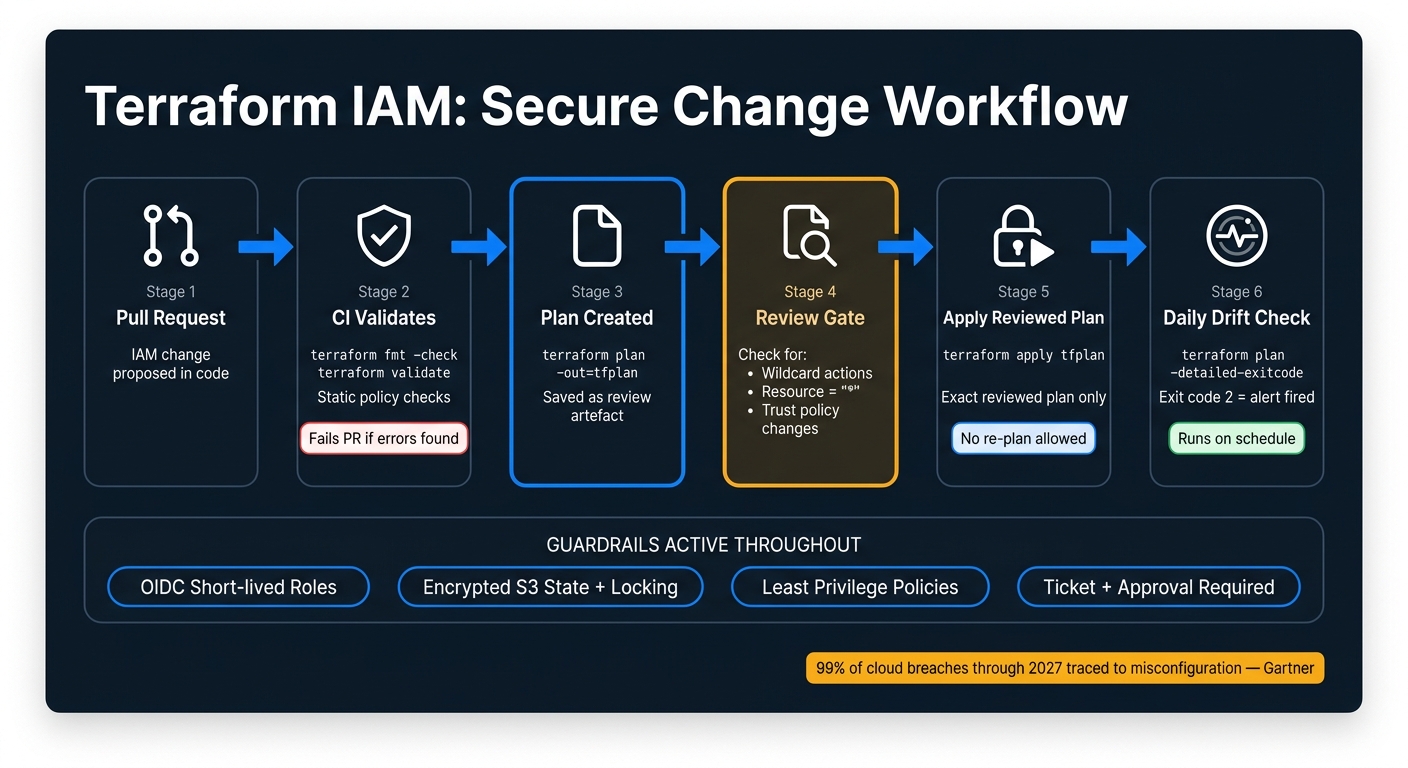 {Terraform IAM Automation: Secure Change Workflow}
:::
{Terraform IAM Automation: Secure Change Workflow}
:::
Run validate, plan and apply with review gates
A safe IAM workflow in Terraform follows a clear path: terraform init, terraform validate, terraform plan, then terraform apply. Each step acts as a checkpoint.
On every pull request, CI should run init and validate on its own. If either fails, the PR stops there. After that, CI creates a plan with terraform plan -out=tfplan against the target production account. That saved plan file becomes the review artefact. Reviewers can then check for wildcard actions, overly broad resources, and trust policy changes before approving the merge.
Apply only the reviewed plan file. When you run terraform apply tfplan, Terraform deploys the exact change set that people reviewed. If you allow an implicit re-plan during apply, the whole review step loses its point.
Production applies should also require approved change windows and ticket references. Keep the PR, the plan output, and the approval in one place so the audit trail is clear and easy to follow.
With that change path under control, the next job is spotting anything that shifts outside Terraform.
Detect drift and enforce policy checks in CI/CD
Manual IAM changes - say, someone edits a policy straight in the AWS console - can cause configuration drift. A scheduled terraform plan job helps catch that before it turns into a bigger mess.
Set up a CI job that runs terraform plan -detailed-exitcode every day, plus a weekly full run. An exit code of 2 means Terraform has found a difference between the state file and what exists in the cloud. If that happens on an IAM resource, the pipeline should fail and send an alert showing which roles or policies drifted.
Drift detection is only part of the picture. Every pipeline run should also include static checks such as:
-
terraform fmt -check -
terraform validate - Policy rules for disallowed actions, missing trust conditions, and wildcard resources
Use OIDC federation so CI/CD can assume short-lived roles instead of relying on stored keys.
That gives you a cleaner, safer pipeline before choosing whether a single-account or multi-account setup suits your estate.
Single-account versus multi-account IAM management
Once validation and drift checks are set, you need to pick the account model they will govern.
Single-account IAM can work for small, lower-risk teams. Multi-account IAM tends to scale better when isolation, compliance, or regulated data come into play.
In a multi-account setup, cross-account access usually relies on assume-role patterns with tightly scoped trust policies. That lets a central CI/CD pipeline deploy across accounts without keeping permanent credentials in each one. The same Terraform gates - validate, plan, apply - still apply in both models.
| Model | Complexity | Security control | Overhead | Suitability for UK organisations |
|---|---|---|---|---|
| Single-account | Low to moderate | Centralised; harder to isolate production | Lower | Smaller teams, non-regulated workloads |
| Multi-account (environment-based) | Moderate | Strong isolation between environments | Higher | Medium to large organisations; stricter regulatory requirements |
| Multi-account (function-based) | High | Very strong; fine-grained isolation by function | Highest | Large enterprises, heavily regulated sectors (finance, healthcare) |
IBM's 2024 Cost of a Data Breach report found that 74% of cloud breaches involving cloud assets were related to misconfigured cloud environments. [8] That makes access easier to govern, audit, and reconcile against Terraform definitions.
Next, turn these controls into day-to-day IAM guardrails and the failure patterns to avoid.
Best practices, common mistakes and conclusion
Best practices that reduce risk
Once Terraform is managing IAM changes, a few guardrails help keep things under control over time.
Start with least privilege. Give a workload only the actions it needs. Scope permissions to specific resource ARNs instead of using Resource="*", and use condition blocks to limit access by region, tag, or source account where that fits. Tenable's 2024 Cloud Risk Report found that 23% of cloud identities had critical or high-severity excessive permissions, and in AWS alone, 35% of human identities had critical permissions.[1] That’s a clear sign that permissions need regular review and tightening.
Grant access through roles and groups instead of attaching permissions to individual users. It’s easier to audit, simpler to remove when someone leaves, and it keeps Terraform code easier to follow. For CI/CD, use OIDC federation so pipelines assume short-lived roles instead of depending on stored keys.
Protect Terraform state properly. Encrypt it, turn on versioning and locking, and limit access to the state path.[11][2] And never commit state files or secrets to version control.
Mistakes that cause access sprawl and drift
At this stage, the biggest problems usually come from how teams run the process, not from Terraform itself.
Manual console changes are a big one. They break Terraform control and introduce drift. Every out-of-band edit creates a mismatch between declared state and what’s live, and in multi-account setups those mismatches pile up fast. Temporary broad access is another common trap. It often stays in place far longer than anyone planned. Tenable found that 84.2% of organisations had unused or longstanding access keys with excessive permissions.[1]
Another issue is modules that hide too much. A reusable module that defaults to admin-like access can spread over-permissioning across multiple teams before anyone spots it. Keep policy documents visible during review. If a reviewer can’t tell what access a module grants, the module is too abstract.
| Mistake | Consequence | Fix |
|---|---|---|
| Manual console changes | Drift between state and reality | Enforce all production changes through Terraform and run regular drift detection |
Broad temporarypermissions |
Permanent over-access | Review and tighten permissions regularly |
| Overly abstract modules | Hidden excessive access | Keep policy documents visible in code review |
Secrets in .tf files or state |
Exposure of credentials and policy data | Store secrets in a secret manager; mark sensitive outputs |
Conclusion: the core steps to automate IAM well
These controls turn IAM from one-off changes into a process teams can repeat without guesswork.
Good IAM automation comes down to four things: secure Terraform, least-privilege code, review gates, and drift checks. None of them is hard in isolation. The trouble starts when a team skips one. When all four are in place, policy intent lives in code, changes are checked before production, state and backends are protected, and drift is spotted early. Gartner projects that 99% of compromised cloud records through 2027 will trace back to user misconfiguration or account compromise rather than provider failures.[9][10] Automation doesn’t remove that risk, but it does make weak points easier to spot and fix.
Hokstad Consulting helps teams put secure Terraform-based IAM automation in place.
FAQs
How do I start moving existing IAM to Terraform?
Start by building reusable modules for your roles and policies. Use aws_iam_policy_document to define policies instead of raw JSON, and keep everything in Git so every change is tracked, auditable, and reviewed through pull requests.
Before rolling this out fully, run proof-of-concept trials in a sandbox to test compatibility. Hokstad Consulting can support the move by improving DevOps workflows, centralising identity management, and aligning IAM governance with UK regulatory standards.
When should I use a permission boundary?
Use a permission boundary as a security safeguard to set the maximum a role can do, no matter what its identity policy allows.
This is especially helpful for sandbox setups and pipeline roles. It stops developers and automated processes from creating roles or changing permissions beyond the limits set by your security team.
How do I handle IAM changes made outside Terraform?
Treat your Terraform repository as the single source of truth for IAM.
If someone makes manual changes outside Terraform, you end up with configuration drift. And once that happens, your live setup no longer matches what’s in version control. That’s a problem, because the next deployment will likely overwrite those changes anyway.
Use continuous monitoring, regular audits, and automated drift detection to spot changes that drift away from your version-controlled baseline and fix them before they pile up.