
CI/CD pipelines need strict permissions to protect sensitive infrastructure. Over-permissioned IAM roles in pipelines often lead to security risks, including breaches that expose secrets or enable privilege escalation. Following the principle of least privilege - granting only the permissions required for specific tasks - reduces these risks.
Key strategies include:
- Separate roles for each environment (e.g., development, staging, production).
- Use OpenID Connect (OIDC) for temporary credentials instead of static access keys.
- Apply permission boundaries to limit maximum privileges.
- Start with broad permissions in a test environment, then refine using AWS CloudTrail and IAM Access Analyzer.
- Regularly monitor and review policies to remove unused permissions and address misconfigurations.
These practices ensure your pipelines remain secure, even as they scale or evolve.
Securing Your DevOps AWS CI/CD Pipeline | IAM Roles, Least Privilege Policies, CloudTrail Auditing
Challenges in Applying Least Privilege to Pipelines
Applying the principle of least privilege to pipelines is no small feat. Several interconnected challenges can weaken the security of pipelines, making it crucial to address these issues with precision and care.
Over-Permissive Roles and Policies
One of the most common pitfalls is the tendency for pipelines to become over-permissioned. This often happens when developers, under pressure to resolve deployment issues quickly, expand permissions as a temporary fix. Unfortunately, these broad permissions are rarely scaled back once the immediate issue is resolved.
CI/CD pipelines hold powerful, long-lived credentials with no structural limit on what they can do.- DEV Community [1]
Over time, permissions pile up with each sprint or team change, leading to a situation where the granted permissions far exceed what's actually needed. A typical example is the use of overly broad actions like iam:PassRole scoped to *. This creates a dangerous opening for attackers to pass high-privilege roles to services they control, enabling privilege escalation [1]. Such unchecked accumulation of permissions complicates efforts to define roles tailored to specific environments.
Scoping Access Across Environments
Defining environment-specific roles is essential, yet it presents its own challenges. If a single role is shared across development, staging, and production, a security breach in a less critical environment - like a compromised feature branch - can lead directly to exposure of production resources.
Mapping out the exact permissions needed for each environment can be a laborious task. To save time, teams often resort to using wildcards, which results in roles that are far too broad for their intended purpose. This practice undermines the goal of achieving a least privilege setup [8].
Gaps in Auditability and Governance
The issues don’t stop at over-permissioning and improper scoping. Weak governance structures further compound the problem. Manual policy reviews, while useful for small-scale setups, become unmanageable as the number of roles grows beyond 15 [1]. Many organisations still rely on these manual processes, allowing permissions to accumulate unchecked, with no clear record of who added them or why.
A stark example of the consequences of poor governance occurred in April 2026, when an AI-driven campaign exploited pull_request_target triggers. Within just 26 hours, it launched 475 malicious pull requests, successfully stealing CI/CD credentials from hundreds of organisations over six weeks before being discovered [1]. Many affected teams lacked visibility into the activities of their pipeline roles or even what data had been compromised. Without tools like policy versioning, change tracking, and automated reviews, addressing these governance gaps becomes an uphill battle.
How to Design Least Privilege IAM Policies for Pipelines
Addressing the challenges of pipeline security requires adopting tried-and-tested design patterns. These strategies can significantly minimise your pipeline's vulnerability while ensuring deployments remain smooth.
Separate Roles for Each Environment
One of the most crucial steps is to avoid reusing IAM roles across environments. Instead, implement the one repo, many roles
approach. This means using a shared repository but assigning distinct IAM roles to development, staging, and production environments. By enforcing security via trust policies - external to pipeline files - you ensure that any compromise in a feature branch only impacts development resources. Production resources stay protected and unaffected [1].
The repo is shared; the IAM role is per-environment, per-pipeline. Trust policies (not pipeline definitions) enforce who can deploy where.- DEV Community [1]
Another key aspect is managing credential lifetimes, which is explored further in the next section on OIDC.
Using OIDC for Temporary Credentials
Storing long-lived IAM access keys in CI variables creates a significant security risk. If leaked, these keys can grant attackers prolonged access to your resources. OpenID Connect (OIDC) offers a more secure alternative. By using OIDC, your CI/CD platform (e.g., GitHub Actions, GitLab CI, Buildkite) can exchange short-lived JWT tokens for temporary AWS credentials, eliminating the need for static secrets [1][7].
To enhance security, pin the sub (subject) claim in the trust policy to a specific repository and branch. This ensures only authorised users and workflows can assume the role. For a production role on GitHub Actions, your trust policy condition might look like this: repo:myorg/myrepo:ref:refs/heads/main. Avoid broader configurations to limit access strictly [1][7].
The trust boundary is the IAM role, not the repository or pipeline file. Most teams get this backwards.- DEV Community [1]
Additionally, set the max_session_duration to the shortest time your pipeline requires - typically an hour - so credentials expire immediately after the workflow completes [7].
Applying Permission Boundaries
Even with separate roles and OIDC in place, there's still a risk of over-permissive identity policies. Permission boundaries act as safeguards, setting a maximum limit on what a role can do, regardless of its identity policy.
The boundary acts as a CEILING, not a floor. 'Allow \*' here doesn't grant anything; it sets the maximum.- DEV Community [1]
To implement this effectively, create a managed policy that allows broad actions but includes explicit Deny statements for sensitive operations, such as iam:CreateUser, iam:CreateAccessKey, and iam:UpdateAssumeRolePolicy. Importantly, the boundary should also deny actions like iam:DeleteRolePermissionsBoundary and iam:PutRolePermissionsBoundary. This ensures the pipeline cannot bypass its own restrictions [1][6].
Step-by-Step Process for Building Least Privilege Policies
::: @figure 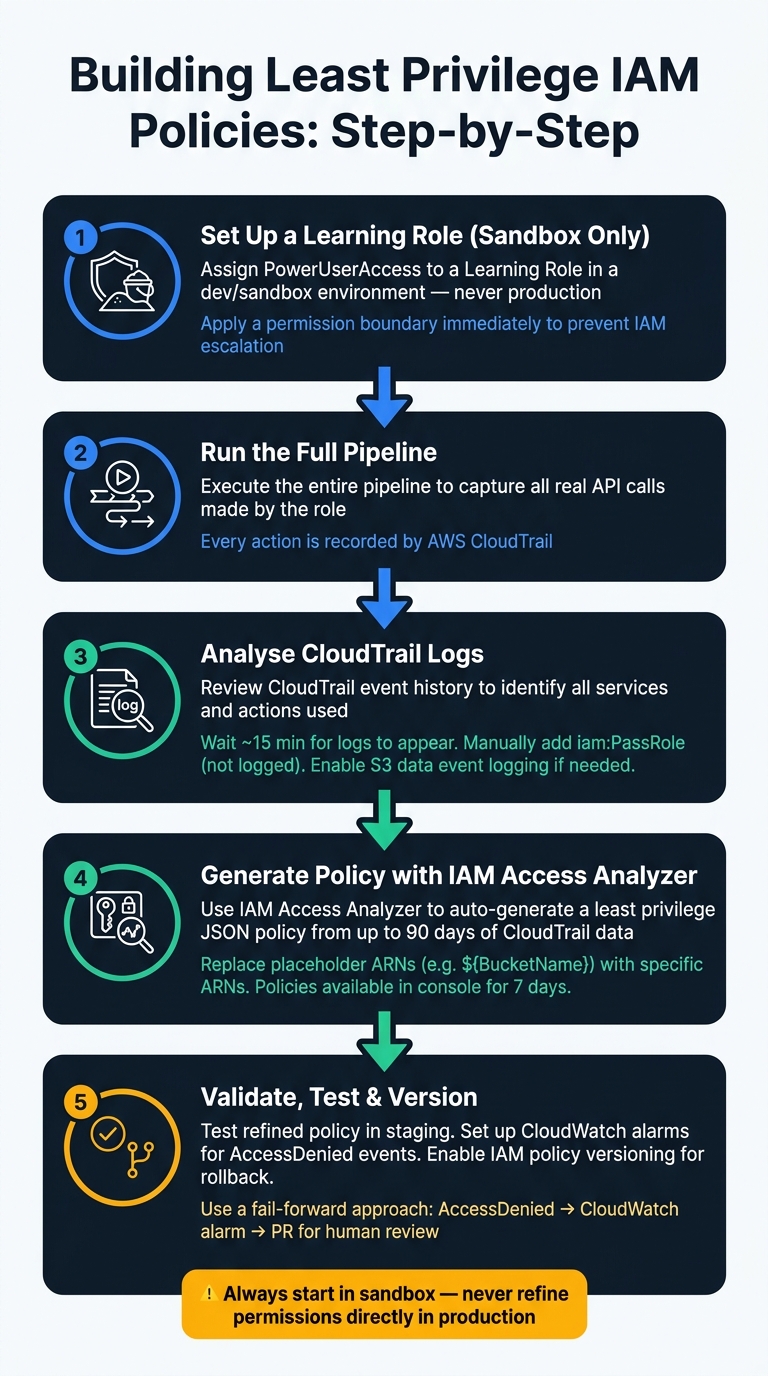 {How to Build Least Privilege IAM Policies for CI/CD Pipelines}
:::
{How to Build Least Privilege IAM Policies for CI/CD Pipelines}
:::
Once you've set up key design patterns like separate roles, OIDC, and permission boundaries, the next hurdle is determining the exact permissions your pipeline needs. Guesswork can lead to either overly permissive policies or broken pipelines. A better approach? Observe first, then refine.
Start with Broad Permissions in a Test Environment
Always begin in a sandbox or development environment - never in production. Start with broad permissions to capture all API calls and then narrow them down based on what you observe. Assign your pipeline a Learning role
with broad permissions, such as PowerUserAccess, and run the entire pipeline. To avoid any risk of IAM escalation, apply a permission boundary right from the start [1]. Once the pipeline has completed its run, analyse the activity using CloudTrail.
Analyse Activity Using CloudTrail
AWS CloudTrail logs every API call your pipeline role makes. After running the pipeline, review the event history in CloudTrail to identify the services and actions used. Keep in mind that CloudTrail logs typically take about 15 minutes to appear, so give it some time before diving into the analysis [11].
One important note: iam:PassRole actions won't show up in CloudTrail logs. If your pipeline passes roles to services like ECS or Lambda, you'll need to manually add this permission to your policy [1][9]. Similarly, if your pipeline interacts with S3 objects, ensure S3 data event logging is enabled in CloudTrail; otherwise, those actions won't appear in your logs [1]. With this data, you can refine permissions using IAM Access Analyzer.
Refine and Validate with IAM Access Analyzer
Once you've gathered enough CloudTrail data, use IAM Access Analyzer to generate a policy based on the actions your role actually performed. This tool reviews up to 90 days of CloudTrail logs and creates a JSON policy template tailored to your pipeline's activities [9]. Generated policies are available in the IAM console for up to 7 days [9].
Carefully review the JSON policy and replace any placeholder ARNs (e.g., ${BucketName}) with specific ARNs to achieve precise resource-level permissions [10][11]. Use the Security
and Errors
tabs in the IAM policy editor to catch any unresolved placeholders or wildcards before saving [11]. After validation, test the refined policy in your staging environment. Use a fail-forward approach, where any AccessDenied events trigger a CloudWatch alarm and a pull request for human review to fill in any gaps [1]. Finally, always enable IAM policy versioning so you can quickly roll back to a previous version if the updated policy causes issues - a single CLI command is all it takes [1].
Need help optimizing your cloud costs?
Get expert advice on how to reduce your cloud expenses without sacrificing performance.
Common Pipeline Permissions and How to Scope Them
When setting up permissions for your pipeline, it’s crucial to grant only the access it needs. Below, we’ll break down specific permissions for key pipeline functions and how to scope them effectively.
Artefact Management in S3
S3 permissions can be tricky because pipelines interact with buckets on two levels: the bucket itself and the objects within it. For bucket-level actions like s3:GetBucketVersioning and s3:GetBucketLocation, permissions should be scoped to arn:aws:s3:::bucket-name. Meanwhile, object-level actions like s3:PutObject and s3:GetObject should target arn:aws:s3:::bucket-name/* [13][15]. Keeping these two levels separate ensures that access remains tightly controlled.
If your artefacts are encrypted with a Customer Managed Key (CMK), remember to include kms:Decrypt and kms:GenerateDataKey, scoped to the specific KMS key ARN rather than using a wildcard (*) [13]. To further enhance security, you can add the aws:ResourceAccount condition. This limits your pipeline to interacting only with buckets owned by the expected AWS account, reducing the risk of confused deputy attacks [15].
Now, let’s look at deployment permissions for ECS, Lambda, and CodeDeploy.
Deployment Permissions for ECS, Lambda, and CodeDeploy
Deployment permissions often involve the iam:PassRole action, which is key when your pipeline assigns roles to services. For example, when passing a task role to ECS or an execution role to Lambda, ensure iam:PassRole is scoped to the specific role ARN. Pair this with the iam:PassedToService condition to restrict which service can use the role [1].
For specific services:
- ECS: Limit
ecs:UpdateServiceandecs:DescribeServicesto the exact service ARN, e.g.,arn:aws:ecs:region:account:service/cluster-name/service-name. - Lambda: Scope
lambda:UpdateFunctionCodeto specific function ARNs and use theaws:RequestedRegioncondition to prevent deployments in unintended regions [5]. - CodeDeploy: Restrict permissions like
codedeploy:CreateDeploymentandcodedeploy:GetDeploymentto specific application and deployment group ARNs.
Here’s a quick summary of key actions and their scoping strategies:
| Service | Key Actions | Scoping Strategy |
|---|---|---|
| ECS |
ecs:UpdateService, ecs:DescribeServices
|
Specific cluster/service ARN [1] |
| Lambda |
lambda:UpdateFunctionCode, lambda:PublishVersion
|
Function ARN + region condition [5] |
| CodeDeploy |
codedeploy:CreateDeployment, codedeploy:GetDeployment
|
Specific application and deployment group ARNs |
| IAM | iam:PassRole |
Scoped role ARN + iam:PassedToService condition [1]
|
Build Permissions for ECR and CloudFormation
Some permissions, like ecr:GetAuthorizationToken, cannot be scoped and must be granted for all resources (*) [1]. However, actions tied to specific repositories - such as ecr:BatchGetImage and ecr:PutImage - should always be scoped to the relevant repository ARN. This separation ensures that even when a wildcard is required, exposure is limited.
CloudFormation permissions can be more complex because stacks often create various resources. Instead of granting your pipeline role broad CloudFormation access, use a dedicated CloudFormation service role. This role should have only the permissions needed for the specific stack. To prevent privilege escalation, apply a permission boundary to the pipeline role. This boundary acts as a safeguard, ensuring that even if the stack tries to create new IAM roles, it cannot exceed the defined limits [1][14].
Governance and Ongoing Policy Reviews
IAM policies need to evolve alongside changes in pipelines and services. Without regular updates, even the most carefully designed least privilege setups can start to drift. Effective governance ensures that roles remain distinct, OIDC is utilised properly, and permission boundaries are consistently enforced. Regular policy reviews are essential to keep everything aligned with security goals.
Service Control Policies and Permission Boundaries
At the AWS Organisations level, Service Control Policies (SCPs) act as guardrails, setting absolute permission limits. Meanwhile, permission boundaries on individual IAM roles restrict privileges further, as previously discussed.
SCPs are meant to be used as coarse-grained guardrails, and they don't directly grant access. The primary function of SCPs is to enforce security invariants across AWS accounts.- AWS Security Blog [3]
A practical strategy is to apply stricter SCPs to the production organisational unit (OU). For instance, you could restrict access to specific AWS regions or block high-risk services altogether. At the same time, permission boundaries allow application teams to manage their own roles safely, without risking privilege escalation [19]. To further secure this setup, include a Deny statement that prevents roles from modifying their own permission boundaries [4][20]. This layered approach ensures that no single team can bypass the limits defined by your security team.
Monitoring Access Patterns
Continuous monitoring is key to keeping policies effective and responsive. Tools like Amazon CloudWatch and EventBridge can capture AccessDenied events from CloudTrail. These events might highlight either misconfigured policies that block legitimate activities or attempted unauthorised access [18].
By default, CloudTrail does not log S3 object-level or DynamoDB events, so these must be enabled manually for complete visibility [12]. Additionally, IAM Access Advisor provides last accessed
timestamps for services and actions, helping you identify unused permissions. Permissions that haven’t been used in 90 days are strong candidates for removal [16].
| Tool | What It Does | Recommended Frequency |
|---|---|---|
| IAM Access Analyzer | Flags unused permissions and external resource sharing | Monthly [16] |
| CloudTrail | Logs API calls for auditing and policy generation | Continuous [12] |
| IAM Access Advisor | Shows last-accessed timestamps for services/actions | Quarterly [2] |
| AWS Config | Detects non-compliant policies (e.g., wildcards) | Continuous [16] |
Policy Versioning and Change Reviews
Treat IAM policies like code. Store them in a version-controlled repository and conduct pull request (PR) reviews before deploying changes to production [17][18]. This approach makes it easier to roll back disruptive policies that might interfere with pipeline workflows [1].
For teams managing a large number of pipelines (e.g., over 15), manual reviews can become impractical. In such cases, consider automating parts of the process. For example, use AWS Step Functions to periodically analyse CloudTrail logs, generate updated least privilege policies, and raise a PR for human approval [17]. Tools like CDK's ConfirmPermissionsBroadening can also automatically pause pipelines and notify security engineers via SNS if a proposed change introduces broader permissions [21]. This creates a structured approval process without significantly delaying routine deployments.
Least-privilege is the security best practice of granting the minimum permissions required to perform a task. Implementing least-privilege access in an already active AWS account can be challenging because you don't want to unintentionally block users.- AWS Prescriptive Guidance [17]
Conclusion
Securing CI/CD pipelines with least privilege IAM policies isn't something you can set and forget - it requires continuous attention and refinement. Each pipeline role should have only the permissions it needs to perform its tasks, tailored to the specific environment and resources it interacts with.
Recent security breaches have shown how over-permissive, static credentials can jeopardise thousands of resources. These incidents highlight the importance of maintaining strict, least privilege access.
To address these challenges, an automated and well-structured approach is key. Replace long-term access keys with OIDC federation, segregate roles by environment, and use tools like CloudTrail and IAM Access Analyzer to refine permissions based on actual usage rather than assumptions. By adopting these practices, you can create a strong security framework that reduces potential risks. Combining Service Control Policies, permission boundaries, identity policies, and resource policies ensures that a single misconfiguration won’t compromise your entire system.
The principle of least privilege states that identities should only be permitted to perform the smallest set of actions necessary to fulfil a specific task. This balances usability, efficiency, and security.- AWS Well-Architected Framework [2]
As your pipeline environments grow, automating security policies becomes increasingly important. This could involve tools like a Role Vending Machine for consistent role provisioning or automated policy updates triggered by AccessDenied events. The ultimate aim is to make secure practices second nature. For expert guidance in designing or auditing your pipeline IAM policies, Hokstad Consulting specialises in these DevOps and cloud infrastructure solutions.
FAQs
How do I pick the right IAM permissions for my CI/CD pipeline?
To choose the right IAM permissions for your CI/CD pipeline, focus on the principle of least privilege. This means granting only the permissions absolutely necessary for the pipeline to function, such as deploying applications or accessing specific resources. Narrow the scope of permissions by defining precise resource boundaries and applying conditions like resource tags.
You can also leverage automation tools to ensure these restrictions are consistently applied. Modern authentication methods, such as OIDC federation, can further enhance security. Combine this with strict trust policies to maintain secure access throughout your pipeline.
How do I stop a dev pipeline role from accessing production?
To keep a development pipeline role from accessing production, implement least privilege IAM policies and establish environment-specific trust boundaries. For example, you can restrict roles to particular branches or repositories. Separating environments into individual AWS accounts is another effective measure, where you can apply Service Control Policies (SCPs) to enforce access restrictions. Regular audits of permissions are essential, and tools like permission boundaries or attribute-based access controls (ABAC) can help reduce the risk of unauthorised access to production.
What should I deny in a permission boundary to prevent IAM escalation?
To reduce the risk of IAM privilege escalation, it's essential to restrict certain actions within the permission boundary. Specifically, deny actions such as:
-
iam:CreateUser -
iam:CreateAccessKey -
iam:AttachUserPolicy -
iam:PutUserPolicy -
iam:DeleteRolePermissionsBoundary -
iam:UpdateAssumeRolePolicy
By implementing these restrictions, you prevent users from granting themselves elevated permissions or circumventing established security measures.