HIPAA compliance is essential for protecting patient data and avoiding hefty penalties. If your organisation handles US patient data, even outside the US, you must meet HIPAA standards. Identity and Access Management (IAM) is at the core of this, ensuring only the right people access sensitive health information.
Here’s what you need to know:
- HIPAA Rules: Privacy Rule (who can access data), Security Rule (how to protect it), and Breach Notification Rule (what to do after a breach).
- IAM Basics: Use unique user IDs, enforce role-based access, and implement multi-factor authentication (MFA).
- Access Reviews: Regularly check and update permissions, disable inactive accounts, and document everything for six years.
- Technical Safeguards: Encrypt data (AES-256 for storage, TLS 1.2+ for transmission), secure networks, and monitor activity with audit logs.
- Training and Vendors: Train staff annually on security practices and sign Business Associate Agreements (BAAs) with all third-party vendors handling patient data.
Non-compliance can cost up to £1.2 million annually in fines. Start by assessing risks, appointing privacy/security officers, and implementing these IAM policies to safeguard electronic Protected Health Information (ePHI).
::: @figure 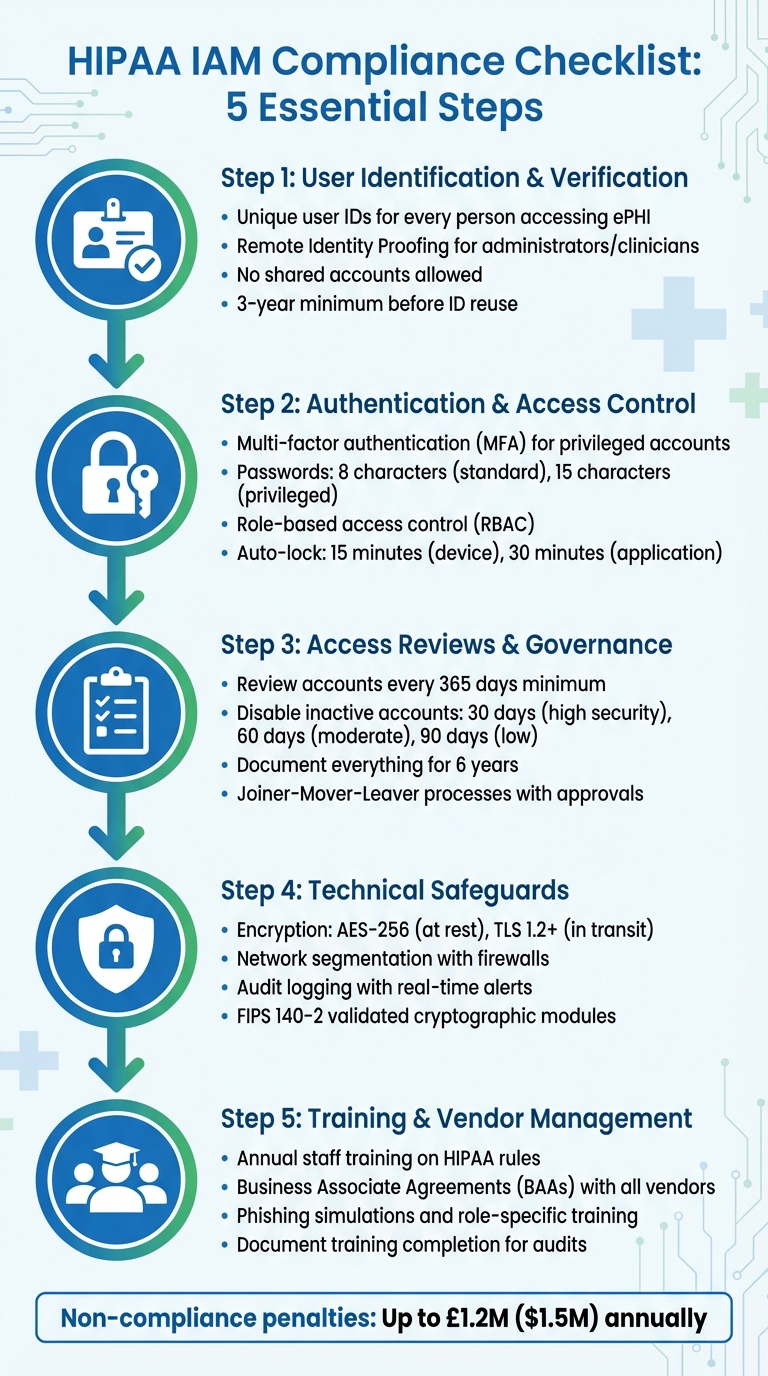 {HIPAA IAM Compliance Checklist: 5 Essential Steps for Healthcare Organizations}
:::
{HIPAA IAM Compliance Checklist: 5 Essential Steps for Healthcare Organizations}
:::
Master HIPAA Compliance: The Ultimate 2025 Checklist for Healthcare Organizations
HIPAA's IAM Requirements Explained
HIPAA's approach to Identity and Access Management (IAM) is built around three key rules designed to safeguard patient information. The Privacy Rule outlines who can access data, the Security Rule focuses on how to protect it, and the Breach Notification Rule specifies what actions to take if things go wrong. Understanding these rules is essential for crafting compliant IAM policies. Let’s dive into how each rule shapes IAM requirements.
HIPAA Privacy Rule
The Privacy Rule introduces the minimum necessary
standard, which requires healthcare organisations to restrict access to Protected Health Information (PHI) based on specific tasks [4]. For instance, a receptionist scheduling appointments doesn’t need access to detailed medical records, whereas a consultant treating a patient does.
This rule also empowers patients by granting them the right to access, obtain, and request the transfer of their health records [4]. To comply, your IAM policies should incorporate role-based access controls that are well-documented and support these individual rights. Any disclosures not related to treatment, payment, or healthcare operations require explicit written authorisation from the patient [4].
The Office for Civil Rights highlights:
The Rule requires appropriate safeguards to protect the privacy of protected health information and sets limits and conditions on the uses and disclosures that may be made of such information without an individual's authorization [4].
HIPAA Security Rule
While the Privacy Rule defines access standards, the Security Rule enforces them through specific safeguards [5]. This rule is technology neutral, meaning it doesn’t prescribe specific tools or systems, allowing organisations to choose solutions that fit their needs, size, and risk profile [6][8].
The Security Rule categorises safeguards into administrative, physical, and technical measures. Among these, technical safeguards are particularly critical for IAM and include requirements like unique user IDs, emergency access procedures, and authentication protocols.
| Safeguard Category | Standard | Implementation Specification | Status |
|---|---|---|---|
| Technical | Access Control | Unique User Identification | Required [8] |
| Technical | Access Control | Emergency Access Procedure | Required [8] |
| Technical | Access Control | Automatic Logoff | Addressable [8] |
| Technical | Access Control | Encryption and Decryption | Addressable [8] |
| Technical | Authentication | Person or Entity Authentication | Required [8] |
Mandatory specifications must be implemented without exception, while addressable ones require documented alternatives if not adopted. Organisations are also required to retain all compliance documentation for at least six years [5].
Since 2019, the Office for Civil Rights has been issuing quarterly cybersecurity newsletters to help organisations identify potential IAM threats, including social engineering and insider attacks [1]. These guidelines provide a solid foundation for managing electronic PHI (ePHI) securely.
Breach Notification Rule
The Breach Notification Rule requires organisations to detect, document, and report any unauthorised access to ePHI. If unsecured ePHI is compromised, affected individuals, the Department of Health and Human Services, and - if the breach impacts over 500 residents - the media must be notified [10].
To meet these requirements, implement detective controls like audit logs and access monitoring to identify unauthorised access and evaluate the extent of breaches [5][10]. The rule also reinforces the principle of least privilege
access, ensuring users only have the permissions necessary for their roles. This minimises the potential damage if an account is compromised [9].
HIPAA violations carry steep penalties, ranging from £79 to £39,500 per violation (approximately $100 to $50,000), with an annual cap of £1.2 million (approximately $1.5 million) for repeated violations [10]. As Gamma Compliance Solutions explains:
The HIPAA Breach Notification Rule requires organizations and associations to report information breaches to the Office for Civil Rights (OCR) and notify patients involved about a possible data compromise [7].
Your IAM policies should include a formal breach response protocol detailing the steps for reporting violations to the OCR. Additionally, Business Associate Agreements with service providers must clearly outline their responsibilities for breach notification and data protection [7][10].
HIPAA-Compliant IAM Policies Checklist
Creating IAM policies that meet HIPAA standards involves turning the regulation's guidelines into actionable steps. Below is a checklist covering the critical elements your organisation needs to address, from verifying user identities to maintaining ongoing governance.
User Identification and Verification
Every user accessing ePHI must have a unique user identifier linked to their HR record before being granted access [11]. This ensures accountability during audits and investigations. Generic or shared accounts are strictly forbidden under HIPAA's technical safeguards.
For administrators and clinicians, implement Remote Identity Proofing through third-party services or phone-based verification [11]. When verifying identities in person, collect supporting documents or combine them with biometric data to enhance security [11].
Authentication protocols should include nonces or TLS to secure transmissions [11]. Sensitive information, like Social Security Numbers and passwords, should always be masked to prevent exposure in shared environments [11]. Once an account is deactivated, its unique identifier must not be reused for a minimum of three years to maintain identity integrity [11].
After verifying identities, ensure robust authentication and access control measures are in place.
Authentication and Access Control
Multi-factor authentication (MFA) is required for privileged accounts, such as administrators and developers, as well as for any remote access via VPN or Virtual Desktop Infrastructure [17,18]. Password policies should enforce a minimum of 8 characters for standard users and 15 characters for privileged accounts, with a history that prevents reuse of the last 6 passwords [11].
Adopt a least-privilege approach by granting permissions only as needed for specific tasks. Use resource tagging and data classification to limit access to sensitive health data sets [14,18]. In cloud environments, rely on federated identity providers to issue temporary credentials rather than long-term access keys [12]. Tools like Amazon Macie or Comprehend Medical can help identify and label PHI in storage buckets, enabling precise access controls [9].
Set automatic device locks after 15 minutes of inactivity and application-level locks after 30 minutes [11]. For emergencies, such as EHR system downtime, establish break-glass
procedures. These should include automatic alerts, strict time limits, and mandatory post-event audits [3].
Regularly review account permissions and governance policies to ensure compliance remains intact.
Access Reviews and Governance
Conduct reviews of user accounts at least once every 365 days to confirm access aligns with current roles [11]. CMS guidelines suggest disabling accounts after 30 days of inactivity for high-security systems, 60 days for moderate systems, and 90 days for low-security systems [11]. Regularly audit accounts to remove unused roles, permissions, and credentials [12].
Implement Joiner-Mover-Leaver
processes with documented approvals to manage access during hiring, role changes, or terminations [7,20]. Every access change should have a traceable approval record to meet audit requirements. Keep documentation of access requests, account changes, and periodic reviews for six years [19,20].
| Component | Frequency/Standard | Requirement |
|---|---|---|
| Access Recertification | At least every 365 days | Review and approve all active user permissions |
| Account Disabling (High) | After 30 days of inactivity | Automatically revoke access for dormant accounts |
| Account Disabling (Moderate) | After 60 days of inactivity | Automatically revoke access for dormant accounts |
| Account Disabling (Low) | After 90 days of inactivity | Automatically revoke access for dormant accounts |
| Documentation Retention | 6 years | Retain logs of approvals, modifications, and deletions |
| Identifier Reuse | 3-year minimum gap | Prevent reassigning a deleted ID to a new user |
Technical Safeguards for ePHI
Technical safeguards play a key role in protecting electronic Protected Health Information (ePHI) by reinforcing Identity and Access Management (IAM) policies. These measures are a cornerstone of HIPAA compliance, focusing on the technical aspects of securing ePHI. While the HIPAA Security Rule doesn't prescribe specific tools, it points to guidance from NIST publications for best practices [13].
Encryption Standards
Encryption, though technically addressable
under HIPAA, is essentially a must. Any unencrypted ePHI that is compromised must be reported as a breach, but data encrypted according to NIST standards is exempt from breach notification requirements [13].
Encryption is the use of an algorithmic process to transform data into a form in which there is a low probability of assigning meaning without use of a confidential process or key.- American Speech-Language-Hearing Association [13]
For data at rest, use AES-256 encryption. Data in transit should be secured with TLS 1.2 or higher. Remote access should rely on IPsec or SSL VPNs to create secure communication channels [3]. Cryptographic modules must meet FIPS 140-2 validation standards, and decryption keys should always be stored separately from the encrypted data [13].
| Data State | Recommended Standard/Protocol | Relevant NIST Guidance |
|---|---|---|
| At Rest | AES-128, AES-192, or AES-256 | NIST SP 800-111 |
| In Transit | TLS 1.2+, IPsec, or SSL VPN | NIST SP 800-52, 800-77, 800-113 |
| Cryptographic Modules | FIPS 140-2 Validation | FIPS PUB 140-2 |
Once encryption is in place, attention should turn to securing networks.
Network Security
To protect ePHI, segment networks to limit lateral movement by attackers [3][14]. Use firewalls at both the network's edge and internally, and deploy intrusion detection systems to monitor for suspicious activity [3][14].
Secure all remote access with VPNs and enforce multi-factor authentication (MFA) for every session [3]. For wireless networks, move beyond basic passwords by implementing authenticated encryption. Mobile devices should be managed through Mobile Device Management (MDM) platforms that allow for remote locking and wiping [3].
If your organisation only requires passwords to be eight characters in length - and with no multi-factor authentication in place either - it's time to rethink your approach.- Peter Arant, Senior Security Consultant, LMG Security [16]
Regularly conduct vulnerability scans and penetration testing to identify weaknesses [16]. Use strong passwords: at least 16 characters for standard accounts and 25 characters for administrator or service accounts [16]. Ensure accurate audit trails by synchronising device clocks with NTP [3].
Audit Logging and Monitoring
Audit logging is crucial for tracking interactions with ePHI and identifying potential security incidents. Log activity across all systems handling ePHI, including electronic health records, databases, operating systems, APIs, and network devices [15][3]. Each log entry should include details like the user, action, timestamp, source, and outcome [3].
Audit controls (164.312(b)) require hardware, software, and procedural mechanisms to record and examine activity in systems containing ePHI.- AccountableHQ [15]
Standardise log entries to capture key details, such as user ID, event type, patient or record ID, timestamp, source IP or device, and whether the action succeeded or failed [15]. Forward logs to a centralised SIEM system with tamper-proof or append-only controls to ensure integrity [15][3]. Configure real-time alerts for suspicious patterns, such as mass record access, unusual after-hours activity, or unexpected data exports [15].
A common oversight is failing to log read
events - when records are viewed but not modified - or exports, which can reduce the logs' effectiveness during investigations [3]. Regularly review logs, document findings, and establish clear escalation protocols for abnormal activity. Limit log deletion rights for administrators and retain logs in accordance with legal and organisational requirements [15].
Staff Training and Third-Party Management
When it comes to technical safeguards, the human factor cannot be overlooked. Many data breaches stem from human error, making employee training a cornerstone of any security strategy. Similarly, third-party vendors handling ePHI (electronic Protected Health Information) pose their own set of challenges, requiring strict oversight through well-defined contracts. Both internal training and external vendor management are essential for maintaining strong IAM (Identity and Access Management) practices that comply with HIPAA regulations. Let’s delve into how to strengthen these areas.
Employee Training
Employees need to be well-versed in HIPAA’s Privacy, Security, and Breach Notification Rules[17][18]. For IAM compliance, training should emphasise critical aspects such as unique user IDs, multi-factor authentication (MFA), strong password protocols, and role-based access control (RBAC)[29]. It’s equally important to cover workstation security, including practices like automatic log-offs, proper screen positioning, and safeguarding mobile devices[19][20].
Your technology and policies are only as strong as the people who use them.- Simbie AI [17]
Interactive training methods, such as phishing simulations, can help employees recognise and avoid social engineering tactics[17][21]. Use a Learning Management System (LMS) to document training sessions, track completion rates, and store quiz results. This documentation is invaluable for OCR audits[19]. Training should not be a one-off event; it needs to happen during onboarding, repeated annually as a refresher, and updated whenever major changes occur - like adopting a new EHR system[17][20].
Tailoring the training to specific roles makes it even more effective. For example, front desk staff should focus on protecting physical privacy, while IT teams should prioritise topics like patch management and audit logs[17][19]. Annual tabletop exercises are also a must to ensure your incident response team can effectively execute breach notification plans when under pressure[17][19]. With annual HIPAA violation penalties exceeding £1.6 million[19], investing in comprehensive training is not just a legal obligation but a financial safeguard.
While internal training is crucial, managing risks from external vendors is just as important.
Business Associate Agreements (BAAs)
If a third-party vendor accesses, creates, maintains, or transmits PHI, a Business Associate Agreement (BAA) is mandatory[22][23]. These agreements clearly define the vendor’s responsibilities for protecting PHI, including administrative, physical, and technical safeguards[23]. They also specify how PHI can be used or disclosed and require vendors to report any breaches or security incidents[22][23].
These Agreements are critical for defining responsibilities, permitted uses of PHI, and breach notification obligations.- Total HIPAA [22]
BAAs must also extend to subcontractors, as vendors are legally accountable for their own compliance and that of their subcontractors under the Omnibus Final Rule[25][22]. Before signing, carefully review the agreement to ensure it doesn’t exclude key IAM-related features that could compromise security[24]. Additionally, the BAA should include a clause requiring the return or destruction of all PHI when the contract ends[23]. Keep signed BAAs on file for at least six years, as they may be needed for breach investigations or audits[22].
For organisations looking to refine their IAM policies and ensure they meet HIPAA standards, consulting experts like Hokstad Consulting (https://hokstadconsulting.com) can provide tailored solutions for both staff training and vendor management processes.
Next Steps for IAM Compliance
Start by conducting a thorough risk assessment to pinpoint vulnerabilities in your ePHI (electronic Protected Health Information) systems [26][5]. Appoint a Security Officer and a Privacy Officer to lead the charge in developing, implementing, and enforcing your IAM (Identity and Access Management) policies [27][2]. Take the time to map out where PHI (Protected Health Information) resides within your IT infrastructure, and classify it appropriately to ensure the right controls are in place [9][27]. These foundational steps set the stage for the practical actions outlined below.
Organizations should use a checklist approach for HIPAA compliance to help translate regulatory language into actionable steps that reduce risk and enhance accountability.– Faisal Khan, GRC Solutions Expert, Vanta [27]
Introduce automated session management tools that enforce screen locks and log users out after periods of inactivity [26][3]. Review your processes for access changes and implement break-glass
protocols for emergencies. These protocols should trigger automatic alerts and enable thorough post-event reviews [3]. Additionally, ensure you maintain all required compliance records as part of your ongoing efforts [27][5].
To take your IAM framework to the next level, consider seeking expert guidance. HIPAA's legal language can be dense and complex, and expert support can help you navigate it effectively. As HIPAA HQ highlights:
The onus of determining adequate protections is on the covered entity[26]
For organisations aiming to simplify IAM compliance while keeping infrastructure costs manageable, Hokstad Consulting offers tailored DevOps and cloud solutions (https://hokstadconsulting.com). Their services can automate up to 85% of required workflows, depending on your technology stack [27]. With potential penalties for non-compliance reaching as high as £1.2 million [26], investing in robust implementation from the outset is not just smart - it’s essential. These steps complete your roadmap for achieving HIPAA-compliant IAM.
FAQs
What are the best IAM practices for achieving HIPAA compliance?
To meet HIPAA compliance requirements, healthcare organisations need to prioritise robust Identity and Access Management (IAM) strategies to safeguard sensitive information. A good starting point is enforcing multi-factor authentication (MFA) for all users, including those with privileged accounts, to strengthen security. Adopting a least-privilege access model is equally important - this means granting users only the permissions they need for their specific roles or tasks. Regularly reviewing these permissions ensures accounts don’t have unnecessary access.
Another key step is using temporary credentials and IAM roles rather than long-term access keys, which can reduce the risk of unauthorised access. Data should always be encrypted both at rest and in transit, with secure key management practices in place to protect encryption keys. Additionally, continuous monitoring and regular audits are essential. This involves tracking user activity, identifying unused accounts, and validating permissions to ensure alignment with security policies.
By implementing these measures, healthcare organisations can align their IAM policies with HIPAA’s stringent security standards. Hokstad Consulting offers specialised support for UK-based healthcare providers, helping them design and automate these controls to improve compliance and strengthen security.
How does role-based access control help meet HIPAA compliance requirements?
Role-based access control (RBAC) is a critical tool for achieving HIPAA compliance, as it ensures that access to electronic protected health information (ePHI) is restricted to authorised personnel. By assigning permissions based on specific roles, organisations can enforce the principle of least-privilege access, meaning users only access the data necessary for their responsibilities.
This method significantly reduces the chances of unauthorised access to sensitive information, aligning with HIPAA's technical safeguards. It also ensures that both systems and users operate within clearly defined permissions, lowering the risk of data breaches or improper use of protected health information.
What actions should be taken if a HIPAA data breach occurs?
If a HIPAA data breach happens, quick action is essential to limit the damage and stop further unauthorised exposure of Protected Health Information (PHI). Start by investigating the breach, pinpointing its cause, and putting safeguards in place to ensure it doesn't happen again.
You'll need to inform the affected individuals without delay and report the breach to the HHS Office for Civil Rights within 60 days. Depending on the situation, you may also need to notify law enforcement and federal cybersecurity agencies. These steps not only help you stay compliant with HIPAA regulations but also reduce the risk to both individuals and your organisation.