
Managing Identity and Access Management (IAM) across AWS, Azure, and Google Cloud can be challenging, especially when ensuring compliance with UK regulations like GDPR, ISO 27001, and PCI DSS. Without a unified approach, organisations risk fragmented access controls, inconsistent permissions, and audit failures. Here's what you need to know:
- Why It Matters: Weak IAM practices can lead to data breaches, regulatory fines, and operational inefficiencies. Over-privileged accounts and poor logging are common pitfalls.
- Key Challenges: Each cloud provider has unique IAM systems, which complicates standardisation. Issues like identity sprawl, shadow admin accounts, and fragmented logs are widespread.
- Steps to Compliance:
- Governance: Assign clear IAM ownership and responsibilities using tools like a RACI matrix.
- Access Control: Enforce least privilege with well-defined roles, MFA, and conditional access.
- Identity Lifecycle: Automate provisioning, de-provisioning, and role changes to prevent privilege creep.
- Centralised Logging: Consolidate audit logs across platforms for visibility and compliance reporting.
- UK-Specific Rules: Ensure GDPR-compliant data residency, accurate timestamps, and proper log retention.
Strong IAM practices simplify audits, improve security, and align with UK regulations. Automating processes and centralising controls are vital for managing multi-cloud environments effectively.
Continuous IAM Hygiene and Compliance: Cloud Custodian - Chris Watkins
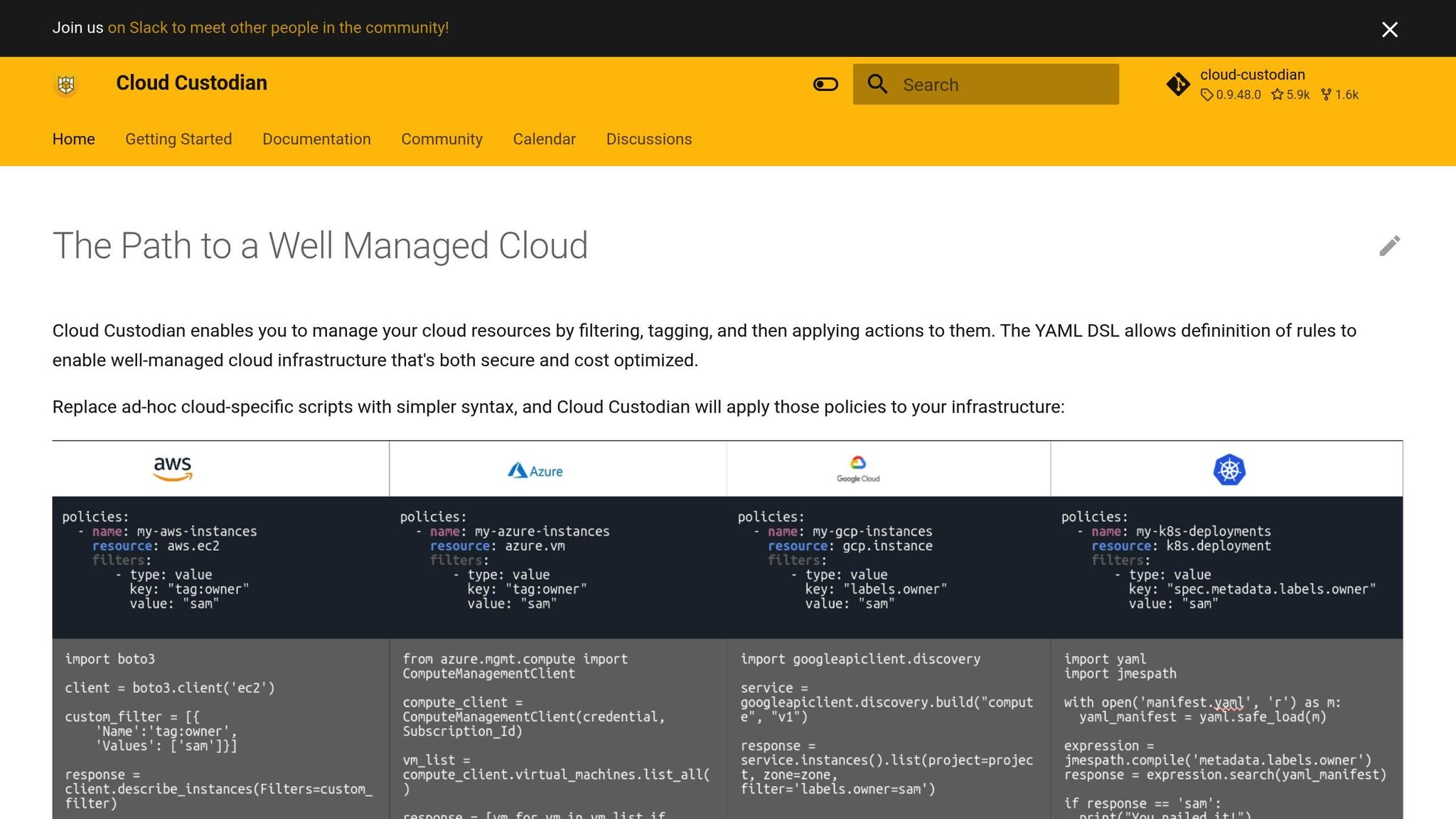
Establish Multi-Cloud IAM Governance
Managing multi-cloud IAM without a clear governance framework can quickly spiral into chaos. Disjointed role creation across platforms like AWS, Azure, and GCP often results in identity sprawl and makes audits a nightmare. This lack of coordination leads to over-privileged accounts and scattered audit trails, creating significant security and compliance risks.
To address this, you need to define ownership, ensure compliance with regulations, and establish consistent access models across all cloud environments. A structured governance framework transforms IAM from a disorganised task into a controlled, auditable process.
Define IAM Ownership and Responsibilities
The first step is identifying who is responsible for IAM decisions. Often, this responsibility is unclear or overlooked. To fix this, document explicit ownership using a RACI matrix (Responsible, Accountable, Consulted, Informed) for every major IAM task across your cloud platforms.
Set up an IAM governance board that includes representatives from security, DevOps, IT, HR, legal, and the Data Protection Officer (DPO). This board should authorise policies, resolve conflicts, and oversee IAM strategy. Document their roles and responsibilities in a governance charter that outlines scope, authority, and reporting lines.
For day-to-day operations, create a cross-functional IAM working group. This group should maintain standards like RBAC/ABAC models, naming conventions, and tagging practices, while also managing implementation in each cloud. Keep a centralised record of decisions to meet UK audit and compliance requirements.
Here’s a practical example of how a RACI model might look for common IAM activities:
-
Creating a new production role:
- Security: Accountable (A) and Consulted (C) on controls.
- DevOps/Platform Engineering: Responsible (R) for technical implementation and testing.
- Application/Data Owner: Responsible (R) for approving required permissions.
- Internal Audit/Risk: Informed (I).
-
Joiners, movers, and leavers:
- HR: Responsible (R) for providing accurate employment data and dates.
- IAM Operations: Responsible (R) for provisioning and de-provisioning access across clouds.
- Security: Accountable (A) for enforcing least privilege.
- Line Managers: Responsible (R) for access approvals and periodic reviews.
This level of clarity prevents issues like DevOps teams creating unauthorised admin accounts to bypass approval bottlenecks. It also ensures that if an auditor asks, Who approved this privileged role?
you can provide a documented trail rather than relying on memory.
This approach is backed by data - 63% of security leaders cite managing identities in multi-cloud environments as their biggest IAM challenge [6]. Clearly defined responsibilities and RACI assignments are essential to avoid identity sprawl.
Map IAM Controls to UK Regulations
Once roles and responsibilities are defined, the next step is mapping your IAM controls to UK regulatory frameworks. Compliance with GDPR, ISO 27001, PCI DSS (for payment data), and NCSC cloud security principles requires specific measures around access control, logging, and accountability.
Start by creating a control catalogue based on these frameworks. For instance:
- GDPR mandates data minimisation and access restriction.
- ISO 27001 Annex A includes access management controls.
- PCI DSS enforces least privilege and strong authentication.
- NCSC principles provide UK-specific guidance on identity and authentication.
Document these requirements in a traceable matrix linking regulation → control objective → technical control → evidence (e.g., logs, reports, tickets).
Data minimisation under GDPR requires designing roles with only the permissions needed for specific tasks. Avoid overly broad permissions like AWS’s
*:*or Azure’sContributorrole. Instead, create fine-grained roles tailored to business needs. For example, a finance role might only allow read-only access to billing data.Access restriction can be enforced using mandatory multi-factor authentication (MFA) for privileged accounts, conditional access based on device or network location, and limiting console access where API access suffices. For UK data, ensure administrators based in the UK manage it to meet data residency requirements.
Accountability and logging involve maintaining centralised, tamper-proof audit logs. UK regulators, including the ICO, expect detailed records of who accessed data, when, and why. Define clear log retention policies (at least 12 months) and establish procedures for audit responses.
Cloud Security Posture Management (CSPM) tools can help identify non-compliant configurations and generate audit-ready reports. Regularly review your controls, especially after regulatory changes or updates to cloud services.
Standardise Access Models Across Clouds
Each cloud provider has its own IAM system - AWS uses roles and policies, Azure relies on RBAC and Entra ID, and GCP has its own structure. These systems don’t naturally align, so it’s crucial to develop a provider-agnostic access model that standardises role definitions across platforms.
Define clear, concise role families (e.g., 'Cloud-Platform-Admin', 'App-Owner') with consistent permissions and map them to native cloud roles. Each role should include a description, documented permissions, and a business justification. For example, a 'Developer-NonProd' role might allow deployment and log viewing in non-production environments only.
For more complex scenarios, combine RBAC (role-based access control) with ABAC (attribute-based access control). Use attributes like department, job function, region (e.g., UK
), and environment (e.g., prod
or nonprod
) to create policies that scale. For instance, UK HR staff can only access HR data tagged 'HR' and 'UK'.
This avoids creating an overwhelming number of roles.
Naming and tagging conventions are critical for managing roles and ensuring compliance. Include details like function, environment, region, and sensitivity in names and tags. For example:
- A role named
ROLE_APP-PAYMENTS_PROD_UK_SUPPORT. - Tags like
owner=finance,data_class=personal,region=UK, andenv=prod.
These conventions make it easier to audit and automate compliance. Use CI/CD checks and infrastructure-as-code (IaC) templates to enforce these standards, ensuring non-compliant roles are flagged or rejected before deployment.
Finally, centralise authentication by using a single identity provider (IdP) with SAML or OIDC federation across all cloud platforms. This simplifies governance and strengthens security by providing a unified authentication framework.
Implement Identity Lifecycle Management
Managing identities in multi-cloud environments is where theory meets practice. Without a consistent approach to creating, updating, and removing identities across AWS, Azure, and GCP, organisations can end up with orphaned accounts or users with excessive permissions - both of which can lead to compliance headaches. Automating identity lifecycle management not only reduces errors but also strengthens audit compliance. The key is to automate the entire process, from onboarding to offboarding, using a centralised identity provider that integrates seamlessly with all cloud platforms. This approach minimises manual errors, prevents credential sprawl, and provides the clear audit trail required by UK regulators.
Centralise Authentication and Federation
A single identity provider (IdP) simplifies multi-cloud identity management. Instead of creating individual accounts for AWS, Azure, and GCP, users authenticate once via the IdP, which then federates their identity across all clouds using protocols like SAML 2.0, OAuth 2.0, or OpenID Connect. This setup is often considered the cornerstone of multi-cloud identity management
because it allows users to access multiple platforms with a single set of credentials, reducing password sprawl and friction [6].
Here’s how it works: a user logs into the IdP with their credentials and multi-factor authentication (MFA). The IdP then issues a SAML assertion or OIDC token containing identity and group membership information. For AWS, this assertion is exchanged for temporary credentials via AWS Identity Center (formerly AWS SSO) or IAM role federation. In Azure, authentication occurs through Entra ID, while in GCP, workforce identity federation or SAML-based SSO grants access to Cloud IAM resources.
Security controls, such as MFA, conditional access based on device compliance or network location, and session policies, should be enforced at the IdP level. These controls are then inherited across all cloud platforms [6]. For UK organisations, it's important to ensure that IdP services and logs are hosted or replicated within EU/UK regions to meet GDPR and data residency requirements [3].
To implement this, organisations should create cloud-specific enterprise applications within their IdP. For example, in AWS, set up a SAML application that integrates with AWS Identity Center or IAM role federation. Ensure user claims include immutable IDs and group information. Mapping IdP groups to cloud roles - for instance, an Azure AD group like AWS-Prod-Finance-ReadOnly
- ensures users have the right permissions without needing to manage local IAM users in each cloud.
This unified approach forms the backbone of the automated processes described below.
Automate Provisioning and De-Provisioning
Manual account handling is not only time-consuming but also risky. Studies show that many organisations have hundreds or even thousands of inactive or overly privileged accounts, which significantly increases the risk of breaches [4][7]. Automating lifecycle management, aligned with an IAM governance framework, ensures changes are tracked and auditable.
When a new employee joins, HR data should automatically trigger identity creation and group membership assignments in the IdP. This ensures precise access across platforms - AWS (via AWS Identity Center or IAM roles), Azure (using Azure AD groups or Entra ID Privileged Identity Management), and GCP (through Cloud IAM bindings) [6].
For employees changing roles, automation prevents privilege creep by removing outdated entitlements before assigning new ones [4]. When someone leaves, the process must be swift: disable the IdP account as soon as HR confirms the departure, revoke active sessions, and automatically remove access (including group memberships, API keys, and tokens) across all platforms. UK organisations should aim to complete de-provisioning within minutes to reduce insider risks and meet regulatory standards [2]. Every action should be timestamped and logged to support GDPR accountability.
Cloud-native tools can simplify this process. For instance, Azure AD provisioning connectors can synchronise users and groups into AWS Identity Center using SCIM-based integrations [6]. Similarly, AWS Identity Center can manage access across multiple AWS accounts via permission sets, while GCP’s Cloud Identity or workforce identity federation can map IdP groups to Google groups for controlling access. For more complex workflows, Identity Governance and Administration (IGA) tools like SailPoint, Saviynt, or OneIdentity can add advanced governance features while maintaining automation.
Manage Non-Human Identities and API Keys
Non-human identities, such as service accounts and API keys, are often overlooked, posing significant security risks. These identities don’t follow the same lifecycle as human users and are frequently over-privileged or left active long after they’re needed.
The first step is to minimise static secrets. Use cloud-native options like AWS IAM roles for EC2 instances and Lambda functions, Azure managed identities, or GCP service accounts with workload identity federation. These provide temporary credentials that rotate automatically, offering a far more secure alternative to embedding access keys in configuration files or environment variables [8].
When static keys are unavoidable - such as when working with legacy systems - strict controls are essential. Require documented justification and approval for key creation, enforce naming conventions and tagging to tie each identity to an owner, and conduct risk assessments for identities accessing personal or regulated data under GDPR [2][3].
Secrets should be stored in dedicated management services like AWS Secrets Manager, Azure Key Vault, or GCP Secret Manager. These tools provide KMS-backed encryption, role-based access control, and detailed logging [3]. Define rotation policies - typically every 30 to 90 days or shorter for high-risk systems - and automate key rotation through CI/CD pipelines or serverless functions. This ensures dependent applications update seamlessly using secret versioning and fallback mechanisms [4].
For service accounts, short-lived tokens issued via workload identity should be the default. AWS STS, Azure managed identities, and GCP workload identity federation all support this approach, reducing the impact of credential compromise [2]. Centralised audit logging should capture every secret creation, access, and rotation event with UK-compliant timestamps to aid investigations and compliance checks [3]. Regular reviews of both human and non-human identities during access certifications help identify unused or excessive permissions [4].
Non-human identities should be governed by strict policies that enforce lifecycle controls and least privilege. Maintain an inventory documenting the purpose, owner, and permissions of each service account, API key, and access key across all platforms. Conduct regular reviews to ensure permissions remain appropriate.
For UK organisations managing complex multi-cloud setups, implementing these identity lifecycle management strategies can be daunting. Specialist consultancies like Hokstad Consulting can help streamline the process, offering expertise in IAM automation and cloud cost optimisation to integrate identity lifecycle management into CI/CD workflows - enhancing both compliance and operational efficiency.
Enforce Least Privilege and Access Controls
The principle of least privilege (PoLP) is straightforward: every identity - whether it’s a person, a service account, or an automated workload - should only have the permissions absolutely necessary to perform its tasks. This approach becomes even more critical in multi-cloud environments like AWS, Azure, and Google Cloud, where identities often span multiple platforms. Without strong access controls, organisations risk privilege creep
, where users accumulate excessive permissions over time. This not only increases the likelihood of security breaches but also creates compliance headaches.
In the UK, least privilege isn’t just a recommended practice - it’s often a regulatory requirement. GDPR, for instance, mandates data minimisation and access restrictions, ensuring personal data is accessible only when strictly necessary. Similarly, industries like finance and healthcare impose strict access controls to meet sector-specific regulations. Demonstrating proper access management through clearly defined roles, regular reviews, and tightly monitored privileged access is essential for compliance audits. A study by Ping Identity revealed that 63% of security leaders identify managing identities across multi-cloud environments as their biggest Identity and Access Management (IAM) challenge, largely due to identity sprawl and inconsistent controls [6]. Additionally, cloud security tools frequently cite over-permissioned identities as a major risk, alongside misconfigurations and vulnerable workloads.
The next step? Building roles that enforce least privilege while aligning with business needs.
Design Role-Based and Attribute-Based Access
Effective access control starts with well-thought-out roles tailored to specific business functions. Role-Based Access Control (RBAC) assigns permissions to roles that correspond to defined job responsibilities. For example, roles like Finance Analyst – Read-only billing data
or DevOps Engineer – Manage CI/CD in non-production
ensure users only get the access they need. Creating a centralised catalogue of standard roles helps maintain consistency across platforms like AWS IAM, Azure RBAC, and GCP IAM. Roles should focus on specific tasks and environments (e.g., development, test, production), avoiding overly broad roles like admin
unless absolutely necessary.
Cloud providers offer guidance to help enforce least privilege. AWS suggests starting with minimal permissions and expanding only as needed, while Microsoft recommends combining RBAC with Azure AD Conditional Access for additional, context-aware controls. Attribute-Based Access Control (ABAC) takes this further by factoring in dynamic attributes like department, location, device status, or employment type. For example, you could limit access to UK-based users by setting the country attribute to GB
, restrict production access to permanent employees, or grant temporary developer permissions based on risk scores. Using identity provider claims as attributes can also reduce the number of roles needed while supporting GDPR compliance. However, ABAC requires a strong governance framework to manage attribute quality and prevent errors.
When designing roles, it’s wise to start with read-only permissions and add higher-level access only when specific tasks demand it. Assigning users to groups linked to roles, rather than granting permissions directly, makes reviews easier and reduces mistakes. Integrating identity federation ensures that changes in HR systems - like new hires, role changes, or departures - automatically update group memberships across all platforms. Surveys show many organisations grant two to three times more permissions than necessary, underscoring the need for lean, well-defined roles.
Once roles are in place, regular reviews are vital to keeping them effective.
Conduct Regular Access Reviews
Even the best-designed roles can lose their relevance over time. Employees change positions, projects end, and service accounts may outlive their original purpose. Without regular reviews, permissions can pile up, leading to privilege creep, toxic access combinations, and orphaned accounts. Quarterly reviews for standard users and groups, and monthly reviews for sensitive roles, are considered best practice. Additional reviews should follow major organisational changes or system updates.
For UK compliance with GDPR and ISO 27001, these reviews should confirm that all identities are active, necessary, and aligned with current job responsibilities. Dormant or unjustified permissions should be promptly removed. Reviews should cover all major cloud platforms and SaaS tools, involving both business managers and system owners - not just IT teams. The process should produce detailed records of what was reviewed, decisions made, and supporting evidence, such as logs or screenshots. This documentation is crucial for demonstrating compliance with regulatory requirements.
Automation can simplify access reviews, especially at scale. Tools like AWS IAM Access Analyzer, Azure Access Reviews, and GCP IAM Recommender help identify excessive, inactive, or misconfigured permissions. Centralised identity governance platforms and SIEM/CSPM solutions can further streamline the process. Integrating these tools with HR systems ensures that reviewer lists and role mappings stay up to date. Evidence shows that organisations conducting quarterly or more frequent reviews significantly reduce dormant and orphaned accounts.
Control Privileged Access
Privileged access refers to permissions that can alter an organisation’s security posture, disrupt operations, or expose sensitive data. Managing this access effectively is critical, especially in multi-cloud environments. High-risk roles include global admin or root accounts, subscription or project owners, IAM administrators, key management roles, and DevOps positions with extensive privileges. The Verizon Data Breach Investigations Report consistently highlights privilege misuse as a leading cause of breaches, making it essential to enforce least privilege and tightly control elevated access.
Categorising privileged access into tiers allows organisations to apply controls proportionate to the level of risk. For the most sensitive access levels, stricter measures like multi-factor authentication (MFA), network restrictions, just-in-time (JIT) access, and session recording should be mandatory. JIT access, for instance, grants temporary elevated permissions only when needed and automatically revokes them afterward. In multi-cloud setups, identity providers or Privileged Access Management (PAM) solutions can issue temporary roles based on approved tickets. Native tools like Azure Privileged Identity Management (PIM) or automation using Lambda functions or Terraform can also facilitate on-demand, temporary role assignments triggered by workflow approvals.
Need help optimizing your cloud costs?
Get expert advice on how to reduce your cloud expenses without sacrificing performance.
Centralise Monitoring and Continuous Compliance
Having strong Identity and Access Management (IAM) policies is only half the battle. Without comprehensive visibility across multiple cloud platforms, even the best policies can fall short. In multi-cloud environments like AWS, Azure, and Google Cloud, each platform generates its own audit logs in unique formats and stores them in different places. Without a centralised system to monitor these logs, visibility becomes fragmented, making it difficult to spot cross-cloud threats, investigate incidents, or meet compliance requirements. Many security leaders identify managing identities across multi-cloud setups as a significant challenge due to identity sprawl, inconsistent monitoring, and limited transparency.
For UK organisations, centralised monitoring isn't just a best practice - it’s a regulatory necessity. GDPR mandates that organisations maintain proper technical and organisational measures, including logging access to personal data and the ability to investigate and report incidents promptly. Similarly, frameworks like ISO 27001 and SOC 2 require continuous monitoring and auditable evidence of access control, moving away from periodic reviews to real-time compliance. Achieving this demands constant visibility, automated checks, and the ability to address issues before they escalate. This centralised approach forms the backbone of real-time monitoring, which we’ll explore further in the following sections.
Enable and Centralise Audit Logging
Effective monitoring begins with enabling and configuring audit logging across all cloud platforms. Each provider offers built-in logging tools - such as AWS CloudTrail, Azure AD and Activity Logs, and GCP Cloud Audit Logs - that capture identity-related activities. However, these tools need to be explicitly enabled and tailored to your needs.
Key events to track include:
- Successful and failed logins.
- Creation, modification, or deletion of IAM users, roles, groups, and policies.
- Changes to multi-factor authentication (MFA) settings.
- Privilege escalation through role assumptions or admin role assignments.
- Creation and use of access keys and service accounts.
- Alterations to logging or security settings.
These logs serve as the foundation for both security monitoring and compliance documentation.
Once the logs are enabled, they should be centralised into a single platform, such as Microsoft Sentinel, Splunk, Elastic, or AWS Security Lake. This central repository provides a unified view for analysis and correlation. Using frameworks like the Elastic Common Schema can standardise log formats, making it easier to query IAM events consistently across platforms.
For UK organisations, log storage must comply with GDPR and UK GDPR requirements. Since logs often contain personal data (e.g., user identifiers or IP addresses), they should be stored in UK or EU regions with strict access controls. It’s essential to document data flows and retention policies, as regulators expect evidence that logs are retained according to legal and contractual obligations - often for several years, particularly for critical IAM and audit logs. Synchronising timestamps across systems using UTC simplifies correlation and aligns with audit expectations.
To manage the high volume of logs generated in multi-cloud environments, organisations can collaborate with specialists like Hokstad Consulting. They can help design cost-effective central logging architectures that balance comprehensive monitoring with controlled storage costs.
Define Alert Rules and Monitoring Policies
Collecting logs is only the first step; they must be actively monitored to identify suspicious activity. Given the sheer volume of IAM events in multi-cloud environments, it’s essential to establish targeted alert rules that focus on high-risk actions while minimising false positives. Examples of high-risk activities include:
- Changes to privileged roles or MFA settings.
- Anomalous geographic or behavioural patterns.
- Creation or use of access keys outside expected automation workflows.
Geographic anomalies, such as logins or API calls from unexpected locations or devices, can signal unauthorised access. For instance, impossible travel
scenarios - where the same account appears in two distant locations within a short timeframe - are a classic indicator of compromised credentials. Other red flags include excessive failed login attempts, frequent password reset requests, or the approval of risky OAuth applications.
Disabling key logging or monitoring tools could point to attempts to conceal malicious behaviour. To manage these risks, organisations should implement tiered alerting with severity levels - for example:
- Critical: Root-account activity or disabling key security controls.
- High: New admin role assignments or MFA bypass attempts.
- Medium: Unusual activities like unexpected geographic access.
Behavioural analytics tools such as Azure Identity Protection or AWS GuardDuty can enhance detection by identifying anomalies that static rules might miss.
It’s also important to tailor alert thresholds to your operational context. For example, if your workforce is primarily UK-based, access from outside the UK or Europe should raise a flag. Considering remote work policies and known third-party access locations can help minimise false positives while ensuring genuine threats are detected. Regularly reviewing alert volumes and outcomes allows for fine-tuning thresholds without overwhelming security teams.
Once alert rules are established, it’s crucial to monitor for deviations from your secure baseline continuously.
Scan for Configuration Drift
Over time, IAM configurations can drift from their approved baselines due to unplanned changes, manual interventions, or incomplete deployments. This configuration drift
can weaken security controls, leaving gaps that often go unnoticed until an incident or audit. With different IAM models and interfaces across cloud providers, the risk of inconsistent or overly permissive configurations increases.
To address this, define IAM baselines as code using tools like Terraform, CloudFormation, or Bicep. These baselines act as the definitive source for roles, policies, and permissions. Automated drift detection tools can then compare current configurations against these baselines. For example:
- AWS Config: Monitors IAM resources against rules (e.g., prohibiting wildcard policies or enforcing MFA) and triggers automatic remediation actions.
- Azure Policy: Audits identity and security settings, such as denying role assignments without just-in-time controls.
- Cloud Security Posture Management (CSPM) platforms: Provide automated compliance checks across cloud environments.
Daily drift reports should be integrated with ticketing systems to track and resolve non-compliant changes. Low-risk, high-volume issues - like removing unused permissions - can be handled automatically, while high-impact changes should require manual approval to maintain control.
For compliance frameworks like ISO 27001, SOC 2, and NIST, continuous reporting is crucial. Exportable evidence, including access review records, handled alerts, configuration baselines, and audit trails, demonstrates that IAM controls remain effective over time - not just at deployment.
Specialist consultancies such as Hokstad Consulting can assist UK organisations in integrating IAM monitoring with CI/CD pipelines, automation, and AI-driven tools for continuous policy checks and drift remediation. This ensures a secure and efficient approach to managing IAM across multi-cloud environments.
UK-Specific IAM Compliance Requirements
Organisations in the UK must navigate specific compliance rules that directly influence how they handle multi-cloud Identity and Access Management (IAM). At the heart of these regulations is the UK GDPR, overseen by the Information Commissioner's Office (ICO). This framework mandates the protection of personal data, which includes identity attributes, access logs, and audit trails generated by IAM systems. Failing to maintain proper logging or enforce strong access controls can result in hefty fines and damage to a company’s reputation. Beyond general data protection, industries like finance face even stricter requirements. Regulatory bodies such as the Financial Conduct Authority (FCA) and the Prudential Regulation Authority (PRA) demand detailed security and access logs to ensure operational resilience. Alarmingly, surveys show that nearly half of UK businesses have experienced cyber breaches, placing even greater emphasis on robust IAM practices [3]. Below, we’ll explore how organisations can meet these UK-specific requirements to strengthen their multi-cloud IAM compliance.
Ensure GDPR Data Residency Compliance
To meet UK regulations, it's essential to treat identity attributes and access logs as personal data when they can be linked to an individual. UK GDPR principles require organisations to prioritise lawfulness, purpose limitation, data minimisation, and storage limitation [3]. When personal data needs to be transferred outside the UK, strict safeguards must be in place. For multi-cloud setups, this involves:
- Choosing UK or EU regions (e.g., AWS London, Azure UK South/West, GCP London) for IAM-related services [9].
- Preventing cross-region replication of logs and backups to non-approved regions.
- Using separate accounts or subscriptions for workloads that require stricter residency controls.
For companies needing to enable global access while adhering to residency rules, federated identity solutions like SAML or OIDC can help. These allow authentication via a UK-hosted identity provider (IdP), ensuring that only the minimum required attributes are shared with foreign clouds to issue local tokens [2]. However, if cross-border data transfers are unavoidable - such as when using a US-hosted SIEM tool - organisations must implement mechanisms like the UK International Data Transfer Agreement (IDTA) or the UK Addendum to EU Standard Contractual Clauses. Additionally, a Transfer Risk Assessment should be conducted [3]. For administrators accessing systems from outside the UK, enforce strong authentication measures, apply least-privilege roles, and implement conditional access policies to block connections from high-risk locations [2].
Align Logging and Timestamp Practices
Accurate timestamps are critical for incident response, forensic investigations, and meeting regulatory requirements. UK guidelines recommend using a 24-hour time format with clearly marked time zones for all log entries, standardising on UTC to prevent issues caused by daylight-saving changes [1].
To ensure consistency, all cloud accounts and on-premise systems involved in IAM processes should synchronise with a trusted time source via the Network Time Protocol (NTP). Systems should also trigger alerts for significant clock drift, as unreliable timestamps can undermine the credibility of logs in legal contexts [5]. Log formats should be consistent across providers and include essential details such as event time, actor identity, source IP, target resource, and outcome, making it easier to query and correlate data [2].
Retention policies must strike a balance between regulatory needs and data minimisation. For most organisations, keeping detailed logs for 12 to 24 months is standard, while highly regulated sectors may require retention for up to six years or more [3]. A multi-tier storage approach is ideal: retain recent logs in hot
storage for 30–90 days, then transition older data to warm
or cold
storage based on retention policies [9]. IAM systems should also support data subject access requests (DSARs), allowing organisations to locate, export, and, when necessary, redact user-related audit events [3].
Optimise IAM Costs for UK Organisations
While comprehensive logging and monitoring are non-negotiable for compliance, they can quickly become a financial burden. Cloud providers like AWS, Azure, and Google Cloud charge for both log ingestion and storage. For example, AWS CloudTrail offers 90 days of free management events, but additional data events incur fees. Similarly, Azure Monitor and Google Cloud Logging base their pricing on data volume and retention [3].
To manage costs, UK organisations should carefully scope and tier their logging strategies. Focus on capturing high-value IAM and security events centrally, while applying sampling, aggregation, or shorter retention periods for less critical operational logs [1]. Identify noisy log sources and reduce verbosity for non-essential events. Use filters before ingestion to ensure only security-relevant data is sent to high-cost SIEM systems, while less critical logs are stored in lower-cost object storage [1].
A multi-tier storage approach balances accessibility with cost efficiency. Recent logs can stay in hot storage for quick access during investigations, while older logs move to warm or cold storage to save costs. Automating this process with lifecycle policies ensures compliance without overspending. De-duplicating overlapping logs is another effective way to cut costs.
For organisations grappling with complex multi-cloud transformations, expert guidance can make a significant difference. Specialist consultancies like Hokstad Consulting provide tailored advice on cloud cost management and IAM optimisation, helping UK businesses maintain compliance while keeping expenses under control.
Conclusion
Managing Identity and Access Management (IAM) across multiple cloud platforms has become one of the biggest challenges for organisations in the UK. Misconfigured permissions and excessive access rights are leading causes of cloud security incidents. A disciplined approach to IAM governance is essential for maintaining security, ensuring compliance, and improving operational efficiency. For businesses working across platforms like AWS, Azure, Google Cloud, and hybrid environments, the varying IAM models, tools, and terminology can create gaps and inconsistencies. However, by adopting a structured and repeatable approach, this complexity can be transformed into a manageable and auditable programme.
To tackle this, organisations should focus on key steps: establishing multi-cloud IAM governance to define a policy baseline, implementing identity lifecycle management to enforce policies consistently, designing least-privilege access controls to mitigate risks, and centralising monitoring to ensure ongoing compliance. For UK organisations, additional considerations such as GDPR’s data residency requirements, precise logging practices, and a cost-conscious IAM design are critical to aligning with both regulatory demands and operational needs. Maintaining continuous IAM compliance ensures adaptability to changes in cloud environments and evolving regulations, creating a solid foundation for streamlined IAM processes.
Unified IAM controls and centralised logging can significantly reduce misconfigurations, lower the risk of breaches, and make audits more straightforward. Automating tasks like access reviews, provisioning, and compliance monitoring not only cuts down on manual effort but also reduces human error, allowing security teams to focus on more strategic priorities. Improved visibility into identities and entitlements can also expose unused or over-provisioned accounts, leading to savings on licences and more efficient use of cloud-native IAM tools.
Key processes, such as user provisioning, access reviews, and compliance checks, should be automated using infrastructure-as-code. Centralising log collection and correlating IAM events across multiple clouds provide the foundation for real-time alerts and audit evidence. While automation offers significant security and compliance benefits, it often requires specialised expertise in cloud platforms, DevOps tools, and governance frameworks.
For UK organisations navigating complex multi-cloud transformations, expert guidance can make a significant difference. Specialist consultancies like Hokstad Consulting can help translate IAM checklists into practical architectures, pipelines, and controls tailored to public, private, and hybrid cloud environments. Their experience in DevOps transformation and cloud cost management allows them to design automation solutions for provisioning, access reviews, and policy enforcement. By leveraging infrastructure-as-code and CI/CD pipelines, they help organisations embed IAM compliance into deployment processes, eliminating the need for manual interventions.
To get started, assess your current IAM posture by enabling centralised logging, tightening privileged access, and standardising roles across cloud platforms. Conduct an internal review to map your existing IAM controls to UK regulatory requirements and create a roadmap for automating essential processes like provisioning and access reviews. If you need to accelerate compliance and cost-effective implementation, consider partnering with a specialist familiar with UK regulations. By taking these steps, you can secure your multi-cloud environment and stay compliant in a constantly evolving regulatory landscape. With the right strategy and support, achieving robust multi-cloud IAM compliance is well within reach for any UK organisation.
FAQs
How can organisations ensure effective IAM management and compliance across multiple cloud platforms under UK regulations?
To manage Identity and Access Management (IAM) effectively across multi-cloud environments while staying compliant with UK regulations, organisations should prioritise a few critical areas:
Access Policies: Establish clear, well-defined access policies for each cloud platform. Adopting role-based access control (RBAC) and following the principle of least privilege can significantly reduce unnecessary access and enhance security.
Monitoring and Auditing: Continuous monitoring is essential to track access activities and maintain compliance. Regular audits help uncover vulnerabilities and ensure that access policies remain aligned with regulatory standards.
Automation and Centralisation: Leveraging tools to centralise IAM management across various platforms can simplify operations. Automating repetitive tasks not only minimises errors but also boosts overall efficiency.
For organisations in need of expert assistance, Hokstad Consulting provides tailored solutions to optimise cloud infrastructure. Their services are designed to streamline IAM processes, ensure compliance, and help reduce operational costs.
What are the advantages of using a unified identity provider in multi-cloud environments, and how does it improve security and compliance?
Using a single identity provider across multiple cloud platforms brings a host of advantages. For one, it simplifies identity management by consolidating user authentication and access controls. This streamlined approach reduces complexity while minimising the risk of security gaps. It also ensures that policies and permissions remain consistent, making access management and monitoring far more straightforward.
On the security front, a unified identity provider adds an extra layer of protection by enabling multi-factor authentication (MFA). This significantly lowers the chances of unauthorised access. Additionally, it supports compliance efforts by centralising logging and reporting, which helps organisations stay audit-ready and meet regulatory requirements with greater ease.
By connecting identity management across different cloud environments, companies can boost efficiency, lower risks, and uphold tighter compliance standards.
How can organisations in the UK optimise IAM logging and monitoring to meet compliance requirements while managing costs effectively?
Balancing compliance and cost efficiency in IAM logging and monitoring is a challenge many UK organisations face. A smart starting point is to focus on critical logs. Pinpoint the logs that are most vital for compliance audits and security, such as those tracking privileged account activities or unauthorised access attempts. By narrowing the scope to what's essential, you can cut down on unnecessary data storage expenses.
Another effective strategy is to tap into cloud-native monitoring tools or third-party solutions that work seamlessly with multi-cloud setups. These tools can automate log analysis, flag anomalies in real time, and simplify compliance reporting. The result? Less manual effort and more efficient use of resources.
It's also important to routinely review your logging policies. Make sure they stay aligned with current regulations, like GDPR, without overdoing it on data retention or provisioning. This keeps your approach both compliant and cost-effective.