
If I place the wrong workload in the wrong cloud, I usually pay twice: once in £ spend and again in slow service.
Here’s the short version: I’d put steady, always-on systems on on-premises or private cloud, use public cloud for bursty demand, keep latency-sensitive and data-heavy services close to users or data, and review placement often because prices, traffic and rules change. The article’s core point is simple: cost, performance, resilience, data locality, and compliance all need to be scored together.
A few numbers make that clear:
- 84% of UK organisations now match workloads to different environments instead of using one cloud for everything
- Dynamic multi-cloud scheduling can cut spend by 15–20%
- Multi-cloud Kubernetes setups have reported 12% lower inter-region latency
- AIOps-led scaling has shown 18% lower infrastructure cost and 31% fewer SLO violation periods
- UK estates now span an average of 2.6 clouds plus on-premises
What I’d check before placing any workload:
- Cost: compute, storage, networking, licences, support time, and egress fees
- Performance: latency, throughput, jitter, uptime, and p95/p99 targets
- Data locality: whether compute should sit near the data
- Compliance: UK-only hosting, audit needs, and sector rules
- Workload pattern: steady, bursty, interactive, or data-heavy
Quick comparison
| Approach | Best for | Main upside | Main risk |
|---|---|---|---|
| On-premises | Steady, data-heavy, low-latency systems | Lower unit cost at high use; close to data | More support effort and fixed capacity |
| Private cloud | Steady business apps with UK hosting needs | Good control and low-latency access | Less elasticity than public cloud |
| Public cloud | Bursty apps, batch jobs, DR/failover | Pay for use; easy scale-out | Egress and traffic costs can climb |
| Edge | Near-user response paths | Very low latency, often sub-50 ms | Fleet control is harder |
| Hybrid | Mixed estates with different workload needs | Better fit by workload | More policy and scheduling work |
If I had to reduce the article to one rule, it would be this: don’t pick one cloud first and force every workload into it; score each workload, place it where it fits, then check the numbers again over time.
::: @figure 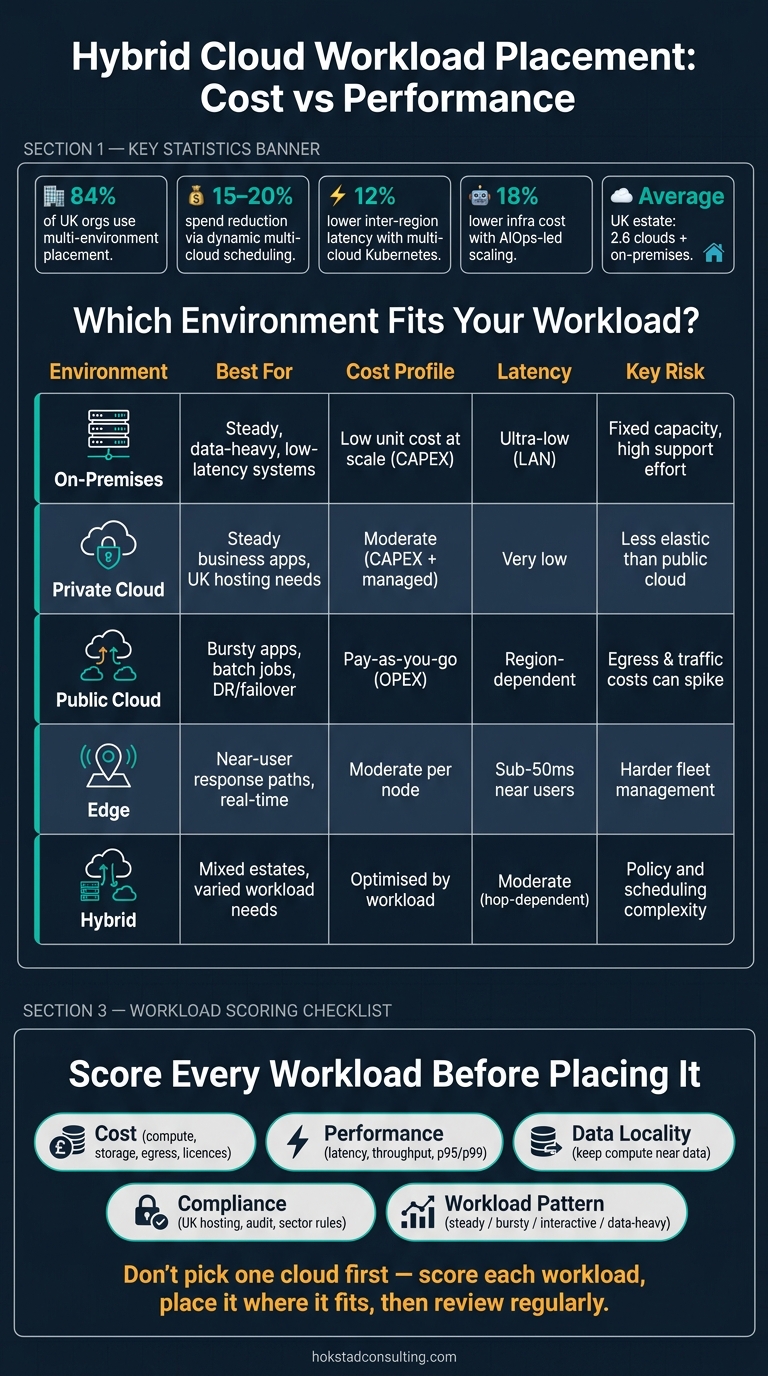 {Hybrid Cloud Workload Placement: Cost vs Performance by Environment}
:::
{Hybrid Cloud Workload Placement: Cost vs Performance by Environment}
:::
Cost-optimised placement: how hybrid cloud reduces spend
Cost drivers that influence placement decisions
The main cost drivers in hybrid cloud are compute, storage, networking, software licensing and engineering overhead. Where you run a workload affects every one of those costs, and weak placement choices can quietly inflate monthly spend.
For UK organisations, the big comparison is CAPEX for owned or colocated infrastructure versus OPEX for public cloud over a three-to-five-year period.[4][7] On-premises and private cloud often make more sense for steady workloads, because fixed hardware and data-centre costs are spread across consistent usage.[8][10]
Public-cloud OPEX works well for variable demand. But there’s a catch: egress fees and cross-environment traffic can wipe out those savings if data sits in the wrong place.[8][10] That’s where many teams get stung. What looks cheap at first can end up costing more once data starts moving back and forth.
It also pays to count engineering time as part of TCO. Running a more complex on-premises or private cloud estate usually needs more internal DevOps and SRE support than using managed public cloud services.[10] So the job isn’t just to find the lowest sticker price. It’s to choose the lowest-cost placement that still hits service levels.
Workloads that suit lower-cost hosting models
Predictable, always-on workloads like core databases, ERP systems, payroll and other line-of-business applications are often cheaper on-premises or in a private cloud. The reason is simple: fixed infrastructure tends to work best when it stays busy.[8][10]
| Workload type | Best placement | Cost advantage |
|---|---|---|
| Core databases / ERP | On-premises or private cloud | Amortised CAPEX and steady utilisation |
| Bursty web front-ends | Public cloud | Pay-as-you-go elasticity |
| Analytics pipelines | Public cloud | Scale up only during peak demand |
| Hybrid split | Hybrid | Reduces data transfer while preserving elasticity |
| Stateless / batch processing | Public cloud | Spot instances can lower compute spend |
A steady payroll system is very different from a web app that spikes during a sale or a reporting pipeline that runs hard for a few hours and then sits idle. Treating them the same is where money gets burned.
Cost-aware autoscaling and scheduling
In Kubernetes, cost control is as much about scheduling as it is about infrastructure choice. One of the most direct fixes is right-sizing pod CPU and memory requests. Use two weeks of usage data to set requests near the 90th percentile, then set limits at about 150% of requests.[9]
After that, autoscaling needs proper tuning. Horizontal Pod Autoscalers and cluster autoscalers should reflect actual load patterns instead of being left on default settings. Node affinity, taints, tolerations and priority classes can help place non-critical workloads on spot instances, while keeping high-performance nodes for critical services.[1][3][5][6]
There’s also an easy win in non-production. Development and test environments don’t need to run all night or all weekend, so scheduling them to sleep outside working hours can trim spend without much effort.[2][5][6]
At some point, though, cutting cost too hard starts to show up as latency or risk. When that happens, performance needs to come first.
Performance-optimised placement: when speed and reliability come first
Performance metrics that matter in hybrid environments
For business-critical workloads, the metrics that matter most are latency, throughput, jitter, availability and SLO adherence.
Latency is the round-trip time between a request and a response. In a real-time fraud check at a card terminal, placing the workload at the edge can support responses below 50 ms.[13][15][16] Throughput shows how many transactions, or how much data, a system can handle each second. Once latency starts to climb or packet loss slips in, throughput tends to fall fast. Jitter is the variation in latency. Availability is usually tracked as monthly uptime, and most UK business-critical systems aim for 99.9% to 99.99%, backed by multi-availability-zone or multi-region setups.[17]
SLOs pull these measures into one working standard. But an SLO only helps if it is defined with care - for example, in p95 or p99 latency, error rate, or availability - and then measured all the time across every placement in the estate.[11][12]
These metrics shape the placement decision. They show whether a workload should stay local, move closer to users, or sit in a central cluster.
Data gravity and proximity to users or systems
Data gravity describes the way large or busy datasets pull applications and services towards them.[19][20][21] That is why transaction-heavy systems, transactional databases, and real-time analytics stores often run better when compute sits next to the data instead of across a network boundary.
The rule here is simple: bring compute to the data, not data to the compute.[19][20]
Workloads that justify performance-first placement
Some workloads make the case for performance-first placement straight away: latency-sensitive APIs, high-I/O databases, regulated financial systems, and AI inference endpoints.
The practical question is not whether a workload looks fast enough on paper. It is where it runs best once real traffic, real users and real network paths are involved.
| Placement | Latency (UK users) | Throughput | SLO reliability | Data gravity |
|---|---|---|---|---|
| On-premises | Ultra-low (LAN) | High | Highest – full control | High – data stays local |
| Private cloud | Very low | High | High | High |
| Public cloud | Region-dependent | Scalable | High (SLA-backed) | Moderate |
| Edge | Lowest – often sub-50ms near users[13][15][16] | Moderate per node; scalable via fleet | High locally; depends on fleet management | Strong for localised data; minimal transfer[13][14] |
| Hybrid | Moderate – depends on hop count | High via private links | High with unified policy | High when compute follows data |
AI inference is a good example. Placement changes depending on whether the model handles live requests or runs in batch. A fraud-scoring model that must answer inside a tight latency budget during a payment flow belongs on-premises or at the edge, close to where the transaction starts.
Regulated systems add another layer. In UK financial services, the FCA’s guidance on cloud outsourcing (FG16/5) calls for defined data residency policies, regulator access, audit trails, and documented exit plans.[18][21] So even when speed leads the discussion, placement still has to meet those rules. In practice, that often means keeping the hot path on UK-based infrastructure.
These trade-offs then turn into scheduling policy across a multi-cluster Kubernetes estate.
Multi-cluster Kubernetes: balancing cost and performance in practice
Cost-first versus performance-first scheduling policies
In multi-cluster Kubernetes, cost and performance signals turn into scheduling rules. That means placement policy is where teams make the trade-off concrete. Cost versus performance is less a one-off architecture call and more a control problem that needs tuning over time.
A cost-first policy aims for the lowest usable compute and memory cost. In practice, that often means leaning on on-premises nodes with sunk capital costs, spot-instance-led fleets, or lower-cost regions. A performance-first policy does the opposite. It keeps capacity ready in low-latency UK clusters and responds fast to latency spikes and jumps in request rates, even when that pushes node costs up.
Here’s how the three common profiles compare:
| Cost-first | Performance-first | Balanced | |
|---|---|---|---|
| Cluster selection criteria | Lowest £/hour; spot-instance-led; on-premises baseline | Low latency to UK users; premium instances; zonal spread | Mixed on-demand/spot; regional proximity; compliance-aware |
| Autoscaling triggers | High CPU threshold (70–80%); aggressive scale-down | Low CPU threshold (40–60%); latency and request-rate triggers | Moderate CPU (60–65%); workload- or namespace-level rules |
| Data locality | Place compute where data already lives | Cluster co-located with primary data sources | Compliance-first; write path near primary database; reads offloaded |
| Expected monthly cost (£) | Low | High | Medium |
| SLO compliance | Lower reliability under load | Stricter reliability targets (99.9%+) | Consistent; critical paths closer to performance-first levels |
Research into multi-layered Kubernetes cost optimisation systems - combining bin-packing, spot instance arbitrage and cross-cluster placement - has reported a 38.4% reduction in mean infrastructure cost per workload unit and a 61% decrease in idle node-hour waste.[22]
Most estates don’t need one blanket rule for every workload. They need a blended policy.
Weighted placement models for mixed workload placement across on-premises, private cloud and public cloud clusters
A practical way to handle this is to score each workload across a few dimensions, such as cost sensitivity, latency sensitivity, data residency needs, security constraints, and operational complexity. Those scores can then guide cluster selection.
For example, a UK retail business might split workloads into three tiers. Customer-facing APIs and payment processing would sit in performance-first UK-region clusters. Content management and search indexing would fit better in balanced clusters. Batch analytics and email generation could run in cost-first clusters with lower-cost compute and storage.
Teams can support that model with labels like compliance=uk-only, cost-tier=low, and latency-tier=uk-low. Custom schedulers or policy controllers can read those labels, score each candidate cluster, and place workloads where they fit best.
Still, a scoring model is only useful if teams keep recalibrating it against live usage and spend. Otherwise, it starts to drift from what’s happening on the ground.
Continuous review through monitoring and automation
Placement scores should be treated as live inputs, not fixed settings. The best setups combine unified observability across all clusters - metrics, logs, and traces - with cost dashboards broken down by cluster and namespace.
That lets teams put SLO burn-rate indicators and latency percentiles next to monthly £ spend per environment. Once those views sit side by side, it becomes much easier to link cost shifts with performance results.
AIOps-based autoscaling that integrates SLO signals has demonstrated 31% fewer SLO violation durations, 24% faster scaling response times and 18% lower infrastructure cost compared with standard Kubernetes autoscalers.[23][24]
Automation matters here too. Policy engines can adjust autoscaling rules, and controllers can move stateless workloads to lower-cost clusters during off-peak hours. That cuts manual toil and helps keep a hybrid estate in line.
Without continuous review, placement decisions slowly fall out of step with current cost and performance targets. Continuous policy review keeps placement aligned as demand and pricing change.
The Multi-Cloud Expedition Episode 11: Optimizing Multi-Cloud Workload Placement
Conclusion: a practical framework for UK hybrid cloud decisions
After weighing cost-first against performance-first placement, the next move is simple: use a workload framework. Hybrid cloud placement only works when workload fit leads the decision. This is not just a technical call. It’s also about cost, performance and compliance.
Classify workloads before placing them
In multi-cluster Kubernetes, classify workloads by criticality, usage pattern, compliance and latency sensitivity. Use lower-cost infrastructure for steady internal jobs, and use performance-first placement for interactive or data-coupled services.
A good place to start is to label each workload as steady, bursty, interactive or data-intensive, then map each one to the best-fit environment. That stops teams from dropping every service into the same cluster by default, which happens more often than people like to admit.
Use measured evidence to review placement over time
Score each workload on cost, latency, data locality, resilience and compliance, using £ spend that includes transfer charges. Network egress and inter-zone traffic can make a placement that looks cheap on paper turn expensive in practice[25][26]. Compliance and resilience should sit at the centre of the decision, not be left until later, especially for UK organisations dealing with data protection duties or sector rules that limit where data can move.
Create a matrix for each workload that covers:
- spend
- latency
- data locality
- resilience
- compliance
Then review it at set intervals or after major changes. Recheck the matrix when traffic shifts, pricing changes or compliance rules move. Track actual spend, transfer charges, response times and support overhead so placement decisions stay tied to measured service data, not guesswork.
For teams that need outside help building a repeatable placement framework, Hokstad Consulting helps teams build repeatable cloud cost and placement frameworks across public, private and hybrid environments.
FAQs
How do I score a workload before placing it?
Start by gathering at least 30 days of performance data. Look at vCPU, memory, network throughput, and disk I/O so you can spot usage patterns and see which workloads are over-provisioned or sitting idle. Then review 3 to 6 months of billing and usage data to check whether demand stays steady or swings up and down.
Next, use statistical analysis, such as standard deviation, to map resource use and line workloads up with the pricing models that cost the least. After that, tier workloads based on mission criticality and how often people or systems access them.
When do egress fees outweigh public cloud savings?
Egress fees can wipe out public cloud savings when you move a lot of data.
At first glance, the maths can look fine. You save money by running workloads in the public cloud, and there’s often a free monthly egress allowance too. But once data transfer volume climbs, those savings can disappear fast. Standard internet egress rates above £0.07 per GB don’t sound huge on their own, yet at scale they add up before you know it.
The cost problem doesn’t stop at internet egress either. Bills can climb when data moves:
- across availability zones
- across regions
- between on-premises systems and the public cloud
Private links may lower the per-GB transfer rate, which sounds like an easy fix. But there’s a catch: you also have to factor in the fixed monthly port fees. In practice, that means you’re trading one cost for another, so the right choice depends on how much data you move and how often.
How often should workload placement be reviewed?
Workload placement needs a regular check-in so resources stay in line with changing business needs, performance goals and cost targets.
Automation can help with real-time changes, which is handy when demand shifts fast. But periodic audits still matter. They help you spot anomalies, unused resources and inefficiencies that build up over time.
A review window of around 30 days usually gives you a clearer picture of how usage is changing. That includes seasonal patterns, which can affect both placement and scaling decisions.