
Which is better for hybrid cloud data transfers: compression or deduplication? The answer depends on your goals. Compression reduces file sizes by encoding patterns within individual files, saving bandwidth and storage. Deduplication, however, scans across datasets to eliminate duplicate blocks, cutting down on redundant data transfer. Both methods can lower costs and improve performance, but each has distinct strengths and limitations.
Key Takeaways:
- Compression is ideal for shrinking individual files (e.g., databases, documents, multimedia) and works best with uncompressed data.
- Deduplication excels in environments with repetitive data (e.g., backups, virtual machines) by removing redundant blocks across datasets.
- Combining both methods - deduplication first, then compression - can maximise efficiency in hybrid cloud environments.
Quick Comparison:
| Feature | Compression | Deduplication |
|---|---|---|
| Scope | Individual files | Across datasets/files |
| Mechanism | Encodes patterns | Removes redundant blocks |
| Best For | Unique files, multimedia | Backups, virtual machines |
| CPU Usage | High for encoding/decoding | High for hash calculations |
| Impact on Bandwidth | Reduces file size | Transmits only unique data |
For hybrid clouds, consider your data type and transfer needs. Deduplication works well for backups and repetitive data, while compression is better for unique files. Using both together often delivers the best results.
::: @figure 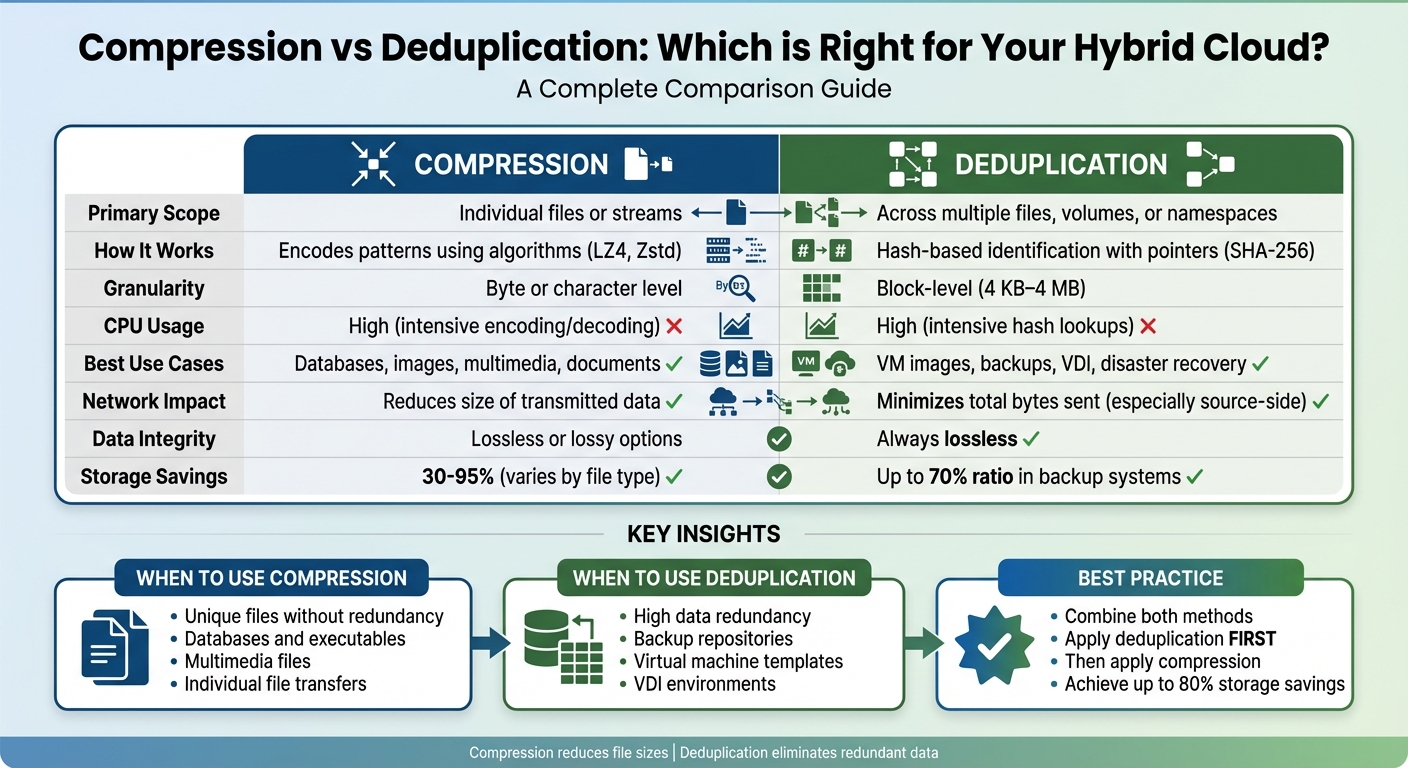 {Compression vs Deduplication for Hybrid Cloud: Complete Comparison Guide}
:::
{Compression vs Deduplication for Hybrid Cloud: Complete Comparison Guide}
:::
What Is Data Compression?
Think of data compression as repacking a suitcase to make everything fit more efficiently. It reduces the size of files by using fewer bits, which is especially useful in hybrid cloud environments. Here, compression minimises file sizes before transferring them between private and public infrastructures, saving both bandwidth and storage space [6][2].
Unlike deduplication, which focuses on removing duplicate blocks across files, compression works by restructuring individual files to save space [7][2].
How Compression Works
Compression generally falls into two categories: lossless and lossy.
- Lossless compression removes redundant data while keeping the original file intact. This type is perfect for text files, databases, and executables, where every detail matters. For example, lossless audio compression can cut file sizes by 40–50% without losing any quality [6].
- Lossy compression, on the other hand, permanently discards less noticeable details, like those in multimedia files. This approach achieves much higher compression ratios. For instance, MP3 files can shrink to just 5–20% of their original size, and H.264 video compression can reduce sizes by factors ranging from 20 to 200 [6]. However, because the removed data is gone for good, lossy compression isn't suitable for critical systems or backups.
In hybrid clouds, compression can be applied inline (before data is written to the cloud) or post-process (after the data reaches its destination). Each method affects performance and resource use differently, so choosing the right one depends on your needs [5].
Common Use Cases in Hybrid Clouds
Compression shines when transferring large files, especially those with internal patterns or redundancies, like text documents, databases, and executables. Lossless methods ensure these files maintain their integrity during the transfer [9][5]. Damon Garn from Cogspinner Coaction explains:
Compression is
best used for... individual files rather than full partitions or volumes... \[and\] files like images, multimedia and databases[2].
Multimedia streaming is another area where compression excels. Video and audio files can handle lossy compression well, making them ideal for saving bandwidth during transfers between public and private clouds [5][1]. Similarly, large file downloads benefit from compression, as reducing file sizes on the client side cuts bandwidth requirements for both uploads and downloads [9].
For cloud object storage, using a seek index at 1MB intervals allows users to access specific parts of compressed files without decompressing the entire dataset. This is particularly helpful for working with large files [9].
Benefits and Limitations of Compression
Compression offers clear advantages: it reduces bandwidth needs, lowers storage costs, and speeds up synchronisation. Microsoft has reported that data reduction techniques can shrink virtualisation libraries and user documents by 30% to 95% [2]. Different compression levels provide varying trade-offs:
-
High
compression using the Zstd 3 algorithm can achieve up to 60% more data reduction than standard levels. -
Extreme
compression (Zstd 9) can reduce file sizes by an additional 33% over high compression but comes with a significant CPU cost [8].
However, compression isn't free of challenges. Encoding and decoding can be resource-intensive, potentially creating bottlenecks if the CPU can't keep up with network speeds [9][2]. For instance, high compression doubles CPU usage and slows restore speeds, while extreme compression uses five times more CPU resources [8]. Such overhead can cause latency issues, particularly for real-time applications like VoIP [6].
| Compression Level | Algorithm | Performance Impact | Use Case |
|---|---|---|---|
| None | N/A | Lowest CPU; highest bandwidth use | Storage devices with hardware-level compression [8] |
| Optimal | Lz4 | Best balance of speed and reduction | Standard backup and replication [8] |
| High | Zstd 3 | 2x CPU usage; slower restore speeds | When saving storage space outweighs speed [8] |
| Extreme | Zstd 9 | 5x CPU usage | Maximum reduction for long-term storage [8] |
Compression also struggles with encrypted data, as encryption removes the patterns compression relies on [7]. Similarly, trying to compress already compressed files, like ZIPs, won't yield further savings and only increases CPU load [8]. Additionally, the exact savings depend heavily on the type of files being compressed, making it hard to predict reductions accurately [2][8].
Need help optimizing your cloud costs?
Get expert advice on how to reduce your cloud expenses without sacrificing performance.
What Is Data Deduplication?
Data deduplication is a method designed to save storage space by eliminating redundant data. Instead of compressing individual files, it scans your entire dataset, identifies identical blocks of data, and stores each unique block just once. When duplicate data is found, the system replaces it with a small pointer or reference to the original block [7][5].
Unlike compression, which works within individual files, deduplication takes a broader approach, analysing entire storage systems to locate and manage duplicate data blocks [7][2].
In hybrid cloud setups, deduplication can start at the source - your local or private cloud - before sending data to the public cloud. This ensures only unique data blocks are transmitted, significantly reducing bandwidth usage. For instance, sending 100 copies of a 1MB file would normally require 100MB of bandwidth. With deduplication, only one copy (≈1MB) is sent, cutting bandwidth needs by a factor of 100:1 [7]. Combined with compression, deduplication is a powerful tool for streamlining hybrid cloud data transfers.
How Deduplication Works
The process begins by dividing data into blocks, usually between 4KB and 64KB in size [7][3]. A unique cryptographic hash is generated for each block and compared against an index of stored hashes. If a match is found, the system replaces the duplicate block with a pointer to the original, rather than storing it again.
There are two primary methods of implementation:
- Inline Deduplication: This happens in real time as data is written, immediately reducing storage use and network traffic. However, it requires more processing power [7][5].
- Post-Process Deduplication: Here, data is written in its original state first, and duplicates are removed later. While this avoids initial performance slowdowns, it does require additional temporary storage [7][1].
These methods allow deduplication to adapt to various hybrid cloud workflows and performance needs.
Common Use Cases in Hybrid Clouds
Deduplication is particularly useful in environments with repetitive data. Backup systems are a prime example, as data tends to change minimally between cycles. This makes deduplication an excellent fit for secondary storage and disaster recovery, with some systems achieving deduplication ratios as high as 70% [1][7][2].
Virtual desktop infrastructure (VDI) and virtual machine repositories also benefit. Many virtual machines share identical system files, and deduplication can significantly reduce storage needs. For example, Microsoft has reported savings of 30% to 95% in storage space for user documents and virtualisation libraries [2].
Large file servers with redundant data also gain from deduplication. By eliminating duplicate blocks before transferring data to the public cloud, organisations can cut bandwidth costs and reduce cloud storage expenses [7][10].
Benefits and Limitations of Deduplication
Deduplication offers several advantages in hybrid cloud environments. It reduces physical storage requirements, lowers bandwidth costs, and extends the lifespan of SSDs [7][5][11]. Importantly, it is a lossless process, meaning the original data remains intact [5][1].
However, there are trade-offs. The hash calculations required for deduplication can be CPU-intensive, potentially slowing down write performance, particularly in post-process implementations [7][2]. To mitigate this, it's best to schedule post-process deduplication during off-peak hours [2][5].
Deduplication is less effective for datasets with minimal redundancy, such as unique multimedia files or data that has already been compressed [7][1]. Encrypted data also presents challenges, as encryption obscures patterns needed for deduplication. Specialised methods, like convergent encryption, can help address this [7][10]. Additionally, there is a small risk of hash collisions - where different data blocks generate the same hash - which could lead to data corruption if not carefully managed with bit-for-bit validation [7].
On traditional spinning disks, deduplication can impact performance by converting sequential operations into random I/O due to fragmented data blocks [9]. This makes it less suitable for primary storage systems requiring high performance.
Compression vs Deduplication: Direct Comparison
Key Differences in How They Work
The main distinction between compression and deduplication lies in their scope. Compression works within individual files or data streams, focusing on reducing redundancy at the byte or character level. It achieves this through encoding algorithms like LZ4 or Zstd, which replace repetitive sequences with shorter representations [2].
Deduplication, on the other hand, operates on a larger scale, spanning multiple files, volumes, or even entire namespaces [5]. It breaks data into blocks (usually between 4 KB and 4 MB) and uses cryptographic hashes like SHA-256 to identify unique pieces [1]. Duplicate blocks are replaced with pointers to a single stored copy.
Whereas compression algorithms identify redundant data inside individual files... the intent of deduplication is to inspect large volumes of data and identify large sections... that are identical, and replace them with a shared copy.- Wikipedia [7]
For hybrid cloud environments, this difference is crucial. Source-side deduplication compares data against what’s already stored at the target location, transmitting only unique blocks, which greatly reduces bandwidth usage [1]. Compression, by contrast, reduces the size of the data being transmitted but does not compare it to existing data [1]. Both methods require significant CPU resources, but their approaches and impacts differ.
Comparison Table
Here’s a side-by-side look at how compression and deduplication compare:
| Parameter | Data Compression | Data Deduplication |
|---|---|---|
| Primary Scope | Within individual files or streams | Across multiple files, volumes, or namespaces |
| Mechanism | Algorithmic encoding at the binary level | Hash-based identification with pointers |
| Granularity | Byte or character level | Block-level (4 KB–4 MB) or file-level |
| CPU Requirement | High (intensive encoding/decoding) | High (intensive hash lookups) |
| Best Use Cases | Databases, images, multimedia | VM images, backups, VDI |
| Network Impact | Reduces the size of transmitted data | Minimises total bytes sent (especially with source-side deduplication) |
| Data Integrity | Can be lossless or lossy | Always retains original data |
Practical Considerations
Choosing the right method - or combining both - depends on your specific needs. For example, encrypted data cannot be effectively deduplicated, as encryption removes the patterns needed for deduplication [7]. Similarly, compression struggles with already-compressed files, such as media files. To maximise efficiency, it’s often best to deduplicate first, then apply lossless compression [1].
Choosing the Right Strategy for Your Hybrid Cloud
When to Use Compression
Compression works best for individual files like databases, documents, images, or videos that don’t have much redundancy. It’s a quick way to shrink file sizes without needing to compare across multiple files.
This method is especially handy for active databases or unique files, such as text documents and executables, where maintaining data integrity through lossless compression is essential. However, applying compression to already-compressed media files (like MP3s or JPEGs) won’t yield much improvement. These considerations are key when deciding on a method for hybrid cloud environments.
When to Use Deduplication
Deduplication is ideal in scenarios where data redundancy is high. Think virtual machine templates, backup repositories, or Virtual Desktop Infrastructure (VDI). For instance, Microsoft’s deduplication feature in Windows Server has shown space savings of 30% to 95% for user documents and virtualisation libraries [2].
Deduplication is the most widely utilised method for reducing backup sizes, particularly for cloud storage backups.- Edwin Kuss, Hystax [1]
This approach is especially effective for disaster recovery workflows and cloud backups. Tools like Hystax Acura have achieved deduplication ratios as high as 70% [1], making it a strong choice for backup and VDI environments. These examples highlight the importance of deduplication in optimising hybrid cloud strategies.
Combining Compression and Deduplication
For maximum efficiency, combining both methods often works best, but the order matters. Start with deduplication, then apply compression. Why? Compression alters the binary structure of data, which can prevent deduplication algorithms from recognising duplicates later [1].
For transferring data over WAN to off-site cloud storage, using 256 KB blocks can improve deduplication ratios. On the other hand, for local SAN or DAS storage, 1 MB blocks are better for performance [8]. High-level compression methods like Zstd 3 can reduce data by an additional 60%, but keep in mind this comes at the cost of doubling CPU usage and slowing restore times [8].
If you’re working with deduplication-enabled storage appliances, choose dedupe-friendly
compression algorithms so the system can still identify duplicates while reducing transfer sizes [8]. For workloads where performance is critical, scheduling post-processing during off-peak hours can help avoid disruptions to real-time operations.
Optimising Data Transfers with Hokstad Consulting

Tailored Solutions for Hybrid Clouds
When it comes to real-world data transfer challenges, one-size-fits-all solutions rarely work. That’s where Hokstad Consulting steps in with strategies designed specifically for hybrid cloud environments. By starting with a thorough analysis of your datasets, they don’t just rely on generic fixes - they dig into your data patterns, storage habits, and transfer workflows. This helps them decide whether compression, deduplication, or a mix of both is the most effective approach for your needs.
Their expertise also extends to managing cloud costs. For instance, they carefully assess architectural decisions that might drive up egress fees, such as cross-region transfers or inter-service data movement. Keeping data within specific regions, like London or Dublin, can help avoid unnecessary expenses. Hokstad Consulting also ensures seamless integration of their solutions with your existing DevOps workflows, aligning technical decisions with regional considerations to deliver both cost and performance benefits.
Achieving Cost and Performance Goals
The improvements Hokstad Consulting offers aren’t just technical - they directly impact your bottom line. Their expertise in cloud cost engineering often results in savings ranging from 30-50%, alongside noticeable boosts in data transfer performance. They achieve this through detailed technical audits, regular checks on deduplication and compression efficiency, and strict compliance with UK data protection laws, including GDPR and the Data Protection Act 2018.
Hokstad Consulting’s flexible engagement options are another standout feature. Their No Savings, No Fee
model means you only pay a percentage of the actual savings achieved, ensuring their goals align with yours. For businesses needing ongoing support, their retainer model offers hourly DevOps assistance, infrastructure monitoring, and security audits, helping you maintain peak efficiency as your hybrid cloud setup evolves.
Conclusion
When deciding between compression and deduplication for hybrid cloud transfers, it’s essential to understand how each method works and where it excels. Deduplication eliminates redundant data, making it particularly effective for backup repositories, virtual machine images, and VDI environments. On the other hand, compression reduces file sizes by encoding patterns within the data, which works well for databases, multimedia files, and general data transfers.
Using these techniques in the right sequence can significantly improve efficiency. By applying deduplication first, and then using lossless compression on the remaining data, organisations can achieve storage savings of up to 80% in enterprise settings [4]. However, it’s important to balance these benefits against the CPU resources they require. As Daryna Havrada from StarWind explains:
Deduplication cuts down on redundant data, and compression shrinks file sizes, making your storage more efficient and cost-effective[5].
For businesses operating in hybrid cloud environments, the advantages go beyond just saving storage space. Smaller data volumes mean lower bandwidth costs, quicker transfer times, and faster recovery processes - key factors when moving data between on-premises systems and cloud platforms. The challenge lies in tailoring your approach to match your specific data types and transfer needs, while keeping computational overhead in mind.
FAQs
How can I determine if my data is better suited for deduplication or compression?
To figure out whether deduplication or compression is the better fit for your data, start by estimating how much storage you could save with each method. Look for redundancy patterns in your data and calculate either deduplication or compression ratios using simple heuristics. These quick calculations don’t need much processing power and can give you a clear idea of which approach will work best for your specific data set.
What’s the best way to reduce CPU load when using compression or deduplication?
To ease the strain on your CPU during compression or deduplication tasks, focus on refining algorithms and workflows. Opt for efficient compression tools such as Zstandard or LZ4, which are designed for speed and low resource consumption. Additionally, adopting data classification and lifecycle management can prevent redundant processing by ensuring only necessary data undergoes these operations. These steps can help make your processes more efficient while keeping resource usage in check.
How should I handle encrypted data transfers in a hybrid cloud setup?
To ensure secure data transfers in a hybrid cloud setup, it's crucial to use encryption in transit, like Transport Layer Security (TLS). This ensures that data remains protected while being transmitted. Decryption should only occur at trusted endpoints, safeguarding against unauthorised access.
Encryption keys require careful handling. Using key management services can help maintain their security and prevent potential breaches. However, be mindful when combining encryption with techniques like compression or deduplication, as these processes can sometimes interfere with maintaining confidentiality.
For the highest level of security, end-to-end encryption is the ideal choice. This ensures that data remains encrypted throughout its journey and is only decrypted in tightly controlled environments.