
Hybrid cloud failover ensures business operations stay online during IT disruptions by automatically switching from primary to backup systems. It combines on-premises control with cloud flexibility, offering cost savings compared to traditional physical data centres. Here's what you need to know:
- Core Components: Automated failure detection, data replication, and orchestration tools are essential for smooth failover.
- Architectures: Options include active-passive setups (e.g., hot, warm, pilot light, cold standby) and active-active configurations for higher availability.
- Key Metrics: Recovery Time Objective (RTO) and Recovery Point Objective (RPO) guide system design and costs.
- Challenges: Risks like split-brain scenarios, replication lag, and network latency require careful planning and testing.
- Best Practices: Automate processes, test regularly, and use tools like Terraform and Azure Site Recovery to mirror production environments.
Hybrid Cloud Disaster Recovery in AWS | Amazon Web Services
Need help optimizing your cloud costs?
Get expert advice on how to reduce your cloud expenses without sacrificing performance.
Core Components of Hybrid Cloud Failover
To ensure hybrid cloud failover operates smoothly, three key elements come into play: automated failure detection, data replication, and orchestration tools. Each of these components has a specific role in making the system resilient and responsive during disruptions. Let’s explore how they work together.
Automated Failure Detection
Monitoring systems are the first line of defence, constantly scanning the infrastructure to spot failures quickly. These checks, running at regular intervals, confirm whether services are functioning as expected. To minimise false positives caused by temporary network issues, multi-region probing is critical. For instance, Google Cloud requires probes from three distinct regions before acknowledging a failure [1].
Failover triggers activate based on thresholds, such as multiple failed health checks from different regions. The time it takes to detect a failure generally depends on a formula: DNS TTL + (Health Check Interval × Unhealthy Threshold). For example, with a DNS TTL of 60 seconds, a 30-second health check interval, and two failed checks, detection could take about 120 seconds.
Circuit breakers play a vital role in preventing widespread failures. If a downstream service becomes unstable, a service mesh can halt traffic to it, allowing the system to stabilise without overwhelming other components [2].
Data Replication and Backup Strategies
The way you replicate data directly impacts how much you might lose during a failure. Synchronous replication writes data to both primary and backup systems at the same time, ensuring no data is lost but potentially slowing down performance due to higher latency. Asynchronous replication, on the other hand, copies data with a slight delay, improving speed but risking the loss of recent updates.
The choice between these methods depends on the criticality of your systems. For mission-critical workloads, synchronous replication is essential, while less sensitive applications can opt for asynchronous replication to save on costs. Change Data Capture (CDC) offers another option by replicating only incremental changes in real-time.
To protect against ransomware, solutions like immutable storage (e.g., Amazon S3 Object Lock) ensure that backup data cannot be deleted or encrypted without authorisation. Monitoring replication lag is equally important; tools like Amazon CloudWatch can alert you if the delay between primary and backup systems exceeds acceptable limits, such as five minutes.
Orchestration and Workflow Automation
Manual processes can introduce delays and errors during failover, which is why automation tools are indispensable. Orchestration tools handle detection, traffic redirection, and system activation seamlessly. Service discovery tools like Consul enable applications to communicate across hybrid environments without relying on hardcoded endpoints [2].
Connectivity between environments is ensured through pre-configured links such as VPNs (with latencies of 20–100 ms) or dedicated interconnects like AWS Direct Connect and Azure ExpressRoute (offering latencies of 5–20 ms) [3]. Identity federation using protocols like OIDC or SAML ensures consistent authentication and access controls. For example, Azure AD can serve as an identity provider for AWS, maintaining unified security policies across both platforms [3].
Using Infrastructure as Code (IaC) tools like Terraform ensures that your recovery environment mirrors the production setup, eliminating configuration mismatches that could cause issues during failover. While full automation accelerates recovery, incorporating manual approval steps for specific workflows can prevent unnecessary failovers caused by temporary glitches.
Hybrid Cloud Failover Architectures
::: @figure 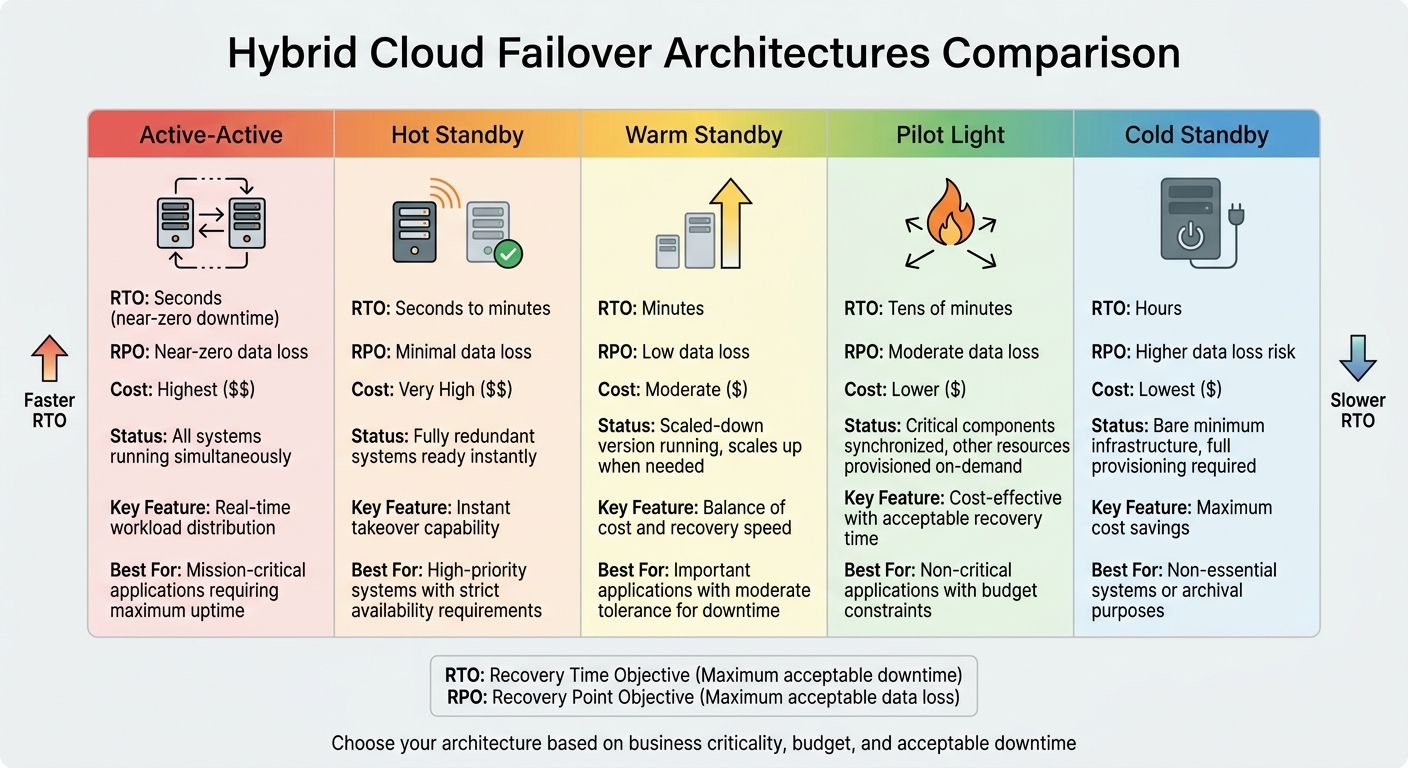 {Hybrid Cloud Failover Architecture Comparison: RTO, RPO, and Cost Trade-offs}
:::
{Hybrid Cloud Failover Architecture Comparison: RTO, RPO, and Cost Trade-offs}
:::
When it comes to hybrid cloud failover setups, the architecture you choose plays a huge role in how quickly your system can recover and how much downtime your business can tolerate. Each approach comes with trade-offs in cost, complexity, and recovery speed, so understanding the options is key to aligning them with your needs.
Active-passive configurations rely on a primary system to handle all traffic, while standby systems remain idle or operate in a reduced capacity. If the primary system fails, the standby system steps in. There are several variations of this setup depending on how prepared the backup is:
- Hot standby: Fully redundant systems that can take over instantly.
- Warm standby: A scaled-down version that can handle reduced traffic but scales up when needed.
- Pilot light: Maintains critical services while provisioning other resources on demand.
- Cold standby: Keeps infrastructure at a bare minimum, requiring full provisioning during a failure.
The choice between these depends on your recovery time objective (RTO), recovery point objective (RPO), and budget.
Active-active architectures, on the other hand, run multiple systems at the same time, distributing workloads across all nodes in real time. If a node fails, traffic automatically shifts to the remaining nodes without requiring a promotion process. This setup delivers the highest availability and performance but demands advanced load balancing and complex data synchronisation. For configurations involving content delivery networks (CDNs), pre-warming caches in secondary environments prevents the risk of overloading the origin during a failover [5]. While active-active setups are ideal for maximising uptime, they are more resource-intensive compared to approaches like pilot light or warm standby.
Speaking of the pilot light approach, this method keeps critical components synchronised while scaling other resources only when a failure occurs. It offers a cost-effective option but involves longer recovery times compared to warm standby, as infrastructure scaling takes time. Warm standby, in contrast, allows for quicker recovery (measured in minutes) since the environment is already operational and just needs to scale out [6]. Additionally, warm standby makes it easier to test readiness using synthetic transactions, as the environment is always running [6].
One often overlooked challenge in failover planning is failback complexity - returning operations to the primary site after recovery. This process is typically more complicated than the initial failover due to data resynchronisation and the need to manage changes made in the secondary site during the outage [4]. However, as AI-driven orchestration becomes standard in disaster recovery plans by 2026, automation is expected to streamline these transitions, reducing the time needed for human decision-making. This builds on the orchestration capabilities discussed in the core components [5].
Step-by-Step Failover Process
Getting a clear handle on the failover process is essential for quick recovery. Below is a practical breakdown of the steps involved, from spotting issues to restoring normal operations.
Step 1: Monitor and Detect Anomalies
Continuous health checks are carried out from multiple locations - usually three distinct regions - to reduce the risk of false positives. As Google Cloud puts it, Failover and failback are the automatic processes that route traffic to and from a load balancer
[1]. Failover kicks in when a majority of these probes detect a problem, following the detection formula discussed earlier. Tools like Consul enhance this process by identifying unhealthy application instances and applying circuit-breaking patterns to stop failures from spreading [2].
Step 2: Trigger Automated Failover
Once a failure is confirmed, automated systems take over. Traffic is rerouted using geo- and latency-based routing methods [8]. Proxy-based CDNs can handle this redirection in seconds, avoiding the typical 2–5 minute delays caused by DNS propagation [3][8]. A proactive method is to configure a backup data trickle
, where 10% of traffic is consistently sent to backup load balancers. This ensures those systems remain active and ready even when the primary systems are functioning [1].
Step 3: Redirect Traffic and Update DNS
DNS failover generally takes 2–5 minutes, even with a 60-second TTL, due to caching on client-side systems and recursive resolvers [3]. To speed things up, update records within an existing delegated zone rather than changing NS delegation at the registrar level, which can take hours [7]. Anti-flapping measures are also critical. These ensure that failover is only triggered after multiple failed probes, preventing unnecessary traffic shifts caused by temporary issues [7].
Step 4: Validate and Activate Backup Systems
Before fully switching to backup systems, it's essential to confirm they’re production-ready. A useful method is using health checks that only mark a system as healthy if the 'FailOverNow' flag isn’t active, giving you manual control over DNS redirection [9]. For manual failovers, it’s important to promote and validate database replicas before directing traffic to avoid immediate system failures [9].
Step 5: Execute Failback Procedures
Restoring operations to the primary systems - known as failback - is often trickier than the initial failover. Data created or modified during the outage at the secondary site needs to be synchronised with the primary [4]. This involves fixing the primary system, verifying data integrity, and carefully managing the transition to prevent conflicts or data loss. Regularly testing these procedures ensures that the failback process runs smoothly when needed.
At Hokstad Consulting, we use these strategies to help businesses fine-tune their cloud setups and reduce downtime as much as possible.
Common Challenges and Solutions in Hybrid Cloud Failover
Even with meticulous planning, hybrid cloud failover can encounter hurdles. Recognising these challenges and addressing them effectively is key to ensuring smooth recovery and maintaining uptime.
Challenge: Split-Brain Scenarios
Split-brain scenarios happen when nodes lose communication, leading multiple nodes to act as the primary, which can result in conflicting data writes or even corruption. While network partitions often cause this, human error is responsible for nearly 80% of system outages. As Microsoft explains, The split-brain scenario is only possible when a system administrator manually performs a forced quorum operation, or in very rare circumstances, a forced failover; explicitly subdividing the quorum node set
[10].
To prevent this, adopt quorum-based voting, where a majority (N/2 + 1) must agree before any node takes on the primary role. Use an odd number of nodes in your cluster to avoid ties. For hybrid deployments spanning two sites, include a witness node in a third, independent location to act as a tie-breaker. Additionally, implement automated fencing (STONITH) with hardware-level tools like IPMI or iLO to isolate faulty nodes and protect shared resources.
Challenge: Replication Lag
Replication lag poses a threat to failover integrity, as it can leave backup systems working with outdated data. This gap between primary and backup systems risks lost transactions or conflicting records during failover.
To address this, align replication frequency with your data change rates and rely on incremental backups to reduce lag. Pre-warming caches as part of your failover procedures can also prevent cold-cache storms
, which occur when sudden traffic shifts overload secondary site servers [5]. AI-driven orchestration tools can help by predicting replication delays before they escalate [5].
Challenge: Network Latency
When hybrid environments are geographically dispersed, latency can slow failover responses. This becomes particularly challenging for organisations bound by data residency rules - such as UK GDPR compliance - which require regional hosting while maintaining replication across platforms [5].
Combat latency by deploying global load balancers that direct traffic based on real-time latency metrics. Network fencing is another useful tool, allowing you to isolate problematic nodes by disabling switch ports or blocking network access, avoiding lengthy timeouts.
Challenge: Testing Without Disruption
Testing failover mechanisms without disrupting production systems is a delicate balance. Unvalidated procedures can lead to prolonged downtime during actual failovers.
Regular testing is essential. Begin with component testing by isolating specific elements like database failovers or DNS updates, rather than testing the entire system at once [3]. Follow this with partial failovers, redirecting only a small portion of traffic to your secondary cloud. Finally, conduct full failover drills on a semi-annual basis. To ensure thoroughness, use different types of tests: tabletop exercises for procedural reviews, monthly component tests for individual services, and comprehensive drills every six months [3]. Gartner analyst Lydia Leong emphasises, If you're not mature enough for chaos engineering, you're not mature enough to successfully implement multicloud failover.
These approaches highlight the importance of controlled, routine testing to maintain failover readiness.
At Hokstad Consulting, we specialise in helping businesses fine-tune their hybrid cloud strategies, ensuring minimal downtime and reduced operational risks.
Best Practices for Hybrid Cloud Failover
These practices are crucial for ensuring your failover mechanisms work effectively, maintaining uninterrupted operations during unexpected disruptions.
Define RTO and RPO Objectives
Before designing your failover strategy, it's essential to establish your Recovery Time Objective (RTO) and Recovery Point Objective (RPO). RTO refers to how quickly systems need to be restored, while RPO defines the amount of acceptable data loss. These metrics will directly impact your architecture choices and related costs.
Different approaches to failover yield different results. For example, a multi-site active/active configuration offers almost no downtime and minimal data loss but comes with higher costs. Meanwhile, pilot light and warm standby options strike a balance, offering recovery within minutes or tens of minutes. The choice depends on your business needs - a financial trading platform, for instance, will have stricter objectives compared to a content management system.
Automate with the Right Tools
Relying on manual failover processes can lead to delays and mistakes. With human error causing nearly 80% of system outages, automation becomes critical. In fact, by 2025, it's expected that 60% of disaster recovery strategies will incorporate automation to streamline recovery and reduce costs.
Automation tools like AWS Database Migration Service (DMS) and PostgreSQL logical replication ensure continuous, near real-time data synchronisation across cloud platforms. For Windows environments, Azure Site Recovery handles health monitoring and switchover tasks, reducing errors and speeding up recovery. These tools not only improve efficiency but also create a foundation for consistent and reliable testing.
Test Failover Mechanisms Regularly
Even with automation in place, regular testing is key to confirming your failover systems work as intended. However, only 21% of enterprise organisations test their disaster recovery plans more than twice a year - a worrying statistic, especially when 94% of businesses fail to recover after major data loss.
To test effectively, use isolated test networks that replicate production environments without affecting live operations. For example, Azure Site Recovery's Test Failover
feature creates virtual machine replicas in a separate environment, ensuring ongoing replication remains unaffected. Start with tabletop exercises to assign roles, progress to dry runs, and eventually conduct full-scale simulations. Tools like Terraform or AWS CloudFormation can automate these tests, ensuring test environments mirror production setups. Schedule major drills during periods of low activity, and keep DNS TTL values low (30–60 seconds) to allow for quick traffic redirection during both tests and real failovers.
Conclusion
Hybrid cloud failover plays a crucial role in keeping your business running smoothly during unexpected disruptions. By diving into its key elements - like automated failure detection and data replication - and tailoring the architecture to your specific needs, you create a strong foundation for resilience.
Of course, challenges such as split-brain scenarios, replication lag, and network latency can test even the most reliable systems. However, strategies like quorum-based decision-making help mitigate these risks effectively.
Practical testing and automation are essential to overcoming these hurdles. As highlighted by the Microsoft Azure Well-Architected Framework:
Criticality is a business decision and it's your responsibility to help guide that decision... If an outage would hit your revenue, damage customer trust, or put you out of compliance, then that's a critical system[3].
This perspective directly influences key decisions around your recovery time objective (RTO), recovery point objective (RPO), architecture choice (such as active-active or pilot light), and testing priorities.
Statistics reveal that human error and insufficient testing are leading causes of system outages. Regular testing - whether through quarterly tabletop scenarios or semi-annual full failovers - is vital to ensure your systems are ready when it matters most.
FAQs
How do I choose between active-active and active-passive failover?
Deciding between active-active and active-passive failover comes down to your organisation's specific needs, including performance expectations, budget constraints, and recovery priorities.
Active-passive failover is often the more affordable and straightforward option. In this setup, a secondary site remains on standby, ready to take over operations in case of a failure. It's simpler to manage but may involve a slight delay during the switchover.
Active-active failover, on the other hand, provides enhanced availability and load balancing. Both sites actively handle traffic at the same time, ensuring seamless operation even during disruptions. However, this approach requires a larger budget and greater technical complexity.
When making your choice, think about your organisation's Recovery Time Objective (RTO) - how quickly systems need to be restored - and Recovery Point Objective (RPO) - the acceptable amount of data loss. These factors will guide you towards the solution that aligns best with your goals.
What RTO and RPO should I set for my workloads?
When determining the right RTO (Recovery Time Objective) and RPO (Recovery Point Objective), it all comes down to how critical your workloads are. For systems that demand high availability, you’ll likely need an RTO measured in minutes and an RPO as close to zero as possible. It’s essential to set these values based on your specific business requirements and disaster recovery objectives to ensure your operations can continue smoothly, even during unexpected failures.
How can I test failover safely without impacting production?
To test failover without disrupting your production systems, it's best to carry out controlled simulations in a non-production environment. Deliberately activate failover mechanisms to confirm that backup systems can manage workloads efficiently. This process helps pinpoint weaknesses, assess recovery procedures, and confirm preparedness. By testing regularly, you ensure your disaster recovery plan performs as intended, reducing the chances of data loss or downtime during actual incidents.