
If I had to cut this down to one point, it’s this: Azure DevOps and GitLab suit teams that want one main platform, Jenkins suits teams that want deep pipeline control, and JFrog suits teams that care most about package and release control.
For a UK hybrid setup, I’d judge these four tools on five things:
- Deployment flow: how builds and releases move from test to production
- Self-hosted execution: how jobs run in cloud and on-premises systems
- Package handling: where artefacts, images, and dependencies live
- Compliance: audit trails, approvals, policy checks, and access control
- Cost: licence fees in £, plus hosting, storage, and admin work
A few points stand out straight away:
- Azure DevOps gives 5 free Basic users, 1,800 hosted minutes per month, and 1 self-hosted job with no minute cap
- GitLab Ultimate can cost about £1,188 per user per year
- Jenkins has no licence fee, but your spend shifts to servers, storage, patching, backups, and plugin upkeep
- Azure Artifacts starts with 2 GB free, then storage is charged per GB each month
- JFrog is often the highest-cost option here, but it adds deep package tracking, scanning, and release promotion
So if you’re choosing between these tools, the main split is simple:
- Pick Azure DevOps or GitLab if you want one place for code, pipelines, and approvals
- Pick Jenkins if you want to shape the pipeline your own way
- Pick JFrog with another CI tool if package control matters more than the pipeline engine itself
::: @figure 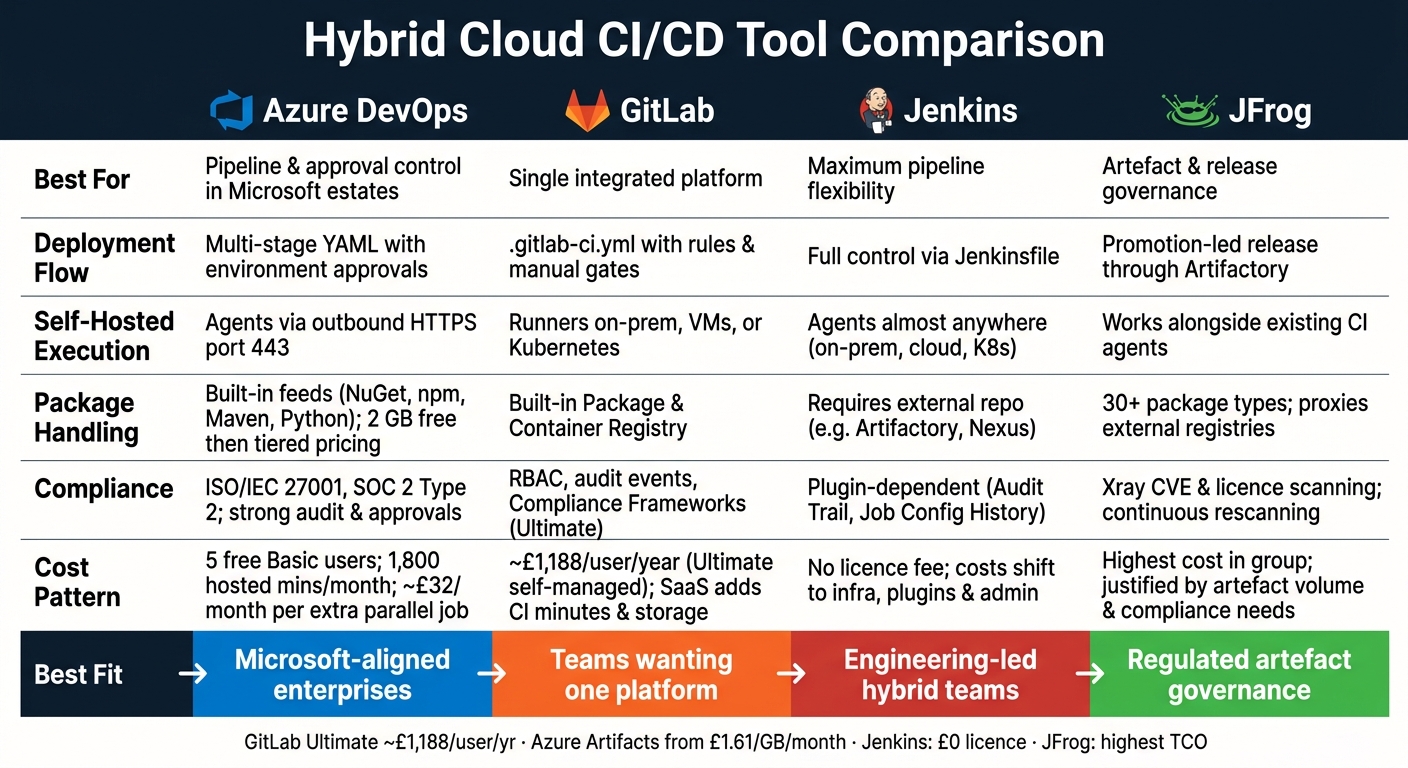 {Hybrid Cloud CI/CD Tools Compared: Azure DevOps vs GitLab vs Jenkins vs JFrog}
:::
{Hybrid Cloud CI/CD Tools Compared: Azure DevOps vs GitLab vs Jenkins vs JFrog}
:::
Quick Comparison
| Tool | Deployment flow | Self-hosted execution | Package handling | Compliance focus | Cost pattern |
|---|---|---|---|---|---|
| Azure DevOps | Stage-based YAML with environment approvals | Self-hosted agents over outbound HTTPS | Built-in feeds for common package types | Strong audit and approval controls | Mid-range subscription, plus infra for self-hosted agents |
| GitLab CI/CD | Pipeline logic in .gitlab-ci.yml with rules and manual gates |
Runners on-premises, VMs, or Kubernetes | Built-in package and container registries | Strong controls, with more policy features in Ultimate | Per-user pricing can climb fast |
| Jenkins | Full pipeline control through Jenkinsfile
|
Agents can run almost anywhere | Needs outside repository tools | Depends on plugins and team setup | No licence fee, but admin and hosting costs are high |
| JFrog | Promotion-led release flow through Artifactory | Works with your CI agents rather than replacing them | Deep package, image, and dependency control | Strong scanning and policy checks with Xray | Highest spend in many cases |
My read: if your main question is “How do I control releases?”, look at Azure DevOps or GitLab first. If your question is “How do I control every package that moves across cloud and on-site systems?”, JFrog will matter more. And if you want the most freedom in pipeline design, Jenkins still has a place.
That’s the lens I’d use for the rest of the article.
1. Azure DevOps
Deployment flow
Azure DevOps fits teams that want tight control over pipelines and approval gates linked to environments, not buried inside scripts.
It uses multi-stage YAML pipelines, where each stage - build, test, staging, production - points to a separate resource.[19][17] Environments keep their own configuration, permissions, approvals, and deployment history. So the checks sit on the environment itself, not in the YAML file.[16][7]
A common hybrid setup for split cloud and on-premises estates looks like this: build and unit tests run on Microsoft-hosted agents, integration tests run on self-hosted agents against on-premises systems, and the final production stage waits for manual sign-off from operations or change-control teams.[4][5][6] That gives teams a clear audit trail from commit to production.
Self-hosted execution
Self-hosted agents connect to Azure DevOps over outbound HTTPS on port 443, so there’s no need to open inbound firewall access.[15] That makes them a good fit for private subnets or on-premises data centres where network changes can be a pain.
From a security point of view, agents should run under least-privilege service accounts. It also helps to split agent pools across dev, test, and production. If you restrict which pipelines can use each pool through environment pipeline permissions, you reduce the blast radius if a pipeline is set up badly or gets compromised.[7][18]
Package handling
Azure Artifacts supports NuGet, npm, Maven, Python, and Universal Packages in one place, and it plugs straight into pipelines. The first 2 GB is free, then storage is charged in tiers.[2]
| Storage tier | Approximate cost (per GB/month) |
|---|---|
| 2–10 GB | £1.61 |
| 10–100 GB | £0.81 |
| 100–1,000 GB | £0.41 |
It’s worth setting retention rules early. In busy hybrid estates, artefact storage can grow faster than most teams expect.[2][8]
Compliance and cost
Azure DevOps Services holds ISO/IEC 27001 certification and SOC 2 Type 2 attestation across its generally available services, which can cut down audit work.[12][13][14]
The free tier includes:
- the first five Basic users
- one Microsoft-hosted CI/CD parallel job with 1,800 minutes per month
- one self-hosted parallel job with unlimited minutes[9][3][10][11]
Extra Microsoft-hosted parallel jobs cost about £32 per month each.[2] With self-hosted execution, the bill moves away from Azure DevOps and onto your own infrastructure and admin time.
The next tool takes a different route for pipeline control and execution.
2. GitLab CI/CD
Deployment flow
GitLab keeps deployment control close to the pipeline file, so hybrid routing is spelled out in plain sight. Pipeline logic lives in .gitlab-ci.yml, and environment plus rules decide whether jobs go to on-premises or cloud targets.[27][30]
In hybrid estates, a common setup is simple: deploy to on-premises staging automatically, then put a manual approval gate in front of production. GitLab also records deployment history per project, which helps when release traceability is a big deal.[32]
If something goes wrong, rollback usually means reverting the commit and redeploying the earlier state.
Self-hosted execution
GitLab Runners handle CI/CD jobs and can run on premises, in private cloud VMs, or in managed Kubernetes clusters.[31][33] The central control plane - GitLab.com or a self-managed GitLab instance - stays put, while runners sit where the work needs to happen.
Tags steer jobs to the right place. For example:
- Use
on-prem-securefor internal systems - Use Kubernetes runners when you need elastic capacity[29]
For UK organisations with data-residency rules, it’s common to keep runners and caches inside UK or EU infrastructure. Outbound-only connectivity to the GitLab control plane can also cut firewall exposure.[23]
This setup has another upside: artefacts stay close to the environments that use them.
Package handling
GitLab includes built-in Package Registry and Container Registry support for formats such as Maven, npm, NuGet, PyPI and OCI/Docker images.[26][28] CI jobs can publish artefacts and push images directly, which means the same artefact can serve both on-premises and cloud deployments.
If a team wants cloud-native registries instead, GitLab pipelines can sign in to them with CI/CD variables and service accounts. Teams can also add signed images with tools such as Cosign for extra traceability.
Compliance and cost
GitLab provides role-based access control, protected branches, audit events and security scanning.[21][22][24] Custom Compliance Frameworks let organisations map controls to specific pipeline rules and enforce them across projects, but they are limited to the Ultimate tier.[25]
Pricing is per user per month. For self-managed Ultimate through AWS Marketplace, pricing is about £1,188 per user per year.[20][1] SaaS deployments also bring extra charges for CI minutes and storage.[20] With self-managed deployments, those costs move into your own infrastructure and admin overhead.
The next tool pushes things further towards manual control and pipeline extensibility.
3. Jenkins
Deployment flow
Jenkins is self-managed, so you control the pipeline end to end. Pipelines sit in a Jenkinsfile in Git, with stages like checkout, build, test, package and deploy spelled out directly.
That level of control matters most in hybrid estates. If work needs to move between cloud and on-premises targets, Jenkins can handle it without much fuss.
Use agent labels to send each stage to the right place. For example:
-
onprem-prodfor on-premises nodes -
cloud-testfor cloud VMs or Kubernetes pods
Multibranch pipelines can push feature branches to ephemeral cloud environments, then move main through staging to on-premises production. Declarative pipelines can also add manual approval gates with input, which pauses the pipeline until someone signs off before production. You can add rollback logic too, if your setup needs it.
Self-hosted execution
Jenkins runs on a controller-agent model. The controller schedules jobs, and agents do the work.
Those agents can run in a few places:
- on-premises
- on cloud VMs
- as ephemeral Kubernetes pods through the Kubernetes plugin
That means Jenkins can target clusters like Amazon EKS, Google GKE or Azure AKS.
A common split is simple: use on-premises agents for regulated workloads, and cloud agents for elastic test runs. To lock things down, secure controller-agent traffic with encryption, store credentials in Jenkins or Vault, and apply NCSC-aligned controls for audit logging, MFA and restricted admin access.
That setup also means external artefact storage is a separate design choice, not something bolted on at the last minute.
Package handling
Jenkins does not include its own artefact repository. Instead, pipelines publish to outside systems such as JFrog Artifactory, Sonatype Nexus or cloud registries through plugins or CLI tools. Container images use docker steps, while Kubernetes deployments use kubectl.
In hybrid setups, one common pattern is to keep proprietary or sensitive packages in an on-premises repository, while less sensitive or more widely used artefacts go to a cloud registry. Promotion between environments is usually handled by Jenkins calling repository APIs after quality gates pass.
In regulated environments, that repository choice matters. It affects both audit trails and cost.
Compliance and cost
In Jenkins, compliance leans heavily on plugins. Tools such as Audit Trail and Job Configuration History can log config changes and access events, which gives regulated teams the audit records they need.
Pipeline-as-code in Git adds another layer. Every change to a Jenkinsfile goes through code review, so you get a traceable change-control record built into the process.
Jenkins itself is free and open source. But the main cost sits elsewhere: infrastructure, storage, egress, and admin time for plugin management, patching, backups and recovery. So Jenkins tends to make financial sense when the team already has the infrastructure and DevOps skills in place, and when total cost of ownership has been mapped out properly.
The next tool looks at the problem from a different side, with artefact management and distribution at the centre of the CI/CD pipeline.
4. JFrog
JFrog sits between your CI engine and your runtime as the artefact and release layer. Artifactory stores, promotes, scans, and distributes build outputs across hybrid environments, whether the pipeline runs on Jenkins, Azure DevOps, or GitLab CI/CD.[34][35]
Deployment flow
In a JFrog setup, the CI pipeline publishes artefacts to Artifactory first. From there, teams promote those artefacts between repositories instead of deploying them straight into runtime.[34][35] That matters in hybrid estates because release control moves away from the CI tool and into the artefact repository.
JFrog Distribution can sign and replicate a Release Bundle to on-premises Edge nodes.[43][44] Then downstream CD tools pull from the local Edge node rather than pulling from the cloud.[34][35][36][38] Put simply, the build may start in one place, but delivery happens much closer to where it will run.
Self-hosted execution
JFrog does not replace agents. It changes what those agents pull, publish, and trust. Instead of fetching dependencies from public registries or cloud-native stores, agents point to Artifactory for both dependencies and build outputs.[34][35][39]
The JFrog Platform deploys on Kubernetes and can run on-premises or in public cloud environments.[40] For UK regulated organisations, that can support a primary cluster with replicated regional nodes that serve local build agents and Kubernetes clusters.[34][41][42] If data location and tighter network control are part of the job, that setup can make life a lot easier.
Package handling
Artifactory supports 30-plus package types, including Maven, Gradle, npm, PyPI, NuGet, Docker, and Helm.[46][47] It also proxies external registries and caches upstream dependencies locally. That means builds do not depend on public internet availability, which is handy for on-premises nodes with restricted outbound access or in air-gapped conditions.[45][46]
Build metadata links each artefact to its source revision, build number, and dependency graph.[34][35] So even if different CI engines produce different builds, you still get one traceability record across the full hybrid estate. That central repository layer also makes policy enforcement easier.
Compliance and cost
JFrog Xray scans artefacts for known CVEs and licence violations, and it can enforce policies that block non-compliant packages from being promoted.[34][41] It also keeps rescanning over time. So if a new vulnerability appears in the database after a build has already been promoted, Xray flags the affected artefacts and alerts teams about components that may already be in production.[34][41]
The trade-off is cost. JFrog is the most expensive option in this group, so it tends to make sense only when artefact volume, compliance pressure, and central governance are strong enough to justify the spend.[37][41]
Pros and Cons
This comparison shows a clean split: some tools give you more control over the pipeline, while others focus on control over release artefacts. So it helps to read the table through that lens: pipeline governance versus artefact governance.
| Tool | Main advantages | Main drawbacks | Best fit |
|---|---|---|---|
| Azure DevOps | Smooth approval-flow control in Microsoft-centric estates | Can add tool sprawl when used alongside other DevOps tools | Enterprises running mixed cloud and on-premises delivery already aligned to Microsoft tooling |
| GitLab CI/CD | Single platform for code, pipelines, security, and artefacts | Per-user pricing rises quickly at scale; governance at scale needs tight admin control | Teams wanting one integrated platform across cloud and on-premises systems |
| Jenkins | Highly customisable; agents run almost anywhere | Needs plugins and custom controls for governance; highest maintenance burden | Engineering-led teams running mixed on-premises and cloud estates that need maximum control and accept higher operational overhead |
| JFrog | Strong artefact governance across hybrid estates; Xray adds vulnerability and licence checks | Artefact governance layer, not the CI engine - teams still need a separate pipeline tool | Teams that need strict artefact governance and still use a separate CI engine |
Cost makes more sense when you look at total cost of ownership, not just the licence fee. Jenkins may be licence-free, but that saving often shifts into infrastructure spend and admin time. Azure DevOps and GitLab roll more functions into subscription pricing, which can make budgeting simpler. JFrog tends to make the most sense when artefact governance sits at the centre of the setup.
Conclusion
There isn’t a single winner here. The right choice depends on a few plain factors: how complex your hybrid setup is, how strict your regulatory duties are, and whether your main goal is to cut licence costs or reduce the work your team has to manage day to day.
When you compare deployment flow, self-hosted execution, package handling, compliance, and cost, the decision usually comes down to pipeline control versus artefact control.
| Organisation type | Best fit | Why |
|---|---|---|
| UK public sector / Microsoft-aligned | Azure DevOps | Azure policy and UK regions |
| Regulated enterprise (finance, healthcare, critical infrastructure) | GitLab Premium/Ultimate self-managed | Self-managed compliance control |
| Engineering-led enterprise with complex hybrid environments | Jenkins + JFrog | Orchestration plus artefact governance |
| SME or start-up reducing operational overhead | GitLab SaaS or Azure DevOps | Lower operational burden |
If you want end-to-end pipeline control, Azure DevOps and GitLab are usually the better fit. If your team needs maximum flexibility, Jenkins gives you more room to shape things your way. And if release governance matters most, JFrog tends to make the strongest case.
FAQs
Which tool is easiest to govern in a hybrid cloud setup?
It comes down to what matters more to you: one place to govern everything or more fine-tuned control.
GitLab CI/CD is often the easiest to govern because it brings source control, CI/CD, and security scanning into a single platform. You get one configuration file, plus built-in runner management, which keeps day-to-day admin simpler.
If you need more custom set-up or support for older systems, Jenkins gives you a lot of power. The trade-off is that it takes more effort to manage.
Already deep into the Microsoft stack? Azure DevOps is also a strong option for governance.
When does Jenkins cost more than paid platforms?
Jenkins is free to use. But “free” doesn’t always mean cheap.
In some cases, Jenkins can end up costing more than a paid platform once the hidden costs of self-hosting start to pile up. That tends to happen when a team doesn’t have dedicated DevOps staff to handle the day-to-day work, such as infrastructure management, security patching, and plugin updates.
Here’s the tipping point: self-hosting is usually only cost-effective once you’re running more than 1,000 jobs per month. Below that, the cost of cloud resources, electricity, and engineering time can outweigh the money saved on licence fees.
Do I need JFrog if my CI tool already stores artefacts?
It depends on your scale and compliance needs. Built-in CI registries can be enough for basic storage. But in enterprise setups, a dedicated repository manager is often the better fit.
A universal repository manager can support a broader mix of packages, give you better search, bring security into one place, and offer tighter control over data sovereignty, replication, and a single source of truth across hybrid clusters.