
Standardising CI/CD configurations can drastically improve deployment consistency, reduce errors, and save time. Without a unified approach, teams face duplicated efforts, unpredictable failures, and rising technical debt. By aligning pipelines across all projects, organisations can achieve faster deployments, fewer outages, and better collaboration.
For example:
- Booking.com reduced deployment-related outages by 70% in 2023 by introducing standardised blue-green and canary deployments.
- A global fintech firm in 2022 cut downtime per incident from 2 hours to under 5 minutes by unifying their pipelines across cloud platforms.
Key steps include:
- Audit current pipelines: Catalogue tools, workflows, and inefficiencies.
- Define standard frameworks: Establish consistent stages like build, test, and deploy.
- Use reusable templates: Store shared configurations centrally to reduce duplication.
- Adopt Infrastructure as Code (IaC): Ensure consistent environments across teams.
- Automate compliance: Enforce security and operational policies through code.
- Monitor performance: Track metrics like deployment frequency and failure rates.
::: @figure 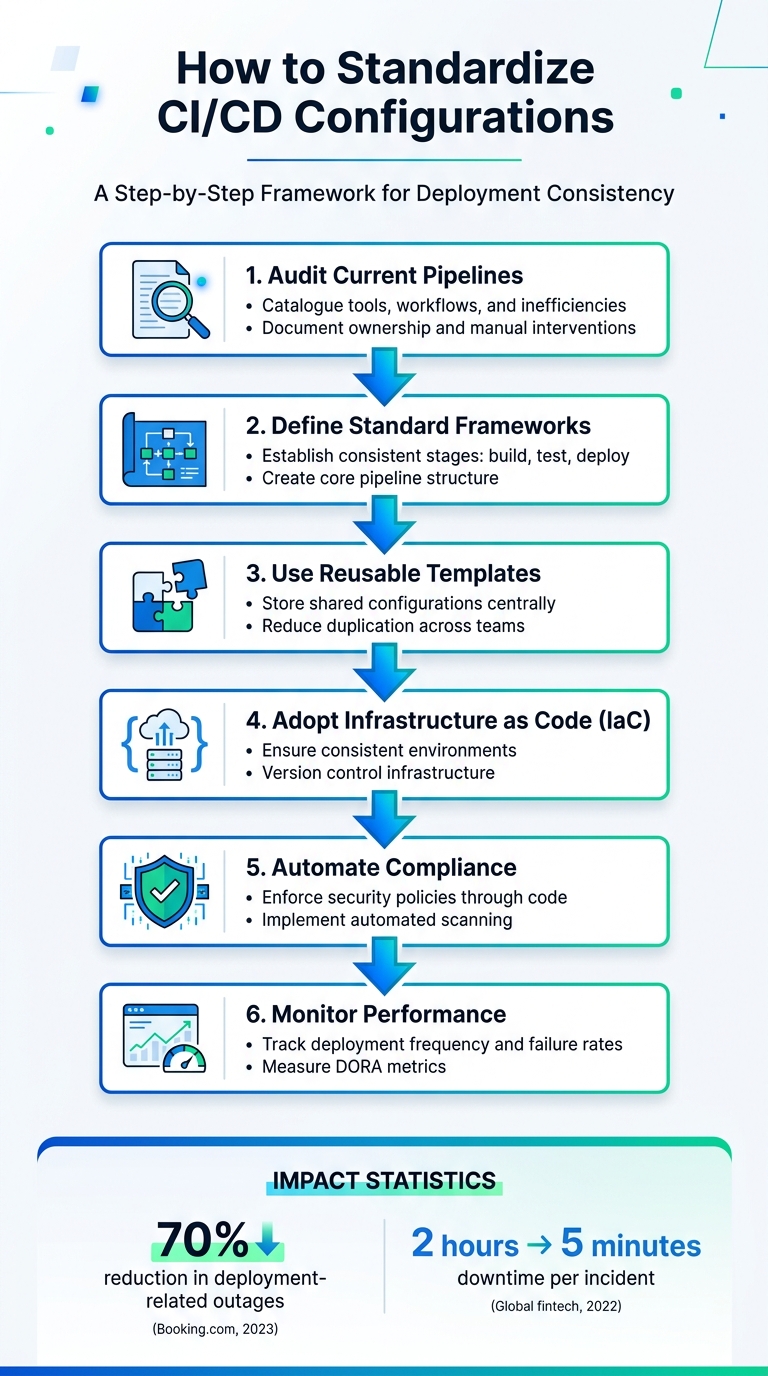 {6 Key Steps to Standardize CI/CD Configurations}
:::
{6 Key Steps to Standardize CI/CD Configurations}
:::
Building a high performant CI/CD platform through standardization - Mihir Vora & Kamlesh Vaghela
Need help optimizing your cloud costs?
Get expert advice on how to reduce your cloud expenses without sacrificing performance.
Assessing Current CI/CD Configurations
Before you dive into standardising your CI/CD pipelines, it’s crucial to take stock of what you already have. By evaluating your current setups, you can identify inconsistencies and inefficiencies while establishing a baseline to track your progress.
Conducting a Configuration Audit
Start by cataloguing every CI/CD pipeline in your organisation. Build a centralised inventory that includes details like tools and their versions, the stages from code commit to production, environment setups, approval workflows, version control practices, security protocols, and performance metrics [1][2]. You can store this inventory in a Git repository or a platform like Confluence for easy access [1].
For each pipeline, note ownership, how configurations are stored, and where manual interventions occur. Break down processes into repeatable steps to improve scalability and consistency [1]. Make sure to check tool versions against vendor support timelines - unsupported versions can introduce security vulnerabilities and limit access to fixes [2]. Also, ensure staging and production environments are aligned to avoid unexpected issues [1].
Using version control for configurations is a must. It allows you to track changes over time and roll back if needed. Add visual aids like diagrams of pipeline flows, decision trees for branching logic, and runbooks for troubleshooting common failures [1]. Assign someone the responsibility of keeping this documentation up-to-date whenever changes occur [1][2].
Once you’ve completed the audit, you’ll be ready to group your pipelines and spot opportunities for standardisation.
Identifying Key Variations and Pain Points
With your pipelines documented, sort them into three categories [2]:
- Keep: These are well-performing pipelines that align with your goals and are thoroughly documented. They can act as templates for standardisation.
- Improve: Pipelines in this group may need updates - perhaps they’re running outdated tools, have incomplete stages, lack security checks, or need better monitoring.
- Replace: These are redundant, outdated, or non-compliant pipelines that should be retired.
Common issues often include inconsistent tool versions, missing or duplicated stages, unclear ownership, a lack of automated testing or security scanning, and manual deployment steps that slow down releases [1][2]. Document these challenges with specific examples and explain their impact on the business to make a strong case for investing in standardisation [1].
To dig deeper, organise interviews with developers, DevOps engineers, QA teams, and release managers. Ask questions like: What manual steps slow your deployments?
, Which pipeline failures happen most often?
, and How long does it take to onboard someone to your CI/CD process?
[1]. When multiple teams identify the same bottleneck, it’s a clear sign that standardisation in that area should be a priority. This collaborative approach also helps ensure buy-in for the initiative.
Here’s a quick look at common pain points and how to document them:
| Pain Point Category | Identification Method | Documentation Tool |
|---|---|---|
| Configuration Drift | Scheduled IaC scans (e.g., terraform plan) |
Audit Logs / Git History |
| Resource Shortages | Monitoring CPU/Memory (Prometheus/Grafana) | Performance Dashboards |
| Tool Fragmentation | Inventory of APIs and native cloud tools | Compatibility Matrix |
| Process Bottlenecks | Measuring stage duration and wait times | Visual Flowcharts |
| Security Gaps | SAST/DAST/SCA scans | Risk Register |
Track both leading and lagging metrics to assess pipeline health [2]. Key indicators include deployment frequency, lead time for changes, mean time to recovery (MTTR), change failure rate, pipeline success rate, build duration, test coverage, security scan results, and the time spent on manual approvals [1][2][3]. You should also monitor adoption rates, configuration drift, and the balance between time spent on pipeline maintenance versus feature development [1][2]. Compare your current performance to industry benchmarks and internal targets to evaluate your progress after standardisation [3].
These insights will guide you in building a framework for standardised pipelines in the next steps.
Defining a Standard Pipeline Framework
After completing your configuration audit, the next logical step is setting up a unified pipeline framework. This framework ensures a balance between maintaining consistency across projects and allowing the flexibility needed for unique requirements. It lays the groundwork for smoother workflows and better tool integration.
Establishing Core Pipeline Stages
A well-structured pipeline needs clearly defined stages that all projects adhere to. It starts with the Source/Commit Stage, where code is stored and managed using version control systems like Git. Automated webhooks trigger the pipeline, and initial checks, such as linting or syntax validation, catch basic issues early.
Next is the Build Stage, where the source code is transformed into deployable artefacts, such as binaries, JAR files, or container images. Using multi-stage Docker builds at this stage helps reduce image sizes and minimises potential vulnerabilities.
Security must be addressed early in the process. The Security Scanning Stage incorporates the shift-left
philosophy, running tools like Static Application Security Testing (SAST), secret scanning to prevent credential exposure, and container image scans to identify vulnerabilities. Following this, the Test Stage executes a range of automated tests: unit tests for individual components, integration tests to ensure components work together, and functional or end-to-end tests to validate user workflows. Aim to complete the entire pipeline within 5–10 minutes to keep developers engaged and productive.
Once the build is verified, it moves to Artefact Management, where it is stored in a versioned repository like Amazon ECR, Nexus, or Artifactory. This ensures that the same artefact is used across all environments, following the principle of build once, promote everywhere. The Staging/Acceptance Stage then deploys the artefact to an environment resembling production for final integration and user acceptance testing. Finally, the Deployment Stage releases the artefact to production using strategies like Canary or Blue-Green deployments to mitigate risks. A Monitoring and Rollback phase is essential, where automated health checks monitor for issues like increased error rates or latency, triggering rollbacks if necessary.
To optimise efficiency, parallelise tasks such as unit tests, linting, and security scans. Ephemeral environments, which are temporary and dismantled after use, can help conserve resources during testing.
With these stages defined, the next step focuses on selecting tools that integrate seamlessly into this framework.
Selecting Compatible Tools and Technologies
The tools you choose will determine how well your standardised framework is adopted. Opt for cloud-agnostic tools like Jenkins, GitLab CI/CD, or CircleCI. These tools work across various environments, whether on AWS, Azure, or on-premises, reducing training needs and avoiding vendor lock-in.
Integration is key. Tools that natively connect with your existing DevOps toolchain and support Pipeline-as-Code allow for version-controlled and peer-reviewed pipeline definitions. Poorly integrated tools can lead to manual processes and unnecessary context switching, undermining automation. Look for platforms that support YAML-based configurations or domain-specific languages like Kotlin (TeamCity) or Groovy (Jenkins).
For organisations with hybrid or multi-cloud setups, tools that support self-hosted runners or agents are essential. These allow on-premises operations while being centrally managed, meeting data residency requirements without compromising standardisation. Platforms with modular and reusable components - like CircleCI Orbs
, GitHub Actions
, or GitLab's CI/CD Catalog
- enable customisation while maintaining a standardised structure.
Security and compliance should be integral to your tool choices. Features like native secrets management (e.g., HashiCorp Vault integration), role-based access control (RBAC), and automated vulnerability scanning are critical. Before finalising your selection, conduct a toolchain audit. Map out your current version control systems, cloud providers, and communication tools to ensure the new CI/CD platform supports them through native plugins or APIs. This preparation avoids future integration issues and ensures your framework delivers the consistency and efficiency you’re aiming for.
Implementing Reusable Templates and Infrastructure as Code (IaC)
Building on a standardised pipeline framework becomes even more effective when you integrate reusable templates and Infrastructure as Code (IaC). These approaches ensure consistent deployments across teams and environments.
Creating and Sharing Reusable Pipeline Templates
To avoid duplication and maintain consistency, store reusable pipeline templates in a centralised repository, such as a Jenkins Shared Library or an Azure DevOps template repository. This setup helps prevent configuration drift and ensures all teams align with the same standards [4][5].
When designing templates, structure them by scope:
- Step templates: Handle specific tasks like NuGet restores or Docker scans.
- Job templates: Cover complete tasks such as build or test jobs.
- Stage templates: Define entire deployment workflows.
- Variable templates: Centralise shared settings like registry URLs or AWS regions [4][8].
This layered approach enables teams to assemble pipelines from standardised components while maintaining the flexibility to accommodate project-specific requirements.
To enforce security and compliance checks, mandate a base template using the extends keyword in YAML pipelines. For instance, pin template versions using Git tags (e.g., [email protected]) instead of referencing templates@main. This prevents unexpected changes from disrupting active pipelines and ensures stability [4][6].
By adopting this method, you streamline processes and reduce manual configurations, complementing earlier stages of pipeline development.
Using IaC to Standardise Environment Configurations
IaC tools like Terraform, CloudFormation, and Pulumi allow you to define infrastructure declaratively, ensuring consistent configurations across development, staging, and production environments. This approach also supports version control and reproducibility.
When writing Terraform modules, use the path.module expression to reference local files, such as initialisation scripts. This ensures paths resolve correctly regardless of where the root configuration is executed, avoiding deployment failures in CI/CD pipelines [7]. Additionally, avoid using inline blocks within resources. For example, replace inline blocks in aws_security_group with standalone resources like aws_security_group_rule. This reduces false-positive changes and allows external systems to extend your infrastructure without conflicts [7].
Store IaC scripts in version control alongside your pipeline templates. To ensure quality, integrate automated IaC validation tools - such as terraform validate, tflint, or Checkov - into your CI/CD pipeline. These checks verify infrastructure changes before deployment, reducing errors and improving efficiency.
Maintaining and Monitoring Standardisation
After rolling out reusable templates and Infrastructure as Code (IaC), keeping an eye on adherence to standards is essential. Without regular monitoring, configuration drift can quietly creep back into your pipelines, undoing the consistency you've worked so hard to achieve. The goal is to ensure that standardisation remains intact across teams and projects over time.
Automating Compliance with Standard Pipelines
Policy as Code (PaC) takes regulatory requirements and turns them into machine-readable files, often in formats like Rego or YAML, stored in version control. This approach allows compliance to be tested and deployed in the same way as application code, eliminating the need for manual reviews. Tools like Open Policy Agent (OPA) or Kyverno can enforce rules, such as blocking deployments that use unencrypted storage or unauthorised base images.
To make compliance seamless, integrate these checks early in the development cycle - at the commit or pull request stage. This provides developers with almost instant feedback, cutting down the waiting time from weeks to just minutes. Start in an advisory mode where the system logs warnings but doesn’t block the pipeline. This gives teams time to adjust to the new rules. Once everyone is comfortable, you can switch to blocking mode, which halts the pipeline for violations, preventing unauthorised merges or deployments.
Automated tools should also handle tasks like Static Application Security Testing (SAST), Software Composition Analysis (SCA), and IaC scanning to identify vulnerabilities and configuration drift. To ensure accountability, record policy decisions and pipeline actions in immutable audit trails, such as S3 with Object Lock, to create verifiable evidence for audits. Once compliance is automated, the next step is to measure performance to maintain efficient CI/CD processes.
Tracking Key Metrics for CI/CD Efficiency
Enforcing standards is only part of the puzzle - monitoring pipeline performance is equally important. The DORA framework offers four key metrics to gauge deployment efficiency: deployment frequency, lead time for changes, change failure rate, and mean time to recovery (MTTR).
Elite teams set the bar high, deploying multiple times daily with lead times under an hour, failure rates below 15%, and recovery times of less than an hour. Use these benchmarks to evaluate your current performance and identify areas for improvement. Regular tracking of these metrics ensures that your CI/CD processes remain efficient and aligned with industry best practices.
How Hokstad Consulting Can Help
Standardising CI/CD configurations isn't just about tweaking a few settings - it's about having a deep understanding of CI/CD pipelines and cloud infrastructure. Hokstad Consulting steps in to help businesses tackle inconsistencies, reduce deployment failures, and cut hosting costs. They rely on automation and ongoing support to ensure their solutions deliver measurable improvements right from the start.
Hokstad Consulting's Automated CI/CD Solutions
Hokstad Consulting specialises in creating tailored pipeline automation that works seamlessly with your existing tools, whether it's Jenkins, GitLab CI, or GitHub Actions. Their services include building reusable templates and Infrastructure as Code (IaC) configurations to ensure consistency across environments. For example, they recently helped a UK-based fintech company standardise multi-cloud deployments using shared YAML templates within a GitOps framework. The result? Deployment failures dropped by 60%, and optimised resource provisioning slashed cloud costs by 25% [1][2].
Their approach includes a three-bucket framework
to categorise pipelines into 'keep', 'improve', or 'remove'. This is backed by a thorough audit process that documents workflows, assigns responsibilities using RACI matrices, and produces detailed reports with actionable recommendations [2]. This structured method often reduces setup time by up to 40% for their clients [1].
Hokstad also focuses on cost optimisation through techniques like pipeline parallelisation, caching, and integrating cost-monitoring tools. These strategies typically save clients 20–30% on hosting costs by cutting out redundancies and enforcing resource quotas. For UK businesses, these savings can add up to substantial yearly reductions in cloud expenses [1]. All of this aligns with their mission to standardise CI/CD configurations, delivering consistent and cost-efficient deployments.
DevOps Transformation and Continuous Support
Beyond automation, Hokstad Consulting offers ongoing support to drive long-term DevOps transformation. After the initial implementation, they help businesses define key pipeline stages - build, test, and deploy - while selecting tools that work well together. They also set up monitoring dashboards to track critical metrics like deployment frequency and mean time to recovery (MTTR). Regular quarterly reviews ensure that their solutions stay in sync with business goals as they evolve [9].
Their 24/7 managed services go further, automating compliance checks, conducting health reviews, and providing training on standard templates. They maintain living documentation
through platforms like Confluence, ensuring workflows remain up-to-date and well-governed for roles such as strategists and analysts [1][2]. Clients typically report 50% faster deployment cycles and 30% cost savings post-implementation, measured against DORA metrics [3].
For businesses aiming to eliminate configuration drift and improve pipeline efficiency, Hokstad Consulting offers a free 30-minute consultation. It's a no-pressure opportunity to uncover immediate ways to save on cloud costs and improve standardisation.
Conclusion
Creating standardised CI/CD configurations requires a deliberate, step-by-step approach. This involves auditing your current pipelines, defining a clear framework, using reusable templates and Infrastructure as Code (IaC), and ensuring compliance through automation. Each phase strengthens the next, helping to establish a system for consistent and efficient deployments across your organisation.
The benefits of standardisation are hard to ignore. From shorter deployment cycles to fewer change failures, these improvements align with the performance metrics of top-tier DevOps teams [1]. Beyond these measurable gains, standardisation reduces the challenges posed by tool-specific differences, allowing teams to focus on innovation rather than fixing configuration issues. In fact, nearly 70% of DevOps leaders report increased agility after adopting standardised pipelines [2][10].
Starting this process doesn’t mean overhauling everything at once. Begin with a two-week audit using tools like the GitLab CI linter, then introduce templates gradually [1][9]. This phased approach ensures steady progress without overwhelming your team.
For UK organisations looking to tackle inconsistencies and cut cloud expenses, Hokstad Consulting offers a free 30-minute consultation. Their expertise in DevOps transformation and automated CI/CD strategies can help you move beyond basic templates, building scalable and cost-efficient pipelines that grow alongside your business.
FAQs
How do we standardise pipelines without blocking teams’ flexibility?
Standardising pipelines while allowing teams to remain flexible means focusing on modular and reusable components that can be adjusted to fit specific needs. Tools such as Infrastructure as Code (IaC) help maintain uniformity across different environments while still giving teams the freedom to operate independently. By introducing pipeline templates and governance frameworks, organisations can ensure best practices are followed, while still enabling teams to customise pipelines to suit their unique requirements. This approach strikes a balance between maintaining order, providing oversight, and encouraging creativity.
What’s the quickest way to spot and stop configuration drift?
The quickest way to tackle configuration drift is by implementing continuous monitoring and automated detection as part of your CI/CD pipelines. Using tools like terraform plan, Puppet agents, or AWS Config Rules for regular scans helps catch deviations early. To address these issues promptly, you can automate remediation workflows with solutions like Lambda functions or Terraform, ensuring compliance is maintained while cutting down on manual intervention.
Which CI/CD metrics should we track to prove standardisation is working?
When evaluating your CI/CD processes, focus on tracking key metrics like deployment frequency, lead time for changes, change failure rate (CFR), and mean time to recovery (MTTR). These metrics provide insight into how consistent, reliable, and efficient your workflows are, making it easier to see if your standardisation initiatives are delivering the desired results.