A 7B model needs roughly 98 GB for full fine-tuning states alone - not counting activations. I’d size your GPU for peak training memory, not just the space needed to load the weights.
Here’s how I’d compare the options:
- Full fine-tuning: updates every parameter and uses the most VRAM.
- LoRA: freezes the base model and trains adapters, cutting gradient and optimiser memory.
- QLoRA: also compresses base weights to 4-bit - about 75% less weight storage than FP16/BF16, before quantisation metadata.
For models from 7B to 70B, sequence length, micro-batch size and optimiser settings can change what fits. Weight-only estimates are a starting point, not a GPU recommendation.
Before choosing hardware, I’d test training and evaluation at your intended maximum settings, leave memory headroom, and use measured throughput to estimate total cost in £. If memory runs short, checkpointing, offloading or sharding may help - but multiple GPUs won’t pool their VRAM automatically.
How Much GPU Memory Is Needed for LLM Fine-Tuning?
How training methods affect VRAM
Precision sets the memory needed for weights. The training method determines what else stays in VRAM.
| Method | Base-weight precision | Parameters updated | Main VRAM demand | Trade-off |
|---|---|---|---|---|
| Full fine-tuning | FP16 / BF16 | All parameters | Weights, gradients, optimiser states and activations for the whole model | Highest memory demand |
| LoRA | Frozen FP16 / BF16 | Low-rank adapters only | Frozen weights, adapter gradients/optimiser states and activations | Memory rises with adapter rank and target layers |
| QLoRA | Frozen 4-bit (NF4) | Low-rank adapters only | 4-bit base weights, adapter gradients/optimiser states and activations | Lower base-weight memory; activations still matter |
These methods differ mainly in how much of the model remains trainable.
Full fine-tuning updates every parameter
Every parameter needs a gradient and optimiser state. Mixed-precision Adam commonly uses 14–18 bytes per trainable parameter, before activations and runtime overhead.
That isn’t a universal multiplier. Check your optimiser’s state precision and how it handles master weights.
LoRA reduces trainable state
LoRA freezes the FP16/BF16 base and trains low-rank adapters instead. A higher adapter rank or more target layers means more trainable state.
The backward pass still needs activations, which often account for most of the peak VRAM use.
QLoRA reduces base-weight memory
QLoRA stores the frozen base in 4-bit NF4. That cuts base-weight memory, but quantisation metadata, adapter state and activations still take up VRAM.
The original QLoRA paper reports fine-tuning a 65-billion-parameter model on a single 48 GB GPU.
Treat any minimum figure as a benchmark, not a target. Record the sequence length, micro-batch size, adapter rank and target layers. Then allow enough VRAM for peak allocations, with headroom.
VRAM estimates for 7B to 70B models
::: @figure 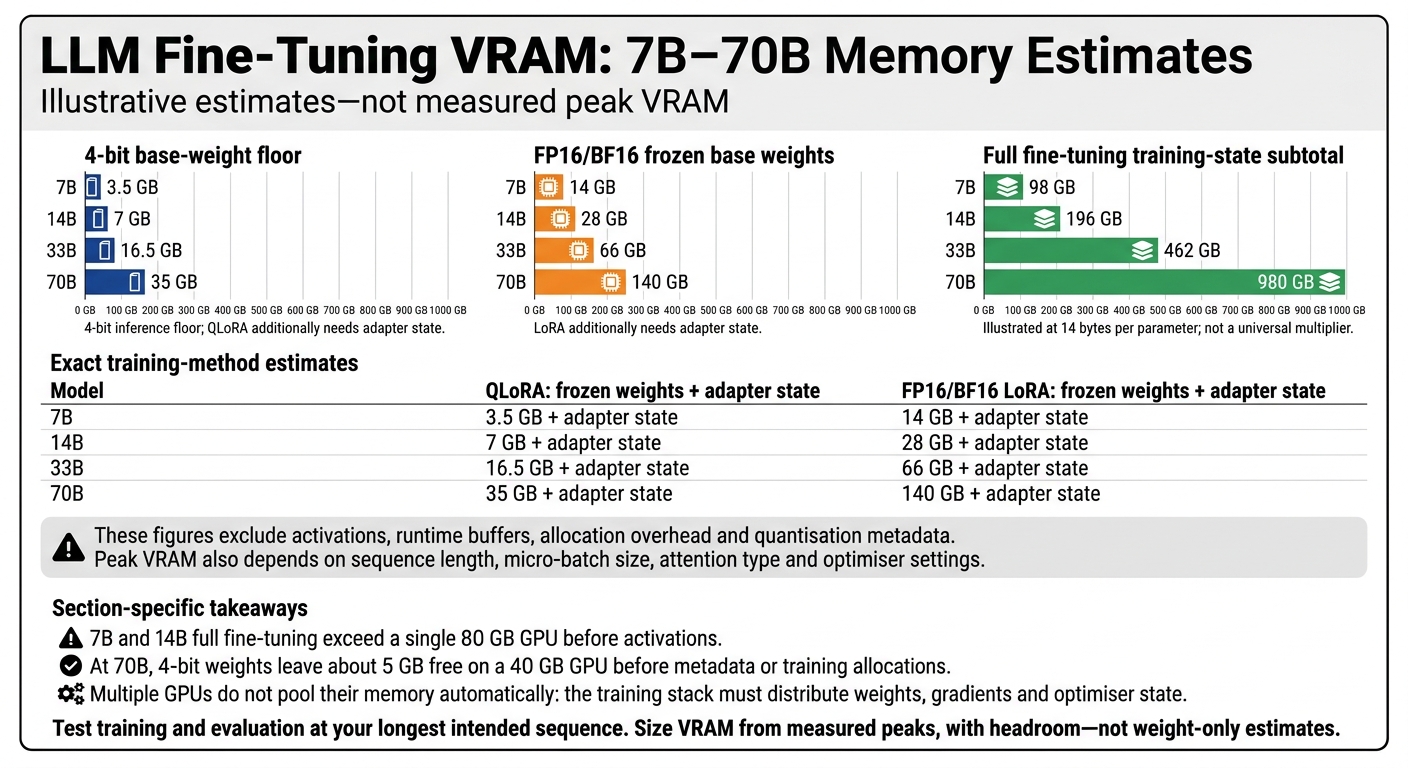 {LLM Fine-Tuning VRAM: 7B–70B Memory Estimates}
:::
These are illustrative estimates, not measured peak VRAM. The table shows how the memory rules translate into common model sizes.
| Nominal model size | 4-bit inference floor | QLoRA: frozen weights + adapter state | FP16/BF16 LoRA: frozen weights + adapter state | Full fine-tuning training-state subtotal |
|---|---|---|---|---|
| 7B | 3.5 GB | 3.5 GB + adapter state | 14 GB + adapter state | 98 GB |
| 14B | 7 GB | 7 GB + adapter state | 28 GB + adapter state | 196 GB |
| 33B | 16.5 GB | 16.5 GB + adapter state | 66 GB + adapter state | 462 GB |
| 70B | 35 GB | 35 GB + adapter state | 140 GB + adapter state | 980 GB |
These figures exclude activations, runtime buffers, allocation overhead and quantisation metadata. Peak VRAM also depends on sequence length, micro-batch size, attention type and optimiser settings.
7B and 14B: check single-GPU capacity
Even with lighter training methods, choose GPU capacity for the workload - not just the 4-bit floor. Full fine-tuning for both 7B and 14B models exceeds the capacity of a single 80 GB GPU before you account for activations.
33B and 70B: plan for more memory
For larger models, how you distribute memory matters as much as model size.
At 70B, 4-bit weights leave about 5 GB free on a 40 GB GPU before metadata or training allocations.
Use higher-memory GPUs, CPU offloading or sharding. Multiple GPUs do not pool their memory automatically: the training stack must distribute weights, gradients and optimiser state.
Why minimum VRAM is not enough
Inference memory gives you a floor; training memory has a changing peak. A run that barely fits often forces you to use shorter sequences or smaller micro-batches, reducing throughput.
Evaluation can also use more memory than training. Test your longest sequence and measure peak allocation in both phases. Set your VRAM budget using those measured peaks, rather than paper estimates.
Why inference memory differs from training
Those VRAM estimates are a memory floor, not peak training memory. Inference mainly needs memory for weights and the KV cache. Training also needs gradients, optimiser state and activations. Here’s how those needs affect the memory budget.
| Method | What consumes VRAM | What drives growth |
|---|---|---|
| Inference | Weights, KV cache and forward-pass workspace | Context length, concurrent requests, cache precision |
| QLoRA | Compressed base weights + adapter state + activations | Adapter rank, sequence length, micro-batch size, quantisation overhead |
| LoRA | Frozen base weights + adapter state + activations | Adapter rank, sequence length, micro-batch size |
| Full fine-tuning | Full weights + gradients + optimiser state + activations | Model size, micro-batch size, sequence length |
Inference uses weights, KV cache and workspace
Inference needs generation state, but not backpropagation. The KV cache stores attention keys and values for earlier tokens. Its memory use depends on the model architecture and cache precision.
Each concurrent request needs its own KV cache, and longer contexts use more cache memory. Forward passes need temporary workspace too.
Training adds backward-pass memory
Training needs memory that inference doesn’t: saved activations, gradients for trainable parameters and optimiser state. LoRA and QLoRA reduce the trainable state, but they still need activations to train adapters through the model.
Teacher-forced training uses fixed token sequences, so it usually doesn’t need a persistent generation KV cache. When sizing VRAM for fine-tuning, account for what backpropagation retains - not just the generation cache.
Calculate, test and budget for VRAM
Calculate your workload's memory budget
Treat the model-size estimates above as a starting point, then calculate peak memory use for your exact training setup.
Start with exact parameter count × bytes per parameter. Add only the states your setup creates: adapters, gradients, optimiser state, master weights, activations and runtime buffers. Leave headroom above that estimated peak.
Gradient accumulation increases the effective batch size by running micro-batches one after another, so it doesn't hold all activations in memory at once. Checkpointing cuts activation memory by recomputing activations during the backward pass. Offloading and sharding move some states out of GPU VRAM.
Test VRAM with a representative training run
Test at your maximum intended sequence length and micro-batch size. Activations can dominate memory use, so smaller test settings may understate your needs.
After warm-up, record both peak allocated and reserved VRAM.
Estimate cost from measured throughput
Use the same run to estimate training time and cost. Take the measured tokens per second for your full setup and calculate:
training hours = intended training tokens ÷ measured tokens per second ÷ 3,600
Multiply those hours by the hourly GPU rate. Include evaluation and checkpointing in your timings so the estimate reflects the actual workload.
If you're budgeting in £, state whether VAT is included. Compare configurations by total project cost, not hourly price alone.
Conclusion: size VRAM for the full workload
Base VRAM sizing on measured peak usage rather than weight-only estimates. Allow headroom, then budget using the total project cost. Hokstad Consulting can help align fine-tuning choices with deployment needs and cost control.
FAQs
Can I fine-tune a 7B model on a 24 GB GPU?
No. Hokstad Consulting estimates that training a 7B-parameter model can require around 280 GB of GPU VRAM [1]. A single 24 GB GPU therefore doesn’t have enough VRAM to fine-tune a model of this size.
How much VRAM headroom should I allow?
Target 60–80% GPU VRAM utilisation to handle short demand spikes without leaving too much capacity idle [1]. For fixed capacity, a common starting point is observed usage at the 95th percentile (P95), plus 20% [1].
For critical clusters, keep 30–50% spare capacity during autoscaling to prevent queues when traffic surges. Don’t scale too aggressively: too little headroom can lead to throttling or out-of-memory (OOM) errors [1].
Will QLoRA reduce my model’s accuracy?
QLoRA’s effect on accuracy depends on how you balance memory savings with your task’s needs. It uses quantisation to fine-tune large language models with much less VRAM. But lower memory use is only part of the picture: you’ll need to track model performance too.
Automate validation with accuracy benchmarks to check that your fine-tuned model meets the performance standards your use case requires.