
When deploying to Kubernetes, you have two main approaches: GitOps and push-based CI/CD pipelines. GitOps uses Git as the source of truth, pulling changes into the cluster via in-cluster agents like ArgoCD or Flux. This ensures continuous reconciliation and improved security by keeping cluster credentials internal. In contrast, CI/CD pipelines actively push changes using tools like Jenkins or GitLab CI, which often require external access to the cluster and lack automated drift correction.
Key Differences:
- GitOps: Pull-based, maintains desired state, enhances security, and simplifies audits.
- CI/CD: Push-based, more flexible for workflows, but less secure and prone to drift.
Quick Comparison:
| Feature | CI/CD (Push) | GitOps (Pull) |
|---|---|---|
| Trigger | Pipeline execution | Git commit or agent detection |
| State Authority | Scripts or CI logs | Git repository |
| Drift Detection | Manual/None | Automated |
| Security | External credentials required | Credentials stay within the cluster |
| Rollback | Manual/scripted | Git revert (auto-sync) |
GitOps excels in Kubernetes-heavy, multi-cluster setups with compliance needs, while CI/CD suits simpler workflows or non-Kubernetes environments. A hybrid model often combines the strengths of both: CI for builds and GitOps for deployments.
::: @figure 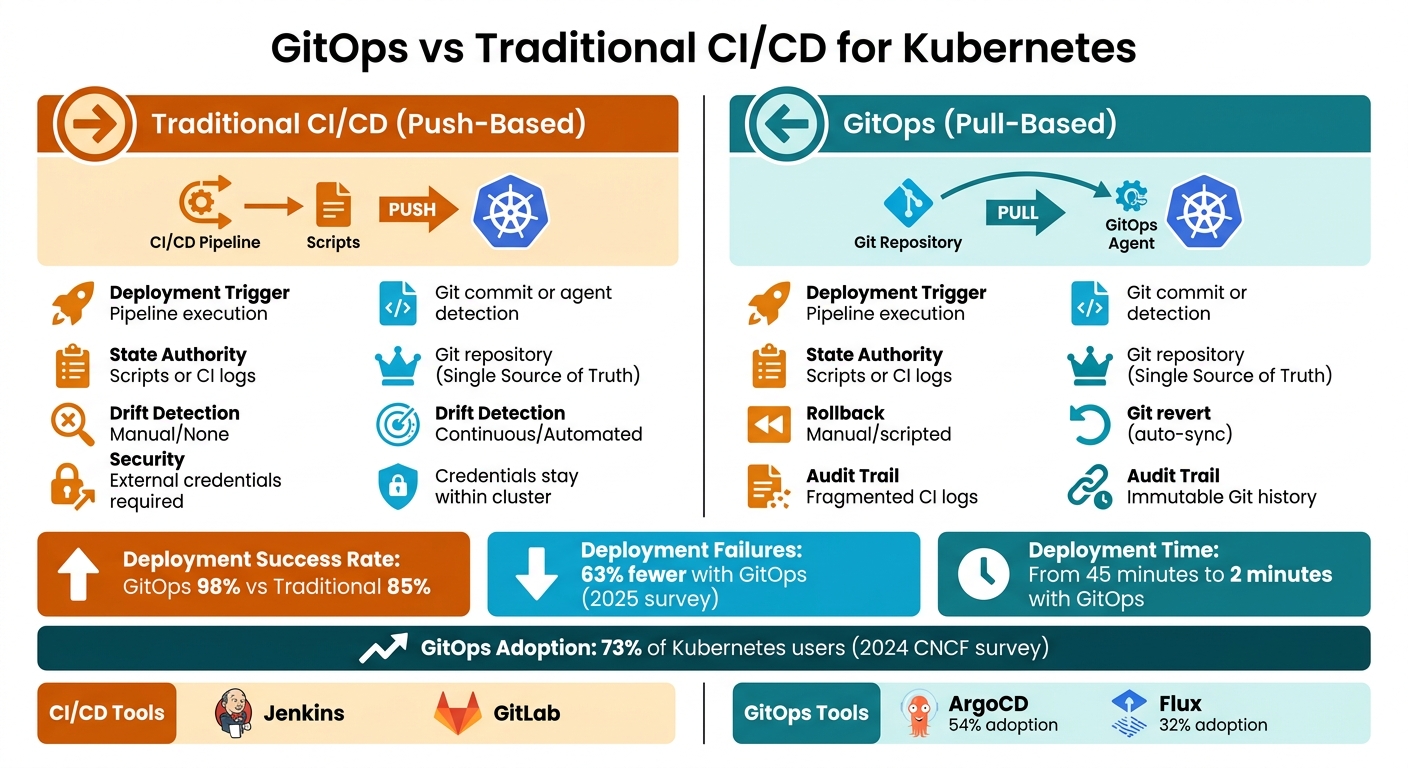 {GitOps vs Traditional CI/CD: Key Differences for Kubernetes Deployment}
:::
{GitOps vs Traditional CI/CD: Key Differences for Kubernetes Deployment}
:::
GitOps vs Traditional CI/CD: The Shift to State-Driven Delivery | Uplatz

Need help optimizing your cloud costs?
Get expert advice on how to reduce your cloud expenses without sacrificing performance.
Architecture and Mechanisms
When it comes to Kubernetes manifest management, the key distinction lies in how changes are applied to the cluster. Traditional CI/CD systems use a push model, where an external server, like Jenkins, sends changes directly to the cluster using commands like kubectl apply. On the other hand, GitOps flips this process with a pull model. In this setup, an in-cluster agent, such as ArgoCD or Flux, continuously monitors your Git repository and automatically pulls changes into the cluster when updates are detected [3][2]. Let’s dive deeper into how these methods differ.
This shift impacts security in a big way. The push model requires cluster credentials (like kubeconfig) to be stored within the CI system, which increases the risk of exposure. In contrast, GitOps agents operate inside the cluster and only require read-only access to the Git repository. This eliminates the need to expose sensitive cluster credentials externally [3][5].
Push vs Pull Deployment
The deployment workflows between these two models are notably different. Traditional CI/CD systems follow a straightforward sequence: code push → CI build → CI pushes changes to the cluster. GitOps introduces an additional step: code push → CI build → update manifests in Git → agent detects changes → agent pulls updates to the cluster [2][4]. While this may seem like an extra step, the process is often faster. Deployment times, which could take up to 45 minutes with manual methods, can drop to as little as 2 minutes when using GitOps [4].
But deployment is just one part of the equation. Keeping the cluster state consistent is equally important.
State Management and Drift Detection
GitOps employs a continuous reconciliation loop, constantly comparing the desired state stored in Git with the actual state of the cluster. If discrepancies arise - whether due to manual changes or unexpected issues - the system automatically corrects them. Traditional CI/CD pipelines, on the other hand, are more of a fire-and-forget
approach. Once the pipeline completes, it does not check if configurations have been altered later [3][5]. This difference is significant: a 2025 survey revealed that 63% of GitOps users experienced fewer deployment failures, thanks largely to automated drift detection [10].
Tools and Automation
The adoption of GitOps has grown rapidly. According to a 2024 CNCF survey, 73% of Kubernetes users now use GitOps practices. Among the tools, ArgoCD leads with a 54% adoption rate, followed by Flux at 32% [4]. ArgoCD stands out for its user-friendly web interface and strong multi-cluster management capabilities. Flux, on the other hand, is favoured for its lightweight design and seamless integration with tools like Kustomize and Helm [9].
Meanwhile, traditional CI/CD tools like Jenkins and GitLab CI are still widely used for building and testing. Many organisations have adopted a hybrid approach, using Jenkins for builds and tools like ArgoCD or Flux for deployments [7][8]. This blend allows teams to leverage the strengths of both systems effectively.
GitOps vs Traditional CI/CD Comparison
When it comes to managing Kubernetes manifests, the differences between GitOps and traditional CI/CD approaches go far beyond deployment methods. They shape how teams handle security, reliability, and daily workflows.
Feature Comparison Table
Here's a side-by-side look at how GitOps and traditional CI/CD stack up:
| Feature | Traditional CI/CD (Push) | GitOps (Pull) |
|---|---|---|
| Deployment Trigger | Pipeline execution [2] | Git commit or agent detection [2] |
| State Authority | Varies (Scripts, CI logs, manual state) | Git repository (Single Source of Truth) |
| Drift Detection | Manual/None [4] | Continuous/Automated [4] |
| Rollback Mechanism | Re-running old pipelines or manual kubectl
|
git revert (automated sync) |
| Audit Trail | Fragmented CI logs and access logs | Immutable Git history (Who/What/When) [4] |
| Security | CI tool needs cluster credentials (higher risk) [6] | In-cluster agent pulls (no external credentials) [6] |
| Complexity | Lower initial setup; higher operational | Higher initial setup [4]; lower operational |
These differences have a direct impact on deployment reliability and security. For example, organisations using GitOps report a median deployment success rate of 98%, compared to 85% for traditional manual or push-based methods [4]. This leap in reliability is largely thanks to GitOps's automated drift detection and continuous reconciliation, which catch potential issues before they cause problems.
Traditional CI/CD methods deploy changes but don’t verify the state afterward, leaving room for discrepancies. In contrast, GitOps continuously monitors and reconciles the system's state, ensuring that the live environment matches the desired configuration. This ongoing state verification is a major factor in GitOps's higher success rates.
The table also highlights significant security and operational advantages. Traditional pipelines often require direct cluster credentials, increasing risk, while GitOps eliminates this by using in-cluster agents. Additionally, tracking changes in traditional CI/CD setups can involve piecing together fragmented logs. GitOps simplifies this with an immutable Git history, offering a clear, centralised record of who made changes, what they changed, and when. This makes compliance and audits much easier [4].
GitOps Benefits and Use Cases
GitOps Benefits for Kubernetes
The advantages of GitOps become particularly evident when managing Kubernetes environments. By leveraging its push–pull model, GitOps improves security, reduces drift, and enhances auditability.
One of the key security features is that cluster credentials remain securely within the cluster. An in-cluster agent fetches changes directly from Git, eliminating the need to expose sensitive credentials externally [8][12].
The continuous reconciliation loop is another standout feature. It automatically corrects manual or unintended changes, ensuring configurations stay consistent and drift-free [8][12]. Additionally, every deployment is logged in Git, creating an immutable audit trail. This is particularly helpful for meeting compliance requirements, such as those under GDPR, which is crucial for organisations in the UK and EU [8][11][12].
In disaster recovery scenarios, GitOps shines by enabling rapid restoration. If a cluster is lost, the GitOps agent can rebuild the entire environment directly from the Git repository, bypassing the need for manual pipeline executions [8][11][12].
GitOps also scales effortlessly across multiple clusters. With tools like ArgoCD's ApplicationSets, managing hundreds - or even thousands - of clusters becomes manageable through a single Git-based workflow [8][11].
These features make GitOps an excellent fit for a variety of use cases.
When to Use GitOps
GitOps is particularly useful in environments where security and compliance are top priorities. Industries like financial services, healthcare, and government benefit greatly from its pull-based model, which avoids direct cluster access from CI systems [8][11][12].
It’s also a strong choice for managing microservices architectures. When dealing with complex, distributed microservices across multiple clusters, GitOps simplifies the process. Tools such as ApplicationSets help synchronise configurations across clusters, ensuring consistency [2].
GitOps’s ability to manage diverse deployments from a single source of truth is another highlight. By using Git branches or directory paths to define environment-specific configurations, organisations can maintain a clear and organised deployment strategy [8][11].
GitOps transforms Kubernetes deployments from error-prone manual operations to declarative, version-controlled, auditable, automatically reconciled systems.- Atmosly [11]
That said, GitOps may not be the best fit for simpler setups. For single-cluster environments with minimal compliance needs, a hybrid approach might be more practical. In such cases, traditional CI can handle the build and test phases, while GitOps manages deployment and state [8][12].
Limitations and Hybrid Models
GitOps Limitations
GitOps shines when it comes to Kubernetes deployments, but its scope is restricted to this domain. It doesn't extend to deploying on virtual machines (VMs), serverless platforms, or bare metal systems. As Nawaz Dhandala puts it:
GitOps with Argo CD only works for Kubernetes. If you deploy to VMs, serverless, or other platforms, you still need traditional pipelines[12].
The initial setup for GitOps also demands more effort. While traditional CI/CD workflows can often be set up in a single day, GitOps typically requires about a week [12]. This added complexity often includes the need to integrate external solutions for secret management.
Another challenge is that GitOps struggles with scenarios requiring intricate orchestration. Multi-stage deployments involving external approvals, database migrations, or coordination across multiple services are harder to handle declaratively compared to the flexibility of scripting in traditional CI/CD pipelines. Teams transitioning to GitOps may face a temporary dip in productivity as they adapt to a workflow centred around Git repositories.
These limitations highlight the areas where traditional CI/CD systems still hold an edge, particularly in terms of orchestration.
Where Traditional CI/CD Excels
Traditional CI/CD systems excel in managing complex workflows with greater flexibility. They are particularly effective for orchestrating conditional steps, running parallel tasks, and integrating approval processes. Moreover, they remain indispensable for deployments in non-Kubernetes environments, such as legacy systems, cloud functions, or bare metal infrastructure.
Secrets management is another area where traditional CI/CD simplifies operations. By using environment variables, these systems eliminate the need for additional secret management tools, which can streamline the setup process.
For smaller applications or early-stage projects, the simplicity and lower initial setup effort of traditional CI/CD make it an attractive choice. When the overhead of GitOps isn't warranted, traditional CI/CD provides a quicker path to deployment.
Hybrid Model: CI for Builds, GitOps for Deployments
A hybrid approach often combines the best aspects of GitOps and traditional CI/CD to address their respective limitations. In this model, traditional CI systems handle the build, testing, and artifact creation phases, while GitOps takes charge of deployments and maintaining the desired state within Kubernetes clusters.
Here’s how it works: the CI system builds and tests the application, publishes the container image, and updates the GitOps repository with the new image tag [8]. The GitOps agent then detects this change and deploys the updated application to the cluster. As Nawaz Dhandala explains:
The most effective pattern is a hybrid: CI builds and publishes, while Flux CD owns all Kubernetes deployment decisions[8].
This division of responsibilities enhances security by keeping cluster credentials out of the CI system. It also allows teams to leverage the strengths of traditional CI for tasks like ephemeral preview environments and multi-step orchestration, while still benefiting from GitOps features such as drift detection, automatic reconciliation, and Git-based audit trails.
Implementing GitOps for Kubernetes
Building on the earlier deployment comparison, let’s dive into the essential tools and practices needed to implement GitOps effectively in Kubernetes.
GitOps Tools
When it comes to GitOps tools, Argo CD and Flux stand out as the leading CNCF Graduated projects in 2026 [18][20]. Each has its strengths depending on your team’s needs and infrastructure.
Argo CD is known for its feature-rich web UI, single sign-on (SSO) capabilities, and centralised multi-cluster management [18][19]. Its visual dashboard eases the transition for teams familiar with traditional CI/CD systems. However, this comes at a cost - Argo CD requires more resources, consuming around 500MB of RAM at baseline [19].
On the other hand, Flux takes a modular approach by using dedicated controllers for specific tasks like source management, Helm, and Kustomize [18][17]. It’s primarily CLI-driven and has a smaller resource footprint, requiring only about 200MB of RAM [19]. This makes it an excellent choice for environments where resources are limited. As DevOps Daily puts it:
Flux's native Kubernetes RBAC integration and per-namespace service account model make multi-tenancy straightforward[18].
In summary, if you need a centralised, user-friendly interface, go for Argo CD. If you prefer something lightweight and decentralised, Flux is your tool [18][19]. Regardless of your choice, you’ll need a strategy for managing secrets. Tools like Sealed Secrets (for encrypting secrets within clusters) or External Secrets Operator (which integrates with Vault or AWS) are essential [21][11].
Once you’ve chosen your tools, following best practices is crucial for creating secure and reliable GitOps workflows.
GitOps Best Practices
To keep your GitOps setup organised, structure your repositories by environment. For example, use directories like /overlays/dev and /overlays/prod instead of relying on separate Git branches [14][17]. This approach simplifies code reviews and makes it easier to compare changes.
For teams managing multiple applications, consider using the App of Apps
pattern in Argo CD. This method involves creating a root application that automatically deploys all infrastructure and application components [11].
Security is non-negotiable - never commit plain-text secrets to Git. Use tools like Sealed Secrets or SOPS to encrypt sensitive data [14][16]. Additionally, always pin Helm chart versions and container image tags with Git SHAs to ensure consistency in your manifests and avoid unexpected behaviour during deployments [23][16].
When starting out, begin with manual synchronisation in your GitOps tool to validate your manifests. Gradually enable automated features like selfHeal and prune as you gain confidence in your setup [15]. Before enabling automated synchronisation, run commands like kubectl diff -k <path> to ensure the live cluster matches the desired state in Git and avoid surprises [15].
With these practices in place, you’ll be well-prepared to transition from traditional CI/CD to GitOps.
Migrating from Traditional CI/CD
Transitioning to GitOps requires a methodical approach to ensure a smooth migration. Start with a pilot project on a non-critical application in a single cluster [22][16]. If you’re moving from manual deployments, use tools like kubectl neat to clean up cluster-generated metadata (e.g., uid and resourceVersion) before committing manifests to Git [15].
By 2024, 76% of Kubernetes users had adopted GitOps practices, a significant jump from 42% in 2021 [22]. Those who made the switch reported a 73% increase in deployment frequency and a 60% reduction in deployment failures [22]. During the migration, configure manual synchronisation gates to allow teams to review and approve changes in the GitOps UI. This builds confidence in the automated reconciliation process [17][23].
The shift to GitOps fundamentally changes how deployment control works. Instead of CI servers running kubectl apply, cluster agents monitor Git repositories and reconcile the state automatically [11]. High-performing teams aim for a lead time of less than 15 minutes for changes and a change failure rate below 5% [16].
Choosing the Right Approach
Key Takeaways
Managing Kubernetes manifests effectively hinges on selecting the right deployment strategy for your needs. The choice boils down to two main approaches: traditional CI/CD, which pushes changes to the cluster, or GitOps, which pulls changes using in-cluster agents like Argo CD or Flux [1].
GitOps shines in areas like drift detection and self-healing. It automatically rectifies any manual changes to your cluster state, whereas traditional CI/CD follows a fire and forget
model with no built-in correction mechanisms [12]. On the security front, GitOps keeps cluster credentials within the cluster itself, avoiding the need to share sensitive information with external CI servers. As Nawaz Dhandala from OneUptime explains:
The CI server only needs Git write access - it never touches the cluster. Cluster credentials never leave the cluster[12].
However, the complexity of setting up these systems can vary. Traditional CI/CD setups are relatively quick, typically taking about a day. In contrast, GitOps setups often require around a week due to the shift towards declarative thinking that it demands [12][13]. While GitOps takes more time upfront, it reduces long-term maintenance, as traditional pipelines often become fragile over time, whereas GitOps systems remain stable and self-correcting [12].
These differences are crucial when deciding which approach suits your needs.
Making the Right Decision
For specific scenarios, traditional CI/CD might be the better fit. It works well for non-Kubernetes targets like virtual machines or serverless platforms, small teams that need a quick setup, or workloads that involve complex orchestration requiring conditional logic that's not easily expressed declaratively [12][8].
On the other hand, GitOps is ideal for Kubernetes-heavy environments, especially those with stringent security or audit requirements, multiple clusters, or a need for automated drift detection [12]. It's purpose-built for declarative systems like Kubernetes but can be excessive for early-stage projects or simple applications [1][13].
For most mature organisations managing Kubernetes manifests, a hybrid approach often delivers the best results. This combines CI for building and testing with GitOps for deployments. OneUptime suggests:
The most effective pattern is a hybrid: CI builds and publishes, while Flux CD owns all Kubernetes deployment decisions[8].
This hybrid model ensures secure, auditable, and reliable Kubernetes operations while keeping your CI system from needing direct cluster access [8].
FAQs
Do I still need CI if I use GitOps?
Yes, GitOps doesn't take the place of traditional CI processes. While GitOps focuses on automating deployments and managing the system's state via Git, CI remains essential for building, testing, and verifying code before it reaches deployment. CI ensures that only well-tested, reliable code is pushed to Git, which then serves as the single source of truth for GitOps workflows. Together, they form a strong and efficient software delivery pipeline.
How does GitOps handle secrets safely in Git?
GitOps prioritises the secure handling of secrets by steering clear of directly storing sensitive information in repositories. Instead, it relies on approaches such as encrypting secrets or working with external secret management tools. These strategies help reduce security risks, protect confidentiality, and enable automation, allowing deployments to remain secure and compliant without introducing unnecessary complications.
How do I migrate from a push pipeline to GitOps without downtime?
To shift from a push-based pipeline to GitOps without causing downtime, it's important to take a step-by-step approach. Start by defining all your Kubernetes resources in Git. Next, integrate a GitOps tool such as Argo CD or Flux CD to manage these resources.
Apply changes gradually, using techniques like canary deployments and health checks to ensure everything is functioning as expected. Continuous monitoring throughout the process is crucial to confirm the cluster stays stable and operational. By following this phased strategy, you can smoothly transition while keeping your systems highly available.