
If I turn on CMEK in Google Cloud without a plan, I can lock my own team out of data. That is the main point of this article.
In simple terms, the article says CMEK works best when I do five things from day one:
- Keep keys in a separate KMS project and split them by environment and trust boundary
- Use organisation policies to stop new supported services from using Google-managed keys
- Separate key admins from key users with tight IAM roles
- Rotate, disable and destroy keys in stages, with a recovery window of at least 30 days
- Log and monitor KMS activity, including failed decrypts and IAM changes
For UK teams, the article also makes three points clear:
- Region choice matters: if data sits in London, the key should usually sit in
europe-west2too - CMEK adds work: more control means more ownership for rotation, access reviews and recovery steps
- Not every GCP service supports CMEK in the same way: some have limits by resource type, version or edition
A few numbers stand out:
- 30 days is the minimum destruction delay the article says I should enforce with org policy
- 90 days is the sample rotation period it suggests for sensitive workloads
- 100 failed decrypts in 5 minutes is the sample alert threshold for KMS failures
::: @figure 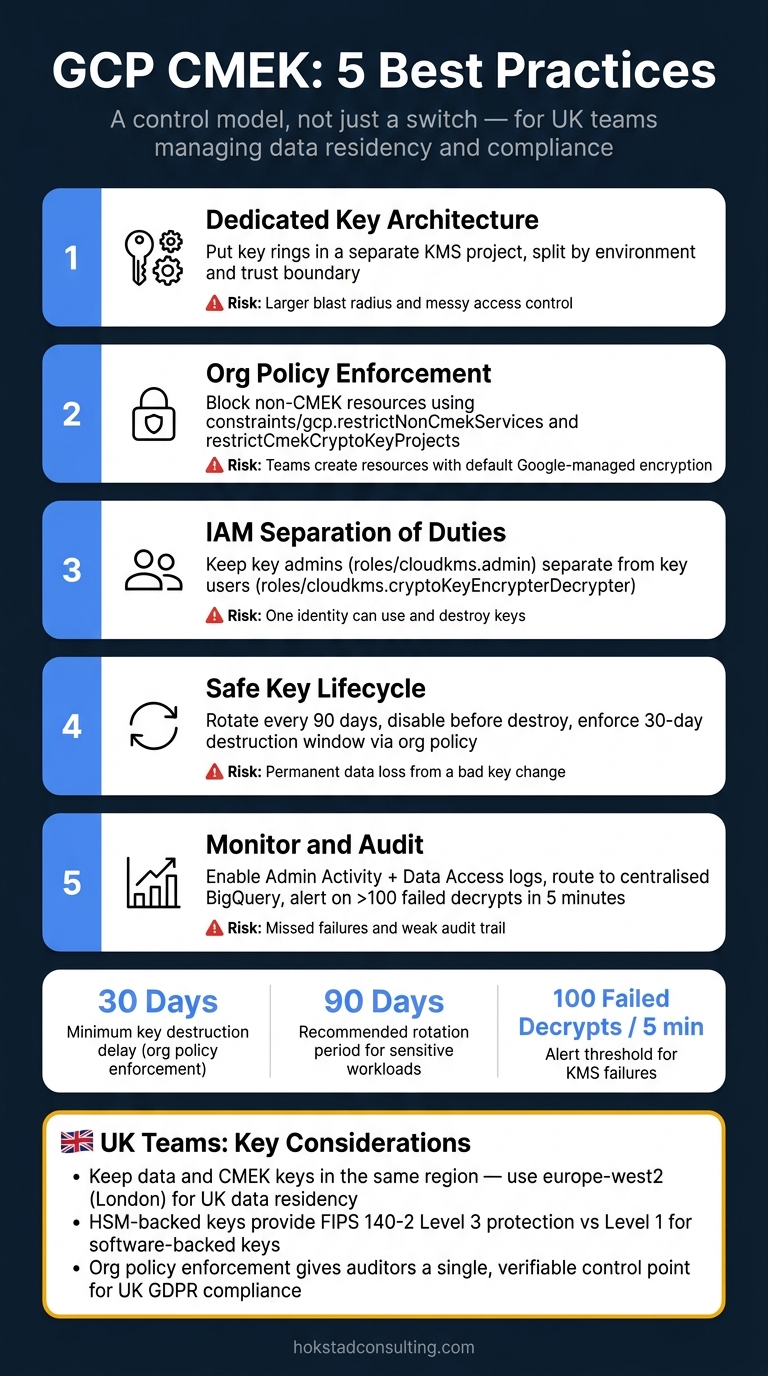 {GCP CMEK: 5 Best Practices at a Glance}
:::
{GCP CMEK: 5 Best Practices at a Glance}
:::
How to use Customer-Managed Encryption Keys (CMEK) and Cloud KMS with Google Cloud Storage
Quick comparison
| Practice | What I need to do | Main risk if I skip it |
|---|---|---|
| Dedicated key design | Put key rings in a separate KMS project and group keys by workload/environment | Larger blast radius and messy access control |
| Org policy enforcement | Use CMEK org policies for supported services and allowed key projects | Teams create new resources with default encryption |
| IAM split | Keep admins and key users separate; use service agents for usage | One identity can both use and destroy keys |
| Lifecycle control | Rotate keys, disable before destroy, keep a recovery window | Permanent data loss from a bad key change |
| Monitoring and audit | Turn on KMS logs, export them, and alert on failures and IAM edits | Missed failures, weak audit trail and avoidable spend |
My short take: CMEK is not just a switch. It is a control model. If I want the audit trail and key control, I also need clear ownership, testing and a safe rollback path.
What UK Teams Need to Know Before Enabling CMEK
Before you switch on CMEK, get clear on the boundaries first: which models and services support it, where data and keys will live, and who owns what. That groundwork saves a lot of pain later.
Cloud KMS, Key Rings and CryptoKeys Explained
Cloud Key Management Service (Cloud KMS) sits underneath CMEK. You create key rings as containers tied to a specific location, then create CryptoKeys inside them for supported services such as Cloud Storage, BigQuery and Cloud SQL.
A sensible place to start is with separate key rings for each environment, such as prod-uk and nonprod-uk, plus a dedicated CryptoKey for each workload or trust boundary. That keeps access narrow and makes admin work far less messy.
Choosing Key Locations for UK and EU Data Residency
Cloud KMS key rings and CryptoKeys are tied to a location. So the region you pick decides where key material is stored and where cryptographic operations happen. For UK data residency, europe-west2 (London) is usually the best fit. For EU workloads that don't need UK-only processing, europe-west1 (Belgium) or europe-west3 (Frankfurt) are common choices.
Here's the catch: if you use a London key to encrypt data stored in Frankfurt - or the other way round - you're introducing cross-border processing. That can make DPIAs and data-transfer assessments harder than they need to be. The cleanest setup is to keep data storage, processing and CMEK key locations in the same region, and formally document any exceptions.
For regulated workloads, it's also worth looking at HSM-backed keys. These use FIPS 140-2 Level 3 protection, while software-backed keys use FIPS 140-2 Level 1. HSM-backed keys provide stronger protection than software-backed keys.[7][6]
Checking Service-Level CMEK Support Before Rollout
CMEK support isn't even across Google Cloud, and that's where teams often get caught out. Core services such as Cloud Storage, BigQuery, Pub/Sub, Compute Engine disks and Cloud SQL do support CMEK, but often only for certain resource types, versions or editions. BigQuery, for instance, limits CMEK to Enterprise, Enterprise Plus and On-Demand editions.[3][4]
Before rollout, build a simple inventory of your key workloads and check each one against Google's CMEK support docs. Flag anything that has to stay on Google-managed keys.
A controlled pilot in a non-production project is a smart move. Test a representative BigQuery dataset, a Cloud Storage bucket and a database. Then check how things behave, what happens when a key is disabled, and how much KMS API activity you see before moving into production.
How Policies Apply Across Folders and Projects
Google Cloud's resource hierarchy - organisation → folders → projects → resources - means IAM roles and organisation policies flow down unless you restrict them. So if you grant a KMS Admin role at folder level, it applies to every project underneath. In plain English: more people may be able to create, change or destroy keys than you meant to allow.
A sensible pattern is to keep all CMEK key rings in a dedicated KMS project inside a locked-down security folder, separate from application projects. Production and non-production workloads can then sit in their own folders, with tighter CMEK policies on production.
That setup makes it much easier to show auditors that residency controls and encryption policies are being applied in a consistent way. It also supports the first best practice below: design a dedicated CMEK hierarchy.
Planning for the Added Ownership CMEK Requires
CMEK shifts day-to-day ownership onto your team. Key rotation, IAM reviews, lifecycle management, incident runbooks and cost tracking all become part of normal operations.
Google Cloud best practices recommend setting the constraints/cloudkms.minimumDestroyScheduledDuration organisation policy to a minimum of 30 days before any key destruction, giving teams a safe window to catch mistakes.[5]
Beyond that, CMEK works best when security, platform and data teams share the load. Once that operating model is in place, the first best practice is to separate keys by environment and workload.
1. Design a Dedicated CMEK Architecture and Key Hierarchy
Put Cloud KMS key rings in a dedicated KMS project, separate from your workload projects. That gives you a cleaner boundary and makes ownership easier to manage. Then map each environment and trust boundary to a clear owner, and split keys based on those lines.
Key hierarchy
Use one KMS project per environment - production, staging and development - and group keys by trust boundary. For UK workloads, use London key rings. Keep IAM tight, with access limited to the smallest group that can do the job.
For highly regulated workloads, Cloud HSM gives stronger protection than software-backed keys. Use HSM-backed keys for your most sensitive data, and software-backed keys for everything else that doesn't need that level of protection.
Cloud KMS cost implications
More keys and more key versions mean higher costs, so how you group workloads is both a security choice and a cost choice. Don't create one CryptoKey per resource. Instead, group services that share the same trust requirements under the same key.
Software-backed keys are cheaper than Cloud HSM, so keep HSM for the workloads that need the highest level of protection.
2. Enforce CMEK Usage with Organisation Policies
Once the key hierarchy is in place, the next step is to make CMEK non-negotiable. Google Cloud gives you two organisation policy constraints for this: constraints/gcp.restrictNonCmekServices, which blocks new resources in named services unless CMEK is set, and constraints/gcp.restrictCmekCryptoKeyProjects, which limits which Cloud KMS projects are allowed to provide those keys.[12][11] Put simply, these policies turn the design from the last section into a hard rule.
Apply constraints/gcp.restrictNonCmekServices at the organisation node (organizations/ORG_ID) with a Deny policy, then list each service API that must use CMEK, such as storage.googleapis.com, bigquery.googleapis.com, and sqladmin.googleapis.com.[12][11] That stops teams from creating things like a Cloud SQL instance or a storage bucket with Google-managed encryption when your standard requires customer-managed control. One catch: these policies affect only new resources, so existing ones need to be migrated through a separate plan.[13][10]
Enforcement and audit value
Using both constraints together cuts down risk in a very direct way. restrictNonCmekServices shuts off accidental use of default encryption. restrictCmekCryptoKeyProjects stops developers from pointing workloads at keys created inside application projects.[9][10]
For UK compliance teams, the main gain is auditability. If your organisation falls under UK GDPR, these constraints give you clear, auditable proof that encryption is enforced from the centre, not left to each team to decide.[8][10] That means one control point for audits instead of a patchwork of project-level checks. And for regulated folders, you can tighten rules further with under:folders/FOLDER_ID selectors, without repeating the same policy across every project.[13]
3. Apply Strong IAM Controls and Separation of Duties
Once you’ve set rules for where CMEK can live, the next step is to lock down who can manage keys and who can use them. That decision sits with IAM.
The main rule is straightforward: key administrators and key users must be different identities with different roles. Key administrators should use roles/cloudkms.admin - or tighter admin roles where needed - to handle the key lifecycle. That includes creating, rotating, disabling and destroying keys. Key users should usually be service accounts rather than human users. They should hold roles such as roles/cloudkms.cryptoKeyEncrypterDecrypter, or encrypt-only or decrypt-only roles, to carry out cryptographic actions.[14][23]
Security control strength
Avoid broad basic roles like roles/owner and roles/editor for anyone working in a key project. Those roles mix admin powers with cryptographic access, which wipes out separation of duties.[14][15][16][20] A cleaner setup is to keep KMS in a separate security project and give admin access only to a small platform or security team. For managed services, give usage roles to the service agent, not the human who created the service.[17][18][19][20]
Compliance, governance and operational resilience
This split in roles does more than tighten access. It also gives auditors a clear trail of ownership. For UK organisations dealing with UK GDPR or FCA expectations, it helps show that no one person can both decrypt data and destroy the key.[16][22]
It also helps to map these roles into a RACI matrix and keep a register of all key projects, named admin groups and service agents with usage rights. That turns a technical setup into something governance teams can review and track. A practical audit step is to export IAM bindings on a regular basis and check for any principal that holds both admin and encrypter/decrypter roles at the same time. That pairing is a separation-of-duties breach and should be fixed at once.[1][21][24]
There’s also an uptime angle here. When key usage is tied to service agents instead of human accounts, production systems are less likely to fail during an incident. If a developer’s credentials are pulled in the middle of a security event, workloads can still run because they rely on stable service agents, not the revoked account.[18][6][2] Putting this pattern into Infrastructure as Code templates means every new service picks it up by default.[18][6][2]
| Role | Typical IAM Role | Responsibility |
|---|---|---|
| Key Administrator | roles/cloudkms.admin |
Create, rotate, disable and destroy keys; manage IAM on key rings |
| Key User (Service Agent) | roles/cloudkms.cryptoKeyEncrypterDecrypter |
Encrypt and decrypt on behalf of integrated services |
| Security Auditor | Read-only IAM and audit log access | Review usage and IAM policies without modifying keys |
Need help optimizing your cloud costs?
Get expert advice on how to reduce your cloud expenses without sacrificing performance.
4. Manage Key Lifecycle, Rotation and Destruction Safely
Once access is locked down, lifecycle rules stop key access from turning into a long-term risk. If this part is handled badly, you can end up with active keys hanging around for too long or, worse, data you can no longer recover.
Rotation policy
Turn on automatic rotation for all symmetric CMEK keys. Rotation creates a new primary version, while older versions stay available for decryption. That means new data uses the latest version, but older encrypted data still works as expected.
For sensitive workloads, use a 90-day rotation period. Only extend that if there's written approval.
In Terraform, this is simple to enforce:
rotation_period = "7776000s" # 90 days
The smart move is to bake this into reusable IaC modules. That way, every new CMEK key gets the right rotation policy by default instead of relying on someone to remember it later.
Compliance and governance value
A documented lifecycle gives auditors clear evidence of rotation periods, approvals and version retention. It also helps your team trace each key version back to the datasets, regions and retention periods it protects. That link matters when someone asks, “Which key version covered this data, and for how long?”
Operational resilience impact
Use a two-step process: disable first, destroy later, with a recovery window in between. It’s a simple idea, but it can save you from a painful mistake.
Before disabling any version, check every dependent service. That includes storage, analytics, databases, backups and cross-project workloads. Then confirm those systems have re-encrypted against the current primary version. After that, scan Cloud Logging for any KMS key disabled errors before you commit to permanent deletion.
| Lifecycle Stage | Status | What It Means |
|---|---|---|
| Active | Encrypt & decrypt | Primary version in use for all new data |
| Rotated (older version) | Decrypt only | New data uses the latest version; old data stays readable |
| Disabled | No operations | Reversible test state to check for remaining dependencies |
| Pending destruction | Pending deletion | Recoverable within the configured safety window |
| Destroyed | Permanent | Key material is gone; any dependent data is unrecoverable |
Cloud KMS cost implications
Each active version costs money, and so does each KMS operation. So there’s a direct cost angle here too. Retire obsolete versions and use envelope encryption to cut down API calls.
Once these lifecycle rules are in place, monitor key usage and failures so you can spot drift early.
5. Monitor, Audit and Control CMEK Usage
Once rotation and destruction are under control, monitoring tells you whether keys are being used safely.
Monitoring controls
Enable Admin Activity, Data Access and System Event logs for Cloud KMS at organisation, folder and project level. Data Access logs - which record encrypt and decrypt operations - must be turned on explicitly. A lot of organisations miss this, which leaves a nasty audit blind spot in their CMEK visibility.
After that, route KMS audit logs to a centralised logging project with organisation-level log sinks, ideally into BigQuery so you can query them at scale. From there, create Cloud Monitoring metrics from logs to track:
- key usage
- destruction events
- IAM changes
-
PERMISSION_DENIEDerrors - disabled-key failures
A sensible starting alert threshold is more than 100 failed KMS decrypts within 5 minutes[25][26]. You should also alert on any unauthorised IAM change on a key ring outside agreed change windows. Test these alerts in a non-production environment before moving them into live services.
Compliance and governance value
Treat KMS audit logs as evidence for UK GDPR and sector audits. Export KMS Admin Activity and Data Access logs to Cloud Storage buckets with object lock, and set retention in line with your regulatory duties. Give compliance and audit teams read-only access, then review log access from time to time.
Those logs should show, in plain terms, which CryptoKeys protected data in which regions, such as europe-west2 for London, which principals carried out operations, and when they did it. You can also use the same logs to produce periodic audit reports for internal reviews and external audits.
The same logs can also reveal avoidable KMS spend.
Cloud KMS cost implications
KMS calls cost money, so it makes sense to cut unnecessary encrypt and decrypt activity and keep alerting lean. Use these signals in the policy summary below.
Policy and Governance at a Glance
With architecture, IAM, lifecycle, and monitoring already set, the next step is deciding how far CMEK should reach across your estate.
That choice comes down to three things: compliance needs, key-management capacity, and how much outage risk you're prepared to carry. Push enforcement further and you get tighter control. But there’s no free lunch. The blast radius of a key or IAM mistake gets bigger too.
| Policy Approach | Scope | Advantages | Trade-offs |
|---|---|---|---|
| No CMEK Enforcement | Default Google-managed encryption. | Lowest overhead, weakest control. | No key lifecycle control; may not satisfy UK GDPR or FCA audit requirements. |
| Targeted Enforcement | Folder- or project-level Org Policy for regulated workloads only. | Balanced cost; covers regulated data; limits impact. | Requires rigorous data classification; risk of sensitive data outside policy scope. |
| Strict Enforcement | Organisation-wide constraints/gcp.restrictNonCmekServices across all supported services [27]. |
Maximum governance; uniform security posture; easiest for auditors to verify. | Highest cost and complexity; highest outage risk if keys or IAM fail. |
A simple way to think about it: the more broadly you enforce CMEK, the more careful your operating model needs to be. If your teams don’t have strong processes for key rotation, IAM changes, service onboarding, and recovery, broad enforcement can turn a policy win into an availability problem.
Recovery windows should sit inside the policy itself, not get bolted on later. That matters because key access failures don’t just affect security. They can stop systems from starting, reading data, or restoring services when you need them most.
For most estates, targeted enforcement is the sensible default for regulated workloads. It gives you tighter control where it matters most without forcing every service and team into the same rule set. Strict enforcement makes sense only when every supported service has been checked, tested, and proven to work under that policy.
Use this scope decision to spot the common implementation mistakes below.
Common Pitfalls to Avoid
Use this checklist to pressure-test your CMEK controls before production. Treat it as a last pass over your architecture, IAM, lifecycle rules and monitoring setup.
Keeping Keys and Workloads in the Same Project
Putting keys and workloads in the same project increases the blast radius if something goes wrong. It also makes separation of duties much weaker, which is the last thing you want around key management.
Overbroad KMS Admin Access
Don’t give workload identities admin rights. Keep roles/cloudkms.admin for key owners, and give roles/cloudkms.cryptoKeyEncrypterDecrypter only to service accounts that need to encrypt or decrypt data.
Destroying Keys Without a Safe Recovery Window
If you destroy a key version, you can’t get it back. That means one rushed deletion can lead to permanent data loss. Enforce a scheduled destruction window with organisation policy, and treat that window as your last safeguard before deletion.
Skipping Tests for Disabled or Revoked Keys
Disabled, revoked and pending-destruction key states shouldn’t be tested for the first time in production. Run those checks in non-production instead, then document how each service fails and which runbook should be triggered.
Letting Audit Logs Inflate Costs
Monitoring should protect your evidence and your budget. Keep Data Access logs enabled only where they’re needed, filter out low-value noise, and archive long-term logs outside Cloud Logging to keep spend under control.
| Pitfall | Primary Risk | Mitigation |
|---|---|---|
| Keys and workloads in the same project | Larger blast radius; weak separation of duties | Keep CMEK keys in a dedicated key project and workloads in separate projects |
| Overbroad KMS admin access | Excessive privilege; one breach affects key management and data access | Use granular roles and separate admin and crypto identities |
| Immediate key destruction | Permanent, irrecoverable data loss | Enforce scheduled destruction windows via organisation policy |
| No disabled-key testing | Unknown failure modes in production | Run pre-production drills with deliberate key disablement |
| Uncontrolled audit log volume | Avoidable cost spikes, or poor forensic visibility | Enable Data Access logs with exclusion filters and archival export |
Conclusion
CMEK is an operating discipline. It brings together architecture, policy, IAM, lifecycle management and monitoring. For UK teams, that has a direct effect on compliance, audit readiness and data residency control. But CMEK is only one part of the picture. It doesn't replace your other security controls.
These controls do their job best when they’re planned as one system: a clear key hierarchy, policy enforcement, tight IAM, safe lifecycle rules and continuous monitoring. After that, execution matters. Treat CMEK as an ongoing control, not a one-off project. Start with a small group of critical workloads, check service support, set clear ownership and recovery steps, then scale with policy and automation.
For teams growing that model, day-to-day support can make a big difference. If you need help with cloud governance, infrastructure design or CMEK automation, Hokstad Consulting can support the rollout.
FAQs
When should I use HSM-backed keys?
Use HSM-backed keys when your organisation handles highly sensitive data or has to meet strict regulatory rules, such as in finance, healthcare or the public sector.
They offer FIPS 140-2 or 140-3 Level 3 validated, tamper-resistant storage. That makes them a strong choice when you need the highest level of protection for root keys, or when you have to show clear compliance with data sovereignty and data protection standards.
How do I migrate existing resources to CMEK?
Migrate existing resources to CMEK with a structured, secure approach. Use envelope encryption so data encryption keys are protected by master keys in Google Cloud KMS.
Before you migrate, catalogue existing keys, retire obsolete ones, and test new keys in a non-production environment. It’s also smart to use provider-supplied secure import mechanisms instead of manual handling, which can create risk where you least want it.
Hokstad Consulting can help weave these security practices into cloud migration and DevOps workflows.
What should my CMEK recovery runbook include?
Your CMEK recovery runbook should spell out how you'll keep services stable and data available if something goes wrong with a key. It should also include a clear rollback plan for migrations, plus testing in non-production to make sure applications can still decrypt data as expected before anything goes live.
It also needs to cover key lifecycle management from end to end:
- secure key generation
- rotation
- revocation if a key is compromised
- use of the key deletion grace period
- immutable audit logs that meet UK data retention requirements
If you skip these details, recovery plans can look fine on paper but fall apart when a key issue hits in practice.