
If I had to boil this down to one line, it would be this: you cut hybrid cloud costs by getting one £ view of spend, assigning ownership, then automating the fixes.
When AWS, Azure, Google Cloud, Kubernetes and on-premises all sit in the same estate, cost data gets split, shared services get hard to price, and finance often sees the full picture too late. The article’s core point is simple: start with visibility, move to allocation, then automate waste reduction and policy checks.
Here’s the short version:
- Build one GBP cost view across public cloud, private cloud and on-premises
- Standardise tags and metadata so spend maps to teams, apps and cost centres
- Keep unallocated spend visible and review it each month
- Automate rightsizing and non-production shutdowns using usage data and UK time settings
- Track discount coverage for Reserved Instances, Savings Plans and similar commitments
- Use spot or pre-emptible capacity only for workloads that can handle interruption
- Set budget alerts at 50%, 75% and 90% of monthly budget
- Add policy checks in IaC and CI/CD before teams deploy oversized or non-compliant resources
- Roll out in phases: visibility, allocation, cost controls, then policy-led governance
- Align reporting to the UK financial year and review results in £ per service, product or unit metric
A few numbers stand out. Non-production scheduling can cut spend by 40–60%. Commitment discounts can save 20–72% against on-demand rates. Spot capacity can be up to around 90% cheaper, but with much more interruption risk. And the article points to 90% attributed spend as a sensible target before stronger tag-led automation is switched on.
One point I’d keep front and centre: automation only works if the cost data is clean enough to trust. If tags are messy, allocation rules are weak, or shared platforms have no agreed split, the automations fire on bad inputs.
So the path is straightforward: visibility → allocation → automation → governance. The rest of the article explains how to put that into practice without losing control of spend, reporting or approvals.
::: @figure 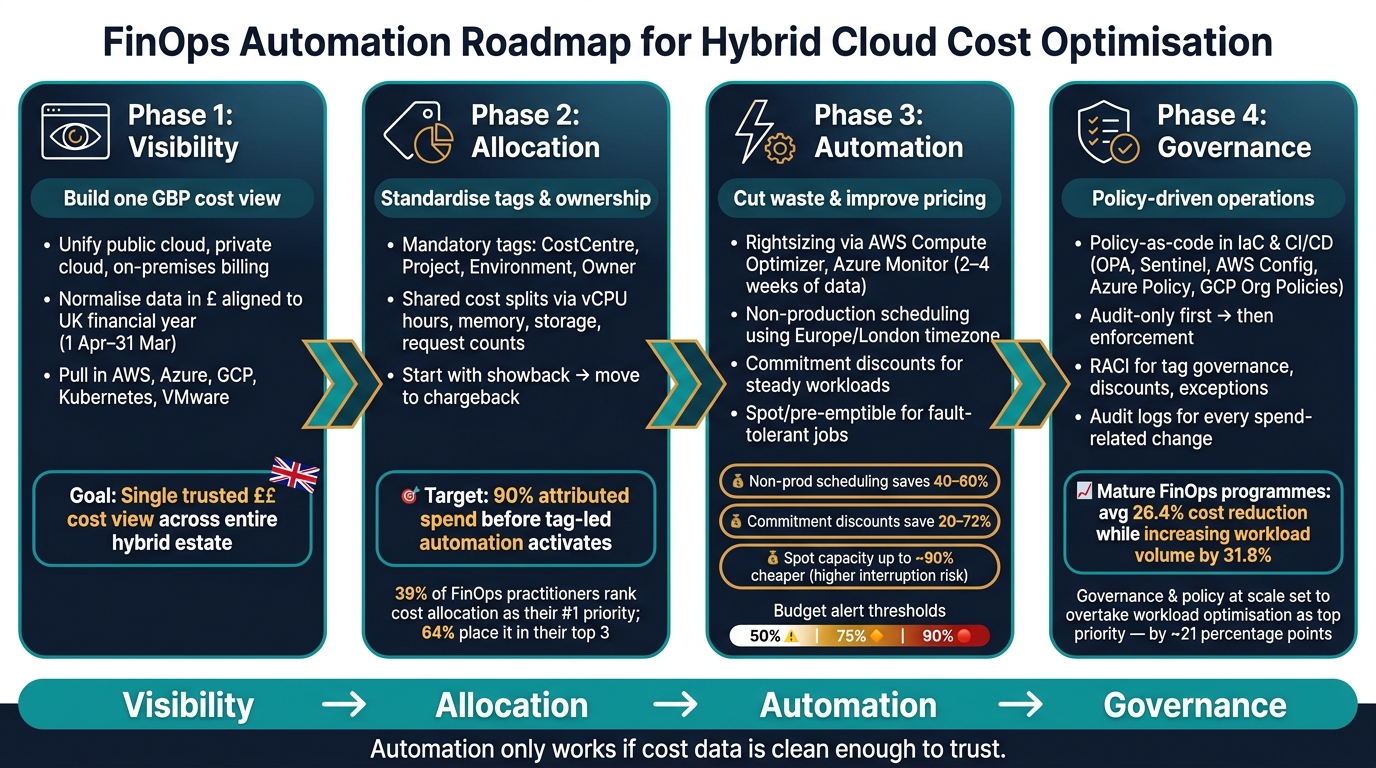 {FinOps Automation Roadmap: Visibility to Governance}
:::
{FinOps Automation Roadmap: Visibility to Governance}
:::
Extend FinOps Capabilities to the Private Cloud with CloudBolt
Build unified cost visibility and allocation first
Before automation can trim spend, you need one trusted view of cost and ownership across the hybrid estate. That means pulling billing data, usage telemetry, asset metadata and allocation rules into a single normalised reporting layer, shown in GBP and matched to the monthly budgeting cycle. That baseline is what later automation depends on.
Tagging, metadata and cost allocation across hybrid infrastructure
For public cloud resources, a practical minimum tag set includes CostCentre, Project or Application, Environment and Owner. Some organisations will also need BusinessUnit, Product or DataClassification for governance. The key point is simple: use one approved value for each tag. If both prod
and production
appear, reporting splits what should be the same environment.
Private cloud and shared on-premises infrastructure often can't use the same tagging model. VMware estates, shared storage clusters, network appliances and central security services may need matching metadata added through CMDB records, asset inventories, cluster labels, host groups or billing dimensions. And for shared platforms - a Kubernetes cluster used by several product teams, for example - tags on their own won't do the job.
In those cases, costs need to be split using a measurable driver, such as:
- vCPU hours
- Memory usage
- Storage consumed
- Request counts
Each shared cost pool should also have a named owner, a clear allocation rule and a review cadence.
Start with showback to build trust. Move to chargeback only when allocation rules reconcile cleanly in GBP.
Automate tag governance and reporting
Tag governance needs two layers of control.
At deployment time, policy checks should block or flag any resource that is missing a mandatory tag, uses an invalid value or breaks the agreed naming convention. Infrastructure-as-code templates and CI/CD pipelines are the best places to do this. Why? Because tags are not retroactive. If a resource runs untagged, you can't go back later and recover that past spend neatly. These checks at deployment time are what make the allocation model reliable enough for automated action.
Then there's the periodic layer. Automated scans should spot orphaned resources, untagged spend and metadata drift from templates that were never updated.
Missing or inconsistent tagging leads to allocation data you can't trust. For shared or legacy resources that need manual fixes, exception queues tend to work better than hard build failures.
| Model | Fairness | Complexity | Automation Potential |
|---|---|---|---|
| Usage-based | High - aligns cost with measurable consumption | Medium to high - requires reliable metering | High - can be fully automated via APIs and monitoring |
| Fixed-percentage | Moderate - simple to explain, less precise | Low to medium - rules are straightforward | Medium - rules are simple but need periodic review |
| Cost-pool | Useful for shared platforms and indirect costs | High - needs documented rules and governance | Medium - combines automated data with manual review |
Keep an unallocated bucket visible in every report and review it monthly with both engineering and finance. Track that bucket each month. Once it's small and stable, you're in a much better place to move into automated rightsizing and policy enforcement. After that, the next step is automating waste reduction and pricing controls.
Use automation to cut waste and improve pricing
Once allocation is in good shape, put three automated controls in place across cloud and on-premises workloads: rightsizing, pricing commitments, and cost guardrails.
Automated rightsizing and scheduling for workloads
Start with the simplest savings first: idle capacity and oversized services. When your tagging and allocation data is clean, you can act on what people are actually using instead of guessing. Cloud tools like AWS CloudWatch and Azure Monitor track CPU, memory, disk I/O, and network throughput over time. AWS Compute Optimizer analyses 14 days of CloudWatch data and recommends better-sized instance types for EC2, Lambda, EBS, and ECS on Fargate.[2] In practice, use at least two to four weeks of data so you cover one full weekly cycle.
For Kubernetes, run Vertical Pod Autoscaler in recommendation mode first. That gives teams a chance to review CPU and memory changes before anything goes live. Then pair VPA with Horizontal Pod Autoscaler for traffic-led scaling. It also helps to keep separate on-demand and spot node pools, so rightsizing changes don't quietly move workloads onto interruptible capacity.
Non-production environments are often the fastest place to cut spend. Automate schedules around UK working hours and use Europe/London as the time zone. This often cuts spend by 40–60%.[2][5] Add a simple override path too, so teams can keep things running when critical work pops up.
Automated discount and spot capacity management
Once usage is under control, automate commitment coverage and spot placement. Use commitments for steady workloads. Use spot or pre-emptible capacity for jobs that can handle interruptions. Commitment-based discounts usually save 20–72% against on-demand pricing. Spot and pre-emptible capacity can be up to around 90% cheaper, but the trade-off is much higher interruption risk.[1][3]
| Strategy | Savings potential | Operational risk | Complexity | Automation requirements |
|---|---|---|---|---|
| Commitment-based discounts (Reserved Instances, Savings Plans, Committed Use Discounts) | Medium–high (20–72% vs on-demand) | Low - capacity is stable | Medium - requires usage forecasting | Medium - track coverage, utilisation and renewal timing |
| Spot / pre-emptible capacity | High (up to ~90% vs on-demand) | Medium–high - instances can be terminated | High - workloads need fault-tolerant design | High - autoscaling, diversification, interruption handling |
Track coverage and utilisation so commitments stay matched to demand. If usage shifts because a service is migrated, resized, or switched off, automated recommendations should flag whether to renew, reduce, or buy again. AWS guidance also points to using Auto Scaling groups with mixed Spot, On-Demand, and Reserved capacity, plus orchestration services like EventBridge or Step Functions, to spread job timing and improve hourly coverage.[1] For spot workloads, automate diversification, interruption handling, and on-demand fallback.
Policy-as-code, anomaly detection and budget controls
Pricing work needs a second line of defence: automated policy checks. This is the Operate phase in practice. Build cost guardrails into IaC and CI/CD so you can block oversized dev instances, oversized databases, and missing autoscaling before they hit production. Tools such as Open Policy Agent (OPA), HashiCorp Sentinel, AWS Config Rules, Azure Policy, and GCP Organisation Policies can enforce these rules as pipeline gates. If a check fails, the merge or deployment is blocked until someone fixes it.[6]
Use anomaly detection and budgets to catch spikes, runaway jobs, and misconfigured autoscaling. The best method depends on how predictable your spend is.
| Detection method | Strengths | Limitations | Data needs |
|---|---|---|---|
| Threshold alerts | Simple to set up, easy to explain, low overhead | Misses gradual drift; static thresholds go stale | Basic metrics and fixed budget figures |
| Statistical / ML-based detection | Adapts to seasonality and variable workloads; catches subtle drift | Requires tuning; can produce false positives; harder to explain to stakeholders | Historical time-series data and established baseline patterns |
Start with threshold alerts at 50%, 75%, and 90% of each monthly budget. Then add statistical anomaly detection once you have enough historical data to build reliable baselines. Pair both with Prometheus and Grafana dashboards, alongside native cloud budgets and alerts, so cost signals sit next to performance and reliability metrics.[4]
Once these controls are automated, the next step is to roll them out in phases with clear ownership.
Need help optimizing your cloud costs?
Get expert advice on how to reduce your cloud expenses without sacrificing performance.
Roll out FinOps automation in a controlled plan
A phased rollout from visibility to policy-driven operations
Once visibility and allocation are in place, the next step is to roll out automation in stages. That matters because each control needs to show its value before you add the next one.
Phase 1 - Baseline and visibility: Start with the unified GBP cost view you already have. Then use three months of cost history to set a baseline.
Phase 2 - Allocation and accountability: Standardise tagging and metadata across your hybrid estate, then map shared services to agreed allocation keys. Get to at least 90% attributed spend before you switch on tag-led automation. When attribution is steady, move into low-risk optimisation.
Phase 3 - Optimisation and automation: Bring in rightsizing, non-production scheduling, and discount management, starting with low-risk workloads. A sensible sequence is to roll out notifications first, then scheduling, then rightsizing for low-risk workloads.
Phase 4 - Policy-driven operations: Put policy-as-code guardrails into CI/CD pipelines and approval workflows. Cloud provider guidance recommends starting with audit-only policies, testing the rules, and only turning on enforcement after teams have reviewed the results [8].
Follow that sequence and you can show savings without knocking day-to-day operations off course. Mature FinOps programmes have achieved an average cost reduction of 26.4% while increasing workload volume by 31.8%, which shows the gains come from better efficiency, not capability cuts [7].
Operating model, governance and reporting for UK organisations
After the technical rollout, ownership and reporting need to be locked into the operating model.
Automation can fall apart fast if nobody clearly owns it. A good setup gives each group a clear role. Engineering teams own implementation and the technical safety of automation. Finance owns budget frameworks, GBP reporting, and variance thresholds. Leadership - such as the CIO, CFO, and Head of Engineering - backs cross-team work and signs off major policy changes.
Define a RACI for tag governance, discount management, policy creation, and exception handling. Then document it properly so it stands up during internal audit.
For reporting, align monthly cost dashboards to the UK financial year - usually 1 April to 31 March. Break reporting down by provider, business unit, product, and KPIs such as £ per transaction or £ per active user. Technical teams may review detailed metrics every week. Finance and leadership will often focus on higher-level dashboards each month, with quarterly reviews used to guide new discount commitments and policy changes.
In regulated sectors, use change-managed automation, segregation of duties, and audit logs for every spend-related change. Auditors, both internal and external, need a clear trail from cloud invoices to internal allocations, along with descriptions of the automations in place and proof of testing and approvals.
How Hokstad Consulting can support hybrid cloud FinOps automation
If you need help with implementation, Hokstad Consulting can turn the rollout plan into working controls. Hokstad Consulting can run a cloud cost audit, embed FinOps into CI/CD and IaC, and build custom automation for rightsizing, scheduling, discount management, and policy-as-code across hybrid estates.
Conclusion: Key steps to make hybrid cloud cost optimisation repeatable
Once visibility, allocation and controls are in place, the next job is to make savings happen again and again. In hybrid cloud, that starts with one GBP view of cloud and on-premises spend, lined up with the UK financial year.
From there, standardised allocation and policy-as-code turn spend data into team-level ownership. Earlier FinOps Foundation research found that cost allocation is the top priority for 39% of practitioners and sits in the top three for 64%.[10] That tells you something simple: if allocation is messy, almost everything that follows gets harder. When ownership is clear, automation has something solid to work with.
Automation is what helps recurring savings stick. Rightsizing and scheduling cut waste. Commitments lock in stable demand. Alerts spot drift before month-end, when there’s still time to act. These controls do far more good when they’re built into CI/CD pipelines and change processes, rather than added later as a patch.
Industry data points in the same direction. FinOps Foundation State of FinOps data shows that governance and policy at scale is set to overtake workload optimisation as the main practitioner priority over the next 12 months - by around 21 percentage points.[9][11] In plain terms, the shift is moving from one-off clean-ups to policy-led operations that teams can run week after week.
The model that makes savings hold is straightforward:
- engineering controls
- finance ownership of GBP reporting
- a phased move from visibility to policy-driven operations
Put simply, the path looks like this: visibility → allocation → automation → governance.
FAQs
How do we start FinOps automation safely?
Use a crawl-walk-run approach: put visibility first, then bring in automated controls.
Start with clean, consistent tagging across your estate. That means tags like owner, project, and cost centre. From there, enforce tagging policies and pull hybrid cloud data into one dashboard, so teams can see what’s going on in one place instead of jumping between tools.
Once you’ve got that baseline view, add advisory warnings in delivery pipelines. These act like early nudges rather than stop signs. After you’ve tuned the rules and cut down false positives, you can move to hard blocks, such as automated budget gates or resource limits.
What if our tagging and cost data is incomplete?
Incomplete tagging and patchy cost data can leave a big slice of monthly spend sitting in the “unallocated” bucket. The fix starts early: make tagging mandatory at the provisioning stage with IaC and pipeline checks, so resources don’t slip through without the right labels.
For resources that already exist, rule-based cost allocation can fill the gaps when resource-level tags are missing. Hokstad Consulting helps businesses build unified reporting and governance, so decisions are based on complete, accurate data.
Which workloads are best for rightsizing, scheduling or spot use?
For rightsizing, look first at resources that sit under 20% utilisation during normal working hours, or never go above 80% of capacity even at peak times. In plain terms, if something is barely breaking a sweat, it may be oversized. Non-production environments like development and testing are often the easiest place to start.
For scheduling and spot use, focus on non-production workloads where demand goes up and down. Scheduling is a good fit for shutting down idle environments outside business hours. Spot instances work best for workloads that can handle interruption without causing problems.