
If I had to sum this up in one line: edge keeps sites running when links fail, and cloud gives me off-site recovery when a site or region goes down.
If I’m planning recovery across branches, data centres, and cloud, I’d focus on six choices first: which workloads matter most, the RTO and RPO for each one, where data lives, how failover works, how often I test, and what security and residency rules apply. That’s the core of the article.
Here’s the short version in plain English:
- Edge is for local continuity when a branch, warehouse, clinic, or plant must keep working during a WAN outage.
- Cloud is for off-site recovery with regional spread, backup storage, and standby services.
- Hybrid recovery works best when I split workloads by business impact instead of using one rule for everything.
- RTO tells me how long a service can be down.
- RPO tells me how much data I can lose, measured in time.
- Critical workloads may need local edge systems, near-zero data loss, and failover in minutes.
- Lower-tier workloads can often use backups, snapshots, or warm standby with recovery in hours.
- Replication choice matters: synchronous gives near-zero data loss but needs low-latency links; asynchronous fits edge-to-cloud better but adds lag.
- Backups are not enough on their own. I also need version-controlled configs, runbooks, and tested restore order.
- Network design matters: dual ISPs, SD-WAN or BGP, and local queueing for disconnected operation can stop an outage turning into lost work.
- Automation cuts failure under pressure: IaC, scripted failover, health checks, and tested failback help teams avoid manual mistakes.
- Testing proves the plan. The article suggests quarterly drills for critical systems and annual tests for lower tiers.
- Cost can vary a lot: edge hardware may run from £5,000 to £50,000 per site, plus £500 to £2,000 per month for dedicated links.
- Governance matters: UK GDPR, the Data Protection Act 2018, MFA, encrypted backups, and clear residency rules all apply to DR copies too.
A simple way I’d read the article is this: keep only the workloads that must survive locally at the edge, send the rest to cloud-based recovery, and automate everything I expect to work during an outage.
| Area | What I’d decide |
|---|---|
| Workloads | Edge, cloud, or both |
| Targets | RTO and RPO by workload |
| Data | Primary location, sync method, retention, encryption |
| Failover | Active-active, active-passive, sync, or async |
| Backups | Snapshots, immutable copies, off-site storage |
| Connectivity | Dual links, 4G/5G backup, traffic priority |
| Recovery process | IaC, scripted runbooks, health checks |
| Control | Access, residency, audit, spend |
That’s the full article in compressed form: place workloads by impact, match recovery design to RTO/RPO, and test the plan until it works the same way every time.
Ensuring High Availability: Minimize Downtime for Edge Computing
Define recovery scope and place workloads correctly
Before you pick any tools, get clear on what sits inside the recovery plan. In practice, that means listing every service across your hybrid estate: customer-facing apps, branch systems, OT/IoT workloads, internal tools, analytics, and batch jobs. Then map each one to a business process, a revenue stream, or any sector rules and data-residency duties. That gives you the basis for the main placement call: does this service need edge continuity, cloud failover, or both?
A structured business impact analysis (BIA) gives you the proof you need to rank services properly. For each one, estimate the financial loss per hour of downtime (£), the operational hit such as missed SLAs or lost output, and any reputational or safety risk. From there, group processes into tiers, from life- or safety-critical at the top to non-critical batch jobs at the bottom. That ranked list then drives your RTO and RPO settings.
Set recovery targets by workload
Once the tiers are in place, set RTO and RPO per workload rather than forcing one rule across the whole estate. A single target sounds tidy, but it usually causes one of two problems: you either overbuild for low-value services or leave critical ones too exposed. Critical workloads need tighter targets. Non-critical ones can live with more relaxed settings.
Those targets should then guide whether recovery sits at the edge, in the cloud, or across both. Edge is a good fit for workloads that need ultra-low latency, local continuity, or strict local data placement. Cloud recovery works for workloads where RTO is measured in hours and latency to a central region is acceptable. Mixed models sit between the two. For example, a UK retailer might capture transactions locally in each shop, then use near-real-time asynchronous replication to a central cloud platform for reconciliation and analytics. These rules then shape the replication and failover design that comes next.
| Workload type | Typical RTO/RPO | Recovery stance |
|---|---|---|
| Transactions / payments | Minutes / near-zero | Local edge resilience or fast cloud failover |
| Operational tools | Hours / hours | Warm standby or mixed edge/cloud recovery |
| Analytics / reporting | Several hours / relaxed | Delayed restoration from snapshots or replicated data lakes |
| Batch / archive / dev-test | Many hours or days / relaxed | Backup and restore |
Choose edge sites and data placement rules
Once workload targets are set, decide where each dataset should live and how it should move. Not every site is fit for use as an edge recovery location. Focus first on sites with diverse connectivity - for example fibre, broadband, and 4G/5G failover - along with stable power, enough UPS capacity, sound physical and access controls, and enough staff on hand to respond when things go wrong. For geographic separation, avoid putting all edge recovery sites in the same region or floodplain. Pairing a London-area site with one in the Midlands or the North cuts exposure to local incidents such as flooding or regional power disruption.
Data placement rules should be clear and written into policy, not left to guesswork. Use local caching for frequently read, lower-sensitivity data such as product catalogues. Use local writes with later synchronisation for transaction or sensor data that must still be captured during a disconnection and matched up when the link comes back. Keep synchronous replication for only the most critical datasets, and only where latency is low enough to make it work. For each dataset, document the primary location, replication direction and frequency, retention period, and encryption requirements.
Build the recovery architecture across edge and cloud
Once workload tiers, RTO/RPO targets and data placement rules are set, the next job is to turn them into a three-layer recovery model: edge, regional hub and cloud.
Each layer has a clear role. The edge keeps the site running locally. Regional hubs take on edge workloads during local failures and hold intermediate replicas. The cloud handles durable storage, global control and services that don't depend on ultra-low latency. The orchestration plane - often built with Kubernetes, Terraform and CI/CD tooling - keeps configuration, health checks and failover policies in step across all three layers. This is the point where RTO and RPO stop being planning terms and start becoming direct choices about replication, failover and local continuity.
Replication and failover patterns
Pick replication based on latency and failure domain.
Synchronous replication commits a write only when all replicas acknowledge it, which gives you an RPO close to zero. The trade-off is simple: it needs low-latency, high-bandwidth links, and it can slow response times if the replica is too far away. That makes it a good fit for short-distance replication - say, between two UK data centres a few tens of kilometres apart - where workloads such as financial transactions or health records can't tolerate any data loss.
Asynchronous replication sends changes to remote targets on a schedule or on a near-real-time basis. It copes better with WAN latency and uneven bandwidth, but it introduces replication lag, and that lag is your practical RPO window. For many edge-to-cloud setups, the pattern is straightforward: synchronous inside a site or campus, asynchronous from edge to regional hub, then asynchronous or near-real-time streaming onward to cloud storage.
Failover is a separate choice, even though it's closely linked to replication. The table below shows the main options.
| Pattern | Recovery speed (RPO/RTO) | Cost impact | Complexity | Ideal use case |
|---|---|---|---|---|
| Synchronous replication | RPO ≈ 0; RTO depends on failover logic | Higher (£££ links, HA) | High | Critical transactional systems; short-distance edge–regional mirroring |
| Asynchronous replication | RPO = seconds–minutes; RTO similar | Moderate (standard WAN) | Moderate | Edge analytics, branch office workloads, content caches |
| Active-active failover | Very low RTO (seconds) | High (fully live capacity) | High | National-scale services, payment gateways, high-uptime SaaS platforms |
| Active-passive failover | RTO = minutes–hours | Lower in steady state | Lower | Individual edge sites, SMEs, workloads where controlled downtime is acceptable |
A lot of organisations mix these models. They run active-active between major regional hubs, then active-passive for smaller edge sites that fail over to a regional or cloud setup. That gives strong resilience where downtime hurts most, without paying for fully live capacity everywhere.
Backups, snapshots and off-site protection
Protect data and configuration as a pair.
For data, use application-consistent snapshots at the edge - for example, storage snapshots tied into your databases - alongside regular backups to regional or cloud object storage. Snapshots are useful for fast local rollback after operational incidents. Immutable backups, such as write-once-read-many storage with retention policies, help defend against ransomware and full site loss. NIST guidance recommends keeping three copies of important files, on two different media types, with at least one copy completely offline or isolated[2].
For configuration, keep infrastructure-as-code templates, Kubernetes manifests, Ansible playbooks, certificates, routing rules and automation runbooks in version-controlled repositories, mirrored to a secure off-site or cloud location. Recovery runbooks should spell out the order of work: restore configuration first - networks, identity, access controls and platform services - then redeploy applications, then rehydrate data from snapshots or backups.
To keep configuration and data in step, take coordinated snapshots. Tag infrastructure and data snapshot sets with the same timestamp so they can be restored as one baseline, not as two separate states that may no longer match.
Store off-site copies in a separate UK region, or in an EU region where compliance allows, and document residency rules clearly. Tiered storage helps keep backup spend in line with the RTO and RPO you actually need.
Network redundancy and disconnected operation
Network design matters just as much as compute design, but it often gets pushed down the list.
At each major edge site, use dual uplinks to different ISPs, with automatic failover through dynamic routing such as BGP or through SD-WAN. In UK setups, a common pattern is fibre broadband or a leased line as the main link, with 4G or 5G cellular as backup, especially at remote or rural sites. SD-WAN can steer traffic over the best available path and keep secure tunnels between edge and cloud in place even when one link drops.
Set clear traffic classes for replication, management, user-facing traffic and monitoring, each with defined quality-of-service priorities. That way, control traffic and replication don't get squeezed out during a partial outage.
For disconnected operation, edge services need to keep running on local dependencies alone for a defined outage window. Writes should go to a durable local queue or write-ahead log that can survive power loss and hardware failure. When connectivity comes back, sync processes read from the queue, run deduplication and idempotency checks, and send changes upstream. Applications should present local consistency, flag writes as pending sync, and handle conflicts during reconciliation. Use trusted time sources - ideally NTP with GPS-backed clocks - so synchronised records remain traceable.
These controls make recovery repeatable; the next step is to automate them and prove they work under test.
Automate recovery and test it regularly
Once you’ve mapped failover paths and defined how disconnected operation should work, the next step is to automate it. That’s what makes recovery repeatable when things get messy. Plans often fall apart when they depend on people working through manual steps under pressure, especially in multi-site or cross-region incidents.
Use infrastructure as code and scripted runbooks
Handle recovery the way you handle application delivery: keep it version-controlled and automated. IaC tools such as Terraform or Pulumi can define edge gateway settings, VPN connections, load balancers, and cloud-side standby environments, so a site can be rebuilt from a known state.
Scripted runbooks can then handle the sequence of tasks, such as:
- promoting a replica database to primary
- updating DNS policies
- re-pointing edge devices to the new endpoint
- running health checks before traffic is switched back
Failback works the same way, just in reverse.
Automated, policy-driven failover handles complex recovery sequences more reliably than manual operations. [1] Blue–green standby environments and immutable rebuilds also help cut drift between primary and recovery sites.
That said, automation is only as good as the monitoring behind it. If your monitoring data is wrong or incomplete, failover decisions will be too.
Monitor edge health, replication and capacity
In edge environments, monitor device health, connectivity, storage utilisation, replication lag, sync error rates, and application-level service availability. Group that data by site, workload, and recovery tier. This directly protects the RTO and RPO commitments set during workload placement. Without it, automated failover is working from a partial picture.
A simple way to do this is to use two thresholds:
- a warning threshold when trends show capacity or replication lag will breach limits within hours
- a critical threshold when those limits have already been crossed
For transactional systems, alert on replication lag above five minutes, so the operations team has time to investigate before the RPO window is breached. [5] It also helps to correlate alerts across sites. If several edge locations lose connectivity at the same time, that often points to a shared upstream failure, not a string of separate site issues.
Those alerts should trigger runbooks before RTO or RPO is breached.
Test against real recovery targets
Drill results show whether the architecture can actually hit the recovery targets set earlier. Test critical systems quarterly and lower tiers annually. [4] Simulate clear failure modes: the loss of a single edge site, a regional cloud outage, or a corrupted database. Shut down connectivity to a subset of edge nodes, run the automated failover runbook, and measure the elapsed time against your RTO.
During each drill, record detection time, failover time, and data lag. Those three metrics map straight to your RTO and RPO commitments. Chaos engineering platforms can capture them automatically and turn the results into structured audit reports. [3]
After each test, run a post-mortem. Document the timeline, note where human intervention was needed, flag any runbook steps that failed or took longer than expected, and assign owners to fix them. Keep all updates to IaC templates and runbooks in version control so changes are auditable and can be rolled back if a fix creates new problems. [4]
Feed test results into governance and capacity decisions.
Governance, cost trade-offs and next steps
::: @figure 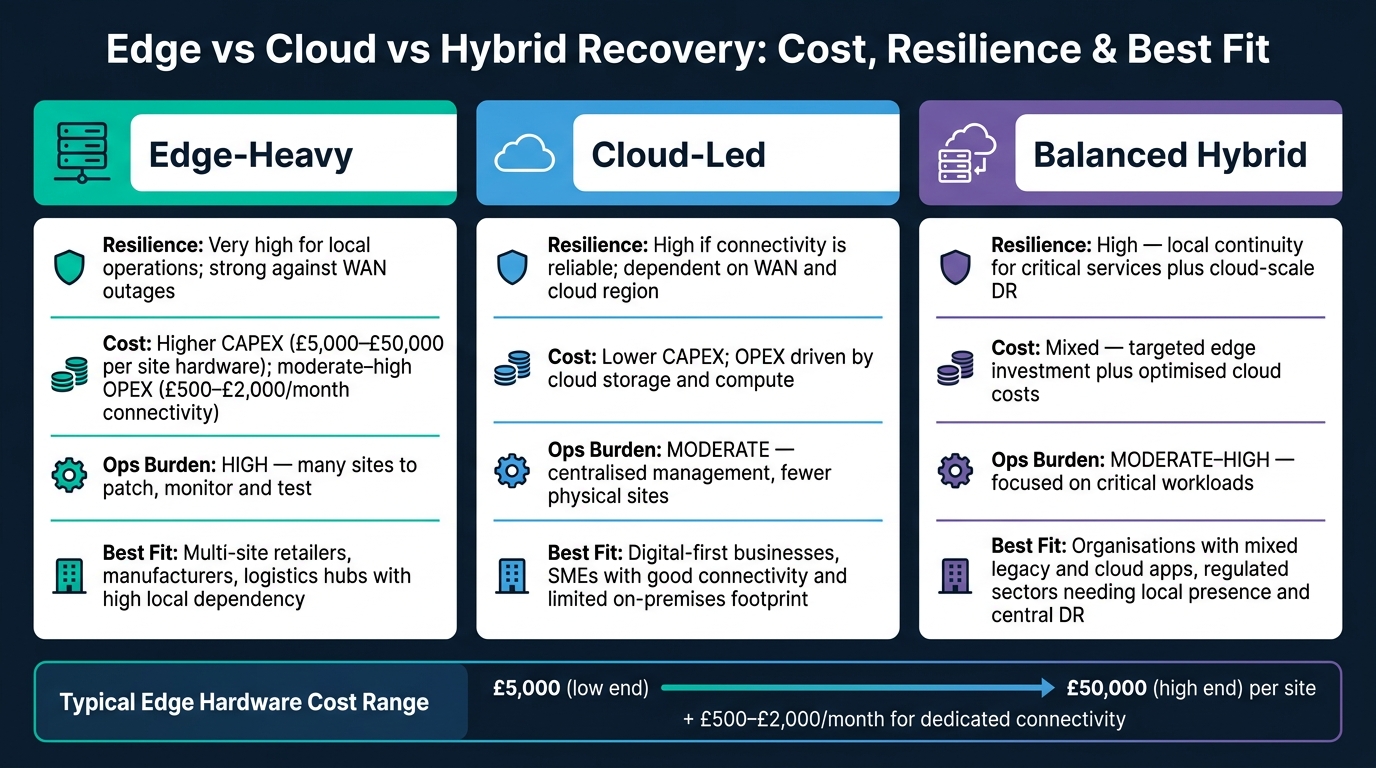 {Edge vs Cloud vs Hybrid Recovery: Cost, Resilience & Best Fit}
:::
{Edge vs Cloud vs Hybrid Recovery: Cost, Resilience & Best Fit}
:::
Once your recovery paths are mapped and your tests are working, one final filter remains: governance, compliance and cost.
Secure access, compliance and data residency
Recovery data needs at least the same level of protection as production data. In many cases, it needs more. Backups often hold full datasets, which means a single gap can expose far more than a live system would. Use TLS 1.2+ for replication, encrypt backups at rest, and protect edge storage with centrally managed keys.
Access control is where many firms come unstuck. Edge systems should tie into your central identity provider so that DR consoles and edge management agents use Single Sign-On and multi-factor authentication. Local accounts on edge devices should exist only for emergencies, and they need regular review. For privileged tasks, such as triggering a live failover or restoring data into a new environment, require time-bound sessions, full session recording, and an approved change record signed off by a manager.
For UK organisations, data residency also needs to sit near the top of the DR checklist. Under UK GDPR and the Data Protection Act 2018, personal data in backups and DR replicas is covered by the same transfer rules as live data. A practical place to start is a dataset residency matrix. Classify each dataset, list the jurisdictions it may use, then pin primary backups, secondary copies and failover sites to those locations. In plain terms, each dataset’s backups and failover targets should stay only in places it is allowed to use. Financial services firms and NHS organisations also face sector rules on top of this baseline.[6][8][10]
Once access and location are set, the next step is simple: decide whether the extra resilience is worth the money and the added admin.
Balance resilience gains against cost and complexity
Start by scoring each workload based on the impact of downtime. Then compare that against the three- to five-year total cost of ownership for each recovery pattern. Edge hardware per site will often cost between £5,000 and £50,000 upfront, with £500–£2,000 per month for dedicated connectivity. For smaller offices with solid broadband and modest data volumes, a cloud-led model is often the cheaper option.[6][11]
| Approach | Resilience | Cost | Ops burden | Best fit |
|---|---|---|---|---|
| Edge-heavy | Very high for local operations; strong against WAN outages | Higher CAPEX for site hardware; moderate to high OPEX | High: many sites to patch, monitor and test | Multi-site retailers, manufacturers, logistics hubs with high local dependency |
| Cloud-led | High if connectivity is reliable; dependent on WAN and cloud region | Lower CAPEX; OPEX driven by cloud storage and compute | Moderate: centralised management, fewer physical sites | Digital-first businesses, SMEs with good connectivity and limited on-premises footprint |
| Balanced hybrid | High: local continuity for critical services plus cloud-scale DR | Mixed: targeted edge investment plus optimised cloud costs | Moderate to high, focused on critical workloads | Organisations with mixed legacy and cloud apps, regulated sectors needing local presence and central DR |
Conclusion: key decisions for a workable recovery plan
A recovery plan only works if people can run it under pressure, more than once, without chaos. That means clear scope, tested automation and joined-up governance.
Six choices tend to decide whether the plan works in practice:
- define which workloads are in scope and how critical they are
- set RTO and RPO by workload using hard business terms, such as revenue lost per hour or the impact of a regulatory breach
- place data on purpose, based on latency, residency rules and cost
- automate failover with infrastructure as code and scripted runbooks, so teams follow tested steps instead of making it up on the spot
- test at a scale that matches real data volumes
- govern security, compliance and cost through one forum rather than splitting them across teams[7][8][9]
DR built in silos has a habit of drifting over time. Folding DR governance into existing change advisory boards, then running quarterly cost and configuration reviews, helps keep the plan tied to how the business actually runs. It also helps stop the architecture quietly growing past the budget or beyond what the team can handle day to day.[7][10]
FAQs
How do I decide which workloads need edge recovery?
Start with a business-led assessment, not technical criteria alone.
That means running a Business Impact Analysis to rank workloads based on what downtime would actually cost the business. Look at the full picture:
- revenue loss
- reputational damage
- regulatory penalties
Then map each workload tier to the right edge model.
Use Thin Edge for large-scale, less time-sensitive applications that can lean on the cloud.
Use Thick Edge for critical systems that need to keep running locally when the cloud goes down.
When should I use synchronous rather than asynchronous replication?
Use synchronous replication when your application needs real-time data consistency and can't tolerate any data loss, especially in high-availability setups.
It keeps your recovery point objective at zero, but it also adds more write latency and cost. This makes it a good fit for mission-critical systems where immediate data integrity matters more than network wait times.
What should I test first in a hybrid cloud recovery plan?
First, take stock of your digital assets. Build a full inventory of your applications, databases and infrastructure across on-premises and cloud environments.
Next, map user flows, spot dependencies and look at the impact of failure. Then group assets by business importance. That gives you clearer recovery goals and helps line up your architecture with what the business actually needs.