
When disaster strikes - whether from cyberattacks, system failures, or natural events - having a solid disaster recovery (DR) plan is critical. Hybrid cloud environments offer a reliable way to combine on-premises control with cloud flexibility, ensuring systems remain operational during disruptions. This guide outlines key steps to build an effective DR strategy:
- Assess Systems & Set Goals: Identify critical systems, classify workloads by business impact, and define Recovery Time Objectives (RTO) and Recovery Point Objectives (RPO).
- Select DR Architecture: Choose from active-active, warm standby, pilot light, or active-passive setups based on cost, recovery speed, and data loss tolerance.
- Implement Data Protection: Follow the 3-2-1 backup rule, use encryption, and ensure secure replication and storage.
- Automate Recovery: Use tools like Infrastructure-as-Code (IaC) and automated failover/failback to minimise errors and speed up recovery.
- Test & Maintain: Regularly test scenarios, monitor systems, and keep the plan updated to meet evolving needs.
Hybrid Cloud Disaster Recovery in AWS | Amazon Web Services
Need help optimizing your cloud costs?
Get expert advice on how to reduce your cloud expenses without sacrificing performance.
Step 1: Assess Critical Systems and Define Recovery Goals
Before setting up disaster recovery (DR) infrastructure, start by taking stock of your assets. This includes applications, databases, and infrastructure, whether they're on-premises or in the cloud. Map out user flows for each system, detailing their purpose, dependencies, and the impact of potential failures [1][7]. Once you've completed this inventory, categorise these assets based on their importance to the business.
Categorise Workloads by Business Impact
Group workloads into tiers based on how their failure would affect the organisation. Avoid basing these decisions solely on technical input. Instead, focus on the real-world implications for your business. As Microsoft Azure's Well-Architected Framework explains:
Criticality is a business decision and it's your responsibility to help guide that decision... If an outage would hit your revenue, damage customer trust, or put you out of compliance, then that's a critical system[7].
Collaborate with business stakeholders to classify systems into four tiers:
- Mission Critical (Tier 0): Systems essential to core business operations.
- Business Critical (Tier 1): Important systems with broad operational impact.
- Business Operational (Tier 2): Systems supporting day-to-day operations.
- Administrative (Tier 3): Systems with minimal operational impact.
Identifying Critical Workloads and Data
Conduct a Business Impact Analysis (BIA) to understand the costs of downtime. This includes financial losses, damage to reputation, and potential regulatory penalties [6]. Classify each asset as Critical, Important, or Non-essential, based on how its failure would affect operations [11]. Keep in mind that mission-critical systems often rely on external services like DNS providers or CDNs [8].
A survey from May 2025 revealed a concerning statistic: only 31% of IT leaders felt confident in their recovery plans [10].
Addressing Risks in Hybrid Cloud Environments
Hybrid cloud setups introduce unique risks, such as connectivity issues, fragmented data, and encryption challenges [9]. Use a scoring system to evaluate threats, rating their likelihood and impact on a scale of 0–5. Multiply these scores to prioritise risks [8].
It's important to understand the shared responsibility model:
The provider is responsible for the security of the cloud. You are responsible for your security in the cloud. Getting this wrong is the quickest way to have your DR plan fail.– HGC IT Solutions [10]
While cloud providers handle physical security and infrastructure, you're responsible for your data, application settings, and access controls. In hybrid environments, these responsibilities can blur as data moves between systems.
The stakes are high: 94% of businesses that lose data due to disasters never recover, and cyberattacks occur roughly every 40 seconds [9]. Human errors and system failures contribute to 23% of unplanned downtime [9]. To prepare, hold workshops with teams from Information Security, Cyber Security, and product development. Use technical diagrams to visualise dependencies and validate threat priorities [8].
Once risks are assessed, set clear recovery targets that balance operational needs with budget constraints.
Recovery Time and Point Objectives (RTO and RPO)
Define RTO (Recovery Time Objective) and RPO (Recovery Point Objective) for each tier:
- Tier 0: Requires near-perfect availability (99.999%) with RTO in seconds and RPO close to zero [7].
- Tier 1: Targets around 99.95% availability, with recovery measured in minutes [7].
- Tier 2: Aims for 99.9% availability, allowing for hours of downtime and data loss [7].
- Tier 3: Can tolerate RTOs ranging from hours to days [7].
Conduct a cost-benefit analysis for each recovery target. AWS offers this advice:
If the cost of the recovery strategy is higher than the cost of the failure or loss, the recovery option should not be put in place unless there is a secondary driver such as regulatory requirements[12].
Timing matters too. For instance, a payroll system failure right before payday has far more serious consequences than the same failure at another time [12]. Document these nuances and revisit classifications every six months to keep pace with changing business needs [3][7].
At Hokstad Consulting, we specialise in helping organisations align their DR strategies with business priorities, ensuring resources are allocated where they deliver the most value.
Step 2: Choose the Right Disaster Recovery Architecture
::: @figure 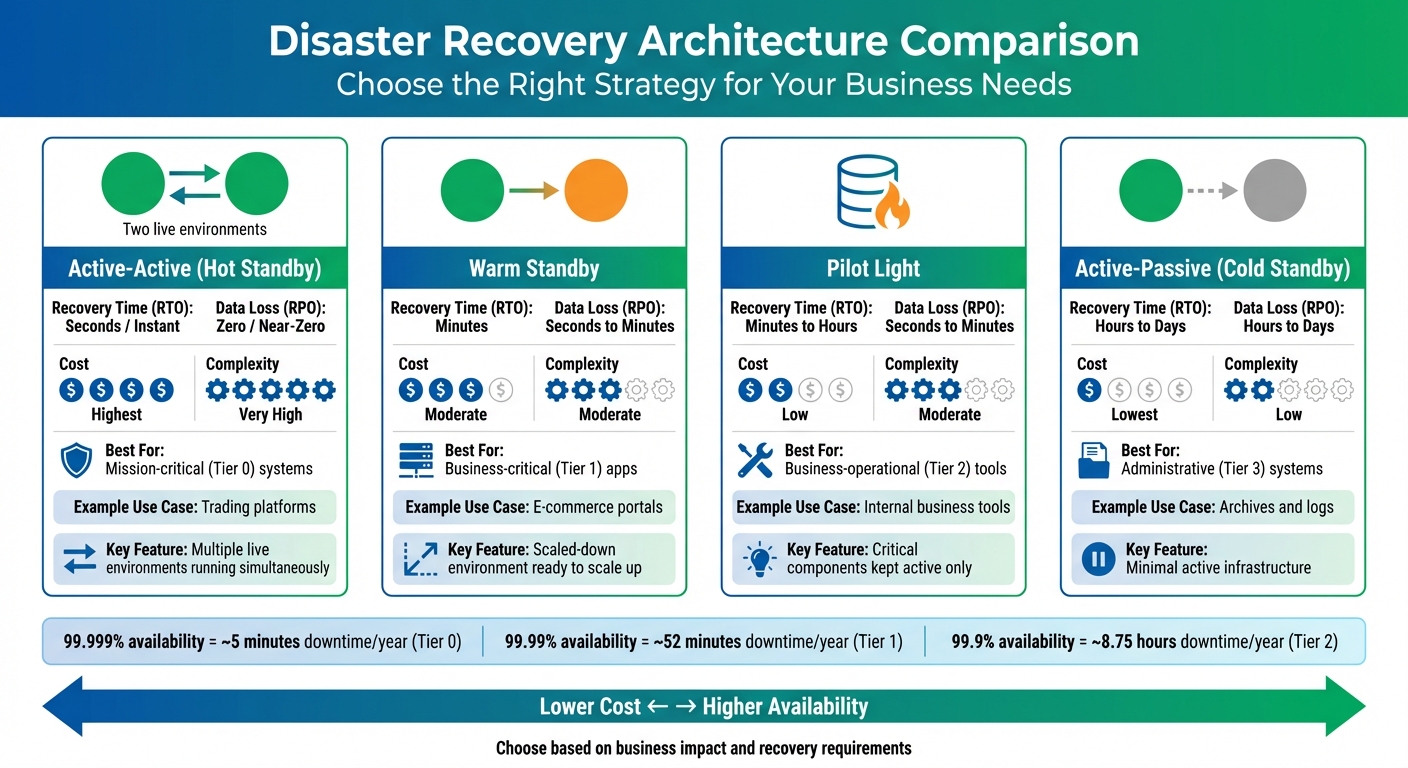 {Hybrid Cloud Disaster Recovery Architecture Comparison Guide}
:::
{Hybrid Cloud Disaster Recovery Architecture Comparison Guide}
:::
Once you've set your recovery goals, the next step is selecting a disaster recovery (DR) architecture that aligns with your speed requirements, tolerance for data loss, and budget.
Overview of DR Architectures
When it comes to disaster recovery planning, there are four key architectures to consider. Each offers a different balance between cost and recovery effectiveness:
Active-Active (Hot Standby): This setup involves multiple live environments running simultaneously. If one fails, the others take over instantly, ensuring almost no downtime [7]. While it delivers exceptional reliability, the cost is steep due to the need for fully redundant infrastructure operating 24/7.
Warm Standby: Here, a scaled-down version of your production environment runs in the cloud. It can handle reduced traffic immediately and scale up when disaster strikes [10, 19]. This option balances cost and recovery speed, as you pay for partial infrastructure while maintaining the ability to recover within minutes.
Pilot Light: Only the most critical components, such as databases, are kept active and synchronised with your production environment. The rest of the resources are powered off until needed [13]. This approach is budget-friendly while ensuring your essential data is always up to date.
Active-Passive (Cold Standby): The most cost-effective option, this setup involves minimal active infrastructure. Data is backed up to the cloud, but the entire environment needs to be provisioned and restored during a disaster [4, 19]. While affordable, recovery takes longer, as everything must be rebuilt from scratch.
In hybrid cloud setups, a common strategy is to run production on-premises while using the cloud as a failover site. For example, you might replicate databases to the cloud in a Warm Standby mode, with application virtual machines spinning up from snapshots only when disaster strikes [4].
Google Cloud offers resources designed to minimise downtime. Zonal resources like Compute Engine have 99.9% availability, equating to around 8.75 hours of downtime per year. Regional resources improve this to 99.99%, or roughly 52 minutes annually [2]. Multi-region databases like Spanner go even further, achieving 99.999% availability by spreading across multiple regions [2].
Your replication strategy also plays a big role in determining recovery point objectives (RPO). Synchronous replication ensures no data is lost but comes with added costs and latency [2, 4]. Asynchronous replication, on the other hand, may allow minor data loss but offers better performance over longer distances. By understanding your recovery priorities and system requirements, you can choose the architecture that strikes the best balance between cost and performance.
Compare DR Architectures
| Architecture | Recovery Time (RTO) | Data Loss (RPO) | Cost | Complexity | Typical Use Case |
|---|---|---|---|---|---|
| Active-Active | Seconds / Instant | Zero / Near-Zero | Highest | Very High | Mission-critical (Tier 0) systems like trading platforms |
| Warm Standby | Minutes | Seconds to Minutes | Moderate | Moderate | Business-critical (Tier 1) apps, such as e-commerce portals |
| Pilot Light | Minutes to Hours | Seconds to Minutes | Low | Moderate | Business-operational (Tier 2) tools |
| Active-Passive | Hours to Days | Hours to Days | Lowest | Low | Administrative (Tier 3) systems like archives |
This table highlights how each architecture fits different operational tiers, helping you choose the best option for your business needs. Systems with high criticality, like Tier 0, demand robust protection, while Tier 3 systems can function with basic recovery capabilities.
It's important to avoid over-investing in less critical systems. For example, using an Active-Active setup for a Tier 3 administrative tool is overkill. Conversely, underestimating the needs of Tier 0 systems could lead to costly downtime or regulatory penalties.
Hokstad Consulting specialises in aligning DR architectures with business needs, ensuring you're not overpaying for unnecessary resilience while keeping your critical systems secure and operational.
Step 3: Implement Backup and Data Protection Strategies
Once your disaster recovery framework is in place, the next priority is safeguarding your data. This ensures quick recovery while keeping backups safe from potential attacks.
Set Up Multi-Tiered Backups and Replication
A good starting point is following the 3-2-1 rule: three copies of your data, stored on two different types of media, with one copy kept offsite [14]. For hybrid cloud setups, this could mean storing one copy on-premises, another in your primary cloud region, and the third in a geographically distant location.
To further protect your backups, isolate them in separate accounts, subscriptions, or projects [14]. This reduces the risk of ransomware spreading from production systems to your backup repositories - a common target in 93% of ransomware attacks [14].
Consider using immutable storage solutions like Amazon S3 Object Lock or Azure Blob immutable storage. These technologies prevent unauthorised changes, deletions, or encryption of your backup data [14]. Additionally, configure soft delete with a minimum retention period of 14 days to guard against accidental or malicious deletions [15]. Adding multi-user authorisation (MUA) for destructive actions ensures that no single administrator can delete critical backups without secondary approval [15].
Azure provides several storage redundancy options to cater to different needs:
- Locally Redundant Storage (LRS): Suitable for non-critical data.
- Zone-Redundant Storage (ZRS): Offers added durability.
- Geo-Redundant Storage (GRS): Ideal for mission-critical workloads that need to survive regional outages [15].
It’s worth noting that nearly half of organisations fail to retain cloud data for more than a year [14], potentially leaving themselves exposed to long-term risks or compliance issues. Once your backups are in place, secure them with strong encryption and access controls.
Apply Encryption and Data Security
Encryption is a key defence. Use HTTPS/TLS 1.3 to secure data in transit and AES-256 for data at rest [14]. For greater control, opt for customer-managed keys (CMK) stored in services like AWS KMS or Azure Key Vault, rather than relying solely on provider-managed encryption [14].
Implement role-based access control (RBAC) to enforce the principle of least privilege. For example, application owners could be granted restore-only
permissions, preventing them from deleting backups or altering policies [14]. As Azure Backup documentation points out:
A rogue admin can delete all your business-critical data or even turn off all the security measures that might leave your system vulnerable to cyber-attacks[15].
To further enhance security, use private endpoints or dedicated links such as AWS Direct Connect to keep backup traffic within your private network [16]. Enable multi-factor authentication (MFA) for all backup management accounts and rotate access keys regularly [14].
Use Real-Time Mirroring and Snapshots
After securing your backups, consider real-time replication to minimise data loss.
Real-time mirroring ensures continuous data transfer between your primary and secondary sites, reducing the risk of data loss for critical workloads. On the other hand, snapshots capture point-in-time copies at scheduled intervals, making them a more cost-effective option for less critical systems. A good rule of thumb is to use mirroring for Tier 0/1 workloads and snapshots for Tier 2/3 [7]. This approach is particularly efficient, as stopped virtual machine (VM) instances only incur storage costs [4].
Each replication method has its trade-offs. For example, Google Cloud’s asynchronous replication offers lower latency but risks slight data loss during outages. In contrast, synchronous replication eliminates data loss but may introduce higher latency [2]. Regardless of the method, snapshots should always complement mirroring. As Google Cloud explains:
The smaller the RPO and RTO target values are, the faster services might recover from an interruption with minimal data loss. However, this implies higher cost because it means building redundant systems[4].
Hokstad Consulting specialises in designing backup strategies that strike a balance between protection and cost efficiency, ensuring your critical data remains secure without unnecessary spending.
Step 4: Automate and Orchestrate Disaster Recovery
Once your backups are secure, the next logical step is to reduce the likelihood of human error during recovery. High-pressure situations can lead to mistakes when relying on manual processes. By automating recovery tasks, you can ensure faster and more consistent results, laying the groundwork for effective failover and failback management through specialised platforms.
Configure Automated Failover and Failback
Automated failover systems are designed to detect failures and seamlessly switch operations to a recovery site, significantly reducing recovery time objectives (RTO). Tools such as VMware Site Recovery Manager and Zerto can transform manual recovery steps into automated workflows. These workflows can handle tasks like configuring networks, mounting storage, and conducting application health checks in a precise, sequential manner [17].
The Disaster Recovery as a Service (DRaaS) sector has seen rapid growth, valued at £9,718.26 million in 2022 and projected to reach £41,182.37 million by 2030 [17]. However, only 21% of enterprise companies test their disaster recovery plans more than twice annually [19]. This lack of regular testing leaves many organisations vulnerable, as automation failures may only come to light during an actual disaster.
When setting up automated failovers, it’s a good idea to include approval gates at key stages. These manual checkpoints ensure failover processes are triggered only when absolutely necessary, striking a balance between speed and human oversight [17]. On the other hand, failback - restoring operations to your primary site - requires its own automated steps. These typically involve resynchronising data, verifying integrity, and redirecting traffic back to the primary environment, often days or weeks after the initial failover [3].
Modern disaster recovery platforms often integrate anti-malware scanning directly into recovery workflows. This is a critical feature, as 93% of ransomware attacks specifically target backup repositories [14]. By scanning files before restoration, these platforms help prevent infected data from being reintroduced during failover [18].
Automation also plays a key role in maintaining consistency across environments, and this is where Infrastructure-as-Code (IaC) tools come into play.
Use Infrastructure-as-Code (IaC) for Consistency
IaC tools like Terraform and AWS CloudFormation ensure that your recovery environment mirrors your production setup, eliminating the risk of configuration drift [17]. As HashiCorp puts it:
Deploy immutable instances using automation by repaving instances with patched images rather than patching them in place. This process requires you to maintain the setup configuration in the code used to deploy the system[21].
To ensure reliability, IaC scripts should be clear, repeatable, and include pinned software versions to avoid unexpected upgrades during critical recovery operations [3]. Additionally, store these scripts in highly available, multi-region repositories. This guarantees they remain accessible even if your primary region experiences a failure.
Google Cloud highlights the importance of ensuring that CI/CD systems and artefact repositories are not single points of failure. This allows you to deploy updates or make configuration changes even when one environment is down [4].
Sensitive information, such as encryption passwords and API keys, should never be stored directly in version control. Instead, use secret management tools to securely inject these values during automated deployments. For instance, Terraform Enterprise requires the encryption password (TFE_ENCRYPTION_PASSWORD) to be available during recovery - without it, your data remains inaccessible [20].
Hokstad Consulting specialises in creating automated disaster recovery workflows using IaC. Their expertise ensures that hybrid cloud environments can recover quickly, efficiently, and securely, all while keeping costs under control.
Step 5: Test, Monitor, and Maintain the DR Plan
A disaster recovery plan is only as good as its execution during a crisis. Without consistent testing and monitoring, it remains a theoretical document that may fall short when you need it most. To ensure your plan delivers when it counts, rigorous testing, regular updates, and automated maintenance are essential.
Test Recovery Scenarios Regularly
Testing is the backbone of a reliable disaster recovery strategy. It confirms whether your plan works as intended and identifies potential weak spots before an actual disaster occurs [1]. Your testing should mimic real-world conditions, covering both failover (switching operations to a secondary system) and failback (returning to the primary system once stability is restored) [11]. These exercises ensure your automated failover processes are ready for action.
Start with tabletop exercises, where team members walk through the plan step-by-step to clarify their roles. Once everyone is clear on their responsibilities, move on to simulation tests. These involve executing an actual failover to your recovery site, giving you a chance to measure whether you’re meeting your Recovery Time Objective (RTO) and Recovery Point Objective (RPO) in practice [22].
For deeper testing, consider using fault injection tools. These tools simulate infrastructure failures by introducing delays or aborting requests, helping you assess how your applications handle unexpected disruptions [5]. For example, Google Cloud’s regional resources, like Regional GKE, are designed for 99.99% availability - equating to about 52 minutes of downtime annually [2]. Testing should account for such realistic availability thresholds.
It’s also crucial to understand that your application’s availability is tied to the reliability of the underlying cloud services. If your recovery depends on three services, each with 99.9% availability, you need to factor in the combined impact on overall resilience [2]. During failover, avoid relying on control plane operations (like creating new VMs), as these may have reduced availability during regional outages. Instead, focus on data plane operations, which are more likely to remain functional [2][13].
Monitor and Update the Plan
Your disaster recovery plan isn’t static - it should evolve alongside your infrastructure and emerging risks. Review and update it at least every six months or after significant changes [3][7]. This ensures it addresses new challenges, such as AI-driven threats, edge computing vulnerabilities, and zero-trust security requirements [1].
Define clear activation criteria to remove ambiguity during a disaster. For instance, you might differentiate between performance degradation (e.g., a 50% drop lasting over 10 minutes) and a full regional outage confirmed by your cloud provider’s status page [3][7].
Health modelling tools are invaluable for spotting potential issues early. Platforms like AWS Resilience Hub can continuously validate whether your workloads are on track to meet recovery objectives [13].
To maintain consistency across environments, integrate the deployment of standby systems into your CI/CD pipelines. This ensures that updates applied to production are automatically mirrored in your recovery sites, preventing issues like outdated software or missing patches during failover [4][5]. Automate corrective actions whenever monitoring highlights gaps, streamlining recovery processes.
Automate Maintenance Processes
In today’s complex hybrid cloud environments, manual maintenance simply can’t keep up. Automation plays a critical role in reducing RTO by detecting failures and triggering recovery actions without waiting for human intervention [1].
By leveraging Infrastructure as Code (IaC), you can prevent configuration drift and ensure your disaster recovery environment remains an exact replica of your primary setup [1][5]. For instance, Google Kubernetes Engine’s node auto-repair feature automatically initiates repairs if a node fails health checks for 10 minutes [5].
Implement lifecycle policies to manage backup data efficiently. Automatically moving older backups to lower-cost storage classes allows you to conduct regular stress tests without driving up costs [5].
Store your disaster recovery documentation, scripts, and credentials in highly available, cross-region locations. As Microsoft Azure advises:
Treat your DR runbook like production code: version it and make it accessible[7].
This ensures that even if your primary region fails, your recovery resources remain accessible.
Finally, add unannounced drills to your testing routine. These surprise exercises reveal how well your team and systems perform under pressure [3]. Use the results to refine your procedures - if someone hesitates during a drill, update the plan to make their role clearer [3].
Hokstad Consulting specialises in helping organisations implement robust testing, monitoring, and maintenance strategies for hybrid cloud disaster recovery. Their expertise ensures your plan keeps pace with evolving infrastructure while managing costs effectively.
Conclusion
A strong hybrid cloud disaster recovery plan ties business priorities to recovery capabilities. As Microsoft Azure points out:
Criticality is a business decision and it's your responsibility to help guide that decision... Azure doesn't decide what's mission critical, you do.[7]
For mission-critical systems (Tier 0), service level objectives must exceed 99.99%, with recovery times measured in seconds. In contrast, less critical workloads (Tier 3) can handle downtime ranging from hours to even days [7].
Key tools like automated failover, Infrastructure as Code (IaC), and real-time monitoring play a crucial role in reducing downtime and preventing errors [23]. With misconfigurations accounting for 59% of cloud security incidents [24], automation not only streamlines recovery but also ensures your recovery environment mirrors the security standards of your production systems. However, automation alone isn’t enough - it requires continuous validation to ensure everything works as expected when it matters most.
Rigorous validation comes through regular testing. From scenario planning to live drills, these exercises confirm whether your recovery time (RTO) and recovery point (RPO) objectives can be met under real-world conditions [3]. Testing helps uncover weaknesses and prepares your team to adapt, allowing your disaster recovery strategy to keep pace with changes in your infrastructure.
FAQs
How can I choose the right disaster recovery architecture for my business?
Selecting the best disaster recovery (DR) setup for your business starts with a clear understanding of your organisation's specific needs, risk levels, and operational priorities. Begin by pinpointing your critical systems, data, and applications, and then evaluate any potential weak points. It's also essential to establish your Recovery Time Objectives (RTOs) - the maximum acceptable downtime - and Recovery Point Objectives (RPOs) - the amount of data loss you can tolerate.
Take stock of your existing infrastructure. Whether you're operating in a hybrid cloud, a multi-region framework, or relying on specific providers, this will shape your approach. For hybrid cloud setups, replicating systems across different geographic regions can provide added protection against localised disruptions, such as natural disasters. However, you'll need to weigh factors like cost, complexity, and the resilience level required to ensure your DR architecture aligns with your business continuity plans.
If you're looking for tailored solutions, Hokstad Consulting offers expertise in designing disaster recovery strategies that suit your organisation's needs, with a focus on hybrid cloud environments and cost-effective approaches.
What should I consider when protecting data in a hybrid cloud environment?
When it comes to safeguarding data in a hybrid cloud environment, strong encryption is a must. This applies to both data in transit and data at rest, ensuring sensitive information stays protected at all times. Make it a habit to test and update your disaster recovery plans regularly - this keeps them relevant and aligned with your business goals.
Start by identifying the systems and data that are most critical to your operations. This helps establish clear backup and recovery priorities. Using geographic redundancy is another smart move - it protects your organisation from localised disruptions by storing data across multiple locations. Additionally, private, dedicated connectivity options can enhance both security and performance in hybrid cloud setups.
Lastly, opt for a cloud provider that delivers secure, scalable solutions designed to meet your specific needs, while also ensuring compliance with industry standards.
How often should I test and update my disaster recovery plan in a hybrid cloud environment?
To keep your disaster recovery plan working as intended, it's important to test and update it on a regular basis. While the timing can vary depending on your organisation’s unique needs, a solid guideline is to review and test the plan at least once a year or whenever there are major changes to your infrastructure or business operations.
Consistent testing allows you to spot weaknesses, adapt to new risks, and ensure your team knows exactly what to do in real emergencies. Staying ahead of potential issues can help reduce downtime and keep your business running smoothly during unforeseen disruptions.