
When databases fail unexpectedly, businesses can face severe disruptions. Nearly 40% of small and medium businesses in the US shut down immediately after a disaster, with 25% closing permanently within a year. Disaster recovery (DR) is critical for preventing such outcomes, especially in hybrid cloud setups, which combine on-premises and cloud infrastructure. These setups ensure data availability during major events like regional outages or cyberattacks.
Key points covered:
- Hybrid Cloud DR: Combines local and cloud systems for reliability and flexibility.
- Challenges: Includes managing diverse infrastructures, network latency, and replication costs.
- RTO & RPO: Recovery Time Objective (how fast systems recover) and Recovery Point Objective (acceptable data loss) guide DR planning.
- Strategies: Options like Pilot Light, Warm Standby, and Multi-Site Active/Active balance cost, complexity, and recovery speed.
- Tools: AWS, Azure, Google Cloud, and open-source solutions provide options for replication, failover, and backup.
- Testing: Regular drills and automation ensure plans work under pressure.
- Security: Measures like encryption and immutable backups protect data from threats like ransomware.
- Compliance: UK regulations such as GDPR require tested, risk-based recovery plans.
Hybrid cloud disaster recovery ensures businesses can recover quickly and securely while meeting compliance standards. Tailoring strategies to workload importance and automating processes can reduce downtime and costs effectively.
Hybrid Cloud Disaster Recovery in AWS | Amazon Web Services
Need help optimizing your cloud costs?
Get expert advice on how to reduce your cloud expenses without sacrificing performance.
Understanding RTO and RPO in Disaster Recovery
::: @figure 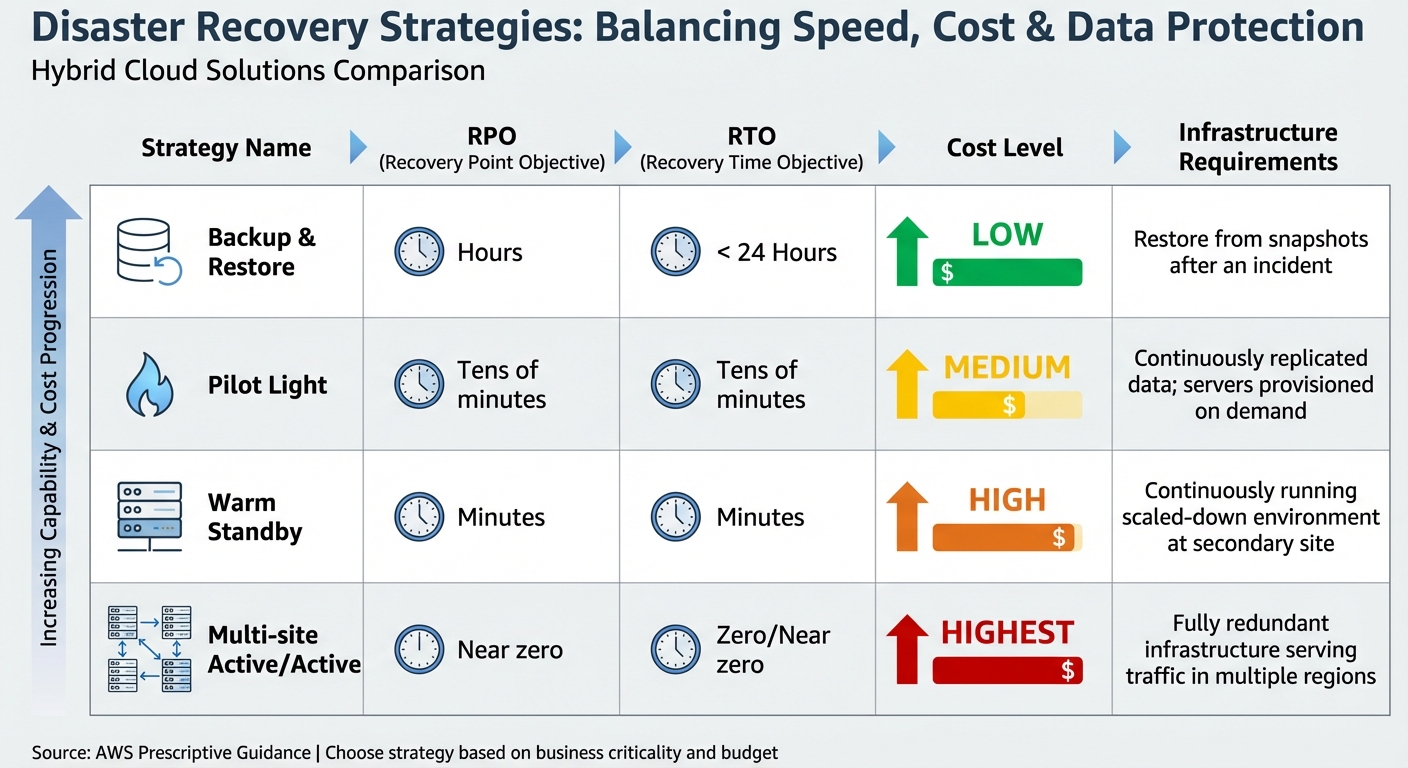 {Hybrid Cloud Disaster Recovery Strategies: RTO, RPO, and Cost Comparison}
:::
{Hybrid Cloud Disaster Recovery Strategies: RTO, RPO, and Cost Comparison}
:::
Recovery Time Objective (RTO) and Recovery Point Objective (RPO) are two essential metrics in disaster recovery planning. RTO defines the maximum acceptable delay before systems and services are restored, while RPO specifies the maximum tolerable data loss, measured as the time since the last valid backup was taken [9]. These metrics aren’t just technical benchmarks - they reflect business priorities and come with financial implications. For instance, regulations like PCI DSS and HIPAA often impose specific RTO and RPO requirements to ensure operational continuity [9]. Ideally, these targets should be set as close to zero as possible, within the constraints of budget and operational feasibility [10].
How RTO and RPO Impact Database Recovery
The tighter your RTO and RPO targets, the more advanced - and expensive - your infrastructure needs to be. For example, a basic backup-and-restore strategy might achieve an RTO of under 24 hours and an RPO measured in hours, offering a cost-effective solution [11]. On the other hand, a multi-site active/active setup can deliver near-zero RTO and RPO but comes with a hefty price tag [11].
In hybrid cloud environments, additional elements like DNS propagation delays, network reconfigurations, and redirection times can influence RTO calculations [1]. Similarly, your replication strategy plays a crucial role in determining RPO. Synchronous replication ensures zero data loss but may introduce latency, while asynchronous replication reduces network overhead but allows for some data loss [1].
| Strategy | RPO | RTO | Cost | Infrastructure Requirement |
|---|---|---|---|---|
| Backup & Restore | Hours | < 24 Hours | Low | Restore from snapshots after an incident |
| Pilot Light | Tens of minutes | Tens of minutes | Medium | Continuously replicated data; servers provisioned on demand |
| Warm Standby | Minutes | Minutes | High | Continuously running scaled-down environment at a secondary site |
| Multi-site Active/Active | Near zero | Zero/Near zero | Highest | Fully redundant infrastructure serving traffic in multiple regions |
Source: AWS Prescriptive Guidance [11]
This framework provides a foundation for setting recovery objectives tailored to specific needs, as explored further in the next section.
Setting RTO and RPO for Hybrid Cloud Databases
Establishing realistic RTO and RPO values begins with conducting a Business Impact Analysis (BIA). This process evaluates the financial, regulatory, and reputational risks associated with downtime [9][13]. Instead of applying blanket targets across all systems, categorise your databases based on their criticality. For instance, mission-critical databases - those supporting financial transactions or healthcare systems - might require RTO and RPO in seconds. Meanwhile, less critical systems, like internal administrative tools, can afford longer recovery times [1][4].
If the cost of the recovery strategy is higher than the cost of the failure or loss, the recovery option should not be put in place unless there is a secondary driver such as regulatory requirements.
– AWS Whitepaper [13]
Before finalising your targets, map out dependencies between databases. For example, ensure your data warehouse is operational before restoring dependent analytics services [12]. Also, consider whether your business can function in a degraded state - such as offering read-only access - while full capabilities are being restored [12]. Automating recovery processes with tools like Terraform or Bicep can help reduce human error during high-pressure failover scenarios and support aggressive RTO goals [1].
Disaster Recovery Strategies for Hybrid Cloud Databases
When it comes to disaster recovery for hybrid cloud databases, the right strategy depends on how much downtime and data loss your business can handle. The three main approaches - Pilot Light, Warm Standby, and Multi-Site Active/Active - each balance cost, complexity, and recovery speed differently. These strategies align with the recovery metrics discussed earlier, helping you craft a disaster recovery plan tailored to your hybrid environment.
Pilot Light Strategy
The Pilot Light strategy keeps your database and core data stores active in the cloud, while other infrastructure components, like application servers, remain dormant until needed in a disaster scenario [14]. Think of it like the pilot light in a boiler - it stays lit and ready to ignite the full system when required. This approach typically offers a recovery point objective (RPO) and recovery time objective (RTO) of tens of minutes [11], making it a practical choice for systems that can tolerate short interruptions.
To set up a Pilot Light strategy, replicate your data asynchronously from on-premises to a minimal cloud instance or object storage. Use tools like Terraform to quickly provision application servers during a disaster [2][5][6]. Additionally, configure DNS or traffic management policies to redirect traffic to the cloud once the environment is scaled up [5]. For example, Oracle Data Guard can achieve an RPO of less than one second in a hybrid configuration using asynchronous transport [2].
The key advantage of this strategy is its cost-effectiveness. You only pay for minimal database instances and storage under normal conditions, with compute costs for application servers incurred only during testing or an actual disaster. However, this comes with a trade-off: recovery times are longer compared to strategies that keep more resources running.
Warm Standby Strategy
Warm Standby takes a step further by maintaining a smaller, fully operational replica of your production environment in the cloud [14]. Unlike the Pilot Light approach, this replica can handle traffic immediately - though at reduced capacity - while scaling up during a failover. This method generally achieves RPO and RTO measured in minutes [11], making it suitable for systems that need to minimise downtime.
Since the environment is already operational, Warm Standby eliminates the need to wait for provisioning during a disaster [14]. To keep this setup ready, deploy smaller virtual machines that run continuously, use synchronisation tools like Oracle Data Guard or Azure Failover Groups to keep the standby database up to date, and regularly test scaling capabilities to ensure the site can handle full production loads [5][17]. For instance, Amazon RDS Multi-AZ deployments can complete automatic failover in about 60 seconds [16].
This strategy strikes a balance between cost and uptime, making it ideal for critical systems that can temporarily operate at reduced capacity during recovery.
Multi-Site Active/Active Strategy
The Multi-Site Active/Active strategy is the most robust option, running workloads across multiple regions - such as on-premises and in the cloud - with all sites actively serving traffic [14]. This eliminates the need for traditional failover during regional outages and offers near-zero RPO and RTO [11]. For example, Azure SQL Database zone-redundant configurations can achieve an RTO of less than 30 seconds and zero RPO [15].
However, this approach requires significant investment. It demands fully redundant infrastructure and complex synchronisation across sites [14]. To manage risks like split-brain scenarios, you can distribute primary databases across regions, use a global load balancer to direct traffic based on proximity or system health, and implement a quorum mechanism to maintain data consistency [6][17].
The smaller the RPO and RTO target values are, the faster services might recover from an interruption with minimal data loss. However, this implies higher cost because it means building redundant systems.
– Google Cloud [6]
While the Multi-Site Active/Active strategy involves the highest costs and operational complexity, it’s the only option that eliminates downtime entirely for mission-critical databases that can’t afford even brief interruptions.
Tools and Services for Hybrid Cloud Disaster Recovery
When it comes to meeting the rigorous Recovery Time Objective (RTO) and Recovery Point Objective (RPO) demands, choosing the right disaster recovery tools is essential. The selection process should align with your infrastructure, recovery goals, and budget. Major cloud providers offer managed services that simplify the process, while open-source solutions offer flexibility for organisations that prefer a cloud-agnostic approach. Below is an overview of some key tools from leading cloud providers and open-source options.
AWS Disaster Recovery Tools
Amazon provides a range of robust disaster recovery tools:
- Amazon RDS Multi-AZ Deployments: These ensure automatic failover, making them a reliable choice for database continuity.
- AWS Elastic Disaster Recovery (DRS): Utilises block-level replication to achieve RPOs measured in seconds and RTOs in minutes [19]. This makes it ideal for migrating on-premises databases to the cloud during a disaster.
- AWS Storage Gateway: Bridges on-premises environments with Amazon S3, ensuring seamless data integration.
- S3 Replication Time Control (RTC): Replicates 99.99% of objects within 15 minutes [20].
- AWS Database Migration Service (DMS): Provides logical replication, offering a cost-effective alternative to SQL Server Enterprise
Always On
features while maintaining near real-time synchronisation [20].
Azure Disaster Recovery Tools
Microsoft Azure offers a suite of disaster recovery solutions tailored for hybrid environments:
- Azure Site Recovery (ASR): Automates failover and recovery for hybrid IaaS setups [1]. This is particularly effective for organisations using VMware or Hyper-V on-premises that aim to replicate entire database servers to Azure.
- SQL Database Geo-Replication: Maintains readable secondary databases in different regions, supporting disaster recovery and read-scale scenarios.
- Azure SQL Database Failover Groups: Simplifies recovery by coordinating the failover of multiple databases simultaneously, ideal for managed instances.
Google Cloud Disaster Recovery Tools
Google Cloud provides tools designed to minimise downtime and data loss:
- Cloud SQL High Availability: Uses synchronous replication within a region to enable automatic failover with minimal disruption.
- Cross-Region Replication: Allows deployment of Cloud SQL replicas across regions for enhanced data protection.
- Database Migration Service: Supports continuous replication from on-premises or other cloud environments into Google Cloud, enabling both homogeneous and heterogeneous database migrations. These tools leverage Google’s global network to optimise data transfer speeds.
Open-Source and VMware Tools
For organisations seeking flexibility, open-source tools and VMware solutions offer valuable options:
- CloudNativePG: Uses Barman-cloud tools for continuous PostgreSQL backup and recovery in Kubernetes to cloud object stores like AWS S3, Azure Blob Storage, and Google Cloud Storage [18]. For example, Snappy can compress a 395 MB backup at a 2.4:1 ratio in just 8.1 seconds, outperforming bzip2's 5.9:1 ratio in 25.4 seconds [18].
- MinIO: Provides an S3-compatible interface that works across multiple clouds, serving as a common abstraction layer for hybrid environments [18].
- Oracle Data Guard: Supports hybrid setups by maintaining standby databases in public clouds (OCI, AWS, Azure, or Google), achieving an RPO of less than one second with asynchronous transport or zero RPO with synchronous configurations [7].
- SQL Server Native Tools: Features like log shipping and secondary replicas offer built-in disaster recovery capabilities without additional licensing costs [3].
- Oracle
oratcptest: Useful for assessing network links in hybrid Oracle environments to ensure they can handle peak redo rates [7].
These tools provide a wide range of options to support hybrid cloud disaster recovery strategies, ensuring your databases can recover efficiently and keep operations running smoothly.
Testing and Validating Your Disaster Recovery Plan
Implementing a disaster recovery plan is just the first step; testing it thoroughly is what ensures it will actually work when needed. Without real-world testing, even the best-laid plans remain purely theoretical. Regular testing helps confirm that your recovery processes function as intended and that your team is prepared to act under pressure.
Disaster Recovery Testing Best Practices
Start small. Begin with tabletop exercises where team members review their roles and responsibilities. From there, move onto controlled dry runs using test databases in non-production environments. Once confident, proceed to full-scale production drills to ensure your Recovery Time Objective (RTO) and Recovery Point Objective (RPO) targets are achievable [1].
Create realistic scenarios by simulating outages. For example, you could rename source databases, disable connected web applications, or power down virtual machines. Test your recovery processes by executing geo-restores or planned failovers, and then check everything - connection strings, logins, functionality, and data integrity.
For a deeper dive into potential vulnerabilities, consider chaos engineering. Tools like Chaos Monkey or AWS Fault Injection Simulator can introduce unexpected failures, revealing weaknesses that standard tests might miss. To keep recovery processes sharp, integrate automated failover testing into your CI/CD pipelines, ensuring validation happens with every code deployment. It’s also crucial to continuously verify the integrity of your backups.
In hybrid environments, be mindful of split-brain scenarios, which occur when bidirectional replication breaks down, and both sites mistakenly assume control [21][6]. Prevent this by implementing quorum systems or data reconciliation protocols. Ensure that replication processes maintain encryption both at rest and in transit to comply with UK data protection regulations. For best results, conduct failover drills monthly and cross-cloud restoration tests quarterly to confirm that backups from one platform can be restored on another seamlessly.
After testing confirms your plan is effective, don’t stop there. Ongoing monitoring and regular updates are vital to keep your recovery framework resilient.
Monitoring and Updating Disaster Recovery Plans
As hybrid cloud setups evolve, keeping your disaster recovery plan up to date is critical. Configuration drift - differences between your documented plan and the actual infrastructure - can undermine recovery efforts if not addressed.
Review your recovery documentation every quarter, ensuring it aligns with your current infrastructure. Track key metrics like actual RTO, RPO, and recovery times during tests to refine your processes. Whenever there’s a change to your infrastructure or configuration, update and retest your plan immediately. Continuous monitoring is equally important - set up alerts for replication lag, backup failures, or connectivity issues so you can act swiftly if something goes wrong.
Security and Compliance Considerations
While earlier sections covered recovery strategies and testing, securing your disaster recovery (DR) setup is just as important. A plan that neglects security or compliance is incomplete, especially in hybrid cloud setups. Protecting sensitive data during replication, backup, and recovery is as crucial as the recovery process itself. It’s also essential to ensure your approach aligns with evolving UK regulations. Below, we’ll explore how to secure your data and stay compliant during disaster recovery.
Data Security in Hybrid Cloud DR
Surprisingly, the biggest threat to disaster recovery isn’t always natural disasters - it’s ransomware. Attackers with administrative access can wipe out both live databases and online backups, effectively disabling your recovery plan. To counter this, use immutable, air-gapped backups. These backups employ Write-Once-Read-Many (WORM) technology, making them tamper-proof - even administrators can’t alter or delete them [23][24]. For added security, store these backups in a separate cloud account with restricted, write-only access [24].
Transparent Data Encryption (TDE) is another essential measure. Before migrating any data, enable TDE on both primary and standby databases. This ensures your data remains encrypted while stored. However, TDE does introduce CPU overhead and demands strong key management. Services like Azure Key Vault, AWS Key Management Service, or Oracle Key Vault can centralise the management of encryption keys, certificates, and secrets across your hybrid environment [7][27]. Treat encryption keys with the same importance as the data itself - losing access to keys could result in permanent data loss.
Inconsistent Identity and Access Management (IAM) practices across sites can create security gaps. To address this, synchronise Role-Based Access Control (RBAC) permissions, policies, and security baselines across all regions [1]. Tools like Infrastructure as Code (IaC) can automate this process, ensuring your DR environment mirrors production [26]. Additionally, during recovery, make sure to collect audit and application logs in the DR environment and backfill them into the production log archive. This maintains an unbroken compliance trail [26].
The table below summarises key security measures and their implementation methods:
| Security Measure | Risk Mitigated | Implementation Method |
|---|---|---|
| Immutable Backups | Ransomware / Accidental Deletion | Air-gapped storage, Write-Once-Read-Many (WORM) [23][24] |
| TDE | Data Theft at Rest | Database-level encryption (e.g., Oracle TDE, Azure SQL Encryption) [7] |
| Private Connectivity | Interception in Transit | AWS Direct Connect, Azure ExpressRoute, OCI FastConnect [7][25] |
| RBAC Synchronisation | Unauthorised Access | Mirroring IAM roles and policies in the DR region [1] |
While securing your data is essential, it’s equally important to meet UK compliance standards.
Compliance Requirements in the UK
Under UK GDPR, organisations are legally required to maintain a risk-based Disaster Recovery Plan that identifies critical records essential for business continuity [22]. This isn’t optional - it’s a core accountability requirement. Additionally, the Data (Use and Access) Act, introduced on 19th June 2025, outlines new guidelines that organisations must now follow [22].
Compliance rules that apply to production environments must also extend to DR environments. This includes encryption, access controls, and audit trails [26]. Regular testing of backups and recovery processes isn’t just a best practice - it’s a regulatory expectation. The UK Information Commissioner’s Office (ICO) stresses that backups are only effective if recovery processes are tested and verified as reliable [22].
Disaster recovery plans should incorporate varying Recovery Time Objectives (RTO) and Recovery Point Objectives (RPO) based on data sensitivity. For mission-critical data, frequent and highly secured backups are essential [22][1]. Include your DR environment in regular penetration testing to ensure it meets the same security standards as your production setup [26]. Finally, use a short DNS Time-to-Live (TTL) setting to enable quick traffic redirection when needed [6].
Integrating DevOps Automation with Hokstad Consulting Services

When it comes to disaster recovery (DR), integrating DevOps automation can make a world of difference in ensuring reliability and efficiency. Traditional manual DR processes often lead to delays and mistakes, with human error accounting for nearly 80% of system outages. By automating disaster recovery through DevOps practices, businesses can reduce these risks, cut costs, and improve overall reliability. Let’s dive into how automation transforms disaster recovery and how Hokstad Consulting helps UK businesses create resilient hybrid cloud databases.
Automating Disaster Recovery with DevOps
DevOps automation brings precision to disaster recovery by using Infrastructure as Code (IaC) tools like Terraform and AWS CloudFormation. These tools ensure that production environments are mirrored accurately, avoiding configuration drift that could lead to failures during recovery.
Automation also integrates DR testing directly into CI/CD pipelines. Instead of relying on annual failover drills, recovery processes can be tested with every code deployment. Tools like AWS Systems Manager and Lambda handle failover tasks, while GitOps platforms such as ArgoCD synchronise cluster states across regions without manual input. This continuous testing approach helps identify and resolve issues before they escalate.
For databases, automation takes care of tasks like backups, replication monitoring, and traffic redirection. If a primary database goes offline, automated systems quickly detect the issue, promote standby instances, and adjust DNS records - all within minutes. This eliminates the need for engineers to manually follow runbooks during high-pressure situations. Additionally, automated scaling can lower disaster recovery costs by 30–50%.
This level of automation provides a solid foundation for customised solutions that meet specific business needs.
How Hokstad Consulting Can Help
Hokstad Consulting specialises in transforming disaster recovery strategies for UK businesses, particularly those operating in hybrid cloud environments. Their expertise lies in combining automated DR solutions with GDPR compliance, ensuring that businesses meet regulatory standards while keeping costs in check. They even offer a No Savings, No Fee
model for cloud cost optimisation, aligning their success with your results.
Their services include implementing multi-region elastic DR strategies using tools like AWS Direct Connect and Azure ExpressRoute, which seamlessly link on-premises databases with cloud providers. Hokstad also employs AI-driven predictive automation to detect anomalies and address potential failures before they lead to outages. Whether your needs involve a cost-efficient Pilot Light strategy or a high-availability Active-Active setup, Hokstad tailors solutions to meet your specific recovery time (RTO) and recovery point (RPO) objectives.
Beyond disaster recovery, their offerings include infrastructure monitoring, zero-downtime migrations, and regular security audits. These services ensure that your DR plan evolves with your business, creating a resilient hybrid cloud framework that’s ready for anything.
Conclusion
A well-thought-out disaster recovery plan for hybrid cloud databases is crucial to keeping businesses running smoothly, even in the face of disruptions. Without such planning, organisations risk severe operational and financial consequences. It’s clear that disaster recovery strategies must evolve in step with changing architectures and business demands.
The key is aligning recovery strategies with the importance of each workload. For mission-critical tasks, systems should be set up with Active-Active configurations, ensuring near-zero Recovery Time Objectives (RTO) and Recovery Point Objectives (RPO). Meanwhile, less critical systems, like administrative functions, can rely on more cost-effective backup and restore methods. This tiered approach ensures that resources are allocated wisely, avoiding unnecessary spending on systems that don’t require immediate recovery.
Automation plays a pivotal role in making disaster recovery more reliable and less prone to human error. By integrating automation into CI/CD pipelines and Infrastructure as Code, businesses can minimise outages and accelerate recovery. Failover processes should be automated for speed, but failback should remain a manual process to protect data integrity.
Testing is another cornerstone of an effective disaster recovery plan. Regularly conduct tabletop exercises, dry runs, and full-scale simulations to identify weaknesses and ensure readiness. Keep runbooks accessible in multiple formats, define clear disaster thresholds, and stick to the 3-2-1 backup rule to safeguard data [8].
For UK businesses, compliance and resilience must remain a top priority. Disaster recovery plans should address system criticality, network readiness, strong security measures, and GDPR compliance. By combining technical accuracy with strategic foresight, organisations can create a recovery plan that ensures continuity, no matter the disruption. Tailoring strategies to the specific needs of each workload is the key to staying prepared and resilient.
FAQs
What are the main differences between Pilot Light, Warm Standby, and Multi-Site Active/Active disaster recovery strategies?
The main distinctions between Pilot Light, Warm Standby, and Multi-Site Active/Active disaster recovery strategies revolve around their level of readiness, cost, and complexity.
Pilot Light involves maintaining a minimal version of your system, designed to be scaled up rapidly in the event of a disaster. It's a budget-friendly option but takes some time to become fully operational.
Warm Standby keeps a partially functioning system that is continuously synchronised with your primary setup. This method allows for quicker recovery compared to Pilot Light but comes with higher ongoing costs.
Multi-Site Active/Active operates multiple fully functional systems simultaneously across different locations. This ensures immediate failover and maximum availability, but it is the most complex and expensive option.
Each strategy serves different needs: Pilot Light is economical but slower to activate, Warm Standby strikes a balance between cost and recovery speed, while Multi-Site Active/Active offers the fastest recovery and highest reliability at a premium price.
How can UK businesses ensure GDPR compliance in their disaster recovery plans?
When it comes to disaster recovery, protecting personal data should be at the heart of your strategy to comply with UK GDPR. Start by maintaining comprehensive records of all data processing activities. This includes detailing how personal data is stored and backed up during recovery efforts. Regularly test your backup and recovery procedures to ensure data remains intact and secure, especially if it's stored across multiple locations.
Data security is non-negotiable. Use encryption to safeguard data both while it's being transmitted and when it's stored. Develop disaster recovery plans that are risk-based, clearly outlining roles, responsibilities, and step-by-step procedures to protect sensitive information. It's equally important to ensure your team is well-trained and fully understands these protocols.
Review these plans regularly, updating and documenting any changes to show accountability and stay aligned with GDPR requirements. By embedding these practices into your disaster recovery framework, you'll be better equipped to manage data protection during unexpected disruptions.
How does automation improve disaster recovery for hybrid cloud databases?
Automation plays a crucial role in enhancing disaster recovery for hybrid cloud databases, offering quicker and more dependable responses to disruptions while minimising the chances of human error. Automated failover systems, for instance, can effortlessly redirect operations to backup environments or alternate regions during outages. This helps to significantly cut downtime and maintain business continuity. On top of that, these systems support continuous data replication, alongside regular testing and validation of recovery processes, ensuring organisations can meet their recovery time objectives (RTO) and recovery point objectives (RPO).
Tools like Kubernetes federation, Terraform, and cloud-native solutions further streamline intricate tasks such as redistributing workloads, monitoring system health, and orchestrating failovers across multiple regions or providers. By proactively identifying failures and initiating recovery workflows, these technologies shorten recovery times and lower operational risks. The result? Disaster recovery in hybrid cloud environments becomes far more reliable, efficient, and consistent.