
DevOps workflow automation simplifies repetitive tasks, improving consistency, speed, and cost efficiency. By integrating processes like CI/CD pipelines, Infrastructure as Code (IaC), and containerisation, companies achieve faster, more reliable deployments while reducing errors and IT costs. For example, Hall Hunter, a UK-based company, saved 30% on IT costs by migrating to an automated Azure environment.
Key strategies include:
- CI/CD Pipelines: Automate code testing and deployment, reducing errors by up to 87%.
- IaC: Standardises infrastructure, eliminating manual server configurations.
- Configuration Management: Maintains consistent environments with tools like Ansible.
- Containerisation: Ensures portability and scalability, especially for Kubernetes deployments.
Popular tools like Jenkins, GitLab CI/CD, Terraform, and Ansible support these strategies. Emerging AI-powered platforms like Harness further streamline processes by automating testing, deployments, and troubleshooting.
Automation isn't just about tools - it requires a phased approach. Start with IaC to ensure consistent environments, then build on this with CI/CD and containerisation. The result? Better software quality, fewer deployment failures, and lower costs.
DevOps Tools | Top 12 DevOps Tools you need to know | DevOps Tutorial | Edureka
Need help optimizing your cloud costs?
Get expert advice on how to reduce your cloud expenses without sacrificing performance.
Core Strategies for Workflow Automation
Streamlining workflows in DevOps hinges on four key strategies that reduce manual tasks, minimise errors, and speed up delivery times. For instance, automated CI/CD processes can boost feature delivery by 63% and reduce deployment errors by 87% [6]. Together, these strategies form the backbone of an effective DevOps automation system.
Continuous Integration and Continuous Delivery (CI/CD) Pipelines
CI/CD pipelines automate the journey from code commit to production, covering tasks like building, packaging, testing, and deploying code [7]. These pipelines act as safety nets, using automated quality checks to catch issues before they reach end-users. Top-performing DevOps teams can go from code commit to production in under an hour, with production deployment failure rates of less than 15% [7]. Modern pipelines are also infrastructure-aware
, meaning they can dynamically provision environments using Infrastructure as Code (IaC), rather than relying on pre-set hardware [7]. However, the rise of AI-assisted coding has introduced challenges, as 45% of developers deploy daily or faster, yet 69% of heavy AI users report frequent deployment issues [5].
Infrastructure as Code (IaC)
IaC replaces manual server configurations with code, eliminating the problem of snowflake servers
- unique setups that are difficult to replicate. By defining infrastructure in code, staging and production environments remain consistent. Configurations are stored in version control systems like Git, enabling peer reviews and providing an audit trail. Automated provisioning can deploy entire environments in minutes instead of days, which is critical for scaling ephemeral infrastructure. IaC tools also address configuration drift by detecting and correcting manual changes in live environments. Declarative tools like Terraform specify the desired end state, while imperative tools like Ansible detail the step-by-step process to achieve that state [4].
Configuration Management
Configuration management ensures consistency across systems by automating the maintenance of software environments. This can be done using push-based models (e.g., Ansible) or pull-based models (e.g., Chef and Puppet) [4]. These methods reduce the risk of configuration errors and ensure uniformity across environments. Embedding automated quality checks - such as static analysis, unit tests with over 80% coverage, and security scans (SAST/DAST) - into pipelines further enhances reliability [6]. Additionally, creating standardised pipeline templates, or golden paths
, lowers the cognitive load for developers and promotes consistency across teams [5].
Containerisation and Orchestration
Containerisation packages applications with their dependencies to ensure portability, while orchestration automates their deployment and scaling. A notable example comes from Drax Group, which, under the leadership of Jasper van Rijn, consolidated various container and package types into the Harness Artifact Registry in early 2026. This effort achieved 100% adoption across teams and established a unified repository for verified software [5].
Harness is helping us achieve a single source of truth for all artifact types... making sure every piece of software is verified before it reaches production.– Jasper van Rijn, Head of Software Engineering, Drax Group [5]
This method ensures consistent application deployment, especially in Kubernetes environments. Tools like Argo CD, which follow GitOps principles, further simplify the process by automatically syncing cluster states with Git repositories [8].
Popular Tools for DevOps Workflow Automation
Building on key automation strategies, these tools are designed to refine and optimise DevOps workflows.
The DevOps tooling ecosystem offers a variety of solutions tailored to specific automation needs. Jenkins continues to dominate with an impressive 44% market share and over 200,000 active installations globally as of early 2026 [10]. Known for its adaptability, Jenkins supports over 1,800 plugins, making it compatible with virtually any DevOps tool [9]. However, this adaptability comes with a price: estimates suggest the total cost of ownership for mid-sized teams ranges between £40,000 and £120,000 annually, factoring in maintenance and labour [10]. Alternatively, platforms like GitLab CI/CD provide an all-in-one approach by consolidating multiple DevOps functions.
GitLab CI/CD offers a unified platform that integrates source code management, CI/CD pipelines, security scanning (SAST/DAST), and container registries into a single interface [10][13]. Its centralised dashboard reduces the need for developers to switch between tools, making it especially appealing for industries with strict compliance requirements. With a 4.5/5 rating on G2 from 871 reviewers, GitLab CI/CD provides 400 compute minutes on its free tier, scaling up to 10,000 minutes at £23/user/month (Premium) and 50,000 minutes at £79/user/month (Ultimate) [4].
For infrastructure provisioning, Terraform has become the go-to tool, earning a 4.7/5 G2 rating from 96 reviews [4]. Using HashiCorp Configuration Language (HCL), it enables declarative infrastructure management, while state files help track changes and prevent configuration drift in multi-cloud environments [12][4]. Alongside Terraform, Ansible simplifies configuration management with its agentless, push-based automation. Using YAML playbooks, Ansible is particularly user-friendly, making it ideal for teams managing system settings and large-scale application deployments [11][3].
CircleCI focuses on high-performance teams, offering cloud-native CI/CD with advanced features such as Docker layer caching and SSH debugging for failing runners [14]. Its credit-based pricing model is tied to compute class (RAM/CPU) and usage time, while native ARM architecture support can cut build times by 15–30% for mobile and IoT projects [14]. With a 4.4/5 rating on G2 from 507 reviewers, CircleCI is a favourite among teams that prioritise speed and scalability [4].
The best CI/CD tool is usually the one closest to your source code.– TechnologyMatch [13]
This concept, referred to as Platform Gravity
, has become increasingly important in 2026. Teams often prefer tools integrated directly with their repositories to reduce authentication challenges [13]. Starting with the CI/CD solution offered by your code host (e.g., GitHub Actions for GitHub or GitLab CI for GitLab) is often more practical unless specific issues demand a standalone platform [13].
These tools highlight the varied approaches that drive DevOps automation forward, paving the way for future AI-driven advancements.
Comparing DevOps Automation Tools
::: @figure 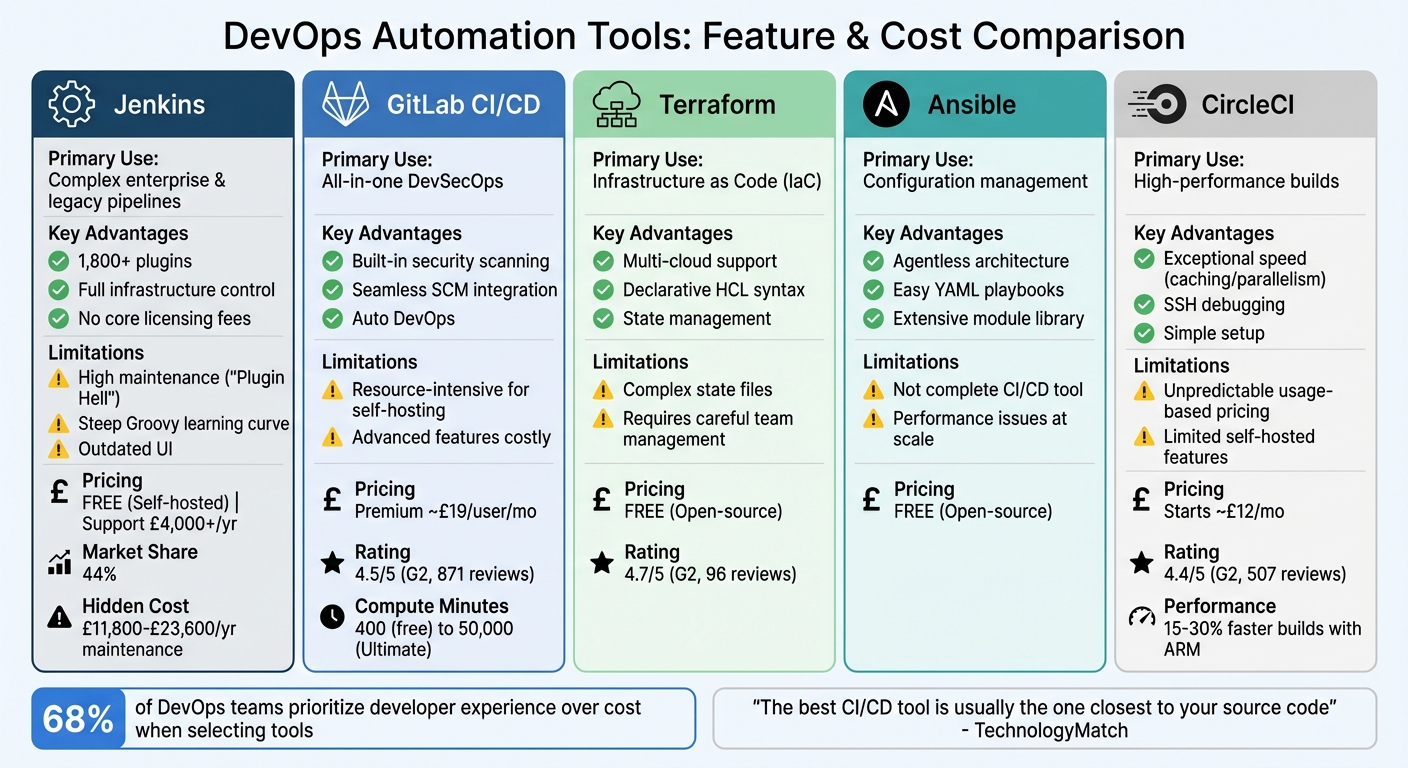 {DevOps Automation Tools Comparison: Features, Pricing, and Use Cases}
:::
{DevOps Automation Tools Comparison: Features, Pricing, and Use Cases}
:::
Tool Comparison Table
Continuing from our exploration of DevOps strategies, let’s dive into a comparison of popular automation tools. The right choice often depends on your team's specific needs, technical environment, and budget constraints.
| Tool | Primary Use Case | Advantages | Limitations | Pricing (£) |
|---|---|---|---|---|
| Jenkins | Complex enterprise & legacy pipelines; air-gapped environments | Over 1,800 plugins; full infrastructure control; no core licensing fees | High maintenance (Plugin Hell); steep Groovy learning curve; outdated UI |
Free (Self-hosted); Support £4,000+/yr |
| GitLab CI/CD | All-in-one DevSecOps; Kubernetes-native deployments | Built-in security scanning; seamless SCM integration; Auto DevOps | Resource-intensive for self-hosting; advanced features can be costly | Premium ~£19/user/mo |
| Terraform | Infrastructure as Code (IaC); cloud provisioning | Multi-cloud support; declarative HCL syntax; state management | Complexity with state files; requires careful team management | Free (Open-source) |
| Ansible | Configuration management; agentless orchestration | Agentless; easy-to-learn YAML playbooks; extensive module library | Not a complete CI/CD tool; performance issues in large environments | Free (Open-source) |
| CircleCI | High-performance builds; fast feedback loops | Exceptional speed (caching/parallelism); SSH debugging; simple setup | Usage-based pricing can feel unpredictable; limited self-hosted features | Starts ~£12/mo |
This table highlights the strengths and challenges of each tool, providing a foundation for understanding their operational impacts.
While feature lists are helpful, it's the operational realities that often define tool choice. For instance, Jenkins may be free to download, but its maintenance can demand 5–10 hours of engineering time weekly. For mid-sized organisations, this translates to an annual cost of £11,800–£23,600 [17]. This illustrates why many teams now prioritise tools that simplify workflows and reduce overheads. In fact, 68% of DevOps teams now focus on developer experience over cost when selecting tools, reflecting a shift towards managed SaaS solutions that ease operational burdens [18].
The Platform Gravity
concept is gaining traction, with teams consolidating their toolchains by adopting CI/CD solutions that integrate directly with code repositories. This approach reduces authentication friction and streamlines the development process [13].
Choosing the right tool often involves trade-offs. Jenkins offers unparalleled control but demands considerable expertise for managing plugins and security updates [16]. GitLab CI/CD shines in regulated sectors due to its built-in compliance scanning [16]. CircleCI is ideal for teams prioritising build speed, with Docker layer caching cutting container image build times by 50–80% [15]. Meanwhile, Terraform and Ansible, while not full CI/CD platforms, are indispensable for infrastructure provisioning and configuration management [9].
Many teams adopt a hybrid approach, combining tools like Jenkins or CircleCI for builds and tests with Terraform or Ansible for provisioning. This mix-and-match strategy aligns with earlier discussions on integrating CI/CD with configuration management to streamline deployments effectively.
AI-Enhanced Tools for Advanced Automation
AI-powered tools are transforming the DevOps lifecycle by reducing manual work and streamlining processes. For example, GitHub Copilot focuses on speeding up code generation, while Harness automates the entire delivery pipeline. Together, they tackle different aspects of automation, creating a more efficient development environment.
GitHub Copilot for Workflow Assistance
GitHub Copilot is changing how developers handle repetitive coding tasks. Rather than spending time writing boilerplate code or searching through documentation, developers can now rely on real-time suggestions directly within their IDE. This tool analyses the context of the existing code and generates snippets that match the project's style and conventions.
The benefits are measurable. A September 2023 study involving 50 developers found that using GitHub Copilot led to a 10.6% increase in pull requests and reduced cycle times by 3.5 hours - a 2.4% efficiency improvement overall. This research, conducted by Yashaswini Raghavan with data from Harness Software Engineering Insights (SEI), highlights how AI can improve collaboration and speed up development workflows [23].
However, this acceleration has introduced what experts call the Velocity Paradox
. According to Trevor Stuart, a Technical Author at Harness:
AI is speeding up the front of the delivery pipeline, but the rest of the system isn't scaling with it.
This imbalance means that while heavy users of AI coding tools deploy to production faster - 45% of daily users versus 15% of weekly users - 69% of these heavy users report frequent deployment issues. On average, incident recovery takes 7.6 hours [22]. To keep up with the increased speed of code generation, downstream processes like testing, security checks, and deployment need to be automated as well. Tools like Harness are stepping in to extend AI's impact across the entire pipeline.
Harness for Intelligent Deployments
Harness takes automation a step further by managing the entire delivery lifecycle. Its autonomous AI can build, deploy, and troubleshoot pipelines, all through natural language prompts [19][21]. The platform uses a Software Delivery Knowledge Graph, which provides context by analysing service topologies, infrastructure updates, and deployment history. This enables smarter, context-driven decisions rather than isolated actions [21][25].
The results are impressive. Organisations report 85% faster pipeline onboarding and a sevenfold improvement in issue resolution times, thanks to automated root cause analysis [19]. The AI Error Analyser identifies failures in logs and can either suggest fixes or apply them automatically, reducing the need for manual debugging [19][20]. Testing processes also see major gains, with test cycle times cut by 80% and test maintenance efforts reduced by 70% [25].
Jyoti Bansal, CEO and Co-founder of Harness, explains:
When we founded Harness, we believed AI would be a core pillar of modern software delivery. These new capabilities bring that vision to life, helping engineering teams move faster, with more intelligence, and less manual work.
Real-world examples highlight the platform's impact. United Airlines improved deployment speeds by 75% after automating governance policies and guardrails with Harness [24]. Similarly, Ancestry reduced developer effort by a staggering 80-to-1 ratio, with Principal Architect Ken Angell noting that features could be implemented once and then automatically applied across all pipelines [24].
Harness also simplifies governance with Policy-as-Code. Teams can generate Open Policy Agent (OPA) policies from conversational inputs, eliminating the need for complex manual coding [19][20]. This approach not only ensures compliance but also reduces the 36% of developer time typically spent on repetitive tasks like chasing approvals or rerunning failed jobs [22][5].
Integrating Automation with DevOps Transformation
Automation isn't just about using tools - it’s about weaving them into a larger strategy to transform how software is delivered. When done right, organisations report a 61% boost in software quality and a 57% drop in deployment failures [1]. But these results don’t come from automating everything at once. Instead, a phased approach works best.
A solid roadmap begins with Infrastructure as Code (IaC) to standardise environments. From there, you can build on this foundation with CI/CD pipelines and configuration management. By creating Golden Paths
- standardised pipeline templates - you can achieve 2.5x faster delivery cycles [2] while easing the workload on developers [22]. Start by focusing on IaC to establish consistency, then gradually introduce other layers of automation.
This step-by-step method ties in perfectly with earlier discussions on CI/CD and configuration management, forming a well-rounded DevOps transformation strategy. It not only builds a strong foundation but also delivers noticeable improvements in speed and cost efficiency.
Take the case of Clock, a digital agency managing over 70 environments for high-profile clients like Riot Games and Epic Games. By automating their scaling processes, they reduced provisioning times from weeks to hours and handled up to 20,000 requests per second [1].
Mapping Automation Strategies to Benefits
Different automation strategies bring unique advantages to a DevOps transformation. The table below outlines how each strategy contributes, connecting technical requirements with real-world benefits:
| Automation Strategy | Key Benefits | Prerequisites | Hokstad Consulting Alignment |
|---|---|---|---|
| Infrastructure as Code (IaC) | Environment parity; 30% OpEx reduction [2] | Cloud provider API access; Terraform/Pulumi | Strategic migration and environment standardisation |
| Configuration Management | Consistent server states; Reduced manual effort [2] | Base node access; Ansible/Chef/Puppet | Automated server hardening and setup |
| CI/CD Pipelines | 2.5x faster delivery cycles [2]; 57% fewer deployment failures [1] | Version control; Automated testing | DevOps transformation with automated pipelines |
| Containerisation & Orchestration | Programmatic scaling; Eliminates configuration drift | Kubernetes/Docker; Container registry | Cloud infrastructure optimisation and auto-scaling |
Pairing automation with tools like Prometheus or Grafana for real-time monitoring takes things a step further. This creates a continuous deploy → observe → measure → iterate
feedback loop [22]. It also shifts cost management from reactive monthly reviews to proactive, real-time engineering practices, with DevOps driving FinOps [2].
Future Trends in DevOps Workflow Automation
The way DevOps operates is shifting significantly, moving away from rigid scripts and fixed workflows to embrace what’s being called intelligent delivery
. This involves AI systems that don’t just follow predefined instructions - they actively observe, learn, and adapt pipelines on their own [26][28]. These advanced tools, often referred to as Agentic AI
, are designed to understand their context, plan actions, and execute them autonomously [27][28]. Instead of scripting for every possible scenario, teams can now rely on AI agents to assess infrastructure states and respond dynamically. This marks a major leap forward in creating pipelines that can evolve and adjust in real time, paving the way for enhanced security and operational efficiency in deployments.
Security Automation as a Necessity
Security in DevOps automation is no longer a nice-to-have
- it’s a critical requirement. With 23% of IT professionals reporting credential exposures due to AI agents and 80% encountering unintended behaviours from these systems [29], integrating security into automated workflows has become essential. The goal is to move away from viewing security as a hindrance and instead position it as a driver of innovation. By embedding security checks into automation, organisations can ensure compliance without relying on manual processes [30]. Tools like Policy-as-Code frameworks allow teams to programmatically define security standards, making it easier to maintain consistency across deployments.
The Role of Serverless Architectures
Serverless architectures are transforming how teams approach automation. Unlike traditional setups requiring always-on CI/CD runners, serverless functions operate only when triggered. They scale down to zero when idle, helping to cut costs and address the 30% to 35% of cloud spend that typically goes to waste on idle resources [34]. This model aligns well with the AI and automation strategies discussed earlier, but it’s not without challenges. Dewan Ahmed from Harness highlights this complexity:
Serverless shifts complexity, especially in short-lived and rapidly scaling functions[33].
To fully leverage serverless automation, teams need to focus on effective state management and ensure these deployments are seamlessly integrated into their CI/CD pipelines. Otherwise, there’s a risk of introducing quick fixes that compromise security or stability.
Market Growth and Future Outlook
The DevOps automation market reflects these evolving trends. Valued at approximately £8.63 billion in 2023, it’s expected to grow to around £42.98 billion by 2030, with a compound annual growth rate (CAGR) of 25.8% [32]. Additionally, 64% of DevOps professionals have expressed the need to consolidate their toolchains [31]. This signals a future where unified platforms dominate, combining AI-driven insights, security automation, and serverless orchestration into streamlined workflows that are both efficient and secure.
Conclusion
DevOps workflow automation has become essential for modern operations. Organisations adopting automation report impressive results: a 61% improvement in software quality, a 55% reduction in IT costs, and a 57% drop in deployment failures [1]. These aren't small wins - they mark a transformation in how software is delivered.
That said, achieving these outcomes requires more than just tools; it demands a thoughtful strategy. Developers spend nearly 36% of their time on repetitive tasks like chasing approvals or rerunning failed jobs [5]. Deborah Emeni from Northflank captures this perfectly:
DevOps automation tools should work for you, not the other way round.[1]
This highlights the importance of choosing tools that suit your team’s goals, operational needs, and compliance requirements.
For UK-based organisations navigating GDPR, data residency, or hybrid cloud setups, tailored solutions are key. Hokstad Consulting specialises in crafting automation strategies that fit specific needs, whether it’s customising CI/CD pipelines or implementing cost-aware autoscaling. They treat cloud costs as a core technical metric, alongside performance and reliability, often structuring fees around the cost savings achieved. Tools like Jenkins, GitLab CI/CD, and Harness are central to their approach, driving efficient and effective DevOps practices.
The industry is clearly moving towards unified platforms that integrate AI-driven insights and advanced security automation. The real challenge? Using automation strategically to unlock its full potential.
FAQs
What should we automate first in DevOps?
To streamline workflows and minimise errors, begin by automating repetitive and error-prone tasks, such as building, testing, and deploying code. Focus on implementing continuous integration (CI) and continuous delivery (CD) processes. These practices not only accelerate delivery but also reduce the need for manual intervention.
You can also automate infrastructure provisioning and configuration management using tools like Terraform or Ansible. This ensures more consistent setups and faster deployments. By taking these initial steps, you create a foundation for smoother, more efficient workflows.
How do we choose between Jenkins and GitLab CI/CD?
Choosing between Jenkins and GitLab CI/CD comes down to your team's specific requirements and existing setup. Jenkins is highly flexible, with access to over 1,800 plugins, making it a strong choice for building intricate pipelines. However, it requires self-hosting and can be challenging to master due to its complexity. In contrast, GitLab CI/CD is an all-in-one platform that prioritises ease of use. It offers both cloud-based and self-hosted options, making it a great fit for teams that value simplicity and straightforward management.
How can AI reduce deployment failures in CI/CD?
AI plays a key role in cutting down deployment failures in CI/CD pipelines by taking on tasks like anomaly detection, issue prediction, and governance enforcement. By analysing operational data, AI identifies patterns that help teams tackle potential problems before they escalate.
It also streamlines processes by automating compliance checks, security scans, and testing. This ensures consistent standards are met while reducing the risk of human error. The result? Better reliability, faster release cycles, and lower operational risks. All of this contributes to fewer deployment failures and smoother, more efficient workflows.