
Cloud cost allocation helps businesses track spending by linking expenses to specific teams, products, or customers. This clarity prevents waste, improves accountability, and guides better financial decisions. With cloud costs fluctuating by up to 400% month-over-month and 78% of organisations estimating 21-50% of their cloud spend is wasted, implementing a clear allocation policy is vital.
Here’s a quick breakdown of the process:
- Assess IT Funding: Understand your organisation’s financial structure and set clear goals for cost tracking.
- Choose a Model: Select an allocation method (e.g., account-based, tag-based, proportional) that fits your needs.
- Set Tagging Rules: Standardise metadata for cloud resources (e.g., tags like
ownerandcost_centre) to ensure accurate tracking. - Engage Stakeholders: Communicate the policy clearly to gain buy-in and promote accountability across teams.
- Automate and Refine: Use tools to enforce tagging, allocate shared costs, and regularly review spending patterns.
This approach ensures transparency, aligns cloud costs with business goals, and supports informed decision-making. Keep reading for detailed steps and practical tips.
::: @figure 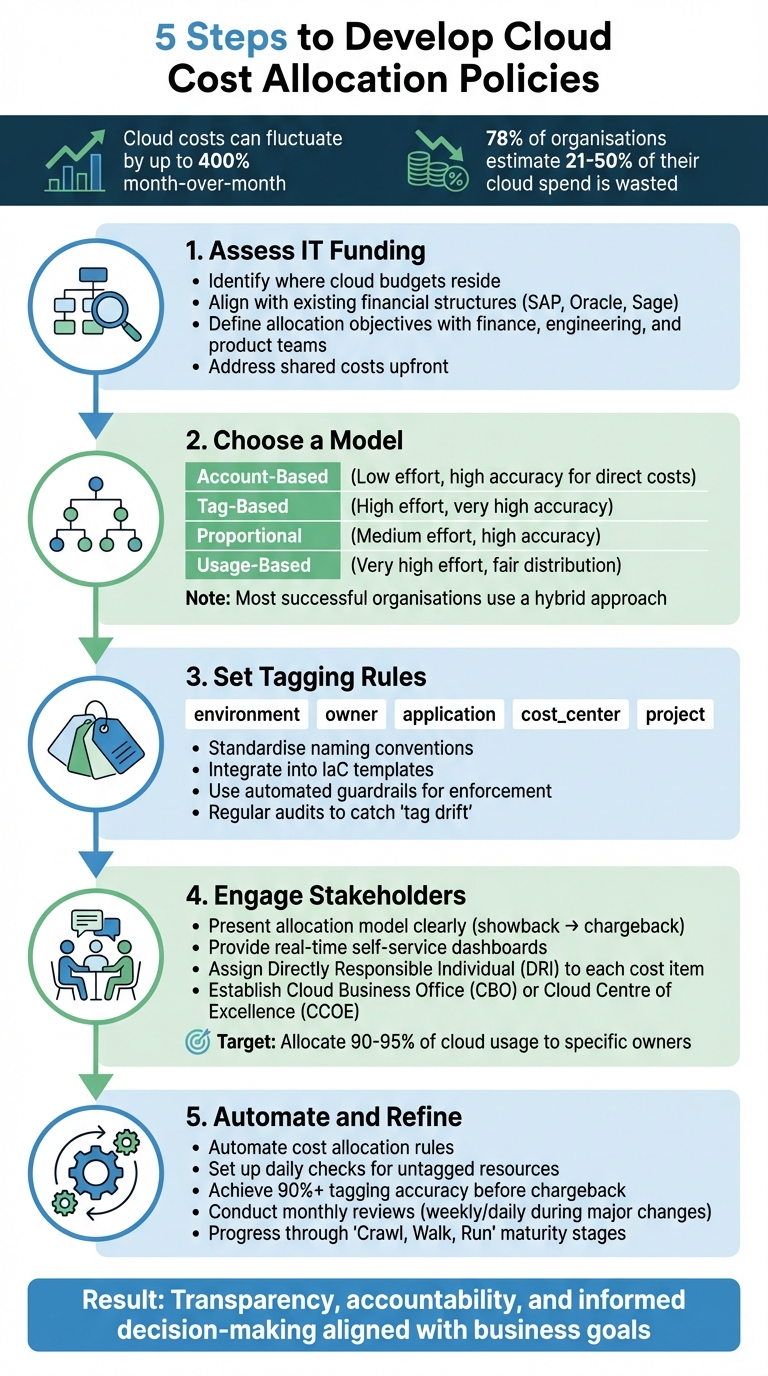 {5 Steps to Develop Cloud Cost Allocation Policies}
:::
{5 Steps to Develop Cloud Cost Allocation Policies}
:::
AWS re:Invent 2020: Cost allocation best practices
Need help optimizing your cloud costs?
Get expert advice on how to reduce your cloud expenses without sacrificing performance.
Step 1: Assess Your Organisation's IT Funding Structure and Objectives
Before diving into cost allocation, it's crucial to evaluate how your organisation funds IT and establish clear objectives for the policy. This initial step is the foundation for success.
Understand Your IT Funding Structure
Start by identifying where your cloud budgets currently reside. Is funding centralised under a single IT department, or do individual business units manage their own cloud spending? Often, finance teams control the budget, but purchasing decisions may rest with engineering teams. This distinction is key.
Your cost allocation policy must align with your existing financial structures, such as cost centres, departments, or business units. If your organisation uses financial management tools like SAP, Oracle, or Sage, ensure the allocation framework can export data in compatible formats. Without this compatibility, finance teams may struggle to reconcile cloud costs with their existing reporting systems [8][9].
This groundwork will help you set up clear and actionable allocation objectives.
Define Allocation Objectives
Once you understand your funding structure, determine the goals of your allocation policy. Are you looking to calculate cost per customer for pricing strategies? Do you need insights into product profitability to guide investment decisions? Or perhaps you're focused on tracking departmental expenses for internal budgeting [9].
Bring together finance, engineering, and product teams early in the process to define these objectives collaboratively [8][9]. Different teams have different priorities - product managers may focus on unit economics, while finance teams need accurate forecasting for budgeting [6][10]. Address shared costs like support fees or shared networking infrastructure upfront. Decide whether these will be distributed proportionally, via fixed allocation, or based on actual usage [1][7].
| Allocation Model | Primary Benefit | Implementation Effort |
|---|---|---|
| Showback | Builds awareness without causing internal friction | Low to Moderate |
| Chargeback | Enforces financial accountability | High |
| Account-Based | Provides high accuracy for direct costs | Low |
| Tag-Based | Enables detailed, customisable tracking | High |
| Usage-Based | Ensures fair distribution of shared resources | Very High |
Keep in mind that cloud provider tags cannot be applied retroactively to past billing data [1][10]. Define measurable targets early to ensure precise tracking from the start.
Identify Regulatory and Compliance Requirements
Involve compliance and finance teams at the outset to ensure your cost allocation framework meets regulatory standards. For UK organisations, this includes adhering to GDPR and the UK Data Protection Act 2018, which require strict access controls and retention policies for billing data that reveals employee or customer activity. If you're in the financial sector, FCA guidelines on cloud outsourcing and operational resilience are also relevant for tracking and reporting cloud costs.
For HMRC compliance, make sure your framework distinguishes between capital expenditure (CapEx) and operational expenditure (OpEx). This is particularly important for tax relief claims, including those related to Research and Development (R&D) activities. Public sector organisations must also comply with the Public Contracts Regulations 2015, demonstrating value for money through transparent spending reports and detailed audit trails.
Mandatory tagging for categories like data classification and compliance context can help manage resources according to their regulatory sensitivity. Audit trails should document who generated cost reports, the data sources used, and the timing. This ensures readiness for financial audits and inspections. Additionally, configure your reporting systems to generate summaries aligned with the UK tax year (6 April to 5 April), even if your internal financial year differs.
In 2026, demonstrable control over cloud cost is essential for audit readiness, regulatory compliance and maintaining public trust.- Antoine Senkoff, CACI [5]
Use GBP (£) consistently in all reports and follow UK date formats (DD/MM/YYYY) to avoid confusion during audits or when integrating with local financial systems.
Step 2: Choose Your Cost Allocation Model
Compare Different Allocation Models
Now that you've assessed your funding structures, it's time to choose a cost allocation model that suits your organisation's needs. Start by considering account-based allocation, which links costs to specific cloud accounts, subscriptions, or projects. This method works well for direct costs but can struggle with shared resources [1][4].
For organisations managing shared accounts, business unit or team-based models offer a practical solution. By grouping resources through meta-tagging or cost categories, you can create clusters like Marketing
or Engineering
that align with how your teams operate [1][4]. Another option is direct allocation, which assigns expenses to the resources that generate them. Alternatively, proportional allocation distributes shared costs based on usage metrics such as CPU consumption, memory utilisation, or the number of requests [11].
When tracking individual usage isn't feasible, even-split allocation divides shared costs equally among consumers. This approach works best for foundational infrastructure, where detailed tracking could become unnecessarily expensive [11]. Weighted allocation, on the other hand, uses predetermined factors like revenue contribution or headcount to distribute costs, reflecting the value that different departments derive from shared services [11].
For organisations with centralised IT departments, utility cost passthrough directly assigns actual costs to the resources consuming them. Some companies evolve this model by adding fixed percentages or using multi-account strategies to leverage volume discounts and improve accountability [12].
The most advanced option is unit-cost mapping, which ties expenses to business metrics like cost per API call, order, or subscriber. High-performing organisations often allocate over 95% of their cloud usage to specific owners, enabling them to act 32% faster on cost-saving initiatives [4].
You don't need complex models. You need consistent ones. The best driver is the one your teams already understand and trust.- Rob Martin, FinOps Architect, Adobe [4]
With these models in mind, think about how each aligns with your organisation's current processes and maturity.
Match the Model to Your Organisation
Most successful organisations adopt a hybrid approach, combining direct allocation for dedicated resources with proportional allocation for shared services [11][4]. This method ensures transparency and accountability while complementing your earlier funding structure assessment.
Your choice of model should also reflect your organisation's FinOps maturity level. At the Crawl
stage, focus on account-based allocation and showback
(reporting costs without internal billing) to build awareness with minimal friction. As you progress to the Walk
stage, consider business unit allocation by using a mix of account structures and metadata. By the Run
stage, you can implement granular, real-time allocation and chargeback
(direct internal billing), often supported by automated, usage-based tracking [7].
To maintain accountability, set up a neutral bucket
for unallocated costs, but keep it under 5% of your total spend [4]. This aligns with cost optimisation principles by ensuring that expenses have clear ownership. For shared resources, define allocation formulas in advance - for example, splitting a shared database cost 60/40 or dividing it based on compute hours. Regular reviews, such as quarterly checks, ensure that fixed proportional allocations remain accurate [6][13].
Below is a comparison of common allocation models based on ease of implementation, accuracy, and ideal use cases:
| Method | Ease of Implementation | Accuracy | Best Use Case |
|---|---|---|---|
| Account-Based | High (Easy) | High (for direct costs) | Organisations with defined team/project accounts [1] |
| Tag-Based | Low (Difficult) | Very High | Granular tracking of individual workloads/applications [1] |
| Even-Split | High (Easy) | Low | Foundational infrastructure (e.g., networking) [11] |
| Proportional | Medium | High | Shared databases or computing platforms [11] |
| Weighted | Medium | Strategic | Organisation-wide services like security or compliance [11] |
Lastly, ensure your chosen model can handle amortising upfront discounts while maintaining compliance with HMRC guidelines and CapEx/OpEx distinctions [11][1].
Step 3: Create a Tagging Policy and Cost Categorisation Framework
Develop a Tagging Policy
A tagging policy sets the rules for the metadata every cloud resource must include. Start with essential tags like environment, owner, application, cost_center, and project. These tags serve different purposes: technical tags, such as application or service, help identify software components, while business tags like cost_center and owner assign financial responsibility.
Consistency is key. Standardise naming conventions to avoid variations that can disrupt cost tracking. For example, decide whether tags should use lowercase, underscores, or camelCase, and ensure these rules are followed. Without clear guidelines, you might end up with inconsistent entries like Env:Prod and environment:production, which can fragment your reports. Also, keep in mind that each cloud provider has its own tagging limits, so follow their specific rules.
To guarantee all resources are tagged from the start, integrate tagging into your Infrastructure as Code (IaC) templates, pulling values dynamically from environment variables or shared configurations. For resources that predate your policy, use tools like AWS Tag Editor or custom scripts to apply tags in bulk. Remember, tags won’t show up in cost reports until they’re manually activated in the cloud provider’s billing console - such as enabling AWS Cost Allocation Tags.
Automated guardrails can help enforce compliance. Start with soft enforcement
, which reports untagged resources, and gradually move to hard enforcement
, which blocks non-compliant deployments. This phased approach helps minimise friction with engineering teams.
Once your tagging policy is in place, you can organise costs to reflect your company’s structure.
Create a Cost Categorisation Framework
With your tagging policy as a foundation, categorise costs to align with your organisation's structure. Collaborate with finance and business units to define categories that match existing divisions, such as departments, cost centres, or specific projects. Add functional categories for technical operations, like workload names, application IDs, or environment types (e.g., production, testing, or development).
Cloud-native tools, such as AWS Cost Categories, allow you to group costs based on rules. These rules can combine dimensions like account IDs, specific tags, services, or charge types into broader business categories. This simplifies cost tracking for business unit owners, sparing them from managing technical details. For untaggable costs, such as Reserved Instance fees or shared support charges, use allocation methods like proportional splits to distribute costs fairly across teams.
Assign Responsibility and Ensure Enforcement
Set up a governance committee with representatives from Finance, Engineering, and Business units to oversee tagging standards. This committee ensures accountability for all allocated costs. Tags like Owner or Operations Team can be used to identify who is responsible for each resource's lifecycle and associated costs, reducing the risk of orphaned resources as teams or structures evolve.
Regular audits - monthly or quarterly - are crucial for catching tag drift.
Tools like AWS Config can automatically flag resources that don’t comply with your tagging policy. It’s estimated that 20–30% of cloud spending is wasted, with 78% of organisations believing that between 21% and 50% of their annual cloud budget is lost to idle resources and poor controls [5]. By reviewing and updating your tagging policy regularly, you can minimise inefficiencies and keep your cloud spending under control.
Step 4: Communicate and Gain Stakeholder Buy-In
Present the Allocation Model Clearly
Once you've established a solid tagging policy and categorisation framework, it's time to focus on clearly communicating your allocation model. This step is essential for promoting accountability. Start by distinguishing between controllable costs, like instance sizing, and uncontrollable costs, such as enterprise support. Providing stakeholders with real-time, self-service dashboards allows them to monitor spending instantly, ensuring transparency and accessibility[2][3][16].
Many organisations begin with a showback
approach to raise awareness of spending patterns. Over time, as data accuracy improves - often reaching 90% or higher - they transition to a chargeback
model[2][3]. As Ashley Hromatko, FinOps Lead at Salesforce, explains:
The trick isn't getting one clean report. It's making clean reports normal. When your showbacks run like clockwork, teams stop resisting them. They start using them[4].
To encourage understanding across teams, establish unit cost metrics that resonate with both technical and business stakeholders. Examples include measuring costs per customer transaction or per workload. This shared language helps bridge the gap between engineering and finance[1]. Assign a Directly Responsible Individual (DRI) to each cost item to ensure accountability is crystal clear[16]. Additionally, moving from monthly to daily reporting enables faster responses to anomalies, keeping costs under control[3].
Encourage Collaboration on Cost Optimisation
Open communication about spending is key to fostering a collaborative approach to cost management. By discussing cost-saving opportunities openly, teams can identify ways to optimise spending without feeling micromanaged. Tools like Role-Based Access Control (RBAC) can limit cost visibility to only the data relevant to each team, avoiding unnecessary complexity[4]. Similarly, persona-based dashboards tailored to specific roles make it easier for individuals to focus on actionable insights[14].
When framing discussions, focus on efficiency and return on investment (ROI) rather than just the total spend. High-performing organisations often allocate over 95% of their cloud usage to specific owners[4], and those with mature FinOps practices aim to allocate at least 90% of their total spend[18]. To ensure new employees are on the same page, include cost-awareness training in your onboarding process, making allocation policies a part of your organisational culture from the start[9][17]. Cost reviews can also be integrated into existing workflows, such as using incident management processes to investigate anomalies in spending[17].
This approach not only encourages collaboration but also helps teams proactively manage costs while adapting to evolving policies.
Use Governance Structures for Communication
Formal governance structures play a critical role in reinforcing accountability and ensuring consistent communication. A Cloud Business Office (CBO) or Cloud Centre of Excellence (CCOE) can serve as the central authority for overseeing policy adoption and coordinating tagging strategies across departments[7][9]. These governance entities bring together key stakeholders from finance, engineering, and business units, ensuring everyone is aligned on spending priorities.
Regular meetings - whether weekly or monthly - between finance teams and functional decision-makers can help review spending against budgets and refine your cost model over time[8][9]. Automated notifications are another useful tool, alerting stakeholders when resources are deployed without required tags or when budgets are nearing their limits. This automation keeps cost awareness front and centre while reducing the need for manual oversight[7][14].
Step 5: Automate and Refine Your Cost Allocation Policy
Automating Cost Allocation
Once you’ve set up a tagging policy and involved stakeholders, automation becomes essential for maintaining accuracy in cost allocation. In growing cloud environments, manual cost tracking quickly becomes impractical. Automate the process by creating rules to divide shared costs - such as networking or support fees - using fixed percentages, proportional usage, or other distribution methods [19][7]. Automated tools can also scan for untagged resources daily and send real-time notifications to owners via platforms like Slack or email, significantly reducing the need for manual audits [3].
To streamline tagging further, use tools like Azure Policy to automate tag inheritance, ensuring resources inherit tags from their parent groups. Set up daily automated checks to verify essential tags - such as Owner, Project, Environment, and CostCentre - are in place. Notify resource creators promptly if tags are missing. Before moving to an automated chargeback system, use automated showback reports for two to three quarters. This helps build awareness while ensuring tagging accuracy reaches at least 90% [3].
Keep in mind that automated rules may take up to 24 hours to apply and another two hours to update after changes [19].
Setting Allocation Rules
With automated tagging established, the next step is to define clear allocation rules to maintain consistent cost management. Use direct allocation for dedicated resources, proportional allocation for shared infrastructure, and fixed-percentage allocation for overhead costs. Wherever possible, base these allocations on actual consumption metrics, such as request volume or data transfer [19][7].
For Reserved Instance fees and Savings Plans, which cannot be tagged upfront, automation can help track their amortisation over time [1]. In Azure, remember that tag names are case-insensitive but tag values are case-sensitive. Standardise terms like Production
and production
to prevent discrepancies in reporting [15].
Scheduling Regular Reviews
After implementing allocation rules, regular reviews are key to maintaining accuracy and adapting to changes. Conduct monthly reviews to monitor spending and adjust rules based on usage [20][5][21]. During periods of significant changes - such as large deployments or migrations - consider increasing the review frequency to weekly or even daily.
Organisations that allocate most of their cloud spending to specific business units often achieve greater cost savings [8]. As your allocation policy evolves, refine the rules based on actual usage patterns and feedback from stakeholders. This continuous improvement process ensures your policy stays aligned with organisational objectives while adapting to the dynamic nature of cloud usage.
For expert guidance in fine-tuning your cloud cost allocation strategy, visit Hokstad Consulting.
Conclusion: Building a Long-Term Cloud Cost Allocation Practice
Transforming cloud spending into actionable business insights takes a methodical approach. By following a structured plan, organisations can develop a cost allocation policy that aligns with their goals and adapts as they grow.
Key Takeaways for Effective Cost Allocation
Creating a cloud cost allocation policy involves five essential steps: evaluating your IT funding setup, choosing an appropriate allocation model, establishing a tagging framework, gaining stakeholder support, and automating processes. With these steps in place, organisations can foster accountability and accelerate cost-saving measures. The focus should remain on consistent application rather than overcomplicating the model. These principles set the stage for a dynamic and effective cost allocation strategy.
The Need for Continuous Improvement
Cost allocation isn't a one-off task - it evolves with your organisation's needs. Starting with the steps outlined above, ongoing refinement ensures your policy stays relevant and effective. Many successful organisations adopt a Crawl, Walk, Run
strategy, progressing from basic account-based allocation with patchy tagging to sophisticated, near real-time allocation with automated adjustments [7].
Ashley Hromatko, FinOps lead at Salesforce, summarises this progression:
The trick isn't getting one clean report. It's making clean reports normal. When your showbacks run like clockwork, teams stop resisting them. They start using them[4].
Sustainability comes from consistent and structured reporting. Weekly showbacks and monthly chargebacks integrate cost management into regular workflows [4]. Start with showbacks to build trust and improve data accuracy before moving to chargebacks [4][6]. As your system matures, focus on unit economics - measuring costs per API request, transaction, or subscriber instead of just total expenditure [4]. Regularly reviewing usage patterns and gathering stakeholder input will keep your allocation strategy flexible and aligned with your business objectives.
For professional assistance in building a sustainable cloud cost allocation practice, visit Hokstad Consulting.
FAQs
What’s the quickest way to start allocating cloud costs?
One of the quickest ways to get a handle on cloud spending is by setting up metadata and resource tagging. This method gives you instant insight into costs, breaking them down by teams, projects, or departments. With this clarity, it's easier to manage budgets and hold everyone accountable for their share of expenses.
Which tags are essential for accurate cost allocation?
To allocate costs effectively, tagging resources with attributes such as department, project, environment, or business unit is key. Tags act like labels, helping you organise and track expenses across various categories.
Here are two tips to make tagging work smoothly:
- Stick to consistent naming conventions: A uniform approach avoids confusion and ensures tags are easy to understand across teams.
- Automate the tagging process: Automation reduces human error and saves time, keeping your tagging system accurate and efficient.
By combining these practices, you can maintain clarity and control over resource costs.
How should we split shared cloud costs fairly?
To fairly divide shared cloud costs, consider approaches such as tagging-based, account-based, or usage-based allocation. These methods help maintain clarity and responsibility in cost sharing. Selecting the right approach depends on your organisation's specific requirements and how resources are shared, ensuring costs are distributed equitably.