
Role-Based Access Control (RBAC) policies help manage permissions by assigning them to roles instead of individuals. This approach limits access to only what's necessary, reducing the risk of breaches and simplifying management. Poorly designed policies can lead to excessive permissions or permission creep
, increasing security risks. Here's the key takeaway:
- RBAC Basics: Users are assigned roles (e.g., Admin, Viewer), which determine their permissions.
- Core Principles: Focus on the Principle of Least Privilege, Segregation of Duties, and Accountability.
- Policy Design Steps: Map roles to job functions, define permissions carefully, and test policies.
- Best Practices: Automate role assignments, review access regularly, and maintain clear documentation.
When done right, RBAC strengthens security and streamlines operations, but it requires regular updates and audits to remain effective.
Role-Based Access Control (RBAC) Explained: How It Works and Why It Matters for Security
Core Principles of RBAC Policy Design
Effective Role-Based Access Control (RBAC) policies are built around three key principles that help balance security and usability.
Principle of Least Privilege (PoLP)
The Principle of Least Privilege ensures that users, applications, and systems are granted only the permissions they absolutely need to perform their tasks efficiently [5][6]. By limiting access, organisations can reduce the risk of security breaches or operational disruptions.
In cloud environments, it's better to assign permissions at the resource-group or individual resource level rather than at broader levels like subscriptions or management groups. Avoid using wildcards such as s3:*; instead, opt for specific API actions like s3:GetObject. This approach offers much tighter control over resources.
Built-in roles, such as Azure's Reader
or Contributor
, are convenient but often grant more access than necessary. Custom roles provide more precise control, allowing organisations to define permissions for specific actions - like enabling a restart while blocking a delete operation [7].
Without least privilege, a single compromised account can access production databases, modify critical infrastructure, or exfiltrate sensitive data across multiple systems.- HashiCorp [6]
Next, let's explore how separating responsibilities strengthens security.
Segregation of Duties (SoD)
Segregation of Duties prevents any one individual from completing an entire sensitive process on their own [8][9]. For instance, a developer might deploy code to a staging environment but shouldn't have the authority to approve its release into production. Similarly, a finance officer who creates payment records shouldn't also be able to authorise fund disbursements. This division of responsibilities helps reduce risks tied to excessive permissions, which many organisations inadvertently grant - sometimes two to three times more than necessary [10].
Eliminate conflicting permissions as they have the potential to be abused. Separation of Duty policies can prevent such conflicts of interest and minimise potential insider threats.- Alex Olivier, Product Lead, Cerbos [4]
Tools like conflict matrices or automated permission analysis engines can help identify overlapping or conflicting access rights.
Finally, let's look at how accountability and auditability ensure transparency and control.
Accountability and Auditability
Accountability ensures that every action can be traced back to a specific user or service account, while auditability provides visibility into who accessed what, when, and why [2]. These measures are essential for maintaining security and enabling effective forensic investigations.
Log all successful and failed login attempts, permission changes, and resource accesses [2]. Use tools like AWS CloudTrail or Azure Monitor to centralise and aggregate logs, creating a unified view of system activity [3]. When implementing Just-In-Time (JIT) access, require users to provide a reason for elevated permissions and set a time limit for their access. This creates a clear audit trail for privileged actions [2][11].
To combat permission creep
, conduct quarterly reviews for privileged roles and annual reviews for standard users. These reviews help identify and remove unnecessary permissions, keeping access levels aligned with current responsibilities [3].
Steps to Design RBAC Policies
::: @figure 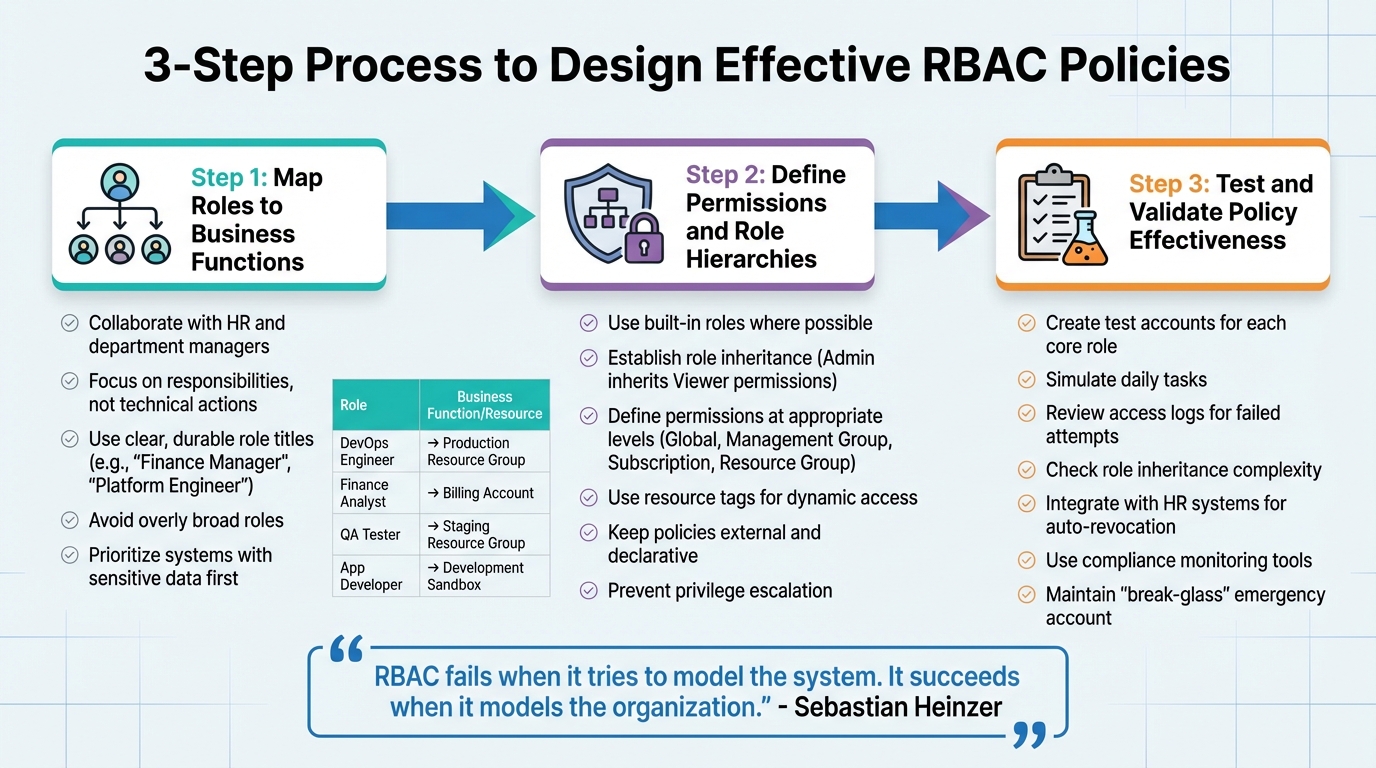 {3-Step RBAC Policy Design Process: Map, Define, and Test}
:::
{3-Step RBAC Policy Design Process: Map, Define, and Test}
:::
These steps turn the core principles of Role-Based Access Control (RBAC) into practical policies that help secure and simplify your cloud environment.
Crafting RBAC policies that work well requires a structured approach. The key is aligning access controls with the actual workflows and responsibilities within your organisation. Here’s how to do it.
Map Roles to Business Functions
Start by focusing on responsibilities rather than technical actions. If you can’t summarise a role in one clear sentence without referencing specific API calls, it’s probably too detailed to be practical [13]. Collaborate with Human Resources and department managers to identify job roles and their associated responsibilities [3]. Talking to team leads about the tools, tasks, and cloud resources their teams use daily can provide valuable insights [3].
RBAC fails when it tries to model the system. It succeeds when it models the organization.- Sebastian Heinzer [13]
Design roles that can withstand organisational changes. For example, use titles like Finance Manager
or Platform Engineer
rather than temporary or overly specific labels like Q3 Reporting Fixer
[13]. Avoid overly broad roles - Software Engineer
is often too vague to be useful. Instead, go for more specific titles like Frontend Developer
, Database Administrator
, or Mobile Engineer
to ensure precise access [3]. Standardising role templates across departments ensures consistency, such as ensuring a QA Analyst
in one team has the same baseline permissions as another in a different team [2].
Here’s an example of how roles can align with responsibilities and resource access:
| Functional Role | Primary Responsibilities | Required Actions | Resource Scope |
|---|---|---|---|
| DevOps Engineer | Deploy and monitor production apps | Start/Stop VM, Read Metrics | Production Resource Group |
| Finance Analyst | Analyse monthly cloud expenditure | Read Billing Accounts | Entire Billing Account |
| QA Tester | Test new features in safe environments | Restart VM, Read Logs | Staging Resource Group |
| App Developer | Build and debug application features | Start/Stop Web Apps | Development Sandbox |
Focus on systems that handle sensitive data or have strict compliance requirements first [12]. For temporary needs, such as migration access, use time-bound elevation or Just-In-Time (JIT) access instead of creating permanent, ad-hoc roles [13][2].
Once roles are clearly mapped, move on to defining permissions and creating role hierarchies.
Define Permissions and Role Hierarchies
With roles in place, the next step is to define the specific permissions each role requires. Wherever possible, use built-in roles rather than creating custom ones [11]. Reserve high-privilege roles for select personnel to minimise risks [11].
Establish a hierarchy for roles using inheritance. For example, higher-level roles like Admin
can automatically include the permissions of lower-level roles like Viewer.
This approach reduces redundancy and makes administration easier [14][15]. Define permissions at different levels - Global, Management Group, Subscription, or Resource Group - to ensure users only access what they need for specific projects or instances [11][15]. In AWS, you can use resource tags (e.g., Project: Alpha
) to dynamically assign access, avoiding the need to hardcode resource IDs into policies [3].
Keep authorisation policies external and declarative (e.g., using a policy engine) so they can be updated without requiring code changes [13]. Also, ensure that users cannot assign roles with higher privileges than their own, preventing privilege escalation [15].
Test and Validate Policy Effectiveness
Once roles and permissions are defined, testing their effectiveness is essential.
Create test accounts for each core role and simulate daily tasks. For instance, test whether a Finance Analyst can perform their duties but is blocked from modifying a production database [3]. A successful test ensures users can complete their work without unnecessary access or privilege escalation [3][17].
Review access logs to confirm user actions align with their assigned roles. Look for failed attempts to access restricted resources, which could indicate gaps in your policies [16]. Pay close attention to role inheritance and group nesting - if inheritance paths become too complex, simplify them to avoid silent privilege escalation [17].
Integrate your RBAC system with HR systems to automatically revoke access when an employee’s status changes [3]. Use compliance tools like Azure Policy to monitor resource compliance in real time [11]. Additionally, maintain a highly secured break-glass
account for emergencies. Every action taken with this account should be logged and should trigger immediate alerts to the security team [3].
For organisations looking for tailored advice on optimising their RBAC strategies, services like Hokstad Consulting can offer customised solutions to address specific needs.
Best Practices for RBAC Policy Management
Creating RBAC (Role-Based Access Control) policies is just the start. To keep them effective, you need to maintain them actively and use automation wisely. Without this, even well-crafted policies can become outdated, leading to security risks and operational headaches.
Automate Role Assignments
Manually assigning roles is slow and prone to mistakes. Surprisingly, only 23% of companies automate access allocation, even though 62% of breaches involve misused privileged credentials [3]. Automation can solve this by ensuring new hires get access immediately, while offboarding happens as soon as someone leaves.
Connect your RBAC system to your HRIS (Human Resource Information System) so that hiring or termination automatically triggers access updates [3]. Tools like Terraform or Bicep let you define role assignments in version-controlled files, making changes consistent, traceable, and easy to review [18][19].
When using automation scripts, allow for short delays (up to 10 minutes) to avoid failures in dependent resources [18]. For temporary access needs, consider Just-In-Time (JIT) access, which ensures elevated privileges expire automatically, reducing long-term risks [3][19].
| Feature | Manual Role Assignment | Automated Role Assignment |
|---|---|---|
| Speed | Slow; reliant on IT tickets | Instant; triggered by HR/System events |
| Accuracy | High risk of errors/typos | High; follows predefined logic/code |
| Offboarding | Often delayed or overlooked | Immediate via HRIS integration |
| Auditability | Manual logs/emails | Automated, timestamped audit trails |
| Scalability | Difficult for large organisations | Easily scalable with IaC and group management |
A mature RBAC implementation acts as a force multiplier. It allows you to delegate tasks confidently, knowing that guardrails are in place.– Cloud Toggle [3]
Once automation is in place, regular reviews are essential to catch gaps and remove outdated permissions.
Conduct Regular Access Reviews
Access issues often don't show up as direct security incidents but as confusion over who can access what
[21]. Misconfigured access controls account for 80% of data breaches, and unauthorised access was involved in 43% of incidents in 2020 [20].
Run quarterly reviews using tools like CLI or PowerShell scripts (e.g., az role assignment list) to export role assignments for compliance checks [20][7]. Compare access logs with role permissions to find deviations, failed attempts, or unauthorised changes [16][20]. Look out for inactive accounts (over 90 days) or roles with excessive permissions.
Group nesting and role inheritance chains can also create complexity. If you can't trace a user's permissions on a single page, it's probably too convoluted [17]. Remove accounts for former employees or those who have switched teams to prevent unintended permissions [16][1]. Regular penetration tests or simulated attacks can further validate your RBAC setup by highlighting privilege escalation risks [17].
Auditing RBAC isn't just a 'nice-to-have' - it's essential for identifying gaps, reducing exposure, and maintaining compliance with regulations.– hoop.dev [16]
Strong documentation and governance practices ensure your RBAC system stays effective and aligned with evolving needs.
Documentation and Governance
Without proper oversight, roles can become outdated, leading to excessive permissions that accumulate over time [21]. An access matrix mapping functional roles to specific actions, resource scopes, and justifications can serve as a blueprint for security reviews and troubleshooting [21]. Document every permission with its purpose to simplify audits and maintenance.
Assign business owners to each role so updates reflect changing responsibilities. A quarterly review cycle works well for most organisations to address privilege creep and dormant accounts. Integrating your RBAC system with your HRIS ensures access is automatically revoked when an employee's status changes [3].
These steps help your RBAC framework adapt to changing environments and organisational roles.
An RBAC implementation is only as good as its last review. Managing access is a continuous cycle of verifying, auditing, and tweaking.– Cloud Toggle [3]
For example, in October 2025, Austin Capital Bank adopted Atlan's governance platform for their Snowflake data stack. Led by Ian Bass, Head of Data & Analytics, the initiative provided clear visibility into who has access to what.
This allowed the bank to launch new products faster while protecting sensitive data with advanced masking policies [22].
Implementing RBAC can cut IT administrative workloads by 60% to 80% compared to managing individual user accounts [23]. For tailored advice on optimising RBAC governance and automation, Hokstad Consulting offers customised solutions for cloud infrastructure and DevOps transformation.
Conclusion
Key Points to Remember
Crafting effective RBAC policies hinges on three essential principles: Least Privilege, Segregation of Duties, and Accountability. These principles guide the process of mapping roles to specific job functions, ensuring that access is both precise and secure [3]. By integrating RBAC systems with HR platforms, organisations can streamline provisioning and revocation processes, minimising human error and plugging potential security gaps.
When introducing new roles, test them thoroughly using dedicated identities. This ensures that access is granted appropriately without unnecessary permissions. As Cloud Toggle aptly puts it:
The most important question in RBAC testing isn't 'Can the user do their job?' but rather 'What else can they do?'[3]
These steps form the backbone of a well-maintained RBAC system.
Continuous Optimisation
RBAC is not a one-and-done solution. Regular reviews are crucial to keep policies effective and aligned with organisational needs. As team structures and IT systems evolve, RBAC policies can degrade, leading to issues like privilege creep - where roles gain excessive permissions - or role explosion, where redundant and overly specific roles become unmanageable [24][25][26].
To combat this, schedule quarterly reviews to identify and clean up inactive permissions [26]. Retire roles that have gone unused for 90 days to avoid administrative clutter [26]. Leveraging automation and machine learning for risk scoring can significantly reduce over-privileged accounts, with studies showing up to a 70% reduction in the first quarter alone [26].
For more detailed insights into role mapping, permission testing, and automation strategies, revisit earlier sections of this guide.
If your organisation is looking for tailored assistance in RBAC governance, automation, or cloud infrastructure management, Hokstad Consulting provides personalised DevOps and cloud cost engineering solutions. Their expertise can help refine your systems and ensure long-term efficiency.
FAQs
How do I choose the right number of roles?
Finding the right number of roles for your organisation is all about striking a balance between simplicity and security. Start by defining roles that align closely with your organisation's specific job functions. Avoid creating too many roles that overlap or add unnecessary complexity - it only makes things harder to manage.
It's also important to regularly review these roles. Over time, permissions can accumulate, leading to what's known as permission creep.
By keeping roles up to date, you ensure they remain relevant and aligned with the organisation's needs as it grows or changes.
The goal is to maintain a manageable number of roles that are clearly defined. This approach not only keeps things organised but also reduces potential risks.
When should I create a custom role instead of using a built-in one?
When built-in roles fall short of addressing your organisation's specific requirements, creating a custom role is the way to go. Custom roles let you define precise permissions that align with your needs, helping you stick to the principle of least privilege. This approach prevents granting excessive access and boosts security by offering more detailed control over what users can do.
How often should I review and remove unused permissions?
To keep your permissions in check, it's wise to audit and review them regularly. Aim to assess unused permissions at least once a quarter or whenever there are major changes to your environment. These routine checks are crucial for reducing security risks, ensuring compliance, and sticking to the principle of least privilege - only granting access that's absolutely necessary.