
If I want a hybrid cloud setup that stays online, I need more than a backup link. I need clear recovery targets, at least two paths for key traffic, automatic failover, matched security rules on every path, and failure testing before go-live.
Here’s the short version:
- I start with RTO and RPO for each service, because a payments app and an internal reporting tool should not be built the same way.
- I map failure domains early, such as one carrier, one firewall pair, one DNS service, or one cloud region.
- I pick the lowest-cost design that still meets the recovery target:
- Active-active for the most critical systems
- Warm standby for services that can take a short hit
- Pilot light or backup and restore where longer recovery is allowed
- I use dynamic routing, often BGP, so failover happens on its own, not by hand.
- I keep segmentation and access rules the same across on-premises, cloud, and backup paths.
- I test failures for links, devices, sites, and regions and check whether recovery stays within target, such as under 30 seconds for route convergence and below 1% packet loss during drills.
A simple rule helps: if one fault can stop traffic, I treat it as a design issue. That includes hidden weak spots like a single NAT gateway, one identity path, or one ISP point of presence.
| Design choice | Best use | Recovery target | Cost level |
|---|---|---|---|
| Active-active | Tier 0, customer-facing systems | Seconds or near-instant | Highest |
| Warm standby | Tier 1 services | Minutes | Mid-range |
| Pilot light | Tier 2 workloads | 10–30 minutes | Lower |
| Backup and restore | Tier 3 systems | Hours to days | Lowest |
In short: I’d design the network around business recovery targets first, then add dual connectivity, auto failover, matched security controls, and repeatable tests so the topology works when something fails.
How to Keep Private Connectivity Running When a Device Fails
Step 1: Turn Business and Technical Requirements into a Topology Brief
Once RTO, RPO and service criticality are set, turn them into a short brief the design team can use.
Map Workloads, Sites and Failure Domains
Start with a full workload list. For each workload, note its location, business owner, criticality, and environment label: production, staging, test, or development. Then map its dependencies. That means the databases it uses, the APIs it calls, and the network paths it depends on.
After that, group workloads into failure domains. In plain terms, look for single points that could knock out more than one service at once. List each failure domain and the services tied to it. Common examples include:
- A single firewall pair handling all traffic
- One leased line acting as the only WAN path
- One cloud gateway
- One DNS dependency
- One cloud region
For each domain, record the outage it can tolerate: minutes, hours, or none. This makes shared dependencies hard to miss before you lock in the topology.
For example, if an office, data centre and cloud portal all rely on one circuit and one firewall pair, one link failure can knock out both services.
Choose RTO and RPO Targets for Each Critical Service
Set RTO and RPO for each service, not just for the estate as a whole. A customer-facing payment service might need an RTO of 15 minutes and an RPO of 5 minutes. An internal reporting tool might allow an RTO of 8 hours and an RPO of 24 hours. Same business, very different recovery needs.
| Service Tier | Criticality | Typical RTO | Typical RPO | Connectivity Implication |
|---|---|---|---|---|
| Tier 0 | Mission critical | Seconds | Near-zero | Dual private circuits, active-active |
| Tier 1 | Business critical | Minutes | Seconds to minutes | Private circuit plus VPN failover |
| Tier 2 | Business operational | Hours | Hours | VPN over the internet may suffice |
| Tier 3 | Administrative | Hours to days | Hours to days | Backup and restore may be acceptable |
Use these tiers to work out which services need private connectivity, which can rely on VPN failover, and which call for an active-active setup.
Set Constraints for Compliance, Security and Cost
The brief should also capture three constraint groups: regulatory, security, and budget.
For compliance, document where data, replicas, backups, and recovery copies can be stored or processed. For security, record segmentation boundaries between production and non-production environments, encryption rules such as TLS 1.2 as a minimum for data in transit and IPsec for VPN tunnels, plus change-control limits like maintenance windows and segregation of duties.
Cost matters too. State the current circuit spend and the maximum uplift allowed for resilience. That gives the design team a clear limit. In practice, it helps them judge whether a second private circuit makes sense or whether an internet-based failover path is enough for the service’s recovery targets. Without that ceiling, designs often drift into over-engineering.
Step 2: Choose a Resilient Topology and Redundant Connectivity Model
::: @figure 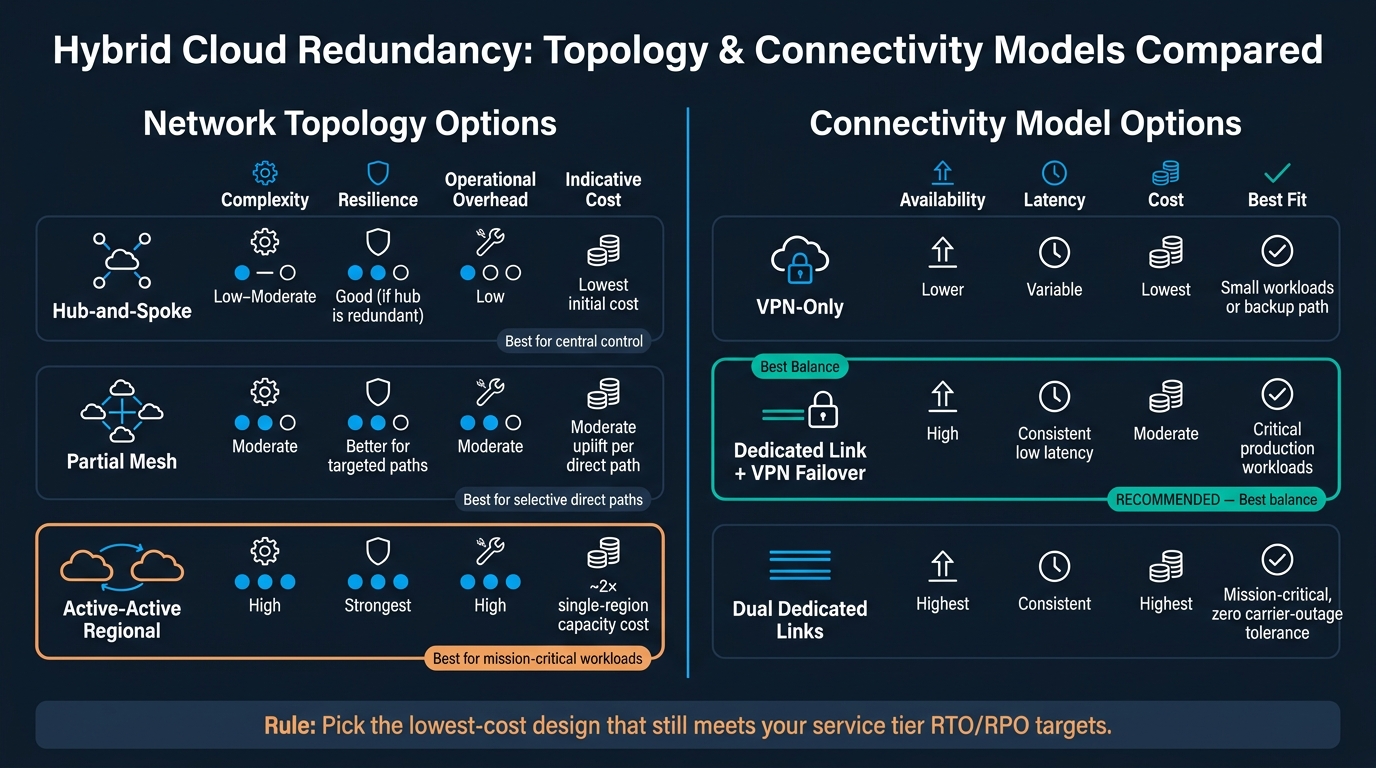 {Hybrid Cloud Redundancy: Topology & Connectivity Models Compared}
:::
{Hybrid Cloud Redundancy: Topology & Connectivity Models Compared}
:::
With your tiers and constraints in place, the next job is to choose the network shape. Start with the service tier, then pick the topology to match. Not the other way round.
That choice affects how traffic moves, how far a failure spreads, and how much work the network needs day to day.
Hub-and-Spoke, Partial Mesh or Active-Active Regional Design
Hub-and-spoke works well for organisations that want central control. Sites and cloud workloads connect through a central hub, which must be redundant. If it is not, the hub becomes the very single point of failure you were trying to avoid.
Partial mesh makes sense when some traffic needs a direct path. Think replication traffic or payment flows that would otherwise be pushed through the hub. Keep this model tight. If a workload does not clearly earn the extra setup and testing effort, it probably should not be on a direct path.
Active-active regional design runs critical services at the same time across two or more regions. That gives you the best uptime, but it comes at a price. Active-active will often cost about 2× a single-region deployment [1]. It also needs careful handling of data consistency, state management, and global load balancing. This is the sort of design you keep for the systems that matter most to customers or revenue.
Pair Dedicated Private Connectivity with VPN Failover
A common pattern is simple: use a primary private circuit for production traffic, then back it up with an IPsec VPN that takes over if the circuit, provider, or edge device fails. [2][3][5][6]
Under normal conditions, this gives you steady, low-latency performance. If something breaks, you still have a lower-cost backup route ready to go. The key point is that the VPN should not be treated as a box-ticking fallback. It needs to be a tested failover path.
You can go further with dual providers, dual customer-edge routers, and separate ingress points in different locations. But that only makes sense when the failure domain is serious enough to justify the extra spend and testing work. [4][5]
Use the comparison tables below to choose the lowest-cost design that still meets the service tier.
Topology and Connectivity Options Compared
Use the tables below to map topology and connectivity to service tiers.
| Topology | Complexity | Resilience | Operational Overhead | Indicative Monthly Cost |
|---|---|---|---|---|
| Hub-and-spoke | Low–Moderate | Good, provided the hub is redundant | Low | Lowest initial cost |
| Partial mesh | Moderate | Better for targeted paths | Moderate | Moderate uplift per direct path |
| Active-active regional | High | Strongest | High | ~2× single-region capacity cost [1] |
| Connectivity Model | Availability | Latency | Cost | Best Fit |
|---|---|---|---|---|
| VPN-only | Lower | Variable | Lowest | Small workloads or backup path |
| Dedicated link + VPN failover | High | Consistent low latency | Moderate | Critical production workloads |
| Dual dedicated links | Highest | Consistent | Highest | Mission-critical workloads where a single carrier outage is unacceptable |
For most hybrid environments, dedicated link + VPN failover hits the best balance between cost and resilience. Dual dedicated links are usually worth it only when even one carrier outage is too much risk for your most critical services.
Step 3 applies routing, segmentation and failover rules to this topology.
Step 3: Design Routing, Segmentation and Automatic Failover
Once you've picked the topology, the next job is to set up routes, segmentation and failover behaviour. Routing decides where traffic goes. Segmentation decides what that traffic is allowed to reach after failover.
Use Dynamic Routing and Tune Failover Behaviour
Use BGP on every critical hybrid path. Then set path preference so traffic switches over by itself when a link drops.
A common setup is to give routes learned through your private circuit a higher local preference. That makes outbound traffic use the private path instead of the VPN. For traffic coming back from the cloud, use AS path prepending on the backup VPN link so cloud-side routing is less likely to pick it.
Set failover timers to match each service's RTO.
How fast failover happens comes down to your BGP timers and link detection settings. For most business services, 5–30 seconds of convergence is fine. If you're dealing with latency-sensitive workloads, tighten the BGP timers and add Bidirectional Forwarding Detection (BFD) so link loss is spotted faster.
Start with the safer timer values your cloud provider recommends. Test failover in a controlled setting, see how it behaves, and then adjust. Don't get too aggressive. Route flaps are a headache, and unstable routing is worse than a slightly slower failover [8].
Apply Segmentation Consistently Across On-Premises and Cloud
Path preference on its own won't save you if your trust boundaries disappear during failover.
Split production, non-production, management and shared services into separate VPCs, VNets or VRFs, each with its own CIDR ranges [9][12][7]. Non-production should not be able to start traffic into production. Management networks should handle out-of-band access, monitoring and backups, so keep them separate and tightly locked down.
Mirror your on-premises security zones in the cloud, and keep them the same on the VPN failover path. This matters more than many teams expect. If a failover path changes access rules, redundancy falls apart even if the links themselves stay up.
Use infrastructure as code to push the same rules into both environments and stop drift over time [8][7].
Route traffic between zones through a central inspection layer, and apply the same policy on both the primary and backup paths [7].
Remove Hidden Single Points of Failure at the Edge and in the Cloud
The last resilience check is the dependency chain outside the main transit path. This is where many designs look solid on paper and then fall over in live use. The usual culprits are the parts people forget to map.
| Dependency | Common SPOF | Fix |
|---|---|---|
| Outbound internet / NAT | Single NAT gateway or firewall | Redundant NAT gateways or an HA firewall pair |
| Cloud connectivity | Single VPN or private connectivity gateway | Multiple gateways, separate edge routers, diverse carrier PoPs |
| DNS | One resolver in one data centre | Redundant resolvers per site and region, with health-check-based failover |
| Identity | One AD forest or identity endpoint via one path | Multiple domain controllers across regions, redundant connectivity for identity endpoints |
| Carrier | Single ISP or single PoP | Dual providers, physically diverse paths into UK sites |
Run a failure-domain mapping exercise for edge and cloud dependencies. Diagram every dependency. Then ask a blunt question: what happens if this fails? For each one, decide whether you need duplication or diversification. If one failure can stop traffic, fix it before go-live [10][11].
Step 4: Test Failure Scenarios, Run Operations and Control Cost
A redundant topology that has never been tested is just a diagram. This step turns the design into something you can rely on day to day.
Test Link, Device, Site and Region Failures Before Go-Live
Once routing and segmentation are in place, you need to prove failover works under real faults.
Test circuit, device, site and region failures one by one, and check that each drill meets the agreed RTO.
Set pass and fail criteria before you begin. Good starter targets are routing convergence in under 30 seconds, packet loss below 1%, and end-to-end application availability confirmed through synthetic transactions. If a drill fails, log the incident, fix the gap, and run the test again. Do not mark the topology as production-ready until every drill passes [14][15].
Monitor Hybrid Connectivity and Treat Network Changes as Code
Once the setup is live, you need steady visibility across both the control plane and the data plane. On the control plane, watch BGP session state, routes learned and advertised, and any path changes that might add new failure domains. On the data plane, track throughput, packet loss, latency and jitter across both primary private links and VPN backup tunnels. Use these starter thresholds: BGP session down for more than 30 seconds, latency more than 20% above baseline, and packet loss above 1% [15].
Add synthetic probes as well, such as scheduled TCP and HTTP checks, to spot patchy issues before users feel them. Feed these signals into one observability platform so network and SRE teams are working from the same view.
For change management, handle the network the same way you handle application code. Store VPN configurations, BGP policies, security group rules and routing policies in version control. Use Terraform or Pulumi to define hybrid infrastructure in a consistent way across on-premises and cloud. Then build CI/CD pipelines that run syntax validation and policy-as-code checks before any change reaches production. If a deployment harms connectivity, use automated rollback [13][16].
That approach also gives you an audit trail for governance and UK compliance.
Use the checklist below to lock these controls into day-to-day operations.
Design Checklist and When to Bring in Specialist Help
Before go-live, confirm the following:
- Service RTO and RPO targets are documented and agreed
- Workloads map to a topology pattern with dual-path connectivity
- Routing, segmentation and identity paths are consistent across on-premises and cloud
- Monitoring covers BGP health, packet loss, latency and path changes
- All network constructs are under version control with CI/CD checks
- Failover drills are scheduled at least quarterly, with results logged and acted on
On cost, match redundancy to actual business risk. Keep active-active designs for mission-critical services. Where RTO and RPO targets allow it, active-passive designs can cut spend. It also helps to scale backup capacity down during normal operation and scale it up only during failover events.
Specialist help makes sense when the design spans multiple clouds, compliance demands are strict, or cost and performance issues keep dragging on. Hokstad Consulting can help teams design and run topologies that balance resilience and cloud spend over time.
FAQs
How do I choose between active-active and warm standby?
Choose active-active when near-zero downtime matters, you can take on the extra cost and operational overhead, and your team can handle multi-writer data synchronisation safely. Traffic is shared across all nodes, so if one goes down, requests can be rerouted fast.
Choose warm standby when a short failover delay is fine and you want a simpler setup at a lower cost. The standby can serve a smaller amount of traffic straight away, then scale up after failover.
What are the most common hidden single points of failure?
Common hidden single points of failure in hybrid cloud setups often sit in places teams rely on every day but don’t always stress-test.
That can include:
- CI/CD systems and artefact repositories
- Untested passive nodes
- Routers, switches, power supplies and network links without proper redundancy
- Replication lag that leaves backup systems with out-of-date data
Human error also plays a big part, contributing to nearly 80% of system outages.
How often should failover testing be done?
For hybrid cloud redundancy, test failover at more than one level.
Run monthly component tests for individual services. Then carry out full failover drills every six months. A good way to start is with tabletop exercises. They help you check procedures, roles, and decision-making before you move into live simulations.
If there are major infrastructure changes or shifts in the business, test more often or review the plan again. That way, your failover setup still meets your RTO/RPO targets.