
Deploying code on-demand is about balancing speed, reliability, and risk. Modern deployment strategies minimise downtime, limit user impact, and enable faster recovery when issues occur. Here’s a quick overview of five key approaches:
- Blue-Green Deployment: Two identical environments (Blue and Green) allow seamless switching with minimal downtime and instant rollback. However, it requires double the infrastructure.
- Canary Deployment: Gradual rollout to a small user group reduces risk and allows real-time monitoring. It’s resource-efficient but requires advanced traffic routing tools.
- Rolling Deployment: Updates instances incrementally, ensuring continuous service. It’s cost-effective but requires robust health checks and backward compatibility.
- Shadow Deployment: Tests new versions with mirrored traffic without affecting users. It’s resource-heavy but excellent for live performance testing.
- All-at-Once Deployment: Updates everything simultaneously, making it simple but risky with potential downtime and widespread impact.
Choosing the right strategy depends on your tolerance for downtime, application type (stateless or stateful), and available resources. For zero downtime, Blue-Green or Rolling are ideal. High-risk updates benefit from Canary or Shadow deployments, while All-at-Once fits non-critical systems.
Quick Comparison
| Strategy | Downtime | Rollback Speed | Resource Overhead | Complexity | Ideal Use Case |
|---|---|---|---|---|---|
| Blue-Green | None | Instant | High | Medium | Critical services, fast rollback |
| Canary | None | Instant | Moderate | High | High-risk changes, gradual rollout |
| Rolling | None | Minutes | Low | Low | Standard stateless applications |
| Shadow | None | Instant | High | High | Testing live performance safely |
| All-at-Once | Yes | Slow | Low | Low | Non-critical or development systems |
Deploying successfully requires automation, monitoring tools, and a robust CI/CD pipeline to ensure smooth execution and rapid recovery. Each strategy has trade-offs, so align your choice with your system’s needs and business priorities.
::: @figure 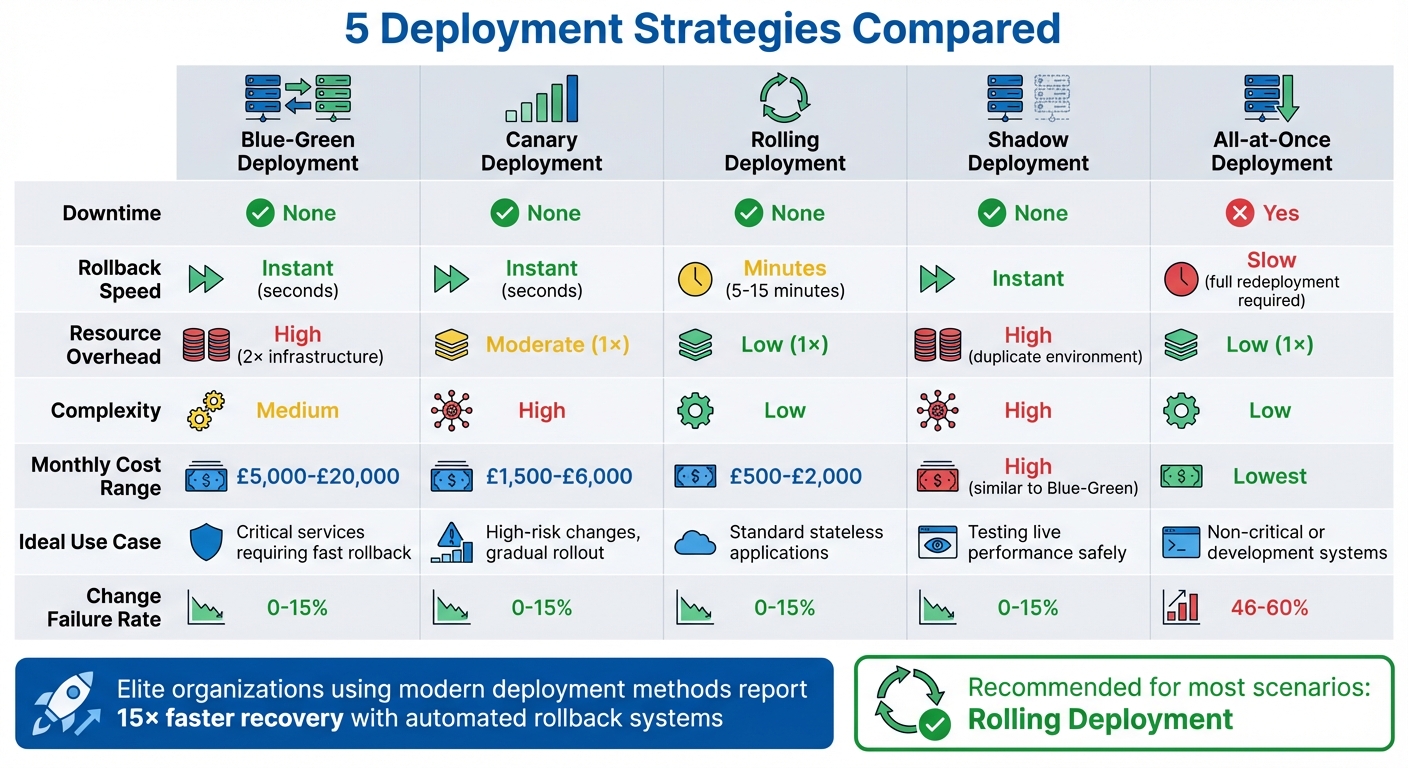 {Comparison of 5 Deployment Strategies: Downtime, Rollback Speed, and Resource Requirements}
:::
{Comparison of 5 Deployment Strategies: Downtime, Rollback Speed, and Resource Requirements}
:::
Top 5 Deployment Strategies In DevOps | Deployment Strategies Explained
1. Blue-Green Deployment
Blue-green deployment involves two identical production environments running side by side. The Blue
environment handles live traffic, while the Green
environment is used to stage and test the new version. Once the Green environment is validated, a load balancer redirects all traffic from Blue to Green in just seconds.
Here’s why blue-green deployments are a popular choice for on-demand execution:
Downtime Minimisation
One of the standout advantages is nearly eliminating downtime. The switch occurs at the routing level instead of the application level, ensuring uninterrupted service availability. For instance, Netflix employs this method for its recommendation engine, seamlessly directing its 100 million daily sessions to Blue while testing Green. If any issues arise after the switch, traffic can be redirected back to Blue immediately, with no impact on users [1].
Rollback Capabilities
Blue-green deployment excels in instant rollback. Since the previous stable version remains operational, recovery is as simple as rerouting traffic back to the Blue environment. Automated systems make this even faster - organisations can recover 15 times quicker compared to manual methods [1]. For example, Thomas Wilson, SRE Manager at Burst SMS, shared that by using Harness, their recovery time dropped from two hours to under five minutes, a dramatic 96% improvement [3].
Infrastructure Requirements
The main challenge is increased infrastructure costs. During the deployment, both environments must run at full capacity, effectively doubling resource usage [3]. To control costs, teams often rely on Auto Scaling Groups, keeping the idle environment at minimal capacity and scaling it up only during deployment [4][5]. For stateful applications, the expand-contract
pattern is used to ensure database schemas remain compatible with both versions, avoiding data inconsistencies during transitions or rollbacks [1]. These considerations highlight the importance of careful planning to make blue-green deployments smooth and efficient.
2. Canary Deployment
Canary deployments take a different approach compared to blue-green deployments by introducing updates gradually. Instead of switching environments entirely, this method rolls out changes to a small group of users - usually 0.1–1% of traffic - before expanding to the full user base. The term comes from the old practice of using canaries in coal mines to detect danger early; here, the idea is that if something goes wrong, only a small number of users are affected, while the majority continues on the stable version.
Risk Mitigation
A major advantage of canary deployments is their ability to limit the impact of potential issues. For instance, Google Search uses this approach for ranking algorithm updates, initially deploying changes to a canary group that handles 0.1–1% of queries. The team then monitors key metrics like click-through rates and engagement levels across various regions. If any problems are identified - such as a drop in performance - the update is rolled back before it reaches the wider audience [1]. This step-by-step release process ensures that any issues are contained to a small subset of users.
Downtime Minimisation
By testing updates on real production traffic, canary deployments significantly reduce the risk of downtime. The stable version remains operational while the new release is tested, ensuring full system capacity throughout. This setup allows for early detection of problems, especially in edge cases, without disrupting the entire user base [1][6]. Additionally, rollbacks are quick and efficient, ensuring minimal interruption if something goes wrong.
Rollback Capabilities
When issues arise, canary deployments allow for fast recovery. Automated rollback systems can redirect traffic back to the stable version almost instantly, making the process up to 15 times faster than manual rollback methods [1]. Organisations that rely on such systems report lower failure rates during updates - between 0–15% - compared to the 46–60% failure rates seen in less efficient setups [1]. This rapid response capability helps maintain user trust and system reliability.
Infrastructure Requirements
The infrastructure needed for canary deployments falls somewhere between rolling updates and blue-green deployments. While it demands more resources than rolling updates, it is less resource-intensive than blue-green setups. Key requirements include tools to manage traffic routing for the canary group and a solid observability stack to track performance metrics in real time. Monthly costs for implementing canary deployments typically range from £1,500 to £6,000, placing them between the higher costs of blue-green deployments (£5,000–£20,000) and the lower costs of rolling updates (£500–£2,000) [6].
3. Rolling Deployment
Rolling deployments update application instances in small, manageable batches, ensuring continuous service throughout the process.
This approach replaces old instances with new ones incrementally, keeping some instances online at all times. Unlike strategies that involve switching entire environments or routing a small user percentage to a new version, rolling deployments focus on updating one instance at a time, verifying each batch before moving on. Tools like Kubernetes or load balancers handle this process, using connection draining to let existing connections finish while preventing new requests from reaching instances marked for updates [7].
Downtime Minimisation
Rolling deployments are designed to keep downtime to a minimum by updating instances one at a time. A load balancer temporarily removes an instance from service, updates it, runs health checks to ensure it’s functioning correctly, and then reintegrates it before moving to the next batch. For example, Shopify employs this method with its Kubernetes pods, using maxUnavailable: 0 to maintain full capacity during updates [1]. To ensure smooth rollouts, robust health checks - such as Kubernetes readiness and liveness probes - are essential for validating each instance.
Risk Mitigation
This strategy also reduces risk by limiting the scope of potential failures. Since only a small portion of the system is updated at any given time, the rest of the fleet continues to serve traffic if an issue arises [2]. However, during the rollout, both old and new versions run side-by-side, making backward compatibility for databases and APIs crucial. This is often managed using the expand-contract
pattern: new database columns are added first, the application is updated to use them, and outdated columns are removed in a later phase [2].
Infrastructure Requirements
Rolling deployments are more resource-efficient than blue-green deployments, as they don’t require a duplicate production environment. Monthly infrastructure costs typically range from £500 to £2,000 [7], thanks to the limited additional capacity needed during transitions. Key components include a load balancer, an orchestration platform (like Kubernetes or Amazon ECS) to manage instance updates, and monitoring tools to track system health. Adjusting parameters like window size
or maxSurge
allows teams to balance deployment speed with available resources [7].
Rollback Capabilities
Automated rollbacks in rolling deployments enable organisations to recover from issues much faster - up to 15 times quicker than with manual methods [1]. If a problem occurs, the orchestrator can pause the rollout and revert affected instances to the previous version in stages. While rollbacks in rolling deployments aren’t as immediate as those in blue-green setups, they are typically completed within 5–15 minutes, ensuring minimal disruption.
4. Shadow Deployment
Shadow deployment offers a clever way to test new releases in real-time while keeping the existing system stable. It runs the new version alongside the current production version, processing mirrored traffic in the background. This allows teams to assess the new version’s performance under actual conditions without impacting the user experience [2].
Downtime Minimisation
Since users only interact with the stable production version, shadow deployment ensures there’s no downtime. The mirrored traffic helps simulate real-world usage, allowing teams to detect performance issues or bottlenecks before the official release. This proactive approach reduces the risk of unexpected outages during a full rollout [8][9].
Risk Mitigation
One of the biggest advantages of shadow deployment is its ability to validate new versions live without exposing users to potential failures. Safeguards, such as preventing duplicate emails or redundant database entries, are crucial to avoid unintended consequences [1]. This method is often the first step in a broader progressive delivery pipeline, which may also include canary deployments and feature flags [10].
Infrastructure Requirements
Shadow deployments demand additional infrastructure resources since both the production and shadow environments run simultaneously. This makes it a resource-heavy option during testing. Key components include:
- Traffic mirroring tools such as service meshes or load balancers.
- Monitoring systems to compare performance metrics between the two versions.
- Safeguards to ensure shadow traffic doesn’t interfere with the live environment.
While resource-intensive, this setup strengthens the testing process, making it an essential part of a robust delivery pipeline.
Rollback Capabilities
Rollback with shadow deployment is straightforward and quick. If issues arise, teams can simply stop mirroring traffic to the shadow version. Since users never interact with the shadow environment, there’s no need for complex redirections or production rollbacks. Organisations equipped with automated rollback systems can recover up to 15 times faster compared to manual processes [1].
5. All-at-Once Deployment
All-at-once deployment, often called Recreate
or Big Bang
deployment, involves updating a system in a single, sweeping action. The existing version is completely shut down before the new one comes online, meaning all users experience downtime during the transition [1].
This method is straightforward, which can be both an advantage and a drawback. On the plus side, it only requires one production environment, and since only one version is active at a time, version compatibility issues are eliminated [1]. However, the simplicity comes at a cost: it puts all users at risk simultaneously. A stark example of this is the Knight Capital Group incident in August 2012. A configuration error during their deployment caused 4 million erroneous trades in just 45 minutes, resulting in a staggering £352 million loss. Without an automated rollback option, the company faced insolvency and was later acquired by Getco [1].
The goal of deployment strategy is not to prevent all failures -- it is to limit blast radius and accelerate recovery. A deployment approach that exposes 100% of users to a broken release simultaneously is a choice, not a necessity.- When Notes Fly [1]
Downtime Minimisation
IT downtime can be incredibly costly. Gartner estimates that for mid-size enterprises, it averages £4,480 per minute [4]. To minimise disruption, deployments should be scheduled during periods of low traffic. Using feature flags can also help by delaying the activation of new features until initial health checks confirm everything is functioning as expected [4].
Risk Mitigation
All-at-once deployments come with the highest risk compared to other strategies. For instance, elite organisations using modern deployment methods report change failure rates between 0–15%, while traditional all-at-once approaches often see rates as high as 46–60% [1]. If something goes wrong, the impact is immediate and widespread. A typical incident might cause over 18 minutes of elevated errors for all users, whereas a canary rollout might limit the problem to just 5 minutes, affecting only 5% of users [11]. To manage this risk, thorough smoke, integration, and performance testing in a mirrored staging environment is critical, as there’s no soak
period in production to catch issues [1].
Infrastructure Requirements
This deployment style is the least demanding in terms of infrastructure, needing only a single production environment and incurring roughly 1× the resource cost [1]. However, automation tools like Kubernetes or AWS CodeDeploy are essential for managing the sequential shutdown and startup of instances. Configuration management systems also play a key role in ensuring consistent updates across servers [1]. This approach is particularly suited to stateful applications that can’t handle multiple concurrent versions or systems needing complex database migrations that must be completed before the new code goes live [12]. That said, the simplicity in infrastructure is counterbalanced by the challenges of rolling back.
Rollback Capabilities
Rolling back an all-at-once deployment isn’t quick or easy. Reverting to the previous version involves repeating the entire deployment process in reverse - shutting down the faulty release and redeploying the old version. This extends the downtime [1]. While automated rollback tools can speed up recovery, they don’t eliminate the outage entirely. Because of these limitations, all-at-once deployments are best suited for development environments, non-critical applications, or systems with pre-planned maintenance windows [1].
How to Choose the Right Deployment Strategy
Once you’ve reviewed the various deployment strategies, it’s time to weigh your options and decide which one suits your environment best. Several factors come into play, from technical limitations to how much risk you’re willing to take on.
Deployment risk boils down to two key variables: the percentage of users exposed to new code at the same time and the speed at which problems are detected and reversed [1]. Striking the right balance between speed, cost, and reliability often hinges on these factors.
Downtime Tolerance
If zero downtime is a must, strategies like blue-green and rolling deployments are your go-to options. Both ensure continuous availability, but they differ in cost and rollback speed. Blue-green deployments allow for instant rollback but require double the infrastructure, at least temporarily [1]. On the other hand, if you’re dealing with development environments or non-critical systems where short maintenance windows are acceptable, recreate strategies can still work despite their limitations.
Application Statefulness
The statefulness of your application can significantly shape your choice. Stateless applications pair well with rolling updates, which are natively supported by platforms like Kubernetes and AWS ECS [1]. For stateful applications, such as databases, recreate strategies may be necessary to maintain consistency. Alternatively, you might need to adopt more complex methods, like blue-green deployments, especially for high-traffic systems where downtime isn’t an option [1].
Operational Maturity and Tooling
Your team’s operational capabilities and the tools at your disposal are also critical factors. Basic strategies like recreate or rolling are often built into orchestration platforms, making them easier to implement. However, more advanced options, like canary deployments, demand additional infrastructure such as service meshes or feature flag systems [1]. Staged rollouts, where changes are gradually introduced to specific user groups (e.g., employees first, then 1%, 10%, and so on), require a significant engineering investment [1].
Comparing Deployment Strategies
Here’s a quick comparison of how different strategies handle key considerations like downtime, rollback speed, and complexity:
| Strategy | Downtime | Rollback Speed | Resource Overhead | Complexity | Best For |
|---|---|---|---|---|---|
| Recreate | Yes | Slow | Low | Low | Stateful apps, version consistency [1] |
| Rolling | None | Minutes | 1× | Low | Standard stateless applications [1] |
| Blue-Green | None | Seconds | 2× (temporary) | Medium | Critical services, complex rollbacks [1] |
| Canary | None | Seconds | 1× | High | High-risk changes, performance testing [1] |
Final Considerations
For most scenarios, rolling deployments are the default choice [1]. They offer zero downtime, are resource-efficient, and integrate smoothly with container orchestration platforms. If instant rollback is a priority or the cost of downtime is too high, blue-green deployments are worth the extra infrastructure expense. Canary deployments, while more complex, are ideal for high-stakes changes that need careful validation. For instance, Google uses canary releases for testing updates to its ranking algorithms, initially rolling out changes to just 0.1% to 1% of queries before scaling up [1].
What You Need to Implement On-Demand Deployment
To make the most of the deployment strategies mentioned earlier, you need a solid operational setup.
On-demand deployments rely on having the right mix of infrastructure, automation, and monitoring tools to enable quick, consistent, and reversible releases.
CI/CD pipelines are at the heart of on-demand execution. By organising these pipelines as Directed Acyclic Graphs (DAGs), you can run processes like linting, unit tests, and security scans simultaneously - reducing execution time by as much as 80% [14]. Focusing on fast and cost-effective checks ensures a fail-fast approach, helping top-performing teams achieve change lead times of under an hour with failure rates below 15% [13]. This efficient structure supports the rapid and controlled deployments discussed earlier.
Traffic routing is another key component. Here are a few options to consider:
- Load balancers: Offer quick switching with moderate complexity.
- Service meshes: Provide advanced control but come with added complexity.
- DNS routing: Simple to implement but slower due to Time-to-Live (TTL) dependencies.
- Kubernetes tools: Strike a balance between speed, control, and complexity.
Lastly, monitoring and observability are essential. Use real-time metrics, logs, and traces to spot issues quickly. Keep an eye on error rates, response times, and resource usage to maintain smooth deployments.
With a fine-tuned CI/CD pipeline, effective traffic routing methods, and robust monitoring in place, on-demand deployments become much easier to manage. For expert advice on refining your deployment strategies, you might explore working with Hokstad Consulting.
Conclusion
Deploying on demand is all about striking the right balance between moving forward with new ideas and keeping risks in check.
The choice of deployment strategy isn’t just a technical decision - it’s a strategic one that affects how well your organisation can adapt to market needs, manage potential risks, and ensure a smooth experience for users. Each approach has its strengths and trade-offs: Blue-Green deployments allow for instant rollbacks but require parallel environments; Canary deployments reduce risk by gradually rolling out changes to a small group of users; Rolling deployments offer zero downtime without hefty costs; Shadow deployments provide a way to test performance without impacting users; and All-at-Once deployments, while straightforward, carry considerable risk.
Real-world examples, like the Knight Capital incident, remind us of the dangers tied to poor deployment practices. The numbers don’t lie - top-performing teams experience change failure rates as low as 0–15%, while less efficient teams face rates as high as 46–60% [1]. This highlights the importance of a well-thought-out deployment strategy in minimising failures and speeding up recovery.
FAQs
Which deployment strategy is best for my app?
The right deployment strategy hinges on your app’s requirements for downtime, risk, and complexity. Blue-green deployments are great for reducing downtime and enabling quick rollbacks by directing traffic between two separate environments. If you want to test updates cautiously, canary deployments let you release changes to a small group of users first. For continuous updates while keeping availability high, rolling deployments work by updating instances step by step. The choice comes down to your app’s tolerance for downtime and how intricate your infrastructure is.
What tooling do I need for canary or shadow deployments?
To carry out canary or shadow deployments effectively, you'll require deployment automation tools like Kubernetes. Additionally, you'll need tools for traffic management, monitoring, and health checks. These tools work together to streamline the deployment process and ensure your system remains stable while updates are being implemented.
How do I handle database changes with zero-downtime deployments?
To handle database changes without causing downtime, it's essential to rely on strategies like feature flags, gradual rollouts, and backward-compatible changes. These methods help update database schemas while keeping users unaffected. Approaches such as expand-contract and blue-green deployments are particularly effective. They allow you to prepare and thoroughly test new environments before directing live traffic to them.
Key steps include detailed planning, rolling out updates incrementally, and using load balancers to maintain uninterrupted service. Load balancers also make it easier to roll back quickly if any issues arise, ensuring a seamless experience for users.