
If you need the short answer, here it is: use data sync for shared, live records; use replication for uptime, failover, and recovery. Mixing them up can lead to data clashes, extra storage spend, and slower recovery.
I’d break it down like this:
- Data sync keeps records matched across systems that people or apps both change
- Replication copies data from one system to another, most often one way
- Sync needs rules for edit clashes
- Replication is tied more closely to RPO, RTO, and standby systems
- Sync often moves only changed data, while replication can mean full copies and more storage
- Over distance, synchronous replication can add about 1 ms latency per 100 miles
- For UK teams, this also links to record accuracy, service uptime, and monthly cloud costs in £
What matters most is the job in front of you. If two systems both update customer or stock records, I’d look at sync first. If the aim is to keep a backup site ready or spread read traffic, I’d look at replication.
::: @figure 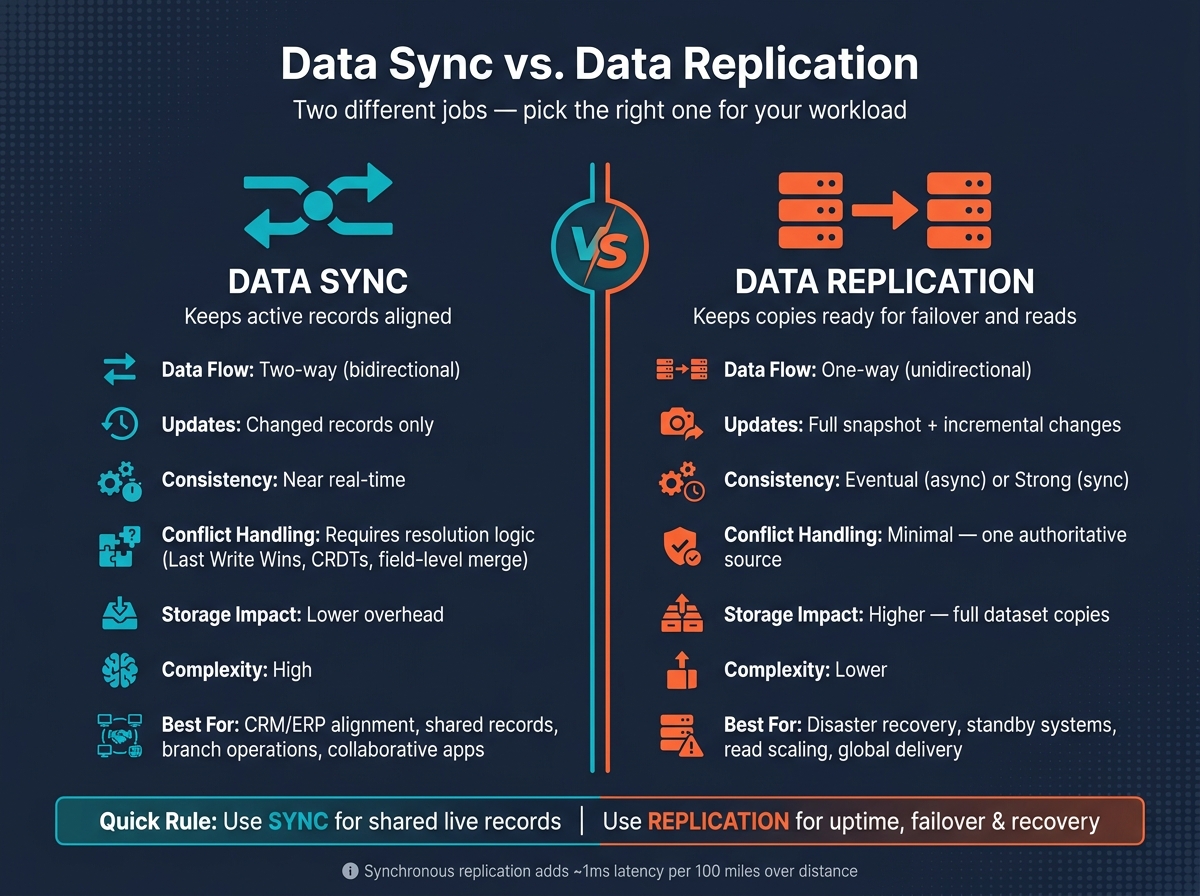 {Data Sync vs. Replication: Side-by-Side Comparison}
:::
{Data Sync vs. Replication: Side-by-Side Comparison}
:::
Data Replication Explained: Types, Topologies, and Benefits for Beginners
Quick Comparison
| Criteria | Data Sync | Replication |
|---|---|---|
| Main purpose | Keep active records aligned | Keep a copy ready for failover or reads |
| Data flow | Often two-way | Usually one-way |
| Updates | Sends changed items | Starts with full copy, then sends later changes |
| Consistency | Near real time | Often eventual in async setups |
| Edit clashes | Needs rules to sort them | Rare, because one source leads |
| Cost pattern | Lower storage use in many cases | More storage and possible egress fees |
| Best for | CRM/ERP alignment, shared records, multi-site work | Disaster recovery, standby systems, read scaling |
So when I read this topic, I don’t see two similar tools. I see two different jobs: one keeps data matched, the other keeps services available.
Key Differences at a Glance
Data synchronisation keeps active systems in step. Data replication makes copies so systems stay up and data stays available. That one difference shapes how each approach deals with updates, clashes, and recovery.
| Feature | Data Synchronisation | Data Replication |
|---|---|---|
| Primary goal | Operational consistency across active systems | Availability, reliability, and recovery |
| Data flow | Often bidirectional (two-way) | Typically unidirectional (one-way) |
| Type of copy | Selective updates of changed records | Full, identical clones of datasets or volumes |
| Consistency | Near-real-time | Eventual, often asynchronous |
| Latency | Higher, due to change coordination | Lower in asynchronous mode |
| Conflict handling | High complexity: it needs resolution logic | Minimal to none |
| Fault tolerance | Focuses on data integrity | Focuses on system redundancy |
| Common use | CRM/ERP alignment, collaborative editing | Disaster recovery, read-only replicas, backups |
Data sync: keeping records aligned and current
Synchronisation keeps active systems aligned in real time or near real time. If updates can happen in more than one place, things get messy fast. One system says one thing, another says something else, and now you need rules to decide what sticks.
That’s why sync setups need conflict-resolution logic. Common rules include Last Write Wins, trusted source, and field-level merging. The upside is that records stay aligned across systems people are actively using. The downside is the extra coordination work, which replication largely sidesteps.
Replication: duplicate copies for resilience
Replication makes a different trade-off. It keeps data movement simpler and leans harder into resilience. Instead of keeping two active systems in constant back-and-forth, it copies data from a primary source to one or more targets, usually in one direction.
The primary source stays authoritative. That makes replication a good fit for high-availability setups, where the job isn’t to keep every record in perfect harmony across active systems, but to keep services running and data ready to read or restore.
How Each Approach Works in Practice
In day-to-day use, sync is built to sort out change conflicts, while replication is built to keep a dependable copy of the source. That difference affects how each one deals with updates, sequence, and recovery.
How data sync handles changes and conflicts
In two-way sync, conflict handling is the hard part.
Sync begins by spotting what changed. Modern systems use Change Data Capture (CDC), which reads transaction logs or database triggers to detect inserts, updates, and deletes as they happen [1][5]. Those changes are then sent to other systems through APIs, webhooks, or event streaming, with ordering metadata attached so events stay in the right sequence [2][6].
The tricky bit comes when two systems update the same record at the same time. If there are no rules in place, one system can overwrite the other and leave you with two different versions of the truth. To avoid that, sync setups define clear ownership at the field level, so each system controls specific data [6]. In team-based apps, methods such as Conflict-free Replicated Data Types (CRDTs) or Operational Transformation (OT) can merge edits on their own without losing data [1][2][5].
So sync isn’t just a data issue. It’s also a coordination issue.
How replication supports recovery and scale
Replication starts with a full snapshot of the source, then applies later changes bit by bit through CDC or transaction logs [1][3].
The main decision is whether replication is synchronous or asynchronous. With synchronous replication, writes are confirmed only after the replica responds. With asynchronous replication, writes are confirmed straight away and some lag is accepted. During high-load periods, asynchronous replicas can fall behind the source, but that trade-off often makes sense for cross-region setups where write latency matters [7]. Replication can also shift read traffic to replicas, which leaves the primary system focused on writes.
The trade-off is simple: less coordination, but more reliance on clear source-of-truth discipline.
When to Choose Data Sync or Replication
Pick the model based on the main job you need it to do.
Choose data sync when consistency is the main requirement
Use data sync when more than one system is actively changing the same records and people need the latest version every time. A common example is CRM and ERP alignment, or branch offices working from shared records. In that kind of setup, sync is usually the better choice for shared operational data.
Choose replication when availability and recovery come first
Choose replication when uptime, failover, or read distribution matter more than two-way alignment. The goal here isn't to keep multiple systems updating each other in lockstep. It's to make recovery fast and keep reads dependable.
That's why replication is often used for disaster recovery. If the primary system fails, a standby replica can step in fast. It's also useful for spreading read traffic across regions, which helps take pressure off the main system. For mission-critical setups, asynchronous cross-region replication often gives the best balance between availability and latency.
The trade-offs stand out most when you look at complexity, cost, and recovery targets side by side.
Cost, complexity, and delivery trade-offs
| Factor | Data Sync | Replication |
|---|---|---|
| Complexity | High: needs conflict resolution | Lower - straightforward source-to-target copying |
| Consistency | Strong, immediate alignment | Eventual in async models; strong in synchronous setups |
| Bandwidth usage | Low: sends changes only | Can be heavy - full dataset copies on initial load |
| Storage growth | Minimal overhead | Higher: each copy adds storage |
| Egress charges | Low to moderate | Can be significant for cross-region or multi-cloud setups [5][2] |
| Recovery objectives | Not the primary focus | Built for low RTO and minimal data loss |
| Best fit | Collaborative apps, CRM/ERP, branch operations | Disaster recovery, read-heavy scaling, maintenance windows, global delivery |
Cross-region replication can push up egress and storage costs.
Conclusion: Picking the Right Model for the Workload
Once recovery, conflict handling, and cost are clear, the choice usually gets a lot simpler.
Data sync keeps records in step. Replication keeps extra copies ready to use. So the choice isn’t about the label. It’s about the job you need the system to do. Use sync for shared records that need to stay up to date. Use replication for uptime, failover, and read distribution.
Key points to carry into planning
Define your recovery targets before choosing a model. Replication design should follow your RPO and RTO [5][4]. Synchronous replication can deliver RPO zero, but it also adds write latency. Asynchronous replication is often the better fit when low latency matters more.
Any multi-writer sync setup needs clear conflict rules. That part can get messy fast if it isn’t planned up front. Replication is often simpler because it uses a one-way source-to-destination flow.
Assess cost early. Replication often needs more bandwidth and storage, while sync usually moves less data. Price both options before you decide.
FAQs
Can I use sync and replication together?
Yes. Many organisations use data synchronisation and data replication together to balance consistency, performance and disaster recovery.
For example, a business might use synchronous replication for critical systems where zero data loss is the goal. At the same time, it may use asynchronous replication or data synchronisation for data that doesn’t need to update instantly.
That mix helps keep systems available without slowing everything down. It also lets teams match the right approach to each application’s needs for speed and data integrity.
How do I choose between synchronous and asynchronous replication?
Choose synchronous replication when you need immediate consistency and can't accept data loss. It delivers an RPO of zero, but there's a trade-off: write latency goes up because the primary has to wait for a replica to confirm each write.
Choose asynchronous replication when you care more about throughput, lower latency, or workloads spread across long distances. It can improve performance, but it also means temporary inconsistency is possible, and some data may be lost during failover.
What causes data conflicts in two-way sync?
In two-way synchronisation, conflicts crop up when two or more systems change the same data at about the same time. You then end up with different versions of the same record in different places, which can lead to data loss if one change overwrites another.
Because both systems can accept updates and send them back and forth, teams usually deal with this using rules such as last-write-wins, business logic, field-level merging, or manual review.