
Data replication is vital for disaster recovery, but it can be expensive if not managed correctly. Here’s how you can reduce costs while maintaining strong recovery capabilities:
- Prioritise your data: Not all data needs the same level of replication. Categorise it into tiers based on how critical it is to your business.
- Match replication methods to needs: Use synchronous replication for critical systems (e.g., payment processing) and asynchronous or periodic backups for less essential data.
- Optimise storage: Move rarely used data to cheaper cold storage options and limit versioning to avoid unnecessary costs.
- Test efficiently: Use low-cost testing methods like tabletop exercises or isolated replicas to ensure your recovery plan works.
- Monitor and adjust: Use tools like AWS Cost Explorer or Snowflake dashboards to track expenses and tweak replication frequency based on data change rates.
How Does Data Replication Work For Disaster Recovery Planning? - Cloud Stack Studio

Need help optimizing your cloud costs?
Get expert advice on how to reduce your cloud expenses without sacrificing performance.
Prioritising Data Based on Business Criticality
::: @figure 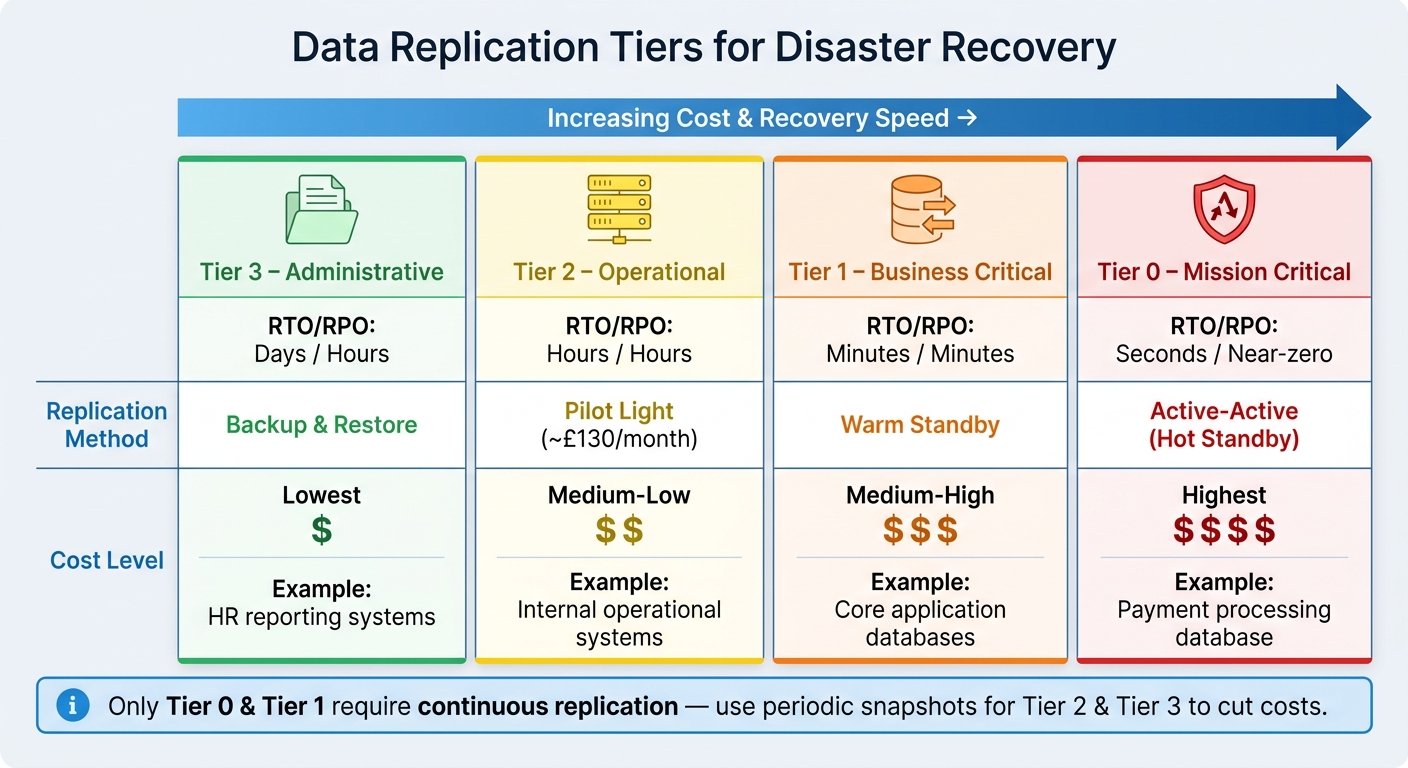 {Data Replication Tiers: Cost vs. Recovery Speed for Disaster Recovery}
:::
{Data Replication Tiers: Cost vs. Recovery Speed for Disaster Recovery}
:::
Not all data needs the same level of protection. Treating every dataset equally in terms of replication frequency and speed can drive up costs unnecessarily. A smarter strategy is to categorise your data by how essential it is to daily operations, then tailor your replication efforts to match each category. This tiered approach ensures that replication frequency aligns with business risk while keeping costs under control.
Defining Data Tiers Using RTO and RPO
The easiest way to organise your data is to base it on your Recovery Time Objective (RTO) and Recovery Point Objective (RPO). Essentially, ask yourself: How quickly does this data need to be restored? How much data loss can we tolerate? These questions naturally divide your data into tiers, each with a distinct cost and urgency profile.
| Tier | Criticality | Target RTO / RPO | Recommended DR Pattern | Cost Level |
|---|---|---|---|---|
| Tier 0 | Mission Critical | Seconds / Near-zero | Active-Active (Hot Standby) | Highest |
| Tier 1 | Business Critical | Minutes / Minutes | Warm Standby | Medium-High |
| Tier 2 | Operational | Hours / Hours | Pilot Light | Medium-Low |
| Tier 3 | Administrative | Days / Hours | Backup & Restore | Lowest |
For instance, a payment processing database would fall under Tier 0, as any downtime or data loss could be catastrophic. On the other hand, an internal HR reporting system could be categorised as Tier 3, where daily backups are sufficient without affecting business operations.
Focusing Replication on High-Priority Data
When your data is categorised into tiers, cost management becomes easier: only Tier 0 and Tier 1 data require continuous or near-continuous replication. For Tier 2 and Tier 3 data, periodic snapshots or backup-and-restore methods are much more cost-efficient.
Use access logs and analytics to identify which datasets are actively used versus those that are rarely accessed. Dormant data can often be moved to low-cost cold storage [1]. Shifting less critical data to cheaper storage options helps reduce your replication overhead while maintaining robust recovery capabilities for the data that truly matters.
Choosing Cost-Efficient Replication Methods
Choosing the right data replication method for each tier is essential to balancing costs and recovery capabilities. This approach works alongside the tiered strategy, ensuring that replication aligns with the importance of the data.
Synchronous vs Asynchronous Replication
Synchronous replication ensures that every write is simultaneously confirmed on both the primary and replica systems. This method eliminates data loss but introduces higher latency because of the time needed for acknowledgements.
In contrast, asynchronous replication confirms writes immediately on the primary system, with the replica updating shortly after. While this creates a slight delay, shifting the recovery point objective (RPO) to seconds or minutes, it reduces costs and maintains better application performance.
| Feature | Synchronous | Asynchronous |
|---|---|---|
| Data Loss Risk | Zero | Potential loss of recent writes |
| Application Latency | Higher | Minimal impact |
| Infrastructure Cost | Higher | Lower |
| RPO | Near-zero | Seconds to minutes |
| Best For | Tier 0 (e.g., payment systems) | Tier 1 and Tier 2 data |
Synchronous replication is generally reserved for Tier 0 workloads, such as payment systems, where even the smallest data loss is unacceptable. Applying it to all workloads, however, is a common and expensive error in disaster recovery planning. By tailoring replication methods to specific tiers, you can significantly cut costs while maintaining performance where it matters most.
Using Object-Level and Versioned Replication to Cut Costs
Replication costs in cloud environments can escalate quickly if entire buckets are replicated, especially when unmanaged versioning is involved.
Object-level replication offers a solution by allowing you to filter data using prefixes or tags. This ensures that only critical data is replicated to secondary regions. For instance, replicating 1 TB across regions incurs transfer fees of about £16 (approximately 1.6 pence per GB) [2]. By excluding non-essential objects, you can make a noticeable impact on these costs.
Versioning, while often required for replication, can also drive up expenses. Each object modification creates a new version, increasing storage costs [2]. To manage this, set lifecycle policies to retain only five to ten recent versions, automatically transition older versions to low-cost storage like Glacier, or delete them entirely [2]. These steps help prevent unnecessary expenses.
Additional cost-saving measures include using AWS S3 Replication Time Control (RTC) if you need guaranteed replication times. RTC ensures 99.99% of objects replicate within 15 minutes, but it adds approximately £0.012 per GB to standard transfer fees [2]. For most Tier 1 and Tier 2 workloads, standard asynchronous replication without RTC is sufficient. By default, delete markers are excluded from replication, reducing the risk of accidental data loss [2].
Up next, learn how to test these replication methods efficiently without overspending.
Testing Disaster Recovery Plans Without High Costs
Once you've set up cost-efficient replication strategies, the next step is ensuring your recovery plan actually works - without breaking the bank. Replication alone won’t cut it; testing is what turns a theoretical plan into a reliable one. As Nawaz Dhandala of OneUptime aptly states:
A disaster recovery plan that has never been tested is not a plan - it is a wish.[3]
The good news? You don’t need a massive budget to test effectively. It’s all about picking the right testing methods for your needs.
Low-Cost Testing Approaches
One of the most affordable ways to begin is with a tabletop exercise. This is essentially a group discussion where your team talks through how they would handle a specific disaster scenario. Since no systems are activated, it’s a low-cost way to identify weak spots in roles, communication, or procedures before they become real problems.
Another option is a walkthrough. Here, you go through your disaster recovery plan step by step, verifying details like outdated information or overlooked dependencies. It’s simple enough to do quarterly and doesn’t require extra infrastructure spending.
For a more hands-on approach, test actual systems using an isolated production replica. This allows you to simulate a failover without disrupting live operations or risking downtime. A dry run like this can uncover potential issues at minimal cost. Automation tools can further reduce manual effort and errors during the testing process.
Checking Data Integrity and Failover Processes
After running discussion-based tests, it’s time to confirm that your data and failover mechanisms are solid. In a Pilot Light setup - where a minimal version of your environment operates in a secondary location - you can promote a cross-region read replica to primary during a test. This lets you check data consistency and then re-establish replication afterwards [3]. It’s a practical way to test without making permanent changes.
Reducing DNS Time-to-Live (TTL) settings is another simple yet effective measure. Lower TTL values ensure quicker traffic redirection during failover tests, giving you a more accurate sense of your recovery time [3].
For context, a Pilot Light configuration on GCP costs about £130 per month, while a Warm Standby setup runs closer to £600 per month [3]. For Tier 1 and Tier 2 workloads, Pilot Light strikes a good balance - offering enough resources to test failover effectively without the high ongoing costs of a fully active standby environment. These cost-conscious testing strategies ensure your disaster recovery plan is both reliable and budget-friendly.
Monitoring and Reducing Replication Costs Over Time
After testing your disaster recovery (DR) setup, it’s important to keep an eye on replication costs and adjust your approach as your data and infrastructure grow.
Using Cloud Provider Tools to Track Replication Costs
Once your DR plan is operational, use cloud provider tools to monitor expenses. For instance, AWS Cost Explorer can help you track spending by filtering costs through allocation tags. If you’re using a tool like CloudEndure, enabling user-defined tags (such as Name
) in the AWS Billing & Cost Management Dashboard makes it easier to see the costs associated with EC2 instances, EBS volumes, and snapshots [4].
For Snowflake users, the Snowsight dashboard provides a Replication
page that shows refresh operations, replica lag time, and lag distribution across replication groups [5]. For a more detailed view, you can query the REPLICATION_GROUP_USAGE_HISTORY SQL view. This will give you a breakdown of credits used and bytes transferred over the past year, highlighting costs in two main areas: data transfer (moving data between regions) and compute (calculating deltas and copying data) [6].
| Tool | What It Tracks | Key Benefit |
|---|---|---|
| AWS Cost Explorer | Tagged resource costs (EC2, EBS) | Reveals hidden disaster recovery infrastructure expenses |
| Snowflake Snowsight | Replication lag and refresh status | Provides a live view of data freshness |
| Snowflake SQL Views | Credits used and bytes transferred | Offers detailed insights into compute and transfer costs |
Adjusting Replication Frequency to Match Data Change Rates
To cut costs, align your replication frequency with how often your data changes. Frequent replication becomes expensive if the data changes only a few times a day [6]. For example, running hourly replication for a dataset that updates minimally is unnecessary. Automating replication to increase during peak activity and scale back during quieter periods can significantly reduce compute and data transfer costs. This is especially useful for lower-priority data where a longer recovery point objective is acceptable.
Beyond automation, expert advice can help fine-tune your replication strategy for even greater savings.
How Hokstad Consulting Can Help Reduce Replication Costs
Even with advanced tools, turning cost data into actual savings can be challenging. This is where expert guidance proves invaluable. Hokstad Consulting specialises in cloud cost optimisation, helping businesses reduce expenses related to cloud infrastructure - including replication and DR costs - by as much as 30–50%. Their process involves cloud cost audits, replication strategy reviews, and custom automation to identify and eliminate inefficiencies that might go unnoticed during routine operations. Plus, their no savings, no fee
model ensures there’s no financial risk, as their fee is tied to the savings they help you achieve.
Conclusion: How to Keep Data Replication Costs Under Control
Keeping replication costs manageable starts with clear priorities. Begin by setting your Recovery Time Objective (RTO) and Recovery Point Objective (RPO) targets. Remember, stricter recovery targets come with higher costs. Reserve the most robust protection methods for your critical systems, while using more cost-efficient options like asynchronous or object-level replication for less essential data.
Choosing the right replication strategy is only part of the equation. Regular testing and monitoring are equally important. Schedule disaster recovery drills at least quarterly to ensure your RTO and RPO targets are practical and achievable. Additionally, take advantage of cloud provider monitoring tools to keep an eye on expenses and avoid surprises. Fine-tuning replication frequency to reflect real data change rates can also help cut down on unnecessary compute and transfer costs.
FAQs
How do I set the right RTO and RPO for each system?
To determine the right RTO and RPO for your systems, start by assessing how critical each one is to your operations. Systems that are essential - think compliance platforms or banking applications - typically require short RTOs and RPOs. These systems often use synchronous replication to minimise data loss and ensure swift recovery.
On the other hand, less crucial systems can handle longer RTOs and RPOs, making asynchronous replication a more cost-effective option. This approach balances recovery needs with budget considerations.
It's also essential to regularly test and monitor your recovery plans. This ensures they remain aligned with your organisation's current needs and can adapt to any changes in priorities or risks.
When should I use synchronous vs asynchronous replication?
When strong consistency and avoiding data loss are top priorities - like in banking or regulatory environments - synchronous replication is the way to go. It guarantees near-zero Recovery Time Objective (RTO) and Recovery Point Objective (RPO), but it comes with higher costs and slower write speeds due to its stringent data synchronisation requirements.
On the other hand, asynchronous replication works well for workloads where slight data delays are acceptable. It offers faster write speeds and is more cost-effective, though there’s a risk of data loss if a failure occurs before replication completes.
The choice depends on your workload’s consistency requirements and the budget you have available.
What’s the cheapest way to test disaster recovery without downtime?
The most budget-friendly way to evaluate disaster recovery without causing downtime is by using low-resource methods like backup and restore or the pilot light approach. Among these, backup and restore is the least expensive, though it comes with longer recovery times - typically over 24 hours. On the other hand, the pilot light strategy, while a bit more expensive, offers much faster recovery times (ranging from minutes to seconds) by maintaining critical systems in a ready state with only minimal infrastructure active.