
If I want to cut CDN spend fast, I focus on five things: cache rules, origin shielding, encoding, multi-CDN routing, and monthly cost checks. That’s because video delivery costs sit mostly in edge egress, origin fetches, and request volume - and each of these five areas hits one of those cost lines.
For UK and European streaming, delivery often lands around £0.03–£0.06 per GB at the edge. So at 1 PB delivered, I could be looking at £30,000–£60,000 before extra origin traffic and request fees. In most cases, the biggest savings come from three moves: send fewer bytes, get more cache hits, and send traffic to the right CDN.
Here’s the whole article in plain English:
- Improve cache hit ratios by using longer TTLs for VOD segments and stripping useless query strings
- Add origin shielding and tiered caching so cache misses don’t keep hitting origin
- Trim delivered bytes with better codecs and leaner ABR ladders
- Route traffic across CDNs by cost and health instead of sending everything to one provider
- Track £/GB, CHR, and origin egress every month so waste doesn’t creep back in
If I had to prioritise, I’d do it in this order:
- Fix cache policy
- Add shielding
- Audit encoding and ABR ladders
- Tune multi-CDN routing
- Set alerts and review bills monthly
::: @figure 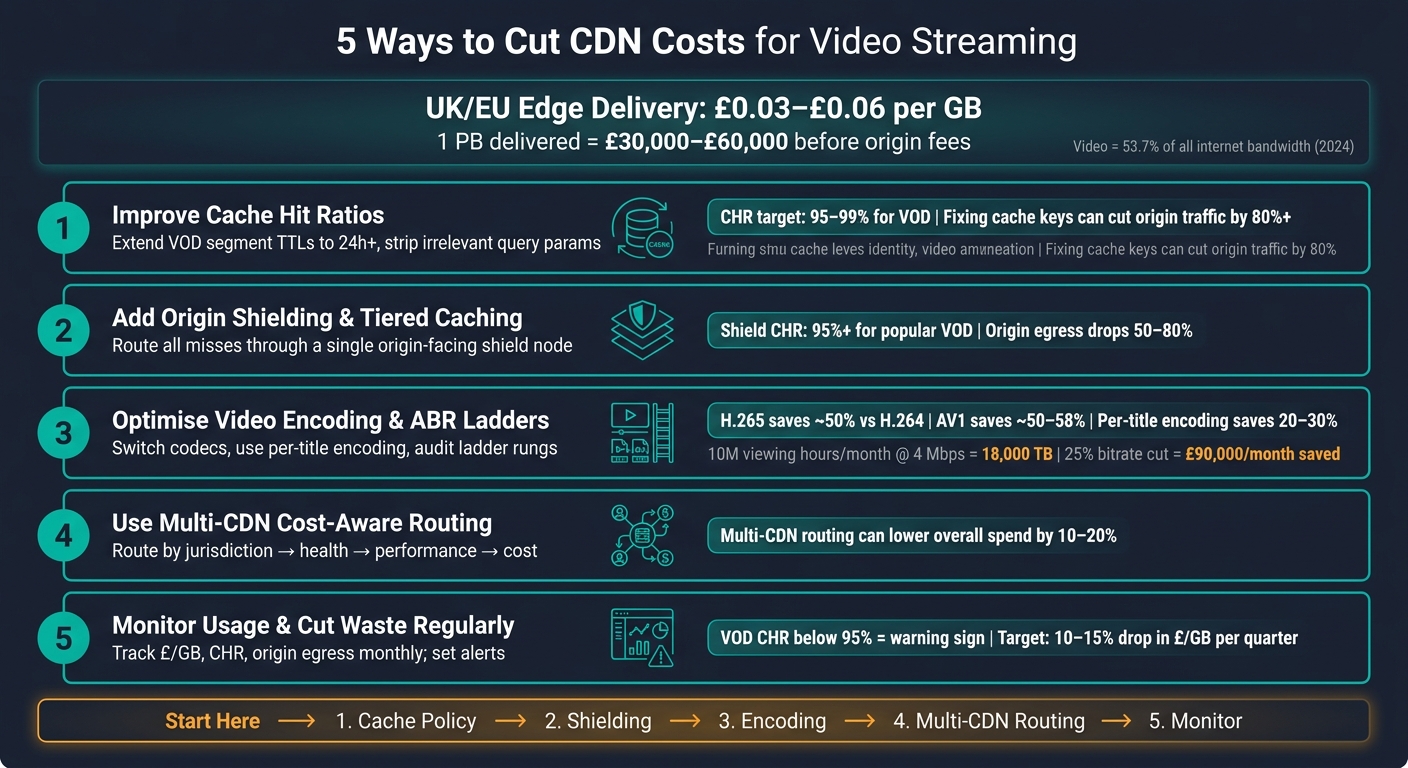 {5 Ways to Cut CDN Costs for Video Streaming}
:::
{5 Ways to Cut CDN Costs for Video Streaming}
:::
Reducing CDN Costs for Video Streaming: Caching, Multi-CDN, and Encoding Strategies
Quick Comparison
| Method | Main cost it cuts | What I’d expect it to change |
|---|---|---|
| Better cache policies | Origin fetches, request waste | Higher CHR, lower origin egress |
| Origin shielding | Origin traffic during misses | Fewer origin requests, lower origin bill |
| Encoding and ABR tuning | Total GB delivered | Lower £/GB through fewer bytes sent |
| Multi-CDN routing | High delivery rates in some regions | Lower blended delivery cost |
| Usage monitoring | Hidden waste over time | Fewer billing surprises, faster fixes |
In short: if I improve cache efficiency, lower bitrate waste, and watch routing costs by region, I can cut CDN spend without making playback worse.
What Drives CDN Costs in Video Streaming
The biggest thing behind your CDN bill is delivered volume. Put simply, the more video people watch, the more you pay. Higher bitrates push that up fast, and so does longer watch time. A 2024 industry report cited by Google Cloud found that streaming video now makes up 53.7% of all internet bandwidth traffic, up 4.8% year on year.[7]
ABR adds another layer to this. It doesn't just send more data across different renditions. It also increases the number of segment requests. With 4-second chunks, players generate roughly 900 segment requests per rendition during a 60-minute programme, and that's before adding manifest refreshes.[5][6] At small scale, that may not look like much. Across millions of sessions, though, request charges start to bite. Google Cloud, for instance, charges $0.0075 per 10,000 cache lookup requests.[3]
The first cost driver you can control is cache-key waste. If your segment URLs include query parameters that change by user but don't need to, the CDN sees each version as a separate object. That splits the cache and pushes miss rates up. The gap can be huge: a cache hit ratio of 70% instead of 97% leaves origin traffic much higher than it should be. In one example, fixing that setup cut origin traffic by more than 80% and reduced both CDN and origin bandwidth charges.[2][4]
Live streaming is tougher here. Typical live cache hit ratios sit around 30–60%, while VOD often lands at 85–95%.[1][6] Even so, on-demand libraries usually have room for improvement. Query-string variation and weak TTL settings are common problems, and both can often be fixed without a massive rebuild.
Track these metrics together so you can see which part of the bill is shifting:
| KPI | Target Benchmark | Why It Matters |
|---|---|---|
| £ per GB delivered | Falling or stable month-on-month | Direct measure of unit delivery cost |
| Cache hit ratio (VOD segments) | 95–99% | High ratio means fewer origin fetches |
| Origin offload (byte offload) | ≥ 95% | Measures bytes kept off origin, not just requests |
The first lever is cache policy, because it cuts both origin traffic and request volume.
1. Improve Cache Hit Ratios with Better Cache Policies
CHR tells you how often your CDN serves content from cache instead of going back to origin. For video, byte hit ratio matters more, because the biggest segments drive most of the cost.[8][9][12] If you improve this number, you can often cut your £ per GB delivered pretty fast.
For VOD, segments don’t change once they’re published. Even so, a lot of teams still give them short cache lifetimes. That’s money left on the table. If you extend segment TTLs to 24 hours or more, those files stay at the edge for longer and get reused more often.
Cache keys matter just as much. Say your URLs include query parameters like utm_source, session_id, or fbclid. The CDN will treat each version as a different object, even if the video file behind it is exactly the same. By stripping out those irrelevant parameters with cache-key rules, you merge duplicate entries and improve hit ratios.[16][17][18]
Live and VOD need different handling. Using one blanket TTL for everything sounds simple, but it usually costs more than it saves.
- VOD: use long TTLs and heavily normalised cache keys
- Live manifests (
.m3u8,.mpd): keep TTLs very short, around 1–5 seconds - Live segments: once written, they don’t change, so they can take longer TTLs of several minutes to hours[17][19]
Split policy by asset type so each file gets the right treatment.
| Content Type | Recommended TTL | Key Action |
|---|---|---|
VOD segments (.ts, .m4s) |
24 hours to 30 days | Strip all irrelevant query parameters |
| VOD manifests | 1–24 hours | Normalise cache keys; use s-maxage
|
| Live manifests | 1–5 seconds | Short TTL; do not cache aggressively |
| Live segments | 2× segment duration or longer | Treat as immutable once published |
| Personalised ad manifests | 0 seconds | Never cache; unique per viewer |
There’s a performance upside too. Edge hits help pages and players start faster, and they can cut rebuffering. Segments served from a nearby edge cache can get time-to-first-byte (TTFB) under 50 ms, which helps with faster start-up, fewer rebuffer events, and steadier ABR behaviour for UK viewers.[16] Caching also gives you a buffer if origin has a short outage. Cached segments can keep playback going.
The catch is purge discipline. Longer TTLs work best when you have a clean purge process for the rare times content does need to change, such as DRM key updates, takedown requests, or corrected files.
After rollout, watch the numbers. Check whether cache hits go up and origin egress comes down. Track CHR, origin offload, and origin egress in Grafana, your CDN dashboard, or ELK.[10][13][11]
2. Use Origin Shielding and Tiered Caching
Once you’ve tuned cache keys and TTLs, the next job is to stop the leftover cache misses from going straight to origin. That’s where shielding helps. It sends misses to a single origin-facing node, while tiered caching adds a regional cache layer before the request ever reaches origin.
For UK services, put the shield near the origin, not near the audience. That sounds backwards at first, but it’s usually the right move. The goal here isn’t shaving a few milliseconds off edge delivery. It’s cutting repeat trips back to origin.
Why does that matter so much? Because origin egress often costs more than edge delivery. So every hit at the shield or upper cache tier avoids a more expensive fetch. Over time, that adds up fast.
With shielding and tiered caching in place, popular objects can stay cached for much longer, and origin fetches can fall hard. When this is set up well, shield-layer cache-hit ratios for popular content can go past 95–99%, and origin egress for those assets can drop by 50–80% or more.[14] For a large catalogue or a high-traffic live event, that can mean tens of thousands of pounds saved each month.
There’s another upside: playback holds up better when traffic surges. During spikes, shielding soaks up repeated segment requests and shields the origin from sudden load bursts.[15][20] If a lot of viewers pile into the same stream at once, that buffer can make the difference between steady delivery and a stressed origin.
In practice, keep it simple:
- Place the shield close to origin
- Route
/hls/and/dash/through it - Exclude personalised endpoints
After rollout, watch the numbers in your CDN dashboard or billing exports. Focus on origin offload percentage, origin request count, and origin egress GB, alongside your cache-hit ratio figures.
| Metric to Track | What a Healthy Result Looks Like |
|---|---|
| Shield cache-hit ratio | 95%+ for popular VOD; lower but stable for live manifests |
| Origin egress GB | 50–80% reduction vs pre-shielding baseline |
| Origin request count | Sharp drop, especially during traffic spikes |
| Effective £ per GB delivered | Lower total cost (CDN + origin egress combined) |
3. Optimise Video Encoding and ABR Ladders
Encoding is the next big cost lever. Lower bitrates mean fewer gigabytes delivered, which means a smaller CDN bill. And when you run a high-volume library, those savings add up fast.
Codec choice matters a lot. Moving from H.264/AVC to H.265/HEVC can cut bitrate by about 50% at the same visual quality. AV1 can go even further - roughly 50% less data than H.264 and 30% less than HEVC.[21][24]
Here’s what that looks like in practice. If a UK service delivers 10 million viewing hours a month at an average of 4 Mbps, that works out to about 18,000 TB of CDN traffic, or 18 million GB. Cut bitrate by 25%, and traffic drops to about 13,500 TB. At £0.02 per GB, that’s roughly £90,000 a month saved.
Your ABR ladder matters just as much as the codec. This is the set of renditions at different resolutions and bitrates that the player can switch between. If the ladder is fixed, it often wastes bandwidth. A cartoon and a football match simply do not need the same 1080p bitrate.
That’s where per-title and per-scene encoding come in. They can reduce bitrate by 20–30% across a catalogue.[22][23] For UK services with large VOD libraries, that can have a big effect on delivery spend. The right codec mix comes down to three things: device reach, bitrate reduction, and encoding overhead.
| Codec | Bitrate Saving vs H.264 | Encoding Complexity | UK Device Support |
|---|---|---|---|
| H.264 (AVC) | Baseline | Low | Broadest support, including older set-top boxes, smart TVs and browsers |
| H.265 (HEVC) | ~50% | Moderate | Good on newer TVs, iOS devices and 4K set-top boxes |
| AV1 | ~50–58% | High | Growing in modern browsers and Android devices |
A hybrid codec setup usually makes the most sense:
- Keep H.264 for broad compatibility
- Add HEVC for newer devices
- Hold back AV1 for a later rollout
It also pays to audit your ladder rungs on a regular basis. Remove rarely used 12–15 Mbps 1080p steps, keep the remaining rungs spaced about 20–30% apart, and check player logs to see what viewers are actually pulling. If nobody uses a rung, it’s just adding storage use and origin requests for no good reason.
For large catalogues, automate encoding audits and cost modelling. That way, bitrate changes don’t stay as theory on a slide deck - they show up as clear CDN savings.
Once encoding is tuned, the next lever is routing traffic across CDNs more intelligently.
4. Use Multi-CDN Routing to Control Costs
Once you've tuned bitrate, the next cost lever is where each viewer gets served from.
Running two or more CDNs side by side can lower spend, but only if routing is cost-aware. In plain terms, you need a steering layer that decides, for each request, which CDN should serve that viewer based on live performance data, regional availability, and contracted £/GB rates. That way, you're watching costs without hurting playback quality.
The routing logic should follow a clear order: jurisdiction first, then allowlists, health, and performance. Cost should come last. Why? Because the cheapest CDN on paper can still be the wrong choice if it's struggling in that region. If one provider is congested, the router should shift traffic to another CDN on its own, then move traffic back when things settle down.
It also helps to pair multi-CDN with a shared origin shield. That means all CDN providers miss against one origin-facing layer instead of hitting your storage directly. It keeps origin traffic under control and avoids a mess when cache misses pile up.
There is a trade-off, though. The day-to-day overhead is real. You'll need to keep rate cards, logs, and security settings in sync across providers, and make sure failover doesn't break playback. A sensible way to start is to run a pilot in one region, check the cost and quality impact, and then roll it out more broadly.
Use the steering layer that fits the amount of control your workflow can handle.
| Routing Approach | Control Level | Complexity | Best For |
|---|---|---|---|
| DNS/GSLB-based steering | Coarse-grained, geographic | Low–Medium | Simpler setups, regional failover |
| Server-side routing | Fine-grained, centralised | Medium | Cost/performance logic without player changes |
| Player-side routing | Highest granularity, per-segment | High | Large-scale OTT with multi-platform player support |
5. Monitor CDN Usage and Cut Waste Regularly
Once cache, encoding and routing changes are live, you need a simple loop to keep those savings in place: measure, detect, correct.
Why? Because CDN waste has a habit of creeping back in. A deployment can slip in bad TTLs. Old video renditions can pile up. Bot traffic can fly under the radar. And none of it makes much noise until the bill lands.
Track the numbers that show both performance and cost:
- daily traffic by region
- CHR
- origin egress
- 95th-percentile bandwidth
- status codes
- traffic share by CDN
- effective £/GB - monthly spend divided by total GB delivered
For VOD, a sustained CHR below 95% is a warning sign [26][27]. And if CHR drops by 5 points overnight, that usually points to a bad deploy or cache-busting query strings [25].
Tracking £/GB by region and by CDN provider tells you far more than one blended average ever will. It can show, for instance, that one geography is being served by a pricier provider even though another CDN performs just as well there. That kind of routing issue stands out in monitoring. Guesswork usually misses it.
Getting the monitoring stack set up takes a few weeks. Export CDN logs into one central place, build dashboards for cost and cache data, and send alerts into incident management. After that, upkeep is light. In most cases, it takes only a few hours a week from an engineer or SRE.
Treat CDN cost optimisation like a control loop, not a one-off tidy-up. Set a quarterly target, such as a 10–15% drop in effective £/GB, then review progress every month. If alerts keep going off, go back and check the earlier fixes. If the data shows drift that keeps coming back, it may be time to ask a blunt question: does the team have enough in-house capacity to deal with it?
When to Bring in Outside Help
If the five fixes above still leave spend high, it’s time for an external review. This usually makes sense when CDN spend is a material line item, the root cause isn’t clear, or your internal tuning has stopped making much difference. At that point, in-house optimisation often stops paying back.
Outside help is a good fit when cache hit ratios stay low after tuning, when you’re planning a multi-CDN rollout, or when observability gaps mean engineers don’t have clear evidence for what’s driving cost.
It also makes sense when the expected savings and lower risk should pay back within 6–12 months.
Hokstad Consulting can help with CDN architecture reviews, multi-CDN rollout, observability design, and cost engineering.
Preparation is straightforward. Pull together:
- recent CDN invoices
- current pricing schedules
- traffic reports by region
- current cache and ABR configurations
- CHR, origin egress, and QoE data
The comparison tables below show which fix matches each cost driver.
Comparison Tables
After the five tactics above, these tables give you a quick side-by-side view of impact, complexity, and likely savings.
Cache Architecture
At 1,500 TB/month and £0.03/GB, edge delivery costs £45,000 before origin egress.
| Cache Architecture | Origin Load | Origin Fetch Traffic | Resilience | Indicative Monthly Impact (1,500 TB) |
|---|---|---|---|---|
| No Shielding | High | High | Low | Highest origin egress cost |
| Single Shield | Medium | Reduced | Medium | Lower origin egress cost |
| Tiered Caching | Low | Minimal | High | Lowest origin egress cost |
This is where cache design starts to matter. No Shielding pushes more requests back to origin, which means more fetch traffic and more spend. Add a Single Shield, and origin gets hit less often. Move to Tiered Caching, and origin traffic drops to a minimum, which usually means the lowest egress bill.
Encoding Approach
Content-aware ladders reduce delivered bytes, but the amount saved depends on the catalogue.
| Encoding Approach | Bandwidth Use | Visual Quality | Encoding Effort | Indicative Monthly Saving |
|---|---|---|---|---|
| Generic H.264 Ladder | Baseline (100%) | Standard | Low | None |
| Content-Aware Ladder | Typically 70–80% of baseline | Equal or better | Medium–High | Illustrative: £9,000–£13,500/month at 20–30% bitrate reduction |
A Generic H.264 Ladder is the simple starting point, but it often ships more data than needed. A Content-Aware Ladder trims bitrate while keeping quality the same, or in some cases improving it. On a large catalogue, that gap adds up fast.
Delivery Model
Multi-CDN brings more operational work, but cost-aware routing can lower total spend when performance and health checks come first.
| Delivery Model | Operational Complexity | Resilience | Routing Control | Est. Cost Effect (vs. baseline) |
|---|---|---|---|---|
| Single CDN | Low | Low–Medium | Limited | Baseline (~£45,000/month) |
| Multi-CDN with Cost-Aware Routing | High | High | Full | Variable; often 10–20% lower overall spend |
A Single CDN is simpler to run, but your routing options are limited. With Multi-CDN with Cost-Aware Routing, you get more control and better failover, though the setup is harder to manage. If routing logic keeps performance and service health first, the cost gap can be meaningful.
Conclusion
The biggest savings usually come from three levers: sending fewer bytes, getting more from cache, and routing traffic in a smarter way.
Put those gains to work in this order. Start with cache policies, origin shielding, and ABR ladder audits. Then move to encoding redesign and multi-CDN routing once those early gains are holding.
After the quick wins, protect viewer experience. Set guardrails for start-up time, rebuffer rate, and satisfaction score, and track them alongside £/GB.
Then stop costs from drifting back up. Review invoices and usage every month, and revisit encoding, routing, and cache policy every quarter.
If you're scaling fast or running multiple CDNs and regions, Hokstad Consulting can help audit architecture, tune routing, and automate cost controls.
FAQs
Which change should I make first to cut CDN costs quickly?
Start with a quick caching win: cut cache misses by normalising cache keys and stripping query parameters that don't matter, such as utm_source, fbclid, and session_id.
That change improves the cache hit ratio and cuts expensive origin fetches. In many cases, it's the fastest way to bring down CDN costs. Hokstad Consulting can audit cache behaviour and put these changes in place while keeping video streaming performance on target.
How do I lower CDN spend without harming playback quality?
Focus on a higher cache hit ratio and a leaner delivery pipeline. Tighten your cache keys, strip out parameters that don’t matter, use versioned filenames, set longer TTLs, and turn on compression for text-based assets.
It also helps to use an origin shield and adaptive bitrate streaming. That cuts wasted data while keeping playback smooth, which is what people care about in the end.
If you’re dealing with heavy traffic, a multi-CDN setup can also help route requests at a lower cost.
When is multi-CDN routing worth the extra complexity?
Multi-CDN routing is worth it when a single CDN can't keep coverage steady. That usually shows up during outages, sudden traffic spikes, or regional congestion that drags down adaptive streaming quality.
It also makes sense when you need tighter cost control and more resilience through redundancy or failover, and you can take on the extra operational work. That work includes standardising configurations, keeping cache keys consistent, and unifying observability.