
If you're managing infrastructure in Kubernetes, you’ve likely come across Crossplane and Terraform. Both are Infrastructure as Code (IaC) tools but differ significantly in their approach. Here’s a quick breakdown:
- Terraform: A standalone CLI tool that uses HCL (HashiCorp Configuration Language). It’s ideal for provisioning infrastructure across multiple providers, with manual execution for applying changes.
- Crossplane: A Kubernetes-native control plane that uses YAML manifests. It continuously reconciles infrastructure states and integrates seamlessly with Kubernetes and GitOps workflows.
Key Differences:
- Execution: Terraform runs on-demand, while Crossplane operates continuously within a Kubernetes cluster.
- State Management: Terraform uses
.tfstatefiles; Crossplane stores state in Kubernetes’ etcd. - Use Cases: Terraform excels in setting up base infrastructure (e.g., VPCs, IAM roles), whereas Crossplane simplifies dynamic, Kubernetes-focused resource management.
- Learning Curve: Terraform requires HCL knowledge; Crossplane demands Kubernetes expertise.
Quick Comparison
| Feature | Terraform | Crossplane |
|---|---|---|
| Architecture | Standalone CLI tool | Kubernetes-native control plane |
| State Management | Central .tfstate file |
Kubernetes CRDs (etcd) |
| Execution Model | Manual (on-demand) | Continuous reconciliation |
| Configuration | HCL | YAML |
| GitOps | Needs CI/CD for Git triggers | Native integration with tools |
| Provider Support | 3,000+ providers | Limited but growing ecosystem |
Summary:
Use Terraform for initial infrastructure setup and multi-cloud environments. Choose Crossplane for Kubernetes-native workflows and self-service infrastructure. A hybrid approach often works best, leveraging Terraform for base infrastructure and Crossplane for application-level resources.
::: @figure 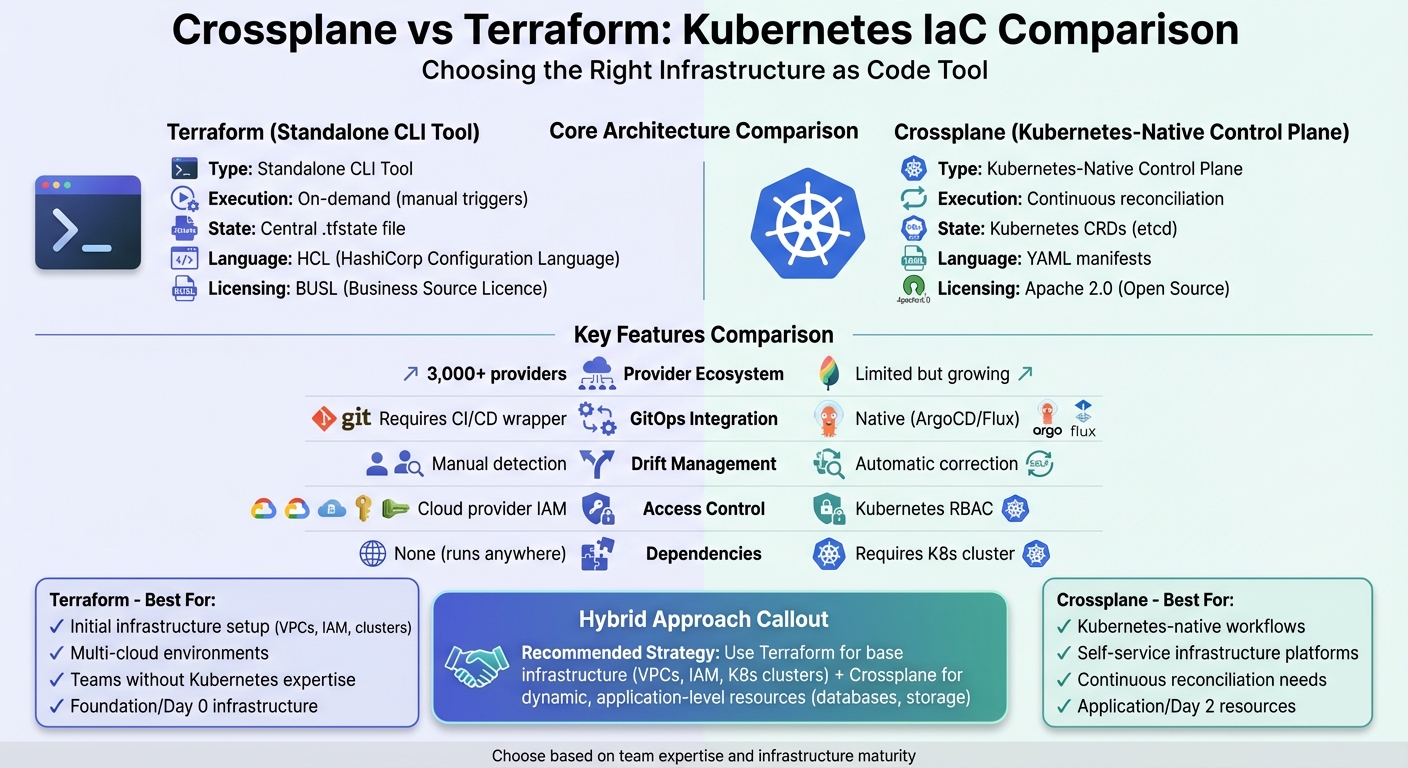 {Crossplane vs Terraform: Complete Feature Comparison for Kubernetes IaC}
:::
{Crossplane vs Terraform: Complete Feature Comparison for Kubernetes IaC}
:::
Crossplane vs Terraform
Need help optimizing your cloud costs?
Get expert advice on how to reduce your cloud expenses without sacrificing performance.
What is Crossplane?
Crossplane is a Kubernetes-native control plane designed to extend the Kubernetes API for managing external cloud infrastructure. Instead of operating as a standalone command-line tool, it works as a persistent controller within your Kubernetes cluster. This setup allows external resources to be managed as if they were native Kubernetes objects. With Crossplane, teams can use familiar tools like kubectl and YAML manifests to handle infrastructure.
At its core, Crossplane uses Custom Resource Definitions (CRDs) to represent cloud infrastructure as Kubernetes resources. For example, when you define a CRD for an AWS RDS instance, Crossplane's provider plugins translate that Kubernetes object into the necessary API calls to AWS. This means the state of your infrastructure is stored directly in the cluster's ETCD database, removing the need for separate state files. As an incubating project under the Cloud Native Computing Foundation (CNCF) [3], Crossplane has become popular among platform teams seeking to enable self-service infrastructure. Its CRD-based model underpins its most advanced features.
A standout feature of Crossplane is its Composite Resources (XRs). These allow platform teams to combine multiple cloud resources into simplified abstractions that developers can use via Claims
. For instance, a Standard Database
composite resource might include an RDS instance, security groups, and backup policies. Marcin Chmiel from Kubecharm highlights this benefit:
Crossplane makes it easy to abstract these details and expose a clean and simple-to-use interface to your infrastructure[2].
Crossplane operates on a continuous reconciliation model rather than manual execution. Its control loops constantly monitor and correct any discrepancies between the desired and actual states, ensuring consistency without manual intervention. Additionally, it leverages Kubernetes' built-in RBAC system, enabling platform teams to assign precise permissions at the API level - like create database
- without revealing underlying cloud provider credentials.
The provider ecosystem for Crossplane supports major cloud platforms such as AWS, Azure, and GCP. Some providers even achieve full API coverage by generating resources directly from provider schemas [3], keeping pace with cloud updates. Since Crossplane uses standard Kubernetes manifests, it integrates smoothly with GitOps tools like ArgoCD and Flux, making it easy to manage infrastructure via version-controlled repositories [1][3].
What is Terraform?
Terraform is a standalone tool for Infrastructure as Code (IaC), designed to work through a command-line interface. It uses its own configuration language, HCL (HashiCorp Configuration Language), to define infrastructure. Unlike Crossplane, which integrates directly with Kubernetes, Terraform operates as a short-lived process. It runs either locally or within a CI/CD pipeline, executing changes only when triggered manually. As Nic Cope, Senior Principal Engineer at Upbound, puts it:
Terraform is a command-line tool - not a control plane. Because it is a short-lived, one-shot process it will only attempt to reconcile your desired configuration with actual infrastructure when it is invoked[1].
Terraform's workflow is built around three key stages: Write, Plan, and Apply. The Plan phase is particularly useful, as it allows teams to preview changes before they are applied, reducing the risk of unexpected impacts on production environments [3].
One of Terraform's standout features is its extensive provider ecosystem, which includes over 3,000 providers. These providers act as translators, converting HCL code into API calls for various platforms, enabling true multi-cloud functionality. For Kubernetes infrastructure, Terraform is especially effective in provisioning foundational elements like VPCs, IAM roles, and clusters such as EKS, AKS, or GKE [3].
A great example of Terraform's flexibility is Orbica, an AI-powered platform for environmental monitoring. Orbica used Terraform in combination with Spacelift to manage infrastructure modules. This approach allowed them to create better abstractions and reduce the risk of vendor lock-in as their stack expanded across multiple frameworks [3].
State Management in Terraform
Terraform's state management is a core part of its functionality. It uses a state file - commonly named .tfstate - to map configurations to actual resources and track dependencies. This file acts as the source of truth
, which is why teams often use remote backends with state locking (like S3) to avoid issues caused by simultaneous modifications [3].
Unlike Crossplane, which continuously reconciles configurations, Terraform only detects changes or drift
when commands like terraform plan or terraform apply are run. This discrete model of state management contrasts with Crossplane's persistent reconciliation approach.
In August 2023, Terraform's licensing shifted to the Business Source Licence (BUSL), sparking the creation of OpenTofu, an open-source alternative that ensures permanent community access to the tool [3]. Despite this change, Terraform remains a widely adopted standard in the IaC space, thanks to its large and active user community [3].
Architecture Differences
The primary distinction between Crossplane and Terraform lies in their design and operational approach. Nic Cope, Senior Principal Engineer at Upbound, puts it succinctly:
The key difference is that Crossplane is a control plane, where Terraform is a command-line tool - an interface to control planes[1].
Terraform functions as a standalone CLI tool, running temporarily on a local machine or within a CI/CD pipeline. It only executes tasks when explicitly prompted. In contrast, Crossplane operates as a Kubernetes-native control plane, continuously running within a Kubernetes cluster. It uses persistent control loops to monitor infrastructure and automatically address any drift in real-time [1][2][7].
This architectural divergence shapes their operational models. Crossplane embraces loose coupling and eventual consistency, enabling multiple controllers to manage separate resources simultaneously without requiring global locks [1].
State management is another area where they differ. Terraform relies on a central .tfstate file to store infrastructure state, while Crossplane leverages Kubernetes Custom Resource Definitions (CRDs) stored in etcd. The state in Crossplane is managed via the Kubernetes API [1][3].
To make these differences clearer, here’s a side-by-side comparison of their architectural features:
Comparison Table: Architecture Features
| Feature | Terraform | Crossplane |
|---|---|---|
| Core Architecture | Standalone CLI tool | Kubernetes-native Control Plane |
| State Management | Central state file (.tfstate) | Kubernetes CRDs (etcd) |
| Execution Model | On-demand (Imperative runs) | Continuous reconciliation (Control loops) |
| Configuration Language | HCL (HashiCorp Configuration Language) | YAML (Kubernetes manifests) |
| Drift Handling | Manual detection/correction | Automatic, persistent correction |
| K8s Dependency | None (runs on any OS) | Requires a Kubernetes cluster |
| Access Control | Cloud provider IAM / Terraform Cloud | Kubernetes RBAC |
| Licensing | BUSL (Business Source Licence) | Apache Licence 2.0 |
Kubernetes IaC Use Cases
The way Crossplane and Terraform operate within Kubernetes environments reveals their distinct approaches to managing infrastructure. Choosing between these tools often depends on your organisation's specific needs and workflows. For instance, their behaviour in GitOps workflows highlights key differences. Crossplane works seamlessly with GitOps tools like ArgoCD and Flux, treating infrastructure as standard Kubernetes manifests. Terraform, on the other hand, typically relies on a CI/CD pipeline to trigger CLI runs based on Git events [1][8]. These differences influence how each tool is applied in scenarios like GitOps, self-service infrastructure, and multi-cloud setups.
Crossplane simplifies self-service infrastructure management by leveraging composite resources. These act as custom APIs - think of an AcmeDatabase
resource - that allow developers to request resources using straightforward parameters, bypassing the need for detailed cloud expertise. As Flavius Dinu, Developer Advocate, puts it:
Crossplane encapsulates guardrails such as policies and permissions behind a custom API to enable customers to self-service without requiring them to become infrastructure experts[3].
In contrast, Terraform modules demand familiarity with HCL and a deeper understanding of cloud-specific configurations, making them less intuitive for developers without cloud expertise.
Multi-cloud provisioning is another area where the two tools diverge. Crossplane's unified Kubernetes API allows developers to make resource requests across multiple cloud providers dynamically. Christian Dussol, Senior Engineering Manager, explains:
Instead of juggling multiple cloud-specific tools, you use kubectl uniformly[6].
For example, a single Database
request could be fulfilled by AWS RDS, Azure SQL, or GCP Cloud SQL, depending on the environment.
A hybrid approach is also gaining traction in Kubernetes environments. Many teams use Terraform for foundational infrastructure - such as VPCs, IAM roles, and Kubernetes clusters - while adopting Crossplane for dynamic, workload-level resources like databases and S3 buckets. This combination leverages Terraform's stability for static infrastructure while empowering developers with Crossplane's self-service capabilities via the Kubernetes API [3][9]. These varied use cases underscore the importance of selecting the right tool for your Kubernetes-native infrastructure needs.
Comparison Table: Kubernetes Use Cases
| Use Case | Terraform | Crossplane |
|---|---|---|
| GitOps Integration | Requires CI/CD wrapper for Git-triggered runs | Native integration with ArgoCD/Flux |
| Self-Service APIs | Modules require HCL knowledge | Custom XRDs hide cloud complexity |
| Multi-Cloud Abstraction | Provider-specific HCL for each cloud | Unified Kubernetes API via Compositions |
| Access Control | Managed via cloud provider IAM | Handled through Kubernetes RBAC |
| Developer Interface | Terraform CLI with HCL files | kubectl with YAML manifests |
| Foundation Infrastructure | Ideal for VPCs, IAM, clusters | Requires existing Kubernetes cluster |
| Dynamic Workload Resources | Manual runs via CLI or pipelines | Continuous reconciliation built in |
Strengths and Limitations
Knowing where each tool shines - and where it falls short - can guide you in shaping your Kubernetes infrastructure strategy.
Terraform offers a straightforward workflow and uses HashiCorp Configuration Language (HCL), which is easier to read and manage for complex setups compared to raw YAML. Its ecosystem is vast, with support for over 3,000 providers, making it capable of managing nearly any infrastructure platform [3]. The 'plan and apply' model is a key feature, allowing engineers to preview changes and avoid accidental infrastructure issues [3][4].
That said, Terraform has its drawbacks, particularly in Kubernetes-native environments. Its monolithic state files require locking, which can hinder collaboration by restricting concurrent changes [1]. As Nic Cope, Senior Principal Engineer at Upbound, points out:
Terraform is a command-line tool - not a control plane[1].
Since Terraform operates as a short-lived process, it only reconciles infrastructure when manually triggered, which can delay responses to drift or other operational issues. Additionally, the shift to the Business Source Licence (BUSL) has raised concerns about vendor lock-in and its impact on the open-source community [3][10].
Crossplane, on the other hand, embraces its Kubernetes-native design to address many of these issues. It integrates seamlessly with Custom Resource Definitions (CRDs) and the Kubernetes API, enabling platform teams to use familiar tools like kubectl and Helm while adhering to standard security practices like RBAC [1]. Crossplane also simplifies infrastructure management by allowing the creation of Composite Resources (XRs), which abstract complex details behind custom APIs tailored to your organisation. For teams already using GitOps tools like ArgoCD or Flux, Crossplane fits naturally into existing workflows.
However, Crossplane isn’t without its challenges. It requires a Kubernetes cluster to function, which can create a chicken-and-egg
scenario where Terraform might be needed for initial cluster setup [11]. As Flavius Dinu, Developer Advocate, explains:
Crossplane's complexity also derives from the fact that you have to manage a K8s cluster for it[3].
Building custom platform APIs (XRDs) and Compositions has a steep learning curve and can lead to dependency conflicts [11]. Additionally, if the underlying Kubernetes cluster fails, Crossplane loses its ability to manage external resources [11]. While its ecosystem is growing, it remains smaller than Terraform's and is still at the CNCF 'incubating' maturity level [3].
Comparison Table: Strengths and Limitations
| Aspect | Terraform | Crossplane |
|---|---|---|
| Primary Strength | Predictable plan/apply workflow; 3,000+ providers | Kubernetes-native integration; continuous reconciliation |
| Configuration Language | HCL (designed for infrastructure) | YAML (standard for Kubernetes, but verbose) |
| Ecosystem Maturity | Extensive and well-established community | CNCF incubating; smaller but growing |
| State Management | Monolithic state files requiring locking | Managed through Kubernetes CRDs |
| Drift Detection | Manual detection via triggered runs | Automatic and continuous |
| Bootstrapping | Standalone binary with no dependencies | Requires an existing Kubernetes cluster |
| Learning Curve | Requires learning HCL | Demands advanced Kubernetes knowledge |
| Self-Service APIs | Modules need HCL familiarity | XRDs simplify complexity for developers |
| Operational Risk | State file corruption can block deployments | Cluster failure can disable the control plane |
| Licensing | Concerns over BUSL adoption | Open-source (Apache 2.0) |
Performance, Security, and Scalability
When managing infrastructure at scale, performance overhead, security boundaries, and scalability become key considerations. Terraform and Crossplane handle these challenges differently, influenced by their unique architectures. These design differences directly impact how each tool performs, secures resources, and scales under heavy workloads.
Terraform's monolithic state file can create challenges as infrastructure grows. Each execution locks the entire state file, preventing parallel operations and slowing down collaboration efforts [1]. Security in Terraform relies on encrypting the state file using remote backends and cloud provider IAM policies. However, since the state file often contains sensitive information in plain text, ensuring its protection both at rest and in transit is critical. Terraform also requires manual drift detection through explicit commands or scheduled CI/CD workflows [4].
Crossplane, on the other hand, leverages the Kubernetes Resource Model (XRM), which treats each infrastructure component as an independent API endpoint. This approach removes the need for a centralised dependency graph, allowing faster provisioning and better scalability in larger environments [1]. Its state is stored within Kubernetes etcd as Custom Resources, inheriting the cluster's existing encryption and security protocols. Crossplane also uses native Kubernetes RBAC, enabling platform teams to grant permissions for high-level abstractions (like PostgreSQL Instance
) without exposing low-level cloud provider credentials [1][3]. Drift correction is handled automatically and continuously, with unauthorised changes reverted in real time [1].
However, Crossplane does require a running Kubernetes cluster, which adds resource overhead and operational complexity. Terraform, being a standalone binary, has minimal runtime dependencies but requires more manual effort to maintain consistency. Weighing these trade-offs is essential when deciding on integration strategies and assessing overall Kubernetes IaC performance.
Comparison Table: Performance, Security, and Scalability
| Aspect | Terraform | Crossplane |
|---|---|---|
| State Management | Monolithic state file with locking | Distributed via Kubernetes CRDs in etcd
|
| Scalability Bottleneck | State locking prevents parallel execution | Loose coupling via XRM enables independent operations |
| Drift Detection | Manual or scheduled (on-demand) | Automatic and continuous |
| Drift Correction | Requires manual apply
|
Real-time reconciliation loops |
| Security Model | State encryption & cloud IAM | Kubernetes RBAC & admission controllers |
| Access Control | Repository/workspace or cloud-level | API-level RBAC for custom resources |
| Performance Overhead | Fast initial provisioning; manual triggers | Low resource usage; Kubernetes cluster required |
| Audit Logging | Terraform Cloud/Enterprise features | Standard Kubernetes audit logs |
Integration and Hybrid Approaches
Many organisations find success by blending the strengths of Terraform and Crossplane. A common strategy involves using Terraform for foundational infrastructure - such as VPCs, IAM roles, and Kubernetes clusters - while Crossplane focuses on application-level resources like databases, storage buckets, and message queues. This layered approach allows for self-service provisioning while ensuring a structured deployment process [5][3].
In practice, Terraform is often used to bootstrap Crossplane. It handles tasks like installing Crossplane via Helm, setting up cloud provider configurations, and defining initial Compositions and XRDs (Composite Resource Definitions) [5][4]. Nic Cope, Senior Principal Engineer at Upbound, highlights this synergy:
Terraform is an interface to control planes, and its Kubernetes provider allows to orchestrate the Kubernetes control plane! This means it's possible to pair Terraform with Crossplane[1].
The Crossplane Provider-Terraform takes this integration further by enabling Terraform modules to run directly within Kubernetes. This approach allows organisations to leverage their existing Terraform modules and providers - especially those tailored for specific use cases - while benefiting from Crossplane's continuous reconciliation capabilities [3][12]. To ensure reliability, it's crucial to configure the Kubernetes backend for Terraform state. This prevents data loss if the controller restarts. Additionally, keep in mind that the default execution timeout is set to 20 minutes, which may need adjustment for longer tasks like provisioning database clusters [12].
Maintaining clear boundaries between the two tools is essential to avoid overlapping responsibilities. For example, Terraform can provision foundational IAM roles and OIDC providers, while Crossplane uses these roles to manage cloud resources dynamically. This eliminates the need for static access keys by leveraging IAM Roles for Service Accounts (IRSA) or workload identities [5][3].
To ensure smooth integration, it's important to document and enforce these boundaries. This prevents resource conflicts or double management [5]. While Crossplane continuously reconciles the resources it manages, foundational infrastructure provisioned by Terraform should be regularly checked for drift using tools like terraform plan or automated monitoring solutions [5]. For a unified workflow, tools like ArgoCD can orchestrate both Terraform and Crossplane within a single GitOps pipeline. In this setup, Terraform handles the initial cluster setup, while Crossplane manages the lifecycle of resources requested through Kubernetes manifests [3].
Choosing Between Crossplane and Terraform
Deciding between Crossplane and Terraform largely hinges on your team's skills and how your operations are structured. Terraform operates as a standalone tool, running on any operating system without needing a Kubernetes cluster. Its learning curve is relatively smooth - HCL (HashiCorp Configuration Language) is specifically designed for infrastructure tasks and is often simpler to understand compared to Crossplane's intricate YAML manifests. As Chafik Belhaoues, Cloud Architect, aptly describes:
Terraform is probably the gentlest introduction to Infrastructure as Code... Kubernetes, on the other hand, is like learning to pilot a fighter jet[13].
These operational distinctions highlight areas like drift management, ecosystem support, and integration that require careful evaluation.
Infrastructure Lifecycle Considerations
When it comes to infrastructure lifecycle needs, Terraform shines in Day 0
tasks - like setting up VPCs, IAM roles, and even Kubernetes clusters themselves. Once your cluster is up and running, Crossplane becomes particularly useful for Day 2
operations. It empowers developers with self-service capabilities through custom APIs and compositions, simplifying much of the underlying complexity.
Drift Management and Reconciliation
Drift management is another critical factor. Crossplane uses continuous control loops to automatically correct configuration drift in real time. On the other hand, Terraform requires manual intervention through plan and apply commands. However, Terraform provides a significant advantage with its ability to preview changes before applying them - an essential feature when modifying critical, shared infrastructure. Crossplane, unfortunately, does not offer a built-in dry run
feature [9].
Ecosystem and Integration
The choice also depends on your ecosystem needs. Terraform's expansive ecosystem, with over 3,000 providers, supports a wide range of environments [3]. In contrast, Crossplane is more suited to Kubernetes-focused teams, especially those building internal developer platforms where infrastructure is managed as Kubernetes objects. Additionally, if your team already uses GitOps tools like ArgoCD or Flux, Crossplane integrates seamlessly into these workflows [1].
A Combined Approach
For many organisations, the best approach might be to combine both tools. Use Terraform for foundational infrastructure setup and rely on Crossplane to manage in-cluster resources. This layered strategy offers a balance - keeping operations straightforward while giving developers more autonomy. Each tool brings distinct strengths depending on the phase of infrastructure management and team expertise, making them highly complementary.
Conclusion
Deciding between Crossplane and Terraform isn't about finding a universal solution - it’s about matching the tool to your team’s needs and expertise. Terraform shines when it comes to provisioning foundational infrastructure, offering a vast ecosystem of over 3,000 providers and a straightforward HCL syntax. On the other hand, Crossplane stands out with its continuous reconciliation and tight integration with Kubernetes, making it a great fit for teams building developer platforms with self-service features. As Nic Cope, Senior Principal Engineer at Upbound, puts it:
Terraform is a command-line tool - an interface to control planes... Crossplane is itself a control plane[1].
This core difference impacts areas like state management and how quickly each tool addresses infrastructure drift.
When it comes to cost and efficiency, the choice depends on the maturity of your infrastructure. Terraform’s lightweight binary runs anywhere, avoiding additional infrastructure costs, which makes it appealing for initial deployments. In contrast, Crossplane requires a Kubernetes cluster to operate, which comes with operational overhead but offsets this by reducing manual tasks and offering automated reconciliation. For organisations already using Kubernetes, this trade-off often leans in Crossplane’s favour for ongoing operations.
A hybrid approach often strikes the right balance. For example, Terraform can be used to set up foundational elements like VPCs, IAM roles, or even Kubernetes clusters themselves. Then, Crossplane can take over to manage application-specific resources such as databases or storage buckets. This method combines Terraform’s broad provider ecosystem with Crossplane’s automation and self-service advantages, easing the workload on developers while retaining operational control.
Ultimately, the choice between these tools depends on whether your focus is on managing infrastructure through Kubernetes or building a platform centred around Kubernetes. Teams aiming to minimise manual intervention and adopt continuous reconciliation will likely favour Crossplane. Meanwhile, those looking for broad provider support and familiar tooling will find Terraform more suitable. By understanding these distinctions, you can ensure your automation strategy aligns with both technical priorities and broader business goals.
FAQs
Can I use Crossplane and Terraform together?
Crossplane and Terraform can absolutely work in tandem, blending their strengths to create a more efficient system. Crossplane’s Kubernetes-native approach to management and its ability to continuously reconcile resources work well alongside Terraform’s infrastructure-as-code (IaC) capabilities. This pairing is especially helpful in managing complex multi-cloud setups, where Terraform handles the initial provisioning of infrastructure, and Crossplane takes over for ongoing resource management via Kubernetes APIs.
Which should I use for Day 0 vs Day 2 infrastructure?
For Day 0 infrastructure - the initial setup and provisioning - Terraform stands out. Its straightforward, push-based approach and extensive provider compatibility make it a strong choice, whether you're working across multiple clouds or managing on-premise environments.
For Day 2 infrastructure - ongoing operations and management - Crossplane shines. With its Kubernetes-native control plane, it ensures continuous state reconciliation for consistency and supports automation, making it a perfect fit for dynamic Kubernetes ecosystems.
How do I avoid conflicts if both manage the same resources?
When using Crossplane and Terraform to manage resources, it’s essential to clearly define their roles to avoid conflicts. Crossplane works best for tasks that need continuous reconciliation, while Terraform is ideal for manual provisioning.
The key difference lies in how they handle infrastructure state: Crossplane automatically keeps the infrastructure aligned with its desired state, whereas Terraform depends on manual runs and a centralised state file.
To prevent issues, focus on coordination, version control, and access management. This ensures that neither tool overwrites the other’s changes, keeping your infrastructure stable and predictable.