
If I allow cross-account access without rules, I make audits harder, incidents slower, and old access easier to miss. This topic comes down to 6 common patterns: CI/CD, shared logging, security tooling, data access, break-glass admin, and vendor support.
Here’s the short version:
- I should use short-lived STS sessions, not long-lived keys
- I should lock trust to named roles, accounts, repos, branches, or vendors
- I should keep logs in one central archive
- I should review access on a set schedule and remove it when the work ends
- I should treat break-glass and vendor access as higher-risk than day-to-day machine roles
A lot of cross-account problems start with convenience: broad trust, stale vendor roles, or logs spread across many accounts. In AWS, one weak trust policy can open more access than intended. And if I cannot answer who assumed what role, when, and why, I have a governance problem.
The 6 patterns covered are:
- CI/CD pipelines for deployments across accounts
- Shared logging to a central log archive
- Central security tooling for detection and investigation
- Data access and analytics across producer and consumer accounts
- Break-glass admin for emergency use
- Vendor and third-party support with tight trust and time limits
A useful rule here: the trust path, monitoring, and removal date should be clear for every cross-account role.
::: @figure 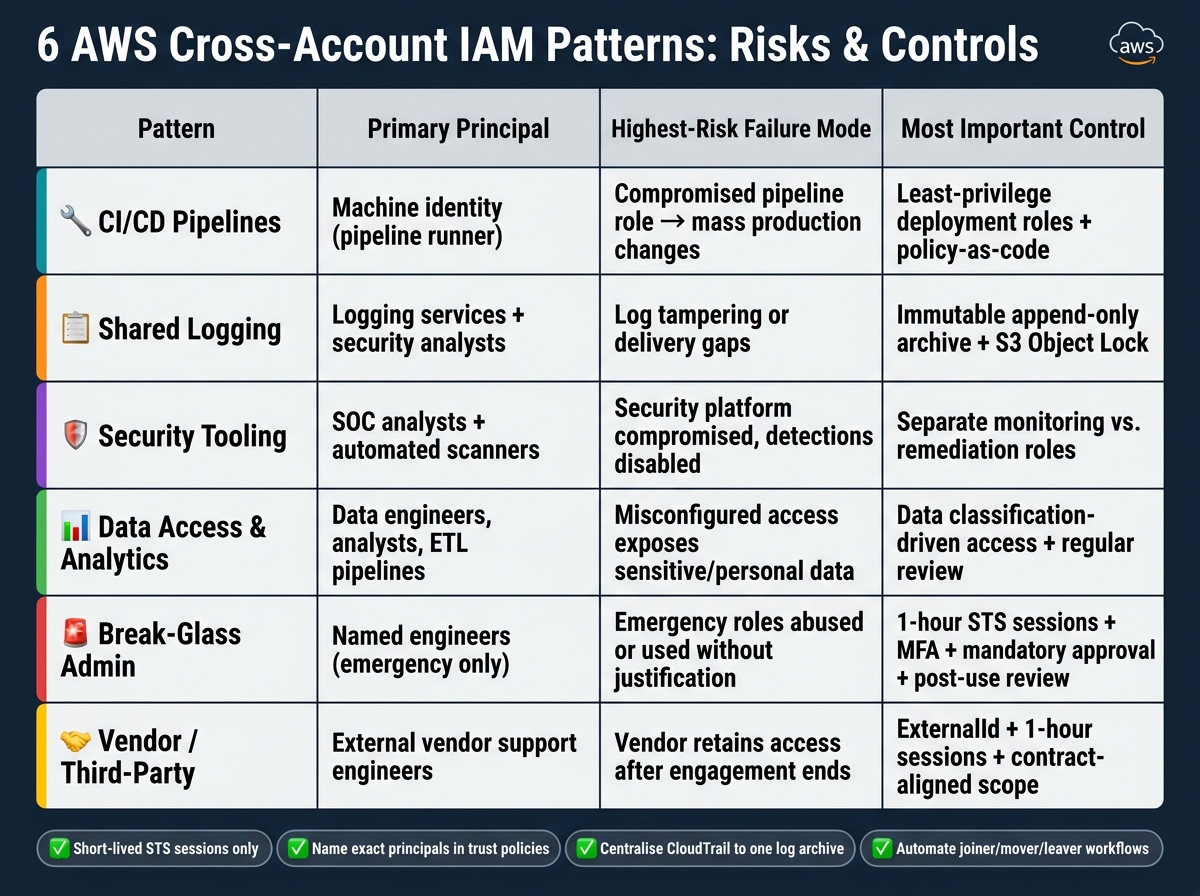 {6 AWS Cross-Account IAM Patterns: Risks & Controls Compared}
:::
{6 AWS Cross-Account IAM Patterns: Risks & Controls Compared}
:::
Managing Cross-Account Permissions in AWS - 3 Simple steps with best practices |AWS project IAM
Quick comparison
| Pattern | Main user | Main risk | Main control |
|---|---|---|---|
| CI/CD | Machine identity | Pipeline compromise | Scoped deployment role + strict trust |
| Shared logging | Services + analysts | Log tampering | Append-only write path + central archive |
| Security tooling | SOC + scanners | Security account overreach | Separate read, investigate, and fix roles |
| Data access | Analysts + pipelines | Data exposure | Data-owner-led access + scoped KMS/S3/Lake Formation |
| Break-glass | Named engineers | Misuse of admin access | 1-hour sessions, MFA, approvals, post-use review |
| Vendor access | External support staff | Old or over-scoped access | ExternalId, 1-hour sessions, contract-aligned scope |
I see this article as a governance checklist more than a setup guide: classify the role, lock the trust, log every session, and remove access on time.
Why Cross-Account IAM Requires Governance from Day One
Most cross-account IAM failures don’t begin with bad intent. They usually begin with convenience.
A team needs to move fast, so it creates a broad role to get the job done. The work ends, but the role stays. Weeks turn into months, and that one shortcut becomes a quiet risk sitting in the background.
The main problem is unmanaged trust relationships. Every cross-account role includes a trust policy that decides which external principals can assume it. If that policy trusts an entire account instead of a named role, the blast radius grows fast if that trusted account is ever compromised.
Expired third-party access adds another layer of risk. Vendor and contractor roles often outlive the project they were set up for, which leaves production access in place long after the engagement has ended. For UK organisations handling personal data, that kind of leftover access creates direct exposure under the UK GDPR and the Data Protection Act 2018.
Then there’s the visibility problem. If CloudTrail is turned on in each account but not pulled into one central place, it becomes much harder to answer a key incident question: which external principals assumed which roles, and when? Without that answer, incident response slows down, and regulatory reporting becomes harder than it should be.
A small set of controls deals with most of these failure points. They don’t all work in the same way across every setup, but they form the backbone of sound cross-account IAM governance.
| Control | What it does |
|---|---|
| Role standardisation | Defines approved role archetypes with scoped permissions and standard trust policies, packaged as reusable IaC modules |
| MFA for privileged access | Requires aws:MultiFactorAuthPresent=true conditions on roles with write access or administrative scope, and applies to human users via federated identity |
| Centralised logging account | Aggregates CloudTrail and AWS Config from all member accounts into a central, write-only archive, with read access limited to security and platform teams |
| IAM Access Analyzer | Continuously identifies roles and resources accessible from outside the account or organisation to flag external access automatically |
| Service control policies (SCPs) | Apply organisation-wide guardrails - such as preventing dangerous actions or overly broad trust policies - that still apply even to the root user of member accounts |
| Tagging standards | Tag every cross-account role consistently so roles can be inventoried, reviewed and attributed quickly |
| Documented ownership | Assign a business and technical owner, with a review and deprovisioning date |
The best time to put these controls in place is during account creation. Add them later, and the clean-up work usually costs more and slows delivery.
The six patterns below show how these risks surface in day-to-day AWS estates. Next, see how these controls shape CI/CD deployment roles.
1. Cross-Account CI/CD Pipelines and Deployment Roles
Use sts:AssumeRole so a pipeline in a tooling account can assume a tightly scoped deployment role in the target account. If you're using GitHub Actions or a similar system, start with OIDC. That lets the pipeline swap a short-lived token for temporary AWS credentials before it assumes the target role.
Why does that matter? It removes static secrets from the pipeline. No long-lived keys sitting in CI/CD settings, waiting to leak. As a result, the trust policy becomes the main place where access is controlled.
The trust policy does most of the heavy lifting here. Trust the exact pipeline role ARN, not the entire CI/CD account. Then lock it down with conditions such as aws:PrincipalOrgID, OIDC sub claims tied to a named repository and branch, or ExternalId for cross-account setups.
Permissions on the deployment role should allow only the deployment actions the pipeline needs. Nothing more. In production accounts, add a manual approval gate before promotion to production.
Both sides need to match up:
- The pipeline role must have permission to call
sts:AssumeRole - The target role must trust that pipeline role
Use CloudTrail and session tags to track what was deployed, where it went, and when it happened. Review deployment roles whenever the pipeline system changes. Revoke them at once if a CI/CD vendor is replaced, and delete them when an application is retired.
Think of deployment roles as temporary access paths, not permanent fixtures. Those same deployment logs become even more useful when they're centralised with the rest of the estate.
The trust conditions below show the narrowest safe version of this pattern.
| Trust policy condition | What it restricts |
|---|---|
StringEquals on OIDC sub
|
Limits access to a specific repository/branch |
StringEquals on aud
|
Validates the intended OIDC audience (sts.amazonaws.com) |
StringEquals on ExternalId
|
Prevents confused deputy attacks in cross-account trust |
StringEquals on aws:PrincipalOrgID
|
Restricts assumption to principals within the AWS organisation |
2. Shared Logging and Central Log Archive Accounts
The next pattern is the central log archive. It takes account-level events and turns them into shared evidence. Each workload account sends logs to one place, and only a small group of roles can read them. That place is the Log Archive account: a dedicated AWS account in your Security OU used only for log intake and retention. Keep it append-only for workload accounts and read-only for approved teams.
For log intake, use service principals and bucket policies. Then give analysts read-only cross-account roles for query and review. Those bucket policies should allow writes only from approved source accounts and only to approved prefixes. They should also explicitly block destructive actions like s3:DeleteObject.
The trust boundary matters most here. Workload accounts should only be able to append. They should never be able to change, delete, or read back logs from other accounts. The clean way to enforce that is with explicit Deny statements in bucket policies, backed by SCPs on the Security OU. Those SCPs should block s3:DeleteObject, s3:DeleteBucket, and s3:PutBucketPolicy for any principal outside a tightly controlled break-glass role.
Once log intake and log access are split, harden the archive against tampering. Turn on S3 Object Lock in compliance mode, versioning, and MFA Delete on all central log buckets. Export findings to S3 in the Log Archive account for long-term retention. A common lifecycle setup keeps logs in S3 Standard for 90 days, then moves them to S3 Glacier. That helps balance cost with compliance needs.[4][5][6]
Retention should be managed with S3 lifecycle policies and CloudWatch Logs retention settings. IAM needs to limit who can change those lifecycle rules. Bucket policies and KMS key policies should be managed through infrastructure as code and reviewed through pull requests, so every change leaves an audit trail before it reaches production.
| Access type | Role example | Permissions granted | Permissions denied |
|---|---|---|---|
| Security operations | SecOpsReadLogs |
s3:GetObject, Athena query access |
s3:DeleteObject, s3:PutObject
|
| Platform engineering | LoggingAdmin |
Manage lifecycle rules and log configuration | Read highly sensitive log prefixes |
| Application teams | AppTeamXLogsRead |
Read only their own application prefix | All other prefixes |
| Compliance / audit | AuditLogsRead |
Review log configurations and sample logs | Change infrastructure |
3. Central Security Tooling and Detection Services
Log Archive stores the evidence. Security Tooling reads it, checks it, and turns it into action. In the AWS Security Reference Architecture, the Security Tooling account is a dedicated account that acts as the delegated administrator for services such as Amazon GuardDuty, AWS Security Hub, IAM Access Analyzer, Amazon Inspector, Amazon Macie, and AWS Config.[8][10][11] That setup turns central logs into organisation-wide detection and response data.
The IAM piece behind this is the delegated administrator relationship in AWS Organisations. The management account assigns the Security Tooling account as the admin for each service. Once that is in place, the account can view and manage findings across all member accounts.[9][14]
For telemetry access, the Security Tooling account should assume read-only cross-account roles in each member account, using roles such as SecurityAuditRole. Those roles should be locked down with conditions like aws:PrincipalArn and aws:SourceAccount to stop confused deputy attacks.[3][7] Just as important, these roles must never include s3:DeleteObject, s3:PutObject, or any lifecycle configuration permissions on log buckets.[3][7]
The direction of access matters. Security Tooling reads from workload accounts, but workload accounts should never assume roles back into Security Tooling. Keep storage in Log Archive and analysis in Security Tooling so one account does not do both jobs. That cuts down the blast radius if something goes wrong. AWS is very clear on this point: the Security Tooling account should never own the log buckets it reads from.[7] These roles also do not belong in application, data, or finance administration.
A simple way to handle this is to split access by task:
- Detection: a read-only
SecurityAuditrole - Investigation: a role limited to specific CloudTrail and S3 logs
- Remediation: a tightly constrained role with just-in-time (JIT) access that expires after one to eight hours
For high-impact remediation, use permission boundaries as a hard ceiling. If an identity policy is set up badly, the boundary still blocks privilege escalation. You get central oversight without handing out broad write access.
| Security role type | Key permissions | Scoping strategy |
|---|---|---|
| Detection |
SecurityAudit, ViewOnlyAccess
|
Managed policies; org-wide scope |
| Investigation |
cloudtrail:LookupEvents, s3:GetObject
|
Scoped to specific log buckets and regions |
| Remediation |
ec2:StopInstances, iam:UpdateAccessKey
|
Resource-level ARNs + JIT time-bound sessions |
| Trust | sts:AssumeRole |
ExternalId + aws:SourceAccount
|
Capture every AssumeRole call in CloudTrail. Set up GuardDuty and Security Hub with auto-enable for new accounts so any account joining the organisation is enrolled straight away, with no manual steps and no gaps.[12][13] Review delegated admin settings every quarter, and if an account leaves the organisation, revoke its delegated relationships promptly. Rotate long-lived third-party API keys at least every 90 days, keep them in AWS Secrets Manager, and alert on stale secrets.
These controls keep detection centralised without giving Security Tooling broad administrative reach. The next pattern applies similar controls to business and analytics data, where cross-account trust carries different risks.
4. Cross-Account Data Access and Analytics Platforms
For analytics, the trust path needs to stay with the data owner. Cross-account analytics carries a different risk from security tooling. If an analytics team in one account queries a data lake in another, the trust boundary should remain in the data-owning account, not the consumer account. The data owner decides who can assume access, what they can use, and under which conditions. The consumer account should not keep long-lived credentials in the data account.
Use STS with service controls. A consumer account can assume a read-only IAM role in the producer account, scoped to specific S3 prefixes, Glue Data Catalog entries, or Athena workgroups. If the data is encrypted, add kms:Decrypt for the exact key. For data lakes, AWS Lake Formation adds column-level controls and cross-account sharing through RAM. Use version 4 or 5 before exposing data to other accounts.[16][17]
Tag datasets by sensitivity and enforce access with LF-tags. For UK organisations, tag by sensitivity and residency to support UK GDPR and FCA controls. Register only data-product prefixes, never the bucket root.[15] Give each dataset a clear owner, record approval, and remove access when the project or user ends.
Split human analyst access from machine pipeline access. Analysts should federate through the corporate identity provider into a short-lived role with MFA in place. Pipelines should use a dedicated workload role with a tightly scoped trust policy, such as an external ID or source account condition, and sessions that match task length. Permission boundaries should stop either identity type from expanding its own data access.
Lake Formation copies recipient queries into the owning account's CloudTrail. Pair that with Athena history and S3 access logs for a full audit trail. If a project ends or a team member leaves, removing the trust relationship closes access without changing the data. The same revoke-first approach should also apply to break-glass administrative access.
5. Break-Glass Administrative Access
Break-glass access is emergency admin access. It should be used only when normal access routes fail, such as during an IdP outage or an active containment incident. It is not a handy shortcut for routine work. Every use should be treated as a serious event.
Set this up with a dedicated break-glass role or account in the central security or management account, then use cross-account trust into each member account. That keeps emergency access inside a pre-approved cross-account trust path instead of forcing teams to create ad hoc admin access in the middle of a crisis. Day-to-day workforce identities should have no route to these roles. Keep the trust boundary tight: only the emergency principal should be able to assume the admin roles, and access should stay time-bound and highly privileged. Limit STS sessions to one hour [19][25][26][27].
Even during an incident, guardrails still matter. Service control policies should continue to block destructive actions across log archive, security tooling, and workload accounts, such as deleting log archives or disabling central security tooling. Where possible, require MFA when the role is assumed. At the same time, keep at least one access path separate from your primary IdP, because break-glass access exists for the exact moment when federation or SSO is down. Store credentials offline or in a locked physical location. That way, the emergency route stays usable without turning into standing privilege.
Most failures in this area come down to governance. Each use should tie back to an incident record, a named approver, and a clear reason. AWS's Well-Architected Security Pillar explicitly calls for pre-provisioned break-glass access so responders can act even when SSO is unavailable [18][20][21][25]. After use, review the break-glass session in CloudTrail, rotate credentials straight away, and remove any temporary policy changes before the post-incident review is finished [19][20][22][23][24][28].
The table below sums up the main implementation controls:
| Control | Implementation | Purpose |
|---|---|---|
| Authentication | Hardware MFA where feasible, with an access path independent of the primary IdP | Ensures access remains available during IdP or SSO failure |
| Session duration | Maximum 1-hour STS session | Limits blast radius |
| Trust scope | Single security or management account principal only | Prevents lateral assumption by everyday workload identities |
| SCP guardrails | Block log deletion and security tooling changes, even for break-glass sessions | Preserves audit integrity during incidents |
| Post-use rotation | Immediate credential rotation after every activation | Prevents the emergency path becoming a standing backdoor |
Once the incident is resolved, close the emergency session, confirm no temporary policy changes are still in place, and document the full timeline. Break-glass access that is not maintained can quietly turn into a standing backdoor. Test the role every quarter, and check that it still covers every critical account after architecture changes. The same time-bound approval and revocation discipline should apply to vendor support access.
6. Vendor and Third-Party Support Access
Vendor access is not the same as break-glass access. It must match the contract, stay within a clear scope, and be removed on time.
The safest setup is a cross-account IAM role that trusts only the vendor’s AWS account ARN, uses a unique sts:ExternalId, and allows only short-lived sts:AssumeRole sessions. That external ID should be a random UUID, not a phone number, person’s name, or account ID. Why? Because that helps block confused-deputy attacks.
The customer should keep control of the permissions policy at all times. The vendor should only be able to assume the role from its own account. Don’t use wildcard principals in trust policies. Be explicit. Name the vendor account directly, and where you can, limit both the role name and the session name too.
Permissions also need to stay tight. Keep access narrow, and write the boundaries down in two places:
- the technical policy
- the support or data-processing agreement
Those boundaries should line up with UK GDPR and the duties set out in the contract.
Vendor access is a high-risk cross-account pattern. It needs logging, review, and a fixed time limit. Set max_session_duration to one hour. Require phishing-resistant MFA, such as FIDO2 keys. Use permission boundaries so that a bad policy change can’t go past the agreed ceiling.
Send all vendor API calls and AssumeRole events to the central log archive through CloudTrail. Tie sessions back to ticket IDs or change request IDs so each action has a paper trail. Then use IAM Access Analyzer to spot unintended cross-account access that involves vendor principals [1][2].
Some of the largest recorded breaches have come from vendor access failures. That’s why tight scoping and regular review aren’t optional. These roles need the same guardrails as any other cross-account setup, with even stricter offboarding.
The lifecycle below keeps vendor access narrow, auditable, and easy to revoke.
| Lifecycle Stage | Key Action | Control |
|---|---|---|
| Onboarding | Provision a cross-account role with external ID and scoped permissions | Trust policy + permission boundary |
| Active access | Log all sessions linked to ticket IDs; enforce MFA and session limits | CloudTrail + IAM conditions |
| Periodic review | Reconcile active vendor identities and check for dormant roles | Quarterly access review |
| Offboarding | Revoke the role, disable federation mappings, and rotate integration keys | Automated deprovisioning |
| Emergency revocation | Suspend access immediately and preserve logs for investigation | Documented revocation playbook |
Governance Controls That Apply Across All 6 Patterns
The six patterns above serve different jobs, but the controls here show up every time. It doesn’t matter whether the role is for a CI/CD pipeline, a log archive, security tooling, a data platform, a break-glass account, or a vendor. The use case changes. The core guardrails stay the same.
Use short-lived STS sessions only. Set MaxSessionDuration to the shortest period that still works for each cross-account role.
Treat trust policies as control points. Use them as allow-lists. Name the exact principals, apply aws:PrincipalOrgID for internal roles, use ExternalId for vendors, and run IAM Access Analyzer all the time.
Separate role design, use and monitoring. Platform teams set the controls, application teams use them, and security teams review how they’re used. Enforce the upper limit with SCPs.
Automate joiner/mover/leaver workflows. Record an owner, scope, and review date for every role. Then revoke trust and delete roles that are no longer needed.
The table below links each shared control to the risk it cuts down.
| Control | Mechanism | Risk Addressed |
|---|---|---|
| Short-lived credentials | STS temporary sessions | Credential theft and persistent access |
| Scoped trust policies | Explicit principals and conditions | Confused-deputy attacks, lateral movement |
| Central logging | CloudTrail aggregated to a log archive account | Lack of attribution and forensic gaps |
| Segregation of duties | SCPs and approval flow | Privilege escalation by a single team |
| Automated exposure detection | IAM Access Analyzer, Security Hub CSPM | Undetected misconfigurations and drift |
| Onboarding/offboarding | Automated JML workflows | Orphaned roles and privilege creep |
Comparison Table: How the 6 Patterns Differ
The table below compares the six patterns by principal, access model, failure mode, and governance control.
| Pattern | Primary Purpose | Primary Principal | Primary Access Model | Highest-Risk Failure Mode | Most Important Governance Control |
|---|---|---|---|---|---|
| 1. CI/CD Pipelines | Automate deployments across accounts | Pipeline runner or build agent (machine identity) | Role assumption via STS, often in a hub-and-spoke model | Compromised pipeline role causing mass changes across production accounts | Least-privilege deployment roles per environment, enforced via policy-as-code |
| 2. Shared Logging | Centralise logs for audit and incident response | Logging services writing; security analysts reading | Append-only bucket policy for producers; read-only roles for analysts | Log tampering or gaps caused by misconfigured delivery from some accounts | Immutability and retention governance for log archives |
| 3. Central Security Tooling | Monitor and investigate across all accounts | SOC analysts and automated scanners | Read-only roles for monitoring; separate time-bound remediation roles | Security platform compromised, disabling detections estate-wide | Explicit separation of monitoring and remediation roles, with change-control |
| 4. Data Access and Analytics | Share and analyse data across account boundaries | Data engineers, analysts, and ETL pipelines | Resource-based policies (S3/KMS) plus role assumption for processing | Misconfigured access exposing sensitive or personal data beyond intended scope | Data classification-driven access controls with regular review cycles |
| 5. Break-Glass Admin | Emergency access when normal controls fail | Named engineers | Just-in-time elevation with approval workflow | Emergency roles used without justification or abused during quiet periods | Formalised runbook, mandatory approval, automatic logging, and post-event review |
| 6. Vendor and Third-Party Support | Allow external parties to diagnose and fix issues | Vendor support engineers | Role assumption with ExternalId and time-bound sessions |
Vendor retaining access after resolution, or vendor account compromise | Time-bound roles scoped to specific services, with contractual activity logging |
The biggest split comes down to two things: who holds the identity and where control lives.
When the principal is a machine identity, you can automate far more of the process and keep scope tight. CI/CD runners and ETL jobs fit that model well. Human identities are different. They need approvals, clear runbooks, and checks after the access has been used.
There’s also a clear divide in the access model itself. Logging and data-sharing patterns often lean on destination-side resource policies, such as S3 bucket policies or KMS key policies. The other four patterns usually rely on short-lived role assumption instead. That’s the main governance split across all six patterns: resource policy at the destination versus temporary access through assumed roles.
Conclusion
Cross-account IAM isn't a bag of one-off fixes. It's a small set of repeatable patterns that you can govern in a clear way. That distinction matters because it helps keep a multi-account estate secure and auditable.
The next step is simple: classify each role by pattern, then apply the right controls. Each pattern comes with its own trust model, monitoring model and lifecycle. Use those three checks to decide how the role should be governed.
Some roles need stricter handling than others. Break-glass and vendor access are exceptions, so they must be time-bounded. Logging and security tooling rely on continuous observability. CI/CD and data-access roles are part of day-to-day operations. The six patterns work well as a governance checklist:
- identify the pattern
- confirm the trust model
- verify monitoring
- set the lifecycle
If a role can't answer those questions clearly, you've found a governance gap.
Treat the six patterns as a living control set. Review them on a regular basis. Feed lessons from incidents and audits back into the pattern set. And if a role can't be classified cleanly, review it, tighten it, or remove it.
FAQs
Which cross-account IAM pattern fits my use case?
If you're deploying from CI/CD across multiple AWS accounts or environments, use the CI/CD cross-account IAM pattern.
Set up separate environment roles with least-privilege permissions. Lock trust policies to the exact repository and branch, and use OIDC for short-lived credentials instead of static access keys.
It also helps to add permission boundaries and, where needed, SCP guardrails. That gives you an extra layer of protection against privilege escalation and helps keep production safer.
How do I reduce the risk of over-broad trust?
Apply least privilege. Give only the access that's needed, skip wildcards where you can, and use exact resource-level permissions with Amazon Resource Names.
Use permission boundaries to put a hard cap on role permissions. Add conditions like aws:SourceAccount or aws:SourceOrgID in trust policies, and choose OIDC federation instead of static credentials when you need short-lived, tightly scoped access.
What should I review regularly in cross-account roles?
Review access permissions on a set schedule so old, extra, or unused rights don’t pile up and turn into privilege creep.
For standard user roles, carry out reviews every quarter. For high-privilege or administrative accounts, do them every month.
Access should still match a person’s current job and the organisation’s needs. That means checking whether someone still needs what they were given in the first place, and changing permissions when people leave or move roles.
It also helps to look beyond the access list itself. Monitor access logs for unusual behaviour, and audit automated role assignments to make sure people aren’t being given permissions by default that no longer make sense.