
Multi-region disaster recovery (DR) ensures your systems remain operational during regional outages or disasters by replicating data and applications across regions. The challenge lies in balancing recovery speed, data loss tolerance, and cost. Here's what you need to know:
- Key Metrics: RTO (Recovery Time Objective) is the maximum downtime allowed, while RPO (Recovery Point Objective) is the acceptable data loss. Industries like finance and healthcare often require near-zero RTO and RPO due to high downtime costs.
- Strategies:
- Backup & Restore: Cheapest but slowest recovery (RTO < 24 hours, RPO in hours). Ideal for non-critical workloads.
- Pilot Light: Keeps core data ready, with RTO and RPO in minutes. Balances cost and speed.
- Warm Standby: Runs a scaled-down environment for quicker recovery (RTO in minutes, RPO in seconds).
- Hot Standby: Full-capacity active-active setup for near-zero RTO and RPO. Most expensive but ensures maximum uptime.
- Cost-Saving Tips:
- Use tiered storage like Amazon S3 Glacier for backups.
- Automate failover and infrastructure setup with tools like AWS CloudFormation.
- Test and monitor regularly to optimise resources and avoid surprises.
Quick Comparison
| Strategy | RTO | RPO | Cost | Best For |
|---|---|---|---|---|
| Backup & Restore | < 24 Hours | Hours | Low | Non-critical workloads |
| Pilot Light | Minutes | Minutes | Medium-Low | Cost-sensitive recovery |
| Warm Standby | Minutes | Seconds-Minutes | Medium-High | Business-critical applications |
| Hot Standby | Near Zero | Near Zero | High | Mission-critical systems |
This guide simplifies multi-region DR planning, helping you choose the right strategy for your needs while keeping costs under control.
::: @figure 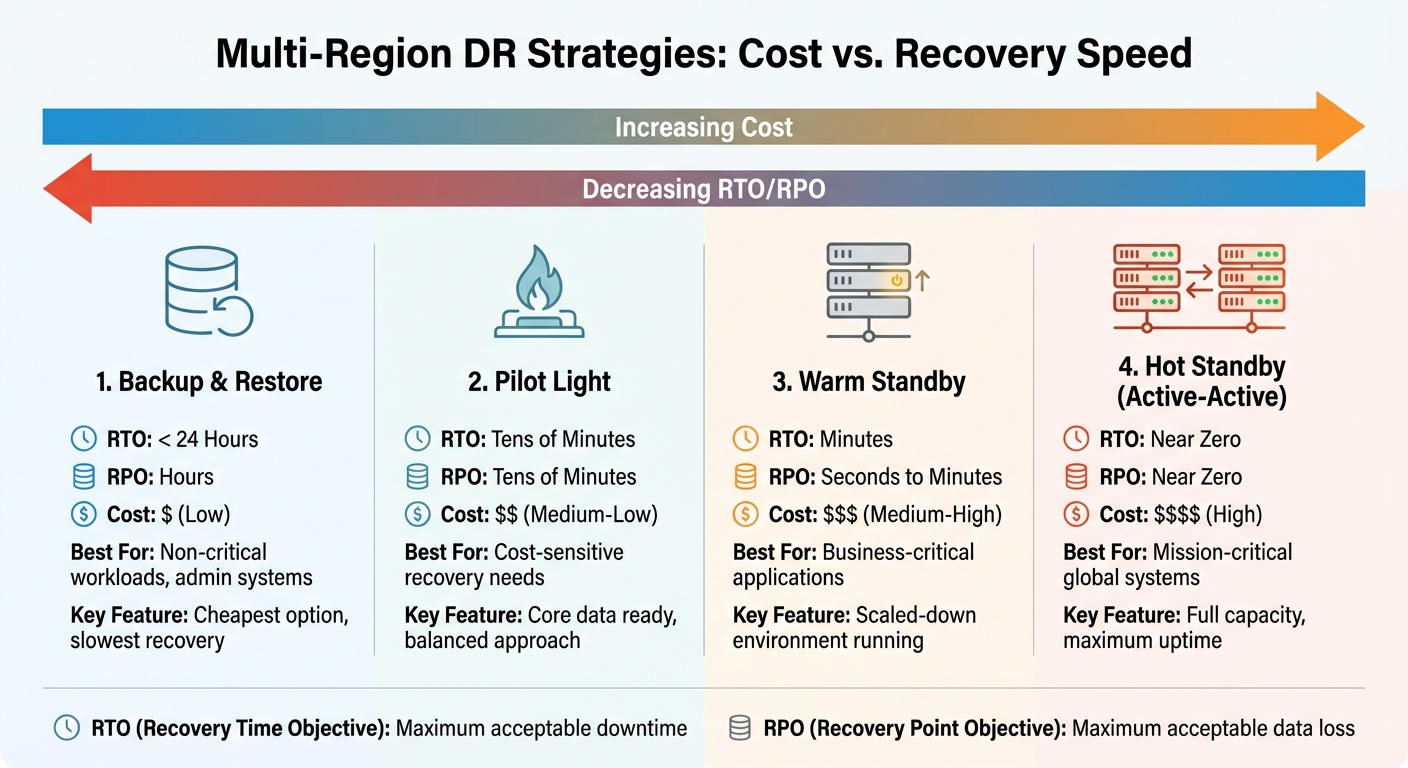 {Multi-Region Disaster Recovery Strategies Comparison: RTO, RPO, and Cost Analysis}
:::
{Multi-Region Disaster Recovery Strategies Comparison: RTO, RPO, and Cost Analysis}
:::
How To Design Multi-Region Disaster Recovery?
Disaster Recovery Strategies by Cost
Selecting the right disaster recovery strategy depends on how much downtime and data loss your organisation can tolerate, as well as your budget. Each approach comes with its own balance of cost, recovery speed, and operational complexity. Below, we explore several strategies to help you find the best fit for your needs.
Backup and Restore: A Budget-Friendly Choice
Backup and Restore is the least expensive disaster recovery method, making it perfect for non-critical workloads where downtime isn’t a major concern. This method involves regularly backing up your data to a secondary region and restoring systems only when a failure occurs [5][7].
The main benefit here is low cost - you’re only paying for storage, not for running compute resources. However, the trade-off is slower recovery. You’re looking at a Recovery Point Objective (RPO) of several hours (potentially losing hours of data) and a Recovery Time Objective (RTO) of under 24 hours [5][7]. This makes it ideal for tasks like administrative work, development environments, or archival data.
To stretch your budget even further, you can use tiered storage options like Amazon S3 Glacier or Glacier Deep Archive for backups that don’t need instant retrieval [2]. Just make sure to have clear procedures in place and regularly test your restores to avoid surprises during an actual disaster.
Pilot Light: Balancing Cost and Recovery Speed
Pilot Light offers a middle ground between cost and recovery speed. It keeps a live copy of your core data - such as databases - while application servers and other resources stay turned off until needed. Think of it like the pilot light on a boiler: the essential components are ready, but the full system only activates when required.
This approach delivers an RPO and RTO measured in tens of minutes [5], making it a good choice for organisations that need quicker recovery but still want to keep costs manageable. You’ll pay for data replication and minimal infrastructure, avoiding the expense of running a full secondary environment.
For added flexibility, you can use On-Demand Capacity Reservations in your backup region [6]. These ensure compute resources are available during a disaster without incurring the cost of keeping them active all the time. You can even share these reservations with development or testing accounts to further optimise costs [6]. For faster recovery, though, you might want to consider Warm Standby.
Warm Standby: Faster Recovery at a Mid-Range Cost
Warm Standby takes things a step further by maintaining a scaled-down but functional version of your environment in a secondary region. Unlike Pilot Light, this setup can handle traffic immediately, albeit at reduced capacity.
With this strategy, RPO drops to seconds or minutes, and RTO is reduced to just minutes [5][7]. It’s a solid option for business-critical applications where short outages are tolerable, but extended downtime would cause significant issues. Since the environment is already operational, failover involves redirecting traffic and scaling up resources rather than building everything from scratch.
The downside? Higher ongoing costs. You’re running compute resources continuously, though at a smaller scale. To save money, you can deploy resources at partial capacity and use auto-scaling to ramp up when needed [1]. Pairing this with Savings Plans can trim compute costs by up to 72% [6], making Warm Standby a viable option for many organisations.
Hot Standby: Maximum Uptime, Maximum Cost
Hot Standby, also known as Multi-Site Active/Active, runs full-capacity environments in multiple regions simultaneously. Traffic is served from all locations at once, ensuring near-zero RPO and RTO [5][7]. In other words, it virtually eliminates both downtime and data loss.
This is the most expensive and complex strategy, requiring advanced traffic management, data synchronisation, and conflict resolution across regions. It’s designed for mission-critical systems where even a few minutes of downtime could result in massive financial or operational losses - think payment processing systems or emergency services.
For the highest reliability, use failover mechanisms based on data plane operations (like Route 53 health checks) instead of control plane operations (like API calls to spin up new instances) [4]. Data plane operations are generally more reliable during regional outages [4][3].
Here’s a quick summary of these strategies:
| Strategy | RPO | RTO | Cost | Best For |
|---|---|---|---|---|
| Backup & Restore | Hours | < 24 Hours | Low | Non-critical apps, admin systems |
| Pilot Light | Tens of Minutes | Tens of Minutes | Medium-Low | Cost-sensitive recovery needs |
| Warm Standby | Seconds to Minutes | Minutes | Medium-High | Business-critical applications |
| Hot Standby | Near Zero | Near Zero | High | Mission-critical global systems |
Tools and Technologies for Multi-Region DR
Cutting costs while ensuring reliability in multi-region disaster recovery is possible with the right tools. These solutions integrate smoothly with previously discussed strategies, offering a streamlined and efficient path to recovery.
Cloud-Native DR Solutions
AWS Elastic Disaster Recovery (AWS DRS) provides a budget-friendly way to safeguard workloads. It employs a staging area design that replicates data into low-cost storage and minimal compute resources in the target region. Full-capacity instances are only launched during a disaster or a drill, keeping costs under control [9]. This approach aligns with the multi-region architectures mentioned earlier, achieving Recovery Point Objectives (RPOs) of seconds and Recovery Time Objectives (RTOs) of minutes [11].
The pricing is simple: around £0.022 per hour per source server, which translates to roughly £1,550 monthly for 100 servers [10]. Staging areas rely on cost-efficient t3.small EC2 instances for replication [10], and an 8-hour disaster recovery drill for a 100-server setup costs about £90 [10]. For example, VP Bank reduced costs by 48% for 78 critical workloads by eliminating idle recovery site resources [9]. Similarly, Olli Salumeria cut disaster recovery costs by 80% using AWS for its SAP ERP infrastructure [9].
For storage, costs can be further reduced with tiered options. Amazon EBS gp3 volumes are approximately 20% cheaper than the older gp2 volumes [11], and Amazon S3 Glacier or Glacier Deep Archive are excellent for backups with less stringent retrieval needs [2].
Save costs by removing idle recovery site resources, and pay for your full disaster recovery site only when needed[9].
Automation and Infrastructure as Code
Manually configuring disaster recovery systems is not only time-consuming but also prone to errors. Tools like AWS CloudFormation, AWS CDK, and Terraform ensure consistent infrastructure deployment across regions, eliminating manual mistakes [12][4]. CloudFormation StackSets further simplify the process by enabling deployment across multiple AWS accounts and regions in one step. Additionally, parameters and conditional logic in these templates allow management of both active and standby environments from a single source [12][4].
Automation also enhances failover processes. For example, AWS Lambda can automatically update Route 53 weights, transforming a manual, multi-step task into a streamlined operation [4][8]. CI/CD pipelines like AWS CodePipeline ensure application code and configuration changes are synchronised across primary and secondary regions, keeping disaster recovery environments up to date [4][8].
Regular disaster recovery drills highlight the advantages of automation. Tools like AWS Elastic Disaster Recovery enable non-disruptive drills, ensuring RTO and RPO targets are consistently met [13][11].
Automation decreases chances of error and improves recovery time[2].
Without automation or Infrastructure as Code, restoring workloads in a recovery region can become overly complex, potentially exceeding RTO targets [4].
Network Optimisation Between Regions
The efficiency of regional connectivity directly impacts both performance and cost. VPC peering is a straightforward, low-cost way to connect primary and recovery regions, securely transferring replication traffic between environments [15].
We recommend VPC peering as a simpler and low-cost way to connect your primary Region to the recovery Region whilst allowing replication traffic to travel between the source server and staging environment[15].
For more complex setups involving multiple VPCs and VPNs, Transit Gateway offers a hub-and-spoke model, simplifying management at a higher cost than VPC peering [15][11]. However, for a simple one-to-one region connection, VPC peering remains the most cost-effective choice.
Traffic management tools like Amazon Route 53 and AWS Global Accelerator play a vital role in failover scenarios. Route 53 uses latency-based or weighted routing policies to direct traffic to the best-performing or available region [14][8]. Meanwhile, Global Accelerator employs static IPs and the AWS global network for faster data propagation and reduced latency [14]. For higher availability, data plane actions like Route 53 health checks are recommended over control plane actions like updating weights [8].
When it comes to data replication, several options cater to different needs:
- Public Internet: The least expensive option, though performance may vary depending on the source ISP [11].
- Site-to-Site VPN: Offers encrypted connections with consistent performance, capped at 1.25 Gbps [11].
- AWS Direct Connect: Provides the highest reliability and performance for large-scale, mission-critical setups, though it requires a higher initial investment [11].
To avoid congestion and ensure production traffic remains unaffected, consider throttling replication traffic at the service or machine level [15][11].
| Connectivity Option | Cost Level | Performance/Reliability | Best Use Case |
|---|---|---|---|
| Public Internet | Lowest | Variable; depends on source ISP | Small workloads; non-critical data [11] |
| VPC Peering | Low | High; stays on provider backbone | Simple 1:1 region replication [15][11] |
| Site-to-Site VPN | Medium | Consistent; encrypted (1.25 Gbps cap) | Secure replication over public internet [11] |
| Transit Gateway | Medium/High | High; simplified management | Complex multi-VPC/multi-account setups [15][11] |
| Direct Connect | High | Highest; dedicated bandwidth | Large-scale, mission-critical enterprise DR [11] |
Need help optimizing your cloud costs?
Get expert advice on how to reduce your cloud expenses without sacrificing performance.
Cost Optimisation Best Practices
Managing costs in multi-region disaster recovery is essential for maintaining reliability without overspending. After evaluating disaster recovery (DR) strategies, these practices can help align your recovery investments with the criticality of your workloads.
Prioritise Workloads by Tier
Not all applications demand the same level of protection. To ensure cost-effectiveness, categorise workloads into tiers based on their business impact. For example:
- Mission Critical (Tier 0): Revenue-generating applications.
- Business Critical (Tier 1): Key operational systems.
- Operational (Tier 2): Supporting services.
- Administrative (Tier 3): Back-office functions.
Each tier should align with a disaster recovery pattern that fits its needs. For instance, expensive Active-Active configurations should be reserved for Tier 0 applications that cannot afford downtime. In contrast, Tier 3 systems can use simpler Backup & Restore methods, such as archival storage with Amazon S3 Glacier. For Warm Standby setups, maintain only minimal baseline capacity, allowing auto-scaling to handle failover scenarios. Conduct quarterly audits to ensure recovery spending stays aligned with your business priorities as they evolve.
| Tier | Criticality | Target RTO/RPO | Recommended DR Pattern | Cost Level |
|---|---|---|---|---|
| Tier 0 | Mission Critical | Seconds / Near-Zero | Active-Active (Hot Standby) | Highest |
| Tier 1 | Business Critical | Minutes / Minutes | Warm Standby | Medium-High |
| Tier 2 | Operational | Hours / Hours | Pilot Light or Cold Standby | Medium-Low |
| Tier 3 | Administrative | Days / Hours | Backup & Restore | Lowest |
Use Pay-As-You-Go and Reserved Instances
Leverage flexible pricing models to optimise DR costs. For predictable, always-on components like staging instances or database replicas, Reserved Instances can save up to 72% compared to pay-as-you-go rates[16]. On the other hand, pay-as-you-go pricing is ideal for recovery capacity that only activates during drills or actual disasters, avoiding the costs of idle infrastructure. Combining Azure Hybrid Benefit with Reserved Instances can reduce costs for long-term workloads by as much as 80%[16].
To maximise savings, use tools like Azure Advisor or AWS Cost Explorer to analyse historical usage and ensure instances are correctly sized. Additionally, set up budget alerts to monitor both actual and forecasted spending, helping you catch unexpected cost spikes from testing or replication traffic. These strategies ensure your disaster recovery environment remains both cost-efficient and prepared for emergencies.
Test and Monitor Regularly
Regular testing and monitoring are key to preventing costly mistakes and identifying inefficiencies. Automated disaster recovery drills can verify that your RTO and RPO targets are still achievable without disrupting production systems. Monitoring tools can reveal underutilised virtual machines, often operating at just 10% capacity. By resizing these resources to match actual demand, you could reduce cloud costs by 20–34%[17].
Use scripts or serverless functions to automate periodic data restores from backups, ensuring data integrity without manual intervention. For monitoring, prioritise data plane operations like Route 53 health checks, as these typically offer higher availability compared to control plane operations. When migrating from on-premises systems, avoid simple lift-and-shift approaches. Instead, use pricing calculators to size resources appropriately for the cloud environment from the start.
For detailed assistance with these practices, Hokstad Consulting provides tailored services to help refine your multi-region disaster recovery strategy and optimise cloud costs.
Step-by-Step Implementation Guide
Setting up a cost-conscious multi-region disaster recovery (DR) architecture calls for a clear and systematic approach. Below is a practical guide to help you design and implement a DR solution that strikes the right balance between cost and dependability.
Assess and Prioritise Workloads
Start by conducting a Business Impact Analysis (BIA) to identify the critical assets and processes that need protection. This step lays the groundwork for defining recovery needs and allocating budgets appropriately. Establish specific Recovery Time Objectives (RTO) and Recovery Point Objectives (RPO) based on how essential each workload is to your operations [20].
Base your evaluation on the 4 C's of DR - Communication, Coordination, Continuity, and Collaboration [18]. Initially, consider a Multi-AZ (Availability Zone) setup to ensure local resilience. As your business grows or compliance requirements evolve, you can scale this up to a multi-region architecture [19]. Assign each workload to a suitable DR pattern - Active-Active setups for mission-critical applications, and Backup & Restore methods for less vital systems.
Once you've prioritised workloads, move on to configuring replication and failover mechanisms to meet your recovery goals.
Configure Replication and Failover
With workloads prioritised, the next step is to set up replication and failover processes tailored to your recovery objectives. Prioritise using data plane mechanisms over control plane operations when designing failover strategies [4]. For instance, tools like Route 53 health checks can provide greater availability compared to relying solely on control plane adjustments. To efficiently redirect traffic across regions, consider using AWS Global Accelerator with AnyCast IP, which avoids the caching issues often linked to DNS-based failover [4].
Create 'Golden AMIs' (Amazon Machine Images) using an Image Builder pipeline. This ensures that standby regions can quickly launch resources with the correct configurations during failover events. Select a replication strategy that fits your workload needs: asynchronous replication is more cost-effective and better for read-heavy workloads, while synchronous replication ensures real-time consistency but comes at a higher cost.
Automate failover processes as much as possible, but handle failback manually to verify data consistency [1].
Test, Monitor, and Refine
Once replication is configured, ongoing testing and refinement are essential. Store DR runbooks in Git and rehearse them monthly or quarterly to clarify responsibilities and address any procedural gaps. Additionally, test your DR plans at least once a year or after significant system updates to ensure RTO and RPO targets remain achievable [20].
| Testing Type | Purpose | Frequency |
|---|---|---|
| Runbook Rehearsal | Define roles and refine procedures | Monthly/Quarterly |
| Planned Failover | Validate geo-redundancy and infrastructure | Semi-Annually |
| Unplanned Drill | Test automated detection and response | Annually |
| Chaos Testing | Uncover hidden dependencies and weaknesses | Continuous/Ad-hoc |
These tests are crucial for keeping your DR strategy aligned with business needs through continuous monitoring and adjustments.
Leverage chaos engineering tools like Azure Chaos Studio to simulate faults and assess how your multi-region architecture handles unexpected failures [1]. After every test or incident, conduct a root cause analysis (RCA) and a DR debrief to update your architecture and runbooks. Additionally, perform application-level checks to verify data integrity, ensuring that no data is lost or corrupted during failover or failback transitions [1].
Define readiness checks - such as application heartbeats and database synchronisation statuses - that must be satisfied before declaring a region fully recovered. These checks help avoid premature failback, which could disrupt service availability.
For tailored support in designing cost-effective multi-region DR solutions, Hokstad Consulting provides specialised services to meet your needs.
Conclusion: Finding the Right Balance
Creating a multi-region disaster recovery (DR) architecture that is both cost-conscious and resilient is no small feat. The challenge lies in managing the trade-off between keeping expenses in check and ensuring operational readiness. One of the most common hurdles organisations face is striving for high availability while working within a limited budget [1]. Before diving into implementation, it’s crucial to secure stakeholder approval on the compromises between cost and recovery speed.
A tiered approach can help align your DR investments with the actual business impact [1]. For example, mission-critical applications may demand an Active-Active setup to minimise downtime and data loss, while less essential systems can rely on simpler Backup & Restore methods. This ensures resources are allocated where they matter most.
Make sure your Recovery Time Objective (RTO) and Recovery Point Objective (RPO) targets are well-defined and validated through regular drills - ideally on a quarterly basis [1]. These metrics serve as a roadmap, helping you allocate resources effectively while maintaining balance between cost and resilience.
To keep storage costs manageable, consider using lower-cost options like Amazon S3 Glacier for backups that don’t need frequent access [2]. Automating failover processes can speed up recovery, while manually managing failback ensures data consistency [1]. These measures align with the strategies discussed earlier, offering practical ways to save costs without sacrificing reliability.
For more tailored advice, Hokstad Consulting provides expert guidance in cloud cost management and infrastructure optimisation. Their services aim to cut cloud expenses while maintaining the resilience and performance standards outlined in this guide. This approach ensures you don’t have to compromise on quality while managing costs effectively.
FAQs
What should I consider when selecting a disaster recovery strategy for my organisation?
Selecting an effective disaster recovery (DR) strategy means understanding your organisation's recovery priorities while balancing cost, compliance, and performance. To start, define your Recovery Time Objective (RTO) and Recovery Point Objective (RPO) for critical workloads. Keep in mind that tighter recovery targets typically come with higher costs. For businesses in the UK, compliance with GDPR and data residency rules is a critical consideration, as these regulations influence how and where your data can be stored and replicated.
Cost is another major factor to weigh. It's not just about the upfront investment in standby resources; ongoing operational expenses also play a significant role. Leveraging elastic cloud features to scale resources up or down as needed can help manage these costs effectively. Additionally, automation and routine testing are vital to ensure your failover processes run smoothly, reducing potential downtime when it matters most.
When it comes to DR patterns, select one that matches your organisation's requirements:
- Backup & Restore: A cost-effective option for non-critical data, offering flexibility in RTO and RPO.
- Pilot Light: Maintains minimal core services in a secondary region, striking a balance between cost and recovery speed.
- Warm Standby: Operates as a scaled-down replica that’s always running, suitable for systems of moderate importance.
- Active/Active: Fully redundant regions that provide near-zero downtime, though at a higher cost.
Hokstad Consulting specialises in designing multi-region DR architectures tailored to your specific needs. They focus on creating solutions that ensure compliance, resilience, and cost-efficiency, helping your business stay prepared without overspending.
How can I reduce costs while ensuring reliable disaster recovery across multiple regions?
To keep costs under control while maintaining reliability, you might want to look into elastic multi-region disaster recovery. This method dynamically adjusts resources to match demand, ensuring you're prepared for fast failovers when necessary without overspending.
You can also save money by using right-sized instances or spot instances, which are more cost-effective options. Pair this with a tiered storage plan - for instance, keeping active backups in S3 for quick access and moving older data to Glacier for long-term, lower-cost storage. Together, these strategies can cut disaster recovery expenses by 30–50%, all while ensuring swift recovery times and solid performance.
What are the best tools for automating disaster recovery across multiple regions?
Automating disaster recovery (DR) across multiple regions can be achieved by using cloud-native tools that simplify failover and recovery with minimal manual effort. Here are some key tools and strategies to consider:
- AWS DRS: Provides continuous replication and automated recovery, ensuring data integrity and quick failover.
- Amazon CloudWatch: Offers real-time monitoring and alerts to detect issues as they arise.
- AWS Config with Open Policy Agent: Helps maintain compliance and identifies configuration drifts across regions, ensuring consistency.
For container-based workloads, Kubernetes Federation is a powerful solution, offering a unified control plane to manage clusters across regions. Additionally, tools like Velero and Kasten K10 are excellent for snapshot-based data protection and replication. Rancher further simplifies workload distribution and policy enforcement, making it easier to manage multi-region setups. To handle traffic redirection during failover, global DNS-based load balancers like AWS Route 53 or Cloudflare ensure users are routed to the healthy region without interruption.
By integrating these tools, you can create a streamlined DR process where monitoring systems activate recovery workflows, compliance checks validate the rebuilt environments, and traffic is redirected smoothly - all while maintaining optimal performance and reliability.