
AI workloads can rack up massive costs if not managed carefully. Running GPUs like NVIDIA A100s or H100s can cost £2–£5 per GPU-hour, and inefficient autoscaling can waste over 70% of these resources. For example, a fintech startup's costs jumped from £8,000 to £52,000 in a week due to idle GPUs running after a traffic surge.
What’s the fix? Cost-aware autoscaling. This approach combines performance metrics (like latency) with financial controls (like cost per prediction). By using predictive intelligence, workload-specific configurations, and budget alerts, businesses can cut infrastructure costs by 30–50% while maintaining performance.
Key strategies include:
- Predicting resource needs with machine learning models to avoid over-provisioning.
- Aligning scaling methods with workload types (e.g., real-time vs batch processing).
- Setting financial guardrails to cap spending and avoid runaway costs.
- Using Service Level Objectives (SLOs) that balance performance and costs.
Results: Companies like StreamForge AI reduced GPU bills by up to 50% in just three months by combining financial metrics with performance goals. Tools like NVIDIA Multi-Instance GPU (MIG) further improved GPU utilisation by 30%.
Takeaway: Cost-aware autoscaling ensures efficient use of expensive AI infrastructure, preventing unnecessary expenses and aligning computing power with business needs.
::: @figure 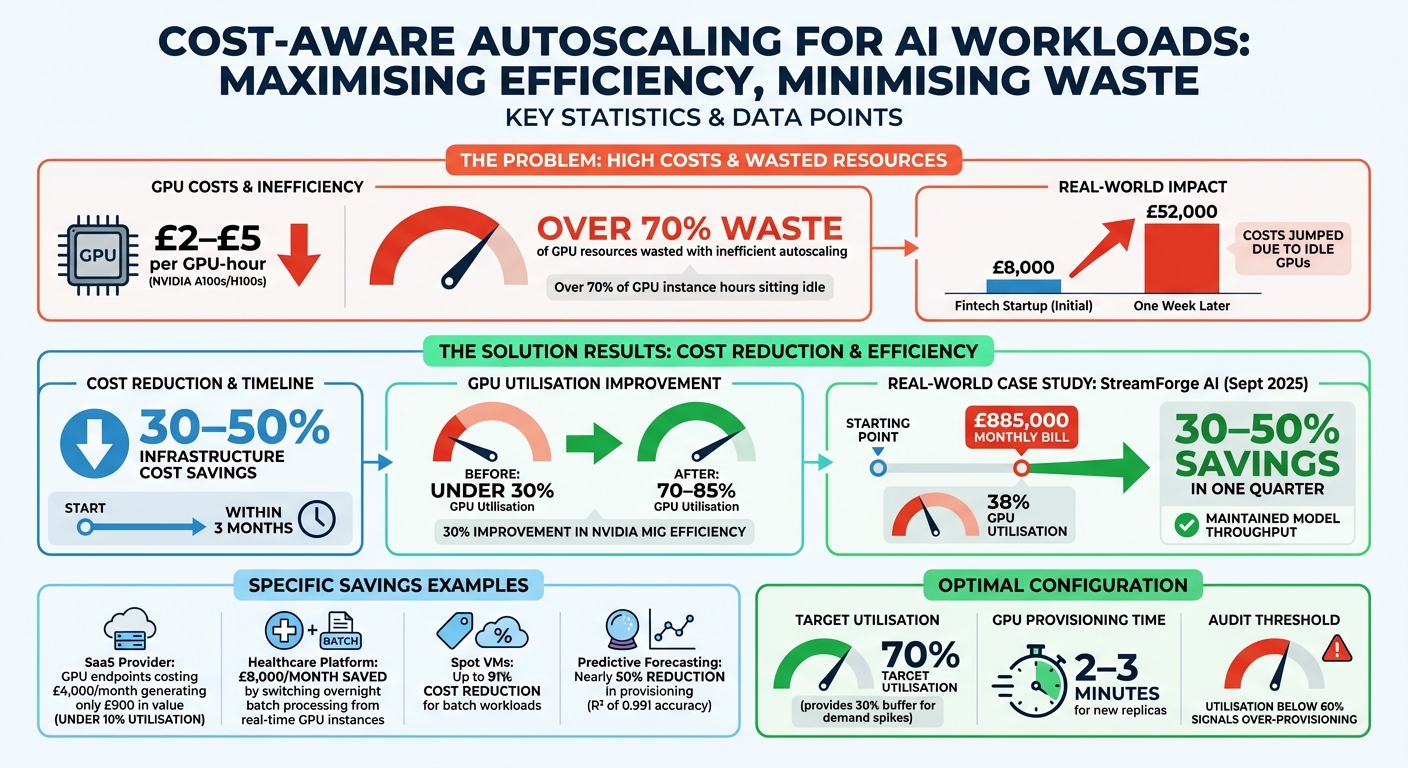 {Cost-Aware Autoscaling: Key Statistics and Savings for AI Workloads}
:::
{Cost-Aware Autoscaling: Key Statistics and Savings for AI Workloads}
:::
Cost Optimization for ML Infrastructure: Smarter AI at Lower Cost | Uplatz

How to Implement Cost-Aware Autoscaling
Creating a cost-aware autoscaling system revolves around three key elements: predictive intelligence, workload-specific configurations, and financial controls. Each component plays a vital part in ensuring your AI infrastructure remains both efficient and budget-friendly.
Using AI to Predict Resource Needs
Machine learning models can analyse historical usage data to predict future resource demands, helping you stay ahead of capacity needs. For instance, a study using Random Forest regression on cluster traces showed that accurate forecasting could reduce provisioning by nearly 50%. By processing around 5,000 jobs into 25 numerical features - such as CPU and memory requests alongside usage distribution statistics - the model achieved an impressive R² of 0.991. This meant it could accurately predict that a job requesting 20 CPUs might only need 8–10 CPUs in reality [7].
Cloud platforms like Google Cloud and AWS offer predictive scaling options. Google Cloud requires at least 3 days of historical data to provide forecasts, while AWS needs a minimum of 24 hours, though 14 days is recommended for identifying usage patterns [5][6]. To ease into predictive scaling, start with a forecast only
mode to see how the system would have scaled your infrastructure. Don’t forget to account for GPU boot times during the initialisation period, ensuring resources are ready when demand spikes [5][6].
This predictive approach lays the groundwork for scaling strategies tailored to specific workload types.
Matching Autoscaling to Workload Types
Not all AI workloads behave the same, so your autoscaling strategy needs to match their unique requirements. For example, serving workloads - which are often bursty and highly sensitive to latency - benefit from rapid scaling with a buffer to handle sudden demand surges. Monitoring queue size is a practical way to keep throughput high while maintaining acceptable latency.
On the other hand, batch workloads like model training are more tolerant of delays, making them ideal for cost-saving options like Spot VMs, which can reduce expenses by up to 91% [9]. Adjusting stabilisation windows, such as the default 5-minute delay for scale-down, ensures resources aren’t prematurely removed during short-term dips in activity [8]. For applications that need near-instant scaling, consider using pause pods - low-priority placeholders that reserve cluster space until high-priority tasks require the resources [9].
By aligning scaling strategies with workload behaviour, you can balance performance and cost effectively.
Setting Budget Controls and Alerts
To prevent unexpected costs from spiralling out of control, financial guardrails are essential. Start by applying detailed resource labels - such as project, team, environment, or model - so you can track expenses more accurately [11]. Use Kubernetes resource quotas and maximum capacity limits to cap spending during periods of high demand [6][12].
Before activating live scaling, use simulation modes to estimate potential budget impacts. Pair this with anomaly dashboards to quickly identify and address deviations in cost or performance. Additionally, Pod Disruption Budgets (PDBs) can help maintain stability by limiting how many replicas are scaled down at once, keeping your system steady while managing costs [10][12].
Using Service Level Objectives (SLOs) to Control Costs
Building on earlier discussions about predictive scaling and budget controls, Service Level Objectives (SLOs) take autoscaling a step further by tying performance directly to business outcomes. Instead of relying solely on reactive metrics, SLOs focus on specific performance targets like inference latency, throughput, or queue wait times [1][9].
A dual-signal approach to autoscaling combines performance SLOs with financial metrics. For instance, StreamForge AI used this method on AWS EKS in September 2025, incorporating both p95 latency and cost per 1,000 requests into their scaling rules. This approach enabled them to reduce a £885,000 monthly bill - based on 38% GPU utilisation - by 30–50% within just one quarter, all while maintaining model throughput [3].
Embedding FinOps early in the architecture forces every scaling decision to answer two questions at once: Does this design meet the performance SLOs of the AI/ML workload? Can we afford to run it that way - today and as usage grows?- FinOps.org [3]
Model tiering is another strategy that helps match infrastructure costs to business priorities. For example:
- Tier 1 workloads (mission-critical, real-time inference) demand dedicated GPU instances to achieve sub-second latency.
- Tier 2 workloads (internal scoring) can handle moderate latency and run on shared compute pools.
- Tier 3 workloads (experimental or batch processing) are delay-tolerant and can use Spot instances, which can reduce costs by up to 91% [1][9].
To ensure smooth scaling, setting target utilisation at around 70% creates a 30% buffer to handle spikes in demand while waiting for new GPU replicas to provision, which usually takes 2–3 minutes [9].
Financial guardrails are crucial for keeping costs under control. Hard limits on concurrent GPU instances per team can prevent runaway expenses. Additionally, pairing performance alerts (e.g., latency > 100ms
) with financial alerts (e.g., cost per 1,000 requests > target
) helps avoid scenarios where idle GPUs consume over 70% of instance hours unnecessarily [1][3].
Need help optimizing your cloud costs?
Get expert advice on how to reduce your cloud expenses without sacrificing performance.
Autoscaling Trade-Offs to Consider
When it comes to autoscaling for AI workloads, there’s always a balancing act between cost efficiency, computational performance, and model accuracy. What works for lightweight models might fall short when dealing with large language models or complex vision systems.
One of the biggest decisions revolves around the type of compute resources. Lightweight models, like Random Forests or basic neural networks, are well-suited for CPU-based instances. These are not only quick to provision but are also significantly cheaper. On the other hand, complex models - think Transformers or large vision networks - need powerful GPUs like the A100 or H100. These GPUs can be 10–20 times more expensive than CPUs and come with added delays for loading model weights and setting up CUDA drivers [1][2]. This makes choosing the right compute type a careful balancing act between cost and efficiency.
Autoscaling is designed to maintain performance, not manage spending. Without clear guidance, it can increase infrastructure costs significantly, especially in GPU-based AI systems.– CloudOptimo [1]
As models grow in complexity, so do inference costs. This highlights the importance of scaling strategies that account for model-specific factors like input size, memory demands, and concurrency needs. Relying on generic CPU or RAM metrics alone won’t cut it [1][2]. Instead, integrating these model-level attributes into your autoscaling decisions can help align performance goals with budget constraints.
Workload Tiering: A Smarter Approach
Workload tiering offers a way to manage costs while meeting performance needs. For instance, mission-critical models can run on dedicated GPUs, targeting utilisation rates of 70% to 85%. Meanwhile, less time-sensitive tasks or experimental models can take advantage of Spot instances, which can slash costs by up to 90%. Shared compute pools are another option for these workloads [1].
For models with high cold-start overheads, adopting longer cooldown periods can help prevent unnecessary resource cycling. In contrast, lightweight models benefit from shorter cooldowns - typically 5 to 10 minutes - to quickly release unused capacity [1].
Lightweight vs Complex Models
The type of model you’re working with should shape your autoscaling strategy. Lightweight models - such as decision trees, simple classifiers, or small neural networks - are ideal for burstable CPU instances. These scale out quickly and have minimal setup times [2]. Complex models, including Transformers, LLMs, and large vision networks, require more proactive strategies, such as pre-provisioning instances to handle their lengthy initialisation times [2].
A great example of this in action comes from StreamForge AI. In September 2025, they used AWS EKS to implement fractional GPU sharing (leveraging NVIDIA MIG) for lightweight transformers. At the same time, they shifted non-critical Ray tuning jobs to Spot GPUs, adding three-minute checkpointing. This approach maintained throughput while keeping costs under control [3]. Additionally, their cluster-sweep
CronJob, which automatically deleted unused storage volumes older than seven days, saved them thousands of pounds each month [3].
Business Benefits of Cost-Aware Autoscaling
Cost-aware autoscaling isn't just a technical upgrade; it has a direct and measurable impact on business outcomes. By aligning computing expenses with actual demand, organisations can significantly reduce costs while maintaining performance. In fact, companies that implement FinOps principles alongside intelligent scaling often see their AI infrastructure costs drop by 30–50% within just three months [3].
Let’s look at some real-world examples. A SaaS provider offering personalised recommendations in September 2025 faced high costs from always-on GPU endpoints. These GPUs cost £4,000 per month but only handled 7–8 requests per second, generating just £900 in value due to utilisation rates below 10% [1]. By adopting cost-aware autoscaling and batching, they slashed these operating expenses dramatically. Similarly, a healthcare platform transitioned its overnight patient risk-score calculations from high-performance real-time GPU instances to a batch-oriented setup, saving £8,000 per month on compute [1].
The secret to these savings lies in optimising resource utilisation. Cost-aware strategies can boost utilisation rates from under 30% to an impressive 70–85% [1]. Technologies like NVIDIA Multi-Instance GPU (MIG) further enhance efficiency by enabling multiple lightweight inference tasks to share a single GPU, cutting idle waste by around 30% [3]. For UK organisations, this means stretching every pound spent on GPU capacity to its fullest potential.
Another major advantage is the reduction in manual work. Automated resource management allows engineering teams to focus on developing models rather than spending time on manual tuning [13]. When combined with proper tagging and cost attribution, businesses gain clear insights into which models and teams are driving expenses. This transparency supports smarter, data-driven investment decisions.
True scalability is more than a lift-and-shift to the public cloud... it is about building elastic, cost-aware, and governance-ready systems.– Ketan Bhadekar, Director of Technology & Platforms, VE3 [4]
These efficiency gains and cost reductions not only improve profitability but also simplify operations. For businesses in the UK aiming to optimise their AI cloud spending, experts like Hokstad Consulting can help craft cost-aware autoscaling strategies that align computing expenses with business goals.
Conclusion
Cost-aware autoscaling bridges the gap between infrastructure demand and performance needs, all while keeping an eye on expenses. Traditional autoscaling often focuses on availability, which can lead to over 70% of GPU instance hours sitting idle [1]. A smarter approach is dual-signal scaling, which combines performance metrics with financial KPIs to ensure every scaling decision meets both technical goals and budget constraints [3].
A key step is to differentiate workload types. For example, real-time conversational AI requires lightning-fast responses, relying on dedicated GPUs. On the other hand, offline batch processing can afford delays and makes better use of spot instances, which are far more cost-effective [1][3]. Tools like NVIDIA MIG take this further by enabling fractional GPU sharing, so multiple lightweight tasks can share a single GPU, significantly boosting utilisation [3]. This distinction is essential for tailoring scaling strategies to meet diverse operational needs.
Without proper oversight, autoscaling can drive up costs, especially in AI systems reliant on GPUs [1]. Balancing performance and cost requires careful configuration. For instance, regularly auditing GPU usage is critical - consistent utilisation below 60% signals over-provisioning [1]. Other practical measures include setting strict limits on maximum concurrent instances, introducing 5–10 minute cooldown periods for workloads prone to sudden spikes, and prioritising models by their importance [1][3].
For UK organisations looking to optimise their GPU spending, experts like Hokstad Consulting can help craft tailored autoscaling strategies. By aligning operational efficiency with financial discipline, businesses can ensure every pound spent on GPU capacity delivers maximum value.
FAQs
How can predictive intelligence help reduce the cost of AI infrastructure?
Predictive intelligence examines workload patterns to anticipate future demand, allowing for just-in-time autoscaling. This means resources can be adjusted - either increased or decreased - exactly when required, cutting down on unnecessary over-provisioning and minimising idle computing time.
By matching resource allocation closely with actual usage, predictive intelligence enables businesses to manage AI infrastructure costs more effectively, all while keeping performance and reliability intact.
What are the advantages of using NVIDIA Multi-Instance GPU (MIG) for AI workloads?
NVIDIA's Multi-Instance GPU (MIG) technology enables an Ampere-class GPU to be split into as many as seven separate, isolated instances. Each of these instances gets its own dedicated compute and memory resources, making it possible to run multiple AI tasks at the same time without any interference between them.
This setup boosts GPU utilisation, delivers steady performance with predictable throughput and latency, and helps cut costs by making the most out of your hardware. It's a smart choice for handling a variety of AI workloads in parallel while ensuring strong performance and clear resource separation.
How can financial safeguards help control costs in AI autoscaling?
Keeping expenses in check during AI autoscaling requires smart financial measures like budget caps, resource quotas, and real-time cost alerts. These tools work together to automatically adjust or limit compute resources as spending nears set thresholds, preventing any surprise costs.
By establishing clear spending limits and keeping a close eye on usage in real time, organisations can maintain a balance between performance and cost control. This approach ensures AI workloads scale efficiently without pushing past budget boundaries.