
If I want Agile delivery to work, I need every change to stay ready for release. That means small merges, automated tests, one built artefact moved through each stage, and a clear path from commit to production. In many UK firms, that path still includes a human approval step - which is why continuous delivery fits better than continuous deployment.
Here’s the article in plain terms:
- Continuous delivery keeps code releasable
- Trunk-based development helps teams avoid long merge problems
- Fast test layers and early checks cut delay
- The same artefact should move from Dev to Staging to Production
- Manual approvals and audit trails matter in regulated teams
- Blue-green, canary, and rolling releases each trade off risk, rollback, and cost
- Shared templates help many teams follow the same rules
- Key metrics include deployment frequency, lead time, failure rate, MTTR, flow efficiency, and pipeline duration
- Cost control comes from test parallelism, caching, runner sizing, and artefact retention
- Risk stays lower when I match controls to change size and use feature flags, staged rollout, and rollback plans
A few numbers stand out. The article says many enterprises still take 18 hours to go from commit to production. It also points to 5–15 minutes as a target for commit feedback, 80% code coverage as a common gate, and under one hour for MTTR as a useful service goal.
If I strip it back even more, the message is simple: build once, test early, promote the same package, gate production well, and measure what slows delivery down.
| Area | What matters most |
|---|---|
| Workflow | Small changes, short-lived branches, fast feedback |
| Quality | Unit tests first, static analysis, security scans, clear gates |
| Release | Dev → Staging → Production, with approvals where needed |
| Governance | Shared templates, pinned versions, audit logs, least privilege |
| Performance | Lead time, deployment frequency, fail rate, MTTR |
| Cost | Caching, parallel tests, right-sized runners, artefact cleanup |
That gives me the full shape of the article before the detail begins.
Jez Humble – Continuous Delivery
Core foundations of a workable delivery pipeline
Before CD can spread across services or teams, a few technical and organisational basics need to be in place. If they aren't, scale doesn't fix anything. It just multiplies drift, delay and inconsistency. Get these foundations right, and the path from code to production becomes much easier to shape.
Engineering practices that enable safe, frequent releases
A practical place to start is trunk-based development. Everyone integrates into a single main branch, while feature branches stay short-lived and disappear quickly. That cuts down the integration mess that builds up when teams work separately for weeks at a time. It also fits the small, frequent releases that Agile iterations rely on.
Automated testing sits underneath all of this. The aim is a layered test suite: a broad base of fast unit tests, a smaller set of integration tests, and only the most critical end-to-end tests. The key idea is simple: keep feedback fast at every stage.
Immutable, versioned artefacts are just as important. Build once, tag once, and promote the same artefact through each environment [2]. Pair that with Infrastructure as Code (IaC) so development, staging and production stay aligned [1]. When environments are defined the same way, drift is far less likely.
Once feedback is fast and artefacts stay fixed, the pipeline can move cleanly from build to production.
Team design, ownership and shared standards
The people side matters just as much as the tooling. Continuous delivery works best when developers, testers, product stakeholders and operations share accountability for pipeline quality [1]. If those duties are split into silos, handoffs slow things down and ownership gets blurry.
At enterprise scale, centralised pipeline templates help stop configuration sprawl. A version-controlled template library can encode approved patterns for builds, security scans and deployments [3]. Teams then extend those templates instead of building pipelines from scratch. That helps keep security and compliance standards steady across the estate [3]. A good rule here is to standardise security, artefact handling, deployment gates and compliance reporting, while leaving toolchain choice to teams when it doesn't add risk [3].
With these basics in place, the next step is to define the pipeline stages, approvals and release patterns.
Designing the continuous delivery workflow from code to production
::: @figure 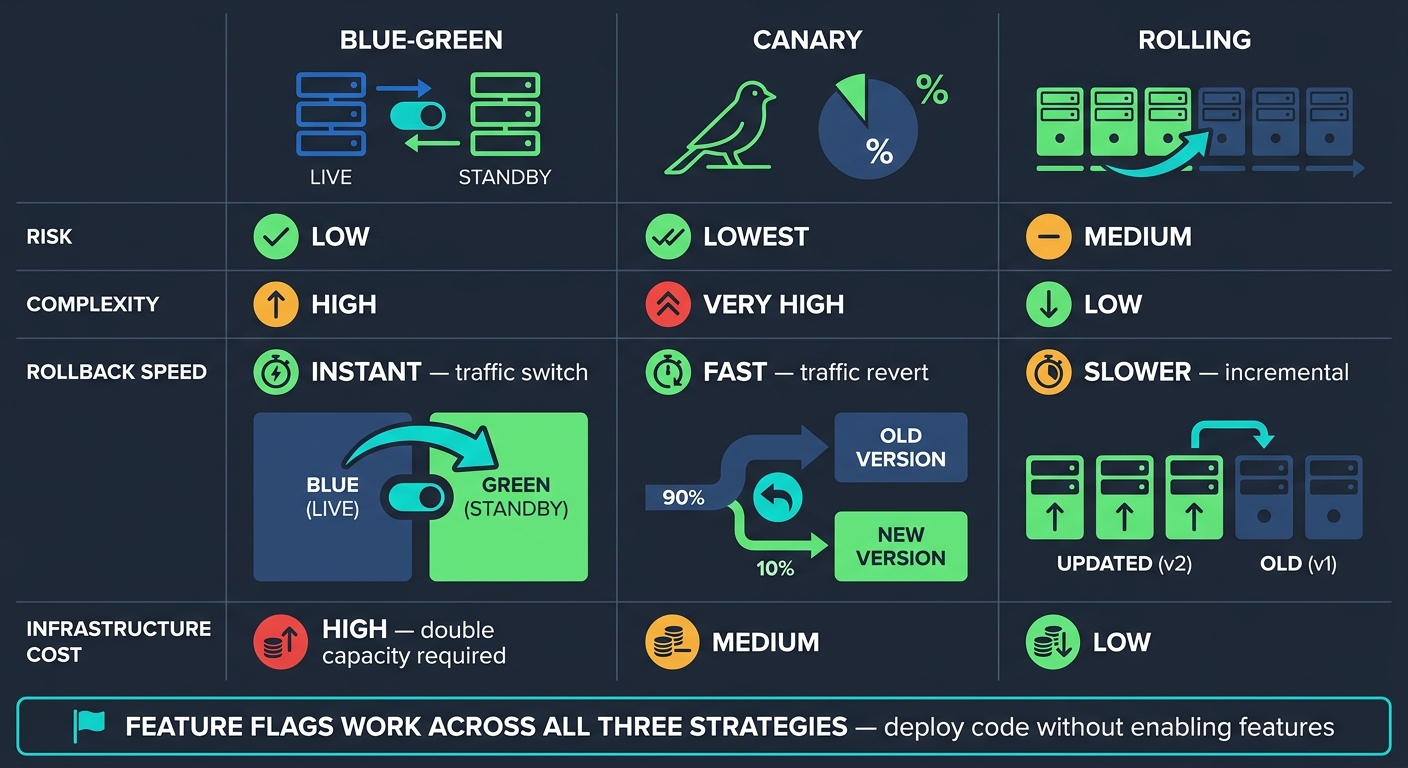 {Continuous Delivery Release Strategies: Risk, Complexity & Cost Compared}
:::
{Continuous Delivery Release Strategies: Risk, Complexity & Cost Compared}
:::
Build, test and security stages that support rapid feedback
The goal is simple: keep Agile feedback loops short while making sure every change stays releasable. That starts with stage order.
Put the cheapest checks first. Run linting and unit tests at the start, and stop the pipeline before integration tests or security scans if those early checks fail [5]. It saves time, cuts waste, and gives developers a clear answer fast.
With stages in the right order and caching in place, commit-to-production feedback can land in 5–15 minutes [2]. That’s fast enough to keep momentum without letting bad changes drift too far downstream. A common setup is to run unit tests, static analysis and security scans in parallel, then use dependency caching to trim build time even more [2][5].
Quality gates sit between stages and act like a checkpoint. A common baseline is:
- 80% code coverage
- A passing static analysis result [2]
The pipeline either clears the gate or it doesn’t. No grey area, no long debate, just a clear signal within minutes.
Once the build is green, the same artefact should move through promotion without being rebuilt.
Promotion, approvals and release patterns
After a build passes its quality gates, promotion should follow a staged path: Dev → Staging → Production [2][3]. Production promotion often needs manual approval or automated proof of compliance [2][3]. Staging also needs to stay close to production, so release issues show up before they hit live users [2].
In regulated settings, approvals need a proper audit trail. One practical way to do that is to store a change request ID from Jira or ServiceNow as a pipeline variable. That creates an immutable link between the artefact and its authorisation record [3]. Pipelines can also be gated by those status checks, which keeps a clear chain of custody from change request to production [3]. Delivery keeps moving, but auditability stays intact.
From there, the release pattern should match the level of risk, rollback speed and infrastructure spend your team can handle.
| Strategy | Risk | Complexity | Rollback Speed | Infrastructure Cost |
|---|---|---|---|---|
| Blue-Green | Low | High | Instant (traffic switch) | High (double capacity) |
| Canary | Lowest | Very High | Fast (traffic revert) | Medium |
| Rolling | Medium | Low | Slower (incremental) | Low |
Feature flags work across all three approaches. They let teams deploy code to production without turning it on straight away. That split matters. Releasing code and enabling a feature are not the same thing.
Database changes need extra care as well. The expand-contract pattern keeps schema changes backward-compatible before the application code that depends on them goes live [3].
Workflow patterns for multi-team and mixed-architecture estates
At enterprise scale, the challenge changes. It’s no longer just about one good pipeline. It’s about making sure lots of teams follow the same release rules.
When dozens of teams ship on their own schedules, pipeline consistency becomes a governance problem as much as an engineering one. Shared template libraries stored in a dedicated repository can encode approved patterns for builds, security scans and deployment gates [3]. Instead of writing pipelines from scratch, teams extend those templates. That keeps compliance standards aligned without slowing everyone down.
One detail matters more than it may seem: pin templates to a released tag. That way, platform updates don’t silently break team pipelines [3].
Scaling continuous delivery across the enterprise
Governance, templates and platform support
At enterprise scale, speed matters only when pipelines follow the same guardrails. In mixed estates - spanning legacy systems, microservices and cloud-native services - the hard part is not building one solid pipeline. It is keeping many pipelines aligned.
The answer is usually light guardrails, not heavy central control. Those guardrails often include manual approvals, deployment locks, branch controls and environment-level protection rules on Development, Staging and Production [3]. Keep immutable audit logs of deployments, configuration changes and approvals, and export them to a centralised SIEM for long-term retention where possible [3].
Governance sets the rules. Templates make those rules usable day to day. Use one shared template repository, and pin each pipeline to a tagged version so platform updates do not break live teams [3].
Your operating model shapes the trade-off between control and speed [3]:
| Model | Defining Characteristic |
|---|---|
| Autonomy-Heavy | Full team freedom; inconsistent compliance |
| Platform-Led (Golden Paths) | Shared controls, local autonomy |
| Centrally Standardised | Maximum consistency; slower delivery |
For most enterprises, platform-led golden paths are the best fit. Teams keep room to move, but security and compliance sit inside the path they already use instead of being bolted on later.
Apply least privilege to deployment credentials. A connection used for Kubernetes deployments should not also have permission to modify databases [3]. Organisations with more than 200 pipelines average 23 service connections with overly permissive access scopes that are not actively monitored [3]. That is the kind of risk that stays quiet until it bites.
Metrics that show delivery performance and reliability
Once the operating model is in place, measurement tells you whether delivery is getting better or just looking busy. Track speed, stability and flow together:
| Metric | Category | What It Tells You |
|---|---|---|
| Deployment Frequency | Velocity | How often code reaches production successfully |
| Lead Time for Changes | Velocity | Time from commit to production deployment |
| Change Fail Rate | Quality | Percentage of deployments causing a production failure |
| Mean Time to Recovery (MTTR) | Reliability | How quickly the team restores service after an incident |
| Flow Efficiency | Process | Ratio of active work time to total lead time |
| Pipeline Duration | Efficiency | Total time for a single pipeline run, start to finish |
The average enterprise takes 18 hours from commit to production [4]. That figure shows the gap between having pipelines and having continuous delivery.
Lead time and deployment frequency show velocity. Change fail rate and MTTR show stability. Flow efficiency is handy for spotting where work sits idle - often in approval queues or environment wait states, not in the build itself. Pipeline duration helps show where compute time is being burned.
When teams track these measures the same way, they become a shared language across engineering and leadership. That makes it easier to back investment, choose what to fix first and show progress over time.
Controlling cloud and pipeline costs at scale
The average enterprise spends US$4.6 million each year on CI/CD infrastructure [4], and inefficient pipelines can lead to US$2.3 million in annual productivity losses [4]. Those are not small numbers.
The biggest cost drivers are also some of the easiest to fix: inefficient test suites running sequentially, long-running build agents, poor caching and artefact sprawl [6]. Test splitting and parallel execution, auto-scaling runner pools and spot instances, and centralised caching for common dependencies and Docker layers can cut both build time and compute spend [6]. Artefact lifecycle policies - such as deleting pull request artefacts after seven days - stop storage costs from creeping up in the background [6].
Start with the areas that usually move the needle fastest:
- Test runtime
- Runner sizing
- Caching
- Artefact retention
Improvement, risk management and conclusion
Reducing risk while increasing release frequency
Once the pipeline is in place, the hard part is keeping delivery fast without making production risk drift upward.
More releases shouldn't mean more danger. The trick is simple: match the control to the size of the change. Use automated gates for routine updates, manual approval for high-risk releases, and progressive delivery for customer-facing changes. That way, teams keep moving without treating every deployment like a major event.
For high-risk changes, branch protection should require two approvers to meet SOC 2 and ISO 27001 audit requirements [7].
Using AI and automation to improve delivery workflows
After the controls are set, automation should take manual work out of that same path.
Use AI to flag flaky tests, summarise incidents, and draft release notes. Then use automation to run the same checks every time, with no shortcuts and no guesswork. That kind of consistency matters because it helps teams keep MTTR under one hour [7].
Conclusion: the operating model UK teams should aim for
Continuous delivery gets better through repetition, measurement, and small, safe releases.
The model UK teams should aim for is one where production releases feel routine, risk is handled by design, and improvement is part of day-to-day work. The target is a pipeline that stays fast, auditable, and easy to recover.
FAQs
How do I start continuous delivery in a legacy estate?
Start with a careful review of your applications, infrastructure and release process. Get every asset into version control first. Then automate builds and compilation, line up your environments so they behave the same way, and add automated tests across unit, integration and end-to-end levels.
From there, bring in deployment automation step by step, with a strong rollback plan in place. Your pipelines should fit around current deployment methods and older constraints, including database migration scripts and security protocols, so you can move towards continuous delivery without disrupting critical operations.
When should I choose blue-green, canary, or rolling releases?
Choose the approach based on your organisation’s appetite for risk, release speed, and infrastructure spend.
- Blue-green: best if you want instant rollback and almost no downtime, but it costs more because you run two live environments.
- Canary: best if you want to roll out changes bit by bit, watch live performance, and limit risk before a full release.
- Rolling: best if you want zero downtime without the extra infrastructure cost, though rollback usually takes longer.
What should I measure first to improve delivery speed?
Start by measuring lead time for changes. It shows how long it takes for a code commit to make its way into production.
This metric helps you spot bottlenecks in the workflow. If delivery is slowing down, you can see where the pipeline is getting stuck and focus on smoothing it out.