
Container image scanning is a security process that identifies vulnerabilities, malware, and misconfigurations in container images. It plays a key role in CI/CD pipelines by catching risks early, blocking insecure images from moving to production, and ensuring continuous monitoring after deployment.
Key Takeaways:
- Scanning inspects each container layer, operating system packages, and application dependencies.
- Vulnerabilities are matched against databases like NVD and CVE.
- Tools can enforce policies, halt builds, and block non-compliant images in Kubernetes clusters.
- Switching to distroless images significantly reduces vulnerabilities and image sizes (e.g., from 24 vulnerabilities and 77.98MB to 2 vulnerabilities and 6.93MB).
- Inline scanning protects proprietary code by analysing locally before pushing to registries.
Best Practices:
- Scan at multiple stages: build, registry, and deployment.
- Automate decisions with scanner exit codes (0 for pass, 1 for fail).
- Use immutable tags to ensure consistency.
- Optimise Dockerfiles for efficiency and security.
- Continuously monitor images for new vulnerabilities.
With tools like Trivy, Snyk, and Aqua Security, you can integrate scanning into your pipeline, block risks, and maintain secure deployments without slowing down development.
How Container Image Scanning Works
Image Retrieval and Analysis
The process kicks off by retrieving the container image from sources like Docker registries, local daemons, or archive files. Once retrieved, the scanner breaks the image into its immutable layers, analysing each one for software packages, binaries, libraries, and operating system files. This layer-by-layer inspection helps trace specific components to the Dockerfile instructions that introduced them, along with any associated vulnerabilities.
But it doesn’t stop at packages. Scanners also review the Dockerfile and metadata for potential security missteps. These might include running the container as a root user, exposing risky ports like SSH (port 22), or using mutable tags like :latest instead of fixed versions. With the image thoroughly dissected and reviewed, the next step is identifying vulnerabilities.
Vulnerability Detection
Scanners rely on static analysis to uncover vulnerabilities, comparing installed packages against recognised databases like the National Vulnerability Database (NVD) or the Common Vulnerabilities & Exposures (CVE) database [5][1]. This process covers both operating system-level packages (installed via tools like apt, yum, or apk) and dependencies from language-specific ecosystems, such as Maven for Java, npm for Node.js, or PyPI for Python [4][2].
Some advanced scanners go a step further, using tools like ClamAV to spot malware signatures [7]. Additionally, many platforms offer continuous monitoring, updating the security status of stored images whenever new vulnerabilities are disclosed [4][3]. This means an image that seems secure today could be flagged tomorrow if fresh vulnerabilities come to light. These findings feed directly into the reporting and enforcement phases.
Reporting and Policy Enforcement
The results of a scan are presented in various formats tailored to different needs: developers might prefer human-readable CLI outputs, while JSON reports are ideal for automated systems. Compliance teams can rely on PDF summaries, and CycloneDX SBOMs (Software Bill of Materials) help track dependencies [7][2][3]. Scanners also use exit codes to guide CI/CD pipelines, signalling whether to proceed (exit code 0) or halt (exit code 1) based on established security thresholds [7][3].
In Kubernetes environments, admission controllers use validating webhooks to block images that haven’t been scanned or fail to meet security policies [3][5]. Tools like Open Policy Agent (OPA) enable more nuanced enforcement, applying stricter rules in production while being more lenient in development [3]. Cloud providers further enhance security by generating attestations - digital signatures that confirm an image has passed all checks before it’s deployed [4].
To manage false positives, teams can use allowlist files (e.g., vulnerability-allowlist.yml) to bypass specific CVE IDs [2][4]. This approach keeps security policies practical, ensuring legitimate deployments aren’t unnecessarily delayed.
How to Scan Docker Image with Trivy in CICD Pipeline running in a Jenkins Container | Step-by-Step
Integrating Container Image Scanning into CI/CD Pipelines
::: @figure 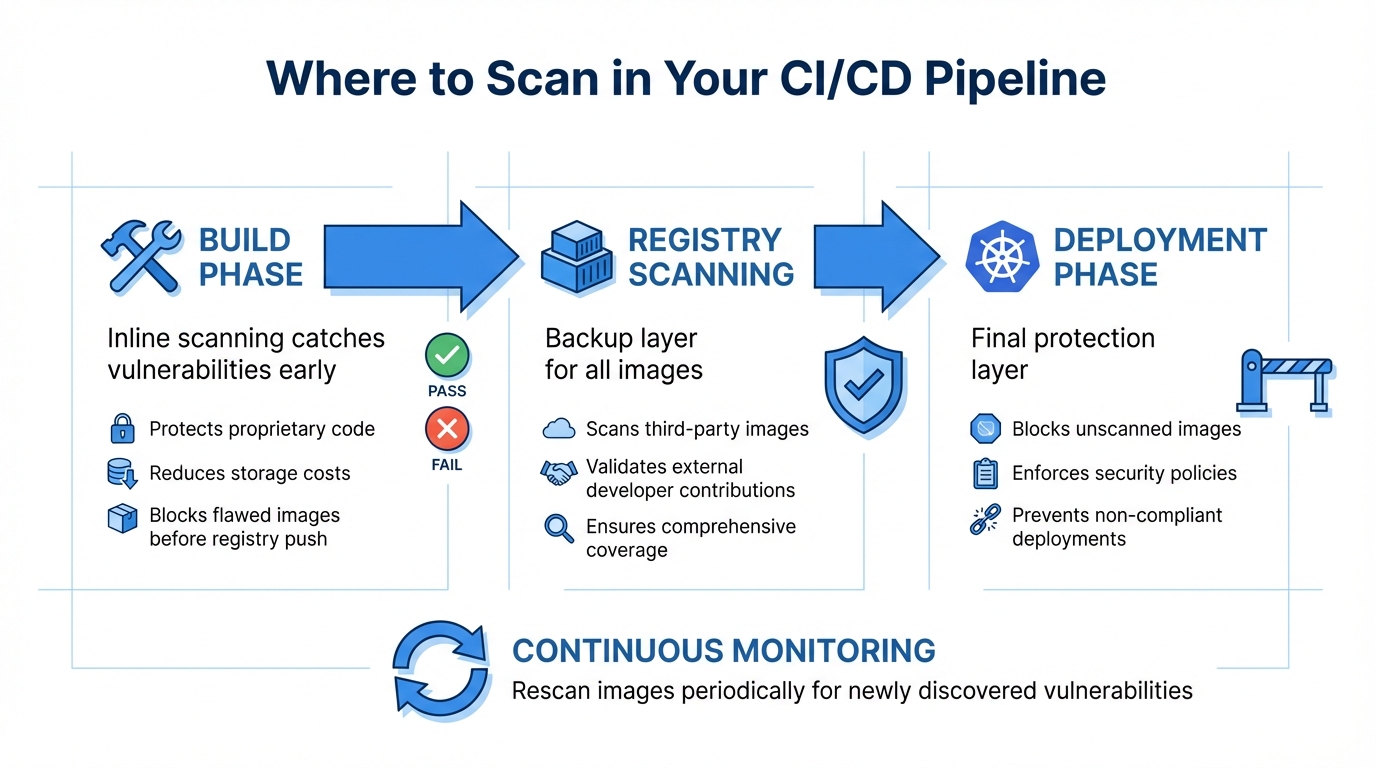 {Container Image Scanning CI/CD Pipeline Integration Points}
:::
{Container Image Scanning CI/CD Pipeline Integration Points}
:::
Where to Scan in Your CI/CD Pipeline
The best way to secure your CI/CD pipeline is by scanning at multiple stages, rather than relying on a single checkpoint. Start with the build phase. Using inline scanners here helps catch vulnerabilities early, preventing flawed images from making it to the registry. This approach not only keeps your proprietary code safe but also cuts down on storage costs by blocking problematic images before they’re pushed [7][3].
Next, registry-level scanning acts as a backup. It ensures that all images - including those from third-party vendors or external developers - are thoroughly checked before deployment [3][4]. Finally, Kubernetes admission controllers provide an additional layer of protection. They block any image that hasn’t been scanned or fails security policies from being scheduled in production [3][5]. Since new vulnerabilities can appear daily, it’s essential to rescan images periodically - even those already running in production [4][6]. By combining these scanning points, you create a thorough security net across your development pipeline.
Best Practices for Integration
Once you’ve identified the best scanning points, the next step is implementing practices to secure your pipeline effectively. Automate decisions within the pipeline by configuring scanner exit codes: an exit code of 0 allows the process to continue, while 1 halts it for critical vulnerabilities [8].
To maintain consistency between scanned and deployed images, use immutable tags (like SHA256 digests) to pin image versions [3]. When building images, structure your Dockerfile strategically. Place larger, unchanging layers (like the base operating system) at the beginning and frequently updated application code at the end. This setup improves cache efficiency, speeding up both builds and scans [3]. For added security, enable malware scanning for images from untrusted sources as part of your inline scanning process [7].
Common Challenges and How to Solve Them
Even with a well-integrated scanning process, challenges can arise. Addressing these ensures your CI/CD pipeline runs smoothly. One common issue is performance bottlenecks. Switching to distroless images can help, as they reduce vulnerabilities and shrink image sizes [3]. Privacy concerns can also surface when pushing images to staging registries. Inline scanning resolves this by analysing images locally and only transmitting metadata, keeping sensitive credentials secure [3][7].
Another challenge is managing vulnerabilities. Focus on fixing issues marked as High
or Critical
that have available patches, filtering by severity and exploitability [1][2]. To avoid repeated disruptions from false positives, use a vulnerability-allowlist.yml file to exclude known, non-applicable issues from breaking builds [2]. Lastly, ensure no images bypass CI/CD checks by using Kubernetes admission controllers with validating webhooks or Open Policy Agent (OPA). These tools intercept API requests and block non-compliant images at the cluster level [3][6].
Need help optimizing your cloud costs?
Get expert advice on how to reduce your cloud expenses without sacrificing performance.
Tools and Technologies for Container Image Scanning
Popular Scanning Tools and Their Features
When it comes to container image scanning, there's a wide range of tools available - from lightweight open-source solutions to enterprise-grade platforms. Trivy is a fast and versatile option, capable of scanning OS packages, application dependencies, infrastructure-as-code files, and even secrets. It's particularly well-suited for CI/CD pipelines, where speed and integration are key [9]. Snyk, on the other hand, integrates seamlessly into development workflows, offering automated fix suggestions that make it easier for teams to address vulnerabilities without needing deep security expertise [9]. For businesses with stringent compliance needs, Aqua Security provides end-to-end protection, from the build phase right through to runtime, with strong policy enforcement features [9].
For those looking for custom registry integrations, Clair offers API-driven static analysis, making it compatible with registries like Harbour and Quay. If you're after a lightweight tool, Grype provides a simple CLI experience with a focus on reducing false positives, making it ideal for automation [10]. Meanwhile, Aikido stands out by using AI to cut down on alert fatigue, offering smarter remediation suggestions [9]. Pricing for these tools varies: Snyk starts at £45 per developer per month, while Trivy, Grype, and Clair are free to use. Enterprise-focused tools like Qualys and Aqua Security typically have custom pricing based on the size of your infrastructure [10]. The right choice ultimately depends on your unique pipeline and security requirements.
How to Choose the Right Tool
Selecting the right container scanner involves balancing several key features. At a minimum, the tool should scan OS packages (such as apt, yum, or apk) and language-specific dependencies (like Go, Java, Node.js, Python, or Ruby). It should also integrate easily with your workflow, whether through a CLI or plugins for platforms like Jenkins or GitLab. Tools that enforce security policies - automatically failing builds when critical vulnerabilities or prohibited licences are detected - are especially valuable [2][3].
Beyond basic vulnerability detection, look for tools that can identify misconfigurations in Dockerfiles, such as running containers as root or exposing insecure ports. The ability to detect hard-coded secrets is another must-have. For better transparency, tools that generate Software Bills of Materials (SBOMs) in formats like CycloneDX or SPDX are incredibly useful. Advanced features like reachability analysis, which determines if a vulnerability is actually exploitable, can help reduce false positives and focus attention on genuine risks [9].
Implementation Examples
Practical examples can help illustrate how these tools fit into real-world workflows. For GitLab users, integrating Trivy is straightforward. By adding the Jobs/Container-Scanning.gitlab-ci.yml template to your pipeline and setting variables like TRIVY_PLATFORM to linux/arm64, you can ensure compatibility across diverse environments [2].
In Google Cloud Build, developers can use the gcloud CLI to implement severity checks. The pipeline builds the container image, runs an on-demand scan, and uses a shell script to parse the results. If critical vulnerabilities are found, the script exits with a failure code, effectively blocking the image from moving to production [11].
For teams using AWS ECR, integrating scanning into a GitLab pipeline is also possible. A before_script step installs the AWS CLI and retrieves a temporary login password using the aws ecr get-login-password command. This password is then passed to the scanner via environment variables (CS_REGISTRY_USER and CS_REGISTRY_PASSWORD), enabling secure scanning of images stored in ECR [2]. These examples show how the right tools and configurations can significantly improve both security and workflow efficiency.
Hokstad Consulting's Approach to Secure CI/CD Pipelines

DevOps Transformation and Automation
Hokstad Consulting brings container image scanning directly into the CI/CD workflow, ensuring vulnerabilities are identified and addressed before deployment. By using inline scanning, images are analysed locally within your build environment. This keeps proprietary code secure while preventing vulnerable images from being pushed to registries [7]. This method not only enhances security but also reduces registry storage costs by blocking rejected image versions from taking up cloud resources [7].
To enforce security policies at the cluster level, Hokstad Consulting employs Kubernetes admission controllers alongside Open Policy Agent (OPA). These tools automatically block any unscanned images or those that fail to meet established security standards [3]. Automated fail-fast
mechanisms are also in place to immediately halt builds when critical vulnerabilities are detected. This proactive approach avoids costly late-stage fixes and emergency rollbacks [3]. These mechanisms integrate seamlessly into the broader CI/CD strategies discussed earlier.
Custom Security and Cost Optimisation Solutions
Hokstad Consulting tailors its services to achieve a balance between security, performance, and cost efficiency. One effective tactic is the use of distroless images, which eliminate package managers and shells, reducing the potential attack surface. Additionally, they optimise Dockerfile layers by placing large, unchanging layers at the top, improving caching efficiency and speeding up both builds and scans [3].
Post-deployment, they ensure continuous runtime monitoring to detect newly identified CVEs without requiring a complete rebuild. This approach maintains security while keeping deployment cycles swift [4]. By combining image slimming, layer optimisation, and ongoing scanning, Hokstad Consulting helps businesses cut cloud costs - specifically in registry storage and data transfer - while also improving deployment speed.
Why Choose Hokstad Consulting
Hokstad Consulting leverages established CI/CD security practices to deliver customised solutions that enhance security and reduce costs. Their expertise spans DevOps transformation, cloud cost optimisation, and bespoke automation, making them an excellent choice for organisations aiming to lower cloud expenses by 30–50% while improving deployment efficiency.
Their no savings, no fee
policy ensures clients only pay based on the cost reductions achieved, with fees capped at a percentage of the savings [hokstadconsulting.com]. Whether you need a one-time cloud cost audit, ongoing support, or a strategic migration with zero downtime, Hokstad Consulting offers flexible engagement models tailored to your needs. By focusing on best practices like image version pinning, misconfiguration scanning, and vulnerability prioritisation, they create secure, efficient pipelines designed specifically for your infrastructure.
Conclusion
Key Takeaways
Container image scanning acts as a crucial first step in safeguarding CI/CD pipelines. By integrating scanning early in the process, vulnerabilities can be identified before they reach registries or production. This proactive approach not only avoids costly fixes later but also reduces the risk of security breaches. Inline scanning adds another layer of protection by analysing images locally and only sending metadata to security services, ensuring proprietary code remains secure [7]. Automating your pipeline with fail-fast mechanisms and enforcing security through Kubernetes admission controllers can block unscanned or non-compliant images [3][5]. Together with continuous runtime monitoring, this layered defence strategy can detect newly discovered CVEs even after deployment [4].
Beyond security, there are practical advantages too. For instance, switching to distroless images can significantly reduce both operating system vulnerabilities and image sizes. A striking example shows a reduction from 77.98MB to just 6.93MB, cutting vulnerabilities from 24 to 2 [3]. These insights highlight the importance of taking immediate steps to strengthen your container security.
Next Steps for Implementation
To put these strategies into action, start by integrating image scanning into your CI/CD pipeline immediately after the build phase. Configure your pipeline to automatically fail builds when high or critical vulnerabilities are detected [3][5]. Use immutable tags or SHA256 digests to pin image versions, avoiding mutable tags like latest
[3].
Consider adopting distroless base images to reduce your attack surface and optimise your Dockerfiles by placing larger, unchanging layers first. This improves caching efficiency and streamlines the build process [3]. Extend your scanning efforts beyond CVEs to include checks for misconfigurations, such as running containers as root, exposing port 22, or embedding leaked secrets [3][6]. Finally, enforce cluster-level security policies by implementing Kubernetes admission controllers with tools like Open Policy Agent [3][5].
These steps provide a solid foundation for a more secure and efficient container management strategy.
FAQs
How is container image scanning integrated into CI/CD pipelines?
Container image scanning fits naturally into CI/CD pipelines as an automated step. Using tools like inline scanners or CI/CD-specific plugins, it examines newly built images for vulnerabilities, misconfigurations, or unapproved content, catching potential problems early.
When security risks or policy violations are detected during the scan, the build can either be halted or flagged as failed. This early intervention helps ensure deployments remain secure and compliant, lowering the chances of issues arising in production environments.
How do distroless images improve container security?
Distroless images improve container security by eliminating unnecessary operating system components like shells, package managers, and other tools. This approach reduces the attack surface, lowering the chances of vulnerabilities being exploited.
With non-essential elements removed, these images also create smaller, more efficient containers. They’re faster to scan and simpler to maintain, making them a smart option for secure and efficient CI/CD pipelines.
How do Kubernetes admission controllers improve security during container image scanning?
Kubernetes admission controllers serve as critical security gatekeepers for your cluster. They step in during the pod creation process, examining container images in real time to identify vulnerabilities or detect policy breaches before deployment.
When an image doesn't align with the set security standards, the admission controller can prevent it from being scheduled. This method ensures that only compliant containers make it into the cluster, helping to safeguard your environment and minimise the risks posed by unverified or insecure images.