
Consul and Istio are two leading service mesh solutions designed to manage communication, security, and observability in microservices architectures. Here's a quick breakdown:
- Consul: Works across multiple platforms (Kubernetes, VMs, serverless), making it ideal for hybrid environments. It has a smaller resource footprint (~30 MB per sidecar) and integrates well with HashiCorp tools like Vault. However, it lacks advanced Layer 7 traffic management and is less Kubernetes-native.
- Istio: Built specifically for Kubernetes, offering advanced Layer 7 traffic control (e.g., fault injection, traffic mirroring) and strong observability with tools like Kiali and Jaeger. It consumes more resources (~50 MB per sidecar) and has a steeper learning curve.
Quick Comparison
| Feature | Consul | Istio |
|---|---|---|
| Platform Support | Works on VMs, Kubernetes, etc. | Kubernetes-focused |
| Traffic Management | Basic L4/L7 | Advanced L7 |
| Resource Usage | ~30 MB per sidecar | ~50 MB per sidecar |
| Observability | Requires manual setup | Integrated tools (Kiali, Jaeger) |
| Ease of Use | Simpler setup | More complex, Kubernetes-native |
Choose Consul for hybrid setups or if you're in the HashiCorp ecosystem. Opt for Istio if you're Kubernetes-heavy and need advanced traffic control and observability.
::: @figure 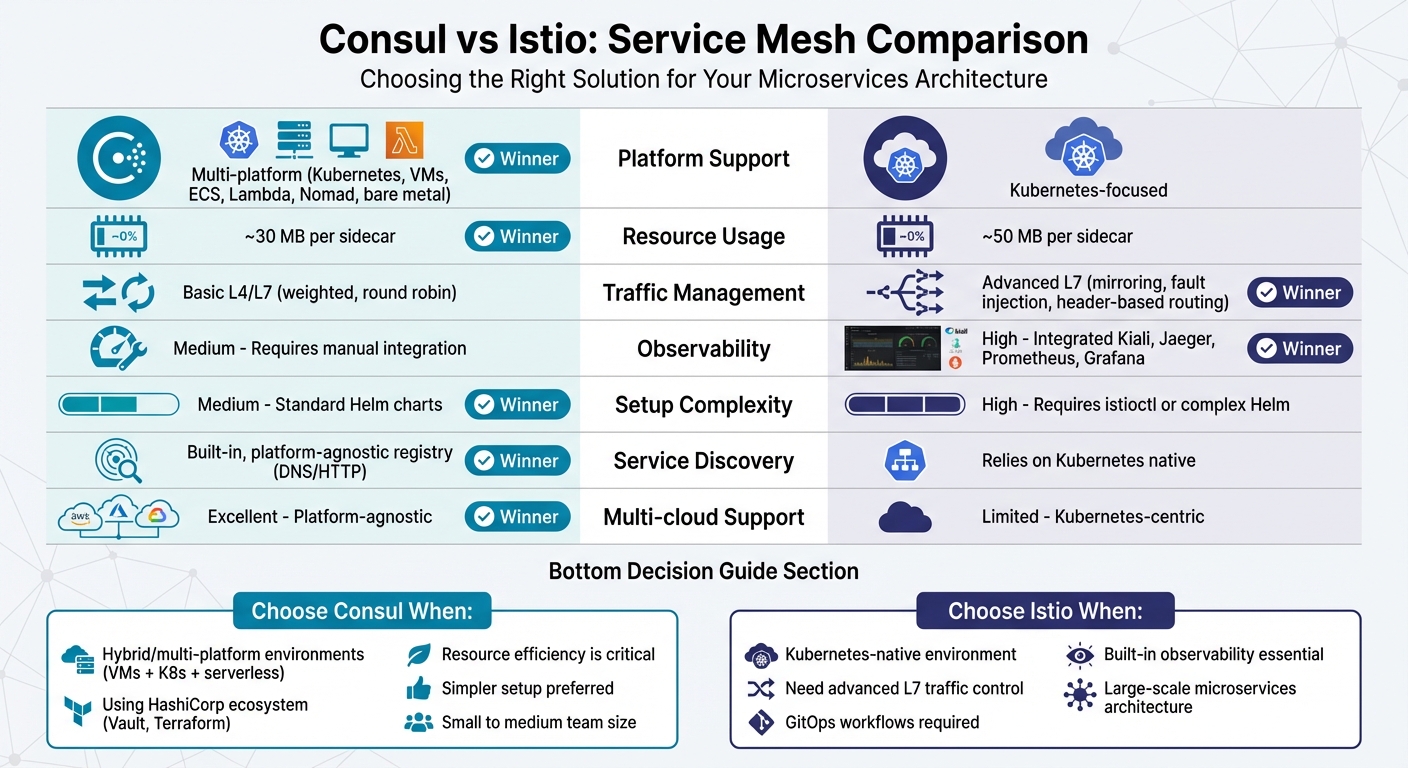 {Consul vs Istio Service Mesh Comparison: Features, Performance, and Use Cases}
:::
{Consul vs Istio Service Mesh Comparison: Features, Performance, and Use Cases}
:::
Consul: Strengths and Weaknesses
Where Consul Excels
One of Consul's standout qualities is its platform neutrality. Unlike many service mesh solutions, it doesn’t restrict itself to Kubernetes. Its control plane and data plane can operate on a wide range of platforms, including virtual machines, ECS, Lambda, Nomad, and even bare metal servers. As HashiCorp's documentation highlights:
Consul is platform agnostic - it supports any runtime (Kubernetes, EKS, AKS, GKE, VMs, ECS, Lambda, Nomad) and any cloud provider [1].
This versatility makes Consul especially appealing for organisations managing hybrid cloud setups or those transitioning from older infrastructure to containerised systems. It can unify service meshes across multiple data centres or VPCs, creating a single security boundary that spans diverse platforms.
Consul also integrates seamlessly with Vault, which allows for automatic TLS certificate rotation without needing to restart services. This feature is particularly useful for teams already using Terraform, Vault, or other HashiCorp tools. Nawaz Dhandala from OneUptime emphasises this point:
Consul is the best choice if you are already in the HashiCorp ecosystem [4].
Its service registry is another strength, built on Raft consensus and proactive health checks, ensuring reliable operation [5].
However, while Consul shines in many areas, it faces challenges in Kubernetes-native environments.
Where Consul Falls Short
Consul's Kubernetes-native support is where it stumbles. Unlike Istio, which uses Custom Resource Definitions (CRDs) that integrate naturally with GitOps workflows, Consul often requires API calls or pod annotations for configuration. As Rurutia1027 from DevOps.dev points out:
Consul's service mesh capabilities are not natively integrated with Kubernetes primitives such as pods, services, and namespaces [6].
Another significant issue lies in security policy enforcement. In early 2026, systems engineer Daniel Quackenbush identified that Consul's intentions
- its way of managing service-to-service communication - could be bypassed. This vulnerability occurs when services communicate via standard Kubernetes DNS (e.g., service:9001) instead of the local proxy address (localhost:9001). While Helm integration is available, this setup can inadvertently lead to bypassing intentions. Quackenbush noted:
With Consul, although it was nice to plugin with Helm, the bypass of intentions with service discovery was ultimately the negator [2].
Consul also lacks advanced Layer 7 traffic management features. Unlike Istio, it doesn’t offer capabilities like traffic mirroring, fault injection, or complex header-based routing [4][6]. While it supports basic traffic splitting for canary deployments and A/B testing, teams needing more advanced traffic control might find these limitations a hurdle. Additionally, its native UI and telemetry tools are less comprehensive compared to Istio's integration with visualisation tools like Kiali [6].
When it comes to resource overhead, Consul’s sidecar proxy requires around 30MB, which sits between Linkerd’s lightweight 10MB and Istio’s heftier 50MB [4]. While not excessive, this overhead can add up in large-scale deployments with hundreds or thousands of services. Multi-datacentre setups also introduce operational complexity, demanding extra effort to maintain consistency and manage distributed tracing - areas where Istio provides more streamlined support [2][6].
Need help optimizing your cloud costs?
Get expert advice on how to reduce your cloud expenses without sacrificing performance.
Istio: Strengths and Weaknesses
Where Istio Excels
Istio's tight integration with Kubernetes makes it a reliable choice for managing service meshes. By using Custom Resource Definitions (CRDs), it works seamlessly with Kubernetes components, ensuring smooth policy enforcement. As Rurutia1027 from DevOps.dev points out:
Istio aligns closely with Kubernetes' architecture, providing a more predictable, observable, and maintainable service mesh than Consul. [6]
One of Istio's standout features is its advanced Layer 7 routing. It supports features like weight-based traffic splitting, retries, circuit breaking, fault injection, and mirroring - all of which give you precise control over service behaviour [4].
When it comes to security and observability, Istio doesn't disappoint. It automates mutual TLS for encrypting pod-to-pod communication and integrates with Kubernetes RBAC to enforce identity-based security across services [3][6]. For observability, Istio offers a comprehensive stack, including tools like Kiali for visualising service dependencies, Jaeger for distributed tracing, and Prometheus with Grafana for metrics [2]. Highlighting recent improvements, Daniel Quackenbush, a full-stack engineer, shares:
The horror stories of Istio have vastly been improved recently, with a simplified control plane. [2]
Istio also shines in multi-cluster and multi-cloud environments, enabling a unified service mesh across providers like AWS, GCP, and Azure [4][6]. These capabilities make it a powerful tool, but not without its challenges.
Where Istio Falls Short
While Istio offers many features, it can be daunting to learn. Developers need to understand Envoy proxies, complex traffic routing configurations, and a multi-tool observability stack (including Kiali, Prometheus, Grafana, and Jaeger). This steep learning curve often demands significant training [6].
Resource usage is another drawback. Istio's sidecar proxies consume roughly 50 MB per instance, which is noticeably higher than some alternatives. For large-scale deployments, this can lead to increased costs [4].
For smaller teams or deployments, managing Istio's full observability stack and numerous CRDs can be overwhelming, especially without deep Kubernetes expertise [4][6]. Additionally, Istio's Kubernetes-centric design can be limiting in non-Kubernetes environments, where Consul's platform-agnostic approach might offer more flexibility.
Consul vs Istio: Feature Comparison
Feature Comparison Table
This table brings together key metrics to help you make an informed choice between Consul and Istio. The differences become clear when looking at factors like resource usage, platform adaptability, and operational complexity.
When it comes to resource overhead, this is a crucial factor for deployments where budgets are tight. Istio’s sidecar proxies use around 50 MB per instance, while Consul’s sidecars require about 30 MB each [4]. In large-scale systems, that 20 MB difference per instance can lead to noticeable cost savings on memory.
Platform flexibility is another area where these tools diverge. Consul offers a built-in service registry that works independently via DNS or HTTP, making it suitable for various environments such as Kubernetes, virtual machines, ECS, Lambda, and Nomad [1]. Istio, on the other hand, leans heavily on Kubernetes’ native service discovery and is deeply tied to the Kubernetes ecosystem [5]. As a result, Istio thrives in large-scale, cloud-native setups driven by GitOps, while Consul is more fitting for smaller, lightweight service discovery needs [6].
Here’s how the two compare across seven important dimensions:
| Feature | Consul | Istio | Better Performer |
|---|---|---|---|
| Service Discovery | Built-in, platform-agnostic registry | Relies on Kubernetes | Consul (for flexibility) |
| Load Balancing | Standard L4/L7 (Weighted, Round Robin) | Advanced L7 (Mirroring, Fault Injection) | Istio |
| Observability | Medium (Requires manual integration) | High (Integrated Kiali, Jaeger, etc.) | Istio |
| Setup Complexity | Medium (Standard Helm charts) | High (Requires istioctl or complex Helm) | Consul |
| Resource Overhead | ~30 MB per sidecar | ~50 MB per sidecar | Consul |
| Multi-cloud Support | Excellent (Platform-agnostic) | Limited (Kubernetes-centric) | Consul |
| Kubernetes Focus | Add-on (Syncs catalogue to K8s) | Native (Uses CRDs and Kubernetes primitives) | Istio |
Observability is another area where Istio pulls ahead. It offers an out-of-the-box experience with integrated tools like Prometheus, Grafana, Jaeger, and Kiali for monitoring [2][6]. Consul, by contrast, requires manual setup to send metrics and traces to similar tools, making it less convenient for teams looking for immediate insights.
Benchmarking Service meshes Istio, Linkerd and Consul on GKE
Which Service Mesh Should You Choose?
Deciding between Consul and Istio depends on your infrastructure setup and the specific needs of your team.
When Consul is the Better Choice
Consul works well in environments that span multiple platforms. If your infrastructure includes a mix of virtual machines, AWS Lambda, ECS, or Nomad alongside Kubernetes, Consul's ability to operate across different runtimes makes it a strong contender. As HashiCorp explains:
Consul is platform agnostic - it supports any runtime (Kubernetes, EKS, AKS, GKE, VMs, ECS, Lambda, Nomad) and any cloud provider. [1]
Another advantage is its smaller sidecar size - 30 MB compared to Istio's 50 MB - which can lead to significant resource savings in large-scale deployments.
For teams already using Vault and Terraform, Consul offers seamless integration, including automatic TLS certificate rotation. Its relatively straightforward setup also makes it manageable for smaller teams, even without dedicated service mesh experts.
However, if your environment is heavily focused on Kubernetes, Istio might be the better fit.
When Istio is the Better Choice
Istio shines in Kubernetes-native environments, especially for organisations needing advanced traffic management. If you're running large-scale microservices entirely on Kubernetes and require features like traffic mirroring, fault injection, or header-based routing, Istio comes equipped with these capabilities from the start [5].
Its Kubernetes-native design leverages Custom Resource Definitions (CRDs), allowing traffic policies to be stored alongside application manifests in version-controlled repositories. This approach simplifies tracking changes, rolling back updates, and maintaining consistency across environments. As Rurutia1027 from DevOps.dev puts it:
Istio excels in cloud-native, GitOps-driven, large-scale microservice environments, while Consul is better suited to small-scale, lightweight service-discovery scenarios. [6]
For teams prioritising observability, Istio integrates directly with tools like Prometheus, Grafana, Jaeger, and Kiali, offering built-in monitoring and tracing with minimal manual setup. However, it's worth noting that Istio's learning curve is steeper, and its higher resource requirements mean organisations should be ready to allocate the necessary engineering capacity to manage it effectively.
Conclusion
When deciding on a service mesh, it's crucial to align your choice with your infrastructure and your team's skill set. Consul stands out with its platform-agnostic design, making it a strong contender for hybrid setups that combine virtual machines, serverless functions, and Kubernetes clusters. Its lightweight 30 MB sidecar footprint [4] and seamless compatibility with the HashiCorp ecosystem [1] make it a practical option for organisations juggling diverse workloads or navigating digital transformation.
On the other hand, Istio excels in Kubernetes-native environments, offering advanced traffic management and observability features. While its 50 MB sidecar demands more resources [4], the trade-off is access to capabilities like traffic mirroring, fault injection, and GitOps integration [6]. For large-scale microservices architectures entirely on Kubernetes, this added complexity can be a worthwhile investment. Striking the right balance between features and resource usage is key to determining your deployment strategy.
It's a good idea to start with minimal deployments - using tools like istioctl profiles or Consul Helm charts - to evaluate resource demands and operational complexity. This step can help you gauge your team's readiness to handle Envoy proxy configurations and custom resource definitions, often referred to as Day 2 operations
[2][6].
Security is a critical consideration for both tools. While both enforce mTLS, their approaches differ. Automating certificate rotation is essential to avoid configuration mishaps [1][3].
Ultimately, assess your infrastructure and your team's expertise carefully. As Nawaz Dhandala advises:
Start with the simplest mesh that meets your requirements and migrate to a more complex one only when needed [4]
The right choice should address your current challenges effectively without introducing operational complexities that outweigh its advantages.
FAQs
Do I actually need a service mesh?
Deciding whether to use a service mesh comes down to your application's environment and what you need to operate effectively. A service mesh can provide advantages such as secure communication between services, traffic management, enhanced observability, and greater resilience - especially for intricate microservices architectures running on platforms like Kubernetes.
That said, if your microservices setup is relatively straightforward or you're aiming to keep operational complexity low, implementing a service mesh might not be essential at this stage. Take the time to assess whether its features match your current needs and could support your future plans.
How can Consul’s intentions be bypassed in Kubernetes, and how do I prevent it?
In Kubernetes, Consul intentions can be bypassed if they’re misconfigured or not properly enforced. Since these intentions rely on service identity rather than network-level controls, it’s critical to handle them with care.
To ensure robust security, define intentions explicitly to allow or deny specific service communications. Enforce these rules at the sidecar proxy level to prevent gaps in protection. Avoid using overly permissive rules, such as wildcards, which can introduce vulnerabilities.
For an added layer of security, consistently apply intentions across all services and implement mTLS (mutual TLS) alongside identity-based policies. This approach strengthens authentication and ensures secure communication between services.
How do I estimate the real cost impact of sidecar memory at scale?
To get a handle on sidecar memory costs at scale, start by benchmarking your service mesh's resource usage under both normal and peak traffic conditions. Track how much memory sidecar proxies, like Envoy, use across different workloads. Then, multiply these figures by the number of instances running in your environment. Don’t forget to factor in extra memory overhead from features like mTLS and traffic management. Regular benchmarking not only keeps your cost projections accurate but also helps fine-tune configurations for better scalability.