
Connect an AI agent to Acumatica through a restricted, read-only connector - not direct ERP access. Start with one customer lookup that returns just 3 fields: CustomerID, CustomerName and Status.
The setup follows five steps:
- Check the API contract: verify the endpoint, version, entity and field names in Web Service Endpoints (SM207060).
- Limit access: use a dedicated read-only identity and keep OAuth tokens outside the model.
- Control requests: let the connector validate customer IDs, build filtered
GETrequests and block other methods. - Check responses: return only approved fields, handle errors and keep sensitive data out of logs.
- Test before expanding: confirm reads work and unsafe requests fail. Keep writes disabled until permissions, approvals and recovery steps have been reviewed.
A successful lookup proves the connection works. It does not mean the integration is ready for production or permitted to change ERP records.
::: @figure 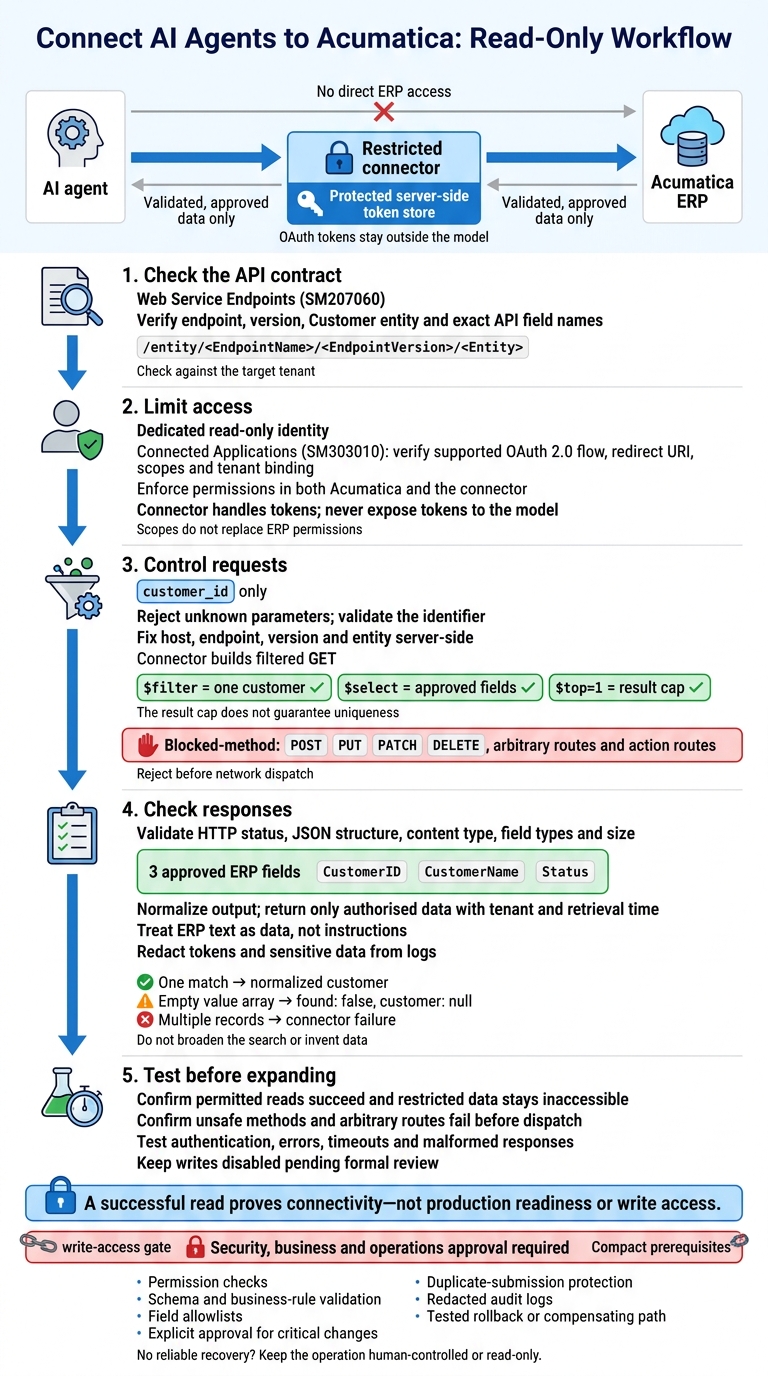 {Connect AI Agents to Acumatica: Read-Only Workflow}
:::
Choose the endpoint, contract version and entity
Use the endpoint version verified in SM207060 so the connector calls the exact Customer contract exposed by the target tenant.[2][5]
Inspect the contract in SM207060
Open the target endpoint in SM207060 and check its contract definition. Confirm that Customer exists, then record its exact key fields and required return fields. Use the API field names shown in SM207060, not the screen labels.[1]
/entity/<endpointname>/<endpointversion>/<entity>[2]
Treat the OpenAPI definition as a reference only and check it against the target tenant.[1][2] Once you’ve confirmed the entity, narrow the request to the exact record and fields you need.
Limit the read to required fields
Use Customer only if it exists in the selected endpoint and matches the required fields. Target one customer with $filter and return only the required fields with $select. Leave out $expand unless you need related data, and expose only GET in the lookup tool.[4][5][6][7]
This prepares the connector for least-privilege access and a filtered GET request.
Set up authentication and permissions
With the endpoint fixed, secure authentication and limit permissions.
In Connected Applications (SM303010), confirm this tenant’s supported OAuth 2.0 flow, redirect URI, scopes and tenant binding. The connector, not the model, handles tokens through the tenant’s supported OAuth 2.0 flow. Use Authorization Code for interactive authorisation; do not assume Client Credentials.[10][11] Keep connected-app registrations, identities and credentials separate for each environment.
Create a least-privilege integration identity
Give the integration identity access only to the tenant, branch or company, Customer entity and fields the endpoint needs. Request the api scope where applicable. Add offline_access only if the chosen flow needs refresh tokens.[8][12]
Scopes do not replace ERP permissions in Acumatica. Test the identity directly: permitted reads should succeed, restricted data should remain inaccessible, and writes should fail. Apply these restrictions in both Acumatica and the connector.
Store client secrets and refresh tokens in a protected server-side secret store. Keep access tokens in protected memory or an encrypted cache. Never expose these secrets or tokens to the model, browser code, source control or ordinary logs.
Validate and route tool calls
Route each request through a narrow tool schema and reject unknown parameters before selecting the configured tenant and endpoint. The connector then acquires or reuses a token and sends the HTTPS request with an Authorization: Bearer header.
Check the HTTP status and JSON structure, remove unapproved fields, and return only authorised data, together with the tenant and retrieval time. Treat customer names, notes and other ERP text as data, not instructions.[3][12]
Track the token response’s expires_in value and renew before expiry.[3][12] If the selected flow issues a refresh token, follow the documented renewal process. Authorization Code and Resource Owner Password Credentials flows can issue refresh tokens when the relevant scope and configuration allow it.[9][10]
If renewal fails, invalidate the cached token. Keep the error and token away from the model, and return a safe status message instead. Redact authentication headers and token responses from diagnostics, but retain safe audit details: request ID, tenant, operation and outcome.
Use these controls to send the first filtered GET request.
Build and test the read-only REST request
With the endpoint and identity fixed, test one read-only customer lookup.
Send a filtered Customer GET request
Use /entity/{endpoint}/{version}/Customer with the verified deployment URL, endpoint, contract version and Customer entity. Build the final request in the connector, not in the model. Use $select to limit the returned fields, $filter to restrict the lookup and $top=1 to cap the result. Send Accept: application/json.
GET https://erp.example.co.uk/entity/Default/24.200.001/Customer?%24select=CustomerID%2CCustomerName%2CStatus&%24filter=CustomerID%20eq%20%27CUST-0001%27&%24top=1 HTTP/1.1
Authorization: Bearer <access-token>
Accept: application/json
Build query parameters with a URL encoder rather than joining strings. Reject identifiers containing apostrophes before building the filter.
Define a restricted customer lookup tool
Expose only the customer identifier as an input. Fix the host, endpoint, version, entity, selected fields and $top=1 server-side. Then build the equality filter from validated input.
Reject arbitrary URLs, raw filters, unsupported fields, mutation methods and action routes. Have the connector return a normalised response.
Restricted tool schema:
{
  "name": "get_acumatica_customer",
  "description": "Retrieve one customer by approved customer identifier; read-only.",
  "input_schema": {
    "type": "object",
    "properties": {
      "customer_id": {
        "type": "string",
        "minLength": 1,
        "maxLength": 30,
        "pattern": "^[A-Za-z0-9][A-Za-z0-9._-]*$"
      }
    },
    "required": ["customer_id"],
    "additionalProperties": false
  }
}
{ "value": [ { "CustomerID": { "value": "CUST-0001" }, "CustomerName": { "value": "Hypothetical Example Ltd" }, "Status": { "value": "Active" } } ] }{ "found": true, "customer": { "id": "CUST-0001", "name": "Hypothetical Example Ltd", "status": "Active" } }
Check results, errors and read-only controls
Test availability, authentication, returned fields and identifier matching separately. Before normalising a response, validate its structure, content type, field types and size.
A 200 OK with one match should return the normalised customer object. An empty value array should return {"found":false,"customer":null}. Do not broaden the search or invent data. Preserve missing values as null, or omit them under a documented schema.
Treat multiple records despite $top=1 as a connector failure: the limit does not guarantee uniqueness. Negative tests must confirm that POST, PUT, PATCH, DELETE and arbitrary routes are rejected before network dispatch.
| Failure | Connector behaviour |
|---|---|
400 validation error |
Correct the request or contract configuration; do not retry unchanged. |
401 authentication failure |
Renew or re-authenticate under the configured policy; retry only when safe. |
403 authorisation failure |
Report insufficient permission; do not retry unchanged credentials. |
429 throttling |
Respect Retry-After when supplied; use bounded exponential back-off. |
5xx server failure |
Retry only idempotent GET requests, with jitter and a total deadline. |
Set connection and response timeouts, a small retry limit and a response-size cap. Test timeouts, malformed responses and transient failures alongside successful reads.
Generate a correlation ID for each attempt and include it in internal logs or safe error responses. Do not assume Acumatica echoes it. Keep error categories stable for the agent, redact tokens and sensitive query values, and retain only the minimum customer data needed for diagnosis.
Use consistent reads and rejection of unsafe methods as the criteria for moving the proof of concept to broader review.
Conclusion: Verify reads before expanding access
Complete the read-only proof of concept by confirming a narrowly defined task, a verified Acumatica endpoint and contract, a least-privilege identity, a validated GET request and restricted output. A successful read proves connectivity - not production readiness or write access.
Before exposing any write path, put the proposed expansion through formal control checks.
Require safeguards before enabling writes
Keep mutation tools disabled until security, business and operations teams approve them through a formal review. Require permission checks, schema and business-rule validation, field allowlists and explicit approval for critical changes.
Prevent duplicate submissions with idempotency keys or, where supported, a unique business-level reference. Resolve uncertain outcomes before retrying. Keep redacted audit logs that link the actor, tool, endpoint, entity, approval and result.
For every mutation, document and test the rollback or compensating path. If there’s no reliable way to recover, keep the operation human-controlled or read-only.
FAQs
How do I prevent cross-tenant data leaks?
Never accept identity, tenant or permission context from agent arguments or model output. Get it server-side from the authenticated session, and enforce strict record-level authorisation immediately before every API call [1].
Treat tool definitions as untrusted proposals. Use middleware to check resource ownership and tenant scope independently [1][2]. If a record is inaccessible, return the same non-revealing error used for missing records. This prevents callers from discovering sensitive records they cannot access [1].
Will Acumatica upgrades break my connector?
Acumatica upgrades can break your connector when the API contract changes. That could mean renamed fields, stricter type requirements or different response formats.
Treat integrations as versioned software. Keep backward compatibility by adding fields or tool versions rather than removing existing ones, and run versioned endpoints in parallel.
Before deployment, run consumer-driven contract tests against a production baseline to check that your agent, schema and backend still work together. Keep a tested rollback procedure ready.
How can I safely add more lookup tools?
Start with a read-only proof of concept and treat tool requests as untrusted proposals. Use an allow-list of tool names, each mapped to a fixed server-side function. Never let the model set URLs, HTTP methods or headers.
Specify exact inputs, bounds, units and formats. Validate arguments in middleware, separately from execution. Before any API call, have your service independently check tenant scope and record-level permissions. Return errors that don’t reveal restricted data.