
Changing a ConfigMap does not restart Pods. If your app reads config from environment variables or a subPath mount, you usually need to replace the Pod. If it reads from a standard volume mount, Kubernetes can update the file in the background, but the app still has to reload it.
Here’s the short version:
- Deployments roll only when
.spec.templatechanges - ConfigMap edits do not change the Pod template
- Env vars stay fixed until the container restarts
- Standard mounted files can change later
-
subPathmounted files do not update after start -
kubectl rollout restartis the simplest fix when a restart is needed - Checksum annotations are a common way to automate this in Helm or GitOps
- Reload sidecars and watch controllers fit cases where teams need automatic action
A good rule I’d use is simple: first check how the app reads the ConfigMap, then pick the update path that matches that behaviour. That avoids mixed replicas, stalled rollouts, and config drift between old and new Pods.
| ConfigMap use | What happens after edit | Usual next step |
|---|---|---|
| Environment variables | Running Pod keeps old value | Roll the Pods |
| Standard volume mount | File updates after a short delay | Reload app if it supports that |
subPath mount |
File stays unchanged | Roll the Pods |
If I were handling this in production, I’d also check readiness probes, maxUnavailable, maxSurge, and PodDisruptionBudgets before any rollout. By default, Deployments often use 25% for both surge and unavailable Pods, and that can affect traffic during replacement.
The main point is straightforward: Config updates are only safe when the trigger, reload method, and rollback path are clear.
Automate pod restarts when ConfigMaps or Secrets change | k8s Reloader
Why Kubernetes does not automatically restart pods when a ConfigMap changes
Kubernetes starts a Deployment rollout only when .spec.template changes. A ConfigMap update changes a separate object, so the Deployment controller sees no change to the template and does nothing. The result is simple: existing Pods keep running with the old config until something recreates them.[5]
That behaviour is deliberate. A ConfigMap can be shared by more than one workload, and not every app needs a restart to pick up new settings.[1][5]
How environment variables, volume mounts, and subPath mounts each behave
Environment variables are locked in when the container starts. Kubernetes has no way to reach into a live container and swap out its environment, so the Pod has to be recreated.[1][3]
Standard volume mounts behave in a different way. The kubelet periodically syncs ConfigMap data into the mounted directory, so the files do get refreshed after a while. But it happens asynchronously.[1][6] Kubernetes can update the file on disk, yet it does not update the running process. If the app reads that file only at start-up, it will keep the old values in memory.
subPath mounts are stricter. They do not receive later ConfigMap updates. The mounted file stays as it was when the Pod was created, which means only a new Pod will see the changed value.[1][4]
Kubernetes can place new data into a volume, but it does not notify the application or trigger a reload inside the app.[1][6]
A short diagnostic sequence before fixing stale config
If Pods are still using old config after a ConfigMap edit, work through these checks in order:
- Confirm the ConfigMap has the new value:
kubectl get configmap CONFIG_NAME -o yaml - Identify how it is referenced:
kubectl get deployment APP_NAME -o yaml
Look forenv,volume, orsubPathreferences. - Check what the container actually sees: run
kubectl exec POD_NAME -- printenv CONFIG_KEYfor environment variables, orkubectl exec POD_NAME -- cat /path/to/config-filefor mounted files. If the env var has not changed, the Pod must be recreated. If the mounted file has not changed, kubelet sync may still be catching up.[3][1] - Determine whether the application supports a file watch or reload signal: check whether it watches files for changes, accepts a signal such as
SIGHUP, or reads config only once at start-up. If it reads config only once, a file update on disk will not help. - Verify whether a rollout actually happened: run
kubectl rollout history deployment/APP_NAMEandkubectl get rs --sort-by=.metadata.creationTimestamp. If there is no new ReplicaSet, the rollout never started.[5][8]
This helps split the issue into three different buckets: a propagation delay, an app reload gap, or a missing rollout trigger. Mix those up and you can lose time chasing the wrong fix, or restart things that did not need restarting. If the app cannot reload in place, the next move is a controlled restart.
The simplest fix: trigger a controlled rolling restart
If the app can't reload config in place, skip straight to a controlled restart. When Kubernetes doesn't start a rollout on its own, kubectl rollout restart is usually the fastest safe fix. It updates the Pod template, and Kubernetes then replaces Pods through the normal rollout flow. Use it for workloads that need a fresh Pod, not for apps that can reload mounted files live.[10][2]
Run rollout restart and watch the deployment complete
The steps are simple:
kubectl rollout restart deployment/my-app -n production
kubectl rollout status deployment/my-app -n production --watch
kubectl get pods -n production -l app=my-app
kubectl rollout status waits for the latest rollout to finish and returns a non-zero exit code if it times out. That makes it handy in scripts and pipelines.[9][5] When the rollout is done, kubectl get pods lets you check that the replacement Pods are up.
This is a good fit for one-off fixes and config changes that don't happen often.
Production checks before restarting workloads
Before you run this in production, check the rollout settings that limit how much can go wrong at once.
A rollout can complete and still cause trouble in production. Start with maxUnavailable and maxSurge. Kubernetes sets both to 25% by default, so make sure your rollout can handle the temporary drop in available Pods or the extra capacity needed during replacement.[7][5] For example, maxUnavailable: 0 usually means you need enough spare capacity and a positive maxSurge.
Before restarting, go through these checks:
- Confirm the ConfigMap has the values you expect, and that the Deployment points to the correct ConfigMap and namespace.
- Review the replica count,
maxUnavailable, andmaxSurge:kubectl get deployment my-app -n production -o yaml - Check the PodDisruptionBudget:
kubectl get pdb -n production. A strict budget can block voluntary disruptions, while a loose one may not give much cover.[11] - Check that readiness only passes when the app can actually serve traffic. Use a
startupProbefor slow initialisation so liveness doesn't restart healthy Pods during warm-up.[13] - Confirm graceful shutdown behaviour. Kubernetes gives a terminating Pod a grace period that defaults to 30 seconds.[12]
If new Pods fail their probes or the rollout stalls, roll back with:
kubectl rollout undo deployment/my-app -n production
kubectl rollout status deployment/my-app -n production --watch
kubectl rollout undo restores the previous revision, but it doesn't fix a broken ConfigMap.
How teams automate ConfigMap-driven updates
::: @figure 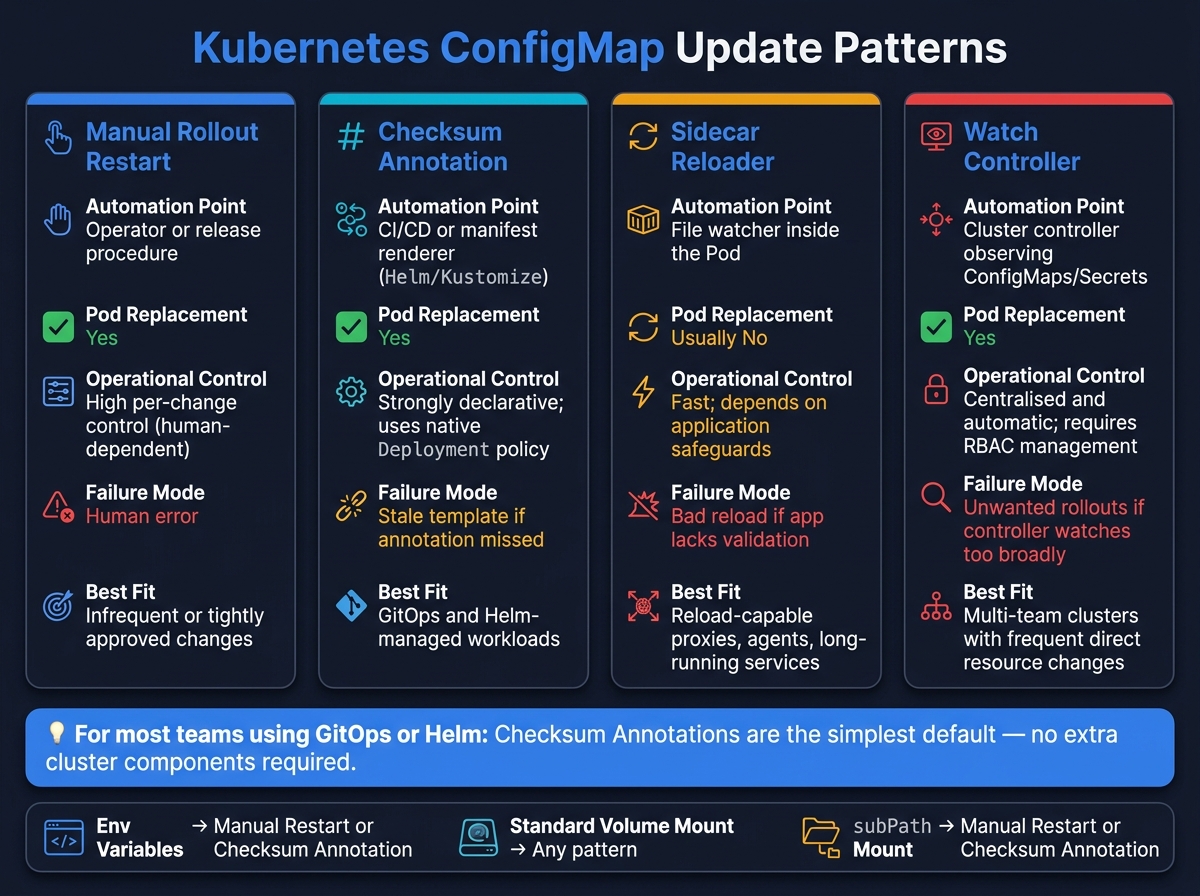 {Kubernetes ConfigMap Update Patterns: Which Method Is Right for You?}
:::
{Kubernetes ConfigMap Update Patterns: Which Method Is Right for You?}
:::
Manual kubectl rollout restart is fine for a one-off change. But when config changes happen again and again, teams usually automate the process.
At that point, there are two main paths: change the Pod template so Kubernetes rolls out new Pods, or reload the process inside the existing Pod. The most common patterns are checksum annotations on the Pod template and watch-controller automation that reacts to ConfigMap or Secret changes.
Checksum annotations on the pod template
A checksum annotation makes a ConfigMap change visible to the Deployment controller. You write a hash of the rendered ConfigMap content into spec.template.metadata.annotations. When the content changes, the hash changes. That means the Pod template changes, and Kubernetes starts a rolling update.[16][17]
In a Helm workflow, it often looks like this:
spec:
  template:
    metadata:
      annotations:
        checksum/config: {{ include (print $.Template.BasePath "/configmap.yaml") . | sha256sum }}
One detail matters a lot here: hash the rendered manifest, not the source template. And if a workload depends on more than one ConfigMap or Secret, add a separate checksum for each one.[14][17]
annotations:
  checksum/app-config: <hash-of-rendered-configmap>
  checksum/database-secret: <hash-of-rendered-secret>
If you miss one of those dependencies, you get a quiet failure. The annotation does not change, no rollout starts, and the Pods keep running with old configuration.
Sidecar reloaders and watch controllers
Checksum annotations still lead to a rollout. Sidecars take a different route: they try to reload the app in place.
A sidecar reloader runs in the same Pod as the main container. It watches the mounted config files and tells the application to reload by sending a reload signal, without replacing the Pod.[3] That can work well for apps that already support safe live reloads with validation, such as proxies, long-running agents, or services where a restart is costly. The trade-off is extra workload complexity. You now have another container to run, shared volumes to manage, and signal handling to get right.
Controllers keep that logic outside the workload and then let Kubernetes handle the rollout.
A watch controller is a separate cluster component. It watches ConfigMaps or Secrets through the Kubernetes API and patches the workload’s Pod template when it sees a change. Kubernetes then rolls out the update using the Deployment’s existing strategy.[18] This approach helps when lots of teams need the same automatic response to direct ConfigMap edits. But it also brings cluster-level overhead: RBAC, upgrades, high availability, and the chance of unwanted rollouts if the controller watches too much.[15][19]
Comparison of restart, annotation, and reload patterns
| Method | Automation point | Pod replacement | Operational control | Failure mode | Best-fit workload |
|---|---|---|---|---|---|
Manual rollout restart
|
Operator or release procedure | Yes | High per-change control, dependent on human action | Human error | Infrequent or tightly approved changes |
| Checksum annotation | CI/CD or manifest renderer | Yes | Strongly declarative; uses native Deployment policy | Stale template | GitOps and Helm/Kustomize-managed workloads |
| Sidecar reloader | File watcher inside the Pod | Usually no | Fast; depends on application safeguards | Bad reload | Reload-capable proxies, agents, and long-running services |
| Watch controller | Cluster controller observing ConfigMaps or Secrets | Yes | Centralised and automatic; requires RBAC and lifecycle management | Controller risk | Multi-team clusters with frequent direct resource changes |
A sidecar and a controller do different jobs. The sidecar changes how the app behaves inside a running Pod. The controller decides when Kubernetes should replace Pods.
For most teams that manage configuration through a dependable delivery pipeline, checksum annotations are the simplest default. They do not need extra cluster components, and they keep rollout behaviour under Kubernetes’ own controls.
Choosing the right production pattern
Which pattern fits which workload
Once you know how the ConfigMap is being used, pick the update pattern that matches that setup.
The choice usually comes down to three things: how the app reads config, what kicks off the change, and how much disruption the workload can handle.
| Workload type | Best-fit pattern |
|---|---|
Environment variables or subPath mounts; infrequent or tightly approved changes |
Manual rolling restart |
| Helm, GitOps, or declarative pipeline; any consumption model | Checksum annotation |
| App can safely reload mounted files without interrupting traffic | Live reload |
| Application-specific reload logic (signals, admin endpoints, config validation) | Sidecar reloader |
| Many workloads needing a consistent, centrally managed restart policy | Watch controller |
Production checklist before rollout
Before you apply any pattern, write down who owns the trigger and how the change will be checked.
- Assign clear ownership of the rollout trigger: the application pipeline, GitOps controller, platform controller, or a named operator.
- Confirm the new configuration is valid before rollout, and test rollback for both the Deployment and the ConfigMap.
- After rollout, monitor availability, replacements, restarts, and readiness failures.
- Expose a non-sensitive config version or commit ID in metrics or logs.
Conclusion: make config changes observable, repeatable, and safe
The goal isn't just to update config. It's to make the update path predictable across workloads.
Use one tested pattern for each workload class, and document the trigger, owner, validation, rollback, and monitoring. That turns a config change from a manual, error-prone task into a repeatable, auditable process.
FAQs
Why didn’t my Pods restart after a ConfigMap change?
Pods don’t restart on their own after a ConfigMap change. That’s because Kubernetes only starts a rolling update when the Pod template changes.
A ConfigMap sits outside the Deployment, so changing it doesn’t alter the Pod template. The result? Existing Pods just keep running with the configuration they already loaded.
If you want Pods to pick up the new ConfigMap, you need to force that restart yourself. Common ways to do that include:
- manually triggering a rollout
- using a sidecar watcher
- adding a ConfigMap content hash to the Pod template annotations
How can I tell whether my app needs a rollout or reload?
In Kubernetes, a rollout happens when the Pod template changes. That usually means something inside the spec has been updated, like a new container image or different environment variables. If you only scale the number of replicas up or down, Kubernetes does not create a new revision.
ConfigMap and Secret changes work a bit differently. Updating either one does not automatically trigger a rolling update. So if your pods need to pick up those new values, you’ll need to restart them yourself or use a sidecar watcher to handle it for you.
You can check the revision history with kubectl rollout history deployment/[name].
When should I use checksum annotations instead of a manual restart?
Use checksum annotations when you want ConfigMap or Secret changes to trigger a new Deployment rollout without a manual restart.
When you update the checksum annotation on the Deployment pod template, the pod template hash changes too. That tells Kubernetes to run a rolling update.
This is usually a better fit for production. It’s repeatable, easy to track in manifests or CI/CD, and removes the need for someone to step in and restart things by hand.