
If you run cloud and on-premises systems together, security controls fail most often at the joins: identity, network paths, and data handling. My view is simple: if I want hybrid cloud security to hold up under audit, I need five things in place from the start - clear scope, named owners, baseline controls, automatic evidence, and fixed review cycles.
Here’s the short version:
- I first define what data I hold, where it sits, and which rules apply.
- I then assign one named owner for each control, plus each evidence source.
- I put controls in place in this order: identity, network, encryption, backup and recovery.
- I move evidence into central logging and drift checks instead of manual checks.
- I review controls on a set cycle: weekly, monthly, quarterly, and yearly.
A few points stand out from the article:
- The ICO has linked serious incidents to configuration and coding errors.
- For many UK firms, scope will include personal data, payment data, system logs, and internal records.
- MFA for admin access, default-deny access rules, and annual restore tests at a minimum are core parts of the model.
- Evidence should be machine-produced, stored in a way that cannot be altered after the event, and kept for a set period.
- Exceptions need a named owner, expiry date, and written risk sign-off.
| Area | What I focus on |
|---|---|
| Scope | Data classes, systems, suppliers, backups, identity, data flows |
| Ownership | Shared responsibility, RACI, named control owners |
| Controls | Least privilege, MFA, segmentation, encryption, backups |
| Evidence | SIEM logs, drift reports, key logs, access reviews |
| Reviews | Test restores, tabletop exercises, fix-time tracking |
If I had to cut the whole piece down to one line, it would be this: hybrid cloud compliance works best when every control is defined, owned, logged, and checked on a timetable.
Below, I’d use that model to keep cloud and on-premises security aligned without leaving gaps between them.
::: @figure 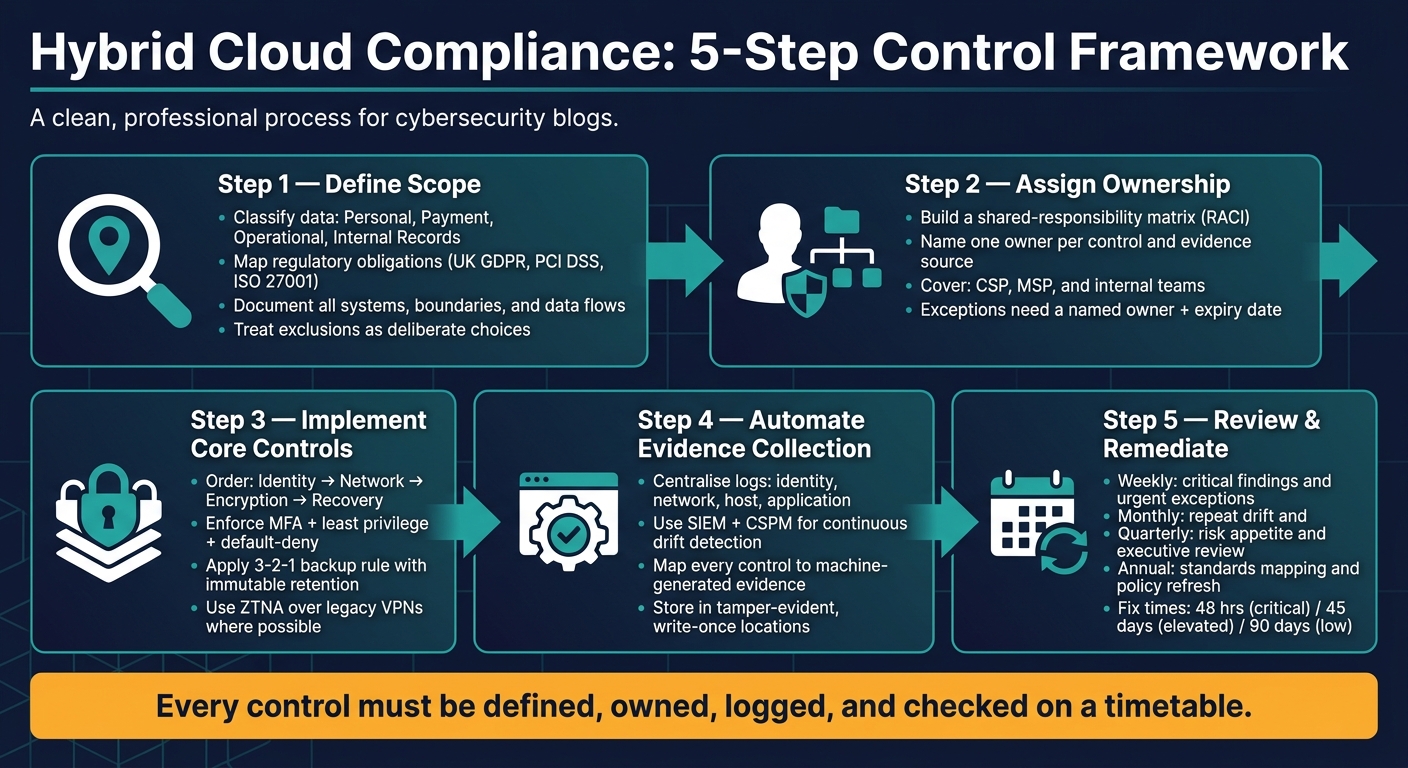 {Hybrid Cloud Compliance: 5-Step Control Framework}
:::
{Hybrid Cloud Compliance: 5-Step Control Framework}
:::
Automating security and compliance for hybrid environments
1. Define the compliance scope before changing any controls
Before you change any control, pin down the scope first. Be clear on what you're protecting and where it lives across cloud, on-premises systems, backups, and third-party services. Regulated data almost never sits in one neat place. It tends to spread into identity systems, backup copies, admin tools, and managed service environments. So if your scope leaves out on-premises identity, backup replicas, or service providers, it isn't complete. Treat exclusions as deliberate choices, not something that happens by default.[3][4]
After that, classify the data and tie each class to a clear obligation.
Classify data and map regulatory obligations
Start with your data categories, then work backwards through every system that touches them. For most UK organisations, four classes cover the bulk of the job: personal data under UK GDPR, payment data under PCI DSS, operational data such as system logs, configuration records, and telemetry, and sensitive internal records such as financial forecasts, security configurations, and incident reports. Each class comes with its own duties, and those duties shape which controls apply and how strict they need to be.[1][2]
| Data class | Primary obligation | Key requirements |
|---|---|---|
| Personal data | UK GDPR / Data Protection Act 2018 | Lawful basis, minimisation, retention, accountability |
| Payment data | PCI DSS | Segmentation, encryption, access control, assessment |
| Operational data | ISO 27001 / internal policy | Integrity, availability, retention |
| Sensitive internal records | ISO 27001 / contractual NDAs | Confidentiality, access restriction, incident handling |
Set explicit retention rules for each class. The ICO's storage limitation principle says personal data must not be kept in identifiable form for longer than needed for the purpose it was collected for.[2]
Once you've mapped the obligations, list every system that handles each data class.
Document systems, boundaries, and evidence locations
Build an asset register that covers every component involved in creating, processing, storing, transmitting, or administering regulated data. That means cloud accounts, private infrastructure, VPN endpoints, firewalls, identity providers, logging platforms, and backup and disaster recovery stores.[3][4] For each asset, record the owner, the environment it sits in - production, test, or DR - the data classes it handles, and where the audit evidence will come from.[3][4] In hybrid networks, scope needs to cover every route data can take between zones.
The ICO expects this level of documentation. Organisations with 250 or more employees must record all processing activities. Smaller organisations must do the same when processing is not occasional, carries risk, or involves special category or criminal conviction data.[5] A data flow diagram helps here. It should show how regulated data moves between zones, including ingress and egress points, encryption states, and any access from outside the UK.[3][4]
That register then feeds into control ownership and audit evidence later on. Once the scope is set, you can assign ownership and start implementation.
2. Map shared responsibility and assign control ownership
In a hybrid cloud setup, responsibility is split across three parties: your organisation, the cloud service provider (CSP), and any managed service provider (MSP) that supports part of the estate. The UK NCSC is clear on this point: you still own the security of the services you choose. That includes how those services are configured, what data goes into them, and whether they meet your security needs, no matter who hosts the underlying infrastructure.[9][6]
Once you’ve set the scope, assign a named owner to every control and every source of evidence. If no one owns it, it tends to drift.
Build a shared-responsibility matrix
A shared-responsibility matrix, backed by a RACI chart, helps you assign each control area, reviewer, and evidence source. The DWP cloud computing security policy requires a documented RACI matrix for every cloud deployment.[8] Keep the matrix in a central location, link it to supplier contracts, and review it every year or after a service change.
The table below covers the core control areas for a hybrid cloud environment.
| Control Area | Owner | Reviewer | Evidence Source |
|---|---|---|---|
| Physical security | Cloud provider (public cloud) / facilities manager (on-premises) | Compliance officer | Provider SOC 2 Type II report; on-premises access logs |
| Operating system patching (IaaS) | IT operations / DevOps | Security lead | Patch management tool dashboard; monthly patch reports |
| Encryption at rest | Platform / cloud engineering | Security architect | KMS configuration audit; HSM access logs |
| Key management | Platform / cloud engineering | Compliance lead | Key rotation logs; key-management console access records |
| IAM and access reviews | Security / platform owner | Compliance lead | Quarterly access review reports; approval records |
| Logging and monitoring | SOC / security operations | Audit team | SIEM dashboards; log retention configuration |
| Backups and recovery | IT operations / MSP (if contracted) | Compliance officer | Recovery test logs; backup job reports |
| Incident response | Incident response team (organisation-led) | CISO | Incident post-mortems; ICO notification records |
| Network firewalls | Network / cloud infrastructure lead | Security operations | Firewall change tickets; configuration diffs |
| Exception approvals | Risk owner / change advisory board | Compliance lead | Exception registry; risk assessment records |
Two areas need extra care: incident response and backups. An MSP may detect events or run parts of the infrastructure, but your organisation still needs to own classification, ICO or sector regulator notifications, business continuity decisions, retention periods, and restore testing. Those calls have to line up with UK data protection duties and sector rules.[9][7]
Assign owners for policies, technical controls, and exceptions
Once the matrix is in place, each row needs a named role, not just a team label. “IT operations” sounds neat on paper, but auditors will still ask: who, exactly, signs this off?
Typical assignments look like this:
- The Information Security Lead or CISO owns security policies and exception governance
- Network or cloud infrastructure engineers own firewall rules, segmentation, and hybrid connectivity changes
- Platform or cloud engineering owns IAM settings, key management, and baseline configuration
- IT operations or DevOps teams own patching and vulnerability remediation workflows
Each owner should also have a review cycle. Quarterly access reviews and monthly firewall rule reviews are sensible places to start.
Exceptions need the same level of control. A temporary exception or delayed patch should always have a documented business owner, an expiry date, and an approved risk assessment. Without that, an auditor can’t tell whether it was a conscious short-term decision or a control that slipped through the gaps.
With ownership set, the next step is to put the identity, network, encryption, and recovery controls in place.
3. Put core controls in place across identity and network boundaries
Put these controls in place in a set order: identity, network, encryption, then recovery. That sequence keeps the basics in line before you move to backup and restore. Use the ownership matrix to standardise controls across cloud and on-premises systems. Identity, network, encryption, and recovery need to work the same way in both cloud and on-premises zones, otherwise common gaps stay open.
Enforce least privilege, MFA, and privileged access controls
Start with a central identity provider (IdP) that federates to your cloud platforms and the on-premises directory. Apply the same policy to cloud consoles, on-premises admin access, and partner entry points. That gives you one place to enforce authentication rules, review access, and generate audit logs.[11]
Apply RBAC by role, not by name. Each role should spell out exactly which datasets and operations are allowed - view, edit, export, administer - with default deny in place. Separation of duties matters here. A person who can access sensitive data should not also be able to change security settings.[12][20]
MFA is non-negotiable for all privileged access, including cloud consoles, identity providers, break-glass accounts, PAM tools, and role elevation workflows. App-based authenticators are preferred over SMS, in line with NCSC guidance. Where you can, use phishing-resistant MFA for administrators.[10][13][14]
For privileged accounts, deploy a PAM solution that enforces just-in-time (JIT) elevation with time limits and approval workflow, records privileged sessions, and automates credential rotation. A compromised admin account can delete cloud configuration[17], so standing admin access should be the exception, not the default.
Service accounts and API keys need the same level of care. At tenant level, disable service-account key creation or upload by default, and use managed identities or short-lived tokens wherever possible. Every service account should have a named owner and a documented purpose. Rotate API keys and tokens on a 90-day schedule at a minimum. Pre-deployment secret scanning in your CI/CD pipeline helps catch hard-coded credentials before they reach production.[18]
Secure hybrid network paths and boundary logging
Treat the on-premises/public-cloud boundary as a control point. Design your network around clear zones - internet-facing, internal user, regulated data, and administrative - and place workloads in the zone that matches their sensitivity.
Firewalls and cloud security groups should use deny-by-default rules, with only the traffic flows your applications actually need allowed through. Firewall rule changes should go through a change control process.[15]
For remote and partner access, consider replacing or supplementing old-style VPNs with Zero Trust Network Access (ZTNA). A VPN can open broad network access once a user is connected. ZTNA is tighter. It applies per-application, identity-driven policies, which is much closer to least privilege at the network layer.[15] All hybrid connections should use encrypted, authenticated transport such as IPsec VPNs or private connectivity. Where TLS is used for APIs and internal services, enforce TLS 1.2 or above with centrally managed certificates and expiry alerts.[15][16][19]
Configure private DNS zones for internal services so they resolve only within the hybrid environment. Log DNS queries and alert on failed lookups or unexpected external resolvers. When you correlate DNS logs with firewall and identity events, they can provide useful audit evidence and help spot lateral movement early.[15]
Apply encryption, backup, and recovery controls to regulated data
Encryption at rest should be enabled by default across all storage holding regulated data, including databases, object stores, disks, and file shares, on both cloud and on-premises infrastructure. Use a centralised key management service, backed by an HSM or a dedicated key-management appliance. Keep clear records of which team owns each key, which systems it protects, and when it was last rotated.[16][19]
Automate key rotation annually at a minimum, or straight after a role change or suspected incident. The team that manages encryption keys should not be the same team that can access the data those keys protect. Splitting those duties is a simple way to show control to auditors.[16]
For backups, follow the 3-2-1 principle:
- Three copies of data
- On two different media types
- With at least one stored off-site
Backups of regulated data must be encrypted in transit and at rest. They also need immutable retention, such as write-once storage or object-lock policies, so they cannot be deleted or changed during the required retention period. Accounts that can change retention settings or delete backups should require MFA and sit under strict RBAC.
Run documented restore tests at least annually and after any major architectural change. Measure both recovery time and data integrity. Record the test date, systems restored, participants, issues found, and remediation status. Those records are audit artefacts in their own right. Retention periods should line up with your own obligations - ICO expectations under UK GDPR, FCA operational resilience rules, or NHS data retention standards - depending on your sector.[16]
Once these controls are in place, centralise logs and evidence so you can monitor them continuously.
4. Automate monitoring, evidence collection, and continuous checks
Once your core controls are live, the next step is simple: stop relying on manual spot checks. Shift to continuous monitoring and automatic evidence capture instead. That means bringing logs into one place, spotting drift as it happens, and producing audit-ready records without a last-minute scramble.
Centralise logs and detect configuration drift
Pull identity, network, host, and application logs into one monitored platform. In practice, that usually means:
- Identity logs: Entra ID sign-in logs and PAM audit trails
- Network logs: firewall allow/deny events, VPN logs, and cloud security group flow logs
- System and host logs: OS security events and EDR/XDR alerts
- Application logs: API gateway logs, database audit trails, and admin actions
Taken together, these logs help prove GDPR accountability, network segmentation, and least-privilege control.[21][25]
Use a central SIEM that can ingest cloud logs natively and accept TLS-encrypted forwarding from on-premises systems. AWS services can feed logs through CloudWatch or CloudTrail, Azure through Azure Monitor, and GCP through Cloud Logging. On-premises systems should forward through TLS-encrypted syslog collectors. Normalise logs to a common schema, set timestamps to UTC, and keep logs that contain personal data in the UK or another approved region.[21][25]
For drift detection, define baselines as code across infrastructure, systems, and cloud policy. These baselines act as the enforcement layer for the identity, network, encryption, and recovery controls already in place. Azure Policy with Machine Configuration supports Audit, Apply and Monitor, and Apply and Autocorrect. It can also extend to on-premises servers through Azure Arc, which gives you one way to detect and, if you choose, fix drift across a hybrid estate.[28][29][30]
On AWS, use Config conformance packs against CIS or ISO benchmarks. In GCP, Security Command Centre's Compliance Manager shows drift findings when a configuration change breaks an enforced posture. Initial findings often appear within about six hours of deploying a new posture, with checks continuing after that.[31]
Alerting needs a bit of discipline. If you fire alerts based on raw event volume, teams drown in noise. It works far better to line alerts up with control risk. So, alert at once if MFA is disabled for an administrator account or if a firewall rule expands exposure to a regulated network segment. Send major but less urgent issues to a daily review queue. Keep lower-priority signals for trend analysis. Each alert type should also have a clear runbook, so triage, escalation, and closure happen the same way every time and leave a record behind.
Map each control to its audit evidence
Every identity, network, encryption, and recovery control from the previous section should map to machine-generated evidence. For each control, define the evidence source, collection method, review frequency, owner, and retention period.[22][25][27]
A SaaS compliance case study covering 112 controls found that infrastructure configurations were snapshotted daily through API, access control lists were collected weekly, encryption status was checked daily through AWS Config, and vulnerability scan results were gathered continuously.[27] When that level of automation is in place, building an audit pack stops being a multi-week trawl through systems. It becomes a script run or a dashboard export.
The table below gives a practical starting point for a UK hybrid environment, with retention periods lined up to retention policy.[22][25][26][27]
| Control | Evidence Source | Review Frequency | Owner | Retention Period |
|---|---|---|---|---|
| MFA enforcement | Monthly IdP MFA status report (Entra ID / Okta) | Monthly | Head of Infrastructure | 3 years |
| Privileged access | PAM session logs and JIT elevation audit trail | Weekly | Identity Manager | 3 years |
| Firewall rule changes | Firewall change management export; SIEM alerts for unauthorised changes | Per change; weekly review | Network Security Lead | 6 years (high-risk systems) |
| Backup and recovery | Backup job status reports; restore test logs and sign-off | Daily automated; quarterly manual test | DR / BCM Lead | Per retention policy |
| Access recertification | Identity governance tool export showing review completion and decisions | Quarterly | Application Owner | Two review cycles |
| Configuration drift | CSPM drift reports; IaC state history | Continuous | DevOps / SecOps | 1 year |
| Encryption key rotation | KMS/HSM key rotation logs | Annual (or post-incident) | Security Officer | 5 years |
Store evidence in tamper-evident locations, such as version-controlled repositories or write-once buckets, so records cannot be changed after the event. If you already use CI/CD pipelines, build compliance checks straight into them. Policy-as-code tools can scan Terraform or Kubernetes manifests before deployment and fail builds that break logging or segmentation rules. That way, new services inherit monitoring by default.[21][23][24][25]
Use these evidence streams to support the review and remediation cycle in the next step.
5. Review, test, and maintain compliance controls
Once evidence is automated, the next job is to keep controls working through a fixed review and remediation cycle. That matters because controls drift over time as systems change, cloud settings shift, and rules move on. A set operating rhythm helps stop things from slipping.
Run regular reviews, tests, and remediation tracking
Use a weekly, monthly, quarterly, and annual review cadence.[37] Each layer has a different job.
- Weekly cloud security reviews deal with critical findings and urgent exceptions.
- Monthly governance meetings look at repeat drift and policy issues that still haven't been sorted.
- Quarterly executive risk reviews look at risk appetite, funding gaps, and ageing exceptions.
- Annual reviews refresh standards mapping, policies, and audit findings.
Some technical tests also need to run on a fixed schedule alongside those governance reviews. Backup restores for critical systems should be checked every month.[34][40] Incident-response tabletop exercises should run at least twice a year, using cloud-focused scenarios such as compromised IAM credentials or ransomware hitting object storage.[38][41] These exercises need to test both the technical response and whether people know their role across security, operations, and compliance teams. After-action reports should record weaknesses, owners, and remediation deadlines.
Review meetings shouldn't become talk shops. Their output needs to lead to deadlines. Use risk-based fix times: 48 hours for actively exploited or internet-facing issues that affect sensitive data, 45 days for elevated-risk issues, and 90 days for low-risk or unreachable issues.[39] Track progress with Mean Time to Remediate (MTTR) and SLA compliance rates, and check claimed fixes with rescans.[32][35][36]
Every exception should be recorded in a formal way.[33][34] That means a unique ID, a named owner, a business justification, any compensating controls already in place, and a closure date set within a defined month range. If the same exceptions keep rolling over, that's usually a sign the policy itself needs another look, not that the exception should be renewed again.
Key points for a workable hybrid cloud compliance model
Keep the model simple: defined scope, named owners, enforced controls, automated evidence, and regular review. Fit the operating rhythm to the estate, not the other way round.
FAQs
Where should I start with hybrid cloud compliance?
Start with one governance framework that covers both your on-premises setup and your public cloud estate. That gives you one set of rules, one way to track decisions, and a clearer view of where gaps might sit. From there, map how personal data moves through your systems so you can spot regulatory risks early, including any cross-border transfers.
Next, tighten identity management with SSO and mandatory MFA. It’s one of the simplest ways to cut down access risk without making day-to-day work harder than it needs to be. On top of that, use automation for compliance checks and continuous auditing so configurations stay consistent and properly documented over time.
How do I prove controls are working during an audit?
Maintain detailed, tamper-evident audit trails for system activity, user actions and security events. That gives you a clear record of what happened, who did it and when.
Use automated compliance checks to produce real-time evidence that controls align with standards such as GDPR and ISO 27001. Instead of scrambling for proof during an audit, you have it ready as events happen.
It also helps to centralise logs from all environments in a SIEM, automate access reviews and risk assessments, and keep timestamps synchronised. If an incident occurs, accurate time records make reconstruction far less messy and give auditors a clean trail to verify.
How often should hybrid cloud security controls be reviewed?
Hybrid cloud security controls need regular review to keep compliance on track and stop users from building up more access than they should have. How often you do that depends on your organisation’s risk profile. That said, the norm is shifting towards continuous monitoring instead of occasional manual reviews.
Automated risk assessment, compliance checks and continuous auditing can spot vulnerabilities, misconfigurations and policy drift early. They also help keep access permissions at the right level across every environment.