
Managing cloud costs can feel overwhelming, but avoiding common missteps can save you time and money. Here are the key mistakes businesses often make and how to fix them:
- Overprovisioning Resources: Allocating more resources than needed wastes money. Regularly analyse usage, automate shutdowns for non-production environments, and use tools like AWS Compute Optimizer to rightsize.
- Limited Visibility into Spending: Without clear tracking, costs spiral. Centralise billing data, use real-time monitoring tools, and set budget alerts to keep spending transparent and manageable.
- Inconsistent Resource Tagging: Poor tagging leads to messy reports and missed savings. Standardise tagging policies, automate enforcement, and conduct regular audits to maintain clarity.
- Overlooking Data Transfer Costs: Egress fees can add up unexpectedly. Group resources by region, use private connections like VPC endpoints, and consider CDNs to reduce transfer costs.
- Missing Governance Policies: Without clear policies, costs go unchecked. Assign ownership, enforce metadata tagging, and implement automated tools like AWS Budgets to maintain control.
::: @figure 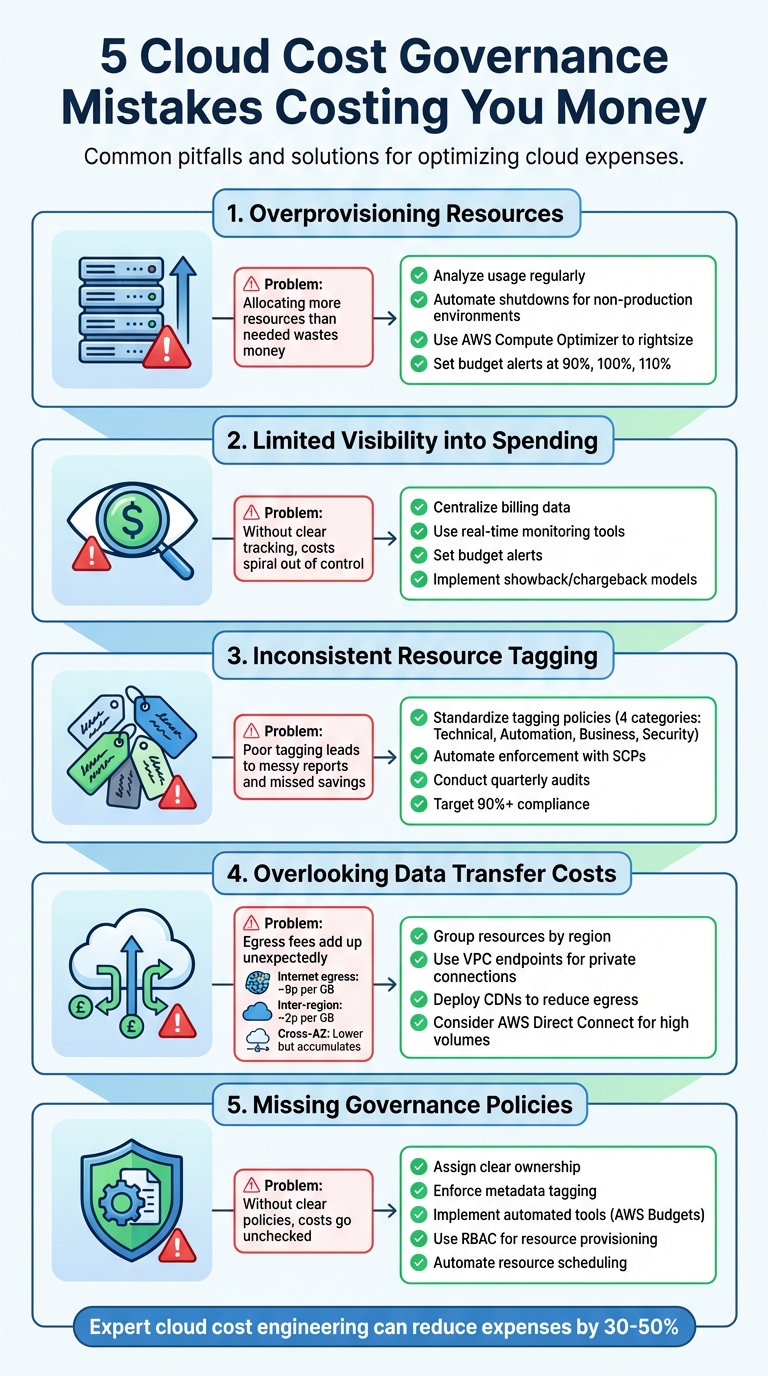 {5 Common Cloud Cost Governance Mistakes and How to Fix Them}
:::
{5 Common Cloud Cost Governance Mistakes and How to Fix Them}
:::
Mistake 1: Overprovisioning Resources
What Overprovisioning Costs You
Overprovisioning happens when more cloud resources are allocated than workloads actually need, leading to unnecessary expenses.
Some clear indicators of overprovisioning include orphaned resources such as unattached storage volumes, idle load balancers, or unused IP addresses, all of which keep generating charges [3]. Another common issue is purchasing too many Reserved Instances or Savings Plans without properly aligning them with long-term usage patterns [7]. Running non-production environments, like development and testing servers, around the clock - even though they’re only needed during work hours - also drives up costs unnecessarily [3].
To tackle overspending, set budget threshold alerts at 90%, 100%, and 110% of your target to catch any red flags before the billing cycle ends [4]. Enforcing mandatory resource tagging can also help teams identify and manage underused assets, ensuring accountability across the board [7] [9].
How to Rightsize and Autoscale
The solution lies in matching your resources to actual demand.
Rightsizing begins with analysing your current resource usage. Tools like AWS Compute Optimizer and Azure Advisor use machine learning to evaluate usage trends and recommend instance types that match your needs [1] [8]. It’s often best to start with generic instance types and adjust based on performance data.
Automating off-hours shutdowns for non-production environments - like EC2 or RDS - can significantly cut costs. For example, shutting down these resources between 20:00 and 06:00 can make a noticeable difference [1] [3]. Before committing to Reserved Instances or Savings Plans, conduct a rightsizing audit to avoid locking in oversized resources [7]. You can also save more by using S3 lifecycle policies to move rarely accessed data to cheaper storage tiers [1].
Regular audits, either monthly or quarterly, are essential for identifying underused resources. Engaging stakeholders for feedback ensures that resource allocations align with actual needs [7]. This proactive approach keeps your cloud spending efficient and under control.
Mistake 2: Limited Visibility into Spending
Why Limited Visibility Causes Problems
When you don't have a clear picture of where your cloud budget is going, unnecessary spending becomes almost unavoidable. Disjointed spending across multiple accounts or regions without centralised tracking creates blind spots and oversight issues [9]. If billing and cost management tools aren't set up correctly, the risk is categorised as High
[9].
One of the first issues this causes is a lack of accountability. Without proper visibility, implementing showback
or chargeback
models becomes impossible, making it difficult to hold teams or departments accountable for their cloud usage [6][4]. This often leads to engineering teams having little motivation to optimise their resource consumption, while finance departments struggle to make sense of the escalating costs.
Another major challenge is poor planning. When visibility is low, IT budgeting becomes static and disconnected from actual needs, resulting in ineffective financial planning and missed opportunities to maximise long-term value [6]. Essentially, you're making decisions based on outdated invoices rather than real-time data, which is akin to navigating without a map.
These challenges highlight the need for a more proactive and streamlined approach, which is explored in the next section.
Setting Up Real-Time Monitoring
The first step towards solving this issue is centralising all usage and billing data into a single, unified platform. This allows you to have a comprehensive view of all workloads by consolidating data from compute, storage, and network services into one place for analysis [4].
Visibility across your cloud environment is critical. Your cloud team and your finance teams will require visibility into the cloud spend, and stakeholders owning business units and workloads need the ability to generate and save custom reports.- AWS Whitepaper [12]
Detailed tracking on an hourly or daily basis is also essential. Use resource tags and cost categories to map expenses to specific business units, projects, or teams. Tools like AWS Cost Explorer can help you analyse historical trends and predict future spending [9][10][11]. For identifying unusual spending patterns, machine learning tools such as AWS Cost Anomaly Detection can provide immediate alerts and pinpoint the root causes [5][10].
Set up automated alerts to trigger at 90%, 100%, and 110% of your budget thresholds, and include forecast alerts at 110% to anticipate overspending. Assign a Directly Responsible Individual (DRI) for each cost item to ensure accountability [4]. Finally, display cost dashboards prominently in shared spaces like digital workspaces or operations centres to keep optimisation front and centre [9][10].
Mistake 3: Inconsistent Resource Tagging
How Poor Tagging Affects Cost Tracking
Inconsistent or missing resource tags can make tracking cloud expenses a nightmare. Without proper tags, allocating costs to the right projects, departments, or owners becomes nearly impossible. This leads to billing reports that show overall spending but fail to identify who is responsible for specific charges, complicating processes like chargeback and showback [15][17].
The issue worsens when teams use different naming conventions. For instance, one department might tag resources as yourcompany:cost-centre
, while another uses a variation in case or format. This is particularly problematic in Azure, where tag keys are case-insensitive, but tag values are case-sensitive. For example, environment: Production
and environment: production
would appear as separate entries in cost reports [19]. Such inconsistencies can fragment a single department's spending across multiple categories, making financial planning unnecessarily complex. Beyond messy reports, this lack of uniformity can derail automated cost-saving measures.
Tagging may seem like a small task, but it plays a critical role in cloud governance. Without consistent and complete tags, efforts around cost allocation, chargeback, automation, and compliance begin to fall apart.- Juliana Costa Yereb, Senior FinOps Specialist, ProsperOps [15]
Inconsistent tagging doesn’t just confuse reports - it can break automation. For example, scripts designed to shut down development environments over weekends might fail if tags are incorrect or missing, leaving unnecessary instances running and draining your budget [15][16]. To make matters worse, tags don’t apply retroactively, so even if you tag a resource later, it won’t reflect historical cost data [13][15].
Creating Standard Tagging Policies
To address these challenges, establish a clear and standardised tagging policy that simplifies cost tracking and supports automation. Start by defining a tagging taxonomy with four key categories:
- Technical Tags: Provide identifying details.
- Automation Tags: Enable scheduling and backups.
- Business Tags: Indicate ownership or cost centres.
- Security Tags: Highlight data sensitivity.
Keep naming conventions straightforward - use lowercase letters, hyphens to separate words, and a company prefix followed by a colon (e.g., yourcompany:cost-centre
) [21][18][14].
Automate enforcement from the beginning. For example, in AWS, use Service Control Policies (SCPs) to block the creation of resources without mandatory tags [21]. To maintain compliance, deploy AWS Config rules to monitor resources continuously and flag any that don’t meet tagging standards [21]. Also, remember to activate tags in your billing console - just applying them won’t make them visible in cost reports [21][13].
Set realistic compliance goals. While achieving 100% tagging compliance is unrealistic (some resources simply can’t be tagged), aim for over 90% as an initial benchmark [20]. Use the FinOps compliance formula to measure progress:
(Total Cost of Tagging Policy Compliant Resources / Total Cost of Taggable Resources) × 100 [20].
To improve tagging consistency, conduct quarterly audits using tools like AWS Tag Editor to fill in missing tags on legacy resources. Lastly, avoid including sensitive information like passwords or personal data in tags, as they are stored in plain text and visible in logs [16][19].
Mistake 4: Overlooking Data Transfer Costs
How Data Transfer Fees Add Up
Data transfer costs can be a frustrating wildcard in your cloud budget. While moving data into the cloud (ingress) is often free, getting it out (egress) comes with charges that vary depending on where the data is sent [22][24]. Unlike the more predictable costs of storage or compute, egress fees can catch you off guard.
The cost to move data out of the cloud is variable and often unpredictable.– Kevin Bogusch, Senior Competitive Intelligence Analyst, Oracle [22]
For example, a website with 10,000 monthly visitors, each viewing two pages, might generate about 44.2 GB of egress traffic every month. At Azure's June 2023 rate of 8.7 pence per GB after the first 100 GB, this would cost approximately £3.50 [22]. Now imagine a more data-heavy scenario: a developer transferring 4 TB to another region and 2 TB to the internet. In this case, storage costs might account for less than 10% of the total monthly bill, with egress fees making up the rest [22].
Here’s a rough idea of typical egress charges: internet egress costs about 9 pence per GB, inter-region transfers around 2 pence per GB, and cross-availability zone transfers, while cheaper, can still add up [22]. These variations make it essential to choose your regions wisely.
Choosing Cost-Effective Regions
Picking the right region for your workloads can make a big difference in controlling data transfer costs. Regional pricing depends on factors like land costs, fibre infrastructure, electricity rates, and local taxes [28][29]. The key is to balance cost savings with performance and compliance needs.
For workloads that aren’t critical - like development or testing environments - deploying in lower-cost regions such as US East instead of Asia Pacific can lead to significant savings, as long as there are no data privacy or latency concerns [28][3]. However, ensure that your chosen region offers all the services you need. Deploying in a region missing a critical service could result in expensive cross-region data transfers [28][25].
Data transfer charges in AWS are determined by the source, destination, and volume of traffic. Factoring in these fees during the design phase can lead to cost savings.– AWS Well-Architected Framework [23]
To keep transfer costs down, group resources that communicate frequently in the same region or availability zone. Use VPC endpoints to establish private connections to services like S3, avoiding public internet fees [27][25]. Similarly, align NAT gateways with high-traffic instances in the same availability zone to dodge cross-AZ charges [27][25]. For businesses with consistently high egress volumes, a private link like AWS Direct Connect can offer unlimited or discounted data transfer compared to standard internet rates [22][26]. Another effective strategy is using a Content Delivery Network (CDN) to cache assets closer to users, cutting down on direct cloud egress [22].
Mistake 5: Missing Governance Policies
Why Governance Matters for Cost Control
Without well-defined governance policies, cloud costs can quickly spiral out of control. Unauthorised resource provisioning and unchecked security breaches - like crypto mining - can lead to unexpectedly high bills [31][2]. When no one is held accountable, managing these costs becomes nearly impossible.
A strong governance framework begins with clear ownership. Assigning resource costs to specific workloads or product owners encourages efficient usage and reduces unnecessary spending [1]. Establishing a dedicated team - whether it’s a Cloud Business Office, Cloud Centre of Excellence, or a FinOps team - can help maintain cost visibility across the organisation. Executive sponsorship is especially important for resolving escalations and ensuring cost efficiency [30].
A comprehensive governance policy should address every stage of a resource's lifecycle [1]. Key elements include mandatory metadata tagging to allocate costs accurately, guardrails like Service Control Policies (SCPs) and IAM policies to limit resource types or regions, and automated alerts to flag spending that exceeds predetermined thresholds [3][5][9]. Involving finance, engineering, and business teams early on ensures these policies align with actual organisational needs [1].
Implementing Savings Plans and Cost Controls
Once governance is in place, cost controls can help maintain financial discipline. Automated tools, such as AWS Budgets or Azure Cost Management, can set budget thresholds and notify stakeholders when spending goes beyond forecasts, preventing unpleasant surprises [5][3]. Role-Based Access Control (RBAC) ensures that only authorised users can provision costly resources, reinforcing the principle of least privilege [2].
Simple measures like automated resource scheduling can yield immediate savings. For instance, setting policies to turn off non-production environments outside business hours is a straightforward way to cut expenses [3]. Similarly, lifecycle management policies - like S3 lifecycle rules or automated deletion of idle resources - help eliminate unnecessary costs by removing outdated or unused data [1][3]. Regular collaboration between finance, technology, and business teams to review financial metrics and workload efficiency creates a balanced approach that supports innovation without overspending [30]. Additionally, onboarding new team members with training on cost awareness and governance policies helps prevent careless provisioning from the outset [1].
For tailored cloud cost governance solutions, Hokstad Consulting offers expert cloud cost engineering services.
Why Cloud Governance Always Breaks
Conclusion
Managing cloud costs effectively isn't just about saving money - it's about creating a financial framework that supports growth while eliminating unnecessary waste. Common pitfalls like overprovisioning, poor visibility, inconsistent tagging, overlooked data transfer costs, and missing governance policies often stem from reactive management and can quietly eat away at budgets.
Addressing these issues brings both financial and operational advantages. By improving accountability, reducing risks, and preventing costly budget overruns, organisations can create a more efficient and sustainable cloud strategy.
Strong governance requires collaboration across teams and well-defined policies. These policies should allocate costs, enforce monitoring, and quickly flag anomalies before spending spirals out of control. For instance, attributing costs to specific workloads or product owners encourages smarter usage and reduces waste [1]. Real-time monitoring and anomaly detection help teams catch spending spikes early, preventing them from becoming larger financial problems [5][9]. Clear policies also mitigate risks in unmanaged cloud environments, such as unexpected budget overruns or potential security vulnerabilities [1][5]. Together, these measures create a robust framework for long-term success.
For organisations struggling with cloud cost management, bringing in expert help can make a significant difference. Hokstad Consulting specialises in cloud cost engineering and DevOps transformation, offering tailored governance frameworks and automated cost controls. Their approach has been proven to cut cloud expenses by 30–50%, and with their No Savings, No Fee
model, you only pay for actual savings - making it a practical, risk-free solution.
FAQs
What steps can I take to avoid overprovisioning cloud resources?
To prevent overprovisioning in cloud resources, begin with thorough workload assessments. This helps you pinpoint the exact resource needs of your applications, ensuring you're not allocating more than necessary. Regularly revisiting and right-sizing these resources keeps them in line with actual usage trends.
Using automation tools is another smart move. These tools track performance metrics and automatically adjust resources based on demand, striking a balance between efficiency and cost-effectiveness. On top of that, promoting a mindset of cost awareness within your team can significantly reduce unnecessary provisioning and encourage smarter resource allocation.
What are the best tools for tracking and managing cloud costs?
To keep cloud expenses in check, organisations can turn to cloud-native cost management tools like AWS Cost Explorer and Azure Cost Management. These platforms provide detailed insights into spending patterns, resource usage, and unusual activity, making it easier to monitor and adjust cloud budgets effectively.
Automated solutions, such as AWS Cost & Usage Reports, deliver comprehensive data that simplifies resource allocation and expense control. On top of that, FinOps platforms bring advanced capabilities like customisable dashboards, automated cost allocation, and anomaly detection to help organisations better manage their costs as they grow.
Using these tools, businesses can achieve real-time visibility into their cloud spending, optimise how resources are used, and steer clear of unexpected budget surprises.
Why is it essential to use consistent resource tagging for managing cloud costs?
Consistent resource tagging plays a crucial role in managing cloud expenses by offering a transparent view of where your money is going. By tagging resources in an organised and systematic way, you can assign costs directly to specific teams, projects, or departments. This ensures better accountability and keeps spending under control.
Beyond just tracking, tagging helps pinpoint inefficiencies and supports effective governance by enabling detailed monitoring and analysis. It’s a straightforward yet effective method to streamline budgets and make smarter decisions about how resources are used.